
TRENDnet TC-PDT
4.7Editor score
Reversible 110 and Krone
Twist-lock blade holder
Combined insertion and cutting
Comfort grip construction
Our Ethernet Punch Down Tool guide compares 10 top models for Cat 5e to Cat 8, 66 and 110 blades, impact control, comfort, and versatility for installers.
An Ethernet punch down tool seats and trims conductors inside keystone jacks, patch panels, and wiring blocks. A worthwhile model should use a compatible blade, provide controlled impact, cut cleanly, and remain comfortable through repeated terminations. The right choice also depends on whether you need one cable standard or a broad mix of networking hardware.
We compared ten options using the supplied specifications, focusing on supported cable and block types, blade interchangeability, impact settings, integrated accessories, ergonomic construction, and ease of maintenance. The list includes general-purpose 66 and 110 tools, premium impact models, a complete cable-installation kit, and specialized tools designed to terminate compatible 90-degree keystone jacks.
Each pick shows how the tool fits a particular installation workflow, from economical DIY punch-down work to professional, high-volume termination. Ratings and product details reflect the available information, while prices and availability can change. Always verify the connector or jack design, blade standard, and installation requirements before ordering.
4.7Editor score

4.8Editor score

4.7Editor score
This side-by-side comparison highlights the most important differences among the ten tools, including supported termination systems, blade configurations, impact control, and included accessories. It also highlights specialized models that are not universal substitutes for standard 66 or 110 punch-down tools.


The Cable Matters Punch Down Tool with 110 Blade is a general-purpose option for installers working with common 110 IDC hardware. It carries a 4.3 rating and supports Cat 5, Cat 5e, Cat 6, Cat 6A, Cat 7, and Cat 8 network or voice cables. Its most appealing feature is the combination of broad cable-category support with straightforward, removable-blade operation.
We may earn a commission when you buy through this link, at no additional cost to you.
The impact-style handle uses a twist-and-lock arrangement to retain the removable 110 blade. Its groove aligns with the handle detent to help keep the blade from loosening, while a reversible cut/punch design handles seating and excess-wire trimming. Low and high impact settings let the user choose a more forceful or gentler stroke according to the termination and cable being used.
The limitation is compatibility: this model focuses on 110-style hardware and does not include a 66 blade. It also works best with a compatible keystone punch-down stand, as the data notes, because a stable base can help keep the jack aligned. These are reasonable constraints for someone whose equipment mix is consistently 110 based.
Choose this model if your work centers on keystone jacks, patch panels, or blocks with 110 IDC terminals and you want one tool to cover several modern Ethernet categories. It is especially useful for a home-lab or structured-cabling setup that does not require a separate 66 termination system.
The low and high settings make it easier to match the tool's force to different jacks, blocks, and cable types. That control is valuable when working across several wiring standards without wanting to force a single fixed impact level.
The removable twist-lock blade changes quickly and is designed to resist loosening during use. This simplifies replacement and helps keep the cutting and punch-down mechanism aligned.
We may earn a commission when you buy through this link, at no additional cost to you.
The Klein Tools VDV427-300 stands out as the most balanced general-purpose choice in this guide. Its 4.8 rating, 66 and 110 blade support, and compatibility with CAT3, CAT5e, and CAT6/6A cable make it appropriate for many residential, commercial, and maintenance projects. It handles wire insertion and cutting in a single operation.
We may earn a commission when you buy through this link, at no additional cost to you.
A selectable high and low impact-force lever provides useful control across different cable types and applications. The spring-loaded mechanism supports fast seating, while the cushioned, non-slip handle is designed for comfort during repeated use. The included metal injection-molded blade adds durability to the tool's professional-oriented construction.
The supplied description does not claim compatibility with Cat 7 or Cat 8, so installers working with those categories should verify the hardware and conductor requirements before relying on it. The model also costs more than many entry-level punch-down tools, but that difference reflects its broader blade support, adjustable mechanism, ergonomic grip, and included pick and spudger.
This is a strong recommendation for technicians who encounter a mixture of 66 and 110 blocks or need one dependable tool for common Cat 5e, Cat 6, and Cat 6A terminations. It is less suitable for someone who only needs a single 110-style task, but it is the most versatile conventional option listed here.
The 66 and 110 configuration reduces tool switching when a project includes both wiring-block standards. That makes the VDV427-300 easier to keep in a service kit than a single-standard model.
The cushioned handle and non-slip grip are particularly useful for larger wiring jobs. Combined with the spring-loaded action, they support a controlled workflow without requiring a separate tool for every seating cycle.
We may earn a commission when you buy through this link, at no additional cost to you.
The TRENDnet TC-PDT is a compelling value-oriented punch-down tool with a 4.7 rating. It supports Cat 5, Cat 5e, Cat 6, and Cat 6A network cables and uses interchangeable, reversible blades for 110 and Krone standards. It inserts and cuts terminations in one operation, covering the essential functions needed for common cabling work.
We may earn a commission when you buy through this link, at no additional cost to you.
Its twist-and-lock holder facilitates rapid blade changes and helps prevent blade pullout. The design also provides storage for a spare blade, reducing the chance of losing a small, easily misplaced component. An ergonomic comfort grip makes the tool easier to control while seating conductors into telephone sockets, faceplates, and patch panels.
The important distinction is that Krone is not the same as 66. Buyers who need 66 blocks should not assume compatibility from the product's general networking description. The tool is also centered on 110 and Krone rather than covering 66, and its listed cable support stops at Cat 6A.
The TC-PDT is a good fit for installers who work with 110 or Krone systems and want a capable, well-reviewed tool without moving to a premium general-purpose model. Its supported standards, blade storage, and comfortable design make it especially practical for ongoing residential or light commercial cabling.
Reversible 110 and Krone blades let the same tool cover two common wiring arrangements. Twist-and-lock retention and dedicated spare-blade storage make the system practical for technicians who want fewer loose parts.
The combined insert-and-cut action keeps the workflow efficient. Its comfortable grip and simple standards coverage also make it approachable for DIY users while remaining useful for routine professional installations.
We may earn a commission when you buy through this link, at no additional cost to you.
The Cable Matters Punch Down Tool with 110 and 66 Blade expands the brand's basic 110 design into a dual-standard option. It has a 4.4 rating and supports Cat 5, Cat 5e, Cat 6, Cat 6A, Cat 7, and Cat 8 cables, as well as voice cable. Its blade configuration covers both 66-style and 110-style punch-down blocks.
We may earn a commission when you buy through this link, at no additional cost to you.
The removable blade uses twist-and-lock sockets and can be stored inside the tool body during transport. Low and high impact settings accommodate different termination requirements, while a spring-action mechanism provides fast, low-effort seating. A reversible cut-and-punch blade combines conductor seating with excess-wire trimming.
Like many traditional punch-down tools, it is designed to work with a stable keystone-jack stand, which is not included in the listed package. Its dual-blade design may also feel more substantial than a single-blade model. Buyers should confirm that their faceplates, blocks, and jacks use the supported 66 or 110 IDC format.
This model is well suited to installers who want one conventional tool for two block standards and several modern Ethernet categories. It gives a practical middle ground between a basic 110-only puncher and a more specialized speed-termination tool.
Including both 66 and 110 blades broadens the hardware this tool can address. That is useful for mixed-panel jobs and reduces the need to carry separate conventional tools for each block format.
The removable blade can be secured within the body for transport. This is a practical feature because loose precision blades are easy to damage, displace, or lose.
We may earn a commission when you buy through this link, at no additional cost to you.
The VCELINK Punch Down Impact Tool is positioned as a multi-function installation accessory rather than a narrowly specified blade tool. It carries a 4.3 rating and includes reversible 110 and 66 blades, allowing it to address two common wiring systems while performing punching and cutting in the same action.
We may earn a commission when you buy through this link, at no additional cost to you.
The double cutter-head design is intended to trim excess cable as conductors are seated. Adjustable low and high impact settings accommodate different termination applications, and a bottom compartment stores an extra blade. Pull-out wire-puller and flat-blade tools add cleanup and handling functions at the sides of the body.
The package includes a mini wire stripper, which can be useful for a compact kit. However, the supplied product data does not explicitly identify supported Cat 5, Cat 5e, Cat 6, Cat 6A, Cat 7, or Cat 8 categories, so buyers should check the tool and their cable requirements rather than assuming a category range.
This VCELINK model is most attractive to technicians who value several utilities in one tool and work with 66 or 110 hardware. It is a practical choice for a mobile toolkit, provided the blade format and physical layout suit the specific jacks and blocks being terminated.
Wire pullers, a flat-blade pull-out, blade storage, and a mini stripper extend the tool's usefulness beyond the core termination action. These additions can reduce the number of small accessories needed in a field kit.
The double cutter head allows excess wire to be cut as the conductors are punched. This can streamline repetitive work while keeping the blade standards clearly identified as 66 and 110.
We may earn a commission when you buy through this link, at no additional cost to you.
The VCELINK Speed Punch Down Tool is a specialized solution for VCE's C265 90-degree keystone jacks. Its 4.6 rating reflects a focused design built around faster, less repetitive termination. The tool can punch down and cut eight wires in one smooth operation, a major change from working through a traditional stand one conductor at a time.
We may earn a commission when you buy through this link, at no additional cost to you.
Because the keystone is held directly in the tool, it can be terminated on a patch panel or wall plate without a separate punch-down stand. The design also suits tight spaces and multi-port plates where a conventional 110-style puncher is awkward. It is intended for 90-degree Cat 6A, Cat 6, and Cat 5E VCE keystone jacks.
Its specialized compatibility is also its main weakness. It is explicitly designed only for the VCE C265 series and is not a general 66 or 110 block tool. The replaceable SK5 steel blade head helps extend tool life because the small working component can be changed without replacing the entire tool.
Buy this model when the project specifically uses VCE C265 keystones and speed is a priority. It is a poor choice for mixed wiring inventories, because a standard punch-down tool with interchangeable 66 and 110 blades would serve a wider range of conventional equipment.
The ability to punch and cut all eight conductors in one action is the defining advantage. It can substantially reduce repetitive motions compared with a traditional tool that handles wires individually.
Holding the keystone within the tool removes the need for a separate support platform in compatible applications. This makes the system useful for patch panels, wall plates, and confined working areas.
We may earn a commission when you buy through this link, at no additional cost to you.
The Rapink Speed Keystone Jack Tool is another dedicated speed-termination option, but it is restricted to compatible Rapink Cat 6 90-degree keystone jacks. Its 4.2 rating and specialized housing distinguish it from general-purpose punch-down tools. The primary advantage is the ability to punch the connection and cut excess wire together while holding the jack securely.
We may earn a commission when you buy through this link, at no additional cost to you.
The built-in housing keeps the keystone in place during termination. That design reduces the chance of a jack rolling out under a traditional 110-style punch tool and allows the work to be completed in the air, including around patch panels where conventional tools are inconvenient. It also reduces repetitive crimping and associated hand fatigue.
A central adjustment nut controls trimming depth. This is important because a setting that leaves excess wire may appear unfinished, while one that cuts too deeply can damage the keystone. The body uses carbon steel with an alloy steel termination head, and the supplied data states that the head is designed for more than 10,000 presses.
This tool is most appropriate for installers working consistently with the specified Rapink Cat 6 90-degree keystone. It should not be purchased as a universal keystone puncher because the product title explicitly states that it does not fit other brands. Confirm the exact jack model before ordering.
The adjustable trimming depth gives the installer control over how closely excess conductors are cut. A proper setting improves the finished termination while reducing the risk of cutting into the jack.
The secure housing keeps the keystone from shifting during the punch. By combining termination and trimming in one action, the tool can reduce repetitive motions compared with using separate tools for each step.
We may earn a commission when you buy through this link, at no additional cost to you.
The Fluke Networks D914S is the premium conventional option in this lineup, combining a 4.7 rating with professional-oriented ergonomics and integrated utilities. It includes an EverSharp 66/110 cut blade for termination into 66 and 110 wiring blocks. The recognizable yellow, blue, and black color scheme also makes the tool easy to identify in a kit.
We may earn a commission when you buy through this link, at no additional cost to you.
Its automatic spring handle chooses low impact for 24 and 26 AWG wire or high impact for 22 AWG wire. A rubber handle and ergonomic shape improve grip and are intended to reduce hand fatigue during extended work. The hook, spudger, and blade-storage areas are built into the handle, keeping related accessories close at hand.
The main consideration is cost, which is higher than that of conventional entry-level punchers. A replacement EverSharp blade is not included for future service; the data directs buyers to search for Fluke Networks part 10056000. Even so, the lifetime warranty supports the tool's premium positioning and makes it attractive for daily professional use.
Choose the D914S for a technician who repeatedly terminates 66 and 110 blocks, values a polished ergonomic design, and wants integrated accessories. It is a particularly strong choice for professional service kits where reliability, comfortable handling, and warranty support outweigh minimizing tool cost.
The spring handle automatically selects an impact level based on the stated wire gauges. This reduces the need for manual force adjustments and helps standardize terminations across different conductor sizes.
Built-in hook and spudger tools plus dedicated blade storage keep frequently needed items in one place. The soft-touch grip and ergonomic design support comfortable use during repetitive service work.
We may earn a commission when you buy through this link, at no additional cost to you.
The Klein Tools VDV026-212 is a complete cable-installation kit rather than a single-purpose punch-down tool. It has a 4.8 rating and includes a 110-type punchdown tool, radial stripper, ratcheting modular crimper and stripper, cable cutter, six RJ45 Cat 5e plugs, and a zippered storage bag. That breadth makes it useful for assembling a new toolkit.
We may earn a commission when you buy through this link, at no additional cost to you.
The radial stripper automatically adjusts to different cable diameters, helping protect conductors during stripping. The ratcheting crimper and stripper supports data-cable termination, while the punchdown tool uses Klein's DuraBlade cutting edge for clean, accurate wire termination. A dedicated cable cutter completes the basic preparation workflow.
The punchdown component is specifically described as 110 type, so this is not the more flexible 66-and-110 solution offered by the Klein VDV427-300. The package also includes coax-related items in its broader identity, but the listed tools center on modular and data-cable work. Buyers who already own those functions may only need a punch-down tool instead.
This kit is an excellent choice for a technician building a comprehensive installation set, a student assembling essential tools, or a homeowner handling several wiring tasks. The included storage bag makes transport and organization easier, while the punchdown tool, stripper, crimper, plugs, and cutter cover most of a modular cabling workflow.
The bundle covers stripping, cutting, punching, and crimping, reducing the need to source each tool separately. It is particularly useful for new network-installation setups that require several basic termination functions.
The polyester zippered pouch keeps the tools together and protected during transport. This is a meaningful advantage for mobile technicians who otherwise risk scattering small parts and accessories.
We may earn a commission when you buy through this link, at no additional cost to you.
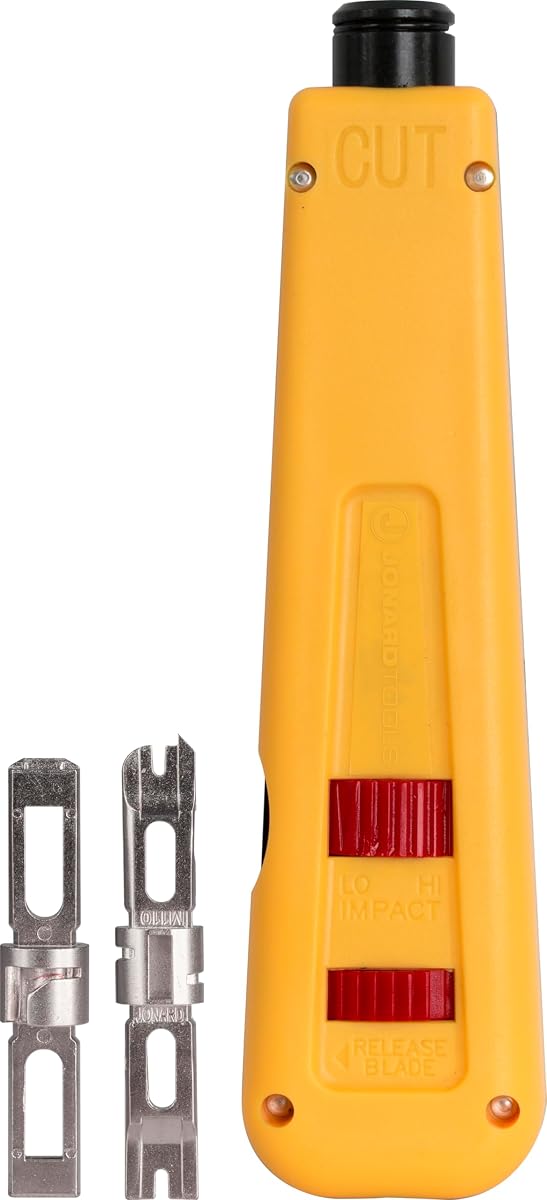
The Jonard Tools EPD-91461 is a durable manual punchdown option with a 4.5 rating. It includes both 66 and 110 blades, allowing it to cover two common block systems without an immediate need for another conventional tool. Its color-coded body is divided into yellow and blue halves to make the cut side easier to identify.
We may earn a commission when you buy through this link, at no additional cost to you.
Adjustable high and low impact settings let the user tune the force to the application. The blades are made from hardened, nickel-plated alloy steel, and the product information states that the tool was tested up to 100,000 cycles at the high-impact setting. Those details suggest a design aimed at sustained service work.
A combination hook and spudger is stored in the chassis, and the enlarged blade-storage compartment helps organize additional components. The tool is compatible with Jonard EPB-series blades and other similar brands, but compatible or replacement blades are sold separately. It is also strictly a manual design rather than an automatic spring model.
Choose the EPD-91461 when you want a straightforward manual tool with 66 and 110 support, durable blade construction, and clear visual orientation. It suits installers who value control and long-term serviceability over a speed-termination mechanism designed for one specific keystone brand.
Hardened, nickel-plated alloy steel blades and a reported 100,000-cycle test figure support the tool's durability positioning. The replaceable blade ecosystem allows worn components to be renewed.
The two-color body helps identify the cutting side, while the integrated hook, spudger, and enlarged storage compartment keep small components organized.
We may earn a commission when you buy through this link, at no additional cost to you.
The right Ethernet punch-down tool depends on the terminations you perform, the hardware you own, and the amount of repetitive work expected. Blade standard, impact control, ergonomics, and serviceability matter more than features that are irrelevant to your installation.
Begin by identifying the type of insulation displacement contact used by your jacks, patch panels, and wiring blocks. A 66 blade and a 110 blade are not interchangeable standards, while Krone is another distinct configuration. The TRENDnet TC-PDT is designed around 110 and Krone, the Fluke D914S and Jonard EPD-91461 cover 66 and 110, and the Klein VDV427-300 also supports 66 and 110. Choosing the correct standard prevents blade incompatibility and potential damage to the termination hardware.
A tool's physical operation may work across multiple cable categories, but the supplied specifications can differ. Cable Matters models list Cat 5 through Cat 8 support, while the Klein VDV427-300 lists CAT3 through CAT6/6A. The TRENDnet TC-PDT lists Cat 5 through Cat 6A. For higher-category work, also consider conductor gauge, jack construction, shielding, and whether the manufacturer explicitly supports the exact cable being used.
Impact control helps balance conductor seating against accidental damage to the jack. Low and high settings are common on the Klein, Cable Matters, and VCELINK conventional tools, while the Jonard model offers adjustable settings and the Fluke D914S automatically selects low impact for 24 and 26 AWG or high impact for 22 AWG wire. Consider your normal cable gauges and the types of IDC terminals used in your work.
Conventional punch-down tools seat individual conductors and are broadly reusable when paired with compatible blades. The VCELINK Speed Punch Tool and Rapink Speed Keystone Tool instead hold a specific brand of 90-degree keystone and perform faster combined operations. They are excellent for compatible production workflows but are not universal replacements for 66 and 110 tools.
A handle that feels comfortable during a short job may become tiring over a full installation day. The Klein VDV427-300 uses a cushioned, non-slip handle, the Fluke D914S features a rubber grip and ergonomic design, and the TRENDnet TC-PDT includes a comfort grip. Automatic or spring-loaded mechanisms can also reduce repeated effort, but control and consistency should be balanced against those conveniences.
Small blades are easy to damage or lose, so secure storage is a practical feature. The Cable Matters dual-blade tool stores its removable blade within the body, the TRENDnet tool includes a twist-lock holder for spare blades, and both the Fluke and Jonard models provide integrated storage. The Klein VDV427-300 also includes a pick and spudger, while the VCELINK model adds pull-out tools and a mini stripper.
Because the working edge is the part most exposed to repeated cutting and impact, replaceable blades extend the useful life of a tool. The Jonard EPD-91461 supports EPB-series and similar blades, the VCELINK Speed Punch Tool has a replaceable SK5 steel head, and Fluke offers a separately sold replacement blade. Confirm availability and compatibility before choosing a model that depends on proprietary components.
A dedicated punch-down tool is efficient for an established workflow, while a bundled kit can be more practical for someone building a toolkit from scratch. The Klein VDV026-212 includes a punchdown tool, radial stripper, ratcheting crimper and stripper, cable cutter, RJ45 Cat 5e plugs, and a storage pouch. It is broader in scope, whereas a single tool offers less unnecessary equipment to carry.
Prepare the cable by exposing and arranging the conductors according to the wiring pattern required by the jack, panel, or block. Keep each conductor straight and correctly identified, as twisted or crossed wires can create installation errors. Place the supported keystone or block in a suitable punch-down stand when using a conventional tool, or use the dedicated housing supplied with a compatible speed-termination tool.
Install the correct blade and confirm it locks securely. Begin with the tool's lower or gentler impact setting when uncertain, then use the appropriate higher setting if the conductor does not seat fully. Keep the blade aligned with the IDC, apply steady pressure, and allow the tool to seat and trim the conductor in one controlled action. Avoid striking the jack sideways or forcing a misaligned blade.
After each termination, inspect the seated conductor and trimmed excess for a clean result. Store blades inside the tool or in their designated compartment, and keep the mechanism free of metal fragments and adhesive residue. Replace a blade when it becomes dull, damaged, or inconsistent. Periodically verify that a test setup still produces reliable connections, and retire the tool if its impact, alignment, or spring mechanism no longer behaves consistently.
An Ethernet punch down tool seats twisted-pair conductors into the insulation displacement contacts of a keystone jack, patch panel, or wiring block. It also trims the excess conductor in many models. The tool is used for permanent cable terminations rather than temporary connections made with plugs.
No. These are different termination arrangements, and a blade designed for one should not be assumed to work with another. Check the connector manufacturer or wiring-block standard before ordering. Products described with 66 and 110 support are not automatically compatible with Krone, and the TRENDnet TC-PDT's 110-and-Krone configuration is a separate combination.
Some tools explicitly list broad category support, including Cat 5, Cat 5e, Cat 6, Cat 6A, Cat 7, and Cat 8. The two Cable Matters models in this guide make that claim. Even with a compatible tool, cable category, conductor diameter, jack design, and shielding requirements should all be verified before installation.
A conventional impact tool generally seats one conductor at a time in a stand or against a supported block. A speed tool holds a compatible keystone and terminates multiple wires in one action. The VCELINK and Rapink speed tools are faster for their specified jacks but are not universal substitutes for general 66 and 110 tools.
A stable stand is generally recommended for conventional tools because it keeps the jack or block aligned while each conductor is seated. The Cable Matters product descriptions specifically mention pairing the tool with a keystone punch-down stand. Dedicated speed tools have their own built-in housings and may not require a separate stand.
Look for a dull or damaged cutting edge, uneven trimming, conductors that do not seat consistently, and blade movement that the locking mechanism should prevent. Models with removable or replaceable heads make servicing easier. Fluke lists replacement part 10056000 for the D914S, while the VCELINK Speed Punch Tool uses a replaceable SK5 blade head.
Some general-purpose models support both network and voice cables, including the Cable Matters 110 and dual-standard tools. Other models focus on specific networking categories. The TRENDnet TC-PDT also mentions telephone sockets, so always confirm the connector type, wiring standard, and cable construction before using it.
A single tool is best when you already own strippers, cutters, crimpers, and a suitable stand. A kit is more convenient for building a complete setup or handling varied cable-preparation tasks. The Klein VDV026-212 offers a 110-type punchdown tool together with several other essential tools, six RJ45 Cat 5e plugs, and a storage pouch.
The Klein Tools VDV427-300 is the strongest all-around choice because it combines 66 and 110 support, adjustable impact, a cushioned grip, and useful accessories. The TRENDnet TC-PDT stands out as the best budget-oriented option for 110 and Krone work, while the Fluke Networks D914S offers premium ergonomics, integrated utilities, automatic impact selection, and a lifetime warranty.
Prioritize the blade standard and jack compatibility before considering convenience or speed. General-purpose tools are the safest choice for mixed hardware, while the VCELINK and Rapink speed tools make sense only when their specific compatible keystones are being used. For a new toolkit, the Klein VDV026-212 combines punch-down capability with stripping, cutting, crimping, plugs, and organized storage.
Ratings, product configurations, prices, and availability can change, so review the current listing and verify the exact connector or block standard before buying. Matching the tool to your wiring hardware, cable gauges, and expected workload will produce a more useful purchase than choosing from features you will never use.