
GANA Aluminum Bidirectional HDMI Switch
4.3Editor score
Two-source switching
Bidirectional operation
No external power
4K at 60Hz
Our cheap HDMI switch guide compares 10 affordable models for input count, 4K support, remote control, compatibility, and everyday ease of use.
A cheap HDMI switch can make a crowded entertainment setup feel much more organized by letting several consoles, streaming devices, laptops, and disc players share one television or monitor input. The best affordable models combine straightforward switching, dependable 4K support, broad device compatibility, and enough features for the way you actually use your home entertainment space.
We compared all 10 switches by examining input count, supported resolutions, switching methods, power requirements, included accessories, and compatibility with common gaming and streaming equipment. The list includes manual, remote-controlled, powered, and bidirectional designs, giving readers options for simple setups as well as more advanced home theaters.
Each review explains the standout benefits, practical limitations, and ideal buyer for the product, helping you identify the right switch without overspending on capabilities you may never use. Product availability and pricing can change, so compare the current listing details and verify your display, source devices, and cable requirements before ordering.
4.3Editor score
4.4Editor score

4.3Editor score
The table below compares the ten switches by capacity, maximum resolution, switching method, and power requirements, making it easier to match a model to your devices and setup.




The UGREEN HDMI Switch 5 in 1 Out is the most feature-packed model in this guide, combining five source connections, 4K at 60Hz support, and both remote and manual controls. Its 4.3 rating reflects a generally capable device for gamers and entertainment users who want one television connection to serve several consoles, streaming boxes, and other HDMI sources.
We may earn a commission when you buy through this link, at no additional cost to you.
Its main strength is the generous five-input layout. You can connect devices such as a PS5, Xbox, Nintendo Switch, Roku, Apple TV, Blu-ray player, or laptop without constantly replacing cables. Support for HDR, VRR, 3D, HDCP, and an 18Gbps bandwidth rating makes it particularly suitable for mixed gaming and media setups. The remote can operate from up to 33 feet, while five LED indicators reveal the selected input.
There are some meaningful limitations. It does not automatically switch when a source turns on, so you must use the remote or physical control. It also does not support ARC or eARC, which matters if your soundbar receives audio through the television's return channel. The USB power cable is included, but the adapter and batteries are not, and achieving 4K at 60Hz requires suitably short input and output cables.
This is the strongest choice for someone who genuinely owns five HDMI sources or expects that number to grow. It is less appropriate for a minimal two-device setup or for users who require automatic source detection or audio return functionality. Even so, its combination of capacity, display features, and convenient remote control makes it a capable premium pick within an inexpensive switch category.
Five ports give you room to keep consoles, media players, streaming devices, and a laptop connected at the same time. This minimizes cable replacement and makes the switch practical for a shared family television or a gaming corner with multiple systems.
HDR, VRR, and 18Gbps transmission support complement its 4K at 60Hz capability. These features are useful when your source console and television are both equipped to take advantage of them.
We may earn a commission when you buy through this link, at no additional cost to you.
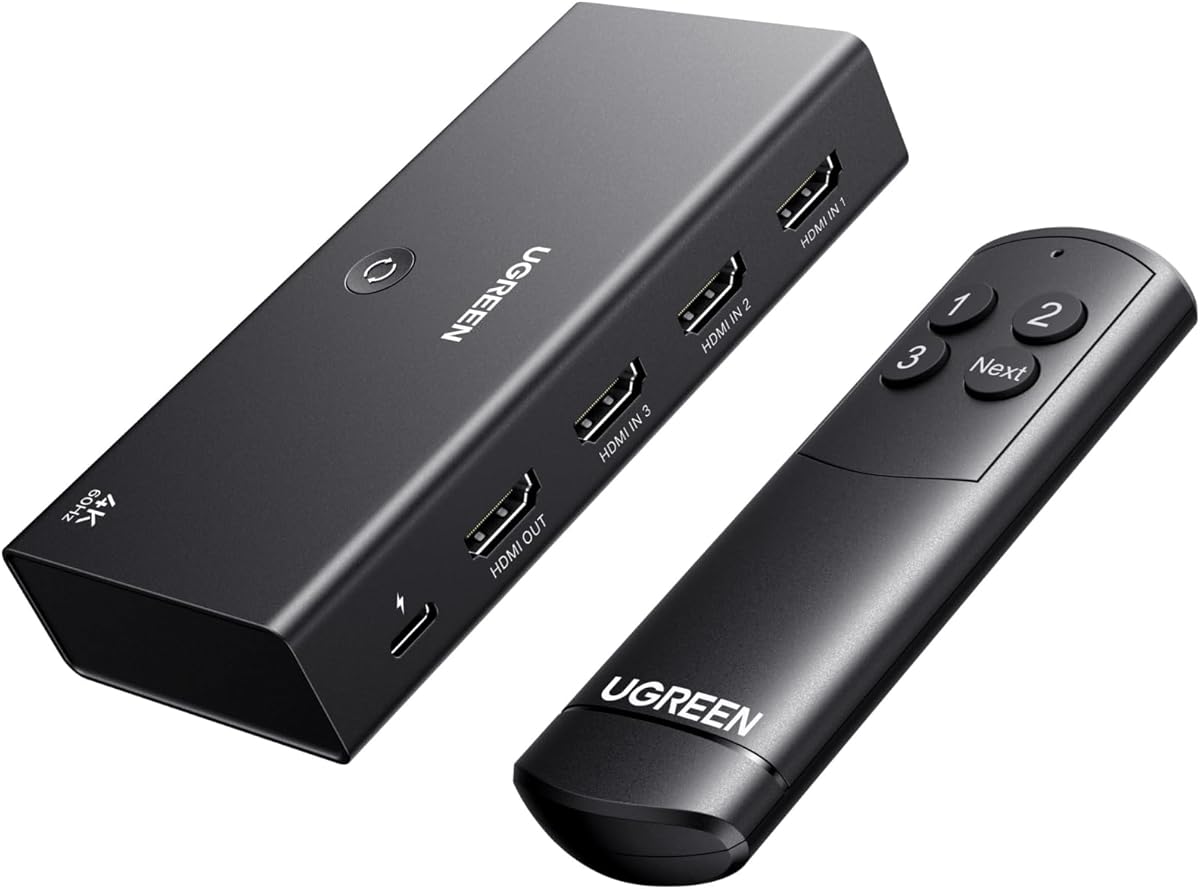
The UGREEN HDMI Switch 3 in 1 Out offers the strongest balance of features, portability, and affordability in the group. It has the highest listed rating among these products at 4.4 and includes enough capacity for three common HDMI sources while remaining less imposing than a five-port unit.
We may earn a commission when you buy through this link, at no additional cost to you.
The switch supports 4K at 60Hz, 18Gbps bandwidth, HDR10 and HDR10+, 3D, Dolby Atmos, DTS, and multiple color formats. Those specifications make it suitable for modern televisions, consoles, streaming devices, and home theater equipment. A remote control provides convenient switching from across the room, while a manual button remains available when the remote does not face the IR receiver clearly.
The trade-offs are straightforward but important. It cannot display on two screens simultaneously, and automatic switching is not supported. A 5V 1A or greater power adapter is recommended for normal operation, but neither the adapter nor HDMI cables are included. All HDMI cables and the power connection should be established before using the remote or switching button.
For most people, three inputs cover the common combination of a game console, streaming stick, and Blu-ray player or laptop. It is also easier to place behind a television than a larger switchbox. This makes the UGREEN 3-in-1 model a strong general recommendation for households that want remote convenience and modern display support without paying for unnecessary ports.
A three-input arrangement is a practical sweet spot for most living rooms. It can handle a console, streaming device, and another source while avoiding the extra size and complexity associated with a larger switch.
HDR10+, Dolby Atmos, DTS, and 18Gbps transmission give the switch flexibility across both gaming and cinematic content. The complete feature set feels more useful than a basic selector at nearly the same general price tier.
We may earn a commission when you buy through this link, at no additional cost to you.
The GANA Aluminum Bidirectional HDMI Switcher is an inexpensive, compact solution for people who only need to alternate between two HDMI sources. Its 4.3 rating indicates solid user satisfaction, and the lack of a remote, complicated menu, or power adapter makes it one of the most approachable options in the guide.
We may earn a commission when you buy through this link, at no additional cost to you.
Its three-port physical arrangement can operate in either direction: two HDMI sources can feed one display, or one source can be toggled between two displays. Only one display works at a time. The switch supports 4K at 60Hz and backward-compatible 2K and 1080p output, along with 3D. A button on the unit changes the active path, and two LEDs indicate its status.
The main limitation is that 4K at 60Hz requires a standard HDMI 2.0 cable, with the combined cable length no more than three meters for the best result. It does not offer a remote, automatic source detection, or the broader feature set of the powered models. It also relies on USB power rather than a separate external power supply.
This switch makes the most sense for a simple setup involving a console and streaming device, or a laptop and television. If you need more than two sources, regular remote switching, or advanced gaming features, choose a three-port or five-port model instead. For a first HDMI switch or a compact secondary setup, however, this GANA model offers an attractive balance of simplicity and capability.
Because it does not require an external power adapter, this model is convenient for travel, temporary displays, and uncluttered media cabinets. Plug in the sources and display, then use the button to change paths.
The ability to route one source toward either of two displays, or two sources toward one display, provides flexibility beyond a conventional fixed-direction switch. Only one display will operate at a time.
We may earn a commission when you buy through this link, at no additional cost to you.
The Anker HDMI Switch is a clean, uncomplicated option for a desk, small office, or entertainment area that needs only two source devices. Its 4.4 rating ties for the highest in the group, while the single-button design keeps daily operation exceptionally easy.
We may earn a commission when you buy through this link, at no additional cost to you.
The switch supports resolutions up to 4K at 60Hz and works with laptops, game consoles, televisions, and VR headsets. Pressing the button transitions between the selected sources without unplugging cables. The package includes the switch, a safety guide, an 18-month warranty, and customer service support.
Its limitations make it more specialized. It cannot send a picture to two displays simultaneously and does not automatically detect a newly active source. HDMI CEC is unsupported, so it should not be selected if your setup depends on that control feature. Its stated 4K guidance calls for short input and output cables, with the combined length no greater than 6.5 feet when using 30AWG wiring.
The Anker model is an excellent pick for a compact two-device setup where simplicity matters more than input count. It is less suitable for a full home theater or a family television with several consoles and streaming boxes. If your requirement is precisely two sources and manual button control, it offers a neat and highly rated solution.
A dedicated manual button is ideal when switching is infrequent or when you sit close to the display. It removes remote aiming and menu complexity from the basic process.
Connecting a laptop and another computer or console to one monitor is a common desk need. This switch handles that task without requiring a larger multi-port hub.
We may earn a commission when you buy through this link, at no additional cost to you.
The Acer 5-in-1 HDMI Switch is designed for homes and offices where several sources need to remain connected to one display. It combines five inputs with 4K at 60Hz, an IR remote, physical buttons, and LED indicators, making source selection visible and convenient.
We may earn a commission when you buy through this link, at no additional cost to you.
Its 18Gbps bandwidth, HDMI 2.0 and 1.4 support, HDCP 2.3, HDR, and 3D compatibility suit modern consoles and media equipment. The metallic-style enclosure, gold-plated ports, and ventilation openings suggest attention to durability and heat management. The wide-range fisheye IR receiver is designed to improve remote reception from different seating positions.
You will need to supply a power source, remote battery, and HDMI cables. The included USB-A to USB-C cable provides power, but the adapter is not included. Automatic source switching is unsupported, so the remote and buttons are the only selection methods. To achieve 4K at 60Hz, total HDMI cable length must remain at or below ten feet.
This model is well suited to a multi-console gaming family room, home theater, or conference room. It is especially compelling if you already own several devices and want them all connected rather than moving cables between games. If you only have two sources or want the simplest possible selector, the smaller options in this guide may be more appropriate.
Keeping the switch near the display while operating the remote from a sofa or bed reduces the need to reach the equipment. Physical buttons provide a backup when the infrared signal is obstructed.
The switch can consolidate a laptop, projector, television stick, player, and console into one display connection. It is equally useful for presentations and multimedia entertainment.
We may earn a commission when you buy through this link, at no additional cost to you.
The GANA 3-in-1 HDMI Switch is a basic, budget-conscious selector for users who need more inputs than a two-port switch but do not require 4K at 60Hz. Its three-input design accommodates common devices such as an Xbox, PlayStation, Blu-ray player, laptop, or receiver.
We may earn a commission when you buy through this link, at no additional cost to you.
The switch supports 4K at 30Hz, 3D, HD audio, and HDCP-compliant signals. A manual button on the unit changes the active input in seconds, eliminating cable replacement between work and entertainment devices. A fixed 1.8-foot HDMI pigtail is included, which can reduce the number of loose connections around the switch.
The major compromise is resolution. It supports 4K at 30Hz rather than 4K at 60Hz, and gaming consoles such as the PS5 or Xbox may require a manual output adjustment. The USB-C power connection and cable are included, but the device must remain connected to power for stable transmission. It cannot display on two monitors at once and offers no remote.
Choose this model if your display, content, and source devices do not require 60Hz 4K and you prefer manual control. It is a sensible secondary switch for a bedroom, office, or less demanding display. For a modern 4K television used mainly for gaming, a 4K at 60Hz model is the safer purchase.
The attached output cable creates one consistent connection to the television or projector. It can be easier to manage than a fully detachable switch with several loose cables.
Three inputs and straightforward button control suit a bedroom television, conference display, or other setup where convenience is more important than high-refresh gaming performance.
We may earn a commission when you buy through this link, at no additional cost to you.
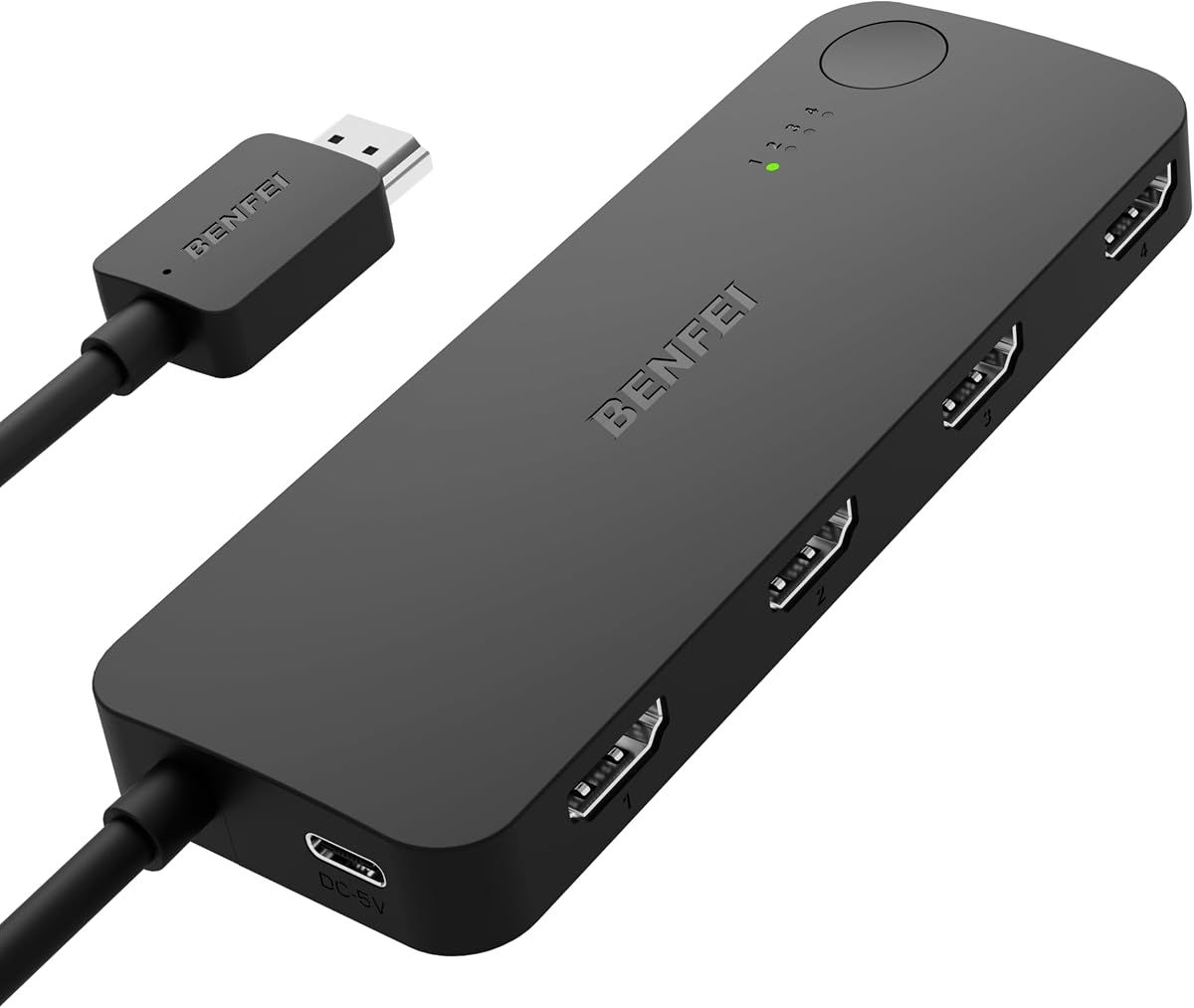
The BENFEI 4-in-1 HDMI Switch stands out for its adaptive equalization technology and stated support for HDMI transmission over distances as long as 30 feet. That makes it particularly interesting when the switch or television is positioned farther from your source devices than a basic compact switch can comfortably serve.
We may earn a commission when you buy through this link, at no additional cost to you.
It supports 4K at 60Hz, 2K at 144Hz, HDMI 2.0b and 1.4, multiple HDCP versions, and 8-, 10-, and 12-bit color. Audio pass-through includes uncompressed 7.1, 5.1, and 2-channel configurations, with Dolby Atmos and DTS compliance. Four source ports allow consoles, streaming sticks, players, laptops, and other equipment to remain connected.
The included four-foot fixed pigtail saves the need for one separate output cable and can reduce connection problems associated with loose or low-grade wiring. However, that fixed length also influences where you can position the switch. A USB-C power cable is included and must be connected, while remote control and automatic switching are not offered.
This model is a good match for a home theater with longer cable runs or an installation where the television and console are not close together. It also offers more ports than many basic selectors without reaching five inputs. Be sure to plan the fixed cable and power placement carefully, especially if the switch is to be mounted behind furniture.
The advertised long-distance transmission can make a switch practical in rooms where equipment cannot sit beside the display. Matching quality cables and securing all connections will help maintain a reliable signal.
Four ports are enough for a console, streaming device, media player, and computer or game system. This is often a more practical capacity than choosing a five-port model with features you do not need.
We may earn a commission when you buy through this link, at no additional cost to you.
The NEWCARE 3-in-1 HDMI Switch is a practical choice for buyers who want more than basic source selection without paying for a remote-control model. It includes a 2.6-foot high-speed HDMI cable, offers 4K at 60Hz support, and can connect three source devices to one display.
We may earn a commission when you buy through this link, at no additional cost to you.
Manual button switching keeps operation direct. The switch supports a wide range of video formats, including 4K at 60Hz, 2K, 1080p and 1080i, 720p, lower-resolution formats, and 3D. It handles 12-bit deep color, RGB 8:8:8, HDCP 2.2, and up to 18Gbps performance. Gold-plated connectors are intended to resist corrosion and support stable signal transfer.
The included cable makes setup easier, but the switch still requires an external 5V 1A power connection. The power adapter is not included, so you may need another compatible cable or adapter. For 4K at 60Hz, each input and output cable should be no longer than 1.5 meters. Automatic switching and remote operation are unavailable.
This switch is well suited to users who already have several compatible sources but prefer a single button. The included cable adds convenience for a first-time setup, particularly if you have not purchased the necessary HDMI leads yet. Choose a remote-controlled model if switching from across the room is a frequent requirement.
The included 2.6-foot cable can get a basic installation underway without an immediate extra cable purchase. Additional source cables and the specified power connection may still be required.
Support for multiple refresh rates, color depths, 3D, and HDCP 2.2 provides flexibility across older and newer content. It remains a straightforward one-display selector rather than a matrix switcher.
We may earn a commission when you buy through this link, at no additional cost to you.
The GANA 5-in-1 HDMI Switch combines a generous five-port layout with remote control in an aluminum enclosure. Its 4.2 rating and extensive compatibility list make it a credible option for a shared television that regularly connects gaming systems, streaming devices, and disc players.
We may earn a commission when you buy through this link, at no additional cost to you.
It supports 4K at 60Hz, 4K at 30Hz, 2560 by 1440 at 120Hz, and 1920 by 1080 at 240Hz. The 18Gbps transmission rating covers modern high-bandwidth signals, while 3D, UHD, HDCP 2.2, and HDR support broaden its appeal. All ports are positioned on the same side, which can simplify cable routing behind a television.
The IR remote operates within a stated range of 33 feet, and a physical button offers manual control. LEDs indicate the selected port. However, the switch requires a continuous USB power connection, and the included cable does not include a wall adapter. HDMI cables are also not included. Only one display can be used at a time.
This model is worth considering when you need five sources and prefer an understated metal enclosure over a plastic desktop selector. It is particularly useful for a home entertainment center where several device types must remain plugged in. If remote convenience is unnecessary, a manual three- or four-port model may offer a simpler setup.
Placing every HDMI connection on one side of the enclosure makes it easier to manage cables behind a television or entertainment cabinet. It reduces the need to reach around the unit during installation.
The listed 120Hz 2K and 240Hz 1080p modes can suit compatible PCs, televisions, and displays. Your equipment must support the selected resolution and refresh rate for the mode to be available.
We may earn a commission when you buy through this link, at no additional cost to you.
The Generic 3-in-1 HDMI Switch is a no-frills option for users who want remote switching across three sources but do not need high-refresh 4K gaming features. Its 4.2 rating suggests a generally satisfactory experience, and the included remote makes it more convenient than a purely manual selector.
We may earn a commission when you buy through this link, at no additional cost to you.
The switch supports resolutions up to 4K at 30Hz and provides 10.2Gbps high-speed transmission. You can change sources with either the remote or a button on the unit, while LEDs show which source is active. Its stated compatibility includes PS5 and PS4 systems, Xbox devices, Blu-ray players, PCs, televisions, projectors, and monitors.
The 30Hz 4K ceiling is the defining limitation. It is less attractive for a modern gaming television where a console can output 4K at 60Hz, and the lower bandwidth figure is lower than many competing products. The product description does not establish that it supports high-refresh PC modes, advanced HDR features, or simultaneous displays.
This model is best for a secondary television, a basic media center, or a display where 4K at 30Hz is sufficient. It is a useful remote-control option for casual users, but gamers and home theater enthusiasts should prioritize a 4K at 60Hz switch with more clearly documented bandwidth and display support.
The included remote allows convenient source changes from a sofa or desk, while the physical button provides a straightforward fallback. LED indicators reduce ambiguity about the active input.
A 4K at 30Hz signal is suitable for many films, television programs, and general-purpose displays. Check your source and screen specifications first if they are intended primarily for gaming.
We may earn a commission when you buy through this link, at no additional cost to you.
Choosing a cheap HDMI switch starts with the number of devices you need to connect, followed by resolution, switching method, power requirements, and compatibility. Careful planning prevents common problems such as unsupported refresh rates, limited cable lengths, or a switch that cannot operate with your intended audio setup.
Count every source you expect to use regularly rather than only the devices currently connected. A two-input switch is ideal for a laptop and console or a streaming stick and game system. Three inputs offer a more comfortable balance for a console, streaming device, and media player, while four- and five-input models are better for active gaming families, home theaters, and offices that frequently connect several consoles, computers, and streaming hardware.
Choose input capacity with a little practical headroom, but avoid paying for ports that will remain unused. A switch with more inputs can also be physically larger and may require more room behind a television. Remember that the product describes one input group and one output: these devices route a selected source to one display and do not normally send separate images to multiple screens at the same time.
4K at 60Hz is the practical target for a modern television setup, especially when a current game console or powerful computer is involved. Some inexpensive switches support only 4K at 30Hz, which may be adequate for movies and general viewing but does not match the capabilities of many newer displays. For PC use, check the supported 2K refresh rates as carefully as 4K. Models advertising 144Hz at 2K or 240Hz at 1080p can be useful for compatible gaming monitors.
Select a switch that meets the highest mode used by your most demanding source, rather than focusing only on the television's maximum resolution. A switch cannot add capabilities that the source, display, or cables do not support. Also consider whether HDR, VRR, 3D, or high-bit-depth color matters to you, since basic models often omit those features.
Manual button switching is the simplest and often the least expensive method. It works well for a desk setup or when the switch is physically close to the source equipment. Remote-controlled switches are more convenient for a television viewed from a sofa or bed, but the remote must have a clear path to the IR receiver. None of the listed products supports automatic switching, so each source will normally need to be selected deliberately.
Decide how often you will switch. A frequently changing setup benefits from a remote and clear LED indicators, while occasional changes may not justify a more advanced model. If your setup depends on automatic source detection, verify that capability separately rather than assuming it is included.
Some compact switches draw enough power directly from the connected HDMI source to operate without a separate adapter. Others require a continuous USB or USB-C power connection for stable video and audio. Powered models are often preferable for modern consoles and high-bandwidth signals because they reduce the chance of resets, dropped frames, or startup problems.
Check the package contents carefully. A USB power cable does not always include a wall adapter, and some products require a particular power output, such as 5V 1A or higher. Before buying, confirm that you have a suitable adapter or can add one without creating an unnecessary extra purchase.
The advertised maximum resolution may depend on cable length and wire quality. Several switches specify that 4K at 60Hz requires input and output cables no longer than about 1.5 meters, while others allow a total length of roughly three meters. BENFEI's adaptive equalization and stated 30-foot capability address longer installations, but actual performance depends on source, display, cable quality, and interference.
Use high-speed HDMI cables that meet the requirements of the selected mode, particularly for 4K at 60Hz, high refresh rates, HDR, or VRR. Secure connections and avoid running signal cables loosely around power adapters or high-interference equipment. A fixed pigtail can provide a secure display connection, although it may limit placement.
Most switches work with standard HDMI sources, including game consoles, streaming sticks, Blu-ray players, laptops, desktop computers, projectors, and televisions. The more important differences are optional functions such as CEC, ARC, eARC, HDR, VRR, 3D, Dolby Atmos, and DTS. For example, the UGREEN 5-in-1 model supports HDR and VRR but not ARC or eARC, while the Anker 2-in-1 model does not support HDMI CEC.
Review your existing equipment instead of relying only on the switch's compatibility list. A device can have a suitable HDMI connector without supporting every optional feature. If your soundbar relies on the television's return-audio feature, confirm that pathway independently; adding an HDMI switch does not automatically preserve ARC, eARC, or CEC behavior.
Most products in this guide are conventional multiple-input selectors, but the GANA 2-in-1 model is bidirectional. It can route two sources to one display or one source toward either of two displays, with only one display operating at a time. This can be useful for a portable or flexible setup, though it does not create simultaneous extended-display support.
Models with an attached output pigtail simplify one connection and can reduce the number of loose cables. The trade-off is less freedom in positioning the switch relative to the television. Fully detachable designs generally provide more installation flexibility, but they require you to select and maintain cables of suitable length and quality.
The difference between an included cable and an included power adapter can materially affect the total setup effort. The UGREEN models provide remote controls but not batteries or wall adapters, while NEWCARE includes an HDMI cable and requires an external power connection that is not included. The Acer model includes a remote and USB power cable but excludes the adapter, battery, and HDMI leads.
Plan where the switch will live before ordering. Remote range is useful only if the IR receiver remains visible, while a fixed pigtail may not reach the display connection. Metal housings and ventilation features may improve heat management, but every model should have adequate airflow. Labeling each source can also make later switching easier, especially in a busy entertainment center.
Begin by identifying the source devices and the single display that will receive their signal. Connect each source to the appropriate numbered HDMI input on the switch, then connect the switch output to the television, projector, or monitor. Before switching, complete the power connection if the model requires it. For remote models, point the controller at the IR receiver and avoid placing objects in front of it.
Use the manual button or remote to choose the input you want, then confirm that the correct LED is illuminated. If the display remains blank, reconnect the power lead first and make sure every source is fully powered. Check the television's selected input, verify that the source is outputting the expected resolution, and reseat the HDMI connections. Avoid hot-plugging cables while the system is actively transmitting if the manufacturer does not recommend it.
To care for the switch, keep the enclosure away from heat, moisture, and heavy objects. Do not leave cables under strain or tightly bend connectors. If the device becomes unusually warm or a source repeatedly disconnects, unplug it and inspect the power supply, ventilation, and cables. Keep the remote's battery compartment dry, and use the correct replacement type when the included battery is not supplied.
Some do, but the resolution support varies considerably across models. Several switches in this guide support 4K at 60Hz, while others are limited to 4K at 30Hz or require short cables for the higher mode. Check both the source device and television capabilities, and follow the cable-length guidance in the product listing.
Yes, these switches commonly support current game consoles as long as the selected output mode is within the switch's specifications. Console compatibility does not guarantee 4K at 60Hz, VRR, or every high-refresh setting. Select a compatible picture mode on the console and verify that the television and cables also support the intended format.
An HDMI switch routes one selected source to one display, while a splitter takes one source and distributes it to multiple displays. Most products described as switches in this guide cannot send simultaneous video to two screens. The GANA bidirectional model can alternate between two displays, but only one is active at a time.
It depends on the model and your setup. NEWCARE includes a 2.6-foot HDMI cable, while several remote-controlled models include only a power cable. You will generally need one suitable cable per source device and at least one output cable unless a fixed pigtail is included. Purchase high-speed cables that meet the length limits for your desired resolution.
High-bandwidth signals and the power drawn from connected devices can exceed what passive HDMI connections reliably provide. External power helps stabilize transmission, reduce resets, and support demanding modes consistently. Check the required adapter output, and ensure the power cable is connected before using the switching button or remote.
Not every switch does, and support varies by model. The UGREEN 5-in-1 supports neither ARC nor eARC, while the Anker 2-in-1 does not support HDMI CEC. If your installation depends on those functions, check the exact limitations and plan how audio and device control will reach your soundbar or television.
A properly selected switch that supports the intended resolution, refresh rate, color format, and cable length should preserve the source signal without adding meaningful gameplay lag. Problems can occur when the mode exceeds the switch's capabilities or when cables are long or low quality. Align the source output, television, switch, and cable specifications for the most reliable result.
A remote is convenient when the switch is behind a television and you regularly change sources from a sofa or bed. For a desk or compact setup, manual button control can be faster and simpler. Neither remote-controlled nor manual models in this guide are described as supporting automatic switching, so consider how often you expect to change inputs.
The UGREEN 3-in-1 HDMI Switch is the most well-rounded recommendation because it combines three practical inputs, 4K at 60Hz, strong multimedia feature support, and convenient remote control. The GANA bidirectional model is the best budget starting point for a simple two-device setup, while the UGREEN 5-in-1 model is the strongest premium choice for people who need five sources and gaming features.
Prioritize the specifications your setup actually uses. Input count, 4K at 60Hz support, remote convenience, power requirements, and cable length matter more than broad compatibility language. If your main concern is gaming, verify VRR, HDR, and refresh-rate support; if it is home theater use, check audio formats and whether your soundbar relies on ARC or eARC.
Finally, review the current listing, included accessories, and warranty information before buying because product bundles and pricing can change. Confirm that your source devices, display, cables, and power adapter all meet the selected switch's requirements. A modest switch that matches your setup precisely can deliver better everyday value than a more elaborate model loaded with features you cannot use.