
ATOMSTACK A40 PRO V2
4.8Editor score
Switchable 24W and 48W modes
Modular four-in-one rotary system
Automatic air assist included
500mm/s stated engraving speed
A 50W laser engraver can provide the balance of speed, marking detail, and cutting capability needed for serious craft work, small production runs, and personalized products. The best model depends on whether you primarily mark metal, cut wood and acrylic, engrave curved items, or value a large enclosed workspace.
This guide compares ten machines using their stated output, working-area dimensions, engraving speed, materials, software compatibility, positioning features, safety systems, and rotary capabilities. It includes true 50W systems as well as closely related adjustable-power models that can deliver 50W-class output.
Each review identifies the strongest reasons to consider a particular machine and any meaningful trade-offs. Ratings and specifications reflect the supplied product information, while current pricing, availability, software updates, and safety requirements should always be checked before making a final purchase.
4.8Editor score
4.6Editor score

4.4Editor score
As an Amazon Associate we earn from qualifying purchases.
The table below places all ten machines side by side, highlighting differences in laser type, stated power, work area, speed, and workflow features. It includes 50W models alongside 48W, 40W, and 60W options that may suit buyers seeking comparable performance with different materials, bed sizes, or operating priorities.


The GWEIKE G2 Max is a 50W fiber laser engraver built around detailed metal marking, deep engraving, and broader workshop capability. Its supplied rating is 4.4, and the standout specification is the claimed engraving speed of up to 15000mm/s. The 150 by 150mm field is also familiar enough for jewelry, serial plates, custom labels, and compact production batches.
We may earn a commission when you buy through this link, at no additional cost to you.
A high-speed precision galvanometer, 0.001mm stated accuracy, and support for HD 8K engraving resolution make this model appealing when fine text and intricate graphics are important. The fiber source is advertised for deep engraving and metal cutting, while the color system can mark more than 90 colors on metals including stainless steel and titanium. Materials also extend to plastic, leather, dark glass, colored ceramics, acrylic, and stone.
The main limitation is its relatively compact work area compared with the largest CO2 beds in this list. It is also a Class 4 system, so safe operation depends on appropriate enclosure, eye protection, ventilation, fire awareness, and compliance with the supplied emergency stop, protective glasses, and cover. The claimed 0.001mm accuracy should be understood as a machine specification rather than an independently verified result.
This is our premium choice for buyers who prioritize metal work, speed, and sophisticated marking options in a compact footprint. It is a strong fit for jewelry engraving, customization businesses, and makers who need more than basic raster marking. Buyers should confirm their material needs, ventilation requirements, accessories, and exact operating procedures before committing.
The 15000mm/s claimed speed and 0.001mm stated accuracy pair well with detailed production work. These specifications make the G2 Max most compelling for operators who repeatedly mark compact metal components and need efficient job turnaround.
Dual red-light positioning, an electric lift column, and GLaser and LightBurn compatibility simplify setup and design transfer. Wi-Fi and USB connectivity add flexibility between computers, smartphones, and the laser.
We may earn a commission when you buy through this link, at no additional cost to you.
The VEVOR 50W CO2 Laser Engraver is a strong option for users who cut and engrave wood, acrylic, leather, and other non-metal materials. It has a supplied rating of 5.0 and a spacious 20 by 12-inch work area. The four-way pass-through arrangement allows longer stock to move through the machine, making it more practical for signs, panels, and decorative pieces than a small desktop engraver.
We may earn a commission when you buy through this link, at no additional cost to you.
The listed maximum speed is 600mm/s, and the source describes burr-free cutting on wood, acrylic, and other suitable materials. Recommended cutting depths are up to 7mm for acrylic and 5mm for wood, while the stated laser tube life exceeds 3,500 hours. Two bed styles—a honeycomb bed and an aluminum blade bed—provide options for different jobs and material support.
Its most important limitation is material type. The product information explicitly says it is not for metal engraving and is only suitable for coated metals, making it less relevant to buyers seeking a 50W fiber marker for jewelry or industrial metal identification. Focusing is handled manually through the control panel, focus knob, and adjustable worktable, which is less automated than camera-assisted or automatic-focus systems.
Despite those limits, this is a compelling machine for sign makers, craft sellers, and educators working primarily with non-metal stock. Broad compatibility with LightBurn, RDWorks, and other design software, along with USB or power-cable connectivity and Windows, macOS, and Linux support, makes it approachable across a range of creative workflows.
The large bed and pass-through design are the main advantages for full-size signs, wood panels, and repeated batches. A honeycomb bed can support delicate parts, while the blade bed provides a stable alternative for cutting work.
Four-way air assist directs airflow to move smoke and debris away from the work area. A pull-out waste tray, water-pump cooling, and multiple security features support cleaner, steadier operation.
We may earn a commission when you buy through this link, at no additional cost to you.
The Cloudray CLM50F is a compact 50W fiber engraver aimed especially at jewelry, small metal parts, and portable production work. Its supplied rating is 5.0. The 4.3 by 4.3-inch field is compact, but the package also advertises a 6.9 by 6.9-inch area and support for a 7.9 by 7.9-inch field through an adjustable manual lift block.
We may earn a commission when you buy through this link, at no additional cost to you.
The Max laser source and GSOBK galvo scanner are listed as supporting a lifespan over 100,000 hours and a maximum marking speed of 10,000mm/s. Stated marking accuracy is 0.01mm, with deep engraving reaching up to 0.5mm depending on material, speed, and focus. Stainless steel, aluminum, and brass are among the listed marking materials.
A 360-degree D69 rotary attachment expands the machine's usefulness for rings, bracelets, and metal rods. The package also includes two F-theta lenses, safety goggles, a USB drive, power and USB cables, an Allen wrench, a positioning bar, and an aluminum card. That accessory list is useful for new owners, although the stated gross weight of 43 pounds means it is portable but not particularly light for extended carrying.
This model is best for jewelry makers and small-batch metal engravers who prioritize detail and rotary capability over a large bed. EZCAD2 and LightBurn compatibility and support for several Windows versions plus macOS broaden the software options. Confirm rotary alignment, available lenses, ventilation plans, and local safety requirements before ordering.
The included rotary axis makes this stand out among compact fiber lasers. It allows cylindrical and round products such as rings and bracelets to be presented to the marking head for personalized work.
A stated 0.01mm accuracy supports fine text and small graphics, while 10,000mm/s maximum marking speed is useful for repetitive jobs. The system can also engrave wood, leather, and metal according to the supplied information.
We may earn a commission when you buy through this link, at no additional cost to you.
The OMTech 50W Fiber Laser Engraver combines a relatively generous 7.9 by 7.9-inch workspace with features aimed at metal customization and production. The supplied rating is 5.0. Its rotary-axis inclusion and two red-dot pointers improve positioning for jewelry, tags, and other small products, while the 200 by 200mm field allows more freedom than the smallest desktop fiber systems.
We may earn a commission when you buy through this link, at no additional cost to you.
The stated engraving speed reaches 275.6 ips, or 7,000mm/s, and accuracy is listed at 0.1mm. These figures position the machine as a production-oriented engraver rather than a basic marker. It uses a fiber laser, making metal marking its most relevant application, and the included red-dot locators help operators establish position and focus without relying on a camera.
Software compatibility is centered on EZCAD2 for Windows. That is a benefit for operators already familiar with the platform, but buyers interested in LightBurn should verify the exact software configuration and included accessories before purchase. The supplied information does not describe an integrated camera, automatic focusing system, or advanced material presets, so this model is less obviously suited to users prioritizing a highly automated workflow.
Overall, this is a well-balanced choice for jewelers, promotional-product makers, and small workshops that want a square metal-marking area, rotary capability, and strong speed without moving to a larger enclosed production system. Its 5.0 supplied rating and focused feature set make it worth close comparison with the Cloudray and GWEIKE fiber engravers.
The 200 by 200mm field is one of the larger among the compact fiber systems reviewed. It offers room for larger logos, multiple serialized tags, and more complex jewelry layouts without moving to a full-size bed.
A stated 7,000mm/s maximum speed supports quick production runs. The included rotary axis and dual red-dot pointers make it easier to repeat similar jobs on round, flat, or unusually shaped pieces.
We may earn a commission when you buy through this link, at no additional cost to you.
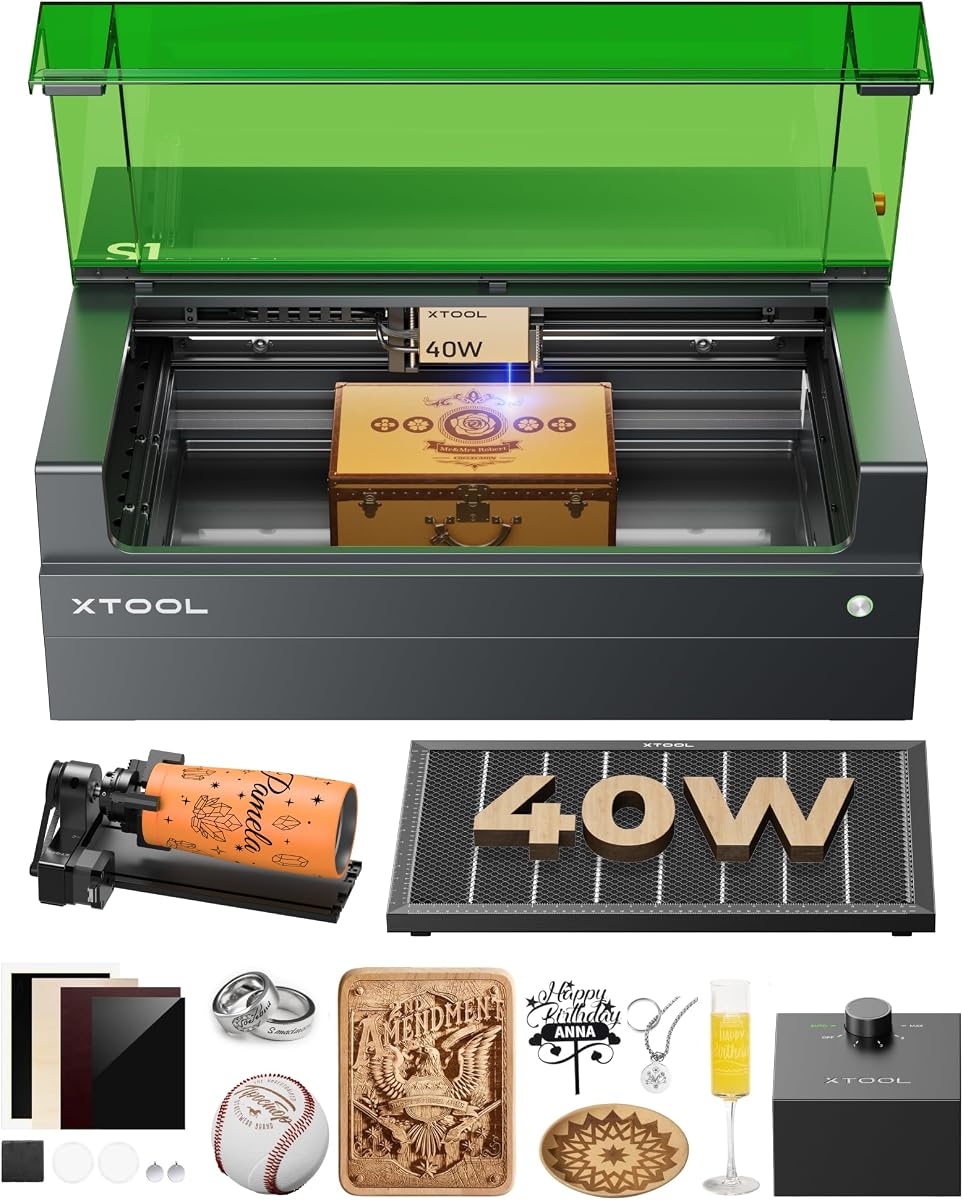
The xTool S1 is an enclosed 40W laser cutter and engraver that offers one of the most approachable production workflows in this guide. Although it is listed at 40W rather than 50W, its large 23.93 by 15.16-inch bed, 600mm/s speed, integrated positioning technology, and rotary bundle make it highly relevant to anyone comparing 50W-class creative machines.
We may earn a commission when you buy through this link, at no additional cost to you.
The supplied information highlights a 3mm aerospace-grade aluminum frame, automatic focus, xTool Creative Space software, and Pin-point Positioning technology. It supports 3D engraving on curved surfaces such as spoons and plates, while AutoPassthrough extends project capability to materials up to 118 inches. The software includes preset parameters for more than 400 tested materials, text-to-design features, and over 1,000 step-by-step tutorials.
Safety and workflow are major strengths. The fully enclosed Class 1 design, protective cover, flame sensors, emergency stop, and lid-open stop provide a more reassuring setup for homes, classrooms, and shared workspaces than an open Class 4 system. The trade-off is that a diode laser is primarily intended for wood, acrylic, leather, and similar materials, with metal engraving dependent on appropriate coatings or compatible surfaces.
This is our editor's choice for the most complete general-purpose creative package. It is particularly attractive to beginners, schools, and small businesses that value automation, large projects, curved work, and safety. It is less suitable for a buyer whose central requirement is a true 50W fiber source for deep bare-metal engraving, but it may still be the more productive overall choice for the intended projects.
Automatic focus, material presets, a text-to-design tool, and extensive tutorials reduce the learning curve. The workflow is designed to help users preview a design, make basic adjustments, and begin engraving without first mastering advanced laser settings.
The wide bed accommodates large signs and batch production, while the rotary bundle expands the range to tumblers and other curved surfaces. AutoPassthrough further extends the usable project length for compatible longer materials.
We may earn a commission when you buy through this link, at no additional cost to you.
The ATOMSTACK A40 PRO V2 is a 48W machine with a 24W precision mode, making it a close alternative for buyers comparing 50W engravers on capability rather than an exact wattage match. It carries a 4.8 supplied rating and emphasizes a physical one-key switch between detailed engraving and higher-power cutting.
We may earn a commission when you buy through this link, at no additional cost to you.
The 48W mode is stated to cut 18mm basswood, 9mm MDF, and 0.1mm stainless steel in one pass, while 24W mode is intended for intricate work with less scorching. A maximum speed of 500mm/s supports production tasks. The modular rotary package combines roller, chuck, sphere, and ring attachments, covering cylindrical objects from 12mm rings to 200mm tumblers and wine glasses.
Automatic air assist helps remove smoke and debris while protecting the lens, and the anodized all-aluminum frame is designed to limit vibration at higher speeds. These details make it attractive for batch engraving. However, no specific working-area dimensions are included in the supplied information, so buyers should confirm that its bed is large enough for their planned products.
This is our budget-oriented top pick because it combines dual power modes, extensive rotary accessories, and an automated exhaust feature without focusing solely on maximum wattage. It suits serious hobbyists and small businesses producing wood, stone, acrylic, leather, jewelry, and limited metal work. Confirm material compatibility, focus requirements, and safety controls before purchasing.
The physical 24W and 48W selector lets operators move between fine engraving and more aggressive cutting. This flexibility can reduce the need to change power settings for every material or project.
Roller, chuck, sphere, and ring modules provide several ways to rotate cylindrical items. The stated 0.1-degree precision and 360-degree-per-second speed are designed for stable batch work on compatible pieces.
We may earn a commission when you buy through this link, at no additional cost to you.
The OMTech LYF-50W is a compact 50W fiber laser engraver designed around metal marking and a simplified control interface. No user rating was supplied for this model, so its listed performance should be evaluated primarily from the manufacturer's specifications. The 5.9 by 5.9-inch work area sits between the smallest jewelry units and larger square workbeds.
We may earn a commission when you buy through this link, at no additional cost to you.
Its galvanometer is listed with a 0.01mm spot diameter, an air-spaced field lens with protective and anti-reflective coatings, and a maximum engraving speed of 10,000mm/s. The lens is stated to introduce less than 1% distortion. A red-dot indicator helps with focus adjustment and can be started or stopped from the machine's focus button.
Text instructions beside the controls and support for both LightBurn and EZCAD2 help make the machine approachable. The software is listed for 32-bit and 64-bit versions of Windows 7, 8, and 10 and supports a wide range of image formats. One point that needs clarification is the supplied description, which states both a 50W output and a Class 2 classification with 0.874mW output; buyers should verify the exact configuration and certification for their region.
This model is a sensible choice for a compact metal-marking setup that values fast galvo movement, compact construction, and access to both major control platforms. It may suit a repair shop, jeweler, or small-label business. Confirm technical specifications, included accessories, service support, ventilation requirements, and the final safety classification before ordering.
A claimed 10,000mm/s speed and 0.01mm spot diameter support fine, fast marking in a relatively small enclosure. These specifications are especially relevant to jewelry, tags, and serialized components.
On-body text guidance and a one-finger red-dot control reduce setup complexity. LightBurn and EZCAD2 compatibility gives users the option to choose a preferred design and parameter workflow.
We may earn a commission when you buy through this link, at no additional cost to you.
The KENTOKTOOL LE400PRO is a 5.5W entry-level laser engraver that appears in this comparison because its listing groups it with 50W machines, although its actual output is far lower. It has a 4.5 supplied rating and a 400 by 400mm work area. Buyers who require genuine 50W metal-cutting or deep-engraving capability should not mistake it for a comparable high-power system.
We may earn a commission when you buy through this link, at no additional cost to you.
Its strongest features are accessibility and a generous bed for its class. Point-compression focusing is stated to create a 0.08mm square focus, and a new knob design allows tool-free adjustment. Installation is advertised as taking 10 to 20 minutes, while the engraving speed can reach 6,000mm/min. Precise tick marks on both axes help operators position material quickly.
The listed applications include wood, acrylic, glass, stainless steel, ceramic, stone, food, bamboo, plastic, leather, and cardboard, although actual results depend on the specific diode laser, coatings, settings, and material. It can cut wood up to 8mm and 5mm black acrylic. A detachable magnetic cover is stated to filter 97% of UV rays, and an emergency power switch provides an additional shutdown control.
The LE400PRO is best for beginners, students, and hobbyists who want a functional machine for light engraving without investing in a 50W system. It offers GRBL and LightBurn support, Windows and Mac compatibility, and several common file formats. Treat it as a starter machine and evaluate a fiber or higher-output model if your planned work requires serious metal marking or cutting.
Tool-free focus adjustment, axis position scales, and a short installation process reduce the barrier to getting started. Supported design formats and familiar control software make it suitable for learning basic engraving workflows.
The 400 by 400mm bed provides useful room for multiple small pieces or moderately sized signs. It also offers a strong material range for hobby-level projects, even though the laser output is modest.
We may earn a commission when you buy through this link, at no additional cost to you.
The Monport 60W Fiber is a higher-output alternative to a conventional 50W engraver, with extra power potentially benefiting demanding metal marking and cutting tasks. It has a 4.5 supplied rating. The machine uses a 150 by 150mm work area, which the manufacturer describes as an optimal balance for avoiding reduced edge quality or distortion associated with excessively large fields.
We may earn a commission when you buy through this link, at no additional cost to you.
A customized galvanometer system with silicon reflectors is listed at up to 10,000mm/s, while the custom F-theta field mirror contributes to a stated carving accuracy of 0.01mm. The machine can mark gold, silver, copper, stainless steel, brass, titanium, and other metals. It also supports 2.5D engraving, deep engraving, and limited metal-sheet cutting.
The red-dot pointer assists positioning, and the supplied information says the product can operate with LightBurn. Free alternative software and backup parameters stored on an included USB drive are also described. The rotary-axis version is especially relevant to cylindrical products, while the compact integration helps keep the system portable compared with a large bed machine.
This model is best for experienced users who need more engraving intensity than a 50W machine and can manage a Class 5 laser environment. The extra output may shorten processing time or enable deeper marks, but it also requires more rigorous safety and ventilation planning. Verify the included rotary configuration, exact accessories, certification, and local operating rules before purchasing.
The 60W source is positioned as a faster, deeper option for demanding metal engraving. It can also handle limited sheet cutting, although it should not be treated as a general-purpose substitute for a dedicated metal-cutting system.
The 150mm square field is carefully tuned according to the supplied information. That helps maintain effective edge engraving while preserving a compact machine footprint for small workshops and jewelry production.
We may earn a commission when you buy through this link, at no additional cost to you.
The Creality Falcon2 Pro 60W is an enclosed, production-oriented machine with adjustable 22W, 40W, and 60W output. No user rating was supplied, but its feature set distinguishes it from simpler open engravers. The fully enclosed Class 1 design includes a viewing window, emergency stop, intelligent safety monitoring, smoke containment, air assist, and exhaust management.
We may earn a commission when you buy through this link, at no additional cost to you.
Its dual-laser configuration combines a 60W source for heavy cutting and engraving with a 1.6W laser for precise positioning and fine engraving. The integrated HD camera provides material positioning, live preview, and batch alignment, reducing manual setup and improving consistency. LightBurn and LaserGRBL compatibility support familiar design and machine-control workflows.
The principal material limitation is that it is a diode-style cutting system rather than a 50W fiber marker. It is listed for wood, acrylic, leather, bamboo, slate, and coated metal, so users should not assume it can engrave all bare metals deeply. Selecting 22W can improve precision and reduce scorching, while 60W favors demanding cuts and faster production.
This machine is best for makers and small businesses that value enclosure, camera positioning, flexible output, and batch workflow in one system. It bridges the gap between hobbyist projects and commercial production, although the absence of a supplied rating means buyers should examine current owner feedback and independently verify all specifications. Confirm the exact material list, rotary accessories, extraction requirements, and warranty before ordering.
Three selectable output levels let operators balance cutting speed, engraving detail, and the risk of scorching. The dedicated 1.6W laser supports positioning and fine work without requiring the primary laser for every setup task.
The HD camera supports live preview, material placement, and alignment of multiple pieces. These features can reduce setup time and improve consistency when repeating the same design across a production batch.
We may earn a commission when you buy through this link, at no additional cost to you.
A useful 50W laser purchase should begin with the materials, product sizes, and production methods you expect to use. Output, laser type, work area, software, positioning, ventilation, and safety then determine whether the machine is practical for your workspace.
Choose fiber technology for metals and CO2 or diode technology for craft cutting. Verify the machine against your specific materials.
Compare real workload needs instead of wattage alone. Validate representative material samples when finish quality matters.
Choose the smallest area that comfortably fits your products. Include clearance, bed style, and pass-through access in the decision.
Prioritize stable, repeatable results over a single maximum-speed claim. Consider controls, focus, and positioning together.
Confirm the exact control software, operating system, and file formats before ordering. Favor a workflow you can use confidently.
Include rotary capability when your products are curved. Confirm attachment inclusion, diameter range, and setup requirements.
Choose the appropriate safety class for your environment and follow every stated precaution. Plan ventilation, fire control, and protective equipment.
Favor automation that solves a real workflow problem. Ensure the software and controls remain understandable to the primary operator.
Begin by reading the complete manual and confirming that the machine, lens, source, software, and accessories are correctly installed. Work in a well-ventilated area, keep the workspace clear, and use the safety equipment appropriate to the laser class. Secure the material so it cannot shift, then establish focus and confirm the correct settings with a small test on a scrap piece of the same material and finish.
Import a vector or raster design, check its scale and placement, and preview the job before enabling the laser. Use the recommended passes, speed, power, and focus settings rather than copying parameters from a different machine without testing. Monitor the first run, keep the exhaust or air assist functioning, and never leave an operating laser unattended. Stop immediately if smoke, flames, unexpected movement, or abnormal sounds occur.
For maintenance, clean the lens and protective windows with the recommended materials, keep the exhaust free of residue, and inspect moving axes, cables, fasteners, and the work bed. Remove debris after each session and monitor cooling or assist-air components according to the manual. Before a long production run, use a known test piece to verify that focus, power, and positioning remain consistent.
A 50W fiber laser is generally well suited to marking jewelry because it can work with metals such as stainless steel, aluminum, brass, titanium, gold, and silver. The appropriate settings, focus, and marking depth vary by material and finish, so test pieces are important. Some jewelry pieces may also require a rotary attachment for rings, bracelets, or bangles.
It depends on the laser technology. A 50W fiber engraver can perform deep engraving and limited sheet cutting on suitable metals, while CO2 and diode machines generally cannot mark or cut bare metal effectively. Coated metal may respond to a diode or CO2 source, but this is not equivalent to direct fiber marking. Always confirm the exact material list and run a test before production.
The 40W model generally offers lower cutting power and may require more passes for demanding jobs, while a 50W machine can work more quickly or create deeper marks on compatible materials. Actual results also depend on the laser type, optics, focus, speed, and material. The xTool S1's larger bed and automation may make it more productive than a smaller 50W machine for certain craft workflows.
A rotary attachment is necessary if you routinely engrave round, cylindrical, or irregular curved objects because the laser head and bed remain stationary. Flat tags, plaques, boards, and sheet stock do not require it. Look for a package that includes the correct roller or chuck, and check the supported diameter and software setup before purchasing.
LightBurn is a common choice for flexible design control, while EZCAD2 and GRBL-based systems are used with many machines. The best option is the one natively supported by your selected engraver and compatible with your computer and artwork formats. Confirm the exact software version and parameter workflow, because machines using similarly named software may still differ in features and import behavior.
Safety depends on the machine's enclosure, laser class, ventilation, and operator practices. Fully enclosed Class 1 systems can be more suitable for shared home workspaces, but proper exhaust, material precautions, and access control remain important. Open or high-class systems generally require more controlled spaces and additional safety procedures. Follow the manufacturer's manual and all local requirements.
Different metals, plastics, coatings, finishes, and densities absorb laser energy differently. Surface condition, oxidation, paint, focus, power, speed, passes, and assist gas can all influence the result. Test on the exact stock you plan to use, then adjust one variable at a time and save the settings that produce a consistent mark.
The required ventilation depends on the laser source, materials processed, enclosure, and volume of smoke or fumes produced. Follow the machine manual for extraction or filtration guidance and never direct hazardous fumes toward occupied spaces. Cutting plastics and composite materials can create irritating or dangerous smoke, so material-specific safety information should take priority over general assumptions.
The strongest general-purpose choice in this guide is the xTool S1 because it combines a large bed, automatic positioning, curved-work support, an enclosed Class 1 design, and an approachable software workflow. The GWEIKE G2 Max stands out for high-output metal marking, deep engraving, and color capability, while the ATOMSTACK A40 PRO V2 offers the most compelling value-oriented combination of adjustable power and rotary accessories.
Prioritize the type of work you actually perform. Choose a fiber system for direct metal marking, a CO2 or diode machine for wood and acrylic, and the largest practical bed for signs or batches. Look beyond wattage to consider focus, positioning, software, accessories, ventilation, safety class, and whether the machine can be operated safely where you intend to use it.
Prices, discounts, bundles, and availability change frequently, so review the current listing before buying. Verify the exact model, included rotary components, software access, certifications, warranty, and included accessories. A current comparison is particularly important because machines with similar headline wattage can have very different beds, workflows, and material capabilities.