
MOSISO Laptop Case 16 inch
4.7Editor score
Slim polyester construction
Foam and fleece cushioning
Large front accessory pocket
A sleeve for a 16-inch MacBook Pro should balance a close fit with dependable cushioning, useful organization, and enough flexibility to slide into a backpack or briefcase. The right model also needs to accommodate the dimensions and ports of the particular MacBook Pro generation you own, rather than merely relying on a nominal screen size.
This guide compares ten sleeves using their listed compatibility, internal measurements, padding, exterior materials, zipper and handle design, front-pocket layouts, portability, and protection features. It covers slim felt-lined covers, water-resistant business sleeves, multi-pocket organizers, and protective cases with reinforced corners, straps, or accessory pouches.
Each review explains who the product is likely to suit, where it offers the strongest advantages, and which compromises deserve consideration. Ratings and product information reflect the supplied listings, while prices can change frequently, so readers should confirm the current listing, dimensions, and MacBook model before purchasing.
4.7Editor score

4.8Editor score

4.8Editor score
As an Amazon Associate we earn from qualifying purchases.
The table below compares all ten sleeves by their compatibility approach, protection system, storage capacity, and carrying convenience, helping buyers narrow the field without overlooking differences between slim covers and more structured travel cases.


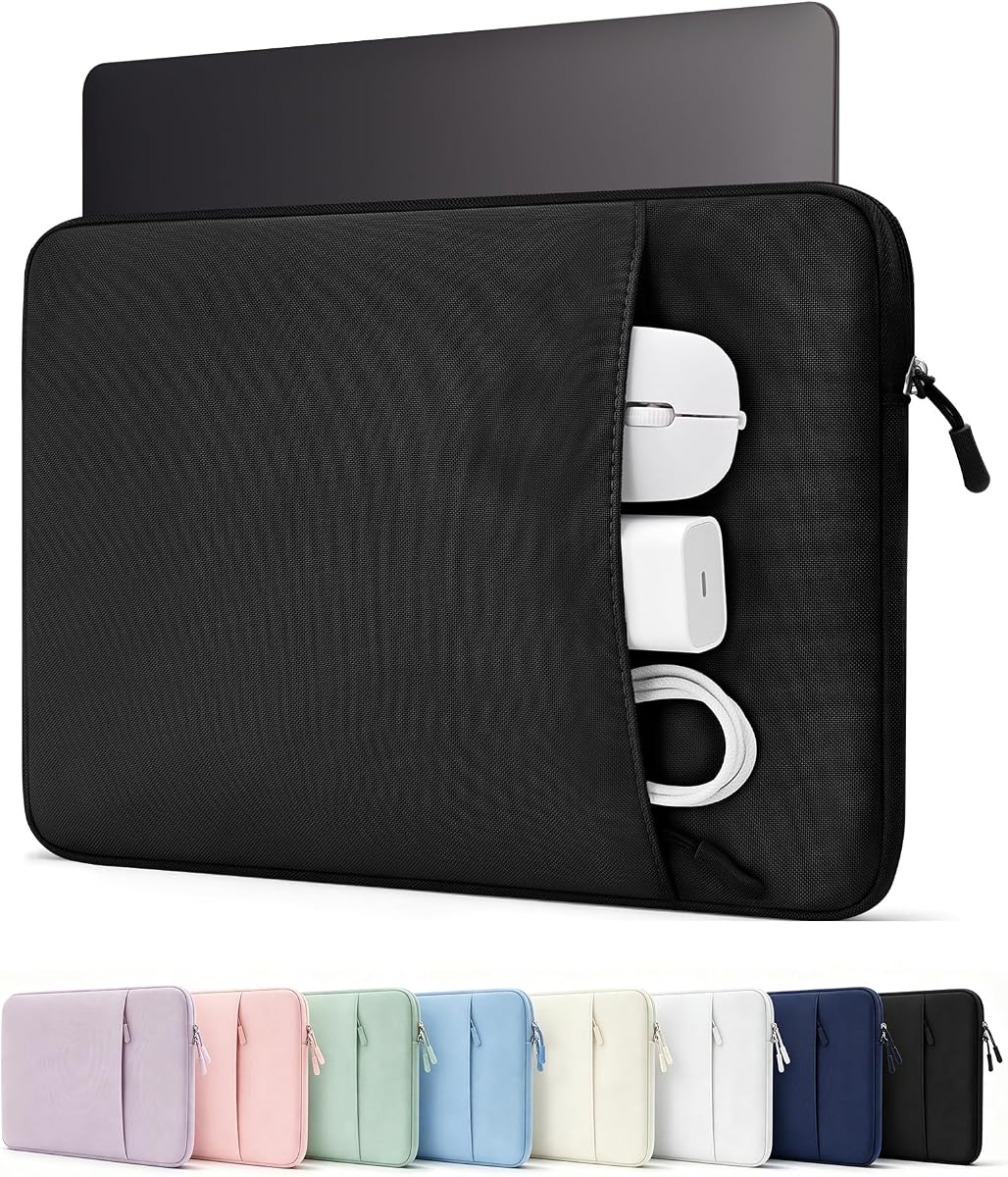


The MOSISO Laptop Case 16 inch, 15-15.6 inch Laptop Sleeve Bag with Pocket earns a 4.7 rating and stands out as a straightforward, affordable-feeling option for everyday MacBook Pro transport. Its combination of a slim profile, polyester construction, foam padding, and a fleece-lined interior makes it more protective than an unstructured fabric pouch without becoming a bulky briefcase.
We may earn a commission when you buy through this link, at no additional cost to you.
Its internal dimensions are listed at 15.55 by 0.79 by 11.42 inches, while the external measurements add a modest amount around the edges. The front vertical pocket measures 11.81 by 11.02 inches, giving room for a mouse, earphones, pens, or a small notepad. A smooth top zipper provides direct access, and the whole sleeve can slide into a briefcase, backpack, or another larger bag.
The main compromise is that the design does not offer the reinforced corners, rigid organization, or separate accessory kit found in more elaborate cases. It is better understood as a padded commuter sleeve than a fully structured travel case. Buyers wanting a handle, shoulder strap, or numerous divided compartments may need to look elsewhere.
This is an easy recommendation for students, office workers, and frequent commuters who want useful protection and one practical pocket in a lightweight format. Its listed compatibility covers 16-inch MacBook Pro models from 2019 through 2026, as well as the 15.4-inch Retina MacBook Pro and several popular 15.6-inch notebooks.
The slim profile is one of the product's strongest benefits because it can be placed inside another carrying bag without adding much bulk. The polyester exterior and soft lining also make the case practical for routine commutes and short work trips.
The single front pocket is larger than those on many minimalist covers and can consolidate common accessories. It offers enough organization for daily essentials without turning the sleeve into a multi-pocket organizer.
We may earn a commission when you buy through this link, at no additional cost to you.
The tomtoc 360° Protective Laptop Sleeve for 16-inch New MacBook Pro M5 Pro/Max has a 4.8 rating and is the most balanced option in the guide. It combines a relatively slim shape with reinforced corners, resilient edges, soft padding, spill-resistant recycled fabric, YKK zippers, and a carefully lined interior.
We may earn a commission when you buy through this link, at no additional cost to you.
The listing describes a design built around 360-degree protection, including CornerArmor technology intended to help manage the impact of falls, shocks, and vibration. The internal dimensions are 14.01 by 9.77 by 0.66 inches, and the front pocket measures 11.81 by 8.66 inches. That pocket can hold a charger, cable, mouse, or external backup drive, while the additional strap provides a place for an AirTag or keys.
Some buyers may find a structured protective sleeve unnecessary when their laptop spends most of its time in a padded compartment inside a backpack. The case also has more material and construction than a basic felt cover. Nevertheless, the combination of a relatively compact profile, a meaningful accessory pocket, and reinforced protection makes those trade-offs reasonable for frequent travelers.
Choose this sleeve if you want a 16-inch MacBook Pro case that looks professional, offers credible drop-oriented protection, and remains easy to carry. The listed fit covers M5 Pro/Max 2026 models and M4, M3, M2, and M1 16-inch MacBook Pro models from 2019 through 2024, alongside some larger Dell, Razer, and ThinkPad models.
Reinforced corners and high-density padding make this sleeve more travel-oriented without requiring a rigid case. It can still slide into a backpack, briefcase, or travel case when you need to move between carrying systems.
The front pocket reduces the need to hunt for a charger or mouse when reaching a shared workspace. A separate tracking-strap area adds a small but thoughtful carrying convenience.
We may earn a commission when you buy through this link, at no additional cost to you.
The tomtoc Slim & 360° Protective Laptop Sleeve for 16-inch New MacBook Pro M5 carries a 4.7 rating and focuses on a restrained, professional appearance. Its clean lines, flat-edge silhouette, refined texture, and flexible construction suit buyers who want protection without a traditional briefcase profile.
We may earn a commission when you buy through this link, at no additional cost to you.
Protection comes from reinforced CornerArmor shock-absorbing corners, soft padding on both sides, and a tear-resistant recycled outer fabric. The dimensions are listed at 14.01 by 9.77 by 0.66 inches internally, and the front pocket measures 10.83 by 10.83 inches. It is designed to hold chargers, cables, or notebooks while remaining easy to place inside backpacks, totes, or briefcases.
Its understated design is the defining feature, but it also means there is no grab handle, shoulder strap, or separate accessory kit. The front pocket is broad rather than divided into many small sections, so buyers who need cable-specific organization may prefer a more compartmentalized case. Those seeking a rugged case may also prefer stronger corner and edge construction.
This model is well suited to designers, developers, office professionals, and students who want a restrained sleeve that coordinates with a minimalist setup. It supports 16-inch MacBook Pro M5 Pro/Max 2026 and M4 through M1 models from 2019 through 2024, making it a flexible choice for users with several supported generations.
The low-profile exterior avoids the visual bulk of a handle-heavy organizer. Flexible recycled materials and soft two-sided padding let the case conform to different bags while protecting the MacBook from routine pressure.
The square front pocket is intentionally uncomplicated and large enough for frequently used charging items. It is a good middle ground between a cover with no storage and a densely partitioned briefcase.
We may earn a commission when you buy through this link, at no additional cost to you.
The tomtoc 360 Protective Laptop Sleeve Kit for 16-inch MacBook Pro M5 Pro/Max has a 4.8 rating and stands out because it includes a separate accessory pouch. That addition makes it a more complete packing solution for travelers who want chargers, cables, a mouse, and other small technology items sorted apart from the laptop.
We may earn a commission when you buy through this link, at no additional cost to you.
The main sleeve uses CornerArmor technology, high-resilience edges, and high-density soft padding within a water-resistant recycled fabric exterior. YKK zippers and an interline-style soft lining contribute to the premium construction. The separate pouch measures 8.86 by 5.12 by 1.97 inches and includes two side mesh pockets, while the laptop compartment has internal dimensions of 14.01 by 9.77 by 0.66 inches.
The trade-off is added complexity and bulk. Carrying both the sleeve and accessory pouch can be less convenient than using a single integrated organizer, and buyers who already keep accessories in a separate tech pouch may see duplication. Even so, the separate components make it easy to remove frequently used cables without opening the main laptop compartment.
This kit is ideal for frequent travelers, consultants, and anyone who wants a dedicated place for every accessory. It supports 16-inch MacBook Pro M5 through M1 Pro/Max models from 2019 through 2026, with additional compatibility listed for Dell XPS 16 Plus, Razer Blade 16, and certain ThinkPad X1 Extreme models.
The small pouch separates chargers, cables, a mouse, and other accessories from the laptop space. Its two mesh pockets make items visible and easy to retrieve at a shared table or during a security checkpoint.
CornerArmor construction, resilient edges, dense padding, spill-resistant fabric, and YKK zippers create a well-rounded protection system. It is a strong option for commuters who place extra value on organization and construction.
We may earn a commission when you buy through this link, at no additional cost to you.
The MOSISO 360 Protective Laptop Case 16 inch, 15-15.6 inch Laptop Sleeve earns a 4.7 rating and offers the broadest organizer layout in this roundup. Four front zipper pockets create dedicated spaces for accessories, while a retractable handle and rear trolley strap make the case more versatile than a basic sleeve.
We may earn a commission when you buy through this link, at no additional cost to you.
Internal dimensions are listed at 15.35 by 10.43 by 0.79 inches, with external dimensions of 15.94 by 11.02 by 0.79 inches. The front storage includes raised left and right pockets, a horizontal pocket, and a vertical pocket. Internally, polyester foam and a fluffy cushion help protect against bumps, shocks, dust, dirt, and accidental scratches.
The primary disadvantage is bulk. Multiple divided pockets, a handle, a trolley belt, and reinforced edges make this a more substantial case than the MOSISO model ranked first. A buyer who prefers an understated profile or carries very few accessories may consider the extra structure unnecessary. The side-opening zipper also differs from the simple top-opening access of the more minimal sleeve.
This case is a strong match for business travelers, mobile workers, and people who want accessories separated and easy to reach. Its compatibility list includes MacBook Pro models from 2019 through 2026, the 15.4-inch Retina MacBook Pro, and many common 15.6-inch laptops from HP, Dell, Lenovo, ASUS, and Acer.
Four zippered pockets are more useful when a charger, mouse, earphones, and writing materials need separate homes. The arrangement also makes it easy to separate similarly sized items that would become mixed in one large compartment.
The extendable handle provides a comfortable hand-carry option, and the rear trolley belt lets the case ride over compatible luggage. These details make it especially practical for airport and business-trip travel.
We may earn a commission when you buy through this link, at no additional cost to you.
The Comfyable Slim Laptop Sleeve 16 Inch Compatible for MacBook Pro M5 M4 M3 M2 Pro/Max 2026, Faux Leather Protective 16-in Mac Cover Case, Black has a 4.5 rating and is built for people who want the least bulky option. Its synthetic leather exterior, felt interior, and flat construction closely resemble a refined laptop envelope.
We may earn a commission when you buy through this link, at no additional cost to you.
The interior dimensions are listed at 14.96 by 11.14 inches, and the sleeve is compatible with 16-inch MacBook Pro M5, M4, M3, and M2 Pro/Max models identified as A3428 and A3429. The exterior is described as animal-free synthetic leather, while the side facing the computer uses soft felt that helps reduce direct contact and scratching.
The major limitation is that there is no exterior storage pocket and no reinforced edge or corner system. It provides a scratch-resistant barrier and light handling support rather than the more substantial drop protection associated with structured sleeves. It is therefore better suited to use inside a backpack that already has a padded laptop compartment.
This is an attractive recommendation for professionals who carry a MacBook Pro between a home office, meeting room, and café. Its ability to lie flat and function as a bottom pad adds versatility, while the minimalist appearance pairs easily with business attire and other coordinated accessories.
The sleeve avoids a handle, strap, and bulky organizer, so it is straightforward to place in another bag. Its low profile also makes it convenient to carry alone when only the MacBook and a small set of essentials are needed.
The felt lining gives the MacBook a soft surface against the case interior. Because the sleeve lies completely flat, it can also serve as a protective base during use in a café, office, or other informal workspace.
We may earn a commission when you buy through this link, at no additional cost to you.
The ProCase Laptop Sleeve 16" for MacBook Pro 16 Inch M5/M4/M3/M2/M1 has a 4.7 rating and combines a practical front organizer with thick impact cushioning. It is positioned as an everyday sleeve for school, commuting, office work, business trips, and travel.
We may earn a commission when you buy through this link, at no additional cost to you.
Its internal dimensions are 14.37 by 10.63 by 0.98 inches, and the listing explicitly calls for checking the size before purchase. Protection comes from thick shock-absorbing padding and an ultra-soft plush lining designed to help guard against scratches, bumps, and everyday impacts. The multi-compartment front pocket can organize a charger, power bank, USB cables, docking hub, mouse, and other small accessories.
Compared with a formal briefcase, this sleeve lacks a handle and shoulder strap, so it is intended primarily for placement inside a larger bag. Its many pockets also make it more substantial than an envelope-style cover. Buyers who want the lightest possible solution or prefer to carry the case by hand may find a slim, pocketless sleeve more convenient.
This ProCase is well suited to users who carry more than just a laptop but do not need a large shoulder bag. It supports 16-inch MacBook Pro M5 through M1 models from 2019 through 2026, along with 15.6- to 16-inch HP, Dell, ASUS, Lenovo, Acer, and Chromebook models.
The divided front pocket makes it easier to separate a mouse from a charger or keep small cables from wrapping around other accessories. This is more useful for daily work than a single undivided pocket of the same size.
Thick padding and plush lining help protect against routine impacts, while the streamlined shape keeps the sleeve easy to place in a backpack, briefcase, or travel bag. It is a versatile choice for students and mobile workers.
We may earn a commission when you buy through this link, at no additional cost to you.
The tomtoc 360° Protective Laptop Case Bag for 16-inch MacBook Pro M5 Pro/Max has a 4.8 rating and is the most business-case-like product in the guide. It combines CornerArmor corner protection, resilient edges, high-density padding, water-resistant recycled fabric, YKK zippers, and padded PU leather handles.
We may earn a commission when you buy through this link, at no additional cost to you.
The internal dimensions are listed at 14.02 by 9.88 by 0.67 inches. Storage extends beyond the laptop compartment, with a front intelligent storage area, a key or AirTag strap, and a hidden back pocket for documents, a phone, or cards. The side zipper opening allows the laptop to be inserted and removed conveniently while helping reduce the chance of an accidental drop.
Its structured design and multiple carrying options make it bulkier than slim sleeves. It may also be unnecessary if the laptop is always carried inside a backpack with a dedicated compartment. In return, it offers a more complete business organization system, a comfortable handle, and a more formal silhouette suitable for meetings and presentations.
This briefcase-style case is an excellent option for commuters and business travelers who want more than a basic padded cover. It supports 16-inch MacBook Pro M5 Pro/Max and M4 through M1 models from 2019 through 2026, along with selected 15-inch devices and larger gaming or business laptops.
The tri-compartment design separates the laptop from accessories and personal items. A front organizer and concealed rear pocket make the case more functional for meetings, document transport, and shared workspaces.
CornerArmor technology, high-density padding, and resilient edges form the central protection system. Water-resistant recycled fabric and YKK zippers add practical durability for commuting and travel.
We may earn a commission when you buy through this link, at no additional cost to you.
The Comfyable Leather Laptop Sleeve Compatible with 16 Inch MacBook Pro M5 Pro/Max & 15 Inch MacBook Air M5 2026 (Loose Fit), Chocolate has a 4.6 rating and emphasizes a soft, classic cover design. Its PU faux-leather exterior, fleece lining, EPE foam padding, and neoprene flap create a refined pouch for the MacBook.
We may earn a commission when you buy through this link, at no additional cost to you.
The internal dimensions are 14.75 by 10.3 by 0.7 inches, and the exterior measures 15.6 by 11.1 by 0.7 inches. The top interior includes a neoprene flap intended to hold the device snugly and prevent the zipper from rubbing against it. The water-resistant exterior is designed to offer protection from minor spills and exposure during travel.
The listing also claims compatibility with 16-inch MacBook Pro M5, M4, M3, and M2 Pro/Max models from 2022 through 2026 and with several 15-inch MacBook Air models. However, the MacBook Air compatibility is explicitly described as loose, so buyers should not treat that option as a precision fit. There is also no exterior pocket for accessories.
This cover is best for users who prioritize soft contact, a simple profile, and a traditional leather-look appearance over heavy-duty structure. It is especially suitable as a secondary sleeve for moving a MacBook between a protected bag and a desk, provided the buyer confirms the exact model dimensions.
The fleece lining creates a gentle surface around the device, while the EPE foam adds a useful buffer against bumps. The neoprene flap provides an additional layer between the zipper area and the MacBook.
The water-resistant PU faux-leather exterior is suitable for everyday commuting and travel. Its slim shape remains easy to carry while offering a more traditional appearance than a technical fabric organizer.
We may earn a commission when you buy through this link, at no additional cost to you.
The tomtoc 360 Protective Laptop Sleeve Designed for 16-inch New MacBook Pro has a 4.7 rating and is the most travel-oriented choice because it includes both a softback handle and an adjustable, detachable shoulder strap. It can function as a dedicated laptop bag rather than merely as a sleeve placed inside another bag.
We may earn a commission when you buy through this link, at no additional cost to you.
Its main compartment is designed for the MacBook, while additional inner compartments and a front pocket can organize an iPad and business essentials. Protection comes from CornerArmor technology, resilient edges, and dual-density foam padding. The exterior uses water-resistant fabric and YKK zippers, and the listing states that the sleeve meets military-standard drop-test criteria.
This case is the largest and most structured option in the guide, so it is not the best match for buyers who require a pocket-light cover. Carrying hardware and multiple compartments also make it less discreet. Nevertheless, the adjustable strap and dedicated organization make it more convenient for long journeys, presentations, and environments where carrying the laptop separately from a briefcase is useful.
It is best for frequent travelers, consultants, and professionals who prefer a complete shoulder-bag solution. Compatibility covers 16-inch MacBook Pro M5, M4, M3, M2, and M1 Pro/Max models from 2019 through 2026, and the listing also notes compatibility with a 15-inch MacBook Air M5/M4 when paired with a hard case.
The detachable adjustable shoulder strap allows the case to be carried close to the body during a commute or airport journey. The softback handle remains available for shorter trips and office transfers.
Dual-density foam, resilient edges, and CornerArmor construction form a strong protective core. Multiple inner compartments separate the MacBook from an iPad and other essentials, reducing the need for a separate organizer.
We may earn a commission when you buy through this link, at no additional cost to you.
The most useful sleeve balances accurate model fit, protective cushioning, realistic storage, and a carrying style suited to the buyer. Comparing internal measurements, supported model numbers, material construction, and access methods is more reliable than relying on the shared 16-inch label alone.
Compatibility labels vary widely among these products. Several listings name specific 16-inch MacBook Pro model numbers and years, while others also identify compatible 15.6-inch laptops. A nominal screen size does not guarantee that every MacBook Pro generation has the same exact dimensions, so buyers should compare their model identifier and the sleeve's internal measurements before ordering.
Pay particular attention to width, depth, and thickness rather than length alone. Also consider any case marketed as a loose fit, because additional room may make the device shift inside the sleeve. Check the product listing again for the exact model and dimensions.
A fleece-lined or lightly padded cover is useful for scratch protection and daily movement. Foam layers add impact absorption, while reinforced corners, high-resilience edges, and dense padding create a more structured protection system for frequent travel or placement in luggage. The strongest choice depends on how often the laptop is carried and whether it already has a protected compartment.
Choose light cushioning for a minimalist secondary sleeve. Choose reinforced construction when the sleeve may be your only layer of protection, especially for buses, flights, and shared work environments.
Storage ranges from a single large front pocket to four divided zippered compartments or a separate accessory pouch. A broad pocket is convenient for a mouse and charger, while smaller sections help prevent cables, pens, and earphones from becoming mixed together. A separate pouch offers more modular packing but can add bulk.
Think about what you carry every day rather than the maximum amount that could technically fit. Daily commuters usually benefit from one or two accessible areas, while organized business travelers may prefer dedicated compartments.
The traditional sleeve slides into a backpack or briefcase and keeps the MacBook separate from other equipment. A structured briefcase adds a handle, pockets, and sometimes a trolley strap, allowing it to serve as the primary bag. Shoulder-bag designs add the most carrying freedom but are also the heaviest and largest options.
Choose a sleeve for the lightest packing arrangement. Choose a briefcase or shoulder bag if you want to travel with only the MacBook case and a smaller collection of accessories.
The guide includes polyester fabric, recycled technical fabric, synthetic leather, PU faux leather, and a felt-lined leather-look cover. Synthetic leather can provide a polished business appearance, while technical fabric is often associated with lighter weight and flexible packing. Water resistance is useful in unpredictable weather, though it should not be treated as complete waterproofing.
Choose the material that matches your travel conditions and work environment. Also consider how the outer surface feels against other devices or clothing in a crowded bag.
Top-opening, side-opening, and multi-compartment zipper designs affect how quickly the MacBook can be accessed. Side opening can reduce the chance of the computer sliding out during removal, while a simple top zipper makes the sleeve easy to operate. YKK zippers are highlighted in several tomtoc listings, but zipper type alone should not outweigh fit and padding.
Consider whether you frequently add or remove the laptop in public, at security, or in a hurry. Choose the access method that feels easiest and safest for your normal routine.
A sleeve that holds a charger, mouse, cables, and documents can occupy more space than its laptop dimensions suggest. Structured handles, raised pockets, shoulder straps, and accessory pouches add further bulk. This matters when the sleeve must fit inside a compact backpack, laptop compartment, or airline personal-item allowance.
Measure the space available in your main bag before choosing. If it is tight, prioritize a low-profile sleeve and a small number of essential accessories.
Some models in the guide include a listed 12-month warranty and customer-support commitment, while others do not mention one in the supplied information. Warranty terms can be useful when a zipper, handle, or lining fails, but they should complement rather than replace a careful fit check. Compatibility support and replacement policies vary by listing.
Read the current product page for warranty terms, support details, return eligibility, and the exact model list. Keeping the original packaging and purchase record can also simplify any later claim.
Before placing the MacBook in the sleeve, compare the machine with the listed internal dimensions and confirm that the model is explicitly supported. Keep the laptop powered off or asleep, avoid leaving cables attached in ways that pull against a port, and close the zipper without trapping the zipper pull against the device.
Organize small accessories before zipping the front pocket or attaching an accessory pouch. Keep sharp objects away from the lining, do not overload raised compartments, and make sure charger cables cannot press against the MacBook screen or aluminum edges. When using a shoulder strap, attach it to the designated points and keep the case below your body when crossing crowded areas.
For care, follow the material instructions supplied with the chosen model. Spot-clean compatible surfaces with a lightly damp cloth, avoid soaking the interior, and let the sleeve dry fully before use. Do not use harsh chemicals, machine washing, or excessive heat on a padded or faux-leather case. Periodically inspect the zipper, seams, padding, handle, and lining for wear.
It may fit physically, but a nominal size label is not enough to confirm a proper fit. MacBook Pro dimensions can vary by generation, and a loose sleeve may let the device shift. Compare the internal length, width, and thickness with the exact model listing before purchasing.
It depends on the sleeve and the journey. A felt-lined cover is best as scratch protection inside a padded backpack compartment, while reinforced cases with dense foam and corner protection offer more support for frequent travel. The sleeve should be considered one layer within a complete carrying system.
A large undivided front pocket can usually accommodate common accessories more easily than several small compartments. Review the stated pocket dimensions and compare them with the charger, mouse, and cable bundle you intend to carry. Raise the front pocket only if it remains comfortable and does not strain the zipper.
Most models without a handle or strap are designed to slide into a backpack, briefcase, or other bag. The products with handles or detachable shoulder straps are more suitable for standalone carrying, but they add weight and occupy more space.
Check the listing and care instructions first because polyester, recycled fabric, felt, synthetic leather, and PU faux leather may require different methods. For most compatible surfaces, gently spot-clean with a lightly damp cloth, avoid soaking the padding, and allow the sleeve to air-dry completely.
Several listings describe their exterior as water-resistant or spill-resistant, which can help during light exposure or an accidental spill. That should not be interpreted as full waterproof protection. Keep the MacBook covered during rain and do not leave the sleeve submerged or in a washing machine.
Some listings explicitly include 15-inch MacBook Air compatibility, often with a note that the fit is loose. A loose fit may allow movement and does not provide the same precise protection as a model made for the Air's dimensions. Confirm the exact Air model and internal measurements first.
A separate pouch is useful when you want chargers, cables, and a mouse sorted independently from the laptop. It also allows the main sleeve to remain visually and physically simpler. The tradeoff is additional bulk and the possibility of duplicating storage already provided by the outer case.
The MOSISO Laptop Case 16 offers the most approachable lightweight option, while the tomtoc 360° Protective Sleeve provides the strongest balance of reinforced protection, portability, and professional appearance. The tomtoc 360 Protective Laptop Sleeve Kit is ideal for travelers who value a separate, well-organized accessory pouch.
Prioritize the exact model compatibility and internal dimensions first, then choose a protection level that reflects your daily environment. Minimal buyers may prefer the Comfyable slim cover, organized commuters may favor the ProCase or MOSISO 360 model, and frequent travelers may appreciate the more structured tomtoc briefcase and shoulder-bag designs.
Before buying, confirm the current listing details, customer rating, compatibility statement, dimensions, warranty, and latest price. Product availability and prices can change, so checking the live listing ensures that the selected sleeve still matches the MacBook Pro model and accessories you intend to carry.