
Rioddas External DVD Drive
4.3Editor score
Integrated USB-A cable
Up to 5Gbps USB transfer
DVD and CD format support
Physical emergency eject
Explore the best DVD drive for ripping, comparing compatibility, disc formats, speed, portability, and features for everyday use.
A DVD drive for ripping should do more than read discs. It should recognize your computer promptly, handle the formats you own, transfer data reliably, and work without requiring complicated setup. The right model can help preserve old movies, music, photos, software installers, and other files that are otherwise difficult to replace.
The drives in this guide were compared using their supplied specifications, ratings, disc-format support, interface options, operating-system compatibility, physical design, and intended uses. The list covers slim USB models, M-Disc-compatible writers, DVD-RAM options, and one all-in-one Blu-ray burner for readers who need broader disc support.
Each review explains where a drive stands out, where its limitations could matter, and which users are most likely to benefit from it. Product selections and technical details can change, and current prices vary, so readers should verify the latest listing, compatibility information, and included accessories before ordering.
4.3Editor score
4.3Editor score

4.2Editor score
The table below compares all ten drives across the factors that most affect ripping: interface speed, disc-format coverage, portability, computer compatibility, and useful extras such as M-Disc, DVD-RAM, card-reader, or Blu-ray support.


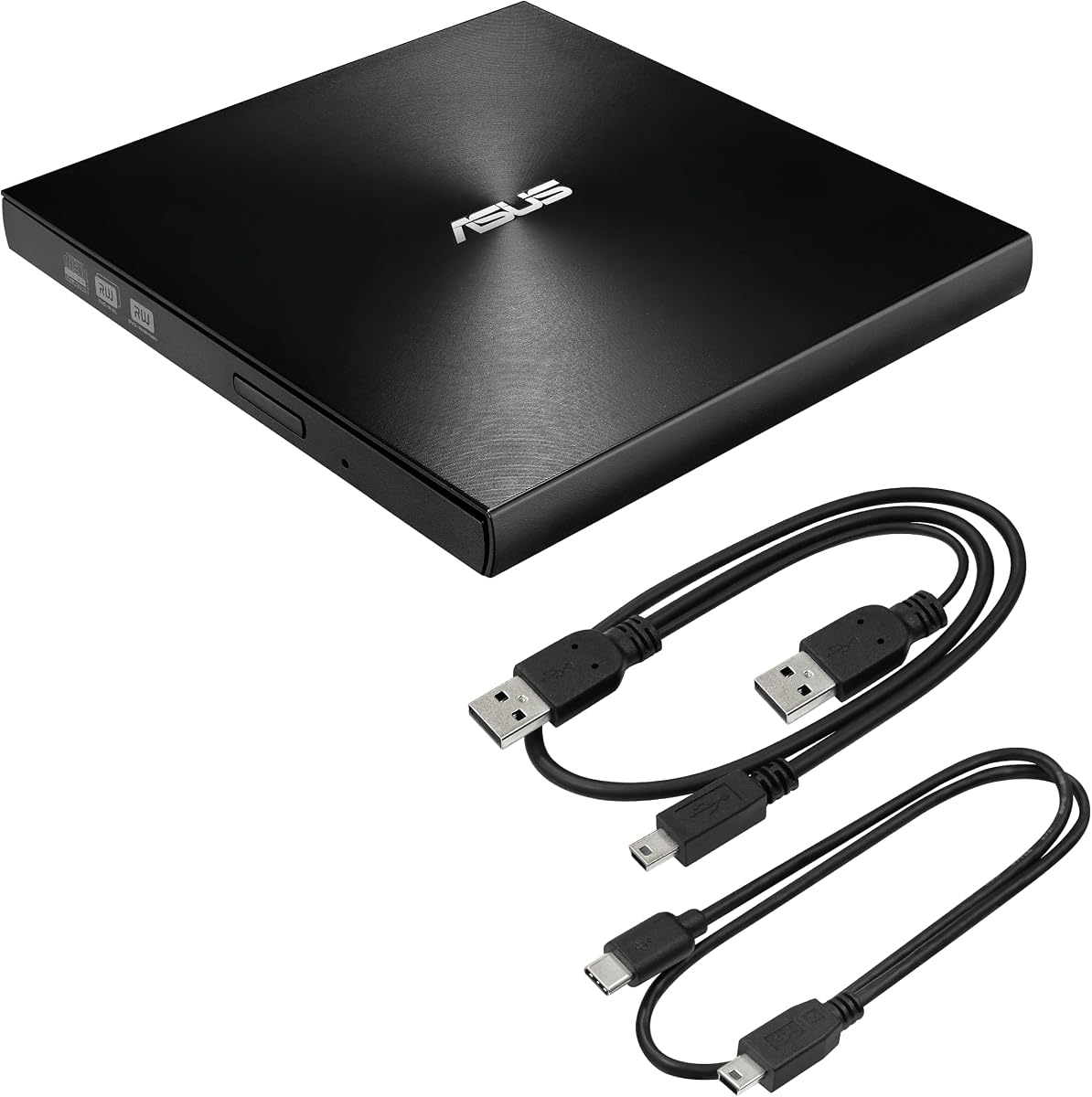
The ASUS ZenDrive Black 13mm combines a slim 13mm body, an 8x external DVD burner, M-Disc support, and compatibility with both Mac and Windows. Its supplied 4.3 rating reflects a generally well-received product, and its most compelling feature for dedicated archivists is the ability to use M-Disc media alongside conventional writable formats.
We may earn a commission when you buy through this link, at no additional cost to you.
The package includes USB 2.0 and Type-C cables, which reduces setup friction across older laptops and newer USB-C systems. Nero BackItUp functionality for Android devices adds another layer of utility, while DISC Encryption II provides password controls and hidden-file features. The drive's thin construction also makes it more discreet and easier to carry than a conventional external optical unit.
Its main limitation is the USB 2.0 interface. The supplied specifications do not claim the 5Gbps transfer capability found on several newer competitors, and real-world throughput is also constrained by the mechanical speed of optical media. The listed operating-system support is also less expansive than that of contemporary models, so buyers should confirm that their current computer is covered.
Even with those qualifications, this is a strong all-around choice for someone who values a refined, highly portable design and long-term disc writing. It is especially attractive to Mac and Windows users who want M-Disc support without carrying a larger desktop-style burner. For those priorities, it earns the Editor's Choice recommendation in this guide.
The 13mm profile makes the ZenDrive easy to place in a laptop sleeve or equipment pouch without adding much bulk. M-Disc support also distinguishes it from basic CD and DVD writers when the goal is creating archival-quality discs designed for long-term storage.
USB 2.0 and Type-C cables are included, allowing the drive to work with a broad range of laptops and desktops. Nero BackItUp support and DISC Encryption II add practical tools for backups, protected content, and hidden files.
We may earn a commission when you buy through this link, at no additional cost to you.
The Rioddas External DVD Drive offers a straightforward way to add optical-disc reading, writing, and ripping to a modern computer. It carries a 4.3 rating, supports USB 3.0 with backward compatibility, and uses plug-and-play power from the host computer. Its supported list covers CD-ROM, CD recordable and rewritable media, DVD-ROM, DVD-R and DVD+ formats, dual-layer DVD, and VCD.
We may earn a commission when you buy through this link, at no additional cost to you.
Strong error tolerance is designed to reduce freezing, skipping, and errors during playback or burning. Copper mesh technology is cited as supporting stable data transmission, while the embedded cable eliminates the need to carry a separate lead. A physical eject button is also valuable because it can release a disc even if the computer fails to recognize the drive.
This model does not support Blu-ray or 4K discs, and DVD-RAM is not included in the stated format list. Users with those discs should choose a drive that explicitly lists the required standard. As with many external burners, a rear motherboard USB port is recommended for stable desktop performance, while USB hubs and extension cables may introduce power or recognition problems.
The Rioddas is a strong pick for budget-conscious users who want an uncomplicated CD and DVD ripper with a modern interface. It works across major Windows, Linux, and macOS systems and supports common laptop and desktop brands. Those users get a practical daily tool without paying for extras they may never use.
USB 3.0 is advertised at up to 5Gbps and remains backward-compatible with USB 2.0. The drive needs no separate power adapter or additional driver, making it particularly convenient for temporary or travel use.
The emergency eject button can release a tray even when software cannot access it. That provides useful protection against forcing the mechanism or leaving a disc trapped inside during a computer failure.
We may earn a commission when you buy through this link, at no additional cost to you.
The Amicool External DVD Drive is a modern, slim solution for users who need to rip ordinary CDs and DVDs on a laptop or desktop. It provides both USB 3.0 and Type-C connectivity, a maximum DVD read speed of 8x, and maximum CD read and write speeds of 24x. Its supplied rating is 4.2.
We may earn a commission when you buy through this link, at no additional cost to you.
Compatibility covers Windows 11, 10, 8.1, 7, Linux, and Intel and Apple Silicon Macs. The listing specifically mentions MacBook Air, MacBook Pro, iMac, and Mac mini, as well as laptops and desktops from brands including Apple, Dell, HP, Lenovo, ASUS, Acer, and Samsung. The built-in cable and thin body make the drive easy to carry without a separate cable.
The drive does not support DVD-RAM, Blu-ray, or certain proprietary formats. On M1, M2, and M3 Macs, the supplied guidance recommends a powered USB-C hub if direct power is insufficient. It also cannot be used with TVs, tablets, game consoles, car stereos, or standalone Blu-ray players, and VLC is recommended for disc use on Mac.
This is a versatile choice for Windows or Mac users who want straightforward CD and DVD ripping in a modern dual-interface package. It suits everyday disc libraries and travel use, but users with DVD-RAM collections or Blu-ray media should look beyond this model. Direct USB connections and careful disc handling remain important for dependable results.
USB 3.0 and Type-C connections cover both traditional ports and modern USB-C laptops. The integrated-cable design keeps the appropriate connector accessible while reducing the chance of leaving a vital cable behind.
The drive supports current Windows releases, Linux, and both Intel and Apple Silicon Macs. Compatibility is focused on computers, however, and does not extend to television sets, tablets, game consoles, or vehicles.
We may earn a commission when you buy through this link, at no additional cost to you.
The ROOFULL USB 3.0 and USB-C drive is a feature-rich CD and DVD burner designed for laptops, desktops, and all-in-one computers. It has a 4.3 rating and supports CD-ROM, CD-R and CD-RW, CD+R and CD+RW, DVD-ROM, DVD±R and DVD±RW, DVD-RAM, and dual-layer DVD±R media, including VCD.
We may earn a commission when you buy through this link, at no additional cost to you.
Its wide format support makes it useful for converting audio and video into digital files, burning photos or data, installing software from disc, and creating backups. The advertised interface speed reaches up to 5Gbps, while maximum optical speeds are 8x for DVD and 24x for CD. Integrated USB-A and USB-C connectors are stored in the body for convenient use without adapters.
Blu-ray and 4K media are not supported. On Mac, the desktop disc icon appears only after a disc has been read, and the physical eject button does not function once the system recognizes the drive; users must eject through Finder or the desktop menu. ChromeOS, smart devices, vehicles, projectors, and game consoles are also outside the compatibility range.
This is a strong all-purpose choice for users who rip a wide range of conventional disc formats, especially DVD-RAM and dual-layer media. The extensive software compatibility and no-driver setup reduce barriers for beginners, while the slim housing and dual connectors make it convenient to move between computers.
DVD-RAM and dual-layer DVD support separates this model from many entry-level writers. That coverage is useful for users preserving varied physical media rather than dealing only with standard DVD-R and DVD+R discs.
Automatic recognition and integrated USB-A and USB-C connectors make the drive practical for laptops and desktops alike. Software is still required for playing, burning, or ripping, even though the hardware itself does not need a driver.
We may earn a commission when you buy through this link, at no additional cost to you.
The LG GP65NG60 is a slim external writer with a 4.4 rating, DVD-RAM support, an 8x maximum DVD write speed, and a 24x maximum CD write speed. Its 14mm body and M-Disc support give it a durable, archival orientation, while CyberLink software is included in the supplied feature list.
We may earn a commission when you buy through this link, at no additional cost to you.
The drive uses a USB 2.0 interface rated at up to 480Mbits per second and is described as compatible with USB 3.0. It supports CD-ROM, DVD-ROM, DVD-R, DVD+R, rewritable variants, dual-layer media, and DVD-RAM. That combination is particularly valuable for users who own older RAM discs and need more than a basic CD-ROM reader.
Its operating-system list is dated compared with newer models, including Windows 8.1 through Windows XP, Server editions, and Mac OS X 10.7.5. The USB 2.0 interface also means it will not exploit the connection speed available from a modern USB 3.0 port. Nevertheless, actual disc throughput is heavily influenced by rotational and laser limits rather than the host interface alone.
The LG GP65NG60 is a compelling choice for DVD-RAM owners and archivists who value established writing functions, M-Disc capability, and a high rating. Modern users should verify operating-system support before buying. For a compact writer centered on archival and RAM-disc use, it remains a capable, distinctive option.
DVD-RAM support is the defining feature for users who own RAM discs, including rewritable media that many newer budget drives omit. Dual-layer DVD support broadens its usefulness for larger software and backup discs.
M-Disc support complements the drive's archival positioning. CyberLink software is also listed, providing a more established software package for users who want help creating, copying, or managing disc content.
We may earn a commission when you buy through this link, at no additional cost to you.
The ROOFULL ECD829-Y is a slim external drive that combines a 4.4 rating with USB 3.0 and Type-C connectivity. It supports up to 5Gbps of interface transfer, 8x maximum DVD speed, and 24x maximum CD speed. A protective carrying sleeve adds practical value for users who intend to move the drive between locations.
We may earn a commission when you buy through this link, at no additional cost to you.
The drive is designed for reading, burning, and ripping conventional CD and DVD media, as well as playing discs and creating backups. Its compatibility list includes multiple generations of Windows, Linux, and macOS, covering laptops, desktops, and all-in-one PCs. The built-in two-in-one cable is stored underneath the body, eliminating the need to hunt for a separate USB lead.
The listed disc scope includes common CD and DVD formats but excludes Blu-ray and 4K media. It also cannot be used with Chromebooks, tablets, phones, vehicles, projectors, televisions, or gaming consoles. On Mac, the tray button does not eject a recognized disc, and the desktop icon appears only after a disc is read successfully. Rip software must be installed separately.
The included sleeve and broad operating-system support make this a convenient choice for frequent travelers, students, and office users. It is a particularly balanced option for people who want modern ports, a slim body, and a protective accessory. The result is well suited to everyday ripping where Blu-ray is not part of the media collection.
The slim housing, hidden dual-interface cable, and extra-thick protective sleeve create a package suited to travel or shared storage. Users can protect the drive while still keeping its connectors close at hand.
The listed capabilities include ripping audio and video into digital files such as MP3, WMA, and MP4, along with burning media, viewing photo CDs, installing software, and backing up files. The host computer still needs suitable software to perform those tasks.
We may earn a commission when you buy through this link, at no additional cost to you.
The BPAKDU 8-in-1 DVD Drive is designed for users who want more than a simple optical reader. Its 4.3-rated package combines a CD/DVD reader, burner, USB 3.0 hub, three USB 2.0 ports, an SD or TF card reader, and a USB-C port. It also supports DVD-RAM, dual-layer DVD, VCD, and SVCD media.
We may earn a commission when you buy through this link, at no additional cost to you.
USB 3.0 operation is advertised at up to 5Gbps, with maximum DVD reading at 8x and maximum CD reading and writing at 24x. The card-reader function makes it convenient to move photos and videos from camera or phone media cards, although SD and TF cards cannot be used simultaneously. The drive is powered by USB and is designed for plug-and-play operation without an internal optical drive.
The additional power connection is listed as a remedy for recognition problems caused by insufficient power, so buyers should understand that it supplements rather than replaces the data connection. Blu-ray is not supported, and the unit is not intended for cars, televisions, tablets, smartphones, projectors, or other consumer devices. Windows 11 users also need compatible media playback software and network access where required by that software.
This is the most functionally expansive conventional CD and DVD option in the list, particularly for users who also need a USB hub and memory-card transfer. Its extra features can reduce the number of accessories on a desk, though it is less streamlined than a dedicated slim drive. It suits power users who will use those secondary functions regularly.
Three USB 2.0 ports, one USB 3.0 port, USB-C connectivity, and an SD or TF reader turn the unit into a compact connectivity hub. It can accommodate peripherals while optical-disc tasks are underway, subject to system and power limits.
The card reader allows photos and videos to be transferred from supported memory cards without relying solely on a separate adapter. Since the SD and TF slots cannot operate at the same time, users will need to move files in separate passes.
We may earn a commission when you buy through this link, at no additional cost to you.
The 8-in-1 External Blu-ray Drive is the broadest disc-handling choice in this guide. It can read and burn Blu-ray, DVD, and CD media and also supports M-Disc, BD-ROM, BD-R, BD-RE, and read-only BD-XL discs. Its 4.2 rating is complemented by a specification sheet that includes both a USB hub and memory-card reader.
We may earn a commission when you buy through this link, at no additional cost to you.
Maximum reading speeds are listed at 6x for Blu-ray, 8x for DVD, and 24x for CD. Writing speeds reach 6x for BD-R, 8x for DVD±R, and 24x for CD-R. The drive supports 3D Blu-ray playback when suitable third-party software is installed. Its maximum Blu-ray recording capacity is 50GB, and 4K playback is not supported.
The hub includes two USB-C ports, one USB 3.0 port, one USB 2.0 port, and an SD or TF card slot. Only one memory-card type can be read at a time. A USB power cable can improve stability on underpowered systems, but it is for power only and does not carry data. A carrying case, four disc sleeves, and a user manual are included.
This premium model is the right choice for users whose collection includes high-definition Blu-ray media, M-Disc, DVD-RAM-era content, or multiple peripheral and card-transfer needs. It is not ideal for 4K disc playback, and television, tablet, smartphone, and in-car compatibility are expressly excluded. For broad computer-based disc work, it offers the most capable specification set.
The drive handles Blu-ray, DVD, CD, M-Disc, and 100GB BD-XL media for reading, while its maximum writing capacity is 50GB. That makes it suitable for users who need to work across several generations of physical media.
The hub, card reader, protective case, and disc sleeves reduce the need for several separate accessories. At 300 grams and 5.5 by 5.5 by 0.35 inches, the drive remains small enough for a laptop bag or suitcase.
We may earn a commission when you buy through this link, at no additional cost to you.
The 8-in-1 USB 3.0 and Type-C DVD Drive is a slim, dual-interface unit for basic CD and DVD tasks. It has a 4.1 rating, advertises transfer speeds up to 5Gbps, and reaches maximum DVD read speeds of 8x and CD read/write speeds of 24x. Its integrated cable and pop-up tray emphasize portability.
We may earn a commission when you buy through this link, at no additional cost to you.
The supplied information lists compatibility with Windows XP, Vista, 2000, ME, 7, 8.1, 10, 11, Linux, and all macOS versions. The drive is intended for laptops, desktops, all-in-one systems, and mini PCs, and it is said to work with major brands including Apple, Dell, HP, Lenovo, ASUS, and Samsung. It is powered directly by a computer USB port.
Despite its product name, the listed functions center on optical-disc reading, writing, and burning rather than a broad collection of hub ports. It does not support DVD-RAM, Blu-ray, or proprietary formats. A separate power cable is included for systems that cannot provide sufficient power, but that cable carries only power. Direct connection and the use of standard recordable media are recommended when recognition issues occur.
This model is a sensible general-purpose option for users with conventional CD and DVD collections. It earns consideration for its broad operating-system coverage, modern Type-C option, and simple setup. The lower rating and limited format scope make it less compelling for demanding archivists, but it remains useful for everyday ripping and disc playback.
The drive automatically recognizes through USB 3.0 or Type-C without extra drivers, while the built-in cable keeps the connection tidy. It is designed for users who want a low-friction path from physical disc to computer.
Its slim body and matte finish make the drive easy to carry, and anti-shock technology is intended to promote stable playback. DVD-RAM, Blu-ray, and proprietary formats remain outside its supported media list.
We may earn a commission when you buy through this link, at no additional cost to you.
The LG GE24NU40 is an established-style external writer with a 4.4 rating and broad conventional disc support. It combines CD-R and CD-RW, DVD-R and DVD-RW, DVD+R and DVD+RW, DVD+R DL, DVD-R DL, and DVD-RAM functions. Maximum CD-RW and DVD+R writing speeds are listed at 24x.
We may earn a commission when you buy through this link, at no additional cost to you.
A USB 2.0 interface supplies the data connection, while Buffer Under Run error protection is intended to reduce recording failures caused by underrunning data. Emergency eject support is another practical feature, giving the user a mechanical option when software-driven ejection is unavailable. The drive is a focused optical writer without a built-in hub or card reader.
Its older-style connection may not suit buyers who want USB 3.0 or Type-C convenience, and the supplied data does not specify a bundled cable or modern USB-C support. The drive also lacks Blu-ray capability. Nevertheless, disc throughput on conventional media is governed by optical mechanics, so the interface alone should not be treated as the only measure of practical performance.
The LG GE24NU40 is a strong choice for users with mixed DVD-R, DVD+R, dual-layer, and DVD-RAM collections who prioritize broad writing functions and error protection. Buyers should confirm their connection setup before ordering. For a traditional multi-format desktop or laptop burner, it offers a focused and well-rated package.
The drive's format matrix covers single-layer and dual-layer DVD media on both minus and plus standards, as well as DVD-RAM. That makes it suitable for users who cannot predict which physical formats their discs will require.
Buffer Under Run error protection helps maintain a steady data flow during recording, reducing the chance of a failed or damaged write. Emergency eject provides a useful fallback when the host computer cannot release the tray.
We may earn a commission when you buy through this link, at no additional cost to you.
The right optical drive depends on the media you own, the computer you use, and the kinds of files you want to create. Paying attention to format support, connection requirements, software, power delivery, and portability will prevent most disappointments.
Prioritize exact media support over unneeded extras. A broad format list is useful, but every format you do not own adds little practical value.
Choose USB-A, USB-C, or a dual-interface design that directly matches your daily computer.
Compare rated DVD and CD speeds, not interface marketing alone, when judging ripping performance.
Start with a direct connection, then add a powered hub only if recognition or reading remains unstable.
Choose separate, reputable ripping and burning software based on your file formats and operating system.
Prioritize slimness and protection for travel, or hub functions for a shared workstation.
Confirm that the drive is intended for your exact computer type and operating system before ordering.
Match archival ambition to the formats and protection features you actually need.
Begin by placing the drive on a stable, level surface and connecting it directly to the computer. Use the appropriate built-in or included cable, and avoid an unpowered hub or extension cable when possible. On a desktop, a rear USB port may provide steadier power than a front-panel port. For a USB-C Mac that struggles with startup recognition, connect the computer to power and consider a powered USB-C hub. Wait until the operating system identifies the drive before inserting a disc if your software expects that sequence.
Insert only clean, undamaged media and handle discs by the edges. Open the drive's tray, place the disc label-side up when required by the mechanism, and close it gently. Use software designed for the desired task: a ripping application for converting tracks or videos into files, a burner for creating discs, and a media player for viewing content. On Mac, expect the desktop disc icon to appear only after the system successfully reads the disc, and eject through the operating system when the physical button does not work.
Always wait for burning or ripping software to finish before ejecting a disc, and do not force the tray if the computer still has it open. Clean fingerprints from disc surfaces with a soft lint-free cloth, moving from the center outward. Keep the drive away from moisture, excessive heat, impact, and dust, and use a sleeve or case during transport. If recognition fails, restart the computer, change ports, verify that the software is installed, and test a standard CD-R or DVD-R before assuming the hardware is faulty.
Yes, unless your computer already has a compatible internal optical drive. Ripping requires hardware that can physically read the disc and transfer its contents to the computer. A modern laptop may need an external USB or USB-C drive, and suitable ripping software must be installed. The drive itself usually does not perform the conversion automatically.
A USB 3.0 connection can provide a faster host transfer rate than USB 2.0, but the optical mechanism may remain the limiting factor. Conventional DVD and CD maximum speeds are still important when comparing drives. If your computer and drive both support USB 3.0, it is generally the preferable connection even when the improvement in a complete rip is modest.
Many drives in this guide support both Windows and macOS, including models with USB-C connections. Compatibility does not guarantee identical behavior: a Mac may show the disc icon only after reading begins, and the physical eject button may not work once macOS takes control. Check the current operating-system requirements in the listing before transferring your workflow to another platform.
A reader can only read compatible discs, while a burner can also write data or media to recordable and rewritable formats. For ripping existing DVDs, reading is the essential function. A burner becomes important when you want to create backup discs, install software onto physical media, or copy files to a blank DVD.
Usually not. Standard commercial DVDs are generally handled with DVD-ROM reading, and many common rewritable formats are supported without DVD-RAM. DVD-RAM matters if you own RAM discs, intend to edit or reuse them repeatedly, or want a writer explicitly designed for that medium. Check your actual collection before paying extra attention to that feature.
Only if the drive explicitly supports Blu-ray. Most conventional CD and DVD models in this guide cannot read or write BD media. The dedicated Blu-ray model supports several BD formats and can burn up to 50GB, but it does not support 4K playback and may require third-party software for Blu-ray playback.
Insufficient power, an unsuitable port, an unpowered hub, or missing software are common causes. Connect the drive directly to the computer, try a rear USB port on a desktop, and use a powered hub if the system is a low-power USB-C model. Restart the computer, try another disc, and confirm that the operating system meets the drive's requirements. Do not confuse a power-only cable with a data cable.
Both formats are widely supported and can work well with modern drives, including most of the models in this guide. The more important considerations are drive compatibility, disc quality, software support, and whether you need rewritable media. DVD+RW and DVD-RW are useful when you expect to erase and reuse a disc, while write-once formats are generally chosen for finalized archives.
The ASUS ZenDrive Black 13mm is the most refined overall recommendation because it combines a slim enclosure, M-Disc support, useful software features, and both USB and Type-C connections. The Rioddas External DVD Drive stands out for a straightforward, budget-friendly USB 3.0 design, while the 8-in-1 External Blu-ray Drive takes the lead for users who need the widest range of physical media and accessories.
For most everyday users, the decisive checklist is simple: confirm that the drive reads your particular disc format, includes the connection type your computer requires, and works with your operating system. Also consider power delivery, software, DVD-RAM or M-Disc needs, and whether portability or a built-in hub matters. A more elaborate drive is only better if its extra functions will actually be used.
Ratings, supported software, accessories, and product availability can change, and current prices vary between sellers and over time. Before purchasing, review the latest product listing and manufacturer guidance, confirm what is included in the box, and verify compatibility with your computer and disc collection. That final check will help ensure a smooth path from physical media to digital files.