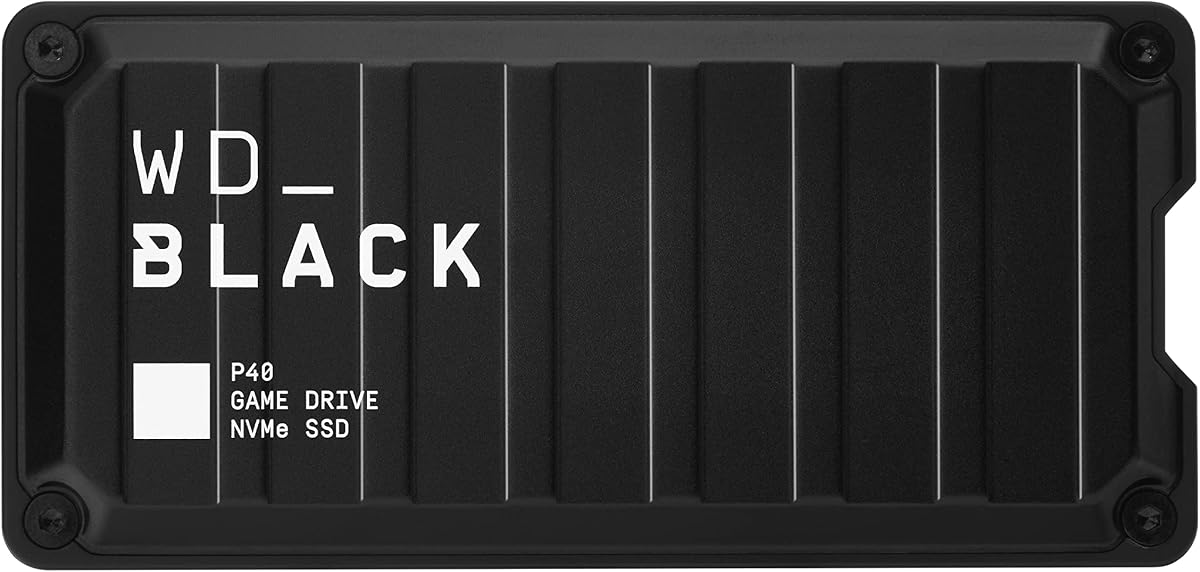
Western Digital 1TB P40 Game Drive SSD
4.6Editor score
Up to 2,000MB/s reads
Customizable RGB lighting
Shock-resistant two-meter design
Discover the best external hard drive for Xbox game storage, comparing capacity, compatibility, speed, design, portability, and setup for every gamer.
An external hard drive can give an Xbox console more room for games without forcing you to constantly delete and reinstall titles. The right drive should offer enough capacity, use a compatible connection, and support the storage workflow required by your specific Xbox generation and operating system.
We compared all ten products by capacity, console compatibility, connection standard, portability, design, and the practical details that affect storing or playing games. The list includes purpose-built gaming drives, portable hard drives, and a compact external solid state drive for shoppers with different needs.
Each review explains the product's strongest benefits, limitations, and best audience, while the comparison table makes the major differences easier to scan. Product ratings and availability can change over time, and prices fluctuate, so confirm current listing details before making a final purchase.
4.6Editor score

4.7Editor score

4.5Editor score
This side-by-side comparison covers capacity, connection, compatibility, portability, and the features that distinguish each drive for Xbox game storage.


The WD_BLACK 6TB P10 Game Drive is the most expansive option in this guide and carries a 4.7 rating. It is designed for collectors who want to preserve a substantial game library while leaving internal console space available for new releases. Its unusually large capacity makes it the leading choice for long-term storage rather than a small, occasional overflow drive.
We may earn a commission when you buy through this link, at no additional cost to you.
The drive is described as the world's first 6TB 2.5-inch portable hard drive, and WD states that it can hold as many as 150 games. That estimate depends on the size of individual titles, so games with large installations will reduce the actual count. The portable metal-top enclosure keeps the design focused, while speeds up to 130MB/s provide a useful balance for moving and organizing collections.
Compatibility is one of its strongest selling points. The product supports Xbox Series X|S, including playing and storing Xbox One games and archiving Xbox Series X|S games, as well as PlayStation 5 use. This wider support may be especially valuable for households that own more than one console. The tradeoff is that the larger housing takes up more space than a compact 1TB or 2TB portable drive.
Choose the 6TB P10 if your priority is keeping hundreds of games and archived titles together without frequent deletion. It is less compelling for someone with only a handful of games, but for a serious Xbox library it provides the strongest capacity-to-form-factor combination in the list.
The headline benefit is simple: 6TB creates enough room for a large collection of installed games, old favorites, and incoming releases. It also reduces the need to keep moving files solely to create a little more internal space.
Support for current Xbox and PlayStation systems makes the P10 useful for more than one console. The metal-topped portable enclosure also keeps the large capacity in a form that can move between locations.
We may earn a commission when you buy through this link, at no additional cost to you.
The WD_BLACK 1TB P40 Game Drive SSD stands apart from the hard-drive alternatives with its solid state construction, RGB lighting, and advertised read speed of up to 2,000MB/s. Its 4.6 rating reflects a product that combines performance-focused design with broad console support, making it the premium option for gamers who prioritize fast transfers and a distinctive appearance.
We may earn a commission when you buy through this link, at no additional cost to you.
The USB 3.2 Gen2x2 interface is the key technical feature. Under favorable host-device and usage conditions, the drive can deliver much faster transfers than conventional portable hard drives. The 1TB capacity is modest compared with the multi-terabyte options here, but it can hold several current titles, and WD describes the product as intended to keep more of the latest and largest games installed and ready to launch.
Its compatibility statement includes Xbox Series X|S and Xbox One, with supported workflows for playing and storing Xbox One games and archiving Xbox Series X|S games. The drive also works with PlayStation systems and PCs or Macs. Downloadable WD_BLACK Dashboard software lets Windows users customize the RGB lighting, although that feature is unavailable for macOS users.
The P40 is a compelling choice for a gamer who wants quick transfers, a compact enclosure, and a gaming setup that looks deliberate. It is less suitable as a long-term archive because 1TB is the smallest capacity in this roundup. The shock-resistant structure, rated to survive drops up to two meters, adds reassurance for a device that will live near a console.
A solid state drive can make large transfers feel substantially faster than a mechanical portable drive. The P40's USB 3.2 Gen2x2 interface is designed for quick movement of sizable game installations when the host system supports the full connection.
Customizable RGB lighting gives the P40 a more deliberate gaming aesthetic than a conventional black utility drive. Windows users can download WD_BLACK Dashboard and personalize the lighting to suit their setup.
We may earn a commission when you buy through this link, at no additional cost to you.
The Seagate 2TB Game Drive is built specifically around Xbox storage and carries a 4.5 rating. It combines a compact 2TB capacity with official console certification, a restrained gaming design, and a built-in green LED bar. For an Xbox owner who wants a straightforward way to move games between internal and external storage, it is one of the clearest choices in the guide.
We may earn a commission when you buy through this link, at no additional cost to you.
The drive works with Xbox Series X, Xbox Series S, and all Xbox One generations. Its stated purpose is to create a game vault that allows games to move between internal console storage and the Seagate drive. A critical limitation appears in the product information: games cannot be played directly from this external hard drive. It is therefore a management and storage device rather than a direct-play external game drive.
The included three-year Rescue Data Recovery Services add value beyond basic capacity, while the one-year limited warranty provides standard coverage. Visually, the enclosure is designed to complement an Xbox, and the green LED bar adds a clear gaming cue without turning the drive into an intensely illuminated accessory. Compared with larger WD_BLACK options, however, 2TB may require more frequent file rotation.
Pick this Seagate model if you want official Xbox certification and a polished design without moving beyond the basic 2TB tier. It is a sensible choice for moderate libraries, especially for users who archive and transfer games rather than expecting to launch them directly from the drive.
Xbox certification provides immediate context for the product's purpose. The drive is designed to work across Xbox Series and Xbox One generations, making it straightforward to add a dedicated external layer to a console library.
The refined black enclosure and illuminated green bar are intended to sit naturally beside an Xbox console. It offers more visual personality than a generic portable hard drive without adding RGB controls or extra software.
We may earn a commission when you buy through this link, at no additional cost to you.
The Seagate Portable 4TB External Hard Drive is a general-purpose portable hard drive with enough capacity to serve as an organized overflow destination for an Xbox library. It carries a 4.6 rating and offers the familiar benefits of automatic recognition, drag-and-drop file management, and broad computer compatibility without the specialized appearance of a gaming drive.
We may earn a commission when you buy through this link, at no additional cost to you.
Its 4TB capacity provides a useful middle ground between the Seagate 2TB Game Drive and larger 5TB or 6TB gaming models. The drive connects over USB 3.0, and the included 18-inch cable makes it easy to link the device to a computer for initial file organization. It works with Windows or Mac systems and requires no additional software for basic recognition and use.
The main limitation is that the supplied information does not explicitly describe Xbox console workflows. A shopper should therefore distinguish between a drive that can hold files and one certified or explicitly documented for particular Xbox storage and direct-play functions. Its general portability also makes it useful for backups, documents, and media when it is not connected to a console.
This Seagate Portable 4TB is best for buyers who want a versatile drive with generous capacity and simple computer-based management. It is especially practical for preparing and organizing files on a laptop before moving them, provided the shopper confirms the required Xbox compatibility and formatting workflow.
Automatic recognition and drag-and-drop handling keep file management approachable. Connecting the drive to a Windows or Mac computer provides a familiar way to organize, copy, and retrieve stored games.
Four terabytes offers more room than many compact portable drives while remaining easy to carry. The included cable supports straightforward use at a desk or wherever a temporary connection to a computer is needed.
We may earn a commission when you buy through this link, at no additional cost to you.
The YOTUO 1TB Portable External Hard Drive is a compact, broadly compatible option with a 4.3 rating. It targets Xbox One and Xbox 360 owners who want a portable way to store older titles or move eligible games out of internal console space, while also serving as general-purpose storage for computers, phones, and other devices.
We may earn a commission when you buy through this link, at no additional cost to you.
Its built-in silicone sleeve is intended to cushion the drive against bumps and falls. That is a useful feature in a small enclosure that may travel between a console, a desk, and a bag. At 0.16 kilograms, the drive is light enough to fit comfortably into a portable setup, and its mirror-and-frosted finish gives it a cleaner appearance than a bare internal drive.
Connectivity is flexible, with USB 3.0 and USB-C support, and the product is listed for use with Windows, Mac, Linux, PS4, PS5, Xbox One, and Xbox Series X|S. The important distinction is that Xbox One games can be stored and played directly according to the listing, while PS5 and Xbox Series X|S games cannot be run or stored directly from the drive. It can still offload eligible Xbox One games to create room for newer titles.
The YOTUO is attractive for a smaller or older game collection, particularly if a protected, lightweight drive is the priority. Its 1TB capacity is the limiting factor for modern libraries, and buyers with Series X or Series S expectations should carefully read the direct-play limitation before buying.
The patented silicone sleeve acts as a shock-absorbing layer around the internal mechanism. It cannot prevent every kind of damage, but it adds useful protection against the bumps associated with regularly carrying a game drive.
USB 3.0, USB-C, and broad device support make the drive convenient beyond the Xbox ecosystem. It can also hold work files, media libraries, and backups, although those additional uses can gradually consume its compact capacity.
We may earn a commission when you buy through this link, at no additional cost to you.
The WD_BLACK 5TB P10 Game Drive for Xbox combines a generous five-terabyte capacity with a 4.7 rating. It occupies a practical middle position between compact one- and two-terabyte models and the six-terabyte maximum in this guide, making it a strong candidate for households with a steadily growing game collection.
We may earn a commission when you buy through this link, at no additional cost to you.
The drive is described as a portable external hard drive using USB 3.2, with gaming console support. Its five-terabyte capacity provides enough room for older favorites, current games, and several future installations. As with every capacity estimate, the actual number of titles depends on how large each game is and how the drive is formatted.
The supplied product information is concise, so the main strengths are clear while certain workflow details are not. Buyers should verify the listing's current compatibility language and console instructions, particularly when they expect to play games directly from the drive. The portable enclosure helps offset the storage bulk and makes the drive practical to keep near a console or move to another location.
This P10 is a strong all-around recommendation for a gamer who wants significant capacity without moving to the largest model. It is particularly appealing for users who maintain a mixture of active and archived games, as well as those who appreciate a drive expressly designed as part of a gaming setup.
Five terabytes provides a substantial buffer for a broad library. Users can keep more older favorites close at hand while reserving internal console storage for recently played or newly installed titles.
The P40, 4TB, and 6TB entries in this guide also come from WD_BLACK, giving buyers several capacity options within a gaming-focused family. The 5TB model fills the gap for shoppers who need more room than 4TB but do not need the absolute maximum.
We may earn a commission when you buy through this link, at no additional cost to you.
The UnionSine 1TB Ultra Slim Portable External Hard Drive is a thin, quiet storage option with a 4.4 rating. It is best viewed as a compact general-purpose drive that can supplement an Xbox setup with selected files or accompany a computer for portable storage, rather than as a heavily specified console accessory.
We may earn a commission when you buy through this link, at no additional cost to you.
Its JMicron 578 solution supports USB 3.0 and USB 2.0 connections, with theoretical read speeds of up to 125MB/s and write speeds of up to 103MB/s. The included cable, user manual, and plug-and-play design remove the need for software installation. An aluminum anti-interference layer around the hard disk chip is intended to improve heat dissipation and protect data.
The enclosure is designed to be pocket-friendly, with rounded corners, a non-slip striped section, and a slim profile. Rounded edges should make it easier to handle, while the striped portion offers both grip and a stated heat-dissipation function. A three-year manufacturer's warranty and free technical support add reassurance for general storage use.
The product information does not explicitly state Xbox console support, so compatibility should be confirmed before purchase. One terabyte also places it below the larger gaming-focused options. It is most useful for shoppers seeking a discreet, inexpensive-feeling portable drive for modest amounts of data, or for temporarily moving a smaller selection of files.
The ultra-thin housing, rounded corners, and non-slip strips prioritize comfortable handling. It should fit more readily into a small bag or console-side storage area than a bulky multi-terabyte gaming drive.
The stated noise-free JMicron solution suits shared rooms and quiet workspaces. Plug-and-play operation also means the drive can be connected without installing management software.
We may earn a commission when you buy through this link, at no additional cost to you.
The WD_BLACK 4TB P10 Game Drive offers a balanced 4TB capacity, portable design, and explicit current-console compatibility. Its 4.6 rating places it among the stronger-rated products in the guide, while its capacity is large enough for an established collection without reaching the physical scale of the 6TB model.
We may earn a commission when you buy through this link, at no additional cost to you.
WD states that the P10 family can hold up to 150 games, although this figure varies with game size. Speeds of up to 130MB/s support practical transfer and organization tasks. Its sleek metal top covering gives the enclosure a more premium appearance and helps provide fast access to the growing game library stored inside.
The listed compatibility is one of the drive's clearest advantages. It supports Xbox Series X|S for playing and storing Xbox One games and archiving Xbox Series X|S games. It also works with PlayStation 5 for playing and storing PS4 games and archiving PS5 games. That makes it a logical choice for gamers who want one drive to support more than one modern console.
A three-year limited warranty reflects WD_BLACK's emphasis on reliability for gaming users. The 4TB capacity is a sensible middle ground for buyers who want fewer manual transfers than a compact drive allows without carrying the largest available option. It is best for a broad, mixed library across Xbox and PlayStation systems.
Four terabytes is large enough to organize many active and archived games, yet the portable design remains easier to accommodate than a very large desktop-style drive. It is a practical default for medium-to-large libraries.
The product information specifically identifies supported Xbox and PlayStation workflows. That clarity helps buyers distinguish it from general-purpose portable hard drives whose console behavior may not be described.
We may earn a commission when you buy through this link, at no additional cost to you.
The WD 2TB Elements Portable External Hard Drive is a highly rated, straightforward storage device with a 4.7 score. It is designed primarily for Windows and Mac users, and its plug-and-play approach makes it convenient for files such as photos, videos, music, documents, and backups. Those qualities can also make it useful for preparing Xbox game files on a computer.
We may earn a commission when you buy through this link, at no additional cost to you.
Its small, lightweight enclosure and plug-and-play expandability support easy transport. The connection uses USB 3.2 Gen 1, providing a 5Gbps interface, while the two-terabyte version balances capacity with portability. Actual available capacity can vary by operating environment, but it remains large enough for a meaningful collection of files or a selected set of games.
Unlike several gaming products in the guide, the supplied information does not explicitly state Xbox compatibility or supported console workflows. Consequently, it should not be treated as a certified Xbox game drive without checking the current listing and console requirements. Its lack of gaming-specific features also means it will not offer RGB lighting, an Always-On mode, or a clearly documented game vault function.
The Elements 2TB is best for a buyer who wants a dependable portable drive primarily for computer storage and can use a computer to manage console files. It is also a sensible choice for backups and media that sit alongside an existing Xbox storage strategy, but a gaming-specific model is the safer pick for direct console workflow documentation.
The small, lightweight enclosure is convenient to carry between a home computer, office, or family member's setup. Plug-and-play readiness reduces the amount of configuration required before use.
Two terabytes is suitable for documents, media, backups, and a manageable number of game files. Its primary strength is flexible everyday storage rather than console-specific features.
We may earn a commission when you buy through this link, at no additional cost to you.
The Toshiba Canvio Gaming 2TB is a compact, console-focused portable hard drive with a 4.7 rating. Its defining feature is a firmware-customized Always-On mode intended to deliver a responsive gaming experience, while the 2TB capacity provides enough room for a moderate collection of games and files.
We may earn a commission when you buy through this link, at no additional cost to you.
Toshiba states that the drive can store up to 50 games using an estimated average of 36GB per title. Actual storage will vary according to file size, formatting, programs, and other factors, so a modern library with several large games can fill it more quickly. The 2TB capacity is therefore best for smaller or carefully managed collections.
Compatibility information lists PlayStation 5 and Xbox Series X|S, including supported Xbox One and Series workflows. The company also advises checking compatibility on its Consumer HDD website because results can depend on hardware configuration and operating system. A two-year manufacturer's limited warranty provides coverage for the drive.
This is a good pick for a gamer who values a compact enclosure, a responsive console-oriented mode, and cross-platform use with PC and Mac. It ranks below the larger WD_BLACK options in capacity, but it provides a more focused and potentially neater solution for users who do not need to store an extensive archive.
The customized firmware mode is designed to keep the drive ready for gaming use. This distinction makes the Canvio Gaming more purpose-built than a basic external file drive.
The sleek, compact enclosure is easy to position near a console or carry to another gaming session. Two terabytes offers a practical starting point for smaller libraries, though it may need regular management as the collection grows.
We may earn a commission when you buy through this link, at no additional cost to you.
The right Xbox storage drive depends on your console generation, the size and number of games you own, whether direct play matters, and how often you intend to move files. Capacity, compatibility, transfer design, and reliability should be considered together rather than in isolation.
In short, compatibility must be confirmed for your exact console and software version before buying.
Choose enough room for your current library plus several future installations, rather than relying only on a headline game count.
Verify whether the product can play the specific games you own directly, or only store and archive them.
Match the connection to your workflow: prioritize fast solid state performance for frequent transfers, or a larger hard drive for storage value.
Match physical size and protection to where the drive will be used before choosing a capacity.
Favor established manufacturers, meaningful warranty coverage, and available data-recovery support.
Treat lighting and gaming modes as useful finishing touches, not substitutes for compatibility and capacity.
Before connecting a new drive, confirm that the console software is current and review the manufacturer's setup instructions. Depending on the model and the games involved, you may need to format the drive, install a firmware update, or use the console's storage settings before moving files. Use the proper USB connection and avoid interrupting the console while it is recognizing, formatting, or indexing the drive.
Organize games deliberately rather than copying large collections without a plan. Give the drive enough free space for future use, and confirm that a game is fully moved before removing it from the console's internal storage. For drives that cannot run games directly, keep the transfer routine consistent and allow enough time to move the titles you intend to use. Back up important save data separately when the console or game provides that option.
Handle the drive as a storage device rather than scratch media. Avoid moving it while transfers are active, do not yank the cable, and keep it away from moisture, excessive heat, and unstable surfaces. Periodically check available space and the console's recognition status, and preserve the original cable, enclosure, and recovery documentation. If the drive begins making unusual sounds, disappears, or produces repeated connection errors, stop moving files and back up accessible data.
It depends on the drive and the game. Some products in this guide list support for playing eligible Xbox One games directly, while others are intended primarily for storage and archiving. The Seagate 2TB Game Drive explicitly states that games cannot be played directly from it. Check the current product listing and Xbox requirements for the specific title before assuming direct play is available.
Support varies by product. The Seagate 2TB Game Drive is described as compatible with Xbox Series X, Xbox Series S, and all Xbox One generations. Other models list Xbox Series X|S compatibility along with specific workflows for Xbox One and Series games. Always verify the model number, console software, and game requirements before purchasing.
A 1TB drive suits a small collection, 2TB works for a moderate library, and 4TB to 6TB is more appropriate for enthusiasts. Published estimates such as 50 or 150 games are based on assumptions and will not apply to every title. Modern games vary greatly in size, so leave extra room for future releases and check your library's current installation requirements.
A hard drive is generally the more practical choice when maximizing storage capacity and value are the priorities. An external SSD offers much faster transfer performance and can be useful for games and files that are accessed frequently. The WD_BLACK P40 is the SSD option here, while the other products are portable hard drives with greater capacity options.
The exact process can depend on the drive and the storage workflow. Some consoles can recognize a suitably formatted drive directly, while other situations require a computer to prepare it first. Follow the manufacturer's current instructions and avoid reformatting a drive that already contains important Xbox-managed data unless you intend to erase it.
Several WD_BLACK models in this guide list support for both Xbox and PlayStation systems, with different capabilities for each generation. You still need to check the relevant game workflows and console software requirements. Separate game libraries may also require distinct organization or formatting procedures, so verify compatibility before transferring a large collection.
Treat an external game drive as storage rather than the only location for valuable data. Use the console's supported transfer and backup functions, and maintain another copy of important save files or reinstallable game records. Favor drives with meaningful warranty coverage, and consider recovery services when they are included. No backup strategy can guarantee that a failed drive's data will be recoverable.
The WD_BLACK 6TB P10 is specifically designed for portable game storage and offers a large amount of room in a 2.5-inch form factor. It is practical for collectors who want to keep extensive Xbox One and archived Xbox Series libraries together. Just confirm that the console's supported workflows meet your needs and allow space for future titles.
The WD_BLACK 6TB P10 is the strongest all-around choice for collectors because it combines the highest capacity with documented Xbox Series workflows, portable construction, and a 4.7 rating. The WD_BLACK P40 is the premium option for fast transfers, RGB customization, and shock resistance, while the Seagate 2TB Game Drive offers the clearest focused approach for shoppers who want official Xbox certification at a more modest capacity.
Prioritize documented compatibility before speed or appearance. Decide whether you need to play games directly, whether current Xbox Series titles must be stored on the drive, and how many games you need to keep available. After that, choose enough capacity for current and future titles, then consider the interface, enclosure, warranty, and any lighting or gaming-specific features.
Ratings, product details, and prices can change, so review the current listing before purchasing. Confirm the exact drive model, console compatibility, included accessories, and storage instructions. Doing that final check helps ensure that the external drive you choose supports the way you actually play rather than merely offering an attractive capacity figure.