
Nulea M501 Wireless Trackball Mouse Ergonomic Thumb Control
4.4Editor score
Rechargeable three-device wireless design
Four adjustable DPI sensitivity levels
Thumb control in compact spaces
Explore the best ergonomic trackball mice, comparing comfort, tilt, controls, connectivity, battery life, precision, and workspace flexibility.
Ergonomic trackball mice reduce the need to move a conventional mouse across a desk, placing cursor control under the thumb and encouraging a more relaxed hand position. The strongest models balance a supportive shape, smooth tracking, accessible controls, dependable wireless connectivity, and enough customization for work or creative tasks.
This guide compares ten trackball mice using the supplied product specifications, customer ratings, connectivity options, control layouts, battery details, and ergonomic features. It covers compact and elevated designs, standard and vertical structures, silent and standard clicks, adjustable sensitivity, multi-device pairing, and models intended for home or business use.
The selections show which options stand out for different priorities, including overall comfort, budget-conscious value, premium adjustability, low-noise operation, and flexible device switching. Ratings and product details can change over time, and current prices vary by seller, configuration, and availability, so shoppers should confirm each listing before purchasing.
4.4Editor score
4.5Editor score

4.4Editor score
This side-by-side comparison highlights the major differences in trackball shape, tilt, sensitivity, wireless connections, controls, battery design, and intended workspace among all ten ergonomic trackball mice.




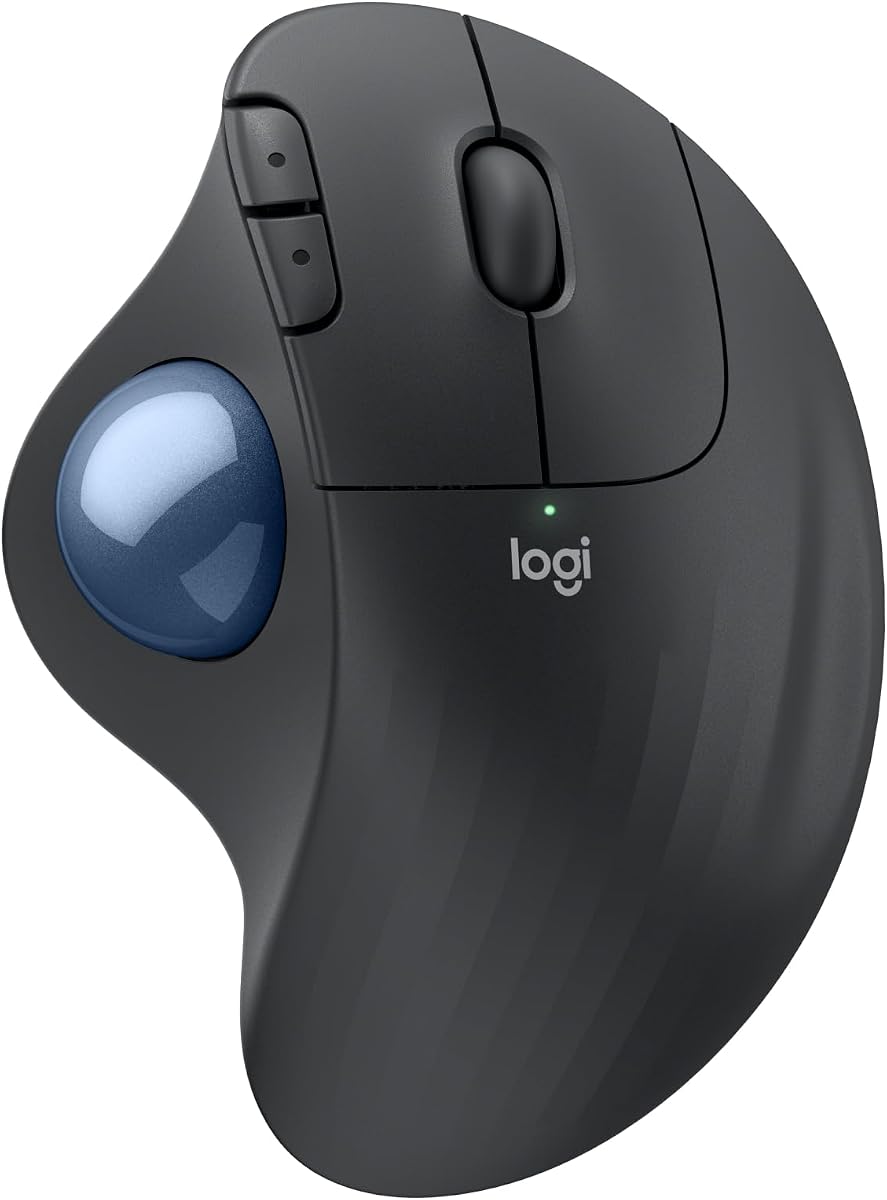
The Logitech ERGO M575S combines a sculpted ergonomic shell, thumb-operated trackball control, and quiet clicking in a design intended for extended daily use. Its 4.5 rating reflects a strong balance of comfort, dependable wireless operation, and practical customization, making it the most well-rounded choice in this guide.
We may earn a commission when you buy through this link, at no additional cost to you.
Its standout quality is the balance between a relaxed grip and practical functionality. The sculpted shape is designed to support the hand and improve forearm posture, while the thumb controls cursor movement without requiring the hand to travel across the desk. Three customizable buttons, configurable cursor speed, shortcuts, and Smart Actions add value for people who switch regularly between browsing, document work, and creative software.
Connectivity is also flexible. Buyers can use Bluetooth or the included Logi Bolt USB receiver, and the supplied AA battery is advertised to deliver up to eighteen months of use. The model works on essentially any surface, which is a practical benefit in compact offices, shared spaces, or less conventional working arrangements. Quiet clicks further improve its suitability where distracting sound would be unwelcome.
The main trade-off is that a single AA battery is used instead of a rechargeable cell, although the exceptional advertised battery duration reduces the inconvenience. App-based control may also feel unnecessary for buyers who want a straightforward mouse. Overall, the ERGO M575S is the strongest recommendation for most users who value proven ergonomics without giving up wireless flexibility, customizable controls, or a compact footprint.
The trackball keeps the hand largely in place while the thumb guides the cursor. That approach supports a more relaxed working position and makes the mouse especially useful when desk space is limited.
Three customizable buttons, cursor-speed adjustment, shortcuts, and Smart Actions let users adapt the mouse to different tasks. The quiet clicks also make it practical for shared offices and late-night work.
We may earn a commission when you buy through this link, at no additional cost to you.
The Nulea M501 offers a straightforward way to enter the trackball category without paying for a premium business mouse. It earns a 4.4 rating and combines a curved, thumb-controlled design, rechargeable battery, adjustable sensitivity, and three-device connectivity in a compact package.
We may earn a commission when you buy through this link, at no additional cost to you.
The M501 is particularly well suited to cramped work areas because the cursor moves through thumb operation rather than broad hand movement. It can operate across a variety of surfaces, including small desks and other unconventional workspaces. Four DPI levels allow users to choose between precision and faster cursor travel, while the back and forward buttons support common navigation tasks.
Wireless flexibility is stronger than the basic shape alone might suggest. It can connect to as many as three devices through Bluetooth or a USB receiver, with a bottom-mounted button used to switch between them. The built-in rechargeable battery removes the need for disposable cells, which is useful for frequent travelers or anyone who does not want to monitor a battery replacement schedule.
Its clearest limitation is that the buttons are not programmable. Some users will also need to fully charge the mouse before first use and avoid a fast charger, following the supplied charging guidance. Those compromises are reasonable for a budget-minded buyer seeking the essential benefits of a trackball: less movement, adjustable precision, wireless freedom, and a rechargeable design.
The M501 covers the core trackball experience without adding a premium app or elaborate stand. Its angled palm support, smooth thumb tracking, and four DPI settings make it easy to adapt to ordinary office work.
Bluetooth and USB receiver connections support up to three paired devices. A dedicated underside control makes switching convenient for users who move between a desktop, laptop, and tablet.
We may earn a commission when you buy through this link, at no additional cost to you.
This black version of the Logitech ERGO M575S delivers the core benefits associated with the M575S family while carrying the highest customer rating in the comparison at 4.6. Its defining features are improved forearm posture, long battery life, and a space-saving design centered on thumb control.
We may earn a commission when you buy through this link, at no additional cost to you.
The most important benefit is freedom from conventional mouse movement. Because the ball remains in the housing while the thumb rolls it, users can navigate without moving their hand across a surface. That makes the model appealing for compact desks and for people who prefer to keep their wrists relatively still during extended computer sessions.
The supported ergonomic design and long advertised battery life also make it a practical daily driver. Rather than requiring repeated movement or frequent charging, it offers a more settled relationship between hand position and cursor control. The black finish also provides a straightforward appearance for professional and minimalist setups.
The supplied information for this particular listing is concise, offering less detail about button customization and connectivity than the accompanying Graphite Blue Ball listing. Buyers should therefore check the package contents and final specifications on the product page. Even so, the strong rating, supportive posture design, and compact footprint make this a compelling choice for users who prioritize the M575S formula.
A 4.6 rating makes this the highest-rated option in the guide. It suggests broad appeal, although individual experiences can still vary with hand size, desk setup, and adaptation time.
Its defining goal is to support better forearm posture by keeping the hand comparatively stationary. The thumb-operated ball directly supports that approach while reducing dependence on open desk space.
We may earn a commission when you buy through this link, at no additional cost to you.
The Logitech MX Ergo S is the most feature-focused premium model in this guide. It combines a 20-degree tilt, a soft rubber grip, a sculpted hand shape, switchable tracking speeds, six customizable buttons, and USB-C charging, earning a 4.4 rating for its advanced ergonomic design.
We may earn a commission when you buy through this link, at no additional cost to you.
The tilt is central to its appeal. Rather than using a flat trackball housing, the MX Ergo S holds the hand at a more supportive angle intended to improve forearm posture. The supplied data associates the design with a 27% muscle-strain reduction claim and notes that it is ergonomist-certified for medium- to large-sized hands. The rubber grip and contoured shape add comfort without changing the fundamental thumb-control format.
Productivity features distinguish it from simpler trackballs. A button switches between speed and high-precision tracking, allowing users to cover long documents quickly and then make fine selections accurately. The Logi Options+ app supports six customizable buttons, time-saving shortcuts, and Smart Actions. Bluetooth, a Logi Bolt receiver, and an Easy-Switch button provide flexible device management.
Battery convenience is another strength. The rechargeable design is advertised to provide up to 24 hours of use after a one-minute charge and up to 120 days from a full charge. A compatible USB-C cable is not included, which is the main practical inconvenience. For buyers who want deep customization, strong app support, and premium ergonomics, the MX Ergo S is the most complete option here.
A dedicated control toggles between rapid movement and high precision. This makes the mouse useful for long scrolling sessions, detailed editing, and ordinary navigation without permanently selecting one cursor speed.
Six customizable buttons, shortcuts, Smart Actions, and Easy-Switch connectivity support a structured multi-device workflow. USB-C charging adds convenience, although shoppers should plan to supply a compatible cable.
We may earn a commission when you buy through this link, at no additional cost to you.
The TECKNET Wireless Trackball combines a 16-degree vertical angle, five sensitivity levels, three-device connectivity, and a rechargeable 500mAh battery. Its 4.5 rating indicates a well-received feature package, while the 5.5-by-4.1-by-2-inch design suggests a model aimed at medium and large hands.
We may earn a commission when you buy through this link, at no additional cost to you.
Its 16-degree angle is less dramatic than the high-vertical designs in this list, but it still promotes a more natural palm and forearm position than a flat mouse. The supplied description associates it with up to 50% less strain, though comfort and strain outcomes naturally depend on the individual user and workstation setup.
Wireless performance is a major selling point. The mouse supports two Bluetooth connections and one 2.4GHz receiver, with the listing citing a lag-free signal range of up to 34 feet. Users can switch among three paired devices from a single button, which is helpful for mixed computer and tablet workflows.
The battery is designed around a 500mAh rechargeable cell, and the manufacturer states that a 15-minute charge can power a full day. Adjustable sensitivity spans five levels from 100 to 1200 DPI, allowing a choice between slower precision and faster travel. The listed recommendation to allow one to two weeks for adaptation is sensible, as trackball technique can initially feel different. It is a strong all-around option for users wanting tilt, charging, and wireless flexibility.
Five DPI settings from 100 to 1200 provide more granularity than the four-level models nearby. This allows users to tune cursor movement for detailed work, broad navigation, or a mixture of both.
Two Bluetooth channels and a 2.4GHz connection allow fast switching among three devices. The stated 34-foot range supports use across a larger room or a shared workstation.
We may earn a commission when you buy through this link, at no additional cost to you.
The Nulea M506 is the highest-rated product in the comparison, with a 4.7 rating. Its 54-degree vertical structure, textured palm surface, thumb-operated ball, and detachable trackball distinguish it from standard flat trackball designs and make it a strong choice for users seeking a pronounced ergonomic angle.
We may earn a commission when you buy through this link, at no additional cost to you.
The elevated vertical form is intended to keep wrists and forearms in a naturally relaxed position. Textured surfaces add grip, while the contour makes the mouse feel more like a vertical grip device than a conventional horizontal mouse. The trackball remains thumb-controlled, preserving the central benefit of reduced hand and arm movement.
Functionality extends beyond cursor movement. Navigation keys, the scroll wheel, and function switches are positioned within reach of the fingers. The mouse supports two Bluetooth channels and one USB receiver, allowing three-device switching, while four DPI settings from 400 to 1600 suit office work, design, photo editing, and multitasking.
Maintenance is unusually convenient because the trackball can be removed without tools for cleaning. The built-in rechargeable battery is advertised to run for up to 21 days after a full charge. A vertical shape can require adjustment for new users, and the supplied listing does not describe programmable controls, but the M506's strong rating, comfortable angle, and easy maintenance make it an excellent all-around choice.
The 54-degree structure places the hand and forearm in a more natural orientation. It is especially relevant for users who spend long periods navigating with a conventional mouse on a flat surface.
The removable trackball can be cleaned without tools, helping prevent accumulated dust from affecting smoothness. Three-device connectivity supports regular movement between computers, laptops, and tablets.
We may earn a commission when you buy through this link, at no additional cost to you.
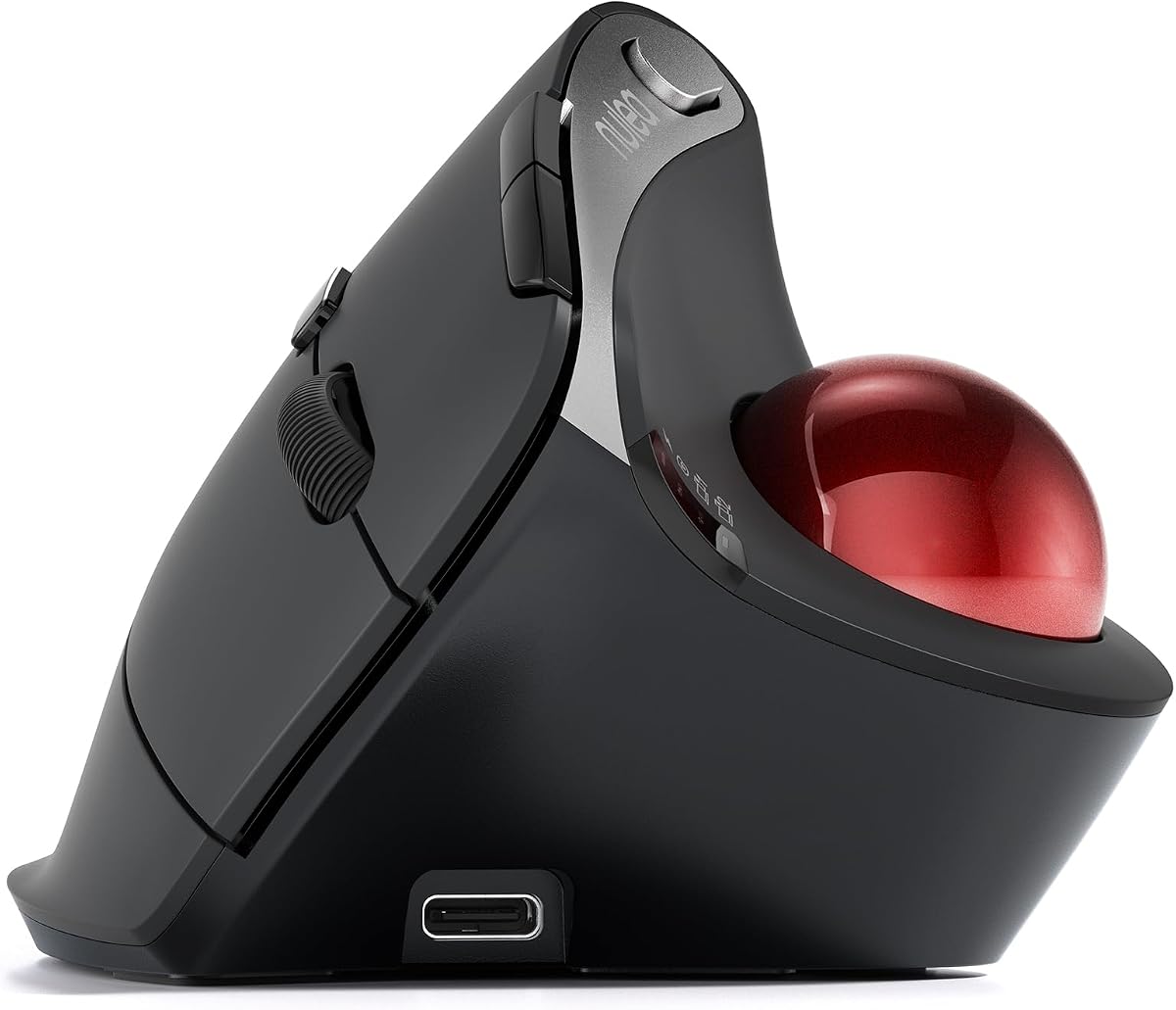
The Nulea Wireless Ergonomic Vertical Trackball stands apart with a 65-degree angle, fully silent operation, and a smart infinite scroll wheel. Its 4.3 rating is the lowest among the ten selections, but the design remains distinctive for people who prioritize silence and dramatic wrist positioning.
We may earn a commission when you buy through this link, at no additional cost to you.
The 65-degree vertical form is the steepest in the guide and is designed to relax the wrist and arm. A sculpted, wave-textured surface follows the palm, while the trackball remains under the thumb so users can navigate with less movement than a conventional mouse requires.
The scroll wheel is a major point of differentiation. It automatically shifts between precise and fast behavior according to scrolling speed and supports smooth four-way movement. That makes long pages, spreadsheets, and vertical documents easier to traverse while retaining the familiar concept of a scroll wheel.
Every listed control is described as silent, including the trackball, buttons, and wheel. Bluetooth and USB receiver connections allow pairing with up to three devices, and the listed compatibility includes PCs, Macs, laptops, tablets, and phones. The lower rating reflects the least favorable customer feedback in this group, while the steep angle may require more adaptation than shallower designs. Buyers who want complete quiet and vertical support should still consider it closely.
The trackball, buttons, and wheel are all described as noise-free. That makes this model attractive in shared workspaces, libraries, homes, and other settings where clicking or scrolling sounds could be disruptive.
The infinite wheel changes between slow precision and rapid movement based on how it is spun. Four-way support also assists navigation beyond a simple up-and-down wheel.
We may earn a commission when you buy through this link, at no additional cost to you.
The Nulea Tilt Stand Trackball combines a 21.7-degree elevated position, silent controls, four DPI levels, and three-device wireless connectivity. Its 4.4 rating places it alongside several other well-received options, while the integrated tilt gives it a more pronounced ergonomic profile than a flat trackball.
We may earn a commission when you buy through this link, at no additional cost to you.
The tilt stand supports a more natural wrist position by elevating the palm and providing a closer fit to the hand. Because the angle is integrated into the product, buyers do not have to find a separate riser or experiment with improvised supports. The result is a compromise between compactness and the more extreme vertical shapes found elsewhere in the guide.
Silent operation extends to the trackball, buttons, and scroll wheel, making it well suited to shared environments. Four sensitivity levels of 400, 800, 1200, and 1600 DPI offer useful control for drawing, editing, multitasking, and routine office work.
The device supports Bluetooth and an included USB receiver, with switching among up to three paired devices. Its main limitations are that the buttons are not programmable and the elevated body may require somewhat more room than a flat model. For buyers seeking a moderate tilt, complete silence, and flexible wireless operation, however, this is a well-rounded and adaptable choice.
A 21.7-degree elevation provides more wrist support than a flat design while remaining less extreme than the 54-, 65-, and other high-angle models. The integrated stand keeps the overall setup relatively straightforward.
Silent buttons, trackball, and wheel reduce working noise. Bluetooth and USB receiver options make it convenient to move among a PC, Mac, laptop, tablet, or phone.
We may earn a commission when you buy through this link, at no additional cost to you.
The Logitech ERGO M575 for Business is a workplace-focused trackball with a 4.4 rating. It retains the comfortable sculpted shape and thumb-controlled tracking of the ERGO line while adding Logitech Sync support for remote deployment and monitoring across an organization.
We may earn a commission when you buy through this link, at no additional cost to you.
Its defining business advantage is centralized manageability. Logitech Sync allows administrators to deploy and monitor compatible devices, making the mouse more suitable for large fleets of employees than a standard consumer model. At the same time, the sculpted shell supports better forearm posture and is advertised to reduce muscle activity by 25%.
Everyday usability remains strong. Smooth thumb control works on any surface, Logi Tune provides cursor-speed adjustment, and the Logi Options+ app supports personalized buttons and shortcuts. The business listing also mentions shortcut options such as activating Copilot in Windows, illustrating how the controls can support company workflows.
The trackball's fixed shape avoids unnecessary desk movement, which is useful in tight or crowded offices. An AA battery is advertised to last up to eighteen months, reducing replacement frequency. The specialized deployment features may not matter to individual users, but organizations should consider them carefully; for home offices, the regular M575S may be the more direct option.
Logitech Sync enables remote deployment and monitoring, giving IT teams a way to manage compatible trackballs at scale. This differentiates the business model from options focused only on individual controls.
The sculpted form is designed to reduce muscle activity and promote better forearm posture. Customizable shortcuts, smooth tracking, and long battery life support a comfortable daily workflow.
We may earn a commission when you buy through this link, at no additional cost to you.
This Logitech MX Ergo S listing combines a 4.5 rating with advanced controls, a 20-degree tilt, and USB-C charging. Its six programmable buttons, switchable tracking behavior, and soft rubber grip make it especially relevant to users who want a trackball to function as a compact productivity controller.
We may earn a commission when you buy through this link, at no additional cost to you.
The core cursor system offers two ways to work. A dedicated button changes between speed and high-precision tracking, allowing rapid movement when needed and more deliberate control for detailed tasks. The sculpted, ergonomist-certified shape and 20-degree tilt support improved forearm posture, with the supplied data citing a 27% muscle-strain reduction claim.
The Logi Options+ app expands the control set through six customizable buttons, time-saving shortcuts, and Smart Actions. This customization is a major advantage for people who regularly use complex applications or need one-click access to frequently used commands.
The rechargeable system supports up to 24 hours of use from a one-minute charge and up to 120 days from a full charge. The mouse also supports Bluetooth and an encrypted dongle, making it suitable for PC and Mac workflows that benefit from secure wireless connectivity. As with the related MX Ergo S listing, a charging cable is not included. Its advanced feature set makes this a strong final recommendation for productivity-focused users.
Six programmable buttons can be assigned to useful commands, while shortcuts and Smart Actions automate repeated sequences. These features help justify the model for users who spend substantial time in demanding software.
A brief USB-C charge is advertised to restore up to 24 hours of operation, while a full charge can support up to 120 days. Bluetooth and an encrypted dongle provide flexible connectivity for PC and Mac users.
We may earn a commission when you buy through this link, at no additional cost to you.
The right ergonomic trackball depends on hand size, preferred angle, control requirements, device setup, and tolerance for adaptation. Reviewing these factors before buying can prevent a costly mismatch.
Trackball mice range from low-profile sculpted designs to steep vertical models and elevated stands. Flat or gently sculpted shapes preserve a conventional mouse-like relationship with the desk, while vertical designs place the hand and forearm at a sharper angle. Tilt stands occupy more space but provide a middle ground. Buyers should consider the angle their current setup lacks and whether their wrist can comfortably maintain the proposed position.
Ergonomic products are not universally comfortable because hands and preferences differ. The MX Ergo S is described for medium-to-large hands, and the TECKNET model is also designed around medium-to-large dimensions. Other models use compact or contoured shells. A trackball should support the palm without forcing the fingers to stretch or press excessively, and product dimensions should be checked before ordering.
A smooth trackball should provide consistent movement without requiring repeated hand repositioning. Adjustable DPI lets users tune the relationship between physical ball movement and cursor travel. The selection includes four- and five-level options, with sensitivities ranging from 100 to 1600 DPI. Precise work may benefit from lower or intermediate settings, while rapid navigation can use higher sensitivity.
Bluetooth avoids a dedicated receiver, while 2.4GHz or vendor-specific receivers can offer convenient device switching. Several Nulea models, the TECKNET trackball, and both Logitech ERGO M575S listings support multiple wireless devices. Buyers who regularly move between a laptop, desktop, and tablet should prioritize a model with an easy-switch button and confirm which connection methods are included.
Basic trackballs often provide primary, scroll, back, and forward controls, while premium models add programmable buttons, shortcuts, and Smart Actions. The M575S Graphite Blue Ball and MX Ergo S offer app-based customization. The Nulea M501 and Tilt Stand models explicitly state that their buttons are not programmable. Software is useful for power users but unnecessary when standard navigation controls are sufficient.
Battery design affects the need for disposable cells and the convenience of travel. The ERGO M575S models use an AA battery advertised to last up to eighteen months, while the Nulea M501, M506, Tilt Stand, TECKNET, and MX Ergo S use rechargeable systems. The TECKNET model includes a 500mAh cell, and the MX Ergo S supports rapid USB-C charging. Buyers should also check whether a charging cable is included.
Quiet or silent operation matters in shared offices, libraries, bedrooms, and during video calls. The M575S Graphite Blue Ball and MX Ergo S feature quieter clicks, while the Nulea Vertical and Tilt Stand models describe the trackball, buttons, and wheel as completely silent. Buyers who are frequently surrounded by others should treat the noise specification as a meaningful selection criterion.
A trackball can save space because it does not need to travel across a surface, but its housing still needs room for the thumb and palm. Vertical and tilted models require additional space. Maintenance matters as well: the M506 has a detachable ball for tool-free cleaning, while the M575S also supports ball removal for cleaning. Consider both the physical footprint and the effort required for long-term upkeep.
Begin by placing the trackball where it naturally supports the angle of your forearm rather than positioning it as if it were a conventional mouse. Keep the palm supported, relax the fingers, and use short thumb strokes. Larger movements can be performed with the hand and wrist, but the objective is to avoid repeatedly moving the entire arm. Begin at a moderate DPI setting and adjust it after becoming familiar with the ball.
For a new multi-device mouse, install the required software if the model supports programmable controls, then pair each intended device before beginning daily work. Learn the device-switch button and make a small test movement after changing connections. If the mouse feels initially slow or fast, change sensitivity rather than making exaggerated thumb movements. Allow one or two weeks of regular use, as several models explicitly note that adaptation can take time.
Keep the trackball and buttons free of dust and debris. Where supported, eject or detach the ball according to the product instructions, clean it gently, and reinstall it securely. Charge rechargeable models with the specified cable and charger guidance; the Nulea M501 specifically advises using the included cable and avoiding a fast charger. Replace the ERGO M575S AA battery when needed and recycle used cells appropriately.
They can be, particularly for people who experience discomfort from repeatedly moving a conventional mouse. A trackball keeps the hand comparatively stationary and uses the thumb to move the cursor, which may support a relaxed forearm posture. Comfort still depends on the model, hand size, desk setup, and personal preference, so trying one alongside a standard mouse can be helpful.
The listed Logitech, Nulea, and TECKNET models are described as usable on virtually any surface because the cursor is controlled by the internal trackball rather than by optical movement across the desk. A surface may still affect comfort, wrist angle, and overall stability, so the housing should remain securely positioned while the ball is rolled.
Most users need a short adjustment period, and TECKNET specifically recommends spending one to two weeks becoming familiar with the design. Thumb movement initially feels unfamiliar because people often use more force than necessary. A moderate DPI setting, short strokes, and regular practice generally make the transition easier.
A flat or sculpted trackball resembles a conventional mouse in its relationship to the desk, while a vertical trackball stands the hand at a steeper angle. Vertical designs can provide a more natural wrist position for some users but usually occupy more space and require more adaptation. Models with an intermediate tilt stand provide a compromise between the two formats.
They are not necessary for basic navigation, but they can improve productivity in software-heavy workflows. The Logitech M575S and MX Ergo S support app-based customization, shortcuts, and Smart Actions, while the Nulea M501 and Tilt Stand versions explicitly state that their buttons are not programmable. Standard click, scroll, back, and forward controls remain available for ordinary tasks.
Several products in this guide can pair with up to three devices. They generally use two Bluetooth channels plus one USB receiver connection, with a button for switching between them. The exact supported operating systems and pairing procedure should be confirmed on the relevant listing before purchase, particularly for specialized workplace deployments.
Power off or disconnect the mouse according to its instructions, remove the ball if the design permits it, and clear away visible dust from the ball and cage. The M506 provides a tool-free detachable ball, and the M575S can be cleaned by ejecting its ball. Use gentle cleaning methods and avoid pushing debris into the mechanism.
Rechargeable models are convenient for frequent travelers and anyone who does not want to carry spare cells, while the ERGO M575S models use an AA battery advertised to last up to eighteen months. The best choice depends on charging access, travel habits, and preference. For rechargeable models, verify the required cable because the MX Ergo S listings do not include one.
The Logitech ERGO M575S is the most balanced recommendation, combining sculpted comfort, quiet clicks, wireless flexibility, customization, and long advertised battery life. The Nulea M501 stands out as the budget-conscious choice, while the Logitech MX Ergo S leads the premium group with its elevated tilt, switchable tracking, extensive button customization, and USB-C charging.
Shoppers should prioritize the feature that solves their most persistent problem: posture support for the M575S family, lower-cost rechargeable operation for the M501, a steeper angle for the M506 or Nulea Vertical Trackball, moderate elevation for the Tilt Stand model, or productivity features for the MX Ergo S. Hand size, available desk area, noise sensitivity, device switching, and maintenance preferences are equally important.
Ratings, software behavior, bundle contents, and current prices can change, so verify the latest listing and package details before ordering. Comparing the intended workspace, connection method, charging requirements, and control layout will help narrow the field and make a more informed purchase.