
MSI PRO B760-P WiFi DDR4
4.6Editor score
12th, 13th, 14th Gen support
Dual-channel DDR4 memory
PCIe 4.0 and M.2 storage
Wi-Fi 6E and 2.5Gb LAN
Our Motherboard for CAD Workstation guide compares 10 models for stability, expansion, memory support, networking, connectivity, and professional workloads.
A motherboard for a CAD workstation must balance processor compatibility, reliable power delivery, fast storage, expansion capability, and dependable networking. The best platform supports demanding engineering software without compromising on thermal design, memory capacity, or long operating sessions. Form factor, remote management, and professional I/O also deserve careful consideration.
We compared ten motherboards across major processor ecosystems, including AM4, AM5, LGA 1700, LGA 1851, sTR5, and LGA 4710-2. The comparison focuses on CPU support, PCIe expansion, M.2 and SlimSAS storage, memory capabilities, Ethernet, wireless networking, power stages, cooling, and workstation-oriented management features.
Each pick highlights a different path for a CAD-focused build, from a practical mainstream platform to models engineered for multi-GPU workstations and Threadripper or Xeon processors. Specifications and product availability can change, so confirm socket support, memory rules, expansion requirements, and current pricing before purchasing components for your system.
4.6Editor score

4.4Editor score

5.0Editor score
The table below compares all ten motherboards by processor platform, expansion support, storage connectivity, and networking. It highlights how mainstream creator boards differ from compact business systems and high-end Threadripper or Xeon workstation platforms.


The MSI PRO B760-P WiFi DDR4 combines broad Intel processor compatibility with a practical feature set for CAD workstations, earning a 4.6 rating. It supports 12th, 13th, and 14th Gen Intel Core processors, plus Pentium Gold and Celeron parts, on the familiar LGA 1700 platform. Its emphasis is dependable everyday computing rather than exotic workstation expansion.
We may earn a commission when you buy through this link, at no additional cost to you.
Power delivery uses a 12+1 Duet Rail system with 8-pin and 4-pin CPU connectors, while Core Boost and Memory Boost provide useful tuning options. The extended heatsink, seven-watt-per-meter-kelvin MOSFET thermal pads, choke thermal pads, and M.2 Shield Frozr support stable operation. A six-layer PCB made with thickened copper and server-grade materials adds structural confidence for sustained professional workloads.
The main limitation is the platform generation. DDR4 memory can remain more attainable than current high-speed DDR5, but its bandwidth and future upgrade path trail newer systems. PCIe 4.0 rather than PCIe 5.0 also means modern graphics cards and storage devices will operate without the newest generation link. These trade-offs are reasonable for a value-oriented workstation that does not need multi-GPU expansion.
This board is best for engineers and designers assembling a capable single-workstation PC with Intel Core processors, one modern graphics card, fast M.2 storage, and wired or wireless networking. For most CAD tasks, those are the important components. It is our best budget pick because it covers the essentials without forcing a workstation-class budget or an advanced processor platform.
The 12+1 power design, reinforced PCB, and dedicated cooling areas create a sensible foundation for processor-intensive CAD and visualization workloads. Memory Boost and Core Boost also provide accessible paths for tuning a workstation after installation.
Built-in 2.5Gbps LAN, Wi-Fi 6E, Bluetooth 5.3, and USB 3.2 Gen2 cover common networking and peripheral needs. HDMI and DisplayPort outputs add flexibility for direct workstation connectivity.
We may earn a commission when you buy through this link, at no additional cost to you.
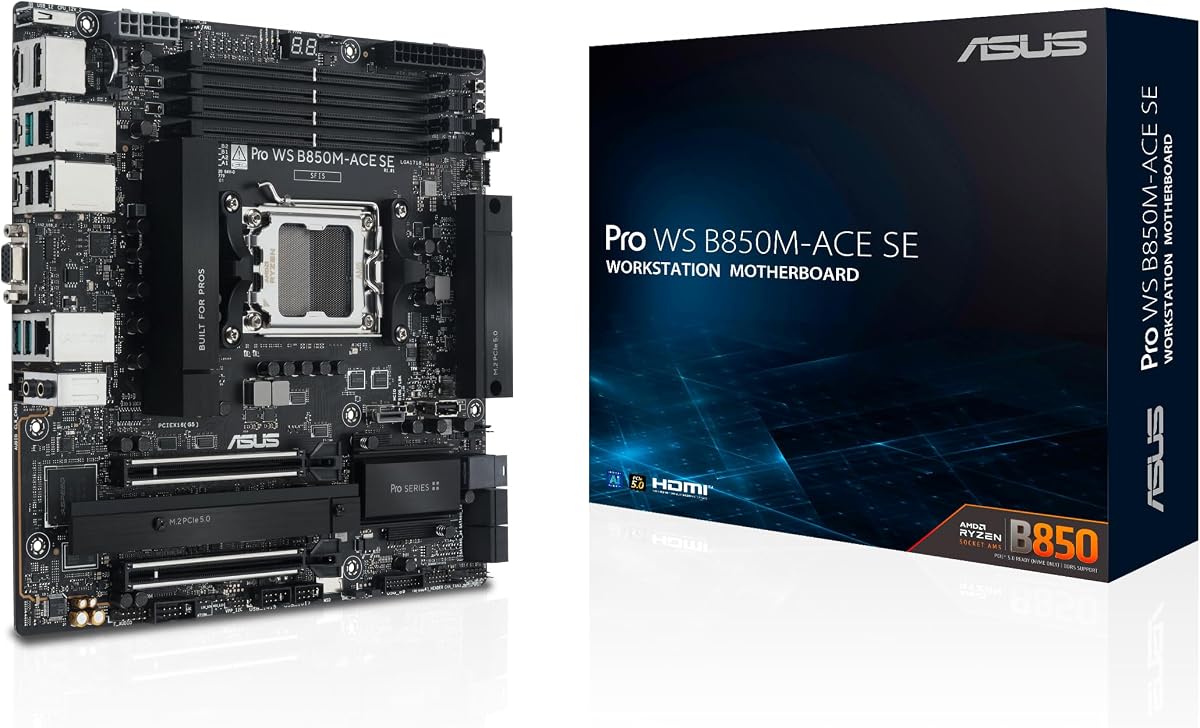
The ASUS Pro WS B850M-ACE SE is a compact business workstation platform built for AMD Ryzen and EPYC 4005 processors. Its 4.3 rating reflects a capable combination of modern PCIe connectivity, fast storage, enterprise networking, and remote management. The MicroATX format makes it especially useful for CAD workstations that need multiple expansion slots without a full-size tower.
We may earn a commission when you buy through this link, at no additional cost to you.
Its standout feature is the dual PCIe 5.0 and 4.0 x16 expansion arrangement, with one slot operating at x4 according to the supplied specifications. Two PCIe 5.0 x4 M.2 connectors, MCIO NVMe support, U.2 capability, front USB Type-C, and USB4 expand the board's storage and peripheral capabilities. Dual Realtek networking includes 10Gb and 2.5Gb LAN.
The onboard AST2600 BMC and ASUS Control Center Express distinguish it from ordinary gaming boards. These server-grade remote-management features can help administrators inspect hardware, manage systems, and address problems without relying solely on local access. Broad compatibility validation and a comprehensive QVL are also valuable for professional deployments. The smaller size and two-M.2 layout are the main constraints.
Choose this model for a compact CAD system using Ryzen 7000, 8000, or 9000 processors, particularly if it needs multiple graphics cards, fast NVMe storage, 10Gb networking, or remote administration. It is a strong fit for engineering studios and managed technical environments where space is limited but workstation-grade connectivity matters.
The AST2600 BMC provides hardware-level remote management, supported by ASUS Control Center Express. That makes the board more practical for offices where technicians may not have immediate physical access to every workstation.
Two high-bandwidth x16 slots support graphics-heavy workloads, while MCIO and U.2 options provide additional storage paths. The compact chassis requirement should be checked against riser, cooler, and power-supply clearances.
We may earn a commission when you buy through this link, at no additional cost to you.
The ASUS Pro WS W680-ACE is a true ATX workstation option for engineers who prioritize memory reliability, management, and expansion. It holds a 4.4 rating and supports 13th Gen Intel Core processors along with 12th Gen Core, Pentium Gold, and Celeron processors. ECC DDR5 support is particularly relevant for CAD systems handling large assemblies, simulations, or mission-critical projects.
We may earn a commission when you buy through this link, at no additional cost to you.
Connectivity is extensive. Dual PCIe 5.0 Safeslots provide room for multiple high-performance graphics cards, while dual PCIe 3.0 slots add further expansion. Three PCIe 4.0 M.2 connectors, SlimSAS, dual Intel 2.5Gb Ethernet, front-panel USB 3.2 Gen2x2 Type-C, and Thunderbolt 4 header support cover high-speed storage, networking, and peripherals. A bundled IPMI expansion card adds remote-control possibilities.
Thermal management includes a large VRM heatsink, dedicated M.2 heatsinks, hybrid fan headers, and Fan Xpert 4. DrMOS power delivery, ProCool connectors, alloy chokes, and durable capacitors reinforce stable operation. The compromises are budget and platform longevity: the supplied price is exceptionally high, and LGA 1700 no longer represents Intel's newest desktop architecture.
This motherboard suits professional teams building ECC-capable, serviceable Intel workstations with demanding graphics and storage requirements. It is less compelling for a simple single-GPU CAD desktop, but its management and expansion features make it compelling for engineering laboratories, architecture firms, and organizations that value workstation longevity over minimizing component cost.
ECC memory can detect and correct certain memory errors, which is valuable in systems that run long simulations or handle irreplaceable design data. The board's DrMOS power solution and extensive cooling help sustain memory and processor performance.
Multiple graphics slots, three M.2 connectors, SlimSAS, dual Ethernet, and Thunderbolt support create room for demanding visualization, rendering, and storage configurations. Plan power and cooling around the final expansion-card arrangement.
We may earn a commission when you buy through this link, at no additional cost to you.
The ASUS ProArt Z890-CREATOR WIFI is our Editor's Choice because it combines a current Intel platform with storage, networking, and creator-oriented features that map closely to modern CAD work. It carries a 4.4 rating and supports Intel Core Ultra Series 2 9, 7, and 5 desktop processors on LGA 1851. The result is a flexible foundation for design, rendering, and visualization.
We may earn a commission when you buy through this link, at no additional cost to you.
Its 16+2+1+2 teamed power stages, ProCool II connectors, alloy chokes, and durable capacitors provide a robust power foundation. Storage is particularly strong, with one PCIe 5.0 M.2 slot and four PCIe 4.0 M.2 slots. Two PCIe 5.0 graphics slots support the latest GPU standards, while front USB 20Gbps Type-C, Thunderbolt 5, Thunderbolt 4, 10Gb Ethernet, 2.5Gb Ethernet, and Wi-Fi 7 create a well-connected workstation.
The board also targets the creative process directly. ASUS ProArt Creator Hub includes color-management features that work with Pantone utilities, while AI Overclocking, AI Cooling II, AI Networking II, AI Advisor, and NPU Boost support setup and tuning. DIY-friendly mechanisms including Q-Release Slim, M.2 Q-Release, Q-Slide, Q-Latch, Q-Antenna, BIOS FlashBack, and Q-Connector improve usability.
For most professional creators, this is the most balanced pick in the roundup. It supports a modern CPU, multiple fast drives, multiple GPUs, high-speed peripherals, and excellent networking without moving to a Threadripper or Xeon platform. Check case dimensions and graphics-card clearance, and verify application support for the specific Intel Core Ultra processor you intend to install.
Five M.2 connectors make it easier to separate operating-system, application, scratch, and project storage. Mixing PCIe generations can also help balance cost and performance without limiting the system to one drive type.
Creator Hub, Pantone-linked color management, and assisted tuning features reduce friction when preparing a workstation for visual production. These utilities are particularly relevant to users who move between CAD, rendering, and color-sensitive applications.
We may earn a commission when you buy through this link, at no additional cost to you.
The ASUS ROG Strix B550-F Gaming WiFi II is a proven AM4 option for a CAD workstation built around Ryzen 3000 or 5000 processors. Its 4.6 rating reflects a mature platform with strong power delivery, solid networking, and useful PCIe 4.0 support. Although its gaming branding is visible, the underlying hardware aligns well with a single-workstation CAD build.
We may earn a commission when you buy through this link, at no additional cost to you.
The 12+2 teamed power stages, ProCool connector, alloy chokes, and durable capacitors provide a capable foundation. PCIe 4.0 support, dual M.2 slots, USB 3.2 Gen2 Type-C, HDMI 2.1, and DisplayPort 1.2 cover the principal needs of a modern engineering desktop. Intel 2.5Gb Ethernet with ASUS LANGuard supplies fast wired connectivity, while Wi-Fi 6E offers flexibility.
The primary compromise is generational. AM4 does not support the latest Ryzen 9000 processors, and PCIe 5.0 graphics and storage links are unavailable. There is also no ECC memory support or workstation BMC. That makes the board less appropriate for managed rendering clusters or long-duration commercial projects where enterprise memory and remote administration matter.
This motherboard is a sensible choice when an AM4 Ryzen CPU is already owned, when DDR4 is preferred, or when a proven PCIe 4.0 platform meets the software and graphics requirements. It remains a strong general-purpose workstation base for modeling, BIM, technical drafting, and light-to-moderate rendering.
PCIe 4.0 provides ample bandwidth for current graphics cards and NVMe drives in most single-workstation setups. Dual M.2 connectors support a fast system drive plus a separate project or cache drive.
Integrated Wi-Fi 6E, Intel 2.5Gb Ethernet, and BIOS FlashBack simplify installation and network access. ASUS LANGuard adds a useful layer of protection for the wired connection.
We may earn a commission when you buy through this link, at no additional cost to you.
The ASUS Pro WS W890E-SAGE SE is the most capable premium platform in this guide, combining Intel Xeon 600 processor support with server-grade expandability and management. Its 5.0 rating is the highest listed here. The EEB form factor and LGA 4710-2 socket clearly identify it as a specialized workstation board rather than a conventional desktop or creator motherboard.
We may earn a commission when you buy through this link, at no additional cost to you.
Seven PCIe 5.0 x16 slots create exceptional room for multiple graphics or accelerator cards. Storage connectivity includes four M.2 connectors, MCIO, two SlimSAS connectors, USB4, and USB 20Gbps Type-C. Dual Intel E610-XAT2 10Gb LAN provides high-speed wired networking, while a dedicated BMC LAN link supports AST2600 remote administration through ASUS Control Center Express.
Its 16+(2+2)+1+2 power stages, multiple CPU and PCIe power connectors, and dual-PSU operation support demanding configurations. Active cooling extends across the VRM, chipset, M.2, and memory areas. NitroPath DRAM technology is designed to improve the performance of ECC RDIMM DDR5 memory, and the board is validated for 24/7 operation and broad compatibility.
This is the best choice for engineering organizations that need maximum graphics expansion, very large memory configurations, 10Gb networking, and out-of-band management. It is overkill for ordinary CAD modeling, but it makes sense for simulation farms, high-end rendering, large BIM environments, and multi-accelerator visualization. Pair it with a compatible workstation case, processor, memory, and power infrastructure.
Seven PCIe 5.0 x16 slots enable unusually dense accelerator configurations. Administrators should plan airflow, power distribution, lane topology, and supported driver configurations before assembling such a system.
A dedicated AST2600 BMC link and ASUS Control Center Express support remote monitoring and management. This is especially useful in studios where expensive hardware and prolonged projects must be maintained efficiently.
We may earn a commission when you buy through this link, at no additional cost to you.
The ASUS Pro WS TRX50-SAGE WiFi A targets high-end CAD, rendering, and simulation workstations built around AMD Ryzen Threadripper. It supports sTR5 processors, including Ryzen Threadripper PRO 9000 and 7000 WX-Series chips and Threadripper 9000 and 7000 processors, with compatibility for processors featuring as many as 96 cores. The supplied rating is 4.0.
We may earn a commission when you buy through this link, at no additional cost to you.
The most notable capability is memory support for up to 1TB of ECC R-DIMM DDR5 modules in a single-DIMM-per-channel configuration. Three PCIe 5.0 x16 slots and one PCIe 4.0 x16 slot support multi-GPU systems. Storage and peripheral options include four M.2 slots, SlimSAS NVMe support, two USB4 ports at 40Gbps, front USB 20Gbps Type-C, and 10Gb plus 2.5Gb Ethernet.
A 20-power-stage design, two 8-pin CPU connectors, massive VRM cooling, chipset and M.2 heatsinks, and an M.2 thermal pad support sustained loading. IPMI expansion-card support and ASUS Control Center Express provide remote-management options, while extensive compatibility validation and 24/7 testing target dependable operation.
Choose this board when a CAD workflow includes parallel rendering, huge assemblies, simulation, or multi-GPU processing and the budget supports the Threadripper platform. It is excessive for conventional drafting or a single-GPU design office. Users should verify case support, processor support, memory population rules, and cooling requirements before ordering.
Threadripper support makes this board relevant to render farms, computational design, and simulations that benefit from many CPU cores. Application licensing and software support should be verified against the chosen processor.
High-capacity ECC RDIMM support and several high-bandwidth expansion slots enable workstations that exceed the limits of ordinary desktop boards. The added cost reflects platform scale rather than a simple performance premium.
We may earn a commission when you buy through this link, at no additional cost to you.
The MSI B850 GAMING PLUS WIFI bundle is a convenient starting point for an AMD-based CAD workstation. It has a 4.6 rating, supports Ryzen 7000 through 9000 processors on AM5, and includes a 16GB TEAMGROUP T-Force Delta DDR5-6000 module. The bundled memory allows a new builder to install the board, processor, graphics card, and storage with fewer separate purchases.
We may earn a commission when you buy through this link, at no additional cost to you.
The included module runs at 6000MHz with CL38 timings and can be configured through AMD EXPO. It occupies one of the board's memory slots, leaving the second slot open for a future module. Adding a matched 16GB module can restore dual-channel operation and improve memory bandwidth, which matters during modeling, rendering, and large project loads.
The platform includes PCIe 5.0 x16 and PCIe 4.0 x16 graphics slots, M.2 Gen5 storage, Wi-Fi 7, and 5G LAN. This is a capable general foundation for CAD work, although its gaming position is less focused on ECC memory, IPMI management, and the multi-slot expandability found in dedicated workstation boards.
The bundle makes most sense for a first AM5 workstation or an upgrade that avoids buying memory separately. It is a strong fit for students, independent designers, and small teams that need current platform support without enterprise management requirements. For sustained professional use, add a second matched memory module and verify that every major CAD application supports the selected processor.
The included 16GB DDR5-6000 module removes one common configuration task and supports immediate system setup. Users can begin with the supplied stick and add a matching module later when workload demands increase.
Ryzen 7000, 8000, and 9000 support, PCIe 5.0 graphics capability, M.2 Gen5, Wi-Fi 7, and 5G Ethernet provide a current foundation. Check CPU memory compatibility before selecting an additional module.
We may earn a commission when you buy through this link, at no additional cost to you.
The ASUS Pro WS W890-SAGE is a high-end Intel Xeon platform for professional CAD environments that need extensive expansion and large ECC memory configurations. It supports Intel Xeon 600 workstation processors on LGA 4710-2 and uses a CEB form factor. No customer rating is available in the supplied product data, so the decision should focus on specifications and system requirements rather than a numerical rating.
We may earn a commission when you buy through this link, at no additional cost to you.
Seven PCIe 5.0 x16 slots provide exceptional graphics or accelerator expansion. Storage options include four M.2 connectors and two SlimSAS connectors, while USB4 and USB 20Gbps Type-C cover high-speed peripherals. Realtek 10Gb LAN and Intel 2.5Gb LAN provide two wired network paths, and readiness for an IPMI expansion card adds optional remote management.
The 12+(2+2)+1+2 power stages, multiple CPU and PCIe power connectors, and dual-PSU operation are designed for heavy configurations. Cooling is provided for the VRM, chipset, and M.2 areas. NitroPath DRAM technology is intended to enhance ECC R-DIMM DDR5 memory performance, with support for a two-DIMM-per-channel arrangement according to the supplied specifications.
This board is appropriate for large simulation nodes, rendering infrastructure, and engineering teams standardizing on Xeon processors. It offers much of the expansion capability of the W890E-SAGE SE but uses a different power-stage design and networking controller combination. Confirm the exact processor, memory population, IPMI card, chassis, and power-supply requirements before building.
Seven PCIe 5.0 x16 slots, four M.2 connectors, and two SlimSAS ports allow a workstation to grow around visualization, storage, and accelerator needs. The platform is best used with a chassis designed for its size, airflow, and power requirements.
Separate 10Gb and 2.5Gb Ethernet connections can support high-speed data movement and normal network access. An IPMI expansion card adds another route to out-of-band management when system uptime is important.
We may earn a commission when you buy through this link, at no additional cost to you.
The ASUS Pro WS TRX50-SAGE WIFI is a CEB workstation motherboard designed for AMD Ryzen Threadripper and Threadripper PRO systems. Its 3.6 rating is the lowest among the products reviewed, so buyers should investigate current customer feedback and platform availability. Even so, the specifications suit demanding CAD, rendering, and simulation builds that prioritize memory capacity and multi-GPU expansion.
We may earn a commission when you buy through this link, at no additional cost to you.
It supports Ryzen Threadripper PRO 7000 WX-Series and Ryzen Threadripper 7000 processors, including options with as many as 96 cores. Up to 1TB of ECC R-DIMM DDR5 memory is supported in a one-DIMM-per-channel configuration. Three PCIe 5.0 x16 slots support multiple graphics cards, and the board includes three M.2 connectors with PCIe 5.0 M.2 support.
A 36-power-stage design, two 8-pin CPU connectors, large VRM cooling, chipset and M.2 heatsinks, and an M.2 thermal pad form a robust power and cooling foundation. Connectivity includes Wi-Fi 7, 10Gb and 2.5Gb Ethernet, front and rear USB 20Gbps Type-C, and SlimSAS NVMe support. IPMI expansion-card support and ASUS Control Center Express add workstation management options.
This motherboard is best for studios that have standardized on the listed Threadripper generation and need expansive memory plus multiple GPUs. It should not be selected solely for gaming aesthetics or a light CAD workload. Confirm processor support, BIOS readiness, memory population rules, chassis dimensions, cooling, and power delivery before purchasing.
Support for processors with up to 96 cores makes the platform relevant to highly threaded modeling, simulation, and rendering. The motherboard does not replace application certification, so teams should verify software support for their chosen processor.
Support for up to 1TB of ECC RDIMM DDR5 and multiple M.2 plus SlimSAS connections enables large project libraries and high-speed scratch storage. Careful airflow and power planning remain essential for sustained workstation operation.
We may earn a commission when you buy through this link, at no additional cost to you.
The right CAD motherboard is determined less by gaming-oriented extras and more by processor compatibility, memory capacity, reliable power delivery, graphics expansion, storage bandwidth, and manageability. Match the platform to the software, accelerator count, case, and operating pattern before comparing individual models.
Begin with the CPU family required by your CAD applications, operating system, and licensing. The list covers Intel LGA 1700, LGA 1851, and LGA 4710-2 alongside AMD AM4, AM5, and sTR5. These are not interchangeable platforms, and each motherboard supports a defined processor range. Check the supplied specifications, the CPU's memory architecture, chipset features, and BIOS support rather than relying only on the socket name.
Choose a mainstream Core or Ryzen processor for conventional modeling, drafting, BIM, and general visualization. Threadripper or Xeon platforms make more sense for parallel rendering, large simulations, high memory demand, or professional fleet management. Always verify whether a listed processor requires a specific board revision or firmware version.
Memory requirements depend on model complexity, rendering methods, and whether projects are handled locally. Desktop DDR4 and DDR5 boards are appropriate for many single-user CAD systems, but ECC DDR5 and RDIMM boards can provide larger capacities and error correction. Threadripper and Xeon boards in this roundup support advanced RDIMM configurations, including capacities as high as 1TB depending on the model.
For a conventional workstation, prioritize capacity and supported speed over raw maximum marketing speed. For critical projects, long render sessions, or institutional deployments, ECC can reduce the impact of memory errors. Match modules according to the board's supported population rules and verify that the CPU's memory channels are populated appropriately.
CAD workstations often depend on a professional GPU for visualization, ray tracing, large assemblies, and GPU-accelerated rendering. At least one modern graphics slot is essential, while multiple x16 slots may be required for multi-GPU rendering or specialized accelerator setups. The Threadripper and Xeon boards offer the greatest expansion, but physical fit, lane sharing, cooling, power consumption, and software compatibility can complicate multi-GPU configurations.
Count the final number of graphics cards, capture cards, measurement devices, and other add-in cards before choosing a board. Do not assume that every long slot operates at full x16 bandwidth in the final configuration. Check the manufacturer's slot and lane layout for the exact model and planned population.
Fast NVMe storage improves project loading, cache operations, and scratch-disk performance, but the number and generation of connectors matter as much as headline speed. Five-M.2 boards are well suited to separating applications, project files, caches, and temporary rendering output. Workstation platforms add MCIO or SlimSAS for flexible high-bandwidth storage, although the attached drives, cables, and backplanes must support those connectors.
Plan storage around sustained workloads rather than capacity alone. Large assemblies and rendering datasets may require several terabytes, and SSDs used as scratch media must have appropriate endurance and thermal behavior. Confirm connector sharing rules, lane relationships, heatsink placement, and operating-system boot support before purchasing the board.
Sustained CPU rendering and simulation can load a motherboard more heavily than short desktop tasks. Strong power stages, multiple CPU power connectors, reinforced PCBs, and substantial VRM heatsinks are particularly relevant on Threadripper and Xeon boards. Mainstream B760, B850, and AM4 platforms can still be well suited to moderate workloads when the processor and graphics card are matched appropriately.
Use the case and CPU-cooler clearances to confirm that large heatsinks fit. Workstation boards may also require active chipset or memory cooling, as shown by the W890E-SAGE SE. A strong board cannot compensate for an inadequate enclosure, blocked airflow, or a power supply that lacks the necessary connectors and capacity.
CAD teams frequently move large models, simulations, texture libraries, and render outputs between workstations or storage servers. 2.5Gb Ethernet is a practical minimum for many modern offices, 5Gb LAN offers additional headroom, and 10Gb connections suit intensive studios. Wi-Fi can improve flexibility but should not automatically be treated as equivalent to a wired high-speed workflow.
The ASUS Pro WS models with AST2600 or IPMI expansion support add remote monitoring and management, useful for studios that cannot easily reach each machine. If the workstation will run unattended or support critical projects, consider out-of-band management as part of the platform rather than an optional extra.
Motherboard size affects graphics clearance, cooling options, cable routing, and the number of expansion slots available. The MSI PRO B760-P WiFi DDR4, ASUS ProArt Z890-CREATOR WIFI, and MSI B850 GAMING PLUS WIFI use ATX layouts, while the ASUS Pro WS B850M-ACE SE uses a compact MicroATX format. The Threadripper and Xeon boards use larger CEB or EEB platforms designed for workstation cases.
Compare the board dimensions against the case manufacturer's supported form factors. Pay special attention to the graphics-card length, CPU-cooler height, power-supply clearance, and rear-panel I/O. A smaller board may offer enough expansion for one GPU, while a larger workstation board may still require careful planning around multi-card cooling.
Hardware capability is only useful when the operating system, CPU, GPU driver, and CAD application all support the configuration. Check the application's recommended processor and graphics requirements, and verify that the motherboard's BIOS supports the selected CPU and any necessary management utilities. Remote-management features can also vary by operating system and deployment method.
For institutional systems, maintain a tested hardware image, record compatible BIOS and driver versions, and validate the entire stack before rollout. Confirm professional GPU licensing, application acceleration, and any cluster or multi-GPU requirements. These steps are especially important when using ECC memory, Threadripper processors, or IPMI-equipped boards.
Install the motherboard in a well-lit, static-safe workspace and consult the manual before applying power. Confirm the socket, memory type, operating-system support, and case compatibility. Install the CPU and cooler according to the instructions, seat memory in the recommended slots, attach the correct CPU and graphics power connectors, and verify that every heatsink, M.2 shield, and I/O shield is properly secured.
Before the first boot, update the BIOS when appropriate and save the original BIOS image to removable storage. Enter the firmware to confirm CPU recognition, memory speed, storage detection, and correct boot order. If the board includes remote management, isolate it on a trusted management network, change default credentials, and configure monitoring before deploying the workstation.
After installation, apply the correct chipset, Ethernet, storage, and graphics drivers, then run memory and storage diagnostics before beginning important project work. Keep airflow paths clear, update firmware and software on a controlled schedule, monitor temperatures under sustained loads, and back up project data separately. For ECC systems, confirm that the operating system and applications report memory errors correctly and investigate warnings promptly.
A gaming motherboard can work well for conventional CAD workloads when it provides the required CPU socket, memory support, graphics slots, storage connectors, and networking. It may lack ECC memory, remote management, validated professional drivers, and multiple high-bandwidth expansion options. A workstation-oriented board is preferable for large simulations, unattended operation, or managed technical teams.
Large projects benefit from high core counts, substantial memory capacity, fast NVMe storage, and multiple GPUs. The ASUS Pro WS TRX50-SAGE models and the two W890 workstation boards are better suited to those configurations than mainstream gaming boards. The exact choice depends on whether your workflow benefits more from Threadripper or Xeon processors and how many accelerators you need.
ECC is not mandatory for every CAD task, but it is valuable on systems running long simulations, rendering continuously, or storing irreplaceable design data. It can detect and correct certain memory errors that might otherwise disrupt a computation. Workstation boards in this guide support advanced ECC memory configurations, while mainstream models generally focus on conventional DDR4 or DDR5.
Wireless networking can provide convenient access to cloud resources and remote services, but wired Ethernet remains preferable for large file transfers and shared project storage. A 2.5Gb connection is a practical mainstream choice, while 10Gb Ethernet benefits busy studios moving substantial datasets. Use wireless as a supplement rather than the only path for critical project traffic.
Many CAD workstations work well with two fast NVMe drives: one for the operating system and applications, and another for active projects or a render scratch disk. More connectors help when separating source assets, caches, temporary files, and completed output. The ProArt Z890-CREATOR WIFI and the larger workstation boards provide the broadest storage options in this roundup.
Choose a mainstream Core or Ryzen processor for typical modeling, drafting, BIM, and general visualization. Threadripper is attractive for heavily threaded rendering and simulation, while Xeon fits organizations standardizing on Intel's server-derived workstation ecosystem. Hardware selection should follow application benchmarks, processor licensing, memory needs, and expansion plans rather than core count alone.
Form factor itself usually has little effect on application speed, but it changes expansion, cooling, and compatibility. MicroATX can suit a compact one-GPU workstation, while ATX provides more flexibility and CEB or EEB boards support dense professional configurations. The right choice is the one that fits your case and supports the required cards, drives, cooling, and power connections.
Remote management is most valuable to studios, laboratories, and IT departments supporting several systems. It can provide out-of-band monitoring and control when the operating system is unavailable, reducing downtime and travel. For a single home workstation, the feature may be optional, but it remains useful for monitoring long computations and maintaining a professional build.
The MSI PRO B760-P WiFi DDR4 is the best budget and overall-value option for mainstream Intel CAD builds, while the ASUS ProArt Z890-CREATOR WIFI is the most balanced creator-focused choice. The ASUS Pro WS W890E-SAGE SE takes the premium position because its seven PCIe 5.0 slots, ECC RDIMM support, 10Gb networking, and IPMI management support demanding professional configurations.
Prioritize CPU and memory compatibility first, then match graphics and storage expansion to the actual workload. A mainstream board is usually enough for conventional modeling and visualization, while Threadripper and Xeon platforms justify their greater cost when rendering, simulation, memory capacity, multi-GPU use, or remote management are genuine requirements. Always verify BIOS, case, cooling, power, and application support.
Current prices and product availability change frequently, so confirm the latest listing details before purchasing. Compare the board with the CPU, memory modules, graphics card, case, power supply, and peripherals already owned or planned. That system-level check will produce a more reliable CAD workstation than selecting a motherboard from headline specifications alone.