
MONTECH AIR 903 MAX
4.8Editor score
Four 140mm fans included
360mm radiator support
400mm graphics card clearance
Our expert guide compares the 10 best high airflow PC cases, covering cooling, fan support, radiator clearance, cable management, and build quality today.
A high airflow PC case gives cool air an unobstructed path into the chassis and helps warm exhaust air leave quickly. The strongest models combine well-ventilated panels, useful fan mounts, spacious layouts, and enough radiator clearance for demanding components, whether the build uses air cooling, an all-in-one cooler, or a custom liquid-cooling loop.
This guide compares ten high airflow cases from CORSAIR, NZXT, MONTECH, LIAN LI, Antec, Cooler Master, and other established manufacturers. We evaluated the supplied specifications for front and rear ventilation, included fans, radiator support, motherboard compatibility, graphics card clearance, cable-management features, and ease of installation rather than claiming hands-on testing.
The selections range from compact ATX mid-towers to spacious full towers and include both minimalist and visually dramatic designs. Each review explains where a case stands out, which builders it suits, and what compromises to consider. Features and availability can change, so confirm the current specifications and accessories with the manufacturer before purchasing.
4.8Editor score

4.7Editor score

4.8Editor score
This side-by-side comparison highlights the included cooling hardware, radiator options, case size, and component compatibility of all ten cases, making it easier to identify the right airflow platform for a new PC build.





The CORSAIR 4000D RS ARGB earns the top position because it combines a genuinely open airflow architecture with an unusually flexible mounting system. Its 4.7 rating reflects a strong balance of cooling capability, clean appearance, and build versatility. Three RS ARGB PWM fans arrive in the front, while the perforated steel Y-pattern panel gives incoming air a low-resistance route into the chassis.
We may earn a commission when you buy through this link, at no additional cost to you.
The InfiniRail system is the case's most important differentiator. Multi-point steel rails can be repositioned to place fans of different sizes where they are most useful, including up to 200mm fans in the front area. The roof supports 140mm positions, while the internal side panel can serve as either a cable cover or an additional fan mount. This makes the 4000D RS more adaptable than a case with fixed mounting locations.
There are some practical trade-offs. The included cooling package consists of three 120mm fans rather than a larger set of 140mm or 160mm models, and the ARGB lighting requires a compatible 5V connection and motherboard control. The modular design is more involved than a conventional fixed-layout chassis, so buyers who value the FRAME system's adjustability are likely to find the trade worthwhile.
This is a strong recommendation for a builder who wants high airflow without sacrificing a refined appearance or future upgrade flexibility. It also makes sense for creators and gamers using powerful CPUs and graphics cards, provided their chosen cooling hardware fits the available mounting points. For straightforward mid-tower builds, the 4000D RS ARGB is arguably the most versatile option in this group.
The Y-pattern front panel reduces visual and physical obstruction while encouraging cool air toward the intake fans. Adjustable InfiniRail mounts let the builder respond to component placement, radiator dimensions, and preferred airflow direction instead of relying on one fixed layout.
The FRAME system allows future changes to the motherboard tray, front I/O, and internal layout. That makes the enclosure more than a static shell, particularly for builders who expect to upgrade components or alter the case over time.
We may earn a commission when you buy through this link, at no additional cost to you.
The NZXT H5 Flow is a compact ATX mid-tower designed to preserve airflow without adopting the dimensions of a full tower. It carries a 4.7 rating and includes two 120mm Quiet Airflow fans, one at the front and one at the rear. Ultra-fine mesh across the top, front, and side panels supports ventilation while helping limit dust access.
We may earn a commission when you buy through this link, at no additional cost to you.
Cooling flexibility is better than the modest fan bundle might initially suggest. A radiator up to 360mm fits at the front, and one up to 240mm can be installed at the top. The perforated side and bottom of the power-supply shroud create additional intake paths for two 120mm fans, although those fans are not included. These openings are particularly useful in a compact enclosure where internal volume is limited.
The main limitation is space. While the H5 Flow handles standard ATX components well, it is not intended to offer the same hardware room as a full tower or an E-ATX-focused chassis. The included fans also represent a modest starting configuration, so builders seeking immediate high fan counts may need to add hardware. Despite that, the ventilation design is thorough for a compact case.
Choose the H5 Flow when a smaller footprint is important but you do not want to compromise on front-to-back ventilation or liquid-cooler compatibility. It is well suited to gaming systems, home offices, and space-conscious entertainment PCs. Buyers should verify the dimensions of every major component before ordering, especially the graphics card and CPU cooler.
Fine mesh and a ventilated PSU shroud preserve useful intake and exhaust routes despite the smaller chassis. The design demonstrates how ventilation-focused construction can make a compact ATX enclosure feel more capable than its dimensions suggest.
Supporting a 360mm front radiator and a 240mm top radiator allows a capable liquid-cooling layout in a compact mid-tower. Builders can select cooling hardware to match their processor rather than choosing a case around a preinstalled tube set.
We may earn a commission when you buy through this link, at no additional cost to you.
The MONTECH AIR 903 MAX stands out for delivering one of the most complete cooling foundations in the roundup. Its 4.8 rating reflects a case that combines a ventilated front panel, four included 140mm fans, broad motherboard support, and room for substantial hardware. Three ARGB PWM fans occupy the front while a fourth PWM fan handles rear exhaust.
We may earn a commission when you buy through this link, at no additional cost to you.
Radiator support is another major strength. A 360mm radiator can be placed at the front or top, giving builders the freedom to use a large all-in-one cooler or construct a more advanced custom loop. The chassis measures 478 by 230 by 493 millimeters and supports E-ATX, ATX, Micro-ATX, and Mini-ITX motherboards. Graphics cards up to 400 millimeters also fit, providing a useful margin for large modern cards.
Its trade-offs are mostly aesthetic and dimensional. The design is intentionally functional rather than elaborate, and the included 140mm fans occupy more space than standard 120mm units. That can matter in crowded builds or when a very long CPU cooler is used. However, the radiator positions, generous graphics card allowance, and four-fan starting point reduce the need for immediate expansion.
This is a particularly compelling choice for builders who prioritize cooling hardware and future compatibility over decorative flourishes. It should suit demanding gaming systems, workstations, and creators who want ample airflow and room for performance components. The combination of fan count, radiator support, and component clearance makes it an easy recommendation for a high-performance mid-tower build.
The three front intakes and one rear exhaust establish a clear directional cooling path. A 140mm fan moves more air across a radiator than a similarly positioned 120mm model, making the included set a meaningful starting point for high-heat components.
Support for long graphics cards, E-ATX motherboards, and large radiators reduces common mid-tower constraints. Builders can begin with a capable air-cooled system and retain room for a larger liquid cooler in a future upgrade.
We may earn a commission when you buy through this link, at no additional cost to you.
The LIAN LI LANCOOL 216 RGB prioritizes airflow with a pair of large 160mm ARGB intake fans, supported by a preinstalled 140mm rear fan. Its 4.7 rating is backed by a steel frame, tempered glass, and fine mesh on the front, top, and power-supply shroud. The result is a visually striking enclosure with a cooling arrangement that should serve powerful components well.
We may earn a commission when you buy through this link, at no additional cost to you.
The modular motherboard I/O is notable because it can be positioned higher or lower to accommodate air-cooled or water-cooled systems. A removable top radiator bracket, fan-cable grooves, an innovative rear PCIe fan bracket, and included cable-management hardware improve installation and maintenance. A seal plate helps maintain pressure when a smaller top radiator or fan arrangement is used.
Large fans bring a physical tradeoff. Their 160mm size requires more clearance around the front intake and can conflict with unusually deep coolers or improperly arranged tubing. The case also supports graphics cards up to 392 millimeters, or 180 millimeters in height in air-cooled mode, so the graphics card position matters. For compatible hardware, however, the spacious interior is a major benefit.
The LANCOOL 216 RGB is an attractive option for a gaming PC where cooling hardware and presentation matter equally. Its dedicated storage mounts, extensive routing hardware, and large component allowance suit builders who want room to work. It is a particularly sensible choice when the case will serve as a visible centerpiece in a well-lit setup.
The pair of 160mm intake fans covers a larger front surface than conventional 120mm alternatives. This can create useful airflow through radiators while reducing the number of separate fans required in the same area.
A 392mm graphics card limit provides substantial room for long modern cards. The adjustable motherboard position adds flexibility for builds that must balance radiator thickness, CPU cooler height, and graphics card dimensions.
We may earn a commission when you buy through this link, at no additional cost to you.
The Antec Flux Pro offers maximum room and cooling flexibility for builders who want a full tower. It includes six PWM fans: three 140mm Tranquil fans at the front, two 120mm P12R reverse fans on the power-supply shroud, and one 140mm Tranquil fan at the rear. The multi-directional vent design supports as many as 12 fans simultaneously.
We may earn a commission when you buy through this link, at no additional cost to you.
Its physical scale opens additional planning options. Removable cooling brackets at the top, front, and PSU shroud allow the fan layout to change, while the case can run a 420mm radiator and a 360mm radiator at the same time. An innovative 90-degree PSU mounting option and a CPU/GPU temperature display add practical and visual features. The enclosure supports E-ATX motherboards, making it suitable for substantial workstation components.
The main disadvantage is footprint. A full tower requires considerably more desk and floor space than a mid-tower, which can make the system less convenient in smaller rooms. The six included fans also use different sizes and types, so a builder interested in a uniform appearance may eventually replace some of them. Mixed reverse fans can also require extra care when planning cable routes.
Choose the Flux Pro for elaborate systems that need maximum internal space, many fans, or simultaneous large-radiator support. It is well suited to enthusiasts who are comfortable with a large chassis and plan to upgrade hardware over time. For a smaller workstation or gaming system, one of the mid-towers offers a more manageable alternative.
The case can accept up to 12 fans, creating several possible intake and exhaust arrangements. Removable mounting brackets make it easier to adapt the layout as radiator size, tubing, or component requirements change.
Simultaneous 420mm and 360mm radiator installation demonstrates the scale of the available cooling envelope. The full-tower format also gives builders room to route substantial cable bundles without sacrificing airflow.
We may earn a commission when you buy through this link, at no additional cost to you.
The CORSAIR 3500X RS ARGB combines a panoramic glass presentation with a case designed to avoid restricting cooling. It supports motherboard formats from Mini-ITX to E-ATX and includes three RS120-R ARGB fans. Side, roof, and power-supply shroud positions allow up to 10 120mm fans, giving the enclosure more expansion potential than the included hardware suggests.
We may earn a commission when you buy through this link, at no additional cost to you.
The wraparound glass provides a clear view of components, while the removable front and side panels simplify assembly and later access. ARGB lighting is controlled through a motherboard 5V header, and the included fan design emphasizes unobstructed illumination. This makes the model a natural fit for a polished gaming system where internal components should remain visible.
The specification note is important: only the three listed fans are included, even if a product image suggests a larger collection. Its 4.6 rating is slightly lower than several alternatives, and buyers wanting a more robust cooling foundation may need to add fans. The panoramic glass also prioritizes appearance over the uninterrupted steel presentation found in more utilitarian airflow cases.
The 3500X RS ARGB is a compelling recommendation for builders who want a display-oriented case without giving up fan capacity or broad motherboard support. It works especially well when the build includes RGB lighting and visible cooling hardware. Confirm the included accessories and component dimensions before assembling the system.
Ten potential 120mm positions let a builder distribute intake and exhaust after considering radiator size and component heat. Starting with three included fans keeps the build manageable while preserving an upgrade path.
The wraparound viewing area highlights internal components while removable panels make maintenance easier. The design balances visual presentation with practical access to a build that will likely receive future tuning.
We may earn a commission when you buy through this link, at no additional cost to you.
The LIAN LI V100-ATX is a modern mid-tower that arrives with four PWM-controlled 120mm ARGB fans and an integrated 26-LED ARGB strip. Its 4.8 rating makes it one of the strongest all-around options here, combining extensive included cooling hardware with a clean exterior and tool-less access to both side panels.
We may earn a commission when you buy through this link, at no additional cost to you.
The chassis supports ATX, Micro-ATX, Mini-ITX, and back-connect versions of ATX or Micro-ATX motherboards. That last option can simplify cable routing for compatible boards. It also accommodates graphics cards up to 420 millimeters, CPU coolers up to 178 millimeters, and a top radiator up to 360 millimeters. These figures give builders a useful degree of freedom with major components.
As with other ARGB designs, the lighting requires coordination with compatible motherboard software, and the 360mm top radiator placement demands attention to CPU cooler height and internal routing. The four included fans are 120mm models, so the maximum airflow of the case depends on how the builder upgrades beyond the starting package. These are manageable considerations rather than major structural limits.
The V100-ATX is a strong all-rounder for a modern gaming or productivity build. It is especially attractive for users who want RGB lighting, easy panel removal, long graphics card support, and a useful number of fans without sourcing every cooling component separately. Its balanced specification makes it easier to recommend for a broad range of builders.
The preinstalled 120mm ARGB fans offer enough hardware for a basic directional setup while keeping the interior uncluttered. Additional fans or radiators can be added as heat output and acoustic requirements become clearer.
Support for back-connecting ATX and Micro-ATX boards can reduce visible cable clutter. Tool-less side panels complement that approach by making it easier to inspect or adjust the completed system.
We may earn a commission when you buy through this link, at no additional cost to you.
The Cooler Master HAF II 500 takes the high airflow concept to an extreme with two 220 by 40mm front intake fans and one 180 by 40mm rear exhaust fan. Its oversized Mighty40 cooling system is paired with large front and rear openings designed to reduce airflow resistance. The result is a case aimed at enthusiasts who want substantial air volume through demanding components.
We may earn a commission when you buy through this link, at no additional cost to you.
Split-level cable management creates room around the oversized rear fan while also supporting tidy routing. The MasterRail mounting system accepts multiple fan and radiator sizes at the front and top. A dual-mode GPU holder can stabilize a single graphics card or support two cards up to 3.6 slots, or 72 millimeters, thick each. A flexible storage cage accommodates 3.5-inch and 2.5-inch drives in different orientations.
The central compromise is physical scale. Enormous fans and openings make this a full-size platform rather than a discreet everyday chassis. Large components can interfere with one another if their dimensions are not checked, particularly around a pair of graphics cards or wide radiator and tubing arrangements. The storage cage's orientation flexibility also depends on power-supply length, so PSU selection matters.
The HAF II 500 is the premium choice here for builders who treat maximum airflow as a primary requirement. Its 4.8 rating, large fan format, and specialized mounting hardware make it compelling for high-end gaming, overclocking, and ambitious workstation systems. Buyers should plan the layout carefully, but the cooling envelope is among the most capable in this roundup.
The 220mm front intakes and 180mm rear exhaust create a large overall ventilation surface. Low-resistance openings complement the oversized fans, helping them move a substantial volume of air through the chassis.
The dual-mode GPU holder secures one card or a pair of cards with substantial thickness. This makes the enclosure relevant to specialized workstations and multi-GPU systems that would overwhelm many conventional mid-towers.
We may earn a commission when you buy through this link, at no additional cost to you.
The NZXT H9 Flow uses a dual-chamber design to separate the main hardware from the power supply and drives. This separation supports both thermal performance and cleaner cable management. Perforated steel panels and angled front-right fans create an efficient cooling path, while the panoramic tempered-glass panel provides a broad view of the components.
We may earn a commission when you buy through this link, at no additional cost to you.
The included fans are three F140Q case-version fans in the front-right and one F120Q case-version fan at the rear. Because the F140Q models are the CV, or case version, they use three-pin DC control. The case can hold up to nine 140mm fans across the top, front-right, and bottom, plus the 120mm rear fan. Large radiators up to 420 millimeters fit at both the top and front-right positions.
One consideration is fan-control compatibility. Builders should not assume the F140Q fans support the same four-pin PWM control as many aftermarket options. The highly specialized capacity—nine 140mm locations plus one 120mm location—also makes the layout less flexible for mixed 120mm and 140mm arrangements. Otherwise, the dimensional allowances and rear-connecting motherboard support are strong.
The H9 Flow is well suited to a polished high-performance build that values organization, panoramic presentation, and large cooling hardware. It is particularly attractive for creators and gamers planning a 420mm radiator. Confirm that the motherboard and cooling controls meet the case's requirements before committing to the layout.
Keeping the power supply and drives in a separate chamber reduces visual clutter around the main components. The arrangement also creates dedicated space for the angled front-right intake path.
Support for 420mm radiators at the top and front-right gives the case room for large liquid-cooling hardware. The included four fans provide a balanced initial configuration while leaving considerable expansion room.
We may earn a commission when you buy through this link, at no additional cost to you.
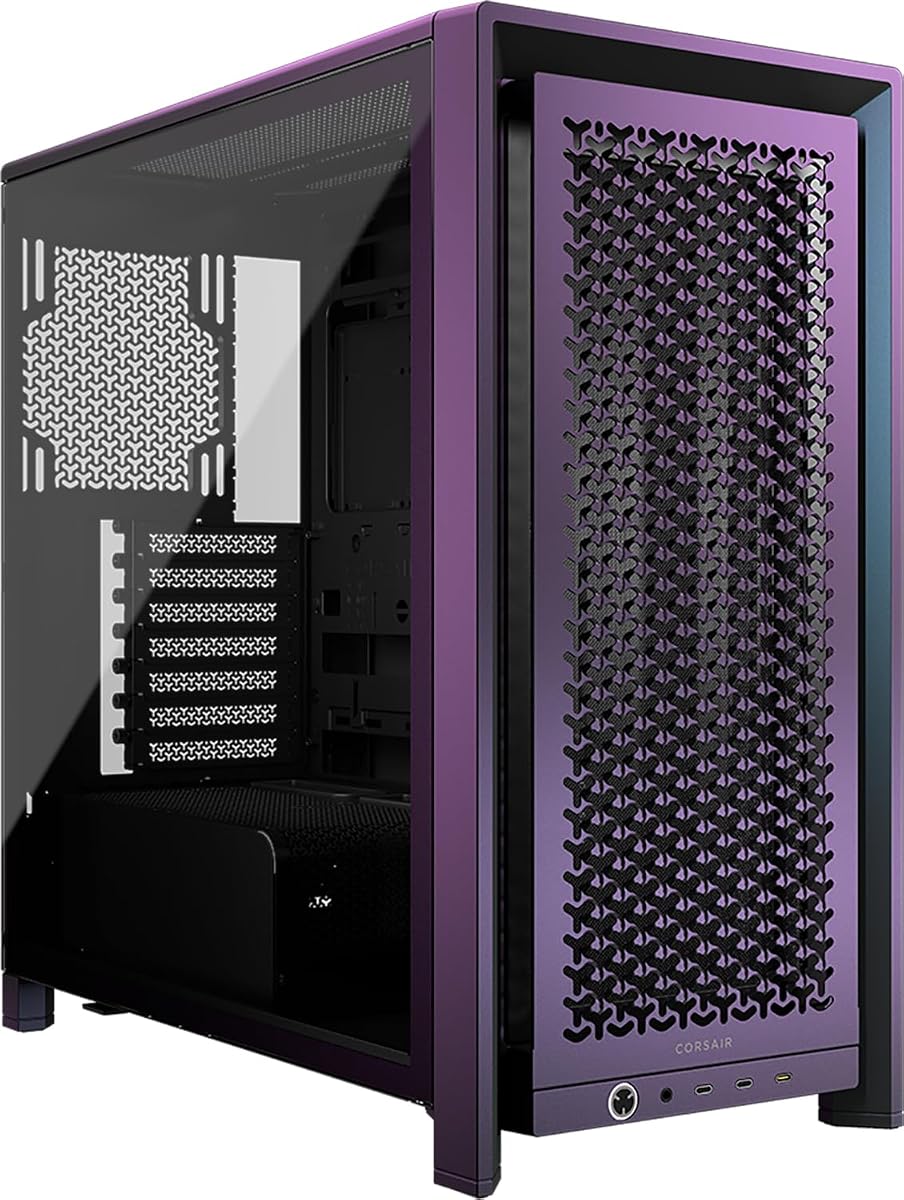
The CORSAIR Frame 4000D Vault Series Galaxy brings the FRAME modular concept to a limited collector-oriented release. Its 4.4 rating is the lowest among the selected cases, but the rating does not tell the entire story: the enclosure shares the 4000D family's emphasis on low-restriction airflow, flexible fan positioning, and extensive cooling capacity.
We may earn a commission when you buy through this link, at no additional cost to you.
The perforated steel front uses a three-dimensional Y-pattern to guide cool air into the chassis. InfiniRail mounts can be adjusted to support fans up to 200mm in the front and 140mm in the roof. Three separate 360mm radiator positions are available at the front, roof, and side, and the case can hold as many as 12 120mm fans. That creates a broad cooling envelope for a mid-tower.
The Vault Series release is limited to 1,337 individually numbered units in each colorway, which may make this specific finish difficult to acquire. Its modular system can also make the build process more complex than a conventional chassis. As with other high-airflow designs, the side radiator position and oversized fans require careful clearance planning around the motherboard and graphics card.
The Galaxy version is most appropriate for a builder who values the FRAME system's modularity and distinctive limited finish as much as raw cooling. It offers an exceptional number of fan and radiator arrangements in a mid-tower footprint. Buyers should confirm availability and plan the layout, but those considerations do not diminish the underlying airflow flexibility.
The individually numbered limited run adds a distinctive identity to an otherwise modular platform. The Galaxy finish does not replace practical airflow engineering; it sits on top of the same perforated front and adjustable mounting system used by the wider 4000D concept.
Front, roof, and side positions provide unusually broad radiator options for a mid-tower. Builders can move cooling hardware as their component layout, tubing plan, or cooling capacity requirements evolve.
We may earn a commission when you buy through this link, at no additional cost to you.
Choosing a high airflow case involves balancing unrestricted ventilation with component fit, cooling hardware, fan control, noise goals, cable routing, and the physical space available for the finished system.
A useful airflow case should guide cool air toward heat-producing components and provide a clear route for warm air to leave. Ventilated front panels, open or fine-mesh surfaces, and aligned intake and exhaust fans matter more than the mere number of fan headers. Pay particular attention to any solid panel or restrictive filter positioned directly in front of the intake. The MONTECH AIR 903 MAX, CORSAIR 4000D RS ARGB, and LIAN LI V100-ATX all combine ventilated fronts with multiple included fans, providing a useful starting point for directional cooling.
The included fans determine how complete the cooling package is on day one. A case with four preinstalled fans can support a capable airflow setup more readily than one with only two, although fan size and placement are equally important. Large 140mm, 160mm, or 220mm models can move substantial air across radiators, while multiple smaller fans can provide finer control over intake and exhaust. Check whether the fans use four-pin PWM or three-pin DC control, particularly on case-version fans, and confirm that the motherboard header or a fan controller can handle the load.
Radiator support determines whether a case can accommodate an all-in-one cooler or a custom loop without compromising component clearance. Look for exact maximum lengths and note whether the stated capacity depends on the radiator position. A 360mm front radiator and 240mm top radiator are useful in a compact mid-tower, while a full tower may support 420mm units. The NZXT H9 Flow and CORSAIR Frame 4000D Vault offer particularly broad radiator options, but builders should also account for pump housing, tubing bends, and the height of the CPU cooler.
Case size does not always reveal the usable component space, so consult the exact motherboard form factors and graphics card dimensions. E-ATX support is useful for extended motherboards, while shorter graphics card limits may restrict some premium models. Cases such as the MONTECH AIR 903 MAX and LIAN LI V100-ATX support very long graphics cards, and the LANCOOL 216 RGB accommodates cards up to 392 millimeters. Remember that some manufacturers specify a different maximum height when the motherboard is moved into an air-cooled position.
Good airflow depends on tidy internal layout, and cable management affects both appearance and usable space. Look for dedicated routing channels, grommets, straps, clips, and space behind the motherboard tray. A dual-chamber design can separate power-supply and drive cables from the main compartment, as seen in the NZXT H9 Flow. Modular or adjustable motherboard trays can also create a cleaner result, although they may complicate the initial installation process. Ensure that the cable-management features do not obstruct a large radiator or unusually thick wiring.
The most capable case is not always the most practical one. Compact ATX mid-towers such as the NZXT H5 Flow can deliver effective ventilation while conserving space, whereas the Cooler Master HAF II 500 and Antec Flux Pro require substantially more room. Large fans, radiators, and multiple graphics cards can make a full tower difficult to position beneath a desk or near a wall. Measure the available area, leave room for front intake clearance, and consider the final system rather than only the empty enclosure.
Tool-less panels, removable radiator brackets, and accessible fan mounts can make a high-airflow system much easier to assemble and service. The LIAN LI V100-ATX offers tool-less side panel access, while the CORSAIR 3500X RS ARGB has removable glass panels. Modular designs provide deeper customization but may require more assembly decisions. Always compare the number of steps involved in reaching the lower radiator area, the power supply, and the front I/O, especially if the system will need frequent maintenance.
Airflow cases range from understated steel and mesh designs to panoramic glass with ARGB fans. A visual style should support rather than interfere with the cooling plan. ARGB lighting requires a compatible 5V header or controller, and some case-version fans use three-pin DC control instead. A restrained exterior can suit a professional workstation, while a glass and RGB design may be preferable for a gaming system. Consider whether the included lighting is synchronized with the motherboard and whether additional fans will share the same control ecosystem.
Begin with the chassis empty, install the power supply and storage first, and check the position of every large component before fastening the motherboard. Keep intake and exhaust directions consistent, connect fan power to the correct header or controller, and route cables through dedicated channels before closing the panels. If the case supports alternative radiator positions, compare the finished clearance for each option before committing to a layout.
After the system is running, confirm that every fan spins at the intended speed and that none blocks an intake or exhaust opening. Use a fan-control utility or BIOS to create a gradual curve that increases cooling as processor and graphics card temperatures rise. Remember that the bundled case fans may use different control protocols, so compatible splitters, headers, or controllers may be required.
Dust can gradually reduce airflow through fine mesh panels and fan blades. Power down the system, disconnect it from mains power, and use a soft brush or controlled stream of compressed air to clean accessible filters, vents, and fans. Avoid pushing debris deeper into the chassis, and clean radiator or filter areas on a schedule that reflects the surrounding environment. Regular inspection helps preserve the high airflow the case was designed to provide.
No. A high airflow chassis improves the air available to components, but the processor still needs an appropriate cooler, whether that is a tower air cooler, an all-in-one liquid cooler, or a custom loop. Case fans help move air through radiators and exhaust heat, while the CPU cooler transfers heat from the processor into that moving stream. Good airflow works best when paired with correctly sized cooling hardware.
No, because fan placement, size, and airflow direction matter as much as the total count. More fans can restrict each other, create opposing pressure, or produce unwanted noise. A balanced setup usually combines front or bottom intake with rear and top exhaust, while leaving enough unobstructed space for the selected fan or radiator. Buyers should plan a complete airflow path rather than simply filling every mounting position.
A mesh-front case describes one visible panel treatment, while a high airflow case describes the overall ventilation architecture. Some high airflow models use perforated steel, others use fine mesh, and some combine both with side or PSU-shroud ventilation. The best examples also provide useful fan mounts, radiator positions, and unobstructed intake and exhaust routes. A mesh front alone does not guarantee a well-designed cooling path.
The appropriate size depends on the processor, graphics card, case dimensions, and cooling budget. A 240mm radiator may suit many mainstream systems, while a 360mm unit provides more surface area for sustained cooling. Builders planning 420mm hardware should choose a larger case explicitly designed for it. Always verify the maximum radiator length at each mounting position and leave clearance for tubing, fans, and the CPU cooler.
Most ARGB fans require a 5V ARGB header for lighting, while their power normally comes from a separate PWM or DC fan connection. A three-pin ARGB header is not compatible with 5V lighting, and connecting the wrong voltage can damage components. Use the supplied connections, check the motherboard manual, and choose a compatible controller if the board does not provide the required header.
Tempered glass can show off internal components and lighting, but it is not a direct measure of cooling quality. Many thermally capable cases use steel or mesh panels instead. Buyers who prioritize component visibility can consider panoramic designs such as the CORSAIR 3500X RS ARGB or NZXT H9 Flow, while builders focused on maximum open ventilation may prefer a steel-focused design.
No. A larger chassis offers more room for fans, radiators, cable routing, and unrestricted intake paths, but a compact model can still perform well when its ventilation is thoughtfully designed. The NZXT H5 Flow illustrates this with mesh panels, a perforated PSU shroud, and front and rear fans. Component fit, noise goals, and available space should be weighed alongside raw case dimensions.
Cleaning frequency depends on dust levels, room conditions, and how close the system is to an intake. Inspect visible mesh and filters every few months and clean them whenever airflow or noise appears to change. Use a soft brush or controlled compressed air while the system is powered off. Always avoid pushing dust farther into the chassis or directing particles toward fan bearings.
The CORSAIR 4000D RS ARGB stands out as the most balanced overall choice because it combines a low-restriction front panel, three included fans, flexible InfiniRail mounting, and a genuinely modular platform. The MONTECH AIR 903 MAX is an excellent value-oriented alternative with four 140mm fans, broad radiator support, and generous graphics card clearance. For the largest cooling envelope, the Cooler Master HAF II 500 pairs massive fans with a multi-GPU-oriented interior.
Prioritize airflow direction, radiator positioning, and real component fit before focusing on the number of installed fans. Check the maximum CPU cooler height, graphics card length, motherboard format, power supply dimensions, and radiator location before purchasing. Consider noise goals and fan-control protocols as well, because excellent ventilation is most useful when the system can maintain a smooth thermal curve without excessive sound.
Features, bundles, and model availability can change over time, so verify the current manufacturer specifications and the exact contents of the package before building. For most users, a capable mid-tower with several included fans and at least one large radiator position offers the strongest balance of cooling, convenience, and physical size.