
Switch 2 Dock with Built-in 6FT HDMI Cable
4.9Editor score
Integrated six-foot HDMI cable
Up to 4K at 120Hz
100W PD pass-through charging
Our expert guide compares the best Third Party Switch 2 Dock options for video output, charging, portability, cooling, ports, and compatibility.
A third party Switch 2 dock can transform a handheld console into a flexible television, monitor, and desktop setup while adding useful charging and peripheral connections. The best model depends on whether you value portability, high refresh output, active cooling, game-card storage, or broad compatibility with other handheld devices.
We compared the ten featured products using the specifications and compatibility information provided by each manufacturer. Our evaluation considers video resolution, charging power, port selection, physical design, cooling, supported consoles, included accessories, and practical limitations such as protective-case restrictions.
Each entry below identifies the strongest use case for a particular dock, while also noting important trade-offs and setup requirements. Product specifications and availability can change, so readers should confirm the latest compatibility details, accessory inclusions, and current pricing before purchasing.
4.9Editor score

4.9Editor score
4.7Editor score
The comparison below highlights the major differences among ten third-party docking solutions, including output modes, charging capacity, cooling, port selection, storage, and device compatibility. These specifications reveal which products are best suited to travel, stationary gaming, high-refresh televisions, or users who still operate a thick protective case.


The JSAUX Switch 2 Dock Extender is a specialized alternative for players who keep the console inside a thick protective case. Rather than competing with the original dock, it extends the existing dock connection through a 35cm USB-C cable and an open stand. Its 4.2 rating reflects a product designed around a specific compatibility problem rather than maximum feature density.
We may earn a commission when you buy through this link, at no additional cost to you.
The extender is the standout choice when a protective shell is thicker than the clearance offered by conventional third-party docks. It supports cases up to 5cm thick while preserving the original dock's charging, data-transfer, and video-output functions. The open, vented stand also encourages passive airflow without adding a fan, noise, or another power source to the setup.
There are meaningful trade-offs. This is not a complete third-party TV dock, and the original Nintendo dock remains part of the system. The 35cm lead is intended to keep the official dock close, so it will not suit someone who needs a long cable or a completely independent desktop hub. The product also lacks the multiple USB ports and mode controls found on several conventional docks.
Choose this extender if your case is too thick for other docks and you value the official dock's established behavior. It is especially useful for a home station where the console is always protected. For a self-contained travel dock with several ports and a shorter setup process, one of the conventional docking stations in this list will be more appropriate.
The five-centimeter case allowance is the defining advantage. It allows charging, video output, and data use without the frustrating need to remove a bulky shell every time the console enters docked mode.
Ventilation holes and an open stand promote natural heat dissipation without moving parts, added power draw, or fan noise. That makes the setup quieter than an actively cooled alternative.
We may earn a commission when you buy through this link, at no additional cost to you.
This portable TV docking station combines an attractive travel format with one of the strongest feature sets in the group. Its 4.7 rating is supported by a compact 6.89 by 2.60 by 1.65-inch body, a weight of 5.29 ounces, and a dedicated button for moving between TV and desktop modes.
We may earn a commission when you buy through this link, at no additional cost to you.
Video output is listed at up to 4K at 120Hz, with additional 2K, 1080p, and 720p modes. The station also includes a USB-C input, USB-C output, one USB 3.0 port, and one USB 2.0 port. It can charge while playing, and the manufacturer identifies protection against overcharging, overheating, short circuits, and overcurrent.
The main drawback is accessory inclusion. Only the dock and manual are supplied, so users need to provide a suitable power adapter and HDMI cable. Although advertised as compatible with Switch 2, Switch, and Switch OLED models, it is not compatible with Switch Lite. Actual display performance also depends on the console, game, television, and cable involved.
This is a strong choice for hotels, dorm rooms, vacations, and a second television. The small size and low weight are especially convincing for travelers. Buyers who already own the necessary cables and value a stylish, feature-rich portable station should find it more useful than a minimal hub with only essential connections.
At only 5.29 ounces, the station is easy to place in a backpack or gaming bag without becoming the dominant item. Its dimensions also leave room for cables and the console in a dedicated travel case.
A single control changes between TV and desktop modes, reducing menu navigation. Holding the same control for two to three seconds toggles the built-in RGB lighting for a more personalized gaming setup.
We may earn a commission when you buy through this link, at no additional cost to you.
The aluminum alloy travel dock is designed for buyers who move between gaming locations or use more than one compatible handheld. Its 4.4 rating reflects a balanced design that combines a durable housing, 4K HDR video support, 100W USB-C charging, and compatibility across an unusually broad device list.
We may earn a commission when you buy through this link, at no additional cost to you.
The HDMI 2.1 output supports 4K at 60Hz to 120Hz with HDR, while 1080p output is also listed. A USB data port supports bidirectional file transfer and compatible keyboards, mice, and other accessories. The USB-C input can accept up to 100W, allowing supported systems to charge while the dock is used for television output.
Compatibility extends beyond Nintendo hardware to Steam Deck, Steam Deck OLED, MSI Claw, ROG Ally, ROG Xbox Ally, and Legion Go 1, 2, and S models. The limited port count is the principal compromise: users wanting several simultaneous USB peripherals may prefer a dock with multiple USB-A connections.
The product is best for travelers and households with several supported handhelds. It is particularly attractive when aluminum construction and high-refresh output matter more than maximum physical ports. Owners should remember that Switch 2 video must be connected through the console's bottom USB-C port because the top port does not support video output.
Aluminum alloy is both durable and helpful at dispersing heat. The result is a compact travel dock that avoids the bulk and material limitations of a larger plastic station.
Broad compatibility makes this model useful for owners of several current gaming handhelds. It can also serve compatible laptops or other USB-C devices when their requirements match the dock's supported functions.
We may earn a commission when you buy through this link, at no additional cost to you.
The AHGEIIY docking station focuses on portability and essential connectivity. At approximately 39 grams, it is among the lightest full docks in the list and is small enough to fit in a pocket or computer bag. Its 4.3 rating reflects a capable travel unit with 4K at 60Hz output, USB 3.0, and 100W power delivery.
We may earn a commission when you buy through this link, at no additional cost to you.
The dock can expand a compatible device's display while supporting charging, high-speed file transfer, and external accessories. It works with Nintendo Switch 2, Switch OLED, original Switch, Steam Deck, and a range of USB-C devices that support DisplayPort Alternate Mode. Original Switch hardware remains limited to 1080p because of console capabilities rather than the dock.
The primary compromise is that wall chargers and HDMI cables are not included. The manufacturer also recommends an original Switch charger or another supply with output greater than 39W. Some devices require a connection sequence in which power is established before the host appears on the television, which may feel less immediate than a truly drop-in experience.
This is a compelling option for travelers who prioritize minimum weight over high-refresh 120Hz output or extensive USB expansion. It also works for users who need a dock for more than Nintendo hardware. For a television setup at home, checking the power and cable requirements before ordering will prevent avoidable setup friction.
At around 39 grams, the dock adds very little to a travel load. Its small footprint makes it convenient to keep in a computer bag alongside the console and a short HDMI cable.
USB 3.0 provides a practical path for file transfer, while the 100W PD input supports charging while connected to a display. The shared hub design can therefore serve both work and gaming.
We may earn a commission when you buy through this link, at no additional cost to you.
The NEWDERY 6-in-1 Charger Dock solves a different part of the Nintendo ecosystem: controller charging and organization. Its 4.3 rating and four-controller-or-four-Joy-Con charging capability make it useful for households with multiple players, even though it does not perform television docking.
We may earn a commission when you buy through this link, at no additional cost to you.
The unit can charge four Joy-Con controllers, two Pro Controllers, or a combination of the original Switch and OLED models at the same time. Individual red and green indicators show charging and completed status. When charging is unnecessary, the dock also acts as a compact stand that keeps controllers accessible and reduces desk clutter.
Compatibility requires careful attention. The listing specifically states that the dock fits the Switch 2 Pro Controller but not the Switch 2 Joy-Con, and third-party controllers may not function. A smart chip provides overheat, short-circuit, and over-power protection. The package includes the charging dock and a charging data cable, but no AC adapter.
Buy this product if your priority is keeping a complete controller set charged and organized. It is not a substitute for a Switch 2 TV dock, so players who need television output still need a separate docking product. It works best as a companion accessory in a shared gaming room or multi-controller household.
Charging up to four controllers at once reduces cable clutter and prevents a party from becoming delayed by low batteries. Separate indicators make it easy to see which device is still charging.
The slide-in design doubles as a stand, so controllers can be stored between sessions without occupying separate shelf space or being scattered around the television.
We may earn a commission when you buy through this link, at no additional cost to you.
This replacement TV base station is built specifically for Nintendo Switch 2 owners who want a straightforward home television setup. Its 4.2 rating reflects a focused design offering 4K at 60Hz or 1080p at 60Hz, a Type-C power input, HDMI 2.0, and a USB 3.0 port.
We may earn a commission when you buy through this link, at no additional cost to you.
The dock supports charging while playing and connection to external controllers. It is intended to reproduce the familiar docked experience without requiring the console to be held throughout a television session. The manufacturer emphasizes an upgraded chip and three levels of protection covering over-voltage, over-current, and short-circuit conditions.
Its specialized nature is both a strength and a limitation. Unlike broadly compatible USB-C hubs, this product is only listed for Switch 2, and its maximum 60Hz output is less advanced than docks offering 4K at 120Hz. It also has fewer connections than multi-function alternatives with multiple USB-A ports and USB-C expansion.
Choose it for a stationary Nintendo setup where straightforward charging, television output, and controller support matter more than cross-device use. The dedicated design can reduce confusion compared with a general-purpose hub. Just confirm that the 60Hz output and limited port selection meet your television and accessory requirements.
Concentrating on Switch 2 keeps the design straightforward. Users receive the core television and charging functions without needing to navigate a broad collection of ports intended for unrelated devices.
Over-voltage, over-current, and short-circuit protection add safeguards around the power and video connections. These protections are particularly relevant during long plugged-in sessions.
We may earn a commission when you buy through this link, at no additional cost to you.
The Piranha Dock Gen 2 stands apart through active cooling and a distinctive plant-inspired presentation. Its 4.3 rating reflects a dock designed to support long television sessions while directing airflow with a built-in fan and providing convenient charging for up to four Switch 2 Joypads.
We may earn a commission when you buy through this link, at no additional cost to you.
Video output is listed at 4K at 60Hz, with screen-mirroring support for Switch 2 and original Switch models. The fan is designed to reduce heat during extended play, while safety features include over-temperature monitoring, short-circuit protection, automatic shutoff, and heat dissipation. Red, green, and white indicators communicate charging, completed charging, and display mode.
The setup requires more planning than many alternatives. A 60W USB-C charger and HDMI cable are not included, and thick protective cases must be removed to obtain a proper fit. Although the active fan is a meaningful distinction, it is unnecessary for some users and makes the design less minimalist than a basic aluminum travel dock.
This model is ideal for players who dock for hours, value active cooling, and want their controllers charged alongside the console. Its playful plant design also makes it a distinctive addition to a gaming display. Buyers should verify desk space and case thickness before ordering.
Unlike passive or open-stand designs, the built-in fan actively moves heat away from the docked system. That distinction makes this dock more relevant to extended, high-output gaming.
Dedicated sides accommodate up to four Switch 2 Joypads, reportedly reaching a full charge in three hours. This eliminates the need for separate controller chargers in a two-player setup.
We may earn a commission when you buy through this link, at no additional cost to you.
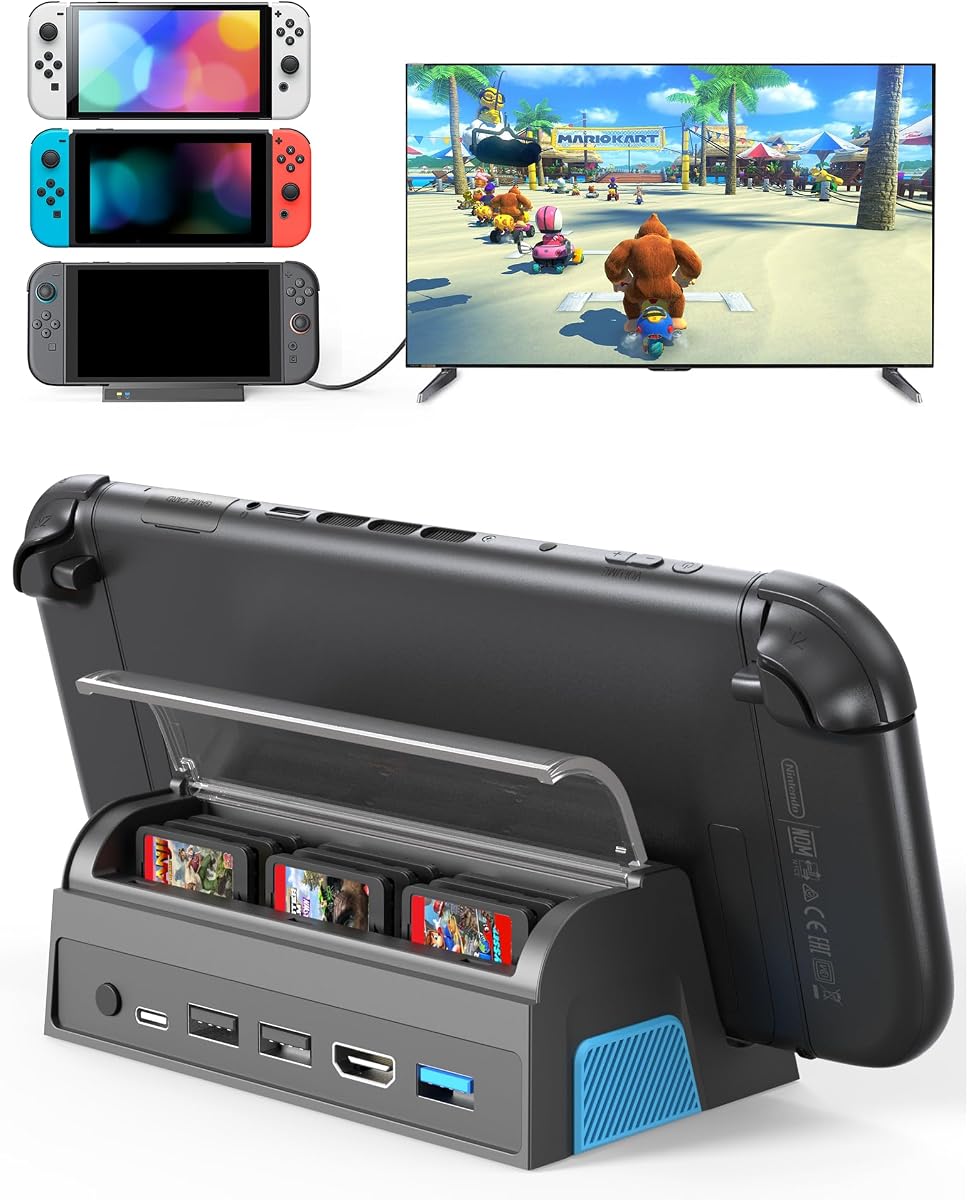
The QJYKIONE dock is the most complete all-in-one option in the guide. It combines a 4.7 rating with 4K at 120Hz HDMI output, three USB data ports, a Type-C charging connection, one-touch display switching, and nine protected game-card slots in a portable 149-gram body.
We may earn a commission when you buy through this link, at no additional cost to you.
The nine slots with a dust cover distinguish it from ordinary docks and make it particularly attractive to physical-game collectors. A Nintendo Switch 2 can be charged while using TV or tabletop mode, and a built-in chip provides short-circuit, over-power, recovery, and overheating protection. The product works with Switch 2, original Switch, and Switch OLED systems.
There are two notable limitations. The dock is not compatible with protective cases, and only the docking station is included; an HDMI cable and charger must be supplied separately. Maximum output also depends on the console: Switch 2 is described as supporting up to 4K at 60Hz, while original Switch and OLED models remain at 1080p.
This is the best premium pick for a physical-game library that needs organized storage as well as television docking. It also suits buyers who want one button to switch between tabletop and TV modes. The missing cables and case restriction should be checked before purchase, but the nine-slot design gives this model a clear functional advantage.
Nine card slots keep an entire portable library together. The included dust cover helps prevent loose or lost cartridges, making the dock useful beyond the television cabinet.
HDMI 2.1 output is listed at up to 4K at 120Hz, while the rear control selects TV or tabletop mode. The dock also supports charging during either mode for uninterrupted play.
We may earn a commission when you buy through this link, at no additional cost to you.
This dock stands out by solving a mundane problem exceptionally well: it integrates a six-foot HDMI 2.1 cable directly into the housing. With a 4.9 rating, it is one of the most favorably reviewed products here and reduces both visual cable clutter and the chance of leaving an essential cable at home.
We may earn a commission when you buy through this link, at no additional cost to you.
Video output reaches up to 4K at 120Hz through the integrated cable. A braided construction is designed for durability, while 100W PD pass-through supports powered use during longer sessions. The aluminum housing improves heat dissipation and keeps the overall package light enough for travel, hotels, or a second gaming location.
The main limitation is the relatively small peripheral selection. A USB-A accessory port is included, but there is not a large bank of USB-A and USB-C ports for keyboards, mice, external storage, and other devices at once. The charger itself also remains a separate item, and owners should still consider how a permanently attached six-foot cable fits into their storage case.
Choose this model if fast, clean television setup is the priority. It is especially effective for a living room where visible cables are undesirable and for players who regularly travel between displays. Those needing a comprehensive desktop hub should look toward a multi-port alternative, while everyone else gains a remarkably convenient integrated design.
The built-in HDMI 2.1 cable removes the need to carry or position a separate six-foot television lead. The result is faster setup and a cleaner entertainment center.
A lightweight aluminum body, 100W PD pass-through, and high-refresh output combine useful power management with strong display capability. The integrated braided cable is built to tolerate repeated packing and setup.
We may earn a commission when you buy through this link, at no additional cost to you.
The final dock is a value-focused alternative that still delivers impressive specifications. Its 4.9 rating, 4K HDR support at up to 120Hz, 100W PD input, and broad compatibility make it one of the strongest choices in the guide for buyers who want more than a Switch-specific adapter.
We may earn a commission when you buy through this link, at no additional cost to you.
The HDMI 2.1 output supports 4K resolution with 60Hz to 120Hz refresh rates and HDR on compatible combinations. A USB accessory port can accept a controller, keyboard, or mouse, while USB-C PD input supports charging while playing. Built-in overcurrent, overvoltage, and overheating protection adds a layer of safety around daily use.
At just 1.7 ounces, the aluminum housing is exceptionally easy to carry, and its metal construction also helps dissipate heat. The limited single USB port means it is better suited to a lean setup than a desk with numerous wired accessories. Display modes, refresh rates, HDR combinations, and charging speed ultimately depend on the connected source, display, and charger.
This is the best budget pick for owners of a Switch 2, original Switch, Switch OLED, Steam Deck, MSI Claw, or one of the listed ROG Ally and Legion Go models. Its combination of portability, charging, and high-refresh support is difficult to dismiss. Use the console's bottom USB-C port for Switch 2 television output.
The extremely light housing fits easily into a backpack, travel pouch, or dorm-room bag. It is a practical way to carry a television-ready setup without accepting the bulk of a full desktop dock.
Compatibility extends across Nintendo, Valve, MSI, ASUS, and Lenovo handhelds. That flexibility gives the dock more value for buyers who regularly switch between devices.
We may earn a commission when you buy through this link, at no additional cost to you.
A useful third party Switch 2 dock should match your display, charging setup, protective case, and travel habits. Comparing the following factors prevents a purchase based solely on a headline refresh rate while overlooking cables, physical fit, or device limitations.
A dock may advertise 4K at 60Hz, 4K at 120Hz, or 1080p, but these figures describe different use cases. A high-refresh television and monitor can take fuller advantage of 120Hz output, whereas many television environments, older Switch games, and the original Switch hardware are limited by the console or game itself. Switch 2's stated maximum is up to 4K at 60Hz, even when the dock offers a 120Hz-capable HDMI connection.
Choose based on the equipment you already own. A 60Hz dock is generally sufficient for a standard living-room television, while 120Hz can be valuable on a compatible gaming monitor. Always check whether the selected dock, television, game, and cable support the same resolution and refresh-rate combination.
Charging while playing is one of the most important functions of a docked console, but the dock's advertised input capacity is only the upper limit. The charger must also support the required protocol and provide enough power for the connected device. Several products in this guide accept up to 100W USB-C power, while one lightweight model recommends a supply greater than 39W.
Most docks do not include a wall charger, and most also require a separate HDMI cable unless one is integrated. Check the package contents before ordering. If you already own a compatible original charger and an appropriate HDMI cable, a portable dock can be a lower-impact purchase than a complete desktop setup.
The console's physical fit is a decisive factor. Many conventional third-party docks are designed for the bare console and explicitly exclude thick protective cases. The JSAUX extender takes a different approach by working with the original dock and allowing cases up to 5cm thick, but it requires the official dock to remain in the setup.
If you always use a substantial shell, measure its added thickness and compare it with the dock's stated clearance. The Piranha Dock Gen 2 and QJYKIONE dock specifically instruct users to remove thick cases. A dock that does not fit without repeated case removal will quickly become frustrating in daily use.
A dock with one USB port may be enough for a controller, while desktop users may want several connections for a keyboard, mouse, external storage, and other accessories. Some models add USB 3.0 for faster transfers, while others offer multiple USB 2.0 ports or both USB-C input and output. More ports improve flexibility but can increase size, weight, and cable congestion.
Match the port count to the way you actually play. A television-focused setup benefits more from a clean HDMI connection and stable charging than from a large bank of unused sockets. A desktop replacement, by contrast, should provide enough USB connectivity to avoid requiring a separate hub.
Compact docks may rely on their housing and open space for passive heat dissipation, while some include an active fan. Active cooling can be useful during extended sessions, but it adds moving parts, potential noise, and another design element to consider. A passive aluminum body is quieter and simpler, though it does not provide the same explicit airflow as a dedicated fan.
Think about how long you normally dock. A short gaming session on a well-ventilated television stand may not justify an actively cooled model, while repeated all-day play may benefit from stronger cooling. Whichever method you choose, leave space around the console and avoid enclosing the dock in a tight cabinet.
Travel docks are measured not only by their listed dimensions but also by what must accompany them. Some weigh under two ounces, while others include an attached HDMI lead, game-card storage, lighting, or multiple adapters. A compact housing can still create a bulky package if several long cables and a sizable charger are required.
The integrated-HDMI design is especially convenient for travel because it removes one loose cable. By contrast, the JSAUX extender depends on the original dock and is better suited to a fixed home location. Compare the complete travel bundle, not only the dock itself, and choose a cable length that reaches your display without creating unnecessary slack.
Physical game collectors may value storage more than another port. The QJYKIONE dock stores nine game cards beneath a dust cover, combining dock and library functions in one unit. Most other docking stations provide no internal card storage and require a separate case or organizer.
This factor should be considered alongside the dock's physical bulk and whether its storage keeps cards accessible during a session. If portability is more important than carrying an entire library, a conventional compact dock may be easier to manage. Storage becomes a decisive advantage when the dock will remain at a home media center.
Nintendo-focused docks simplify setup for a single console, while general USB-C docking stations can serve Steam Deck, ROG Ally, Legion Go, MSI Claw, and other compatible devices. Broad compatibility is useful for shared households, but compatibility does not guarantee that every port or display mode works identically across every product.
Look for DisplayPort Alternate Mode support and check the source device's required connection method. For Switch 2, video output must use the bottom USB-C port; the top port does not support video. If you own only one Nintendo system, a dedicated design may be simpler, but a broad USB-C dock can justify itself as a shared accessory.
Begin by identifying the correct video-output port on the console and the dock. For Switch 2, use the bottom USB-C port because the top USB-C port does not support video output. Connect the dock's power input to a suitable USB-C charger, connect the dock to the television or monitor, and then attach the console. If the display remains blank, establishing power before adding the HDMI connection can resolve the startup sequence.
Use the dock's mode control to select TV output or tabletop mode, then adjust the display mode and refresh rate on the connected television or monitor. Actual available options depend on the console, game, screen, dock, and cable. When a game does not support the selected 4K mode, or when a dock cannot pass the required signal, use the compatible lower resolution or refresh rate.
For long sessions, leave airflow around the console and dock, use the charger and cable specified by the manufacturer, and avoid placing either device under clothing or inside a closed compartment. Clean the housing and ports with a soft, dry cloth, and keep liquids away from the connectors. A compatible case should be removed before docking whenever the product instructions require it.
No. Some docks advertise 4K at 120Hz, while others top out at 4K at 60Hz. Even with a 120Hz-capable dock, the Switch 2 is described as supporting up to 4K at 60Hz, and individual games may offer different output modes. Your television or monitor, game, dock, and cable must all support the selected resolution and refresh rate.
Most do not. Several products in this guide include only the dock, while one explicitly includes a charging data cable for its controller-charging function. The dock with a built-in HDMI 2.1 lead is an exception for video connectivity, but it still requires a suitable power adapter. Check the package contents and compatibility requirements before ordering.
It depends on the dock. Most conventional third-party docks are designed for the bare console, and some explicitly require thick cases to be removed. The JSAUX extender is designed to work with the original Switch 2 dock while supporting cases up to 5cm thick. It is an extender rather than a complete replacement dock.
Use the console's bottom USB-C port for television output because the top USB-C port does not support video. The power connection also follows the dock's design, usually through its own USB-C input. Keep the console seated securely and confirm that all cables are fully inserted before changing display modes.
Yes, several general-purpose docks list support for Steam Deck, ROG Ally, Legion Go, MSI Claw, and other USB-C devices. Compatibility depends on each device supporting DisplayPort Alternate Mode and on the dock meeting its charging and accessory requirements. A Nintendo-specific dock may be simpler but generally offers less cross-device flexibility.
No. Active cooling is most useful for long docked sessions or when the console and dock are kept in a poorly ventilated area. Many compact alternatives use aluminum housings, open layouts, or passive heat dissipation instead. Choose a fan-equipped model when sustained cooling is a priority, but provide clearance around it so the airflow can be effective.
The original Switch and Switch OLED are limited to 1080p output, even when connected to a dock that supports 4K. The dock's higher resolution capability does not change the console's native output limit. Switch 2 can support up to 4K at 60Hz, subject to the game, dock, display, and selected output mode.
A dock with storage is most useful if you regularly play physical games and want the cartridges organized beside the console. The QJYKIONE model includes nine protected slots with a dust cover. If you mainly play downloaded games or carry the console while traveling, a smaller standard dock may be more convenient and easier to carry.
The best third party Switch 2 dock depends on the setup being improved. The QJYKIONE model is the most feature-rich premium choice because it combines high-refresh output with nine game-card slots, while the dock with an integrated HDMI cable is ideal for reducing cable clutter. The lightweight 1.7-ounce portable USB-C dock provides strong value and broad compatibility.
Prioritize physical fit first, then charging and video requirements. Confirm that the console fits, the protective case can remain installed if needed, the charger supplies adequate power, and the display supports the desired resolution and refresh rate. Additional features such as active cooling, multiple USB ports, RGB lighting, and game storage are most valuable when they solve a specific problem in your setup.
Finally, check the current package contents, compatibility notes, and latest pricing before purchasing. Product bundles and specifications can change, and a dock that seems ideal on paper may require extra cables or a different case arrangement. Reviewing the current listing helps ensure that the selected third party Switch 2 dock works with the console, display, and accessories you already own.