
ASUS RT-AX1800S
4.3Editor score
Subscription-free network security
AiMesh expansion support
Five Gigabit Ethernet ports
Our parental control routers guide compares filtering, scheduling, security, coverage, and connectivity features to help families choose the right router.
Parental control routers combine internet access management with the connectivity a modern household needs for streaming, gaming, work, and smart devices. A useful model should make age-appropriate filtering, time limits, and device rules easy to configure while maintaining strong wireless performance, reliable parental control features, and straightforward management.
We compared the included routers based on their documented parental controls, security functions, wireless standards, wired options, capacity, mesh support, and ease of administration through the manufacturer’s app or web interface. The list covers Wi-Fi 6, Wi-Fi 6E, Wi-Fi 7, and a wired VPN-focused alternative for varied household needs.
Each review explains the features that distinguish its router and identifies practical trade-offs. The TP-Link Archer BE230 stands out for explicitly documented, robust parental controls, while several ASUS models add configurable networks, AI-oriented management, and broader VPN support. Prices and promotions can change, so compare current listings before purchasing.
4.3Editor score

4.2Editor score

4.3Editor score
This side-by-side comparison highlights the most important differences in parental control capability, wireless generation, network security, wired connectivity, and expansion potential across all ten routers.





The TP-Link Archer AX21 V5 is a conventional dual-band Wi-Fi 6 router built around dependable everyday performance rather than advanced network segmentation. Its 4.4 rating is the highest among the included models, and its combination of 1.8 Gbps aggregate bandwidth, four external antennas, beamforming, and an advanced front-end module makes it a well-rounded foundation for a busy family network.
We may earn a commission when you buy through this link, at no additional cost to you.
The Archer AX21 can provide up to 1200 Mbps on the 5 GHz band and up to 574 Mbps on 2.4 GHz, allowing compatible devices to divide between faster and more distant connections. OFDMA improves simultaneous communication with multiple devices, while beamforming focuses the signal toward clients. As with any router, actual results depend on the internet plan, device capabilities, interference, building materials, and distance.
Security is another strength. TP-Link highlights its Cybersecurity and Infrastructure Security Agency Secure-by-Design commitment, while the router supports OpenVPN and PPTP server modes for users who want to access their home network remotely. A separate modem is required, and the Tether app makes setup and firmware updates more convenient. The main limitation is that the supplied specifications do not detail the extent of the router’s parental filtering and scheduling tools.
Families that prioritize stable Wi-Fi, simple management, and remote network access may find the AX21 V5 more compelling than a model whose headline feature is raw speed. However, buyers whose primary requirement is finely detailed content filtering should verify the available controls in Tether before making a final decision. It is a balanced choice for households that want modern wireless performance and a strong rating without moving to Wi-Fi 7.
The router’s dual-band design and lack of 6 GHz support should also be considered carefully. It remains suitable for many homes, but it is not aimed at users who need the latest spectrum or multi-gigabit wired connections. Its strongest case is as an approachable, well-reviewed Wi-Fi 6 system that covers the fundamental needs of a connected household.
OFDMA, MU-MIMO-style efficiency, and the division between 2.4 and 5 GHz help the Archer AX21 serve phones, computers, televisions, and connected devices at the same time. The 2.4 GHz band is generally the more useful option for longer distances, while compatible clients can favor 5 GHz for demanding local transfers.
OpenVPN and PPTP server support adds remote access for compatible devices, while TP-Link’s stated security focus provides context for the router’s protective design. The Tether app also gives users a practical route for setup, network management, and firmware maintenance.
We may earn a commission when you buy through this link, at no additional cost to you.
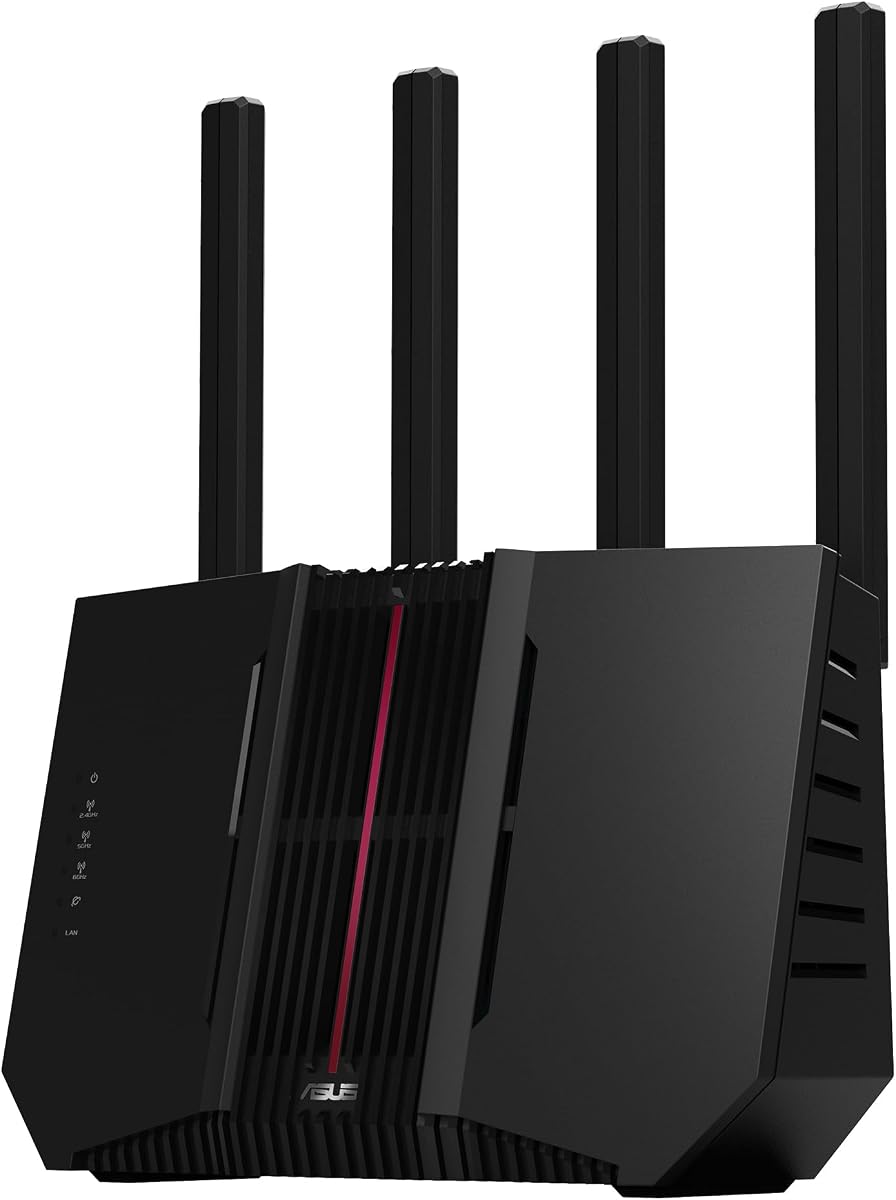
The ASUS RT-AX1800S combines an accessible Wi-Fi 6 platform with the family-management features expected from a parental control router. Its 4.3 rating reflects a generally favorable balance of performance, security, and flexibility, while the inclusion of parental controls, built-in VPN features, and AiMesh compatibility makes it especially relevant to this guide.
We may earn a commission when you buy through this link, at no additional cost to you.
The router supports the 802.11ax standard, MU-MIMO, and OFDMA, helping it serve several devices efficiently. It also includes 1024-QAM and four external antennas. Five Gigabit Ethernet ports—one WAN and four LAN—provide useful wired capacity for a home office, media center, game console, or other stationary device that benefits from a stable connection.
AiProtection Classic, powered by Trend Micro, is described as subscription-free network security, while ASUS Instant Guard provides a one-click secure VPN for access to a home network while away. These tools complement the parental control functions rather than replacing them. The ability to add an AiMesh-compatible router makes it easier to expand coverage without abandoning the ASUS management environment.
The principal trade-off is its dual-band wireless design. It does not provide the 6 GHz capacity found in tri-band models, and every Ethernet port is Gigabit rather than multi-gigabit. Real throughput and range still depend on the client devices, network congestion, building materials, and other environmental conditions, as ASUS notes in the product information.
The RT-AX1800S is a compelling budget-oriented choice for parents who want recognizable filtering tools, useful network protection, and an accessible path to mesh expansion. It is especially suitable for moderate-sized homes where Wi-Fi 6 performance and wired Gigabit connectivity are enough, but 6 GHz spectrum or 2.5G ports are not essential.
AiProtection Classic is a meaningful advantage for households that want network-level security without depending on an ongoing paid subscription. Combined with the RT-AX1800S’s stated parental control functionality, it creates a useful baseline for filtering, device management, and safer browsing.
AiMesh compatibility lets a household begin with one router and add compatible equipment as dead zones become a problem. This is valuable for homes with upstairs bedrooms, long hallways, thick walls, or a detached office where a single access point may not provide satisfactory coverage.
We may earn a commission when you buy through this link, at no additional cost to you.
The TP-Link Archer BE230 is the most straightforward recommendation in this guide for buyers who prioritize documented parental controls. Its product information specifically highlights robust parental controls, comprehensive network protection, and real-time IoT security. With a 4.2 rating, it also offers the reassurance of a newer Wi-Fi 7 platform without abandoning familiar dual-band operation.
We may earn a commission when you buy through this link, at no additional cost to you.
The router is a dual-band BE3600 model, offering up to 2882 Mbps on 5 GHz and up to 688 Mbps on 2.4 GHz. Multi-Link Operation, Multi-RUs, and 4K-QAM improve efficiency and reliability, while a 2 GHz quad-core processor is designed to manage high throughput. For wired connections, it includes one 2.5G WAN/LAN port, one 2.5 Gbps LAN port, and three 1 Gbps LAN ports.
TP-Link HomeShield provides the parental control and network protection layer, including real-time IoT security for connected devices. The free Tether app assists with initial setup, management, and firmware updates. EasyMesh compatibility also allows the Archer BE230 to work with compatible routers and range extenders, making it easier to improve coverage throughout a larger home.
One important limitation is that this is a dual-band router, so it does not support the 6 GHz band. Its stated coverage of up to 2,000 square feet for as many as 60 devices is a maximum under suitable conditions rather than a guarantee for every floor plan. Walls, placement, interference, and client capabilities can all reduce the practical result.
Families that want clearly documented controls, current Wi-Fi technology, and multi-gigabit wired options should give the BE230 particular attention. It is especially useful where a parent wants centralized family rules alongside protection for numerous smart-home products. Those who need 6 GHz capacity should consider the tri-band TP-Link Archer AXE75 instead, while smaller households may find the ASUS RT-AX1800S more restrained and economical.
The router’s parental controls are integrated into TP-Link’s broader network protection platform. That makes the Archer BE230 useful for families seeking filters, time management, and device visibility within the same home-network environment, with IoT security extending the protection beyond conventional computers and phones.
Two 2.5G-class ports offer room for a faster internet service, a network storage device, a modern laptop, or a wired access point. The remaining Gigabit LAN ports keep ordinary wired devices connected without requiring a separate switch.
We may earn a commission when you buy through this link, at no additional cost to you.
The ASUS RT-AX3000S is a dual-band Wi-Fi 6 router aimed at households that want a straightforward balance between speed, scheduling, and whole-home extensibility. Its 4.2 rating and explicitly documented parental control scheduling make it a natural fit for families that primarily need time-based access rules alongside dependable modern connectivity.
We may earn a commission when you buy through this link, at no additional cost to you.
The router offers about 3000 Mbps of aggregate networking speed, including up to 574 Mbps on 2.4 GHz and 2402 Mbps on 5 GHz. MU-MIMO and OFDMA help it communicate with multiple devices efficiently, while 1024-QAM supports faster wireless connections on compatible clients. These features are relevant in homes where school computers, phones, game systems, and televisions share the same connection.
Parental control scheduling allows caregivers to place limits around online activity, and the built-in VPN functionality adds another layer of network utility. ASUS Instant Guard is included for users who want to access the home network securely while away. The device also supports adding compatible AiMesh routers, which makes gradual coverage expansion possible.
Like the other dual-band models in this list, it lacks 6 GHz support, and its supplied information does not highlight multi-gigabit Ethernet. These are acceptable trade-offs for households that prioritize useful scheduling, wireless efficiency, and a flexible mesh path over access to the newest spectrum.
The RT-AX3000S is best suited to a home with growing device demand and a need to organize internet use by schedule. Buyers who need detailed content-category descriptions, however, should review the current ASUS administration interface to confirm that the available parental tools meet their requirements. It remains a versatile option for families that want Wi-Fi 6 performance and extendability without a top-tier specification sheet.
Parental control scheduling gives parents a way to define when particular devices or users should have connectivity. Schedules are especially helpful for homework periods, bedtime routines, and household activities that require predictable periods of internet access.
AiMesh support allows the router to serve as the starting point for a unified mesh network. Because compatible ASUS equipment shares advanced features and roaming behavior, it can be a more coherent solution than combining unrelated access points.
We may earn a commission when you buy through this link, at no additional cost to you.
The TP-Link Archer A54 is a dual-band AC1200 router that focuses on familiar essentials rather than the newest wireless standard. It carries a 4.3 rating, supports Wi-Fi 5, and includes features such as WPA3, EasyMesh compatibility, and app-based management. Those qualities make it a practical option for smaller homes or for buyers who do not need Wi-Fi 6 or Wi-Fi 7 performance.
We may earn a commission when you buy through this link, at no additional cost to you.
The router provides up to 867 Mbps on 5 GHz and up to 300 Mbps on 2.4 GHz, for 1200 Mbps of combined theoretical bandwidth. Four external antennas are intended to support stable connections, and the stated coverage is up to 1,000 square feet. As with other models, actual range varies according to walls, device placement, interference, distance, and other environmental factors.
The Tether app provides a straightforward way to manage the network and maintain current firmware. WPA3 support improves the router’s baseline security, while Access Point mode can turn a wired connection into a wireless network when it is used alongside an existing router. EasyMesh compatibility also creates a route to wider, more seamless coverage.
Its largest limitation is the older Wi-Fi 5 platform. It offers less theoretical headroom than the AX21, BE230, and other Wi-Fi 6 or Wi-Fi 7 choices, and its supplied product information does not detail the parental control toolbox. That makes it less compelling for a buyer whose primary reason for upgrading is sophisticated family filtering.
The A54 is best for a straightforward home network, a secondary location, or a smaller residence where the internet plan and client devices do not demand the latest standard. Its 4.3 rating, WPA3 support, and mesh compatibility create a solid foundation, while parents should verify available control options in Tether before choosing it for a filtering-focused setup.
The Tether app is one of the strongest practical elements of the Archer A54 because it keeps configuration, status checks, and firmware updates in one place. This is useful for parents who want routine family-rule changes without navigating a complex technical interface.
Access Point mode and EasyMesh compatibility allow the router to fit into different network arrangements. It can supplement an existing wired setup or become part of a broader mesh system when the household later needs more range.
We may earn a commission when you buy through this link, at no additional cost to you.
The TP-Link ER605 is the only wired router in the group, and that difference makes it useful for buyers who want centralized filtering and network control rather than a consumer Wi-Fi system. Its 4.4 rating ties for the highest among the included products, while its extensive firewall, filtering, and VPN functions offer substantial administrative control.
We may earn a commission when you buy through this link, at no additional cost to you.
Five Gigabit ports are divided among one Gigabit WAN port, two configurable Gigabit WAN/LAN ports, and two Gigabit LAN ports. This allows up to three WAN connections and makes the ER605 suitable for service-provider failover, dedicated traffic separation, or more advanced small-office arrangements. A USB port can also support a compatible 4G or 3G modem as a WAN backup.
Security tools include advanced firewall policies, denial-of-service defense, and IP, MAC, and URL filtering. Those filtering categories are particularly relevant to parental control use because they can shape access at the network level. The router also supports numerous VPN connections, including LAN-to-LAN IPsec and OpenVPN, L2TP, and PPTP server configurations.
The obvious compromise is that the ER605 has no built-in Wi-Fi. Families will need one or more compatible access points, and a mesh-oriented router may offer a more integrated and visually approachable experience. More complicated routing and firewall rules can also require more setup knowledge than a standard home Wi-Fi system.
The ER605 is ideal for technically confident parents, small offices, and households with a separate access-point arrangement. It offers the most explicitly granular filtering vocabulary in the list, but only makes sense when reliable wired networking is already in place or planned. For most ordinary homes seeking one device to cover both Wi-Fi and parental management, a TP-Link or ASUS Wi-Fi router will be easier to deploy.
IP, MAC, and URL filtering can help administrators decide which devices and destinations may communicate. These tools are not a complete replacement for browser-level content controls, but they add a powerful layer for structured household access policies.
Multiple configurable WAN ports and USB-supported 4G or 3G backup provide options beyond the single-connection design of most consumer routers. They are useful for small offices, remote workers, or anyone who wants a more resilient path to the internet.
We may earn a commission when you buy through this link, at no additional cost to you.
The ASUS RT-BE88U is the premium pick for households that want advanced network organization alongside Wi-Fi 7 performance. Its 4.3 rating is supported by a high-end specification set, including two 10G ports, a quad-core 2.6 GHz processor, Guest Network Pro with support for up to five SSIDs, AiProtection Pro, and comprehensive VPN features.
We may earn a commission when you buy through this link, at no additional cost to you.
Wireless throughput can reach up to 7200 Mbps through Multi-Link Operation and 4096-QAM. The wired side is equally notable, with one 10G SFP+ port and one standard 10G WAN/LAN port. Together they can expand a home network to as much as 34 Gbps of aggregate wired capacity when paired with suitable switches and client hardware.
The ability to establish up to five SSIDs is particularly useful for parental control because separate networks can isolate guests, children’s devices, smart-home equipment, work systems, and main household users. A dedicated network for selected devices can make filtering and access policies easier to apply. AiMesh support extends that structured approach across compatible equipment throughout the home.
AiProtection Pro, powered by Trend Micro, adds one-tap security scanning and broad network protection. The router also supports instant VPN connections and site-to-site VPN, making it attractive to adults who work remotely or need more advanced private connectivity. The 4G LTE and 5G mobile tethering option through the USB port adds another layer of resilience.
The trade-offs are cost, complexity, and the absence of 6 GHz. This is a dual-band Wi-Fi 7 router, so households seeking the latest tri-band spectrum should look at the ASUS RT-BE9700. The RT-BE88U is still exceptionally capable, particularly for advanced users who want multiple networks, high-speed wired links, and security tools in one box.
Supporting up to five SSIDs allows parents to place children’s devices, guests, work equipment, and connected products on dedicated networks. Separation simplifies filtering and reduces the chance that one device category accidentally shares access with another.
The 10G SFP+ and 10G WAN/LAN ports provide a high-capacity foundation for compatible computers, NAS devices, and access points. Families planning extensive smart-home control, large media libraries, or demanding local file transfers can use that wired headroom more effectively than ordinary Gigabit connections.
We may earn a commission when you buy through this link, at no additional cost to you.
The TP-Link Archer AXE75 brings a dedicated 6 GHz band and substantial aggregate capacity to a tri-band Wi-Fi 6E design. Its 4.3 rating, 5400 Mbps class performance, and stated 2025 PCMag Editors’ Choice designation make it a strong all-around router, while HomeShield’s basic parental controls give families a relevant management layer.
We may earn a commission when you buy through this link, at no additional cost to you.
The router can provide up to 2402 Mbps on both 6 GHz and 5 GHz, plus 574 Mbps on 2.4 GHz. The 6 GHz band offers additional bandwidth and low latency for compatible modern clients, reducing congestion on the older bands. OFDMA and true tri-band operation help the router serve more devices simultaneously, which is valuable in homes with a large collection of phones, televisions, computers, and smart products.
TP-Link HomeShield includes basic network security, IoT device identification, basic parental controls, quality of service, and weekly or monthly reports. The Archer AXE75 also supports OpenVPN, PPTP, and L2TP in both server and client roles, and it is EasyMesh compatible. Those features make it a balanced choice for households wanting parental controls, private access, and flexible expansion.
The important distinction is between the included basic parental controls and premium HomeShield features. Families should confirm which control functions require a subscription before making a decision. In addition, clients must support Wi-Fi 6E to benefit fully from 6 GHz, and older phones, laptops, or other devices will continue to use the other bands.
The AXE75 is a strong recommendation for a home that wants 6 GHz without moving to Wi-Fi 7. It offers a compelling balance of capacity, security, VPN functionality, and mesh compatibility. Buyers wanting the most detailed family filters should examine current HomeShield options, while those who need newer wireless technology and multi-gigabit ports may prefer the Archer BE230.
The 6 GHz band can provide compatible devices with a cleaner, high-bandwidth connection than crowded 2.4 or 5 GHz networks. That is particularly useful for recent phones and computers used for video calls, gaming, and large downloads.
Basic parental controls, device identification, quality of service, and weekly or monthly reports cover common household management needs. The inclusion of both VPN client and server modes also makes the router more versatile for remote work and private home access.
We may earn a commission when you buy through this link, at no additional cost to you.
The ASUS RT-BE82U is a dual-band Wi-Fi 7 router that emphasizes a practical balance between speed, security, and multi-gigabit wired connectivity. Its 4.2 rating reflects a capable design, and the inclusion of five 2.5GbE ports, AiProtection Pro, Safe Browsing, and AiMesh support makes it an attractive option for modern family networks.
We may earn a commission when you buy through this link, at no additional cost to you.
The router can reach up to 6500 Mbps, using 4096-QAM to increase transmission speed on a single frequency band. Multi-link Operation allows compatible devices to use multiple bands simultaneously, aiming for more stable connections and efficient data transfers. It is a dual-band model, so 6 GHz access is not available.
Five 2.5GbE ports provide a major wired advantage for households with storage, gaming, creative, or work devices. Network security is handled through AiProtection Pro powered by Trend Micro, with a one-tap scan and Safe Browsing. The router also supports comprehensive VPN use and can join an AiMesh system for unified roaming and broader coverage.
Compared with the RT-BE88U, the RT-BE82U offers less maximum wireless throughput and does not have the premium model’s 10G SFP+ connectivity. However, its five 2.5GbE ports may be more immediately useful to a typical household than a single ultra-fast port. Like all models, actual performance depends on the internet service, client devices, and home environment.
The RT-BE82U is well suited to parents seeking contemporary Wi-Fi, security tools, and strong wired options without moving to the largest premium specification. Its Safe Browsing and scanning features add a useful layer for family internet management, while AiMesh makes it possible to extend the system as coverage requirements grow.
Five 2.5GbE ports make it easier to connect several high-speed devices without relying on a lower-bandwidth switch. This benefits home offices, game consoles, media servers, and network storage when the service plan can supply adequate bandwidth.
AiProtection Pro, one-tap scanning, and Safe Browsing provide families with layered network protection. These features complement parental controls by helping identify unsafe content and suspicious activity across connected devices.
We may earn a commission when you buy through this link, at no additional cost to you.
The ASUS RT-BE9700 is the most advanced wireless platform in the guide, combining tri-band Wi-Fi 7, 320 MHz channels in 6 GHz, 4096-QAM, and throughput of up to 9700 Mbps. Its 3.9 rating is the lowest listed, but that figure should be considered alongside a feature set aimed at demanding homes, smart offices, and early adopters of high-speed local networking.
We may earn a commission when you buy through this link, at no additional cost to you.
Multi-link Operation allows compatible devices to connect across multiple bands for greater stability and efficient data transfer. Versatile WAN configuration and AI WAN detection are designed to support an always-on connection, while a USB port can be used with compatible 4G LTE or 5G mobile tethering equipment for additional resilience.
ASUS Network Security uses a subscription-free, triple-level protection design and a commercial-grade cloud database. The router also supports advanced site-to-site VPN and Instant Guard for secure access over public Wi-Fi. For a family with working adults or a home business, these functions add meaningful value beyond ordinary parental scheduling.
The main trade-offs are the advanced cost and the modest 3.9 rating relative to the alternatives. A high-end router does not automatically guarantee better everyday coverage, and performance depends heavily on the internet plan, client hardware, number of connected devices, and placement. Users without Wi-Fi 7 clients or a need for 6 GHz capacity may receive little practical advantage from the extra hardware.
The RT-BE9700 makes the most sense for buyers who want 6 GHz, very high wireless capacity, and premium ASUS management in one device. It is a strong option for a future-oriented home, but families primarily seeking uncomplicated parental filters may find the Archer BE230 or ASUS RT-AX1800S more focused. Either way, the latest standard should be matched to realistic client and bandwidth requirements.
Wide 320 MHz channels can increase available capacity for compatible Wi-Fi 7 clients. The 6 GHz band is especially attractive in dense neighborhoods or busy homes where many devices compete for the more established 2.4 and 5 GHz bands.
AI WAN detection, flexible WAN configuration, and compatible mobile tethering offer several ways to maintain connectivity. Advanced site-to-site VPN and Instant Guard make the router more useful for adults who require private access to home resources from outside.
We may earn a commission when you buy through this link, at no additional cost to you.
The right parental control router should balance manageable family rules with reliable coverage, appropriate security tools, and enough capacity for every connected device. The following factors help narrow the choices before installation.
Begin by identifying the household’s actual management needs. Some families mainly require bedtime schedules, while others want category-based filtering, per-device exceptions, usage reports, and separate guest or child networks. The TP-Link Archer BE230 explicitly advertises robust parental controls, while the ASUS RT-AX1800S and RT-AX3000S are described with parental control functions, and the ASUS RT-BE88U supports up to five SSIDs through Guest Network Pro. These capabilities differ in depth, so check the current management interface rather than assuming every router offers identical filters, profiles, and exceptions.
Wireless speed is not just a marketing number. It reflects the available spectrum, radio design, client capabilities, and the fastest devices that actually use the network. Wi-Fi 6 models such as the Archer AX21 and ASUS RT-AX1800S offer efficient handling for many devices, while the Archer BE230, ASUS RT-BE88U, and ASUS RT-BE82U use Wi-Fi 7. Tri-band models add a 6 GHz band, but that advantage only benefits compatible clients. Choose a standard based on the hardware already in the home and expected purchases rather than on peak throughput alone.
The 6 GHz band can offer additional bandwidth and low latency, but it is not universally available to every device. The TP-Link Archer AXE75 and ASUS RT-BE9700 include 6 GHz, while every dual-band model in the list does not. Homes with recent Wi-Fi 6E or Wi-Fi 7 phones and computers may benefit from a dedicated 6 GHz network, especially in crowded areas. A dual-band router remains the simpler and often less costly choice when most clients are older and household traffic is moderate.
Parental controls work best alongside general network protection. The ASUS RT-AX1800S includes subscription-free AiProtection Classic, the RT-BE88U and RT-BE82U use AiProtection Pro, and the Archer BE230 combines HomeShield with real-time IoT security. The TP-Link ER605 offers a different, wired approach with IP, MAC, and URL filtering plus detailed firewall policies. Look for HTTPS filtering, phishing or malicious-site protection, device identification, and useful reporting. A service that requires a subscription for essential functions should be evaluated according to the household’s long-term budget.
Fixed devices often benefit from Ethernet because they stay in one place and may transfer large files. The ASUS RT-AX1800S includes five Gigabit ports, the Archer BE230 combines two 2.5G-class ports with three Gigabit LAN ports, and the ASUS RT-BE82U provides five 2.5GbE ports. At the premium end, the RT-BE88U includes one 10G SFP+ port and one 10G WAN/LAN port. The TP-Link ER605 is entirely wired and has three configurable WAN choices. Match the available ports to the home internet service, media system, game console, storage device, and access points.
A faster router cannot overcome poor placement or stubborn building materials. Start with a central location, keep it elevated and open, and test signal in bedrooms, upstairs rooms, and the far end of the home. The ASUS RT-AX1800S, RT-AX3000S, RT-BE88U, RT-BE82U, and RT-BE9700 support AiMesh, while the TP-Link Archer A54, BE230, and AXE75 support EasyMesh. If coverage remains weak, use the manufacturer’s mesh system rather than adding unrelated extenders that create separate management interfaces or inconsistent roaming.
VPN support can protect remote connections and improve access to home resources, but the required direction and protocol matter. The Archer AX21 supports OpenVPN and PPTP server modes, the Archer AXE75 supports server and client roles for OpenVPN, PPTP, and L2TP, and the ASUS models provide various built-in VPN and Instant Guard functions. The ER605 is built around extensive VPN support with multiple connection counts. Check whether the intended remote user is connecting into the home network or using the router as a client to reach an external service.
A router with an excellent specification can still be a poor fit if setup and daily changes are difficult. TP-Link’s Tether app is central to the Archer models, while ASUS provides browser- and app-based management across its lineup. Families should consider who will change filters, pause access, add devices, update firmware, and troubleshoot a lost connection. As a practical compromise, choose a current standard with enough expansion options, but avoid paying for advanced ports or 6 GHz that no current device can use.
Start by connecting the router to the internet service provider’s modem or gateway, then complete the manufacturer’s setup process from a phone or computer on the home network. Create a distinct administrator password, confirm the time zone, and update the firmware before changing individual access rules. A clean initial configuration makes it easier to understand which device is associated with each phone, laptop, television, game console, and smart-home product.
Build family profiles around real users and devices rather than applying the strictest setting to the entire household. Begin with reasonable schedules, add category filters as needed, and create exceptions for schoolwork, video calls, health services, and other legitimate priorities. Use separate SSIDs or guest networks when the router supports them, particularly for visitors, connected products, and children’s devices. Review usage reports periodically and adjust rules as school schedules, bedtime routines, and device habits change.
Keep the router elevated, ventilated, and near the center of the home whenever possible. Avoid placing it inside cabinets, behind televisions, or beside sources of heat. Update firmware through the official app or interface, change default credentials, and periodically review connected-device lists. When adding mesh equipment or access points, use the manufacturer’s supported compatibility process and confirm that devices roam smoothly between access points.
No. The TP-Link Archer BE230 specifically advertises robust parental controls through HomeShield, and the ASUS RT-AX1800S and RT-AX3000S are identified as having parental control functionality. The ASUS RT-BE88U supports multiple SSIDs and convenient parental controls, while the Archer AXE75 includes basic HomeShield parental controls. Availability, depth, and any subscription requirements should be confirmed in the current management interface before purchase.
Not necessarily. Parental controls are primarily software features, and an older or less advanced wireless standard can still provide effective filtering and scheduling. Wi-Fi 7 is most useful for households with compatible devices, demanding traffic, crowded wireless environments, or a need for multi-gigabit networking. Choose the control depth, coverage, and wired capacity that solve the household’s real problems first.
Most of the included TP-Link and ASUS Wi-Fi routers require a compatible modem or gateway to provide internet service unless the device is supplied as part of a combined system. The TP-Link ER605 is a wired router and likewise serves as the gateway for compatible WAN connections. Confirm with the internet service provider whether a separate modem is included, required, or already installed.
A well-positioned router may cover many homes, but walls, floors, and long distances can reduce performance. Models such as the Archer A54 state coverage of up to 1,000 square feet, while the Archer BE230 states up to 2,000 square feet under suitable conditions. Larger or more complex homes may benefit from an AiMesh or EasyMesh expansion, with the extra unit placed to cover a difficult area.
No. Some manufacturers include basic controls at no charge while reserving advanced filtering, reporting, or security capabilities for a paid plan. The ASUS RT-AX1800S is specifically described as offering subscription-free network security, and the ASUS RT-BE9700 has a subscription-free triple-level protection design. Always check the current feature list because product plans and included features can change.
A separate SSID can make family management more precise because it creates a distinct group for selected devices. The ASUS RT-BE88U can establish up to five SSIDs, while other AiMesh and EasyMesh systems offer additional network organization options. Separation is useful for children’s devices, guests, and connected products, provided the chosen network still has appropriate filtering and does not inadvertently bypass parental rules.
A wired router can offer more granular network filtering and multiple WAN options, but it does not provide Wi-Fi by itself. The TP-Link ER605 includes IP, MAC, and URL filtering, advanced firewall policies, and extensive VPN support, making it attractive for technically capable households with separate access points. Most families will find an integrated Wi-Fi router easier to install and maintain.
Good router placement, sensible device grouping, regular firmware updates, and clear household rules can prevent many problems. Dedicated networks for children and connected products can make management more consistent, while built-in browsing protection and device identification provide useful visibility. A mature filtering system still helps, but it works best as part of a broader routine that includes family discussion and appropriate device-use habits.
The TP-Link Archer BE230 is the most direct all-round choice because it clearly documents robust parental controls, real-time IoT security, and comprehensive network protection alongside Wi-Fi 7 and multi-gigabit wired options. The ASUS RT-AX1800S is a more restrained alternative with subscription-free security, five Gigabit ports, and AiMesh expansion, while the ASUS RT-BE88U is the premium choice for advanced segmentation, 10G wired capacity, and extensive security tools.
Prioritize the management experience and controls that your family will actually use, then confirm room size, client devices, and internet speed. Filtering depth, schedules, dedicated networks, safe browsing, reports, and mesh support matter more than a dramatic headline throughput figure. A simpler router that is configured correctly and placed well can serve a household more effectively than an oversized model whose advanced options remain confusing.
Finally, compare current listings, promotions, warranty details, and feature availability before buying. Prices and manufacturer subscription packages can change, while hardware revisions may also affect the management interface. Confirm that the selected model supports the required parental controls and works with the devices already in your home.