
Lenovo IdeaPad Slim 3 Touchscreen Laptop
4.4Editor score
Up to 10-hour stated battery
Ryzen 7 5825U processor
16GB memory and 512GB storage
A laptop with the longest battery life should do more than survive a short commute. It should support focused work, streaming, online classes, video calls, and travel without forcing a search for an outlet. The right balance depends on battery capacity, processor efficiency, display characteristics, workload, and the weight you are willing to carry.
This guide compares ten laptops advertised with long battery life, from everyday models to premium ultraportables and AI-focused systems. We examined stated endurance, processors, memory, storage, displays, ports, weight, and practical features. Because real runtime varies with settings and activity, manufacturer figures are treated as comparative guidance rather than a guaranteed result.
Each review explains who the laptop suits, why its battery claim matters, and where its trade-offs may affect you. The list covers basic home computing, mobile business, content work, and premium productivity, while the comparison table makes key specifications easier to scan. Prices and configurations can change, so verify the latest listing before purchasing.
4.4Editor score

4.8Editor score

4.6Editor score
As an Amazon Associate we earn from qualifying purchases.
The table below compares each laptop's stated battery endurance, core processor, display, and portability, revealing which models are best suited to travel, work, study, and everyday computing.




The Lenovo IdeaPad Slim 3 combines a practical 10-hour stated battery life with hardware that should feel capable well beyond basic document work. Its 4.4 rating reflects a solid balance for students, commuters, and home users. The Ryzen 7 5825U, 16GB of memory, and 512GB SSD provide a particularly useful foundation without turning the system into a workstation.
We may earn a commission when you buy through this link, at no additional cost to you.
Performance comes from eight processor cores capable of reaching 4.5GHz, making the laptop suitable for office applications, online learning, video calls, browsing, and light creative work. The 15.6-inch Full HD touchscreen supports 300 nits and an anti-glare finish, while HDMI can drive an external 4K display at 60Hz. A privacy-shutter webcam, SD reader, dual USB-A ports, and USB-C improve everyday flexibility.
Its battery figure is not the longest in this comparison, so it would be misleading to label it the endurance winner. Instead, its advantage comes from pairing useful all-day capacity with a roomy display and capable specifications. The 15.6-inch chassis is also less pocketable than the smaller premium machines, and sustained demanding workloads may reduce the available runtime below the stated maximum.
This is a strong recommendation for anyone who wants dependable mobile computing without moving into premium pricing. Choose it for balanced performance, a large touchscreen, and useful connectivity. If your top priority is the largest advertised battery figure, consider a Snapdragon-based OmniBook instead, but for general home and school use, the IdeaPad Slim 3 is remarkably complete.
The Ryzen 7 5825U is a practical fit for school, office work, media consumption, and light editing. Its 16GB memory helps when several browser tabs and applications remain open, while the 512GB SSD provides useful room for documents, software, and media.
The anti-glare Full HD panel is easier to use in bright rooms or for long study sessions, and the touchscreen adds direct interaction. For people who regularly connect a larger monitor, the HDMI output supports a 4K workflow at 60Hz.
We may earn a commission when you buy through this link, at no additional cost to you.
The Dell XPS 13 9345 pairs an industry-leading stated 27-hour battery life with the build, display, and performance expected from a premium ultraportable. Its 4.8 rating is the highest among the listed products, signaling particularly strong buyer reception. The Snapdragon X Elite platform is designed to deliver desktop-class efficiency while keeping the XPS 13 thin and light.
We may earn a commission when you buy through this link, at no additional cost to you.
The processor includes a dedicated NPU capable of 45 TOPS, enabling local AI features such as Recall, Cocreate, Windows Studio Effects, and Live Captions. Its 16GB LPDDR5X memory and 512GB PCIe NVMe drive support responsive multitasking and fast storage. The 13.4-inch FHD+ panel reaches 500 nits, includes an anti-reflective finish, and works with two external 4K monitors through the USB4 ports.
The main caveat is platform compatibility. Some specialized desktop applications, older peripherals, and certain games may have better support on traditional x86 laptops. Arm-based Windows systems have become more capable, yet buyers with highly specific software requirements should verify program and driver support. Windows 11 Pro also adds management features such as BitLocker, Remote Desktop, Hyper-V, and Group Policy.
For mobile professionals, developers, analysts, and creators seeking a premium balance of endurance and performance, the XPS 13 9345 is an excellent recommendation. Its battery advantage is substantial enough to support long workdays and travel, while the compact chassis and strong display make it easy to live with away from a desk.
The 45 TOPS NPU can handle supported AI tasks locally, reducing dependence on cloud processing. That can improve responsiveness for features such as live captions, framing, and background effects while supporting an efficient overall platform.
The bright, narrow-bezel FHD+ display is suitable for both travel and desk work. Two full-featured USB4 ports simplify charging, external storage, and dual-monitor arrangements, while Wi-Fi 7 and Bluetooth 5.4 cover modern wireless needs.
We may earn a commission when you buy through this link, at no additional cost to you.
The HP OmniBook 3 14 stands out with an advertised 30 hours of local video playback, a 2K touchscreen, and a 3.13-pound weight. Its 4.6 rating suggests strong overall satisfaction. This is a particularly compelling configuration for mobile workers and students who want a comfortable display without giving up long operating intervals.
We may earn a commission when you buy through this link, at no additional cost to you.
Its Snapdragon X X1-26-100 processor includes a 45 TOPS NPU for local AI tasks, while 16GB LPDDR5X memory and a 512GB PCIe Gen4 SSD provide a responsive general-purpose platform. The 14-inch 1920-by-1200 IPS touchscreen uses a 16:10 aspect ratio, offers 300 nits, and occupies 88 percent of the lid. That combination makes the screen useful for documents, presentations, and media.
Battery recovery is also convenient. The included 65-watt USB-C GaN adapter can restore the battery from zero to 50 percent in approximately 45 minutes. Connectivity includes two USB-C ports with power delivery and DisplayPort 1.4, two USB-A ports, HDMI 2.1, Wi-Fi 6E, and Bluetooth 5.3. As with other Arm systems, specialized software and peripheral compatibility deserve verification.
The OmniBook 3 14 is an excellent recommendation for users who prioritize endurance, a high-resolution touchscreen, and travel-friendly weight. It may be a particularly strong choice for presentations, note-taking, remote work, and general productivity. Those who require maximum internal storage or need specialized x86 applications should assess their exact needs before finalizing the configuration.
The 16:10 touchscreen provides more vertical room than a conventional 16:9 panel, which is helpful for reading documents and reviewing information. At only 3.13 pounds, it also remains practical for commuting and extended mobile use.
The ability to reach approximately 50 percent charge in 45 minutes reduces the disruption caused by a short charging break. The included compact GaN adapter is convenient to carry and accepts a full range of common USB-C accessories.
We may earn a commission when you buy through this link, at no additional cost to you.
This Lenovo configuration is built around power rather than a headline battery figure. Its 10-core Intel Core i7-13620H, 24GB of dual-channel memory, and 1TB PCIe 4.0 SSD create a capable platform for multitasking and heavier productivity. The 4.6 rating indicates that buyers are responding well to the balance of specifications and practicality.
We may earn a commission when you buy through this link, at no additional cost to you.
The 15.6-inch Full HD anti-glare display has narrow bezels and an 87 percent screen-to-body ratio, while Dolby Audio stereo speakers support media and meetings. Connectivity is a major strength, with Wi-Fi 6, Bluetooth 5.2, Gigabit Ethernet, USB-C power delivery and DisplayPort, HDMI, and multiple USB ports. The bundled expansion accessory adds further connectivity, including RJ-45, card readers, and a 4K HDMI port.
Its 1.65-kilogram weight and full-size 15.6-inch screen make it less travel-friendly than the XPS and Surface options. More importantly, the supplied information does not include a specific battery runtime, so this model cannot fairly be compared on endurance claims. A high-power processor and large display may also consume more energy under load than efficient Arm alternatives.
The laptop is best for professionals who need generous memory, storage, and connectivity more than maximum advertised runtime. It suits programmers, analysts, hybrid workers, and small offices that favor conventional Intel compatibility. If you travel frequently and require long intervals away from a charger, an efficient Snapdragon system may be a better match.
Twenty-four gigabytes of dual-channel DDR4 gives the system ample room for many open applications, large working sets, and collaboration tools. It is a meaningful advantage for users who keep large project files, many browser tabs, and communications applications open simultaneously.
USB-C, HDMI, Ethernet, and several USB connections cover a broad range of office peripherals. The included eight-in-one expansion accessory goes further, which is valuable for users who regularly work in temporary desks, meeting rooms, or shared workspaces.
We may earn a commission when you buy through this link, at no additional cost to you.
The Dell XPS 13 9350 is a refined Windows ultraportable with an advertised 26-hour battery life, premium construction, and a fast 120Hz display. Its 4.5 rating reflects a positive balance of mobility, performance, and visual quality. The Intel Core Ultra 7 256V is designed to deliver strong efficiency without abandoning standard Windows application compatibility.
We may earn a commission when you buy through this link, at no additional cost to you.
Eight processor cores can reach 4.8GHz, while Intel Arc Graphics support general productivity, data analysis, and content creation. The 16GB DDR5 configuration and 1TB PCIe SSD provide a solid balance, although 32GB would be preferable for some demanding professional workflows. The 13.4-inch WUXGA panel reaches 500 nits and can drive two external 4K displays through Thunderbolt 4.
The premium design includes a precision haptic glass touchpad, a streamlined function row, and a backlit keyboard. Wi-Fi 7, Bluetooth 5.4, two Thunderbolt 4 connections, an FHD RGB camera, and dual-array microphones cover modern work requirements. Windows 11 Pro adds BitLocker, Remote Desktop, Hyper-V, and Group Policy, making the system attractive to business users.
This XPS is an excellent recommendation for professionals who want a familiar x86 platform in an exceptionally compact chassis. It is especially useful for travel, presentations, and mixed office work where endurance matters. Buyers should note that memory is not user-upgradable and may need to consider the 32GB version for particularly intensive multitasking.
The refined finish, narrow-bezel display, haptic glass touchpad, and backlit keyboard give the laptop a polished daily experience. These details do not increase battery life directly, but they make long mobile work sessions more comfortable.
The Core Ultra 7 256V blends eight cores with efficient architecture suited to mobile work. Its combination of 26-hour stated endurance and standard x86 compatibility offers flexibility for users who cannot adopt an Arm-based system.
We may earn a commission when you buy through this link, at no additional cost to you.
The Lenovo Essential 15.6 is aimed at straightforward home computing, online learning, browsing, document work, and video calls. Its 4.1 rating reflects a functional configuration rather than a high-performance one. The Intel N150 and 8GB of LPDDR5 memory are appropriate for lightweight productivity, while 128GB of UFS 3.1 storage supports fast access to essential files.
We may earn a commission when you buy through this link, at no additional cost to you.
The 15.6-inch Full HD anti-glare display has 250 nits and an 88 percent screen-to-body ratio. A 720p camera with a privacy shutter, stereo speakers, dual-array microphones, Wi-Fi 6, and Bluetooth 5.2 cover common communication needs. The port selection includes two USB-A connections, USB-C with power delivery and DisplayPort, HDMI 1.4, a headphone jack, and an SD card reader.
The main limitations are storage, memory, and software flexibility. Only 128GB leaves limited room for large application libraries, downloaded media, or project files, and 8GB is modest by modern multitasking standards. Windows 11 Home in S mode is also more restrictive than standard Windows, and a less powerful processor may feel slow under sustained compilation, complex editing, or other demanding work.
This laptop is best for secondary-home use, school assignments, email, browsing, and light document tasks. Its slim 3.42-pound frame, MIL-STD-810H testing, and energy-conscious platform may provide practical all-day flexibility, although no specific runtime is listed. Buyers wanting stronger endurance or performance should look at one of the Snapdragon models with a published battery claim.
The platform is well suited to browsing, streaming, online classes, office documents, and communication. Its modest specifications help limit power demands, although the manufacturer does not provide a clear battery-runtime figure for direct comparison.
The large anti-glare display, privacy camera, useful ports, and modest weight cover the essentials for a family or student laptop. The 128GB storage and Windows S mode are the main reasons to verify cloud-storage needs and preferred software before buying.
We may earn a commission when you buy through this link, at no additional cost to you.
The HP OmniBook 5 14 combines an advertised 34-hour battery life with a 2K OLED display and a capable Snapdragon X Plus configuration. Its 3.7 rating is the lowest among these products, but the specifications position it as an ambitious mobile all-rounder. It may appeal most to users who prioritize display quality, storage, and long intervals between charges.
We may earn a commission when you buy through this link, at no additional cost to you.
The X1P-42-100 processor works with 16GB of LPDDR5X memory and a 1TB PCIe Gen4 NVMe drive. Its 1920-by-1200 OLED panel reaches 300 nits and offers a 0.2-millisecond response time, making it appealing for motion-rich content and visually detailed work. HP AI Companion, Paint Cocreator, Live Captions, and Copilot+ features add software value for supported tasks.
Fast Charge can move the battery from zero to 50 percent in approximately 30 minutes, making this one of the stronger options for short breaks. However, OLED screens can consume considerable power, especially at high brightness, so real-world runtime may differ from the maximum figure. Arm-based application and driver support should also be checked against the user's required software.
The OmniBook 5 14 is a worthwhile recommendation for creative students, mobile professionals, and media consumers who want a vivid screen and extensive storage. Its lower rating may reflect the premium feature set or early-market experience rather than a documented defect. For buyers prioritizing endurance, it deserves a place near the top, but the OLED panel and software compatibility warrant informed consideration.
The OLED panel delivers rich colors, fast response, and crisp 2K detail, which is useful for media, design review, and general visual work. Since OLED can draw more power than a conventional panel, users focused strictly on maximum runtime should control brightness and understand the difference between advertised and real results.
A one-terabyte drive gives the system room for extensive application libraries, media, and working files. The roughly 30-minute 0-to-50-percent charging claim is especially convenient when a brief stop near an outlet can restore useful capacity.
We may earn a commission when you buy through this link, at no additional cost to you.
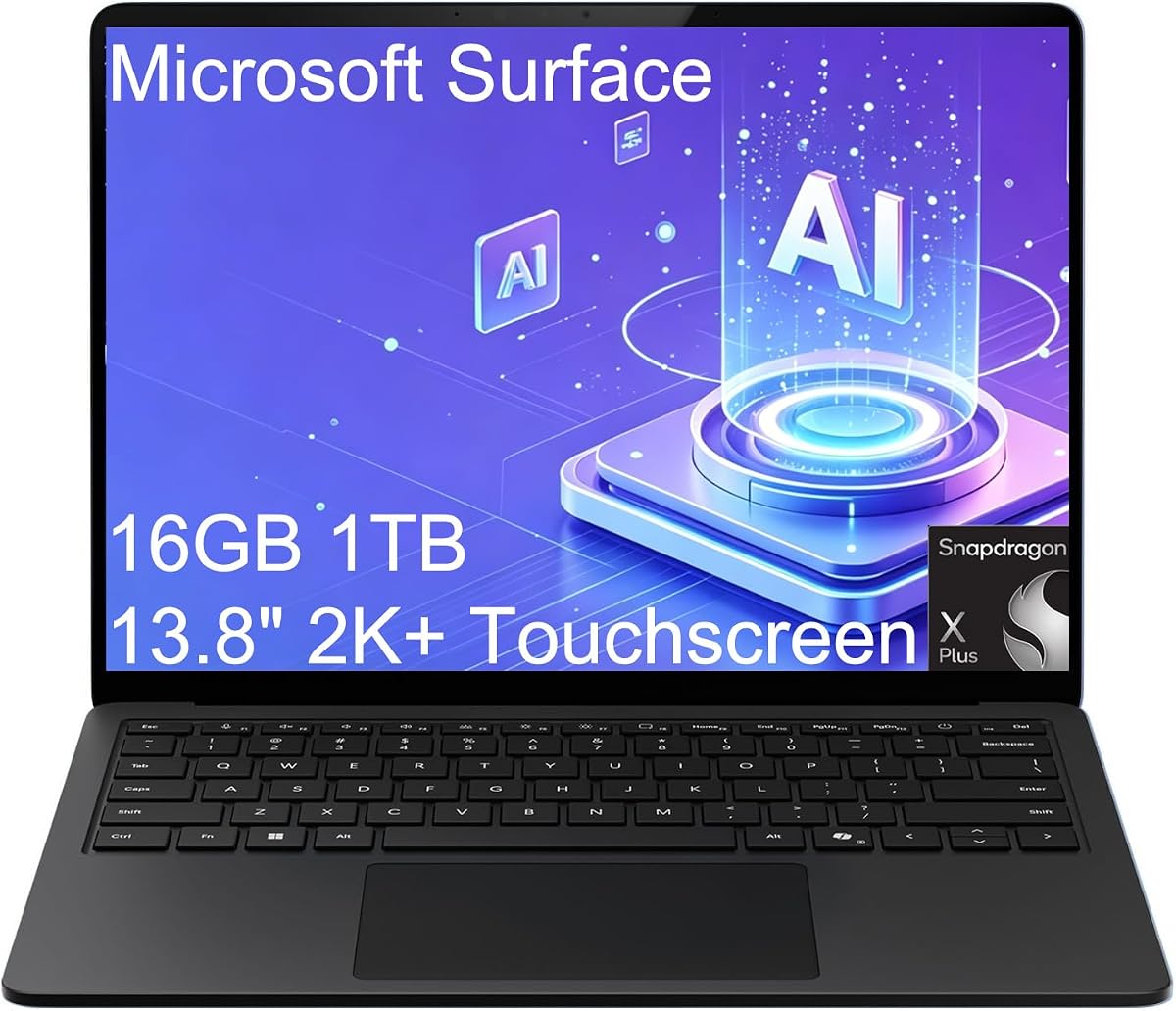
The Microsoft Surface Laptop 7 combines a 2.96-pound design, 20-hour stated battery life, and a high-quality 13.8-inch touchscreen. Its 4.3 rating suits a polished mobile design aimed at consultants, remote workers, and business users. The Snapdragon X Plus platform focuses on efficient productivity, fast startup, and smooth application switching.
We may earn a commission when you buy through this link, at no additional cost to you.
Its 2K+ display has a 1920-by-1800-class resolution, a 120Hz refresh rate, and touch support, while the 1080p front IR camera supports Windows Studio Effects such as framing and background blur. A dedicated Copilot key and an NPU rated up to 45 TOPS provide direct access to local AI features. The one-terabyte SSD and 16GB memory form a practical professional configuration.
Connectivity includes two USB4 Type-C ports, one USB-A port, Surface Connect, and a 3.5mm headphone jack. Those USB4 ports can support two external 4K monitors at 60Hz without a docking station. The port selection is good but less expansive than that of the larger Lenovo model. As with other Arm laptops, buyers should confirm support for essential line-of-business applications.
This Surface is an excellent recommendation for mobile professionals who value a large, smooth touchscreen in a light chassis. It is particularly useful for video meetings, document review, presentations, and travel. Those who want the longest possible advertised runtime may prefer an OmniBook, while users who need more legacy ports may favor another system.
At 2.96 pounds, the Surface minimizes the physical burden of carrying a full-size computer. Its 20-hour stated runtime is lower than the leading Snapdragon claims, but the combination of weight, fast charging, and efficient hardware remains compelling for business travel.
The high-resolution 120Hz panel is well suited to presentations, note-taking, media review, and frequent touch interaction. The IR camera and Studio Effects add practical value for remote meetings, while USB4 expands the display when a desk setup is available.
We may earn a commission when you buy through this link, at no additional cost to you.
The Lenovo Slim 7i Aura Edition is built for creators and professionals who value a vivid display, substantial memory, and minimal carrying weight. Its 2.82-pound chassis and 17-hour stated battery life make it one of the most mobility-conscious premium options here. The 4.3 rating reflects an attractive balance rather than class-leading endurance.
We may earn a commission when you buy through this link, at no additional cost to you.
The Intel Core Ultra 7 258V operates with integrated Intel Arc Graphics and a 47 TOPS NPU. With 32GB of LPDDR5X memory and a 1TB SSD, it offers ample capacity for creative applications and heavy multitasking. The 14-inch OLED touchscreen covers 100 percent of DCI-P3 and reaches as much as 600 nits, with TÜV Low Blue Light certification for late-night use.
Connectivity is unusually flexible for such a light laptop. It supports up to three external monitors through HDMI and Thunderbolt 4, includes two Thunderbolt 4 ports, USB-A, HDMI 2.1, and an SD card reader, and offers Wi-Fi 7 and Bluetooth 5.4. A 5MP IR webcam with a privacy shutter supports secure calls. The trade-off is a 17-hour maximum, which trails the 20-, 26-, 27-, 30-, 34-, and 41.75-hour claims in this list.
The Slim 7i Aura is an excellent recommendation for design-conscious mobile creators, programmers, and business professionals who need 32GB memory and an exceptional display. If endurance is the absolute priority, select a Snapdragon model; if portability, screen quality, memory, and monitor flexibility matter more, this Lenovo is especially compelling.
The 100 percent DCI-P3 OLED panel, high brightness, and touch support provide an excellent surface for visual work. Low Blue Light certification can also improve comfort during long evening sessions, although individual sensitivity varies.
Thirty-two gigabytes of memory provides comfortable headroom for demanding applications, large project files, and extensive multitasking. Support for three external monitors makes the laptop viable as a portable workstation when it reaches a desk.
We may earn a commission when you buy through this link, at no additional cost to you.
The HP OmniBook 3 14 OLED has the most ambitious battery claim in this guide: up to 41 hours and 45 minutes. Its 4.1 rating reflects a capable but not premium performance tier, while the 2K OLED display adds visual appeal. This model is the clearest choice for buyers who prioritize maximum advertised endurance over high-end processing power.
We may earn a commission when you buy through this link, at no additional cost to you.
The Snapdragon X X1-26-100 provides efficient performance, AI features, and Qualcomm Adreno graphics. Its 16GB LPDDR5X memory is adequate for mainstream productivity, and the 256GB PCIe Gen4 SSD offers fast access, though capacity is modest for large creative libraries. Wi-Fi 6E, a 1080p IR camera with HDR auto-switch, and the Copilot key support modern mobile work.
HP Fast Charge can restore the battery from zero to 50 percent in approximately 45 minutes. Otter.ai features can record audio, capture slides, transcribe conversations, and generate meeting summaries, making the system attractive for frequent meetings. As with every maximum battery claim, actual results will vary with display brightness, wireless activity, applications, and processor load.
The OmniBook 3 14 OLED is a compelling recommendation for students, commuters, and office users who want a travel-friendly computer with maximum stated endurance. Its 256GB storage and basic memory may require cloud storage or an external drive, and specialized Arm application support should be verified. As a battery-focused option, it leads the list on the published figure.
A stated runtime of up to 41 hours and 45 minutes offers the greatest potential freedom from outlets. This is especially relevant for long flights, full school or work days without reliable charging, and mobile users who cannot predict when they will find a socket.
The 1080p IR camera includes an HDR auto-switch designed to balance color and contrast under difficult backlighting. Otter.ai transcription and summary tools can improve meeting capture, while the efficient Snapdragon platform and rapid half-charge capability support a mobile workflow.
We may earn a commission when you buy through this link, at no additional cost to you.
Choosing a long-running laptop means balancing published endurance with processor efficiency, display power, portability, memory, software needs, and charging convenience. The most useful configuration is the one that can sustain your normal day rather than one with the largest headline number alone.
Start with the manufacturer's stated runtime, but check what activity the figure describes. The HP OmniBook 3 14 lists up to 41 hours and 45 minutes for local video playback, while the Dell XPS 13 9345 advertises up to 27 hours, the HP OmniBook 3 14 2K Touch lists up to 30 hours, and the HP OmniBook 5 14 lists up to 34 hours. Local video playback is often less demanding than a full day of browsing, calls, and office applications, so treat all maximum claims as comparative signals.
Prioritize a long published figure, then look for rapid charging. Models promising a 0-to-50-percent recovery in roughly 30 or 45 minutes can remain useful even when a full day's schedule is uncertain.
Modern mobile processors are designed to balance performance and power, but high-load workloads consume more energy. The Snapdragon X, X Plus, and X Elite platforms are built around efficiency, while the Core Ultra 7 systems also emphasize efficient operation. Traditional high-performance chips can offer familiar compatibility but may not deliver the same endurance under sustained pressure.
Choose the most efficient processor that comfortably handles your software. A highly efficient chip in an underpowered configuration is less useful than a slightly heavier system with enough processing capacity for your work.
Displays influence both weight and power consumption. A 13.4-inch or 13.8-inch laptop is easier to carry, while a 15.6-inch panel offers more workspace. OLED screens can deliver outstanding color and contrast, but they may use more power than standard LCD panels, especially at high brightness. A 2K touchscreen is attractive for media and creative work but can also add energy demand.
Match the panel to your priorities: choose efficiency for maximum runtime, a conventional LCD for balanced use, and OLED for visual quality with realistic battery expectations.
Battery life is not the only specification that affects daily satisfaction. Memory determines how comfortably you can run many applications at once, while storage determines how many projects, media files, and applications you can keep locally. The list ranges from 8GB RAM and 128GB storage to 32GB RAM and 1TB storage.
Aim for 16GB RAM in a general-purpose laptop, more for heavy creative or development work, and at least 512GB of storage if you expect to keep large files. Cloud storage can supplement capacity, but it requires dependable internet access.
A laptop that lasts all day on a charger is not automatically convenient to carry. Weight matters for commuting, flights, and walking between meetings. The Microsoft Surface Laptop 7 weighs 2.96 pounds, the Lenovo Slim 7i Aura weighs 2.82 pounds, and the HP OmniBook 3 14 2K Touch weighs 3.13 pounds. Larger 15.6-inch models generally feel more substantial in a bag.
Consider the complete travel setup, including charger, cables, and accessories. A lighter computer can improve mobility even when its battery claim is shorter than a larger alternative.
Several strong battery options use Qualcomm Snapdragon processors on Windows. Their efficiency and local AI capabilities are attractive, but specialized applications, device drivers, authentication tools, and older peripherals may behave differently. Intel-based models offer a more conventional compatibility path, which can matter for corporate IT environments.
Before buying an Arm laptop, verify every essential application and accessory. Pay particular attention to line-of-business software, conferencing tools, graphics packages, and hardware security keys.
Battery endurance is only part of mobile freedom. USB-C power delivery, fast charging, and a compact adapter can simplify a day away from an outlet. USB4 and Thunderbolt also improve the experience of connecting to displays, storage, and an Ethernet adapter. Models offering HDMI and multiple USB-A ports can be more convenient in shared offices and conference rooms.
Look for the port mix that matches your working environment. A modern USB-C charger is versatile, but having USB-A, HDMI, Ethernet, and card-reader access can reduce reliance on adapters.
Many current long-life laptops include dedicated neural processing units for local AI tasks. Supported features can include live captions, camera framing, background blur, image tools, and content retrieval. These capabilities are useful, but they should complement rather than replace good battery life, display quality, and conventional performance.
For professional use, consider security features such as an IR camera, Windows Hello, a privacy shutter, fingerprint reader, TPM, BitLocker, and enterprise management functions. The right balance depends on whether the computer is for home, school, business, or travel.
Start by tuning the laptop for a realistic mobile workload rather than relying on a maximum laboratory figure. Set screen brightness to a comfortable level, enable battery saver or a balanced power mode, reduce unnecessary background applications, and connect only the wireless networks and peripherals you need. On OLED models, using dark interface themes and adaptive brightness can help reduce power use.
Charge the system within the manufacturer's recommended temperature and ventilation conditions. Avoid leaving the computer in a hot car, direct sun, or a padded bag while it is charging, and use a compatible, reliable adapter. Fast charging is useful before a trip, but a complete charge cycle when the system is cool can help you begin long journeys with the most dependable available capacity.
Preserve battery health by avoiding prolonged states of near-total depletion when that is not necessary, keeping the operating system and firmware current, and allowing the computer to rest occasionally if it remains hot. For long workdays, adjust power settings to the task, carry the compact charger when possible, and use battery reports or system diagnostics to identify unusually rapid declines.
The HP OmniBook 3 14 OLED has the largest published figure, with up to 41 hours and 45 minutes of battery life. The HP OmniBook 5 14 follows at up to 34 hours, while the HP OmniBook 3 14 2K Touch lists up to 30 hours. These are maximum manufacturer claims, and actual runtime depends on workload, screen settings, wireless use, and battery condition.
No. Battery figures are often based on controlled activities such as local video playback, which can be less demanding than browsing, video calls, and office applications running together. Processor efficiency, display technology, brightness, network activity, and thermal behavior also affect the result. Compare the testing methods and use realistic battery reports when possible.
They can be excellent for common productivity, browsing, communications, and supported AI applications. However, specialized corporate tools, drivers, peripherals, and some engineering or creative programs may require additional compatibility checks. Intel-based alternatives provide a more traditional x86 environment when exact software support is essential.
An OLED panel offers superior contrast, color, and often response time, but it may consume more power than a standard LCD. The HP OmniBook 5 14 and HP OmniBook 3 14 OLED combine vivid displays with long published endurance, yet actual results will depend heavily on brightness. You can reduce consumption with adaptive brightness, dark themes, and conservative power settings.
For general browsing, office work, and streaming, 16GB of memory is a sensible modern baseline, while 8GB is better suited to lighter use. Storage needs depend on whether you keep large media or project files locally, but 512GB is more flexible than 128GB or 256GB. The Lenovo Slim 7i Aura's 32GB and 1TB configuration is particularly generous for heavy multitasking.
It can. A short charging break that restores 30 to 50 percent may provide several useful hours, depending on the workload. Fast charging is most valuable when paired with a compact, compatible USB-C adapter. It does not replace good battery capacity, but it adds flexibility when an outlet is available for only a short time.
Usually, yes. A 15.6-inch machine generally requires more bag space and may be more noticeable when carried, even if some models remain relatively light. Smaller 13.4-inch and 13.8-inch laptops, such as the Dell XPS 13 9345 and Microsoft Surface Laptop 7, are easier to carry during commutes and flights. Choose based on the balance between screen workspace and frequent mobility.
Confirm the exact configuration, operating system, processor, memory, storage, display, and battery claim on the current listing. Also verify that your required applications and accessories support the selected platform. For travel, consider charger size and port access; for work, review security, webcam, and external-display support before making the final choice.
The HP OmniBook 3 14 OLED leads on maximum stated endurance, while the HP OmniBook 5 14 combines a 34-hour claim with an OLED display and one-terabyte storage. The HP OmniBook 3 14 2K Touch offers a balanced 30-hour claim, a sharp touchscreen, and rapid charging. For premium Windows performance, the Dell XPS 13 9345 and Dell XPS 13 9350 provide 27- and 26-hour stated endurance with strong displays and business features.
Prioritize the combination that matches your day rather than the largest number in isolation. Lightweight design, efficient processing, fast charging, sufficient memory, and the display you actually want can matter more than a small difference in maximum runtime. Check application compatibility carefully for Snapdragon systems, and consider the more conventional Lenovo Intel configuration if professional software support is the deciding factor.
Before purchasing, confirm the current configuration and listed specifications because models, storage options, and marketplace listings can change. Also check current prices and warranty terms, since the value of a long-running laptop depends on more than its battery claim. With those checks completed, you can select the machine that best supports your longest, most demanding days away from an outlet.