
GIGABYTE B650 Eagle AX
4.6Editor score
AM5 processor support
Triple M.2 storage
Wi-Fi 6E networking
Our Gigabyte Motherboard guide compares 10 AM5, AM4, and Intel boards across power, PCIe, networking, memory, cooling, expansion, and overall build value.
A Gigabyte motherboard can anchor a high-performance gaming system, a content-creation workstation, or a dependable everyday PC, but the strongest choice depends on processor support, expansion needs, networking, memory, and cooling. The right board makes installation easier while providing enough power and flexibility for future upgrades.
This guide compares ten Gigabyte boards spanning AM5, AM4, and recent Intel platforms. We examined processor compatibility, VRM design, thermal features, M.2 and PCIe support, networking, USB connectivity, form factor, DIY conveniences, and user ratings, allowing each board to stand out in a clearly defined use case.
The selections reveal where each model fits: some prioritize straightforward value, others emphasize high-end networking and storage, and several target compact builds. Ratings and specifications can change as new revisions arrive, and current prices fluctuate, so verify the latest listing and hardware requirements before purchasing.
4.6Editor score

4.5Editor score

4.4Editor score
The comparison below covers ten Gigabyte motherboards for AMD and Intel systems, ranging from compact B760M and entry-level B550 models to feature-rich X870E, Z890, and ATX enthusiast boards. It highlights the platform, memory, storage, networking, power, and form-factor differences that matter most during a build.



The GIGABYTE B650 AORUS Elite AX combines broad AM5 processor support with a feature set that feels more complete than a basic entry board. Its 4.4 rating reflects a generally favorable user reception, while the 14+2+1 power design, 70A power stage, and eight-layer, two-ounce copper PCB target systems that need dependable power delivery without moving to the latest X-series chipset.
We may earn a commission when you buy through this link, at no additional cost to you.
Storage and expansion are the board's strongest practical advantages. It includes PCIe 5.0 support, a PCIe 5.0 NVMe x4 M.2 connection, front and rear USB-C, and a 2.5GbE network interface. Wi-Fi 6E means a complete new system does not necessarily require a separate wireless adapter, while the EZ-Latch and Q-Flash features can simplify assembly and firmware work.
The main trade-off is that the board is not as compact as a micro-ATX model, and RGB Fusion is unnecessary for anyone who prefers a restrained enclosure. Its stated thermal package includes a 6mm heatpipe, fully covered MOSFET heatsinks, an M.2 Thermal Guard, and PCIe Ultra Durable Armor. Users should still coordinate the actual case airflow and CPU cooler with the board layout rather than assuming the included heatsinks eliminate every thermal concern.
This is a strong recommendation for an AM5 gaming or general-purpose build that wants modern storage, fast wired networking, wireless connectivity, and robust power without stepping into the top tier. It is especially attractive when retaining the current processor, memory, and graphics card from an earlier AM5 system. For the newest platform features or a small case, compare it with the X870 AORUS Elite WIFI7 and the smaller B760M Gaming Plus WiFi.
The 14+2+1 design with 70A power stages gives the board more headroom than many conventional B650 models. Fully covered MOSFET cooling, a heatpipe, and an eight-layer copper PCB support stable operation with demanding Ryzen processors.
Wi-Fi 6E, 2.5GbE, PCIe 5.0, and a PCIe 5.0 x4 M.2 slot cover the most visible high-speed needs. This makes the board useful for fast downloads, modern gaming systems, and machines that may add high-bandwidth storage later.
We may earn a commission when you buy through this link, at no additional cost to you.
The GIGABYTE X870 AORUS Elite WIFI7 is a well-rounded choice for a new AMD system, pairing a 4.5 rating with extensive storage and current high-speed connectivity. It supports Ryzen 9000, 8000, and 7000 processors, making it a natural fit for a build centered on the latest AM5 hardware while retaining compatibility with earlier supported generations.
We may earn a commission when you buy through this link, at no additional cost to you.
Four M.2 slots are a meaningful advantage for creators and enthusiasts who want several NVMe drives, a PCIe 5.0 system, or a combination of fast boot storage and spacious secondary storage. Dual USB4, front and rear USB-C, a Sensor Panel Link, Wi-Fi 7, and 2.5GbE LAN create a well-rounded connection set. The 16+2+2 power design supports sustained performance under demanding processor workloads.
Thermal management is handled through VRM heatsinks and an M.2 Thermal Guard, while EZ-Latch reduces the physical effort associated with installing a graphics card and M.2 hardware. As with any board, the CPU cooler and case airflow remain essential parts of the thermal system. The ATX format also requires a suitably sized chassis, and the board does not support DDR4, so all system memory must be DDR5.
The board is recommended for a new AM5 gaming PC, a high-capacity workstation, or an enthusiast system that wants Wi-Fi 7, USB4, and numerous storage options. Compared with the B650 AORUS Elite AX, it offers a more modern platform and greater expansion potential. Buyers who need the absolute top power and storage tier can consider the X870E AORUS PRO ICE, while value-focused builders may prefer the B650 Eagle AX.
Four M.2 connectors allow a more ambitious storage layout than most mainstream boards. Users can combine a PCIe 5.0 drive with multiple PCIe 4.0 devices or separate operating-system, project, library, and scratch storage.
Wi-Fi 7 and 2.5GbE provide two capable networking paths. Wired connectivity suits sustained transfers and low-latency gaming, while Wi-Fi 7 offers flexibility for secondary systems, workspaces, and homes without convenient Ethernet access.
We may earn a commission when you buy through this link, at no additional cost to you.
The GIGABYTE X870E AORUS PRO ICE is the premium option in this group, with a 4.4 rating, a 16+2+2 power design, and 80A Smart Power Stages. It supports the full stated range of Ryzen 9000, 8000, and 7000 processors, giving buyers a powerful foundation for a new AM5 system intended to remain relevant across several platform generations.
We may earn a commission when you buy through this link, at no additional cost to you.
Its headline strengths are the four M.2 slots, PCIe 5.0 support, dual USB4, front and rear USB-C, Wi-Fi 7, and 2.5GbE. A creator could use the abundant storage for production files, scratch media, and a boot drive. A gaming system benefits from fast networking and current peripheral connectivity, while EZ-Latch helps simplify installation of expansion cards and solid-state drives.
Premium positioning does not eliminate the need to select the correct components. The board needs DDR5 memory, an AM5 processor, and an ATX case with suitable clearance. VRM and M.2 Thermal Guard features support cooling, but the processor's thermal envelope and the case's airflow still require attention. Users who value a simple white aesthetic should note that the ICE name identifies the board's design theme, while exact appearance and included accessories should be checked in the current listing.
This is the recommendation for an enthusiast who wants more power delivery, storage connectivity, and premium platform features than the B650 and X870 Elite models provide. It also works well for a high-end workstation with several NVMe devices. If the extra capability would not be used, the X870 AORUS Elite WIFI7 is a more balanced alternative, while the B650 Eagle AX is the practical budget-oriented selection.
The 16+2+2 design uses 80A Smart Power Stages, giving the board a stronger foundation for power-hungry Ryzen processors. It is a useful distinction for sustained demanding workloads, provided the cooling and power supply are matched appropriately.
Dual USB4, Wi-Fi 7, 2.5GbE, and four M.2 slots put important high-speed interfaces directly on the motherboard. That can reduce reliance on add-in cards and keep a carefully planned workstation or enthusiast PC tidy.
We may earn a commission when you buy through this link, at no additional cost to you.
The GIGABYTE Z890 AORUS Master targets builders using Intel Core Ultra Series 2 processors on LGA 1851. Its 4.2 rating is the lowest among the ten selected boards, but the specification sheet explains the ambition clearly: five M.2 slots, dual Thunderbolt 4, 10GbE LAN, Wi-Fi 7, PCIe 5.0, and an exceptionally substantial power design.
We may earn a commission when you buy through this link, at no additional cost to you.
The 18+1+2 configuration with 110A Smart Power Stages makes this board appropriate for high-end Intel systems where processor power delivery and sustained performance matter. VRM Thermal Armor and an M.2 Thermal Guard support cooling. Five M.2 connectors, however, require careful drive selection and case airflow because densely installed high-performance SSDs can generate meaningful heat.
Its practical distinction is the combination of Thunderbolt 4 and 10GbE networking. Thunderbolt 4 can support high-resolution displays, fast external storage, docks, and other peripherals, while 10GbE is especially relevant to creators moving large files over a local network. M.2 EZ-Latch, PCIe EZ-Latch, Wi-Fi EZ-Plug, and an EZ-Debug Zone make the board particularly friendly to builders who value straightforward installation and troubleshooting.
The Z890 AORUS Master is best for a premium Intel workstation or enthusiast gaming system that will actively use its Thunderbolt, networking, and storage capabilities. It requires DDR5 memory and a compatible LGA 1851 processor, and it should be paired with a case and power supply designed for high-end components. Buyers who do not need five M.2 slots or 10GbE may find the Z790 options more sensible.
Five M.2 connectors support a storage-heavy PC, from a dedicated operating-system drive to separate media and project disks. Thermal planning remains important because compact cases and tightly packed drives can restrict airflow.
Dual Thunderbolt 4 and 10GbE LAN provide powerful options for docks, external storage, high-resolution displays, and local file sharing. These interfaces are particularly useful in professional workflows that move data between a laptop, workstation, and shared storage.
We may earn a commission when you buy through this link, at no additional cost to you.
The GIGABYTE B650 Eagle AX is the value-focused AM5 recommendation, and its 4.6 rating is the highest among the products reviewed. It supports Ryzen 9000, 8000, and 7000 processors, accepts DDR5 memory, and provides three M.2 slots without moving to a more elaborate enthusiast board.
We may earn a commission when you buy through this link, at no additional cost to you.
One M.2 connector supports PCIe 5.0, while two additional slots use PCIe 4.0. That arrangement is enough for a fast system drive plus multiple secondary SSDs, and the 12+2+2 phase VRM provides a sound foundation for mainstream and enthusiast Ryzen processors. Wi-Fi 6E offers convenient wireless access, while Q-Flash and Smart Fan 6 contribute to a more manageable setup and maintenance process.
The clearest compromise is networking. Realtek GbE is suitable for ordinary home and office connections, but it is not the natural choice for a workstation that regularly transfers multi-terabyte files or wants maximum wired-network headroom. The board also uses a more conventional feature tier than the X870 and Z890 models in this guide, although its core storage support remains useful.
This motherboard makes sense for a new AM5 gaming system, a creator who needs several drives, or a builder who wants current-platform features without paying for every premium interface. It works especially well as a balanced foundation when paired with a capable processor and graphics card. Users prioritizing 2.5GbE, USB4, or more storage slots should look toward the X870 AORUS Elite WIFI7.
Three M.2 slots provide room for a fast PCIe 5.0 system drive and two PCIe 4.0 secondary drives. This is a useful balance for gaming libraries, creative projects, and applications that benefit from separate high-capacity storage.
Support for three Ryzen generations makes the board an accessible entry point into AM5. It also allows a builder to reuse a compatible DDR5 memory kit and supported processor instead of replacing the entire platform.
We may earn a commission when you buy through this link, at no additional cost to you.
The GIGABYTE B550 AORUS Elite AX V2 is a mature AM4 option for builders who want to support Ryzen 5000, 4000, and 3000 processors without moving to DDR5. It carries a 4.5 rating and includes a 12+2 digital power design, making it a capable choice for established gaming or general-purpose systems.
We may earn a commission when you buy through this link, at no additional cost to you.
Its 2.5GbE LAN is a notable feature for a board of this tier, while Wi-Fi 6 provides another network option. Storage consists of one PCIe 4.0 x16 slot, one PCIe 4.0 M.2 connector, and one PCIe 3.0 M.2 connector. Front USB-C, a reinforced PCIe slot, an M.2 Thermal Guard, and an advanced VRM heatsink cover the essentials for a modern build.
The limiting factor is platform longevity. AM4 hardware may be less attractive for a completely new system when current DDR5 platforms offer newer connectivity and broader upgrade options, and only two M.2 slots restrict storage-heavy configurations. On the other hand, it may be the more practical choice when a compatible Ryzen processor, DDR4 memory, and graphics card are already available.
This board is recommended for upgrading an existing AM4 computer, assembling a value-conscious Ryzen 5000 system, or retaining mature components that would otherwise be discarded. Q-Flash Plus allows BIOS updating without installing the processor, memory, or graphics card, and the integrated I/O shield simplifies case installation. For a new long-term AM5 build, however, the B650 Eagle AX offers a more current foundation.
The 2.5GbE interface is faster than basic gigabit Ethernet and gives a board at this level room for large local transfers and modern network equipment. It remains below the 10GbE option found on the Z890 AORUS Master.
Supporting Ryzen 3000 through 5000 processors and DDR4 memory lets builders preserve compatible components. That makes the B550 AORUS Elite AX V2 most compelling when an upgrade should improve reliability and features without replacing everything.
We may earn a commission when you buy through this link, at no additional cost to you.
The GIGABYTE Z790 Eagle AX serves builders using LGA 1700 processors, with listed support for Intel Core 14th, 13th, and 12th generation CPUs. Its 4.4 rating reflects a well-regarded general-purpose board, while the combination of DDR5, three M.2 slots, 2.5GbE, Wi-Fi 6E, and EZ-Latch gives it a versatile feature set.
We may earn a commission when you buy through this link, at no additional cost to you.
A twin 12+1+1 phase digital VRM solution provides the foundation for processor power delivery. Enlarged MOSFET heatsinks, an advanced thermal design, and an M.2 Thermal Guard help manage heat around the most active board components. Connectivity includes PCIe 5.0, NVMe M.2 storage, and USB 3.2 Gen 2×2 Type-C, making it suitable for a modern gaming PC or productivity system.
Its main limitation is the platform's remaining upgrade path. LGA 1700 is not the newest Intel socket represented here, and the board lacks the USB4 and Wi-Fi 7 interfaces offered by newer X870, X870E, and Z890 products. That does not prevent it from delivering a capable modern PC, but it can make long-term expansion less attractive than a current-platform alternative.
The Z790 Eagle AX is a sensible recommendation for an LGA 1700 build that values multiple M.2 slots, balanced connectivity, and a less extravagant design than the Z790 AORUS Elite AX. It can suit a new system if compatible components are available, but builders starting from scratch should compare it carefully against current-platform boards. Existing LGA 1700 owners are the most obvious audience.
Three M.2 connectors allow a fast primary drive and two secondary devices without requiring a separate expansion card. The mix of PCIe generations should be considered when matching drives to the system's performance needs.
Wi-Fi 6E, 2.5GbE, PCIe 5.0, and USB-C cover common gaming, productivity, and networking requirements. The absence of USB4 distinguishes it from the X870 and Z890 boards in this roundup.
We may earn a commission when you buy through this link, at no additional cost to you.
The GIGABYTE Z790 AORUS Elite AX is a feature-rich ATX board for LGA 1700 systems. It supports Intel Core 14th, 13th, and 12th generation processors and carries a 4.4 rating. Compared with the Z790 Eagle AX, it adds a stronger 16+1+2 power configuration, 70A power stages, and four M.2 slots, making it the more enthusiast-oriented of the two.
We may earn a commission when you buy through this link, at no additional cost to you.
Thermal protection includes an M.2 Thermal Guard III, fully covered MOSFET heatsinks, PCIe Ultra Durable Armor, and a six-layer PCB. The board also includes Wi-Fi 6E, 2.5GbE, USB 3.2 Gen 2×2 Type-C, Q-Flash, EZ-Latch, and RGB Fusion. Together, these features support a visually coordinated, high-speed gaming build or a capable workstation.
Users should note that the listed four M.2 connectors use PCIe 4.0 x4 links, even though PCIe 5.0 is included elsewhere in the expansion and connectivity design. This board is therefore strong in capacity and overall flexibility, but it is not the same as offering four PCIe 5.0 M.2 slots. The LGA 1700 platform also represents an older generation than the newest Intel options in the guide.
This is the better Z790 choice for a builder who wants more power delivery, more storage connections, and the AORUS feature set. It is recommended for an Intel gaming system with several NVMe drives or for an enthusiast who values thermal armor and easy installation. New builders seeking the newest platform should inspect the Z890 AORUS Master, while LGA 1700 owners can choose this model to maximize existing platform compatibility.
The 16+1+2 configuration and 70A power stage give the board a stronger foundation for demanding Core processors. Fully covered MOSFET heatsinks and PCIe armor complement the electrical design with physical protection.
Four M.2 slots make this a practical choice for systems with several NVMe drives. Users should plan cooling around the populated slots, particularly when a case has limited airflow or multiple high-power drives are installed.
We may earn a commission when you buy through this link, at no additional cost to you.
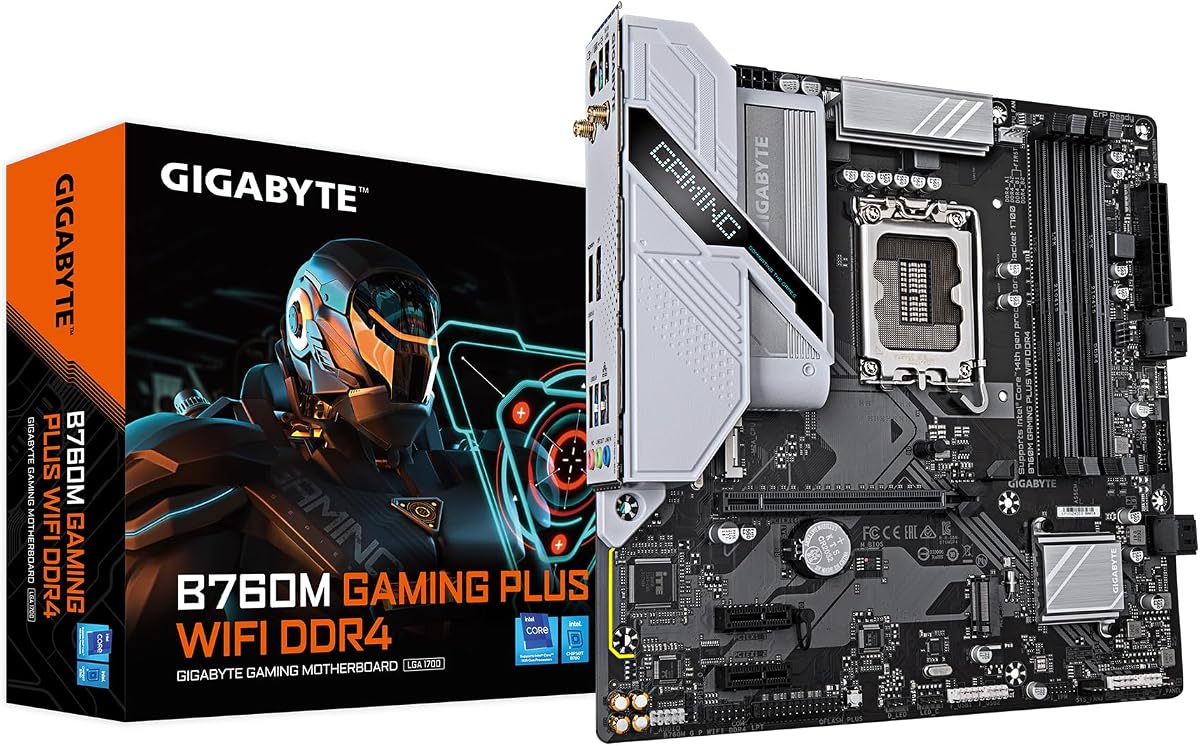
The GIGABYTE B760M Gaming Plus WiFi is the compact option for a smaller LGA 1700 system. It supports Intel Core 14th, 13th, and 12th generation processors, accepts DDR4 memory across four DIMM slots, and has a 4.3 rating. Its micro-ATX size makes it easier to pair with compact cases than the full-size boards in this guide.
We may earn a commission when you buy through this link, at no additional cost to you.
The feature set covers the essentials of a modern gaming build: a reinforced PCIe 4.0 x16 slot, two PCIe 4.0 M.2 connectors, a front USB 3.2 Gen 1 Type-C header, Wi-Fi, and 6GbE LAN. A hybrid digital 4+1+1 power design, enlarged MOSFET heatsinks, Q-Flash Plus, and EZ-Latch add practical conveniences without shifting into a premium component tier.
The two-M.2 limit and smaller power design are the main constraints. Storage-heavy users may need a different board, while demanding processors benefit from stronger VRM stages and more comprehensive cooling. The board remains appropriate for mainstream CPUs and gaming configurations, and the compact format can make airflow planning easier because there is less motherboard area to obstruct case ventilation.
This motherboard is recommended for a small gaming PC, an office or home system with occasional gaming, or a builder who already owns DDR4 memory and wants to reduce case size. Existing LGA 1700 owners can reuse compatible processors and memory. For a full-size or storage-heavy system, the Z790 AORUS Elite AX or AMD B650 AORUS Elite AX provides more room and expansion.
The micro-ATX format can reduce the space required for the motherboard, making the board useful in smaller enclosures. Users should still check GPU length, cooler clearance, and the positions of M.2 slots and rear ports.
Four DDR4 DIMM slots allow compatible existing memory to be retained. That can be useful for a practical upgrade, although new AM5 and current Intel platforms increasingly center their product line around DDR5.
We may earn a commission when you buy through this link, at no additional cost to you.
The GIGABYTE B550 Gaming X V2 is a straightforward AM4 board for Ryzen 5000, 4000, and 3000 processors. Its 4.5 rating shows strong user reception, and the combination of DDR4 support, a 10+3 digital power design, and Q-Flash Plus makes it a practical foundation for a conventional gaming PC or an upgrade that retains existing components.
We may earn a commission when you buy through this link, at no additional cost to you.
Storage includes one PCIe 4.0 M.2 and one PCIe 3.0 M.2 connector, which is sufficient for a primary system drive and one secondary drive. The primary graphics slot uses PCIe 4.0, while front USB-C and a mix of USB Type-A ports cover typical peripheral needs. A VRM heatsink, integrated I/O shield, and Easy Mode BIOS interface simplify setup and maintenance.
Networking is the main specification-level compromise. Basic GbE is fine for everyday browsing, gaming, and office use, but builders who routinely move large files over a local network should consider a board with 2.5GbE. The two-drive M.2 limit and 10+3 power phase also make this model less appropriate for heavily expanded workstations or the most demanding top-end processors.
This is the recommendation for a straightforward AM4 build using supported DDR4 memory, particularly one that can reuse a Ryzen processor and graphics card. It also works for owners of an earlier AM4 system seeking a motherboard refresh and BIOS convenience. A new platform with long-term expansion in mind is better served by AM5, while the B550 AORUS Elite AX V2 is the stronger choice when 2.5GbE networking matters.
The board supports three Ryzen generations and four DDR4 DIMM slots, giving builders flexibility to reuse compatible parts. That makes it practical for conventional gaming, home, and office systems that do not require the newest platform interfaces.
Q-Flash Plus can update the BIOS without installing the processor, RAM, or graphics card. The integrated I/O shield and refreshed Easy Mode interface reduce common assembly and configuration friction.
We may earn a commission when you buy through this link, at no additional cost to you.
The best Gigabyte motherboard is the one that matches the chosen processor, memory, case, expansion devices, and networking needs without paying for unused features. Socket support should come first, followed by power delivery, storage, connectivity, thermal design, and the practical features that make installation and maintenance easier.
The motherboard socket determines which processors can be installed, and that choice should be made before evaluating graphics, storage, or networking. AM5 models in this guide support the stated Ryzen 9000, 8000, and 7000 families, while the AM4 boards cover Ryzen 5000, 4000, and 3000 processors. Intel options use either LGA 1700 or the newer LGA 1851. A processor upgrade is possible only when both the socket and chipset are compatible, and some advanced chipset features depend on specific processor families.
Choose the socket around your processor and desired upgrade path, not just the headline model name. AM5 offers the broadest future-looking platform in this group, while AM4 can be valuable when compatible parts are already owned. LGA 1700 remains suitable for the supported Intel generations, but LGA 1851 is the more current choice for a new Intel Core Ultra Series 2 system.
DDR4 and DDR5 are not interchangeable, so memory type must match the board and processor memory controller. Every model here provides four DIMM slots, but AM5 and LGA 1700 boards use DDR5, while the B550 and B760M boards use DDR4. Consider the number of sticks, supported memory speed profiles, and whether the board offers AMD EXPO or Intel XMP support. More slots do not guarantee better performance, and populating every slot can make memory training or stability management more complicated.
Use the board's supported memory generation as a non-negotiable filter. For a new build, DDR5 models offer a more current direction, while DDR4 can reduce component replacement when upgrading an existing system. Check the CPU's supported memory types and the board's QVL or manufacturer guidance when using high-speed kits.
The phase count and amperage of the VRM indicate the board's power-delivery tier, but the complete thermal system matters just as much. The guide ranges from a 4+1+1 hybrid design in the compact B760M board to 18+1+2 power with 110A Smart Power Stages in the Z890 AORUS Master. Enlarged heatsinks, heatpipes, thermal armor, and M.2 Thermal Guard features help transfer heat away from sensitive components. A robust board for a high-power processor should still be paired with a suitable CPU cooler, quality power supply, and unobstructed case airflow.
Match the VRM tier to the processor rather than choosing the largest number available. Mainstream systems are well served by mainstream designs, while sustained rendering, overclocking, or high-end processors justify stronger stages and extensive cooling. Always verify case clearance as well, because a large motherboard heatsink can conflict with tall air coolers.
M.2 slot count determines how much NVMe storage can be installed without adding a PCIe card. The list spans two to five M.2 connectors, with PCIe 5.0 appearing on several of the most current boards. A machine with one fast boot drive and one or two secondary drives needs less than a workstation archiving projects across several high-capacity SSDs. Slot generation, physical spacing, and cooling are just as important as the raw count, particularly when a graphics card or large M.2 heatsink is installed.
Choose at least one M.2 connector for the operating system and add slots according to your game library, project files, and scratch-storage needs. PCIe 5.0 can benefit compatible high-speed SSDs, but every drive does not need the newest interface. A balanced configuration can place the fastest drive in the primary slot and use PCIe 4.0 for secondary storage.
Network options range from basic gigabit Ethernet to 10GbE, with Wi-Fi 6, 6E, and 7 appearing across the lineup. Gigabit Ethernet is suitable for everyday internet access and many online games, while 2.5GbE offers a useful middle ground for high-speed internet service, local file transfers, and large downloads. Wi-Fi adds flexibility but does not replace the consistency of a wired connection. Boards with 6GbE or 10GbE also demand attention to the router, switch, and network infrastructure.
Choose networking based on the devices in the system and the environment. A compact or office PC may be perfectly served by gigabit Ethernet, a gamer may appreciate 2.5GbE, and a professional moving large files locally will benefit from 10GbE. Check that the included wireless solution and antenna hardware meet the user's needs before finalizing a purchase.
The number and type of USB ports can determine which accessories require adapters. Common USB Type-A ports remain essential for keyboards, mice, storage, and legacy peripherals, while Type-C improves compatible phone charging, drive enclosures, and front-panel access. Newer premium boards add USB4, which supports a broader range of high-bandwidth peripherals and docks. The Z890 AORUS Master stands apart with dual Thunderbolt 4 connectivity, while the X870 boards also list USB4.
Inventory the peripherals you already own and the ports your case provides before choosing a board. Pay particular attention to front USB-C header compatibility, display outputs for integrated graphics, and the number of rear ports. A modern interface is useful, but it should complement rather than dictate the build when none of your devices require it.
ATX boards offer more expansion and often more elaborate cooling, while micro-ATX can suit smaller cases. The B760M Gaming Plus WiFi is the only micro-ATX selection, making it relevant to compact builds, but every board still requires careful clearance planning. Check CPU-cooler height, graphics-card length, rear-panel alignment, and M.2 heatsink space. Even within one form factor, chipset heatsinks and VRM shrouds can vary in size.
Choose the board after the case is known, not merely by desired form factor. Confirm that the board fits, that the power supply supports the planned graphics card and processor, and that the selected cooler does not overlap large motherboard heatsinks. Small systems benefit from deliberate airflow planning around both CPU and storage.
Features such as Q-Flash, Q-Flash Plus, EZ-Latch, EZ-Debug Zone, and integrated I/O shields can save time and reduce installation errors. Q-Flash Plus is particularly useful when updating firmware before the full system is assembled. EZ-Latch mechanisms on compatible M.2 and PCIe slots reduce the need to secure small components with individual screws, while debug aids make initial troubleshooting more convenient. The quality of the BIOS interface and available monitoring options also matter for long-term tuning.
These conveniences do not improve raw performance, but they can make assembly and maintenance easier. Pay attention to them when comparing otherwise similar boards, especially if this is a first build. If you are comfortable with a more involved process, prioritize platform longevity, connectivity, and cooling over minor installation aids.
Begin by reading the board's manual and checking the CPU, cooler, memory, and graphics card installation procedures. Install the processor and memory according to the manual, attach the correct CPU power connectors, and update the BIOS when the processor is supported before installing a graphics card if Q-Flash Plus permits it. Confirm that every power cable is seated fully and that no components or packaging remain between the cooler and motherboard.
After assembling the system, enter the BIOS to confirm the processor and memory are recognized, set the correct date and time, and enable features such as EXPO or XMP only if the memory kit and platform are designed for them. Use a monitoring application to check temperatures and fan behavior under realistic workloads. If the system is unstable, increase memory frequency gradually rather than forcing an unsupported setting, and save a working BIOS profile after successful configuration.
Maintain airflow by keeping the intake and exhaust paths clear, cleaning dust from heatsinks and filters, and confirming that the CPU cooler and case fans operate at sensible speeds. Monitor storage temperatures, particularly when several M.2 drives fill a densely populated board. Update the BIOS when Gigabyte provides relevant fixes or improvements, and use Q-Flash or Q-Flash Plus according to the manual. For any major hardware change, shut down, disconnect power, discharge the system, and avoid working on the board while it is energized.
Yes. The supplied product information states that the B650 AORUS Elite AX supports AMD Ryzen 9000, Ryzen 8000, and Ryzen 7000 series processors. It uses AM5 and requires DDR5 memory. Buyers should still check the current manufacturer support list and BIOS guidance before installation, particularly when pairing the board with the newest processors.
The GIGABYTE Z890 AORUS Master has five M.2 slots, the highest count among the reviewed models. It also offers dual Thunderbolt 4 and 10GbE LAN, making it the most connectivity-focused board here. That capability is most relevant to creators, high-end enthusiasts, and users who expect to add multiple NVMe drives.
Choose AM4 when a compatible Ryzen 5000, 4000, or 3000 processor and DDR4 memory are already owned or when minimizing component replacement is important. Choose AM5 for a new system that should support a broader current platform path and newer connectivity options. The platform decision should account for the processor, memory, graphics card, and other components already in hand.
No. The B650 Eagle AX, B650 AORUS Elite AX, X870 AORUS Elite WIFI7, X870E AORUS PRO ICE, Z890 AORUS Master, Z790 Eagle AX, Z790 AORUS Elite AX, and B760M Gaming Plus WiFi include wireless connectivity in their listed specifications. The B550 AORUS Elite AX V2 lists Wi-Fi 6, while the B550 Gaming X V2 lists GbE LAN and Bluetooth 5.3 rather than a clearly listed wireless network feature.
Q-Flash is Gigabyte's BIOS flashing utility, while Q-Flash Plus adds the ability to update the BIOS with a dedicated flash button and USB drive, without requiring the processor, memory, or graphics card to be installed. Q-Flash Plus is especially convenient during a first build because firmware can be updated before the rest of the system is assembled.
One fast M.2 drive is enough for the operating system, applications, and many games, while two slots add convenient space for large game libraries or separate project storage. Users creating video libraries, maintaining virtual machines, or working with large scratch datasets may prefer three to five slots. Thermal management and case clearance become increasingly important as more high-performance drives are installed.
Only if the selected motherboard does not include the wireless standard you need. Several Gigabyte boards in this guide list Wi-Fi 6, Wi-Fi 6E, or Wi-Fi 7, while the B550 Gaming X V2 does not clearly list wireless networking. Even when Wi-Fi is included, check the antenna hardware, operating-system support, router compatibility, and whether a wired connection may be preferable.
No. AM5 boards require DDR5 memory, and physical notch placement generally prevents DDR4 modules from fitting. The B550 and B760M models listed here use DDR4, while the AM5 and LGA 1700 boards use DDR5. Confirm the memory standard and processor support before buying or reusing a memory kit.
The GIGABYTE B650 Eagle AX is the most practical value selection for a new AM5 build, combining strong user ratings with three M.2 slots, Wi-Fi 6E, and PCIe 5.0. The X870 AORUS Elite WIFI7 is the more complete modern AM5 recommendation because it adds four M.2 slots, USB4, Wi-Fi 7, and a stronger power design. For premium power delivery, the X870E AORUS PRO ICE stands out with 80A Smart Power Stages and extensive high-speed connectivity.
Prioritize processor and memory compatibility first, then match the board to your storage, networking, and case requirements. A builder who needs many NVMe drives or Thunderbolt may favor the Z890 AORUS Master, while an AM4 upgrade can use the B550 AORUS Elite AX V2 or B550 Gaming X V2. Compact systems have a clear option in the micro-ATX B760M Gaming Plus WiFi, and the Z790 models provide a capable route into LGA 1700.
Finally, check the current specification list, supported hardware, warranty information, and latest user feedback before ordering. Board revisions and software support can evolve, and current prices change over time. Comparing the final motherboard against the exact processor, memory, cooler, case, graphics card, and network equipment will prevent expensive incompatibility and help the selected Gigabyte motherboard deliver the intended build.