
UGREEN Nexode Air 65W
4.8Editor score
Compact 65W GaN design
Includes 3.3-foot USB-C cable
Supports broad USB-C devices
Compare 10 Gan Fast Chargers for MacBook Air in our expert guide, evaluating power, portability, ports, displays, safety, and everyday laptop charging needs.
Gan fast chargers for MacBook Air combine efficient power delivery with a compact design, making them useful for travel, office desks, and multi-device charging. The right charger should supply adequate laptop power without slowing down when your phone, tablet, or headphones need charging at the same time.
We compared the featured chargers using their listed power ratings, port configurations, dimensions, safety features, compatibility claims, included cables, and customer ratings. The guide covers single-port, three-port, four-port, and five-port options suitable for different MacBook Air generations and charging routines.
Each review identifies the product's strongest feature, explains its trade-offs, and shows who may benefit from it. Product availability, configurations, and technical details can change, so readers should verify the current listing and confirm their MacBook Air's charging requirements before purchasing.
4.8Editor score

4.7Editor score

4.6Editor score
The table below compares ten Gan fast chargers across output, port count, portability, displays, and bundled accessories, making it easier to match a charger to a specific MacBook Air and travel setup.



The UGREEN Nexode Air 65W is a compact single-port GaN charger with a 4.8 customer rating. It is aimed at travelers and MacBook Air owners who want a straightforward laptop charger without a large power brick, and its listed dimensions of 1.22 by 1.30 by 1.59 inches make it particularly easy to pack.
We may earn a commission when you buy through this link, at no additional cost to you.
Its strongest features are portability, broad compatibility, and the included 3.3-foot USB-C cable. The charger supports fast-charging protocols and is listed as suitable for MacBook Air models as well as numerous phones, tablets, handheld gaming devices, and accessories. Foldable prongs, a frosted port panel, engraved grip ridges, and multiple temperature and electrical protections add practical refinement.
The main limitation is its single USB-C port. Unlike a three-port wall charger, it cannot charge a MacBook Air, phone, and earbuds simultaneously, so users with several devices may need to reconnect cables or retain another adapter. A 65W output also places it below the highest-output options in this list, although it remains well suited to many MacBook Air charging needs.
This is an attractive choice for someone who values a tiny charger, a bundled cable, and one-device-at-a-time simplicity. It is particularly compelling for travel, short commutes, and desk setups where a single reliable USB-C connection is enough. Buyers who regularly charge several devices together should instead consider one of the multiport models.
The foldable prongs and very small housing make this charger easier to carry than a full-size laptop power adapter. It should fit comfortably into a pocket, tech pouch, or small carry-on without requiring a separate plug adapter in locations that use compatible outlets.
The listed device support extends well beyond MacBook Air to cover common USB-C phones, tablets, and accessories. That makes it a versatile single charger when the travel bag also contains several smaller personal devices.
We may earn a commission when you buy through this link, at no additional cost to you.
The Anker 100W Max USB C Charger combines 100W single-port capability, three charging ports, and an integrated display. Its 4.7 rating and broad feature set make it a strong all-around option for MacBook Air users who also want to keep a phone, tablet, or pair of earbuds powered from one wall adapter.
We may earn a commission when you buy through this link, at no additional cost to you.
The display reports charging status, temperature, and port performance, offering more visibility than a charger with simple indicator lights. Anker's low-current mode automatically adjusts an output when a connected device remains at or below 5W for one minute, which is useful for accessories such as earbuds. A foldable plug and dimensions of 2.72 by 2.17 by 1.34 inches support travel, while the included 4.9-foot cable reduces setup friction.
Its maximum 100W output is generous for a MacBook Air and provides headroom for demanding charging sessions, although some models do not need the full rating. The three ports are also more useful than a single-port design, but users should still expect the total available output to be intelligently divided when multiple devices are connected.
This charger is well suited to people who want one adapter for a laptop and several smaller devices without sacrificing detailed charging information. It balances capacity, portability, monitoring, and accessories better than many alternatives, making it an easy recommendation for a general-purpose home or travel setup.
The high-definition display gives users immediate information about status, temperature, and port performance. That visibility is particularly useful when testing different port combinations or checking whether a cable and device are negotiating the intended power level.
Three ports allow a MacBook Air to charge alongside a phone and low-power accessory. This reduces outlet clutter and makes the charger more practical for a work desk, hotel room, or shared charging station.
We may earn a commission when you buy through this link, at no additional cost to you.
The Anker 67W GaN Wall Charger is a three-port model designed to replace a larger laptop charger while supporting a broader mix of devices. It has a 4.6 rating and is listed as 51% smaller than the original 67W MacBook charger, making it a logical option for users who want moderate power and multiple connections.
We may earn a commission when you buy through this link, at no additional cost to you.
Two USB-C ports and one USB-A port allow a MacBook Air, phone, and older USB-A accessory to charge together. A single connected device can receive up to 67W, while two-port combinations can deliver as much as 65W. ActiveShield 2.0 adds built-in protections, and the compact GaN construction helps reduce the bulk associated with a conventional power brick.
This model does not include a cable, which means users who do not already own a suitable USB-C cable will need to purchase one separately. It also lacks the information display found on the 100W and 140W Anker options. Those omissions make it less informative, though the core charging arrangement remains practical and uncluttered.
The Anker 67W charger is best for MacBook Air owners who need more than one port but do not require the very high power available from premium desktop-class adapters. It is especially suitable for travel and office use where carrying a small collection of separate phone and laptop cables is inconvenient.
The combination of two USB-C ports and one USB-A port supports newer devices without abandoning older accessories. This mixed layout can reduce the need to carry multiple charger types during a work trip.
The stated reduction in size compared with an original 67W MacBook charger supports easier packing. It also leaves more room around the outlet, which helps in crowded desks and older wall sockets.
We may earn a commission when you buy through this link, at no additional cost to you.
The UGREEN Nexode 100W is a four-port GaN charger intended for users who regularly connect a MacBook Air to several other USB-C devices. It carries a 4.6 rating and offers 100W to a single USB-C device while providing three USB-C ports and one USB-A port for a mixed-device setup.
We may earn a commission when you buy through this link, at no additional cost to you.
UGREEN states that a 100W 5A charging cable connected to one USB-C port is required to reach the full 100W speed. The listing also notes that Dell and Lenovo laptops may charge at reduced speed because of their charging protocols, a useful caveat for buyers who may use more than one laptop brand.
Dynamic temperature sensors and an intelligent PWM chip adjust power output to safeguard connected devices. The foldable plug and GaN construction make the unit small enough to hold in one hand, which supports the travel-focused design. Its main drawback is that maximum speed depends on both the cable and the connected device, not simply on the charger's headline wattage.
This is a strong choice for a MacBook Air user who wants four ports and 100W of potential laptop power without moving to a larger premium model. It is best for buyers who understand charging protocols, use quality cables, and want a versatile desktop and travel charger.
Four connections allow the charger to serve a MacBook, phone, tablet, and USB-A accessory at once. The result is less outlet congestion and fewer separate adapters on a shared desk.
The 100W rating is not automatically achieved with every USB-C cable. Buyers should use a compatible 5A, 100W cable when they want the charger's full single-port capability.
We may earn a commission when you buy through this link, at no additional cost to you.
The Anker Nano 100W MacBook Charger delivers up to 100W from either USB-C port and adds a third port for smaller devices. Its 4.3 rating is the lowest among the featured products, but the underlying feature set remains capable for users who prioritize portable laptop power over advanced monitoring.
We may earn a commission when you buy through this link, at no additional cost to you.
GaN II technology supports a smaller design, and the charger is listed as 34% smaller than an original 96W MacBook power brick. A five-foot USB-C cable with an E-marker chip is included, and its stated 5,000-plus bend lifespan is useful for a cable that will be moved between travel bags, desks, and outlets.
The product can charge a MacBook, iPhone, and AirPods together, making it a practical travel companion. However, without a display, users cannot inspect real-time port allocation or temperature information. The relatively modest customer rating may also encourage more cautious buyers to compare recent customer feedback and warranty terms before buying.
This charger makes sense for travelers who want strong single-device output in a relatively small package. It is less suitable for buyers who require a detailed display or want the highest power available for large laptops, but it remains a capable high-power option for typical MacBook Air workflows.
The stacked GaN II design reduces size without lowering the stated 100W output. That balance is useful for travelers who want to avoid carrying a full-size Apple-style power adapter.
The bundled five-foot cable includes an E-marker chip and is built for frequent bending. It can serve as the primary laptop cable rather than a disposable extra that must be replaced immediately.
We may earn a commission when you buy through this link, at no additional cost to you.
The Anker Nano II 65W is a minimalist, single-port GaN II charger built around portability. Its 4.7 rating is among the strongest in the group, while the listed size is 58% smaller than an original 61W USB-C charger. It is a natural fit for travelers who charge one device at a time.
We may earn a commission when you buy through this link, at no additional cost to you.
Anker states that the charger can charge a 2020 MacBook Air in less than two hours and a 13-inch MacBook Pro at full speed. It also supports Samsung Super Fast Charging and can deliver up to three times faster than an original 5W iPhone charger for compatible devices. The foldable plug prevents the prongs from catching on other items in a bag.
The biggest practical limitation is the absence of a bundled cable. A MacBook Air owner may already have a suitable USB-C cable, but a first-time charger buyer may need an additional purchase. The single port also rules out simultaneous charging, and the 65W maximum does not provide as much performance headroom as the 100W and 140W alternatives.
This charger is best for a carry-on, weekend bag, or minimal desk where every accessory matters. It is especially attractive for owners of a MacBook Air model with modest power requirements who value a small footprint, a strong customer rating, and proven GaN II efficiency over multiport convenience.
The compact housing and folding prongs keep the adapter easy to pack. A user traveling with a MacBook Air and a single phone can carry one power brick and one cable instead of several device-specific adapters.
The listed charging performance covers a 2020 MacBook Air, a 13-inch MacBook Pro, and compatible phones. PPS support also benefits phones designed for adjustable fast-charging protocols.
We may earn a commission when you buy through this link, at no additional cost to you.
The INIU 65W Laptop Charger is a three-port travel kit that pairs a compact GaN-style wall block with a five-foot nylon-braided USB-C cable. Its 4.6 rating and clear port-allocation information make it an appealing option for MacBook Air users who want a complete laptop charging setup.
We may earn a commission when you buy through this link, at no additional cost to you.
The primary USB-C port delivers 65W when used alone. With two ports, the charger can distribute 45W and 20W across its USB-C connections, 45W and 18W across USB-C and USB-A, or up to 15W across the secondary USB-C and USB-A pair. When all three ports operate, the listed distribution is 45W plus a shared 15W.
Temperature checks occur 1,000 times per second according to the product information, helping reduce heat-related interruptions. Foldable prongs protect the contacts while packed, and the charger is listed as nearly 30% smaller than Apple's 70W charger. The included braided cable adds useful reach for desks, bedsides, hotel outlets, and travel locations.
This model is well suited to buyers who want a cable and multiport charger in one package. It is less suitable for high-end MacBook Pro users or anyone expecting uninterrupted 65W output from every port simultaneously, but for a typical MacBook Air it offers a compact and thoughtfully bundled setup.
The published port combinations make it easier to understand what each device will receive. Buyers can plan for a MacBook on the primary port and smaller accessories on the remaining outputs without guessing.
The included five-foot nylon-braided cable is designed for repeated bending and pulling. Its extra length is helpful when the wall outlet is inconveniently positioned or the laptop is used away from a desk.
We may earn a commission when you buy through this link, at no additional cost to you.
The Anker Prime 160W is the most powerful premium option in this roundup, with 160W total output and up to 140W from one port. Its 4.6 rating reflects a feature set aimed at demanding mobile workstations, including a smart display, app-based controls, and enough capacity for a large laptop alongside two smaller devices.
We may earn a commission when you buy through this link, at no additional cost to you.
Anker states that the 140W output remains consistent without derating during long work sessions or heavy loads. The charger can power a 16-inch MacBook Pro, iPhone, and 11-inch iPad Pro with a listed distribution of 140W, 35W, and 35W. PowerIQ 5.0 handles the smart distribution, while AnkerSense View allows monitoring and mode changes through the display or Bluetooth-connected app.
No cable is included, so buyers should plan to use an existing compatible USB-C cable or add one separately. The extreme output also exceeds the needs of many MacBook Air owners, making this less about necessity and more about having substantial power for a broad device collection. Its premium design is compact, but it is not as pocket-oriented as the smallest single-port models.
This charger is ideal for a professional who charges several high-power devices, travels with larger computers, or wants detailed control over power behavior. It is overkill for light travel, but for a permanent desk setup it can replace several conventional chargers while offering better visibility and flexibility.
The 160W total capacity leaves considerable headroom for a laptop and multiple accessories. Smart distribution can support a large notebook at 140W while continuing to charge a phone and tablet at useful lower levels.
AnkerSense View turns the integrated screen into a more interactive charging dashboard. Custom modes through Bluetooth add control that is unnecessary for basic charging but valuable in a managed multi-device setup.
We may earn a commission when you buy through this link, at no additional cost to you.
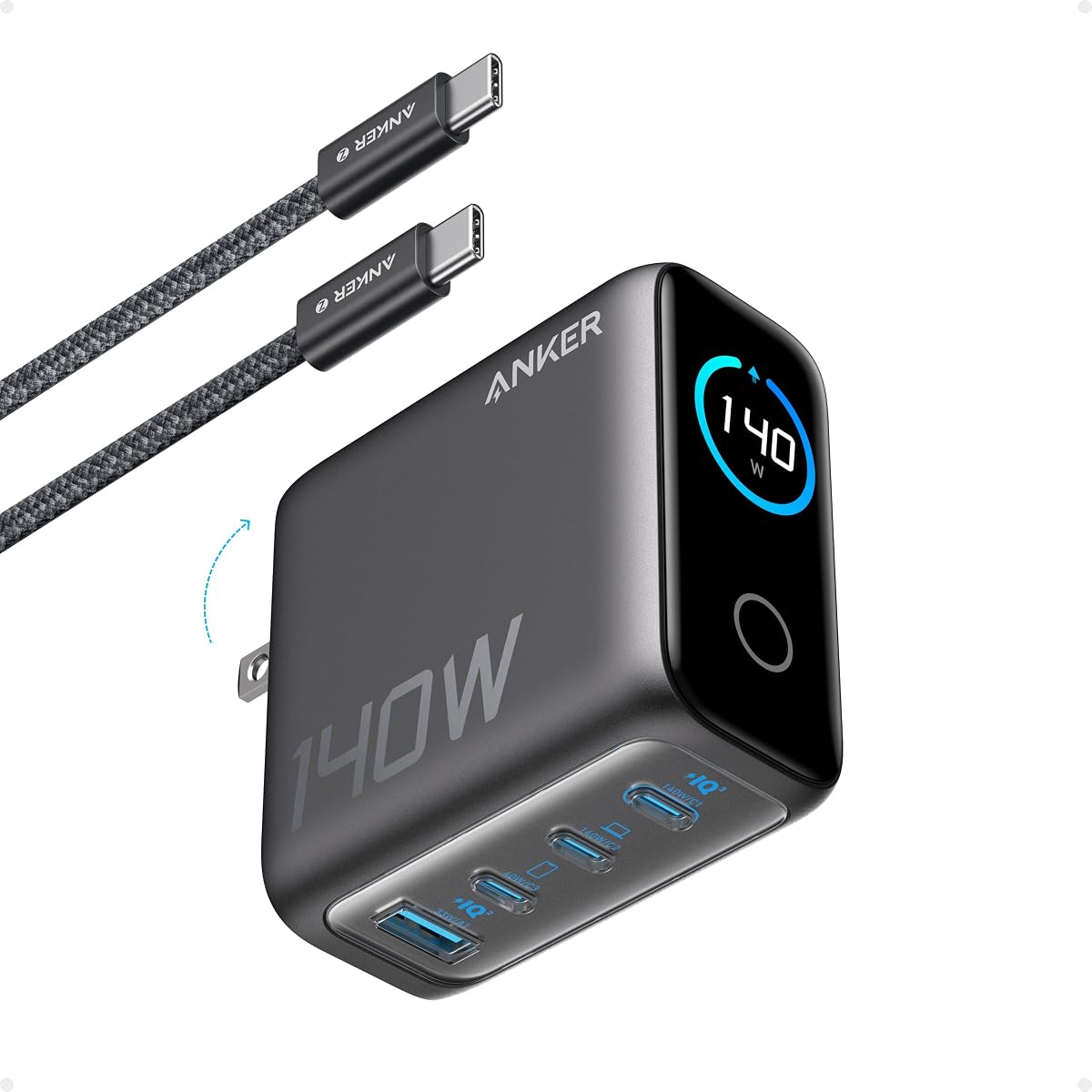
The Anker 140W Max Charger combines four charging ports, high-power USB-C output, and a full color display. Its 4.4 rating sits in the middle of the group, while the ability to offer up to 140W from either of two USB-C ports makes it especially interesting for users with demanding laptops or advanced workflows.
We may earn a commission when you buy through this link, at no additional cost to you.
Anker states that a 15-inch MacBook Air can reach 50% charge in 30 minutes from either high-speed USB-C port. The display presents charging status, temperature, and port details, while ActiveShield 4.0 provides extensive temperature monitoring. The included five-foot 240W USB-C cable is designed to support high-power charging and avoid the bottleneck of an under-rated cable.
Compared with the compact 100W and 65W models, this charger is larger, with listed dimensions of 2.72 by 2.72 by 1.42 inches and a weight of 9.7 ounces. That footprint can be less convenient in a small travel pouch, although the four ports reduce the number of separate adapters required. Its customer rating is also lower than several alternatives, so prospective buyers may wish to examine recent feedback.
This model fits a desk-based buyer who wants high output, four ports, and clear operating information. It is a good match for a MacBook Air user with several other devices, while travelers who only need to charge a laptop and phone will probably prefer a smaller model.
Having two USB-C ports capable of high output reduces the need to remember which port is intended for the laptop. That is helpful when plugging and unplugging accessories throughout the day.
The color screen gives charging status, port information, and temperature more room than a compact numeric display. It is easier to interpret at a glance and can help identify cables or connections that are not performing as expected.
We may earn a commission when you buy through this link, at no additional cost to you.
The UGREEN Nexode Pro 160W is the most port-rich model in the roundup, combining five ports, 160W total output, and a rotatable touch display. Its 4.7 rating reflects a strong feature set for users who want to consolidate laptops, phones, tablets, earbuds, and USB-A accessories around one charging hub.
We may earn a commission when you buy through this link, at no additional cost to you.
Two of the four USB-C ports can deliver up to 140W individually, while the charger distributes 160W across connected devices. The display shows total output, per-port power, the active charging protocol, and internal temperature. Touch controls and an animated interface make it more interactive than conventional indicator lights, while a foldable U.S. plug supports travel and storage.
The product includes multiple layers of protection against overheating, overvoltage, overcurrent, and short circuits, along with dual temperature-control modes. Compatibility is listed across more than 1,000 device types, including common iOS, Android, and Windows systems. The complexity and high output are unnecessary for a user who only charges a MacBook Air and a phone, however, and the many ports can encourage carrying more cables than needed.
This is a strong desktop charging station for a multi-device household, shared office, or creator carrying several USB-C gadgets. It is best for buyers who value controls, detailed power information, and maximum port flexibility over the smallest possible travel footprint.
Four USB-C ports and one USB-A port cover nearly every common charging cable in a modern tech bag. It can reduce a collection of separate wall adapters to one unit without limiting the range of supported accessories.
The rotatable touch panel presents total output, per-port data, active protocol, and temperature. This level of detail is especially useful for users comparing charging behavior across several connected devices.
We may earn a commission when you buy through this link, at no additional cost to you.
Selecting a GaN fast charger for a MacBook Air involves balancing laptop power, charger size, port availability, cable requirements, and the number of devices used away from an outlet.
A useful MacBook Air charger should support the USB-C Power Delivery profile and provide enough wattage for the laptop's charging circuit. Many MacBook Air models are designed around a 30W or 45W adapter, while 65W offers more headroom for demanding work, extended sessions, and compatibility with other USB-C laptops. Chargers rated at 100W or above are sensible for users who also own higher-power MacBook Pro models or want one adapter for an entire device collection.
Choose a charger with clear single-port and multi-port output figures. A headline rating of 100W may describe only one connection, so the two-port or three-port distribution matters when a phone and laptop charge together.
MacBook Air requirements vary by generation, and the charger's USB-C Power Delivery support matters more than the physical shape of the included plug. Check the charging requirements listed for the exact MacBook Air model, then confirm that the charger supports the required power profile and includes a compatible USB-C cable. A higher-rated charger can be useful across several laptop generations, provided the cable and device negotiate the protocol correctly.
For users who switch between Apple and Windows laptops, prioritize broadly compatible USB-C PD chargers. Product listings may note exceptions for Dell or Lenovo systems, whose proprietary charging protocols can prevent full negotiated speed.
A single-port charger is the simplest option for travel and can be exceptionally small. A three-port model is a more balanced choice for a MacBook, phone, and pair of earbuds. Four- and five-port chargers are better for permanent desks, shared workspaces, and people who travel with many accessories. The important detail is how power is divided when every port is occupied.
Look for a dedicated high-power USB-C port for the laptop whenever possible. A charger that offers 65W on one port but only 15W on the others can work well for a MacBook Air, while a high-end multi-device setup benefits from two ports that can each handle substantial output.
GaN technology allows chargers to deliver strong power in smaller housings than many conventional power bricks. The smallest models in this guide are easier to fit into pockets and small tech pouches, while higher-capacity chargers may prioritize total output and port count over dimensions. Foldable prongs are also valuable because they protect the plug and prevent snagging during transport.
For frequent air travel, consider the entire outlet setup rather than just the charger. A compact US-style adapter can be less convenient in regions that require a different plug format, so travelers may need to plan for an appropriate plug converter or local power solution.
The cable can determine whether a charger reaches its stated maximum output. For 100W charging, the product information specifically calls for a 100W 5A cable. For high-power 140W configurations, buyers should verify that the connected cable supports the required current and power delivery profile. A cable that fits physically may still negotiate a lower charging rate.
Also consider reach. A five-foot cable provides more flexibility around a desk, bed, or wall outlet, while a shorter cable reduces clutter inside a bag. Some chargers include a suitable cable, while others require buyers to choose one separately.
Charging displays range from basic status indicators to full color panels that show wattage, temperature, active protocols, and port allocation. Detailed monitoring is useful for users with several devices because it can make output changes easier to understand. It is less important for a straightforward one-laptop setup where the primary need is dependable power delivery.
Interactive displays and app controls can also add convenience through custom modes and real-time feedback. Buyers who value visibility may prefer the Anker 100W, Anker Prime 160W, Anker 140W, or UGREEN Nexode Pro 160W, while those prioritizing a simple and inexpensive setup can ignore the extra screen.
Good chargers should manage heat and protect connected devices from abnormal electrical conditions. The featured products advertise combinations of temperature sensors, intelligent power adjustment, over-temperature protection, over-voltage protection, over-current prevention, and short-circuit safeguards. GaN efficiency can also help reduce heat compared with less efficient designs when the charger is appropriately loaded.
Look for a reputable brand with a warranty and clearly described protections. A charger should never be used with a damaged cable, and a warm connector does not always indicate a fault, but unusually high heat, visible discoloration, buzzing, or a repeated connection interruption should prompt immediate unplugging and inspection.
The best charger for a traveler is not necessarily the best charger for a permanent desk. A pocketable 65W model may cover a MacBook Air and phone during short trips, while a 100W or higher charger with multiple ports is more appropriate for people who carry several devices. Desk users can prioritize an informative display and a high maximum output because size matters less once the charger is stationary.
Match the adapter to the number of devices you actually carry. Carrying a five-port charger for a laptop and one phone adds unnecessary complexity, while relying on a tiny single-port unit for a full travel kit can leave users without a way to charge everything simultaneously.
Begin with a compatible USB-C cable, connect the MacBook Air, and use the charger's highest-rated USB-C port for the laptop when multiple devices are attached. Place the charger on a stable, hard surface with ventilation openings unobstructed, and do not cover it with fabric, papers, or other heat-trapping materials.
Allow the charger to negotiate power normally rather than assuming a full wattage reading immediately after connection. A high-power laptop can briefly draw more current as the operating system evaluates the battery and workload, while the charger may adjust output as temperatures and connected-device requirements change. A display-equipped model provides the clearest indication of the negotiated state.
When traveling, fold the prongs if the charger has a foldable design, wrap the cable without creating a sharp bend, and keep the unit away from moisture and excessive heat. Unplug it when it is not needed, inspect the connector for debris, and stop using it if the plug, casing, or cable becomes damaged.
The correct wattage depends on the MacBook Air generation and your other devices. Many MacBook Air models charge efficiently with 30W or 45W, while a 65W charger provides additional headroom. A 100W charger is useful when you want faster laptop performance, own a higher-power MacBook Pro, or need one adapter for several devices. Always confirm the requirements of the exact model.
A reputable third-party charger that supports the appropriate USB-C Power Delivery profile and includes proper electrical protections is generally designed to work safely with USB-C devices. The charging handshake manages the power the laptop accepts. The charger should also be used with an undamaged, compatible cable, because cable quality can affect both safety and the negotiated charging rate.
Yes, provided the charger has at least two ports. Connect the MacBook Air to the USB-C port with the strongest output and the iPhone to another port. Available power is divided among connected devices, so the laptop will usually retain priority when the charger is designed to distribute power intelligently. Check the listed multi-port output before adding several high-power devices.
No, because a MacBook Air normally includes a USB-C charging cable, and many owners already have one. Several chargers in this roundup also include a cable, but others do not. If you need a separate cable, verify that it supports the charger's intended wattage, particularly for 100W or 140W charging, where a 5A-rated cable is important.
A higher-rated USB-C PD charger is generally suitable because the connected device requests an appropriate power level. The charger and laptop negotiate the supported profile rather than forcing the full advertised wattage into the device. The important requirements are a compatible USB-C connection, proper protocol support, and a cable capable of carrying the intended current.
The smallest single-port models are the easiest to pack, particularly the UGREEN Nexode Air 65W and Anker Nano II 65W. They work well when only the MacBook Air and occasionally one phone need charging. Travelers carrying several devices may prefer a compact three-port 100W charger so they can consolidate more of their charging equipment.
Electrical charging always produces some heat, and a compact GaN adapter may feel warm under sustained high output, particularly while charging a demanding laptop. Warmth is normal within a reasonable range, but it becomes a concern if the charger becomes unusually hot, smells unusual, buzzes, disconnects repeatedly, or shows visible damage. In that situation, unplug it and have it inspected.
A smart display is optional rather than essential. It is helpful when charging several devices because it can show port allocation, temperature, and real-time power information. If your routine consists of charging one MacBook Air and occasionally a phone, a simpler charger with the right wattage, adequate safety features, and a portable design may serve you better.
The UGREEN Nexode Air 65W is the most compact budget-oriented choice, the Anker 100W Max Charger is the strongest all-around option for most setups, and the Anker Prime 160W delivers the highest premium power and control. Each serves a different need, from minimal travel to a multi-device professional desk.
Prioritize USB-C Power Delivery support, sufficient wattage, the number of devices you actually charge, and the quality of the connected cable. A simple 65W unit may be ideal for one MacBook Air, while a 100W multiport charger is more adaptable. Displays and app features are valuable when power allocation matters, but they should not replace good compatibility or thermal protection.
Before buying, check the current listing for the exact MacBook Air model, included accessories, port layout, dimensions, warranty, and any changes to the technical specifications. Product designs and configurations evolve, so current details on the seller's page are the best source for confirming fit and performance.