
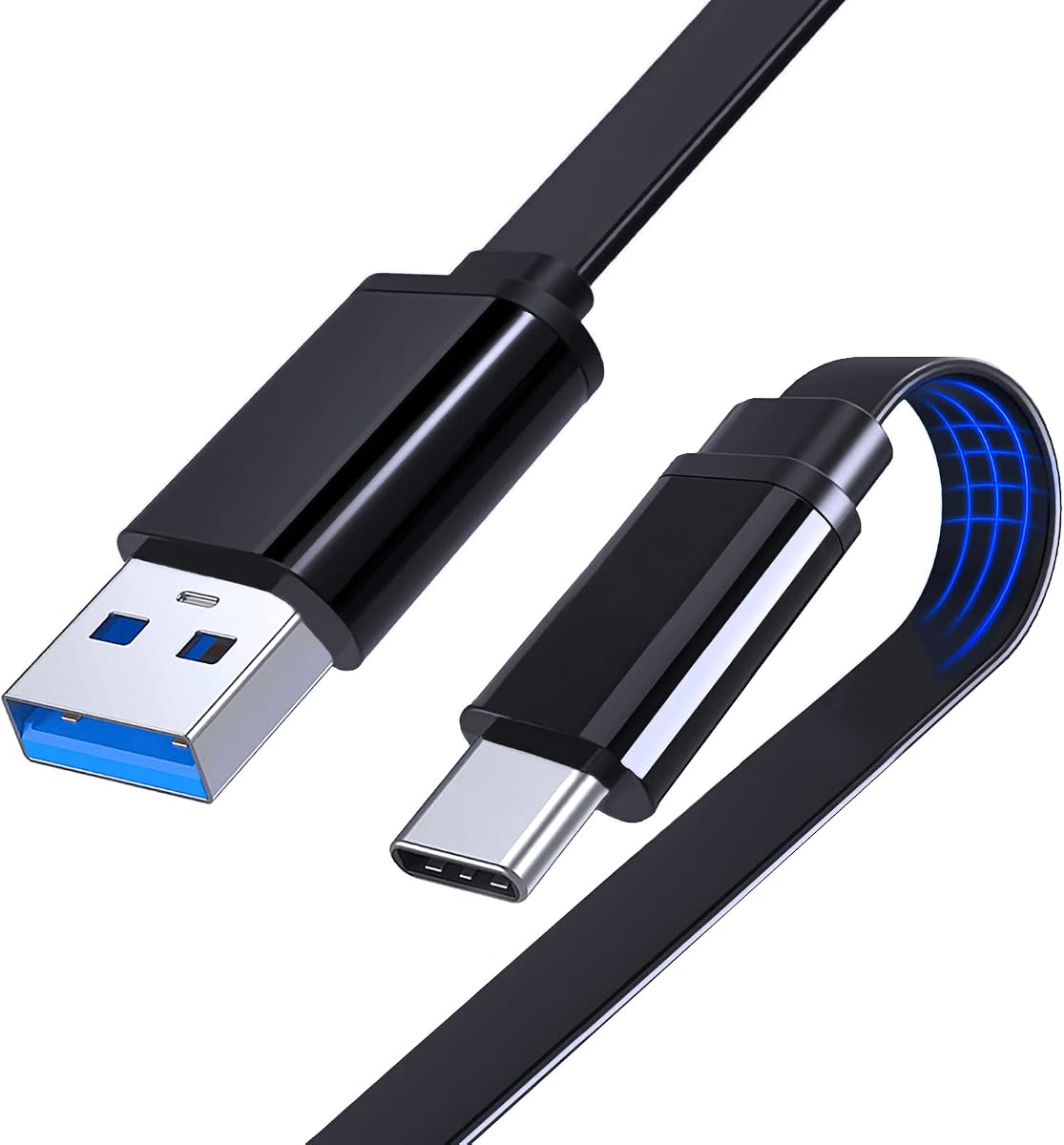
MECCANIXITY Flat USB C Cable 19.7" Right Angle Type C Charging Cord
5.0Editor score
Compact 19.7-inch cable
Right-angle USB-C connector
Flat silicone tangle-resistant body
A flat USB C cable combines a low-profile connector-friendly design with the convenience of USB-C, but the best choice depends on how and where you use it. Important considerations include charging power, data speed, connector angle, cable length, flexibility, and compatibility with your devices.
This guide compares ten flat USB C cables across phones, tablets, laptops, gaming controllers, and home security cameras. The analysis considers each product's stated connector configuration, power delivery, data-transfer capability, physical construction, length, installation accessories, and suitability for common setups.
The selections include USB-A to USB-C and USB-C to USB-C designs, from compact travel cords to long cables intended for permanent installation. Each review highlights the most useful qualities and honest limitations, while current prices and availability should be checked before purchasing because they can change.
5.0Editor score
4.6Editor score

4.4Editor score
As an Amazon Associate we earn from qualifying purchases.
The comparison below highlights each cable's connector arrangement, length, charging capability, and data standard, helping readers distinguish everyday charging cords from high-speed USB4 and installation-focused options.


This three-foot flat USB-A to USB-C cable is the strongest all-purpose choice in the list for buyers who want more than basic charging. It carries a 4.6 rating and stands out for a combination of 10Gbps data transfer, Android Auto support, fast charging, and a low-profile body designed to fit into narrow spaces.
We may earn a commission when you buy through this link, at no additional cost to you.
Its physical design is particularly useful in cars and on desks. The cable is described as two millimeters thick and eight millimeters wide, allowing it to slide beneath furniture, behind equipment, or through tight gaps where a round lead would sit awkwardly. It also reportedly withstands more than 10,000 bending tests and includes an intelligent chip with a 56kΩ pull-up resistor for steadier charging.
The main limitation is its USB-A-to-USB-C configuration. It needs a USB-A charging source rather than connecting two USB-C devices, and it cannot provide the full 240W charging or 40Gbps data capability of the premium USB4 option. Despite its broad compatibility list, actual charging performance also depends on the connected phone, tablet, charger, and vehicle.
This is an excellent choice for Android Auto users, desk setups that have a USB-A port, and anyone who values fast file transfer in a flat cable. Its three-foot length is a practical middle ground: long enough to move a phone around a desk or dashboard, but not so long that it becomes cumbersome.
The stated 10Gbps transfer rate sets this cable above basic USB 2.0 alternatives. It is therefore a sensible pick for moving large files between compatible USB-C storage and a computer when both devices and the USB-A port support the required USB 3.1 standard.
The broad, thin profile makes the cable easier to route along a dashboard, under a desk, or behind mounted equipment. It resists tangling while remaining long enough for common daily tasks.
We may earn a commission when you buy through this link, at no additional cost to you.
This two-pack of ten-foot flat cables is built for permanent installations rather than premium charging performance. It has a 4.6 rating and is especially relevant to home security cameras, phones, and Switch Pro controllers that need power across a room or behind furniture.
We may earn a commission when you buy through this link, at no additional cost to you.
Each USB-A-to-USB-C cable supports charging and data transfer at up to 5V and 2A. Copper conductors, a stated 10,000-plus bending life, and a flat body support dependable routing along walls or floors. The included 25 nail-in clips and eight cable ties make the product unusually installation-ready compared with ordinary replacement cords.
Its limitations are electrical rather than physical. A 2A ceiling is modest next to 60W, 65W, or 240W alternatives, and the basic data capability is not aimed at external storage workflows. It also needs a USB-A power source, which may limit use with modern USB-C-only wall adapters unless the user already has the appropriate adapter.
Choose this product when you need a long, discreet power run for a compatible camera or other USB-C device. The two-pack and installation hardware make it particularly useful for users setting up multiple devices, while the ten-foot length eliminates the need for an undersized original cable.
Nail-in clips and cable ties are included so the flat wire can follow a wall, window frame, or floor edge. These accessories help prevent the cable from becoming a loose obstacle and keep a long installation visually organized.
With two ten-foot cables included, the pack can serve two separate locations or provide a spare. The white finish also blends readily with light walls, trim, and household furnishings.
We may earn a commission when you buy through this link, at no additional cost to you.
This USB4 cable is the premium option in the guide, combining a claimed maximum of 240W charging with 40Gbps data transfer and 8K video at 60Hz. Its 4.4 rating reflects a specialized feature set aimed at compatible laptops, tablets, phones, external storage, and other modern USB-C devices.
We may earn a commission when you buy through this link, at no additional cost to you.
The E-Marker chip is an important part of the design because it helps the cable recognize and manage changing current and voltage demands. When paired with suitable equipment, the charging capability can serve demanding gaming laptops and other high-power accessories. Its USB4 data performance also makes it much more ambitious than the 480Mbps and 5Gbps alternatives in this roundup.
Those headline capabilities come with compatibility conditions. Peak charging requires a compatible charger and device, while 40Gbps transfer and 8K video also depend on the host, display, storage, and connection standards. Users with basic USB-C accessories may gain little from the extra specification and should not assume every connected device will support every advertised function.
This cable makes the most sense for buyers who already own USB4 or Thunderbolt-compatible hardware. It is the strongest option for maximum charging headroom, very fast file movement, and high-resolution display use, while less demanding users can get comparable everyday charging from a shorter and more basic cable.
The stated 240W maximum provides substantial headroom for power-hungry laptops and accessories. Actual output remains limited by the charger, device, and negotiated charging profile rather than by the cable alone.
A claimed 40Gbps data rate and 8K-at-60Hz support make this suitable for external SSDs and compatible display arrangements. Both require matching USB4 devices, cables, ports, and display hardware.
We may earn a commission when you buy through this link, at no additional cost to you.
The DbillionDa USB-C-to-USB-C cable is a six-foot charging cable designed around a 90-degree connector. Its 4.2 rating is the lowest among the ten products, but its ergonomic shape and stated 60W Power Delivery support make it a practical option for phones, tablets, and laptops.
We may earn a commission when you buy through this link, at no additional cost to you.
The angled connector can improve clearance when a device is propped up, placed on a desk, or used close to a wall. It also reduces repeated sideways force at the plug, which is helpful during gaming, video viewing, or extended reading while the device remains connected to power.
The product description mentions fast file transfers but does not provide a specific transfer rate, so buyers with demanding storage workflows should seek a cable with a clearly defined data standard. Its 60W maximum is also below the 65W, 240W, and even some higher-speed options elsewhere in the guide.
Despite the lower rating, this cable fits a clear need: comfortable right-angle power at a generous length. It is most appropriate when USB-C-to-USB-C connectivity, Power Delivery, and connector geometry matter more than maximum transfer speed or specialized display support.
The L-shaped connector leaves more room around the device than a straight plug. This can make a phone or tablet more comfortable to hold while it is charging.
At six feet, the cable provides useful reach between a wall outlet, desk, sofa, or bedside table. That extra length reduces the need to move a device closer to its power source.
We may earn a commission when you buy through this link, at no additional cost to you.
This three-point-three-foot right-angle cable combines a 4.4 rating with 60W charging and a stated 480Mbps data rate. It supports PD 3.0, QC 4.0, and PPS 2.0 when paired with a suitable charger, giving it broader protocol coverage than many simpler alternatives.
We may earn a commission when you buy through this link, at no additional cost to you.
Its nylon-braided exterior and integrated aluminum-alloy construction are designed for durability and reduced tangling. The stated tensile capacity of 175 pounds indicates attention to cable strength, while the 90-degree connector helps with gaming, video viewing, and reading during a long charging session.
The listing explicitly says the cable supports data but not video transmission. Its 480Mbps transfer rate is adequate for ordinary synchronization but far below the 5Gbps, 10Gbps, and 40Gbps options in the guide. It also requires compatible USB-C devices and a sufficiently capable USB-C power adapter to reach its maximum charging output.
This is a balanced pick for a desk, nightstand, gaming setup, or travel bag where a right-angle plug and moderate charging power matter. It is less suitable for external SSDs requiring faster transfers or for users who intend to carry video through the cable.
PD 3.0, QC 4.0, and PPS 2.0 support give the cable useful flexibility across different phones, tablets, and laptops. A compatible wall adapter remains necessary for the best results.
The nylon-braided jacket and 175-pound stated tensile strength are useful for a cable that may be handled frequently. The angled plug also reduces awkward leverage during mobile gaming.
We may earn a commission when you buy through this link, at no additional cost to you.
This compact 19.7-inch cable is a travel-oriented flat USB-C option with a 5.0 rating, the highest listed score in the guide. Its right-angle connector, silicone body, and 65W charging capability distinguish it from basic short cords that often offer little more than basic power delivery.
We may earn a commission when you buy through this link, at no additional cost to you.
The thin silicone construction resists tangling and can be coiled neatly inside a pocket, travel pouch, or laptop sleeve. Its low-profile body is easy to route in a tight space, while the right-angle connector helps reduce stress at the joint and preserves access to the device's port.
The main compromise is reach. At just over 19 inches, the cable is most useful beside a desk, bedside table, sofa, or in a bag; it is not designed to bridge a room. It also supports up to 480Mbps data and explicitly excludes video transmission, so it is better for charging and conventional synchronization than for demanding media workflows.
For a user seeking a short, flexible, right-angle cable at a budget-oriented level, this is the leading pick in the roundup. Its 65W ceiling is generous for a cable of this size, and the rating and construction make it an appealing everyday companion for travel and compact workspaces.
The 50-centimeter length and flat silicone jacket can be coiled without occupying the space of a longer, rounder lead. It is designed to remain manageable inside bags and tight storage areas.
The connector's 90-degree shape changes the direction of applied force and can reduce strain where a straight cable would bend sharply. This is particularly helpful during frequent plugging and unplugging.
We may earn a commission when you buy through this link, at no additional cost to you.
The Monoprice flat cable offers a mature mix of charging and data transfer, with up to 3 amps of charging power and data speeds up to 5Gbps. Its 4.3 rating reflects a capable USB-A-to-USB-C alternative for users who need more speed than a basic USB 2.0 lead.
We may earn a commission when you buy through this link, at no additional cost to you.
The six-foot length is long enough for many desk, living-room, and travel arrangements without becoming difficult to manage. Its flat design is described as more resistant to bending and tangling than ordinary round cables, and the reversible USB-C connector removes the need to check the plug's orientation.
It still depends on USB 3.2 Gen1 hardware for its full 5Gbps potential, so ordinary USB-A ports and older computers may deliver less. The design also lacks the higher charging limits of modern USB-C-to-USB-C power-delivery cables and cannot meet the data needs of a premium USB4 workflow.
This is a sensible pick for users with existing USB-A charging equipment who also want relatively fast synchronization. It works especially well as a general-purpose six-foot cable for compatible phones and tablets, provided the host hardware can take advantage of the stated transfer rate.
A single cable can handle everyday power and file synchronization from a USB-A source. This makes it convenient for desks that still rely on legacy-style host ports.
The broad profile is designed to withstand more flexing while resisting tangles. That makes the six-foot cable easier to store and less likely to form troublesome knots in a bag.
We may earn a commission when you buy through this link, at no additional cost to you.
This 15-centimeter USB-C cable is one of the smallest products in the guide, combining a 4.9 rating with a 65W charging ceiling. It is designed for short, direct connections where a longer cable would be unnecessary or inconvenient.
We may earn a commission when you buy through this link, at no additional cost to you.
Both ends use different-direction angled connectors, which can improve access when the available space around a port is limited. The ultra-slim TPE construction and aluminum-alloy shells protect the plugs, while the special jacket is intended to resist tangling and wear. Rated charging reaches 3.25A, and USB 2.0 data transfer runs at up to 480Mbps.
Its most important limitation is length. Fifteen centimeters is enough for a phone beside a power bank or a device connected to a nearby charger, but it will rarely reach across a desk. The USB 2.0 data rate also makes it unsuitable for users who need to move files rapidly through an external drive.
This cable is a specialized choice for close-range power, portable setups, and locations where connector clearance is poor. It is less useful as a general-purpose charging lead, but for a compatible device that remains next to its power source, its compact shape can be a major convenience.
The opposing angled ends can route the cable away from obstructions on both sides of a connection. This is useful beside a monitor, power bank, or mounted device with limited port space.
At only 15 centimeters, the cable adds very little bulk to a phone, tablet, or laptop bag. Its flat profile and protected connector shells suit frequently mobile use.
We may earn a commission when you buy through this link, at no additional cost to you.
This one-meter flat USB-C-to-USB-C cable offers a balanced mix of flexibility, charging capability, and a right-angle connector. Its 4.8 rating is among the strongest in the group, and the soft TPE construction makes it a practical choice for travel, work, and everyday device charging.
We may earn a commission when you buy through this link, at no additional cost to you.
The cable supports up to 65W with compatible wall adapters, including stated 18W, 30W, and 61W options, and provides data synchronization at up to 480Mbps. Its 90-degree connector is useful when a port is close to a wall or when the device is propped for gaming, video, or reading.
The listing explicitly notes that audio and video transmission are not supported, and the underlying data standard is USB 2.0. It therefore should not be chosen for display use or high-speed external storage. Actual charging speed also depends on the connected device and the power adapter.
This is a good general-purpose pick for someone who wants a one-meter right-angle cable with modern charging power. It is especially useful for travel and compact desks, where the soft, foldable body is easy to pack and the connector shape reduces awkward bends.
The TPE wire is described as ultra-thin and soft enough to bend and fold without excessive tangling. That flexibility makes it easy to coil in a pocket or place inside a small organizer.
A stated 65W maximum supports many phones and tablets, provided the charger and device negotiate a compatible profile. One-meter length offers enough freedom for many desk and nightstand arrangements.
We may earn a commission when you buy through this link, at no additional cost to you.
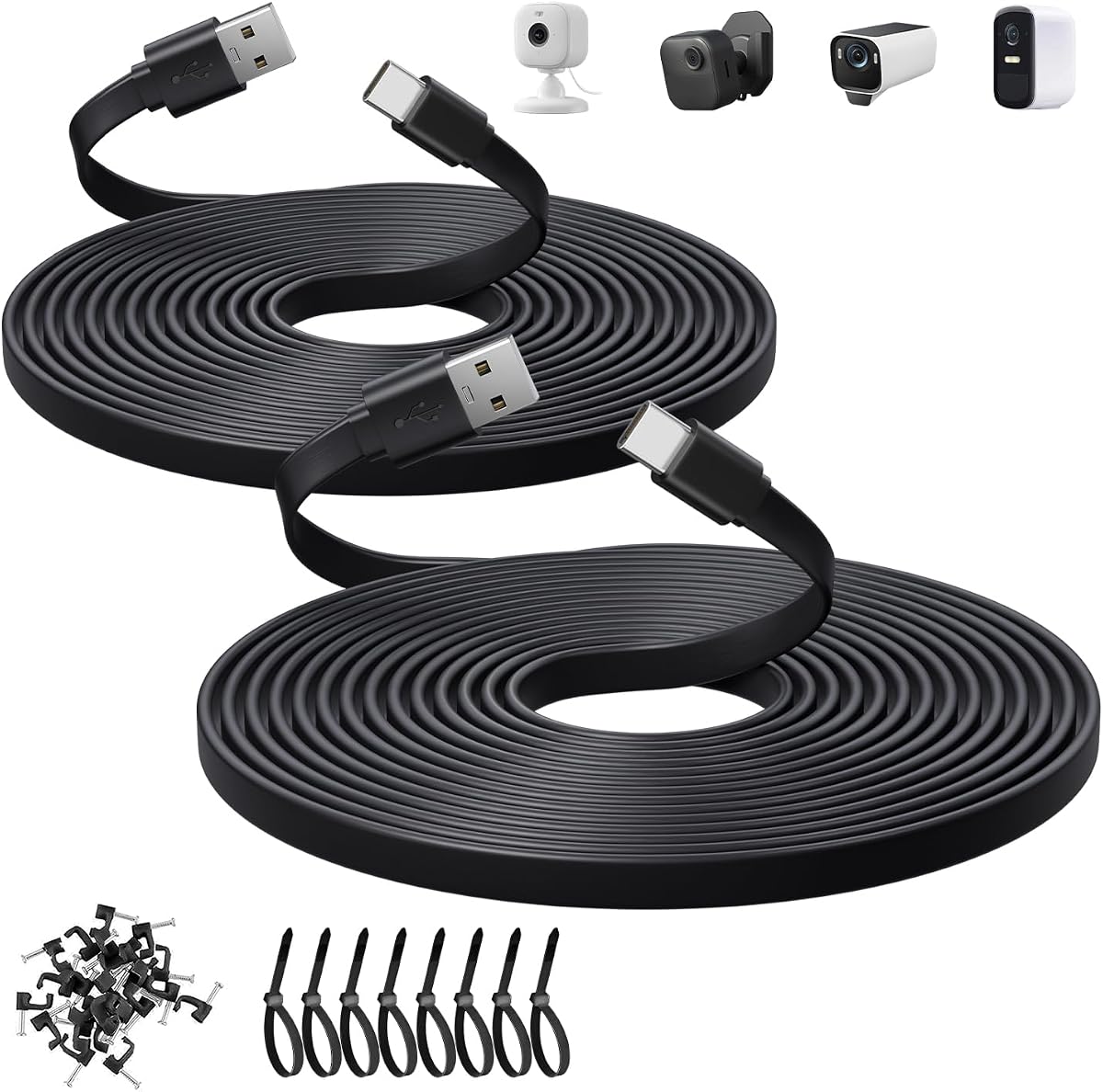
This black two-pack of ten-foot flat USB-A-to-USB-C cables is purpose-built for home security camera installations. It has a 4.7 rating and specifically identifies compatibility with Blink, Ring, eufy, SoloCam, Tapo, and Wyze camera models that use USB-C.
We may earn a commission when you buy through this link, at no additional cost to you.
The flat wire supports 5V 2A power and data transfer and is easy to run through the small gaps beneath doors or windows. Nail-in clips and eight cable ties are included, allowing the leads to be secured along walls or floors. A second ten-foot cable provides flexibility for another camera or an alternate route.
The two-amp limit is the main constraint, and the cable is not aimed at high-power laptop charging or advanced external-storage transfers. It also requires a USB-A source, so compatibility with a camera is not the only consideration; the power supply must provide the appropriate connection as well.
This is a compelling choice for a security-camera setup requiring discreet, long USB-A power runs. Its model-specific compatibility list, installation hardware, two-cable pack, and high rating make it more focused than the general installation bundle ranked second, although both serve similar long-cable use cases.
The product names several current camera families and explicitly limits use to USB-C devices. That focus helps buyers distinguish it from cables that may physically fit but are not presented for those installations.
The thin, black body can be placed beneath trim, through narrow openings, or along baseboards. Clips and ties keep the ten-foot leads from shifting as cameras operate continuously.
We may earn a commission when you buy through this link, at no additional cost to you.
A useful flat USB C cable must match the devices, power source, data workload, and physical space involved. Connector format, charging limits, length, angle, and material should be considered together rather than in isolation.
Start by identifying the ports on both ends. A USB-A to USB-C cable connects a legacy-style rectangular source to a USB-C device, while a USB-C to USB-C cable supports newer computers, power banks, and chargers that expose USB-C ports. This distinction is essential because connector shape does not guarantee the same charging or data capability. It also determines whether you can connect one USB-C device directly to another without an adapter.
Choose USB-A to USB-C when your charger or computer offers only USB-A. Choose USB-C to USB-C for a modern setup and when you want a single cable type across multiple devices. Avoid assuming that a USB-C plug can deliver the advertised output unless the source port, charger, and device all support the required standard.
Charging requirements vary considerably. Basic cables may support 2A, while the options in this guide range from 2A and 3A to stated 60W, 65W, and 240W maximums. Phones generally need less than a gaming laptop, and a camera may work best with a stable, modest 5V supply. Higher wattage offers useful headroom but only reaches that figure with a compatible charger and device.
For everyday phone and tablet charging, a 30W to 65W cable is generally a more relevant range than a specialized 240W cable. For laptops, confirm the charger protocol and required output. If you are replacing a camera lead, match the original cable's connector and current requirement rather than choosing solely by the highest stated wattage.
Data speed can range from 480Mbps in USB 2.0 to 5Gbps, 10Gbps, and as much as 40Gbps with USB4. Faster ratings are useful for external SSDs, large media libraries, and backup workflows, but the host port, storage device, and cable must all support the same standard. A high charging rating does not imply high data performance.
Choose 480Mbps for routine synchronization and basic file movement. Select 5Gbps or 10Gbps when working with compatible flash drives or storage. Consider the USB4 40Gbps option only when the computer, peripheral, and connection path support USB4 and you have a genuine need for its throughput or 8K display capability.
Length should reflect the distance between the power source and device, not just the maximum reach advertised. Very short cables around 15 centimeters suit power banks and closely positioned equipment, while a one-meter cable handles many desk and travel arrangements. Six- and ten-foot versions are useful when furniture, wall outlets, or cameras are farther away.
Avoid a cable that is much longer than needed because excess length can bunch up, snag, or become difficult to manage. For permanent installations, a long flat cable with clips and ties is generally more practical than trying to conceal a round lead with adhesive pads.
A 90-degree connector changes the direction of the cable at the device. This can reduce strain on the port, improve clearance beside walls, and make a phone or tablet easier to hold while charging. It is especially helpful for gaming, reading, and setups where the device rests on a surface while connected.
Angled connectors can also be inconvenient if the direction conflicts with your outlet, stand, or mounting position. Check the angle on both sides and imagine the route the cable will take. A standard straight connector may be easier to manage when the cable needs to run directly outward from the port.
Flat profiles are intended to resist knots and fit beneath objects, but flexibility varies by material. Silicone and soft TPE constructions are easy to bend and coil, while braided nylon can offer abrasion resistance. The flat shape also makes a cable easier to pin beneath a desk edge or run along a wall.
For frequent travel, choose a soft, compact cable that coils easily. For a permanent installation, prioritize a long, manageable profile and secure clips. In either case, avoid sharp bends directly at the connector, where repeated stress can damage the cable even when the exterior feels durable.
General-purpose cables list broad compatibility, while camera-focused options name specific brands and models. Verify that your target device uses USB-C rather than Micro-USB, and confirm whether the camera needs power only or also uses the connection for data. Installation bundles with nail-in clips and ties are particularly useful for cameras positioned away from outlets.
Also note stated exclusions. Several cables in this guide do not support video, audio, or display functions, even though they charge and synchronize data. If your setup involves a monitor, projector, game console display, or powered accessory, verify that specific function before buying.
A two-cable pack can be more useful than a single premium lead when you need to power two devices or keep a spare available. Conversely, a single cable may be preferable for travel. Long installation options often include mounting clips and cable ties, while compact travel products prioritize low weight and simple storage.
Read the package contents before making a decision. Confirm the number of cables, connector direction, length, color, and included hardware. Those details often determine real-world usefulness more than a minor difference in charging specification.
Inspect the cable and both connector tips before first use. Connect it directly with no force, and confirm that the plug orientation matches the device port. For a right-angle cable, position the device and the available clearance before pushing the connector fully into place. A connected device should negotiate a suitable charging and data profile automatically with a compatible source.
When routing a flat cable, keep the broad side against the surface where possible and avoid placing sharp bends near either plug. For permanent installations, use the supplied nail-in clips and cable ties at regular intervals. Do not stretch a ten-foot cable across a doorway or between furniture pieces where it can be pinched, stepped on, or pulled.
Unplug by holding the connector housing rather than pulling the wire. Coil longer cables loosely instead of making a tight knot, and keep the cable away from heat, moisture, and abrasive surfaces. If a connector becomes loose, the cable develops a damaged jacket, or charging becomes inconsistent, discontinue use and replace it rather than forcing a compromised connection.
A flat cable is not inherently more powerful than a round one, but it can be easier to route, less prone to tangling, and useful beneath furniture or along walls. Performance depends primarily on the internal wiring, connector design, charging standard, and data specification. A flat cable with only USB 2.0 data will remain slower than a properly specified round or braided cable.
Yes, provided the cable, charger, and device support compatible power-delivery or fast-charging protocols. The cables in this guide include stated capabilities ranging from 2A and 3A to 60W, 65W, and 240W. A higher cable rating only provides potential; the connected charger and device determine the final negotiated charging speed.
A USB-A to USB-C flat cable has a rectangular USB-A connector on one end and a USB-C connector on the other, making it useful with older wall chargers and computers. A USB-C to USB-C cable has the smaller reversible connector at both ends and is usually preferable for modern chargers and power banks. The two types may also offer different charging and data capabilities.
Right-angle cables can make gaming more comfortable because they direct the wire away from a phone or handheld device, leaving more room to grip it. The angle can also reduce strain on the port compared with a sharply bent straight cable. The main tradeoff is that the connector orientation may not suit every stand, outlet, or docking arrangement.
No. Several products in this guide explicitly support charging and data synchronization but not video, audio, or display transmission. If you plan to connect a display, projector, game console, or powered display accessory, check that the cable specifically supports the required video standard rather than relying on its USB-C shape alone.
Choose roughly 15 centimeters for close-range power-bank or travel connections, around one meter for typical desk and bedside use, and six to ten feet for cameras or installations farther from a power source. The best length is the shortest one that comfortably reaches the intended device without excess cable bunching around furniture or walls.
Only if the camera accepts USB-C and the cable's power output meets its requirements. The two ten-foot options in this guide are aimed at USB-C security cameras and include clips and ties for installation. Confirm the camera model, connector type, and required voltage and current before replacing the original lead.
The wattage figure represents the maximum output the cable is stated to support when paired with compatible hardware. A 65W cable may charge a phone, tablet, or many laptops, while a 240W cable offers more headroom for demanding systems. Neither rating guarantees that a device will draw that much power, because the charger and device also control the charging process.
The strongest general-purpose choice is the 1M Flat USB C Android Auto Cable because it combines a flat three-foot design, 10Gbps data transfer, and broad device support. The MECCANIXITY cable is the most compact and budget-oriented selection, while the Full Function 3.3FT cable leads the group in charging and data capability.
Prioritize the connector arrangement and intended workload before comparing maximum specifications. A right-angle 65W cable may be perfect for a phone at a desk, a USB-A camera cable may be ideal for a permanent installation, and a 40Gbps USB4 lead makes the most sense only when the surrounding equipment supports it. Length, included hardware, and video limitations can matter just as much.
Before ordering, verify the ports on your devices, the charger protocol, the required cable length, and any need for display or high-speed storage support. Prices, availability, and product details can change, so check the current listing and compare the final specifications at the time of purchase.