
Cooling Station and Stand for PS5/Slim/Pro
4.5Editor score
Automatic temperature-based fan control
Four manual fan settings
Dual controller charging
Nine RGB lighting modes
This cooling stand for PS5 console guide compares ten options for cooling, charging, compatibility, storage, lighting, setup, and daily ease of use.
A cooling stand for PS5 Console can improve airflow, organize controllers, and give a gaming setup a cleaner appearance. The best model balances cooling performance, secure console support, charging convenience, and compatibility with the PS5, PS5 Slim, or PS5 Pro configuration you own.
We compared ten stands using their stated specifications and customer ratings, focusing on fan control, supported console and controller models, charging speed, USB connectivity, storage, lighting, installation, and power options. The guide includes both vertical and horizontal designs so you can compare different layouts.
Each review explains the product's strongest features, practical limitations, and ideal buyer, helping you choose without overlooking console compatibility or charging limitations. Product availability and current prices can change, so confirm the latest listing details before purchasing.
4.5Editor score
4.4Editor score

4.5Editor score
The comparison below covers ten all-in-one PS5 cooling stands, highlighting their cooling controls, charging capabilities, physical orientation, and extra features. The table is intended as a quick filter, while the detailed reviews explain the trade-offs behind each specification.


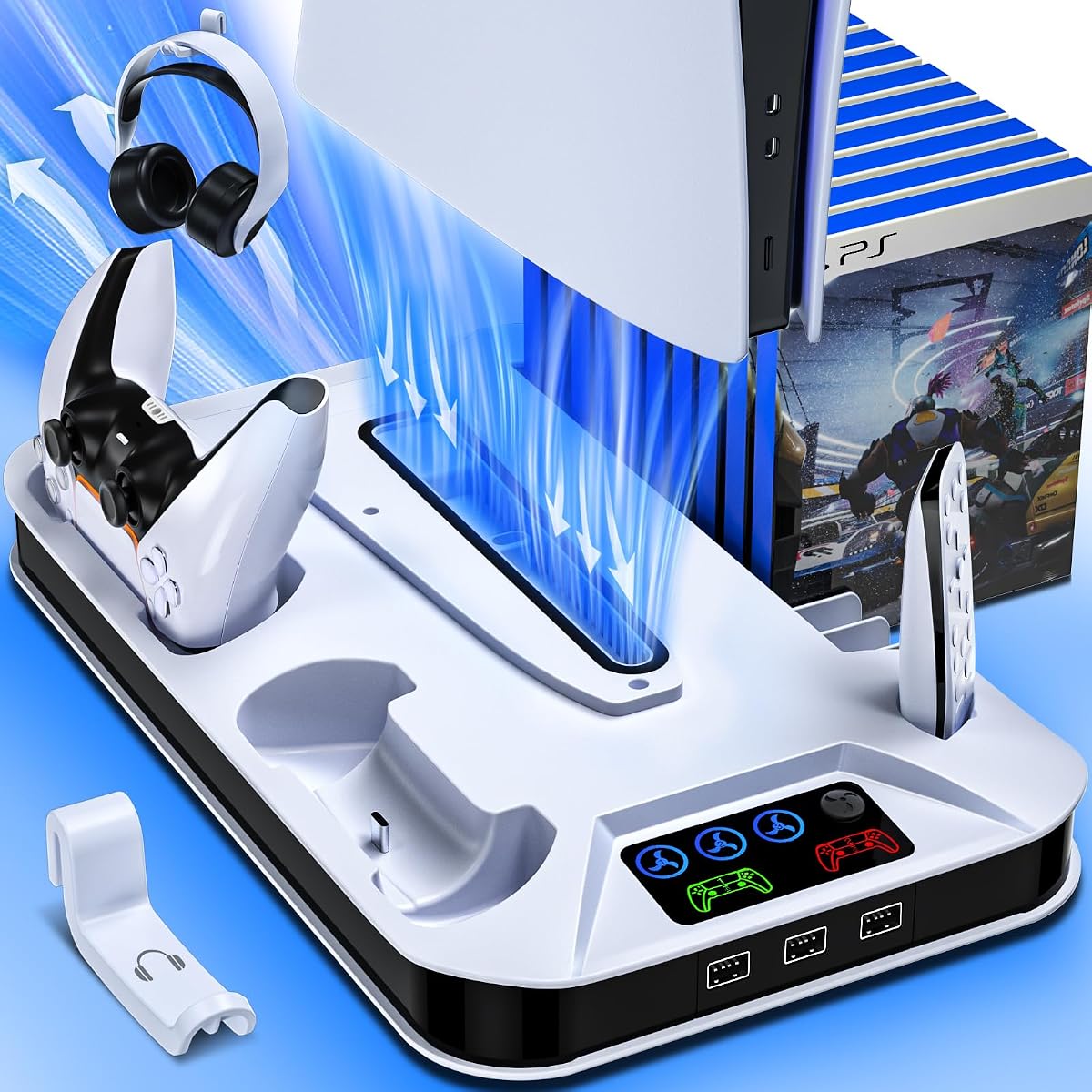
The Kammkonb station combines vertical cooling, dual controller charging, and accessory organization in one reasonably comprehensive package. Its 4.4 customer rating reflects a broadly useful design that supports the original PS5, PS5 Slim, and PS5 Pro in disc and digital configurations. A safety screw helps keep the console stable, while the low-profile vertical format preserves desk space.
We may earn a commission when you buy through this link, at no additional cost to you.
The stand's strongest feature is its three-speed turbo fan, which moves hot air away from the bottom of the console and lets users select low, medium, or high output. Its charging dock can charge two original PS5 controllers in approximately three hours when powered by the console or a suitable 5V/3A adapter. Three additional USB ports are useful for a headset, HD camera, or other compatible accessories, and the protection circuit is designed to guard against overcharging, overcurrent, overvoltage, and short circuits.
There are some compromises. The charging arrangement does not support PS5 Edge controllers, and cooling is controlled manually rather than by a temperature probe. The panel adapter must also be removed for compatible Slim or Pro disc and digital editions. These are not universal concerns, but they matter if you use Edge controllers or prefer unattended temperature-based adjustment.
This is a strong choice for a gamer who wants more than a basic stand. The combination of cooling, secure vertical support, two controller docks, three USB ports, a headset holder, and a media remote slot makes it especially useful for crowded entertainment centers. Choose it when broad accessory functionality and a clean vertical footprint are your priorities.
The three-level fan gives you direct control over airflow, while the dual charging dock removes the need for separate controller cradles. LED indicators show charging and fan status, making the base easier to monitor at a glance.
A headset holder, media remote slot, and three USB ports turn the stand into a compact accessory hub. Console and game discs are not included, and any storage capacity mentioned by the seller should be checked against the accessories you own.
We may earn a commission when you buy through this link, at no additional cost to you.
This horizontal stand offers a different approach to PS5 cooling, holding the console sideways while integrating a fan and dual-controller charging dock. It carries a 4.3 rating and supports the 2020 PS5, 2023 PS5 Slim, and 2024 PS5 Pro in disc and digital editions. Its scalable structure and supplied EVA foam are intended to make those different console shapes fit securely.
We may earn a commission when you buy through this link, at no additional cost to you.
The adjustable charging posts can be moved up or down to accommodate original PS5 DualSense controllers and Edge controllers. When connected to the PS5 through the included cable, the dock can charge both controllers in roughly three to three and a half hours. Red and green LEDs communicate charging status, while a three-position touch control provides low, medium, or high fan output.
Setup is straightforward, although you may need to place the EVA foam for a Digital Edition console and secure the included screws. The horizontal orientation may appeal to gamers who prefer a side-by-side arrangement, but it needs more front-to-back space than a vertical stand and may not fit under every television or shelf. The charging speed is also somewhat slower than the fastest models in this comparison.
This stand is best for players who want broad controller compatibility and a compact all-in-one horizontal setup. It is particularly attractive if you currently use a separate charging dock and want to reduce the number of accessories on your shelf. Verify that the stand's depth and the console's resting position fit your available space.
The adjustable structure is designed to accommodate standard, Slim, and Pro consoles without requiring a different base for each model. The included foam helps support editions that need additional spacing.
The movable posts distinguish this dock from many vertical competitors that only accept standard DualSense controllers. That makes it a better fit for households using original and Edge controllers together.
We may earn a commission when you buy through this link, at no additional cost to you.
The Tokluck station is built for gamers who want the cooling fan to respond to console temperature without continuous manual intervention. It has a 4.4 rating and includes both automatic and manual fan controls. In automatic mode, a built-in temperature probe selects low, medium, or high output according to stated temperature thresholds.
We may earn a commission when you buy through this link, at no additional cost to you.
Manual operation expands the choices to high, medium, low, automatic, and off. The fan remembers the last setting after a restart, while the lighting system offers nine RGB effects with adjustable modes and brightness. A separate memory function restores the previously selected lighting behavior, adding convenience for recurring gaming setups.
The movable charging port accommodates both original PS5 controllers and Edge controllers. The listed charging time is approximately two and a half hours, which is among the faster figures in the group. The station also provides three USB charging ports for other accessories. The trade-off is visual complexity: nine lighting effects and multiple controls may feel excessive if your entertainment center is deliberately minimalist.
This is a compelling choice for players who want automated cooling and customization in one vertical station. It suits long sessions because the fan can increase output as the console warms. It may be less suitable if you want the simplest possible controls, but for automatic management, adjustable lighting, and flexible controller charging, the feature set is well matched to enthusiast setups.
The temperature probe removes the need to predict the console's heat level during a session. Manual and automatic modes also provide a useful fallback if you prefer direct control.
Nine RGB modes let the base match a gaming-room aesthetic, while the adjustable charging post supports both major controller designs. The lighting memory feature avoids repeating the same setup each time.
We may earn a commission when you buy through this link, at no additional cost to you.
The JAVRUNWOF station earns a 4.5 rating by combining a vertical multi-console design, three-speed cooling, and several charging options. It supports standard, Slim, and Pro PS5 consoles in disc and digital editions. The stand includes a safety screw and four non-slip pads to improve stability on a desk or entertainment unit.
We may earn a commission when you buy through this link, at no additional cost to you.
The fan offers normal, medium, and strong settings, giving users a straightforward way to increase circulation during extended play. Two dedicated controller docks can charge original PS5 controllers simultaneously in about two and a half hours when connected to the console or a suitable 5V/3A adapter. Three additional USB ports can charge a headset, HD camera, or other suitable device, and the smart protection circuit stops controller charging at 80 percent.
The clearest limitation is controller compatibility. Unlike several competitors, the charging docks do not fit the PS5 Edge controller. The 80 percent charging cutoff may also appeal to buyers who want a conservative approach, although it means the listed two-and-a-half-hour figure should not be interpreted as a full 100 percent charge for every controller. The removable panel adapter also requires attention when fitting Slim or Pro editions.
This is a good pick for a standard PS5 or Slim setup with original DualSense controllers and several wired accessories. The high rating, straightforward fan controls, stable vertical presentation, and three USB ports make it a balanced choice. Look elsewhere if Edge controller support is essential.
The safety screw and non-slip pads address the most common concern with vertical stands: keeping a large console steady. A removable adapter lets the same base serve different console families.
Two dedicated controller docks and three extra USB ports reduce cable clutter around the console. The protection circuit stops charging at 80 percent to reduce prolonged overcharging exposure.
We may earn a commission when you buy through this link, at no additional cost to you.
Rysker's vertical cooling station is a practical middle ground between basic stands and feature-heavy RGB models. It has a 4.4 rating, supports PS5, PS5 Slim, and PS5 Pro consoles in disc and digital versions, and uses a safety screw to secure the console. Its three-level turbo fan and remembered fan setting keep operation straightforward.
We may earn a commission when you buy through this link, at no additional cost to you.
The main advantage is charging flexibility. The station supports both original PS5 controllers and the PS5 Edge controller, though it is not intended for third-party PS5 controllers. Three USB ports along the side provide additional charging options, while a dedicated media remote slot keeps that small accessory close at hand. LEDs show red during charging and green when a controller is fully charged or in standby.
Third-party controller exclusion is worth noting for anyone using alternative pads. The smart charging chip also stops at 80 percent, so this is a deliberately conservative charging system. Those limitations may not matter for a household using official hardware, but they are relevant if your controller ecosystem is broader.
Choose the Rysker stand for a clean vertical setup, support for both official controller styles, and a useful balance of cooling and organization. It is especially attractive for players who want the Edge controller compatibility often missing from similarly equipped vertical stands but do not need elaborate lighting.
Supporting both original DualSense and Edge controllers makes this dock useful in mixed-controller households. Check the shape of your controllers before purchase because third-party models are excluded.
The fan remembers the last selected speed, reducing repeated button presses after a restart. Side-mounted USB ports and the media remote slot help keep the main gaming area orderly.
We may earn a commission when you buy through this link, at no additional cost to you.
The Gersker stand is an affordable-feeling entry into the category, but its specification sheet is more competitive than that description suggests. It holds a 4.5 rating and includes automatic temperature control, manual fan selection, dual controller charging, and nine RGB lighting modes. It supports PS5, PS5 Slim, and PS5 Pro consoles in both disc and digital editions.
We may earn a commission when you buy through this link, at no additional cost to you.
Automatic mode uses a built-in temperature probe and changes the fan between low, medium, and high according to stated console-temperature ranges. A separate button gives manual control over high, medium, low, and off, while a memory function restores the previous setting after restart. The charging dock supports original and Edge controllers, with a stated two-and-a-half-hour charging time and red or blue status lights.
The lighting system includes seven single-color choices and two breathing effects, allowing the stand to serve as a visual accent as well as a functional base. Some buyers may prefer a completely unlit design, and the fan does not offer continuous fine-tuning between its defined levels. These are aesthetic and control-style limitations rather than fundamental compatibility concerns.
This stand is a strong budget pick for gamers who want automatic cooling, Edge controller support, and attractive lighting without paying for a more elaborate accessory hub. It is especially suitable for PS5 Slim or Pro owners who want a vertical base and may use a mixture of first-party controller types.
Temperature-based control is the defining feature here. The fan starts quietly at lower temperatures and increases output as the console's reported heat rises, making it suitable for both casual and extended sessions.
Nine RGB modes add visible personality without requiring another accessory, and the two-controller dock supports both original and Edge pads. The remembered fan setting keeps day-to-day operation uncomplicated.
We may earn a commission when you buy through this link, at no additional cost to you.
This horizontal station is designed to combine a sideways console stand, cooling fan, and dual charging dock. Its 4.3 rating reflects a versatile format that supports the standard PS5, PS5 Slim, and PS5 Pro in disc and digital editions. The scalable frame and included EVA foam make it adaptable to the different dimensions of those systems.
We may earn a commission when you buy through this link, at no additional cost to you.
The charging posts move up and down to support original PS5 DualSense controllers and Edge controllers. When powered directly from the PS5 through the included cable, the dock can charge two controllers in approximately three to three and a half hours. Red and green LEDs show the status, and a touch-controlled fan offers low, medium, and high output for different gaming loads.
The product's most important operational detail is its standby instruction: on the PS5, go to Settings, select System, select Power Saving, select Features Available in Rest Mode, and set Supply Power to USB Ports to Always. This is necessary if charging and cooling should continue while the console rests. A horizontal base also consumes more depth than a vertical stand, so shelf depth should be checked.
This is a good option for a media console or entertainment center where a sideways PS5 looks more natural and a separate charging dock would be redundant. It combines broad model support, Edge controller charging, and adjustable cooling without a complex installation. Make sure the required standby power setting is acceptable before buying.
A scalable frame and the supplied foam help the stand adapt to standard, Slim, and Pro consoles. This reduces the need to replace the base whenever you change console generation.
Powering the stand from the console allows it to consolidate charging into one setup, but the PS5's USB supply setting must be configured appropriately. The stated charging time may vary by controller and use.
We may earn a commission when you buy through this link, at no additional cost to you.
The Auto Adjustable PS5 Cooling Station stands out for combining a sensor-controlled cooling fan with unusually extensive organization. It has a 4.5 rating and supports original PS5, PS5 Slim, and PS5 Pro disc and digital consoles. The stand's storage sections are intended to keep controllers, a headset, the media remote, a hard drive, and multiple game cases close to the console.
We may earn a commission when you buy through this link, at no additional cost to you.
Its automatic mode uses a built-in sensor to choose low, medium, or high fan output at specified console temperatures, with listed speeds of 2,700, 3,100, and 3,500 RPM. Manual three-speed control is also available. The dual charging dock claims a full charging time of around two hours, while three additional ports support accessories. The supplied Type-C cable can use a wall outlet or the console's front port, and the listing states that controller charging can continue while the console is off.
The smart charging circuit stops at 70 percent rather than taking controllers to a full charge, which may not suit players who want maximum runtime. The game and accessory storage also adds bulk, meaning the stand's footprint should be considered before purchase. In addition, the product listing includes references to PlayStation 4 accessories that should not be confused with PS5 controller support.
This is a strong recommendation for a gaming area where cable and game-case clutter is a priority. It combines cooling, charging, and substantial storage in a vertical format, making it particularly useful for owners with a large game library. Choose it if conservative charging and expanded storage outweigh the need for a full 100 percent charge.
The sensor-driven mode provides a clear cooling hierarchy, from lower RPM at cooler temperatures to the highest output when the console runs warm. Manual control remains available when you want to override automatic behavior.
Dedicated areas for controllers, a headset, media remote, hard drive, and game cases make this more than a cooling base. That organization is valuable in a compact setup where every accessory needs a defined home.
We may earn a commission when you buy through this link, at no additional cost to you.
The heclynis cooling stand combines a compact vertical footprint with a three-speed fan, controller charging, and ring-shaped RGB lighting. It has a 4.4 rating and supports PS5, PS5 Slim, and PS5 Pro disc and digital versions. A security screw is included to help prevent accidental console movement, and the stand can organize controllers, a headset, and game discs.
We may earn a commission when you buy through this link, at no additional cost to you.
Fan speed is changed by double-clicking the control button, with different LED colors indicating the selected level. The dual dock charges two PS5 DualSense controllers in approximately three hours. Red indicates charging, while blue indicates standby or full charge. The included protection system is designed to guard against overcharging, overcurrent, overvoltage, and overheating.
Its RGB ring offers four lighting modes across eight colors, and a long press turns the lighting off when a simpler appearance is preferable. Two USB-A hub ports provide additional power for compatible accessories. Compared with the largest stands, however, it offers fewer extra ports and does not have automatic temperature-based fan control. The described game-disc capacity should also be checked for the physical media you use.
This is a good match for a smaller entertainment center or a gamer who wants lighting without turning the stand into a large storage hub. It provides enough cooling and charging for an organized two-controller setup, while remaining relatively straightforward. Choose it when compactness, visual style, and manual fan control matter more than automatic sensing.
The vertical structure reduces shelf width, and the illuminated ring gives the setup a distinctive gaming-room appearance. Lighting can be switched off when a less conspicuous look is preferred.
Two controller docks, a headset position, and room for game discs cover common storage needs without the largest footprint. Two extra USB-A ports are available for other devices.
We may earn a commission when you buy through this link, at no additional cost to you.
The final pick is a feature-rich vertical station for gamers who view console organization as a connected power hub. It has a 4.5 rating and supports PS5, PS5 Slim, and PS5 Pro disc and digital consoles. A concealed built-in cable and a security screw create a stable, relatively clean setup, while a headset holder adds another point of storage.
We may earn a commission when you buy through this link, at no additional cost to you.
The turbo fan provides low, medium, and high output intended to dissipate heat from the console's lower intake area. The most notable strength is connectivity: three USB ports and one Type-C port create more ways to power controllers, phones, tablets, earbuds, headphones, power banks, laptops, and other compatible devices. The seller emphasizes sturdy construction intended to resist shaking during daily use.
A single connected power cord can charge two controllers in approximately three hours. Red and blue LEDs show charging and full status, and a smart protection chip is designed to prevent overcharging, overheating, overvoltage, and short circuits. Compared with automatic-control models, however, the fan has only three manually selected levels, and the controller charging time is not among the fastest figures in this guide.
This is a premium-style pick for an entertainment center with several wired accessories or a household that wants one central charging point. Its broad port selection and secure vertical design justify considering it when connectivity matters more than temperature sensing. Confirm that your devices use compatible connectors and that the base's footprint fits your shelf.
Three USB ports and one Type-C port distinguish this stand from simpler bases. They can support several everyday devices, making the station a central charging and storage point.
Concealed internal wiring, a security screw, and a sturdy base help preserve a clean gaming area. The headset holder and vertical console support also reduce the need for separate furniture or stands.
We may earn a commission when you buy through this link, at no additional cost to you.
The right PS5 cooling stand should fit your exact console, match your controller type, and suit the way you use the console. Compare orientation, thermal controls, charging behavior, connectivity, and storage rather than focusing only on the number of advertised features.
Compatibility should be the first check because PS5 hardware has changed shape across the original console, PS5 Slim, and PS5 Pro. Look for explicit support for both disc and digital editions, as some stands use a removable panel adapter or require different foam pieces. The listing should also explain how the console is secured, whether with a safety screw, support pads, or a locking panel. A broad compatibility statement is useful only when it covers the precise console and controller combination in your home.
Choose a stand specifically designed for your console family, and review the adapter instructions before assembly.
A vertical stand usually preserves desk depth and places the console in its familiar upright position, but it requires enough height for the full system and its accessories. A horizontal stand can look natural beside a television and may fit better in a shallow entertainment cabinet, yet it needs more front-to-back depth. Both orientations can include a charging dock, and neither automatically provides better cooling than the other.
Measure your shelf and choose the orientation that fits your space without blocking vents or creating a tipping risk.
Three manually selected fan speeds are the most common control scheme, allowing a quiet setting during light games and stronger airflow during demanding sessions. Automatic stands use a temperature probe to adjust output as the console warms, which is convenient but not essential for every user. Pay attention to where the fan draws air from and how the stand is shaped, because simply labeling a product as a cooling station does not guarantee meaningful airflow.
Manual control offers clear user input, while automatic control is easier for long sessions. Choose according to your preference for simplicity or automation.
Not every vertical charging dock accepts both original PS5 DualSense and PS5 Edge controllers. Some use movable posts to accommodate both shapes, while others explicitly support only the original controller and may not work with third-party pads. Charging times in the supplied product information range from about two hours to three and a half hours, and some protection systems stop charging at 70 or 80 percent rather than taking the battery to a full charge.
Match the dock to your controllers and consider whether a partial-charge limit is acceptable. Verify the seller's compatibility warning before buying.
Some stations can draw power from the PS5, while others include a Type-C connection for a wall adapter or other suitable source. Console-powered models may need a change to the system's USB supply setting so charging and cooling continue in rest mode. Wall-powered operation can be more predictable, but it adds a cable to manage. Consider where the outlet is and whether the base can be reached without unplugging the console every time.
Confirm the power source and required console settings before installation. Ensure standby charging is useful to you rather than merely convenient on paper.
Extra USB ports can charge a headset, camera, power bank, phone, or another controller, reducing the number of adapters around the console. Most products in this comparison provide two or three USB-A ports, while one premium pick adds a Type-C port. The number of ports matters less than whether the output and connector types meet your needs. Always use compatible devices and avoid treating a general USB hub as a substitute for high-power charging equipment.
Choose enough ports for the accessories you actually use, and verify connector type and power requirements before purchase.
A cooling stand can also serve as an accessory organizer. Common features include a headset holder, media remote slot, controller docks, and areas for game discs or a drive. Large storage systems help tidy an entertainment center but can make the base bulky, while smaller arrangements are sufficient for a minimalist setup. The stated number of game cases or discs should be checked carefully because physical media formats and accessory sizes can vary.
Prioritize the storage your setup actually needs. A compact organizer is often more useful than an oversized base with mostly empty sections.
RGB lighting can make a gaming setup feel more cohesive, but it is a preference rather than a cooling benefit. The most useful lighting systems offer multiple colors, brightness control, a memory function, and an easy way to turn them off. Installation quality matters just as much: look for a secure screw, stable pads, clear cable routing, and a straightforward process involving foam placement, screws, and power connection.
Prefer a simple installation and a lighting effect you can disable. Stable support should matter more than decorative color.
Begin by identifying the correct console and controller configuration, then install the appropriate panel, adapter, or foam supplied for your PS5 model. Place the stand on a level surface, attach the console according to the instructions, and tighten the safety screw only enough to secure it without forcing the plastic. Route the power cable through the intended opening so it does not pull against the console or interfere with the controller docks.
Place the console in the recommended position and leave its vents unobstructed. Use a low or automatic fan setting during light gaming, then move to a higher manual setting when running demanding games in a warmer room. If the stand supports automatic mode, allow its temperature probe to respond rather than repeatedly overriding it. Keep the base away from soft surfaces that could block the fan intake or outlet, and avoid stacking objects against the console.
For charging, align each supported controller fully with its dock and confirm that the status light changes appropriately. If the console supplies power, configure the PS5's USB supply setting as instructed when you want charging to continue in rest mode. Dust the stand periodically with power disconnected, keep liquids away from the fan and ports, and inspect the security screw and cable connections if the console or stand is moved.
No. The PS5 already contains a cooling system, and a cooling stand adds external airflow through its base rather than replacing internal components. A stand may help move warm air away from the console and keep the lower intake area clear, but it should not be presented as a substitute for a functioning internal fan or proper ventilation.
It depends on the stand. Most products in this guide are advertised for PS5, PS5 Slim, and PS5 Pro disc and digital editions, but some require a removable panel adapter or supplied EVA foam. Check the exact console generation and edition before ordering, and follow the adapter instructions for your model.
Some models can, while others explicitly support only original PS5 controllers. The Scalable Horizontal PS5 Stand, Scalable Horizontal Charging Stand, Tokluck station, Rysker station, and Gersker Auto-Control stand list original and Edge controller support. The Kammkonb and JAVRUNWOF stations do not fit Edge controllers, so check this limitation carefully.
The listed products describe protection circuits that stop controller charging before reaching a full charge. The intent is to reduce prolonged exposure to overcharging or heat. This is a meaningful trade-off: if you prioritize maximum remaining playtime, look for a dock that explicitly supports a full charge; if you prefer a conservative cutoff, the behavior may be desirable.
Some powered stands can continue charging while the console is off or in rest mode. For a console-powered horizontal stand, the seller specifically instructs users to set Supply Power to USB Ports to Always under the PS5's rest-mode power settings. Confirm the stand's power arrangement and your console settings before assuming charging will continue.
The better choice depends on your available space and display arrangement. Vertical stands usually save desk depth and resemble the PS5's normal position, while horizontal stands can suit entertainment centers and shelves with enough front-to-back depth. Both can provide cooling, charging, and organization, so measure your space before deciding.
The effect depends on the room temperature, internal console fan demand, and the stand's airflow design. A cooling base may help hot air move away from the console, but it can also add its own fan noise. Lower fan speeds are appropriate for light sessions, while stronger settings are more useful when the console is already working hard.
Storage varies considerably by model. The Auto Adjustable PS5 Cooling Station lists space for 14 game cases or cards, while the Kammkonb listing mentions 13 game discs and the heclynis stand describes room for 12. Verify capacity and physical fit, especially if you use cases, slim accessories, or a mix of media formats.
The Kammkonb station is the most complete overall choice because it combines three-speed cooling, dual original-controller charging, three USB ports, vertical support, and useful organization. The Gersker Auto-Control stand is the best budget-focused option when automatic fan control, Edge controller charging, and RGB lighting matter most.
For a horizontal entertainment-center arrangement, the Scalable Horizontal PS5 Stand offers a strong mix of model compatibility, controller support, cooling, and charging. The premium-style PS5 Cooling Station with USB Hubs is ideal when extra connectivity is the priority, while the Auto Adjustable PS5 Cooling Station leads the group in storage capacity. Always prioritize exact console and controller compatibility before lighting or secondary features.
Check the current listing, included accessories, power requirements, and current prices before making a final purchase. Product details can change, and the best choice ultimately depends on your console generation, controller mix, available space, and the accessories you want to keep organized.