SonicWall TZ280
4.7Editor score
Up to 2.5 Gbps inspection
Eight Gigabit Ethernet ports
Two Gigabit SFP connectors
Our Firewall Appliances guide compares 10 secure network options, covering ports, throughput, management, subscriptions, and ideal business sizes in 2026.
Firewall appliances place dedicated security controls between a network and its outside connections, helping block threats, filter traffic, support VPN access, and segment users. A useful appliance balances processing power, port capacity, administration, and licensing according to the environment it must protect.
This guide compares ten firewall appliances from Protectli, Fortinet, Ubiquiti, SonicWall, Netgate, and Palo Alto Networks. The comparison considers processor platform, Ethernet connectivity, performance claims, management approach, included services, physical design, and the needs of homes, small offices, branches, and larger organizations.
Each numbered review explains the strongest features, practical limitations, and ideal buyer for all ten models. The top selections highlight the most balanced overall choice, the strongest premium option, and the most approachable value, while current pricing, bundle contents, software terms, and availability should be checked before purchase.
4.7Editor score

4.6Editor score

4.5Editor score
This side-by-side comparison highlights the processors, connectivity, throughput figures, and licensing models that separate the ten firewall appliances, helping buyers match each system to a specific network size and administration preference.


The Protectli Vault FW4B earns a 4.6 rating and stands out as the most balanced appliance in this guide for buyers who want capable hardware without a tied operating system. Its Intel J3160 quad-core processor, AES-NI support, 8GB of memory, and four Gigabit Ethernet ports provide a practical foundation for a dedicated network security platform.
We may earn a commission when you buy through this link, at no additional cost to you.
The main appeal is flexibility. The Vault is compatible with popular choices such as pfSense, OPNsense, untangle, and other open-source firewall software, allowing the buyer to choose the interface and security approach that best fits their experience. Four Gigabit Ethernet ports are enough to support a WAN connection, several internal segments, and an administrative or isolated network without relying on an oversized desktop chassis.
Its compact, fanless, and silent design also makes it easier to place near a router, network cabinet, or desk than a conventional tower. The trade-off is that no operating system comes preinstalled, so a buyer must install and configure the selected firewall software. The optional coreboot BIOS must also be installed by the user, adding another setup decision for less experienced administrators.
The FW4B is most appropriate for a technically capable home, advanced small office, or branch that values software choice and hardware longevity. It is a particularly strong option for anyone comfortable handling disk installation and network configuration. For a simpler managed experience or a turnkey security subscription, one of the vendor-supported appliances may be easier to deploy.
Because no operating system is imposed, administrators can select pfSense, OPNsense, untangle, or another compatible platform. This makes the appliance suitable for both traditional perimeter firewalls and more specialized network-security configurations.
The fanless enclosure combines four Gigabit Ethernet connectors with a small physical footprint. It can serve multiple wired network segments while remaining unobtrusive in an office, lab, or home network cabinet.
We may earn a commission when you buy through this link, at no additional cost to you.
The FortiGate-60F holds a 4.4 rating and brings unusually dense wired connectivity to this roundup. With 10 Gigabit Ethernet RJ45 ports, including two WAN ports, one DMZ port, and seven internal ports, it can consolidate several network functions in a compact business appliance.
We may earn a commission when you buy through this link, at no additional cost to you.
Fortinet's security-processor architecture supports up to 1.4 Gbps IPS throughput and 700 Mbps threat-protection throughput, while dedicated processing is designed to improve inspection of encrypted traffic. The management console adds network automation and visibility, and Zero Touch Integration with Fortinet's Security Fabric is intended to simplify deployment for organizations already invested in the ecosystem.
This particular listing is for the appliance only and does not include a subscription. That distinction is important because the advertised FortiGuard intelligence and broader advanced security functions depend on service activation. Buyers who want immediate protection must also account for the ongoing cost of the appropriate subscription, which is separate from the hardware purchase.
The FortiGate-60F suits small and medium businesses, branch offices, and managed service providers that need more copper ports than a basic desktop firewall provides. It is a strong choice for administrators who value Fortinet's ecosystem, SD-WAN functionality, and centralized management over the freedom to install an alternative operating system.
Two WAN connectors, a dedicated DMZ, and seven internal ports create room for segmented services and multiple network roles. The result is useful for organizations that need more physical interfaces than a minimal three-port firewall.
Purpose-built security processing supports substantial inspection throughput and SSL-focused performance. This helps protect the practical usefulness of inspection when a meaningful share of network traffic is encrypted.
We may earn a commission when you buy through this link, at no additional cost to you.
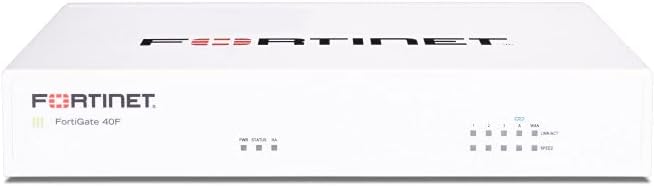
The FortiGate-40F carries a 4.2 rating and provides a more compact option for small organizations that want Fortinet's management ecosystem. Its five Gigabit Ethernet RJ45 ports divide into one WAN connection and four internal ports, which is enough for a modest office with several wired users or separated services.
We may earn a commission when you buy through this link, at no additional cost to you.
The appliance can deliver up to 1 Gbps of IPS throughput and 600 Mbps of threat-protection throughput. A fanless desktop design reduces noise and saves space, while the management interface provides automation, network visibility, and Zero Touch Integration with Fortinet's Security Fabric. FortiGuard Labs threat intelligence adds identification and mitigation capabilities for known and unknown threats.
As with the FortiGate-60F, this is an appliance-only purchase without a subscription. That means hardware functionality is available at acquisition, but comprehensive security services, continuing intelligence, and support require separate licensing. A buyer should therefore treat the FortiGate-40F as a platform choice rather than assume every subscription feature is active immediately.
This model is best for small businesses, professional home offices, and branch locations that need five wired interfaces but do not need the larger port count or greater inspection throughput of the 60F. It is most attractive to buyers already using Fortinet tools or wanting a vendor-supported alternative to self-installed open-source firewalls.
The compact fanless enclosure fits comfortably on a desk or near network equipment. Four internal ports provide useful segmentation without requiring a larger branch gateway.
The management console and Security Fabric integration are designed to reduce deployment complexity. This is especially helpful for organizations that prefer a supported platform over maintaining a custom firewall image.
We may earn a commission when you buy through this link, at no additional cost to you.
The Ubiquiti Unifi Security Appliance receives a 4.5 rating and is the easiest way to add a dedicated gateway to an existing UniFi environment. It provides firewall performance, VLAN support, quality-of-service controls for enterprise VoIP, a VPN server, and three 10/100/1000Base-T ports in a wall-mountable desktop enclosure.
We may earn a commission when you buy through this link, at no additional cost to you.
Its defining strength is ecosystem integration. For an organization already using UniFi access points, cameras, switches, and network management, adding the USG can create a more consistent, centrally managed environment. VLAN support helps separate users, guest traffic, and sensitive devices, while QoS can prioritize voice applications that are sensitive to delay and jitter.
The limitation is physical capacity. Three Gigabit Ethernet ports leave limited room for multiple WAN links, DMZ services, or extensive segmentation without additional switching. The appliance is therefore most natural as a small gateway or centralized UniFi edge device rather than a high-density enterprise firewall.
Choose the Ubiquiti USG when affordability, simple administration, and integration with UniFi equipment matter more than maximum throughput or advanced dedicated security services. It is a sensible choice for a home, small office, or branch standardized on Ubiquiti, provided its port count and feature set match the intended topology.
Controller integration allows the firewall to sit within a familiar UniFi management environment. This simplifies combined administration for compatible access points, switches, and client devices.
VLAN support helps organize traffic into logical groups, while the built-in VPN server supports secure remote access. These capabilities make the compact appliance useful beyond simple double-NAT prevention.
We may earn a commission when you buy through this link, at no additional cost to you.
The SonicWall TZ280 earns the highest product rating in this guide at 4.7 and stands out for strong next-generation firewall performance. It can provide up to 2.5 Gbps of firewall inspection, 1 Gbps of threat-prevention throughput, and 1.2 Gbps of IPSec VPN throughput through SonicWall's RFDPI engine.
We may earn a commission when you buy through this link, at no additional cost to you.
Connectivity is unusually flexible for a desktop appliance. Eight 1GbE ports and two 1G SFP connectors allow administrators to build a wired perimeter, connect additional media, and support branch architectures. Zero-touch deployment and management through the on-box interface or cloud Network Security Manager make the platform attractive to distributed organizations.
SonicOS 8 supports intrusion prevention, gateway anti-malware, application control, TLS and SSL decryption, Capture ATP multi-engine sandboxing, and reputation-based content and DNS filtering. However, this hardware-only listing explicitly excludes security subscriptions, firmware updates, and support, which must be purchased separately to activate protection.
The TZ280 is a strong premium choice for small businesses and branches that need more throughput and interface flexibility than a basic gateway. It is especially relevant for buyers seeking secure SD-WAN, IPSec and SSL VPN, or Zero-Trust Network Access through Cloud Secure Edge, provided they include the required service subscription.
The stated inspection and threat-prevention figures place the TZ280 near the top of this list. Its deep-packet inspection engine is designed to process traffic efficiently while applying a broad collection of security controls.
Eight copper ports and two SFP connectors offer more physical options than most compact firewalls. Zero-touch deployment and cloud management also suit organizations with multiple distributed sites.
We may earn a commission when you buy through this link, at no additional cost to you.
The Netgate 1100 has a 4.1 rating and offers the most clearly turnkey pfSense experience in the roundup. It arrives with pfSense+ preloaded, so the buyer can begin customizing the firewall, router, and VPN functions without first locating and installing an operating system.
We may earn a commission when you buy through this link, at no additional cost to you.
Its dual-core ARM Cortex-A53 processor runs at 1.2 GHz and can provide near-gigabit routing performance for common iPerf3 traffic, along with more than 650 Mbps of firewall throughput. Three switched Gigabit Ethernet ports can be configured as WAN, LAN, or optional network interfaces, providing enough flexibility for a compact secure edge.
The package includes pfSense+ updates for the product lifetime, Netgate TAC Lite technical support, a one-year hardware warranty, and access to free setup assistance from the Technical Assistance Center. Those inclusions distinguish it from bare-metal Protectli systems, although the adult-signature delivery requirement can add a small purchasing inconvenience.
The Netgate 1100 is best for a home, small business, or technical user who wants the familiarity of pfSense without a manual installation process. It is particularly suitable when a quiet, low-power gateway with established support is desired, but its three-port layout and moderate firewall throughput should match the scale of the network.
Preloaded software removes the most involved part of building a dedicated firewall from general-purpose mini PCs. Users can focus on interfaces, firewall rules, VPN access, and network services.
The ARM Cortex-A53 platform delivers meaningful throughput while maintaining low power draw and silent operation. That balance works well for a continuously connected home or office perimeter.
We may earn a commission when you buy through this link, at no additional cost to you.
The FortiGate-100E carries a 4.7 rating, making it one of the strongest-rated products in the comparison. It is a Fortinet network security appliance intended to protect business traffic with capabilities for identifying applications, detecting unknown attacks, blocking known exploits, stopping malware, and filtering malicious websites.
We may earn a commission when you buy through this link, at no additional cost to you.
The principal advantage is membership in the broader Fortinet security ecosystem. Buyers with other Fortinet infrastructure can benefit from a consistent security approach and a familiar operating model, while smaller organizations gain access to a business-class platform without moving to a larger data-center chassis.
The supplied product information is less detailed than for the FortiGate-40F and 60F. It does not list port counts, throughput figures, form factor, or subscription contents, so prospective buyers should confirm the exact configuration and which capabilities require FortiGuard or other service activation before ordering.
The FortiGate-100E is a sensible candidate for organizations already committed to Fortinet or seeking a recognizable enterprise security brand. It may suit a branch, midsize office, or network requiring application awareness and layered threat protection, provided its exact interface layout and current licensing terms align with the intended deployment.
The appliance is described as identifying thousands of applications, detecting unknown attacks, and blocking known exploits. This combination can help administrators move beyond simple port filtering toward more informed network policy decisions.
For organizations already using Fortinet products, adding a FortiGate appliance can preserve a common security framework. That familiarity may reduce management friction across related infrastructure.
We may earn a commission when you buy through this link, at no additional cost to you.
The Palo Alto PA-220 has a 3.0 rating and is positioned as an eight-port next-generation firewall security appliance. It is the only Palo Alto Networks product in this group, giving it appeal for buyers who want to standardize a branch or office around a widely recognized enterprise firewall brand.
We may earn a commission when you buy through this link, at no additional cost to you.
Eight ports can support several internal network segments along with external and service connections. That makes the stated design potentially appropriate for a small organization or branch that needs more wired flexibility than a three-port consumer gateway but does not require a large modular security system.
The listing provides very little detail beyond the model, eight-port format, next-generation firewall designation, and new condition. It does not specify throughput, supported subscriptions, management options, included accessories, or current software entitlement. These omissions make it difficult to compare performance accurately without consulting additional manufacturer or retailer documentation.
The low rating also warrants caution, as it may reflect buyer dissatisfaction, configuration confusion, or a different experience from that of larger Palo Alto deployments. A potential buyer should verify the exact hardware revision, subscription requirements, port behavior, and support status. It is most appropriate for a buyer who values the platform's reputation and has done substantial configuration research.
The advertised port count provides useful physical flexibility for segmented business networks. It can accommodate a WAN, management path, and multiple internal or DMZ connections.
Palo Alto Networks is the defining feature in the sparse listing. Buyers should treat the platform and licensing details as priorities and confirm them directly rather than assuming included services.
We may earn a commission when you buy through this link, at no additional cost to you.
The Protectli Vault FW4C earns a 4.5 rating and differentiates itself through four Intel 2.5 Gigabit Ethernet ports. It uses a quad-core, four-thread Intel J3710 processor that can burst to 2.6 GHz, with AES-NI hardware support for cryptographic workloads associated with secure network traffic.
We may earn a commission when you buy through this link, at no additional cost to you.
The multi-gigabit interfaces are the major attraction. They can support faster local connections and modern network infrastructure without requiring the appliance itself to advertise a specific firewall-inspection rate. Like the FW4B, the FW4C works with pfSense, OPNsense, untangle, and other popular open-source solutions, giving capable administrators considerable control over the software stack.
Its resources are more restrained than those of the FW4B: 4GB of DDR3 memory and a 32GB SSD support the stated role, but offer less room for demanding configurations, extensive logging, or future expansion. As a bare hardware platform, it also requires the buyer to install an operating system, and its advanced multi-gigabit behavior depends on compatible software and network equipment.
The FW4C is a good match for a technically confident home user, advanced office, or enthusiast who wants multi-gigabit interfaces and values open-source firewall choice. It is less attractive for organizations seeking turnkey management, generous storage, or a vendor-supported security bundle, but it offers a distinctive path to high-speed custom networking.
Four 2.5GbE ports are uncommon in this compact appliance class. They can take advantage of faster switches and local links while maintaining a small physical footprint.
The absence of a preinstalled system gives administrators complete control over the firewall platform. That is valuable for experienced users who already know which image and configuration best match their requirements.
We may earn a commission when you buy through this link, at no additional cost to you.
The FortiGate-60F Security Bundle holds a 4.2 rating and packages the FortiGate-60F with one year of FortiGuard Unified Threat Protection and FortiCare Premium. This listing therefore addresses a key drawback of the appliance-only version: comprehensive threat services and premium support are included for the initial term.
We may earn a commission when you buy through this link, at no additional cost to you.
Unified Threat Protection adds web filtering and anti-botnet capabilities intended to protect against advanced online threats. FortiCare Premium adds a support and service-continuity layer, while the underlying appliance provides the high port density associated with the FortiGate-60F family. The bundle is positioned for medium-sized businesses that need stronger protection without deploying larger enterprise infrastructure.
The important consideration is duration. After the included year, continued access to the listed services may require another subscription or renewal arrangement. Organizations should also verify exactly how this particular bundle maps to standard FortiGate hardware and feature entitlements before purchase, especially if they intend to compare it directly with a hardware-only listing.
This package is best for a business that prefers a vendor-supported firewall and wants a bundled start with threat protection and support already included. It may be particularly useful for a medium office or branch that values predictable deployment over assembling hardware and services separately.
A year of Unified Threat Protection provides a more complete starting point than appliance-only hardware. Web filtering and anti-botnet services can address common online risks during the included period.
FortiCare Premium is included for the stated term, adding access to vendor support. Buyers should plan the renewal path and verify coverage expectations before committing to the bundle.
We may earn a commission when you buy through this link, at no additional cost to you.
The right firewall depends on network size, traffic volume, required security subscriptions, administrative experience, and future growth. The following factors help narrow the field before comparing hardware specifications.
Begin by measuring the number of users, devices, concurrent sessions, and expected bandwidth rather than selecting a model only by port count. A small home or office may be well served by a compact three-port appliance, while a branch with many users, local file transfers, voice services, or encrypted application traffic needs more processing capacity. Compare published firewall, IPS, threat-prevention, and VPN throughput when those figures are available. A connector rated for 1 Gbps does not guarantee that the firewall can inspect traffic at that same rate, particularly when intrusion prevention, anti-malware, SSL inspection, and logging are enabled.
Count the physical connections the network will need, including WAN, LAN, management, DMZ, and optional service interfaces. The FortiGate-60F family provides ten RJ45 ports, while the Protectli models offer four and the Netgate and Ubiquiti options offer three. SFP connections can make a firewall more adaptable when fiber or compatible network modules are part of the plan, but module compatibility should be verified. Extra ports also create segmentation options, allowing guest, IoT, server, and workforce networks to remain isolated while sharing one security platform.
Some appliances include the operating system or initial security services, while others ship as hardware only. The Netgate 1100 includes pfSense+ and lifetime software updates, the FortiGate-60F bundle includes a stated year of Unified Threat Protection and FortiCare Premium, and the SonicWall TZ280 listing explicitly excludes active services. Evaluate which protection features are included, what continues after the initial term, and whether the renewal process is suitable. Advanced malware scanning, intrusion prevention, application control, encrypted-traffic inspection, and threat intelligence are often connected to subscriptions.
Administration is as important as processing power. Ubiquiti's appliance is designed to integrate with the UniFi Controller, Fortinet products include a management console and ecosystem integration, SonicWall supports on-box and cloud-oriented management, and the Protectli units let administrators install the software they prefer. A graphical vendor ecosystem may reduce routine complexity, while a bare-metal open-source approach rewards users who are comfortable with images, interfaces, rules, updates, and troubleshooting. Select a platform whose ongoing administration fits the available skills rather than relying on installation assistance alone.
The Protectli Vault FW4B and FW4C are compatible with pfSense, OPNsense, untangle, and other open-source solutions, giving capable users a high degree of control. The Netgate 1100 provides a middle ground by shipping with pfSense+ and including updates and technical support. A full vendor platform may provide integrated threat intelligence, policy automation, cloud management, and a support structure, but often introduces subscription dependencies. Consider who will maintain the installation years later, how updates will be delivered, and whether recovering from a failed disk or configuration should be part of the appliance experience.
Firewall performance and threat-inspection performance are different measurements. The SonicWall TZ280 is listed at up to 2.5 Gbps for firewall inspection, 1 Gbps for threat prevention, and 1.2 Gbps for IPSec VPN. FortiGate models publish separate IPS and threat-protection figures, while the Netgate listing notes more than 650 Mbps of firewall throughput. Higher numbers are not automatically better: a smaller network may be fully served by a simpler unit, while a high-throughput appliance becomes useful when it can sustain inspection with the desired feature set enabled.
A firewall is usually placed between network equipment and may operate continuously, making size, noise, heat, and power important. The Protectli and FortiGate-40F products use compact, fanless designs, while the Netgate 1100 emphasizes low power draw and silent operation. The SonicWall TZ280 provides a desktop enclosure with more interfaces, and the larger FortiGate-100E is better assessed with its full documentation. Confirm rack or wall-mount requirements, port accessibility, ventilation, and the availability of nearby power. A neat physical design is useful, but stability, serviceability, and thermal performance matter more.
Consider how the network may grow in users, bandwidth, encrypted traffic, and application complexity. Faster multi-gigabit ports can extend useful life, as seen with the Protectli FW4C, while a high-port FortiGate offers more room for segmented networks. Software extensibility also matters: sufficient memory and storage can prevent an initially capable appliance from becoming restrictive after logging or additional services are enabled. Review upgrade paths, supported software, interface compatibility, and available documentation before purchasing. A slightly more capable platform may be worthwhile if it avoids a difficult replacement during an active deployment.
Begin by documenting the existing router, internet connection, LAN addressing, DNS services, port forwarding, and any VPN or inbound access rules. Configure the firewall in the correct order, starting with management access, administrator credentials, interface assignments, WAN connectivity, and DNS. Enable logging and create a tested configuration backup before moving production traffic to the appliance. Using a maintenance window and retaining temporary access from the original network reduces the risk of locking out remote administration.
For a bare-metal Protectli system, install the chosen firewall image, confirm the storage and network drivers are recognized, and apply current updates before exposing the device to the internet. For a vendor-supported appliance, complete the registration and subscription process, then apply the recommended baseline policy. Segment internal networks only after the basic WAN and LAN path is stable. Test browsing, DNS, DHCP, VoIP, VPN, remote applications, and critical server access, and document every changed rule so troubleshooting does not depend on memory.
Care for the appliance by keeping it in a ventilated location, maintaining the latest security updates, and checking subscription status before protections expire. Review logs, utilization, and unusual traffic at regular intervals, and back up configurations to more than one secure location. Change administrative credentials, restrict management access, and update recovery contacts as responsibilities change. When replacing the device, preserve the old configuration for reference, migrate services deliberately, and retain the original router until every essential connection has been verified.
A firewall appliance is a dedicated network device that applies security rules between network connections and filters incoming or outgoing traffic. Depending on the model, it may also provide VPN access, routing, application control, intrusion prevention, malware filtering, and centralized management. Unlike a basic router, a firewall appliance is designed specifically to make policy decisions and protect network boundaries.
Many consumer routers include a basic firewall, but the protection and visibility may be limited. A dedicated appliance can provide stronger inspection, better segmentation, more flexible VPN options, centralized logging, and more sophisticated administration. The need depends on the number of users, sensitivity of connected devices, remote-access requirements, and the capabilities of the existing router.
It can be approachable for a first-time user because the interface is usually guided, but deeper changes still require networking knowledge. Software installation, interface assignment, rule design, updates, backups, and troubleshooting are more involved than operating a basic home router. A product such as the Netgate 1100 reduces the setup burden by including pfSense+, while bare-metal Protectli systems offer greater control.
Firewall throughput reflects how much traffic the appliance can move under basic forwarding conditions. IPS throughput measures performance while intrusion-prevention inspection is active, so it is usually lower. Threat-prevention throughput may be lower still when anti-malware, application control, and encrypted-traffic inspection are enabled. Compare the figure relevant to the security features the organization intends to use.
No, but security value often depends on software and services. Open-source appliances can run without a paid subscription, and some vendor systems include an initial term. Other listings, including the SonicWall TZ280 hardware-only model and the FortiGate-60F appliance-only model, require separate service activation for the full protection described. Check the bundle and renewal details before purchasing.
A small office may function with three ports, such as one WAN and two internal connections, especially when downstream switches handle additional devices. Four or more ports become useful for guest networks, servers, management, and isolated IoT systems. The FortiGate-60F's ten-port arrangement is advantageous where several network roles or branch services must be connected directly.
Many do, but the specific protocols and licensing terms vary. The Netgate 1100 is described as a firewall, router, and VPN product, the Ubiquiti USG includes a VPN server, and the SonicWall TZ280 supports IPSec and SSL VPN. The FortiGate models also emphasize VPN capabilities, so buyers should verify client compatibility, user capacity, and whether the desired service is included.
Review it whenever network services, users, locations, or remote-access requirements change, and at least on a regular schedule even when the environment is stable. Review administrator access, active rules, subscriptions, firmware, logs, and backup status. Unused rules and forgotten remote-access accounts can expand the attack surface even when the original business need has disappeared.
The Protectli Vault FW4B is the strongest all-around choice for a technically confident buyer who values flexible software and a compact four-port design. The SonicWall TZ280 stands out as the premium selection with the highest listed inspection throughput and extensive branch-oriented features, while the Ubiquiti Unifi Security Appliance is the budget-friendly option for straightforward UniFi integration.
Before choosing, prioritize the number of required connections, the speed of actual inspected traffic, the security features you intend to enable, and the management experience your team can sustain. Open-source systems reward control and customization, turnkey pfSense reduces initial work, and vendor-supported appliances can simplify administration but often require an ongoing subscription.
Finally, check current pricing, bundle contents, subscription duration, software versions, port availability, and support terms before ordering. Product packages and vendor programs change, and current listings may differ from the specifications captured in this November 2026 guide. Confirm that the selected appliance matches both today's network and its likely future growth.