
GMK104 Barebones Keyboard Kit with Screen and Knob
4.6Editor score
Display and metal knob
Hot-swappable gasket mount
Windows and macOS support
Our Barebones Keyboard Kits guide compares ten mechanical keyboard kits for layout, connectivity, programmability, mounting, displays, and build flexibility.
Barebones keyboard kits provide the foundation for a personalized mechanical keyboard without requiring buyers to select every component at once. A useful kit combines a case, PCB, mounting system, stabilizers, and compatible keycaps, while leaving meaningful choices about switches, keycap sets, and finishing details to the builder.
We compared the ten featured kits by examining their layouts, connectivity options, hot-swap support, mounting structures, programmability, lighting, displays, and practical feature sets. The list includes full-size, 80%, 75%, and 65% designs, with options ranging from straightforward wired builds to advanced wireless kits equipped with screens and rotary controls.
Each review explains where its kit stands out, who will benefit most from its design, and which trade-offs deserve consideration. The GMK104 stands out for its full-size layout and display, the GMK67 for its compact tri-mode build, and the GMK87 for its screen-equipped 80% design. Product availability and prices can change, so confirm current listing details before ordering.
4.6Editor score

4.8Editor score

4.5Editor score
The comparison below places all ten kits side by side, emphasizing the differences that matter most during a DIY build: physical layout, interaction features, wireless support, programmability, switch compatibility, and mounting approach.

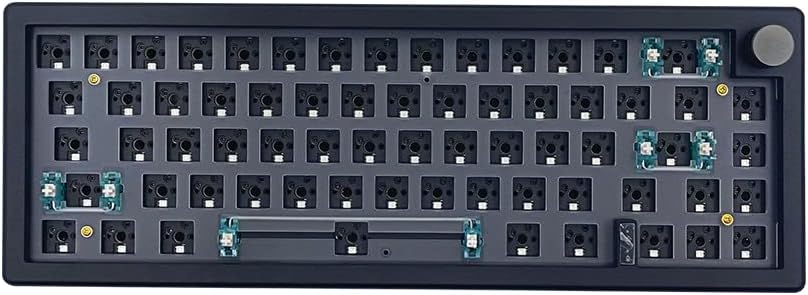


The GMK104 is a full-size barebones kit rated 4.6 out of 5, and it combines a conventional 104-key arrangement with several features normally associated with more specialized custom builds. Its defining additions are a small smart display, two dedicated multimedia buttons, and a metal rotary knob. The result is especially interesting for builders who want their finished keyboard to function as both a productive daily tool and a personalized centerpiece.
We may earn a commission when you buy through this link, at no additional cost to you.
The kit supports Bluetooth 5.0, 2.4GHz wireless, and wired USB-C connectivity, with a listed 4000mAh rechargeable battery. Its hot-swappable PCB accepts 3-pin and 5-pin switches without requiring soldering, while the gasket-mounted structure is intended to reduce vibration and create a more cushioned feel. VIA programmability allows key remapping, macros, and lighting changes, and the south-facing RGB system adds visible customization for Windows and macOS setups.
The obvious trade-off is physical size. A full-size keyboard with a numpad, function row, and dedicated display occupies far more space than a 65% or 75% design. The screen and knob also make the kit more complex than a simple blank PCB, which may not interest someone whose goal is a minimalist, traditional custom board. Nevertheless, these features are presented as optional parts of the experience rather than compromises to typing performance.
This is a strong recommendation for office-focused builders, spreadsheet users, programmers who appreciate a numpad, and enthusiasts who want a smart display without moving to a small format. It combines a complete layout, a flexible hot-swap platform, RGB, and wireless operation in a single foundation. For a first substantial custom build, the GMK104 offers one of the broadest feature sets in this guide.
The 104-key layout preserves the arrow cluster, function row, and numpad, while the display and knob add modern controls without replacing essential keys. This balance makes the kit useful for productivity as well as enthusiast customization.
Bluetooth, 2.4GHz, and USB-C modes provide options for different desks, while hot-swappable sockets make switch experimentation much less intimidating. The listed 4000mAh battery also supports the kit's wireless emphasis.
We may earn a commission when you buy through this link, at no additional cost to you.
The white BOYI GMK67 is a 65% barebones kit rated 4.5 out of 5. It offers a compact footprint, a programmable PCB, hot-swappable switch sockets, RGB lighting, and three connection modes. The design focuses on the essentials of a modern custom keyboard while making them accessible to builders who want a manageable desk footprint.
We may earn a commission when you buy through this link, at no additional cost to you.
Bluetooth 5.0, 2.4GHz, and wired USB-C modes allow the keyboard to move between a desktop setup and mobile devices. The listed 4000mAh battery supports extended wireless use, while VIA software handles key mapping, macros, and backlighting. A multifunction knob provides an additional control for common media tasks. The kit also includes a polycarbonate plate and ample preinstalled foam, reducing the number of assembly decisions and helping limit cavity sound.
As a 65% board, it omits a separate function row and numpad, so users who depend heavily on numeric input may find the layout less convenient. The manufacturer also specifies compatibility with 3-pin and 5-pin mechanical switches, excluding optical and magnetic switches. Those restrictions are reasonable, but they require attention when selecting components for the build.
The GMK67 is ideal for small workspaces, students, and users who prefer arrow keys and a compact main typing area. It also makes a convincing first custom build because the hot-swap system avoids soldering and the supplied plate and foam simplify construction. Among the compact wireless options here, it stands out for its balanced combination of features, layout efficiency, and approachable assembly.
The 65% format preserves dedicated arrow keys while eliminating the numpad and separate function row. Combined with three connection modes, it suits users who alternate between a primary computer and portable devices.
Hot-swap sockets support 3-pin and 5-pin mechanical switches, while a polycarbonate plate and preinstalled foam streamline the build. Buyers still need to add compatible switches, stabilizers where required, and their preferred keycap set.
We may earn a commission when you buy through this link, at no additional cost to you.
The GMK108 is rated 4.1 out of 5 and targets builders who want a traditional full-size mechanical keyboard with contemporary wireless and programming features. Its 108-key arrangement includes a numpad, arrow keys, and function keys, making it a practical foundation for office work, data entry, and gaming.
We may earn a commission when you buy through this link, at no additional cost to you.
Its PCB supports Bluetooth 5.0, 2.4GHz, and wired Type-C connections, with a listed 4000mAh battery. VIA support allows users to remap keys, create macros, and adjust lighting. The hot-swappable PCB accepts 3-pin and 5-pin switches, while gasket mounting is intended to improve the tactile experience. South-facing RGB lighting and Windows and macOS compatibility broaden its everyday appeal.
Compared with the GMK104, this model omits the smart display, multimedia buttons, and metal knob. That keeps the design more conventional, which may be preferable for buyers who want their finished board to look and operate like a standard full-size keyboard. Its larger footprint is the unavoidable trade-off for retaining a numpad.
Choose the GMK108 if a complete function row and numpad are priorities and the added display hardware of the GMK104 is unnecessary. It is a flexible, conventional choice for productivity-minded builders who still want hot-swap construction, RGB, and wireless operation.
The 108-key design includes dedicated navigation, function, and numeric keys. It offers more direct access to spreadsheet and productivity commands than compact alternatives.
The GMK108 avoids screen and knob embellishments, focusing on a familiar full-size shape. Internally, however, it still provides modern programmability, wireless modes, RGB, and hot-swap convenience.
We may earn a commission when you buy through this link, at no additional cost to you.
The white GMK104 is rated 4.8 out of 5, giving it the highest listed rating among the featured barebones kits. It is a full-size 104-key platform with a custom PCB, a small smart display, two multimedia buttons, and a metal knob. Those additions distinguish it from ordinary blank-keyboard kits and make it particularly appealing to builders who enjoy visible, interactive customization.
We may earn a commission when you buy through this link, at no additional cost to you.
QMK and VIA programmability provide ways to remap keys, create macros, and configure lighting. The kit supports Bluetooth 5.0, 2.4GHz, and wired Type-C operation, with a listed 4000mAh rechargeable battery and device switching through FN+Q/W/E. Gasket mounting, 3-pin and 5-pin hot-swap sockets, south-facing RGB, and compatibility with Windows and macOS complete the technical package.
Its size is the largest practical compromise. The full-size footprint, display, and knob can feel visually busy to someone who prefers a clean traditional board. In addition, the display is a specialized feature that requires appropriate setup and may not serve a user who only wants a fast, dependable typing instrument. Those considerations matter, but they do not diminish the kit's strong feature set.
For a builder creating an elaborate everyday keyboard, this is the most distinctive option in the guide. It is well suited to creative professionals, programmers who use a numpad, and enthusiasts who want a display, rotary control, and wireless flexibility in a complete full-size foundation. The white finish also gives the finished build a particularly bright, customizable appearance.
The smart display can be updated in real time, turning the keyboard into something more interactive than a standard input device. It also offers a natural home for status information, artwork, or other personal content.
QMK and VIA support, hot-swap sockets, and three connection modes give the kit considerable flexibility. The included 104-key arrangement ensures the additional electronics do not come at the expense of numeric or navigation keys.
We may earn a commission when you buy through this link, at no additional cost to you.
The black BOYI GMK67 is the dark-finished counterpart to the white version in this guide, carrying a 4.3 rating. It offers the same core combination of a 65% layout, tri-mode connectivity, hot-swappable PCB, gasket mounting, RGB lighting, and programmable controls. Its black case is particularly well suited to dark desk setups and understated custom builds.
We may earn a commission when you buy through this link, at no additional cost to you.
Users can connect through Bluetooth 5.0, 2.4GHz, or a wired Type-C cable. The listed 4000mAh battery and VIA support make it practical for mobile switching and workflow-oriented remapping. Its rotary knob controls multimedia functions, while south-facing SMD LEDs provide a broad lighting palette. A polycarbonate plate and ample foam are included, making the initial build more approachable.
The same limitations that apply to most 65% boards remain relevant. There is no separate numpad, and the kit is intended for 3-pin or 5-pin mechanical switches rather than optical or magnetic designs. A buyer who regularly enters large quantities of numbers may find the compact format less efficient than a full-size alternative.
The black GMK67 is best for users who want a compact, dark mechanical keyboard with wireless flexibility and minimal visual clutter. It is a strong option for gaming, general office work, and laptop-focused setups. Buyers comparing it with the white version should primarily consider appearance, since the listed functions are essentially the same.
The kit's three connection modes and rechargeable battery make it easy to use across a desktop computer, laptop, and other compatible devices. FN shortcuts provide quick device-switching controls.
Hot-swap sockets, a supplied polycarbonate plate, installed foam, and VIA support cover several important parts of the build process. The result is a convenient starting point for experimenting with switches, keycaps, and layouts.
We may earn a commission when you buy through this link, at no additional cost to you.
The white GMK87 is an 87-key, 80%-format barebones kit rated 3.9 out of 5. It combines a TFT-LCD screen, metal knob, hot-swappable PCB, and tri-mode connectivity in a layout designed to preserve useful navigation keys while reducing desk space. The screen can display customized images, dates, and times, giving the finished keyboard a strong visual identity.
We may earn a commission when you buy through this link, at no additional cost to you.
Bluetooth 5.0, 2.4GHz, and wired USB-C operation are supported, with a listed 3000mAh rechargeable battery. The device can be used with tablets, PCs, laptops, and phones. Its PCB accepts most 3-pin and 5-pin mechanical switches, including common Cherry, Gateron, Otemu, Kailh, and other MX-style options. South-facing LEDs, VIA macro support, and controls for lighting mode, speed, and brightness add a high level of customization.
The gasket structure is intended to reduce vibration, while a dual-stage foldable kickstand lets the user adjust the typing angle. A built-in USB storage compartment helps keep the detachable cable organized. As an 80% board, however, it has no separate numpad, and the screen and wireless hardware introduce more setup than a straightforward wired kit. Its lower listed rating also deserves attention when comparing it with stronger-rated alternatives.
This GMK87 is most appropriate for creative users who want a personalized display in a compact 80% format. It is also compelling for mobile multitasking and gaming setups that benefit from wireless flexibility. Those who prioritize a simpler build, a number pad, or a higher listed rating may prefer another option in the comparison.
The TFT display can present custom images and basic time information, while the knob provides direct volume control. These details make the finished board feel more like a personal electronic accessory than a blank build platform.
Gasket mounting aims to soften the typing experience, and the dual-stage kickstand offers height adjustment. The integrated USB compartment keeps the detachable cable accessible and reduces desk clutter.
We may earn a commission when you buy through this link, at no additional cost to you.
The black M87 75% kit is rated 4.2 out of 5 and offers a comparatively straightforward route into custom mechanical keyboard building. It provides a gasket-mounted 75% layout, a hot-swappable PCB, south-facing RGB, and a detachable USB-C cable. The design omits displays, knobs, and wireless functions, allowing the kit to focus on core typing and gaming features.
We may earn a commission when you buy through this link, at no additional cost to you.
Its hot-swap terminals support 3-pin and 5-pin switches, including Cherry, Otemu, Gateron, Kailh, and other MX-style options and clones. NKRO support and full-key anti-ghosting are useful for gaming. The included silencing pads and silicon bottom pad are designed to absorb unwanted clatter while preserving responsiveness, and the product information identifies Windows and macOS compatibility.
Customization is handled through factory lighting presets, music-rhythm modes, and optional software for macros, per-key lighting, and effects. The limitation is that the listed connectivity is wired, so users cannot alternate among devices over Bluetooth or 2.4GHz. As with other barebones products, switches and compatible keycaps remain necessary additions before the board is ready for regular use.
The M87 is a good choice for builders who want a compact, dark wired keyboard without a complicated wireless or display system. It is also practical for gaming, where NKRO and anti-ghosting are useful, and for anyone who prefers a dependable USB-C desk setup. The trade-off is fewer connectivity choices and less visible novelty than the screen-equipped alternatives.
The detachable USB-C cable gives the kit a clean, familiar connection to a desktop or laptop. Without wireless radios, displays, or other advanced modules, it can be a less complicated platform for first-time builders.
Sound-absorbing foam and a silicon bottom pad are included to reduce case vibration and keyboard clatter. The effect ultimately depends on the chosen switches, keycaps, and plate as well as the installed pads.
We may earn a commission when you buy through this link, at no additional cost to you.
The black GMK87 is rated 3.9 out of 5 and combines an 87-key 80% layout with a TFT display and multifunction metal knob. It is visually suited to darker desks and offers the same general interaction features as the white GMK87, allowing users to prioritize a subdued case color without abandoning the customizable screen.
We may earn a commission when you buy through this link, at no additional cost to you.
Triple-mode connectivity includes Bluetooth 5.0, 2.4GHz, and wired Type-C, supported by a listed 3000mAh rechargeable battery. The keyboard can be used with several device categories, including tablets, PCs, laptops, and mobile phones. Its hot-swappable PCB supports most 3-pin and 5-pin mechanical switches, while VIA software enables macros and programmable lighting. South-facing LEDs provide adjustable color, brightness, and speed effects.
Gasket mounting helps reduce internal vibration, and a dual-stage foldable kickstand allows users to choose their preferred height. The integrated USB storage compartment keeps the detachable cable organized. The main compromises remain the lack of a numpad and the extra complexity associated with a display, knob, battery, and multiple wireless modes.
Buyers interested in a small but visually interactive custom board will find the most compelling feature set here. It works well for gaming, creative desktop setups, and users who frequently move among computers and mobile devices. If a screen is unnecessary or a higher listed rating is a priority, a more conventional full-size or compact kit may be a better match.
Custom images and date or time displays make the TFT screen a useful extension of the keyboard's identity. The knob adds a physical control for common media functions.
Bluetooth, 2.4GHz, and USB-C modes cover common connection preferences. The detachable cable can also be stored in the built-in compartment, helping maintain a tidy wireless setup.
We may earn a commission when you buy through this link, at no additional cost to you.
The BOYI GMK67Pro is a black 65% barebones kit rated 4.0 out of 5. Its strongest distinguishing feature is explicit support for both QMK and VIA, giving advanced users broad options for key mapping, macros, and backlight behavior. The compact format and multifunction knob keep it suitable for everyday productivity and gaming.
We may earn a commission when you buy through this link, at no additional cost to you.
Its listed connectivity covers Bluetooth 5.0, 2.4GHz, and wired Type-C, with a 4000mAh battery for wireless operation. Hot-swappable terminals accept Cherry MX-style, Kailh, Gateron, and other 3-pin or 5-pin mechanical switches. The manufacturer specifically notes that optical switches are not supported. South-facing RGB, PORON gaskets, preinstalled foam, and a supplied polycarbonate plate contribute to the overall build platform.
As with other 65% kits, the missing numpad may inconvenience users who handle large spreadsheets or perform frequent numeric entry. The Pro designation does not change the physical layout, and the display-equipped GMK104 or GMK87 may appeal more to buyers seeking a visual focal point. Even so, stronger firmware support can be more valuable to experienced builders than a larger key count.
The GMK67Pro is a strong fit for programmers, productivity users, and gaming enthusiasts who want a small board with extensive remapping options. It is also a logical choice for builders interested in experimenting with QMK while retaining the convenience of VIA. Choose it when programmability and compactness matter more than a numpad or built-in display.
QMK support opens deeper configuration possibilities, while VIA provides a more approachable route to remapping and macros. Buyers should still confirm the current software workflow and required configuration files for the finished board.
PORON gaskets, installed foam, and an included polycarbonate plate provide a considered internal foundation. The final sound and feel will still depend on the selected switches, keycaps, and any additional tuning the builder chooses.
We may earn a commission when you buy through this link, at no additional cost to you.
The white M87 75% kit has a 3.5 rating, the lowest among the ten products in this comparison, but it remains a recognizable custom-keyboard foundation. It uses a gasket-mounted 75% layout, hot-swappable PCB, south-facing RGB, and a detachable USB-C connection. The clean white finish distinguishes it from the black M87 and many dark-themed enthusiast kits.
We may earn a commission when you buy through this link, at no additional cost to you.
The hot-swap PCB supports Cherry, Otemu, Gateron, Kailh, and other MX-style 3-pin and 5-pin switches. NKRO and full-key anti-ghosting make it suitable for gaming, while sound-absorbing pads and a silicon bottom pad are intended to reduce case noise. Software customization can be used for macros, per-key lighting, and effects, and the kit includes multiple factory lighting and music-rhythm modes.
Its wired-only design and lack of a display or knob make it less elaborate than many alternatives. The lower listed rating is another valid reason to examine current customer feedback and confirm the included components carefully before buying. Although a lower rating does not automatically make a kit unusable, it provides less initial reassurance than the higher-rated models in this guide.
This kit is best for a builder who values a light, compact, conventional design and wants a solder-free way to install mechanical switches. It is practical for gaming and general office use, particularly where a clean white aesthetic is desired. Buyers seeking wireless operation, programmable displays, or stronger customer ratings should look to the GMK87 or GMK104 families instead.
The white case creates a bright foundation that can pair effectively with many keycap themes. Its 75% arrangement maintains arrow and function access without requiring the space used by a full-size board.
NKRO, anti-ghosting, hot-swap sockets, and optional macro software cover the principal requirements of a gaming-oriented custom build. Wired USB-C keeps the setup simple and broadly compatible.
We may earn a commission when you buy through this link, at no additional cost to you.
The right barebones kit depends on layout, connection needs, programming preferences, and the level of customization you want. Review these factors before ordering, and remember that switches, keycaps, and possibly stabilizers must still be sourced separately.
Full-size kits such as the GMK104 and GMK108 include a number pad, function row, and dedicated navigation keys, making them appropriate for spreadsheets, accounting, and shortcuts. The GMK87 uses an 80% format with 87 keys, while the M87 uses a 75% format. The GMK67 and GMK67Pro are 65% boards with a more compact arrangement and no separate function row or numpad. Match the layout to your desk and software habits rather than choosing only by appearance.
Wired-only kits offer a simpler setup and avoid battery charging, pairing, and wireless latency concerns. The M87 options use a detachable USB-C connection. The GMK104, GMK108, GMK67, GMK67Pro, and GMK87 support Bluetooth 5.0, 2.4GHz, and wired Type-C operation, making them more flexible across computers and mobile devices. Wireless convenience is valuable, but it also adds configuration steps and creates more opportunities for connection issues.
Hot-swappable sockets let you install or replace mechanical switches without soldering, which makes experimentation considerably easier. Most featured kits support both 3-pin and 5-pin mechanical switches, including common MX-style options. The BOYI GMK67 and GMK67Pro explicitly exclude optical switches, and magnetic switches are also called out as unsuitable for the GMK67. Check the exact plate, stabilizer, and switch requirements before assembling the keyboard.
Gasket mounting places flexible material between the plate and case, which can reduce harsh vibration and improve perceived flexibility. It appears across the GMK104, GMK108, GMK67 family, GMK87, and M87. The final sound is never determined by mounting alone; switch choice, keycap profile, foam, case materials, and plate material all influence the result. Treat gasket mounting as a useful foundation rather than a guarantee of one specific sound.
VIA is common across the selection and provides graphical access to key remapping, macros, and lighting changes. The GMK104 also explicitly supports QMK, while the GMK67Pro supports both QMK and VIA. These platforms can be especially useful for layer access, application shortcuts, and compact layouts. Before buying, ensure the operating system, browser, and configuration method fit your technical comfort level.
The GMK104 includes a smart display, two multimedia buttons, and a metal knob, while the GMK87 uses a TFT-LCD screen and knob. These features can display artwork, time, or other information and provide convenient volume control. They also make assembly and software setup more involved. A display is an exciting feature for a display-oriented build but offers little practical value if the finished board will remain hidden away.
Most tri-mode kits list a 4000mAh battery, while the GMK87 lists a 3000mAh unit. South-facing RGB is widely supported and can usually be adjusted through onboard shortcuts or software. Check the listed shortcut behavior, Windows and macOS compatibility, and device-switching controls. These details help determine whether the kit will integrate smoothly with your existing software environment.
A barebones keyboard is not necessarily a complete keyboard. You will still need switches and keycaps, and the included component list should be checked for stabilizers, a plate, a cable, and mounting pieces. Some kits include a polycarbonate plate, while others use different mounting arrangements. Create a parts checklist before assembly so that missing components do not interrupt the build.
Begin by inventorying the case, PCB, plate, stabilizers, gaskets, cables, and fasteners included with the kit. Compare them with the assembly guide or product listing, then confirm that your chosen switches and keycaps are compatible. Install stabilizers before switches, keep the PCB and plate protected from static discharge, and avoid forcing components that do not align easily.
After assembly, connect the keyboard with its wired mode first and test basic typing, arrow keys, media controls, lighting shortcuts, and the knob or display. Configure VIA, QMK, or the listed software only after confirming that the basic layout works. For wireless use, charge the keyboard fully, enter the requested pairing mode, and test the documented device-switching combinations before relying on them during an important session.
For long-term care, clean the case and keycaps with soft, dry or lightly dampened materials, and avoid spraying cleaner directly onto switches or the display. Disconnect the cable before removing or changing components. Keep the keyboard away from excessive moisture, heat, and direct sunlight, and periodically check that the battery, gaskets, and case remain secure.
A barebones kit normally includes the case, PCB, plate or mounting components, stabilizers, and basic hardware, but it generally does not include switches or keycaps. Exact contents vary by model, so check the listing carefully. The GMK67 family, for example, is described as including a polycarbonate plate and preinstalled foam.
Not when the kit has hot-swappable PCB sockets. All ten featured products support hot-swappable installation of compatible 3-pin or 5-pin mechanical switches, allowing switches to be inserted directly into the PCB. You will need to check switch, plate, and stabilizer compatibility, and certain switch technologies are not supported by every kit.
Yes, as long as the layout includes the arrow and navigation keys needed for your games. The GMK67, M87, and GMK87 families are compact, but gaming-oriented features such as NKRO, anti-ghosting, and programmable RGB are present in the feature descriptions. A full-size option may be preferable for games that use a number pad.
VIA generally provides a more accessible graphical interface for changing key assignments, macros, and lighting. QMK offers deeper firmware-level control and is favored by advanced builders who want more extensive customization. The GMK104 and GMK67Pro explicitly list both options, while many other kits list VIA.
Many featured kits explicitly support Windows and macOS, including the GMK104 and M87. The remaining models provide platform-compatible programmability and connection modes, but buyers should verify the current software and shortcut instructions in the listing. Keyboard layouts and modifier commands may still need adjustment between operating systems.
No. Gasket mounting can reduce internal vibration and harsh case resonance, but the final sound depends heavily on the switches, keycaps, plate, foam, and typing force. Linear switches will generally sound different from tactile or clicky switches, and even two gasket-mounted kits can sound noticeably different depending on their components.
A wireless kit is convenient if you regularly use a laptop, tablet, or phone and value the ability to move among devices. The tri-mode models offer Bluetooth, 2.4GHz, and wired Type-C connectivity. If your keyboard remains at one desk, a wired kit may be simpler and avoids the need to monitor or recharge its battery.
They add more configuration than a standard blank kit because the display can show customized images, dates, and times, while the knob handles media functions. The product information states that the display can be updated in real time, and the GMK87 supports VIA customization. Users should follow the current setup instructions and confirm compatibility before committing to either design.
The GMK104 screen-equipped full-size kit offers the strongest combination of traditional layout, wireless flexibility, programmability, and interactive hardware. The BOYI GMK67 stands out for compact efficiency and an approachable build process, while the GMK87 brings a configurable TFT display and rotary knob to a useful 80% format.
Before choosing, prioritize the layout you can comfortably use, the connection modes you need, and the programming effort you are willing to undertake. A simpler wired 75% kit may be more reliable for your routine, while a screen-equipped model is better suited to a personalized showpiece. Also verify switch, keycap, stabilizer, and plate compatibility before ordering additional components.
Ratings and product configurations can change as listings evolve, and prices are subject to fluctuation. Review the current Amazon listing, customer feedback, included parts, and software requirements before making a final purchase. That extra check helps ensure the barebones kit you select supports both your build plans and your daily workflow.