
Also GO Podcast Equipment Bundle for 2
4.5Editor score
Two-creator all-in-one setup
Built-in audio effects controls
Bluetooth and wired connectivity
Microphone accessories included
Explore the best Podcast Equipment Bundles for solo, duo, and four-person shows, comparing microphones, mixers, monitoring, connectivity, and portability for
Podcast Equipment Bundles combine microphones, audio interfaces, mixers, monitoring, stands, and essential cables into a coordinated recording setup. A well-chosen bundle can shorten setup time, reduce compatibility problems, and help creators move from unboxing to recording without assembling every component separately.
This guide compares ten podcast equipment bundles for solo hosts, two-person conversations, four-person discussions, mobile creators, live streamers, and video podcasters. The evaluation focuses on microphone type, channel count, connectivity, monitoring options, included accessories, portability, and practical features rather than simply on the number of components.
Each pick highlights a different route into podcast production: budget-friendly effects processing, portable phone recording, focused two-person systems, larger group setups, and complete video studios. Product configurations and ratings may change over time, so readers should verify current availability, included accessories, and compatibility before making a final purchase.
4.5Editor score

4.5Editor score

5.0Editor score
This side-by-side comparison covers ten podcast equipment bundles ranging from compact two-person systems to four-host and dual-camera production kits, with particular attention to microphone configuration, recording channels, connectivity, and monitoring.



The Movo PodPro Portable Podcast Equipment Bundle for iPhone/Android Phones carries a 4.5 rating and combines a dual-channel MDX-2 interface, two CastMic XLR microphones, two tabletop stands, and two pairs of studio headphones. Its most distinctive feature is the unusually broad device support: USB-A, USB-C, and Lightning cables are included for phones, tablets, PCs, and Macs.
We may earn a commission when you buy through this link, at no additional cost to you.
The MDX-2 provides two XLR inputs with 48V phantom power, two headphone outputs, and stereo 1/4-inch outputs. That makes it more flexible than a simple microphone-and-cable package, particularly for a two-host mobile show where each person needs independent monitoring. The listed eight-hour battery life becomes three hours when phantom power is active, so creators should plan around the power demands of the microphones they choose.
The CastMic microphones use cardioid pickup and a stated frequency response of 40Hz to 16kHz. Their metal construction is appealing for creators who regularly pack and unpack equipment. The main trade-off is that the included tabletop stands offer less adjustment than boom arms, while the bundle's broad connectivity and travel case add components beyond what a barebones kit would include.
This is a strong choice for mobile podcasters, field interview teams, and beginners who want to record on a phone without sacrificing a two-channel XLR workflow. It is less suitable for someone requiring large boom-arm movement or a permanently installed desktop system, but for portable two-person productions, it offers an unusually balanced package.
The inclusion of USB-A, USB-C, and Lightning connections makes the system practical across modern phones, tablets, and computers. The travel case and battery-powered interface also help creators take the complete setup away from a fixed studio.
Two headphone outputs give each participant a private monitoring path through the MDX-2. This is especially useful in multi-host recordings where a shared output could make level checking less convenient.
We may earn a commission when you buy through this link, at no additional cost to you.
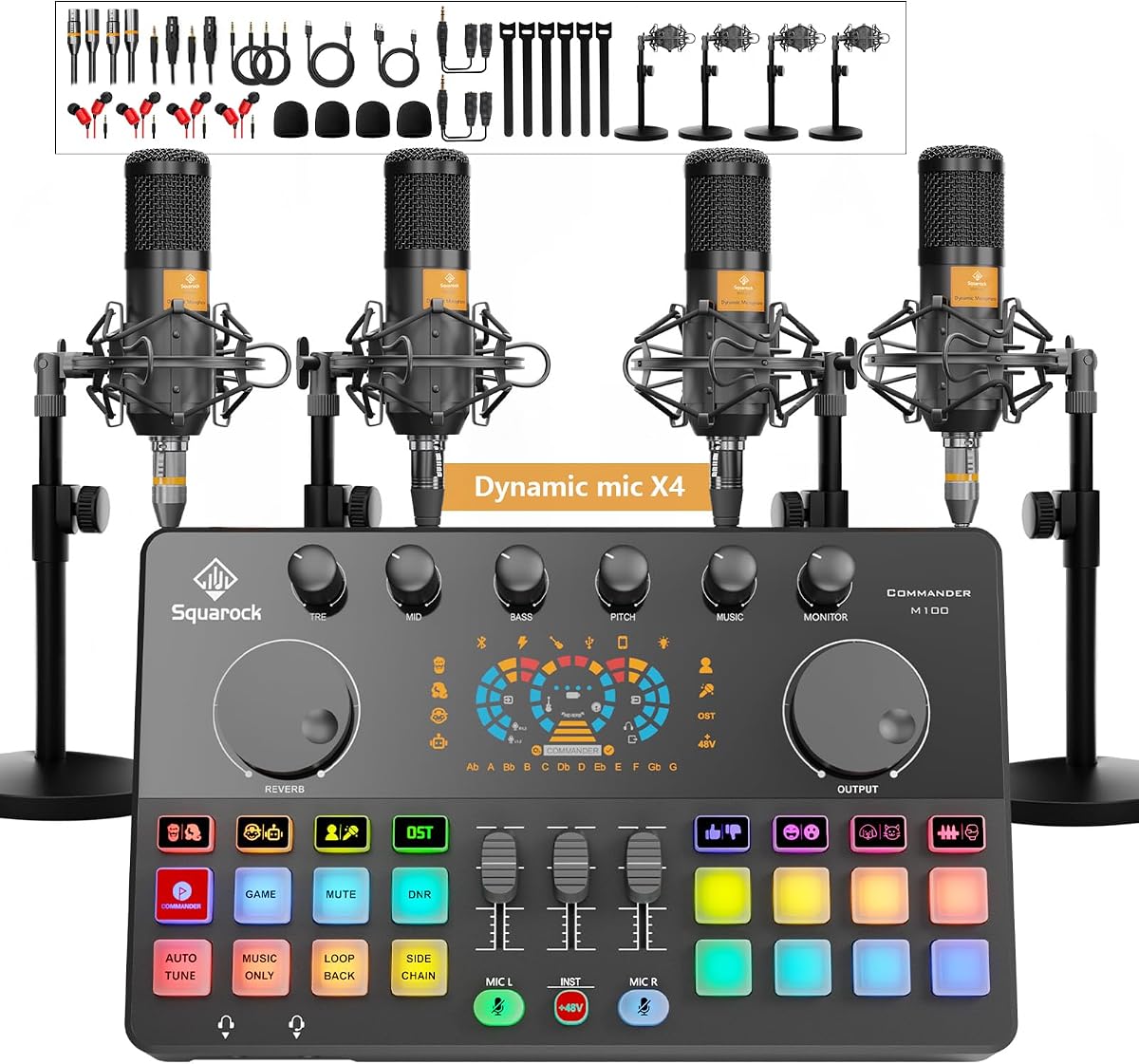
The Podcast Equipment Bundle for 4, M100 Audio Mixer, Dynamic Mics, Recording has a 4.3 rating and is built around a four-person podcast arrangement. It includes four dynamic microphones, desktop stands, monitor earphones, shock mounts, foam covers, earphone splitters, and a collection of cables around a central M100-style mixer and interface.
We may earn a commission when you buy through this link, at no additional cost to you.
Its input design combines dual XLR connections with dual 3.5mm microphone inputs. Individual channel volume, mute controls, noise reduction, three-band EQ, reverb, pitch correction, loopback, side-chain control, voice-change modes, and programmable sound pads create substantial control for live streams and edited podcast production. The built-in 4000mAh battery also supports more flexible indoor or outdoor work.
Compatibility is another strength because the system supports Windows, iOS, and Android without requiring driver installation and is listed for platforms such as TikTok, YouTube, and Twitch. The trade-off is complexity. A mixer with numerous sound effects, RGB modes, a display, and many dedicated buttons requires more setup and learning than a minimalist two-channel interface, particularly for creators making their first recording.
This bundle best suits four-person shows, group live streams, gaming commentary, and creators who enjoy manipulating audio during production. A duo with one desk and a preference for simple controls may prefer a smaller two-person system, while a larger team will appreciate having enough microphones and monitoring accessories immediately available.
Independent channel volume, one-click mute, loopback, side-chain operation, and programmable effects make the mixer more than a basic capture device. These controls are especially relevant when podcasters monitor a live audience or need to trigger sound elements without leaving the interface.
The four microphones, four stands, shock mounts, covers, and headphone accessories reduce the need to source separate components. It is a complete foundation for roundtable recording, although physical desk space should be checked before setup.
We may earn a commission when you buy through this link, at no additional cost to you.
The Movo PodPro Podcast Equipment Bundle for 2 with Boom Arms and Headphones earns a 4.5 rating and offers one of the clearest all-around packages for a two-person show. It combines the dual-channel MDX-2 interface, two CastMic XLR microphones, two adjustable boom arms, two pairs of studio headphones, XLR cables, device cables, and a travel case.
We may earn a commission when you buy through this link, at no additional cost to you.
This configuration improves on a basic tabletop setup by allowing each microphone to be positioned close to its speaker. The MDX-2 adds 48V phantom power, two XLR inputs, two headphone outputs, and stereo 1/4-inch outputs. USB-A, USB-C, and Lightning connections support PCs, Macs, iPhones, iPads, and Android devices, giving the package unusual flexibility for interviews, streaming, and conventional podcast recording.
The CastMic cardioid dynamic microphones have a stated 40Hz to 16kHz response and durable metal construction. Dynamic operation can be reassuring for untreated rooms because it does not depend on external phantom power, although the interface still provides phantom power for compatible microphones. The main disadvantages are the reduced stated battery duration with phantom power enabled and the need to manage several arms, headphones, and cables.
This is the most balanced recommendation for a duo that wants reliable monitoring, flexible positioning, and mobile device support without assembling a complex effects console. It works particularly well for interviews, conversational podcasts, remote streaming, and music-oriented voice recording. Single-person creators can still use the components, although the emphasis is clearly on two speakers.
The included adjustable boom arms keep each microphone within a consistent distance from its speaker while reducing desk clutter. More precise positioning can make a noticeable difference in vocal consistency, especially when hosts move or speak at different volumes.
The MDX-2 bridges phones, tablets, and computers through its included connection cables. That makes the package useful for creators who alternate between mobile capture and desktop editing rather than committing to one device.
We may earn a commission when you buy through this link, at no additional cost to you.
The M100 2‑Person Podcast Equipment Bundle,XLR/USB Dynamic Mics & Audio Mixer has a 4.4 rating and combines two dual-connection microphones with a USB-C audio interface, two studio headphones, stands, XLR cables, USB cables, and 3.5mm audio leads. The microphones can operate through XLR or USB, offering a useful path between a full mixer workflow and direct computer or console use.
We may earn a commission when you buy through this link, at no additional cost to you.
The sound board provides noise reduction, music-only and loopback modes, side-chain control, eight tuning controls, reverb, pitch options, one-click mute, independent microphone volume, real-time monitoring, and an instrument input. Its Commander button stores settings for music, monitoring, reverb, output, microphone channels, instrument level, and sound mode, making it easier to restore a known configuration during a live session.
The dynamic microphones use cardioid-style pickup and are described as providing solid background-noise rejection, which can help in untreated rooms. Their USB mode is compatible with phones, desktops, laptops, and PlayStation systems, while the overall bundle is listed for Windows, Android, Mac, and tablets. A notable limitation is that the microphones' own mute, volume, and echo controls do not function in XLR mode.
This package is best for two-person streamers and podcasters who want both direct USB convenience and the control offered by an interface. The flexible microphone connections are especially appealing for users who may outgrow one recording setup. Those who want an entirely hands-on mixer workflow should understand that the onboard microphone controls are active only in USB mode.
The combined XLR and USB microphone design allows each creator to begin quickly on a compatible device and later move into a routed mixer setup. That versatility is unusual at this bundle level and can accommodate changing recording requirements.
The red Commander button memorizes mixer settings so a creator can return to a known configuration with one press. This is particularly helpful during live broadcasts, where searching through several knobs and mode buttons can interrupt the flow.
We may earn a commission when you buy through this link, at no additional cost to you.
The M100 Podcast Equipment Bundle for 4, Audio Interface with 4 Dynamic Mics has a 4.2 rating and is designed as a complete four-person home-studio package. It includes a sound board, four dynamic microphones, four desktop stands, four earphones, shock mounts, foam covers, splitters, and an assortment of XLR and 3.5mm cables.
We may earn a commission when you buy through this link, at no additional cost to you.
Its microphone inputs are divided between two XLR connections and two 3.5mm connections, providing enough capture capacity for four speakers without requiring separate interfaces. A dedicated 6.35mm instrument input allows a guitar, bass, or keyboard to be mixed alongside vocals, while independent microphone and instrument faders provide basic level control.
The dual USB interface arrangement permits two computers or mobile devices to connect simultaneously. The bundle is listed for Windows, Mac, iOS, and Android and works with applications including YouTube, OBS, and Audacity without specialized driver installation. Its effects, RGB lighting, voice changes, auto-tune options, noise reduction, loopback, and Commander preset memory broaden its appeal to streamers.
This is a practical choice for a four-person discussion, interview panel, or group stream that needs vocals and an instrument in one setup. The varied connector formats require some care during setup, and a small desk may not comfortably hold the mixer, four stands, and headphones. Even so, the package offers a notably complete foundation for group content.
Two USB interface connections allow two compatible computers or mobile devices to work at the same time. This can benefit collaborative production, remote calls, or a creator who wants separate control over recording and streaming.
The dedicated instrument jack and separate fader make the system more useful than a microphone-only bundle for musicians. A vocalist and instrumentalist can balance levels within the same mixer rather than routing every source through additional equipment.
We may earn a commission when you buy through this link, at no additional cost to you.
The Also GO Podcast Equipment Bundle for 2, V8s Sound Card with Voice Changer carries a 4.5 rating and provides an approachable entry into podcast production. The package centers on a BM-800 microphone, V8s-style DJ mixer, microphone boom arms, shock holders, pop filters, foam covers, and a 3.5mm earphone, with additional components for a complete setup.
We may earn a commission when you buy through this link, at no additional cost to you.
Cardioid pickup is used to focus on the speaker in front of the microphone, while the dual-layer pop filter and foam cover help control plosives and wind noise. The mixer provides noise reduction, reverb, treble, bass, ten sound effects, and four voice changes covering female, male, child, and monster styles. Thirteen practical functions give beginners options for experimentation without requiring a separate signal processor.
Compatibility spans Windows, Mac OS, iOS, and Android, with the product also describing use with PCs, smartphones, and Xbox systems. Bluetooth is offered as a simple phone and tablet connection route, while included cables can provide a more direct computer connection. The trade-off is that this is a more conventional entry-level package than the XLR-focused bundles, and a condenser microphone may capture more room noise and handling sound than a dynamic model.
This bundle is a strong recommendation for beginners, voice-over newcomers, casual streamers, and two-person creators who want a mixer with creative effects at an accessible level. It is less compelling for a polished untreated-room setup or for users who want the flexibility of professional XLR routing. Even so, its included accessories make it a coherent first recording system.
Reverb, EQ, noise reduction, sound effects, and voice-change modes give new creators several ways to shape their sound. These tools are particularly engaging for entertainment podcasts, gaming streams, and short-form content where experimentation is part of the format.
Bluetooth offers a convenient route for phone and tablet users, while the included wired connections can be more straightforward with a computer. Supporting both approaches lets creators select the least complicated method for their recording device.
We may earn a commission when you buy through this link, at no additional cost to you.
The Movo 4-Person USB Podcast Equipment Bundle – 4 Condenser Mics, Hub & Case has a 4.4 rating and is built around a UMX-1 four-port USB hub. The bundle includes four condenser microphones and a hard shell carrying case, forming a straightforward solution for panel interviews, group podcasts, classrooms, and remote productions.
We may earn a commission when you buy through this link, at no additional cost to you.
The hub powers all four microphones simultaneously through a dedicated 5V USB-C input. A built-in 3.5mm headphone output provides real-time monitoring, allowing creators to identify level problems or delivery issues before finishing a take. USB plug-and-play operation means no separate driver installation is required, and the listed applications include Zoom, GarageBand, Audacity, OBS, and other major software on Mac and Windows.
Compared with a mixer-centered bundle, the design has fewer physical effects controls and fewer complex routing options. The included microphones are condenser models, so creators should pay close attention to placement, room treatment, and unwanted sound reflections. The absence of XLR inputs also means this package offers less freedom to substitute or route individual microphones than some of the dedicated interface bundles.
This is a compelling option for a group that values portability and quick USB setup over granular hardware mixing. The included case makes the entire system easier to transport to another room, venue, or classroom. For untreated spaces, users may need to control ambient noise carefully, but the bundle remains an efficient way to support four separate microphone inputs.
The compact hub and four microphones pack neatly into the included hard case. That portability makes the system attractive for traveling panels, educational sessions, and production teams that cannot leave a permanent studio in place.
The headphone output provides immediate feedback without requiring a separate monitor controller. Creators can check voice levels and catch obvious performance issues before those problems become embedded in the final take.
We may earn a commission when you buy through this link, at no additional cost to you.
The Movo 4-Person Podcast Equipment Bundle – 4-Channel USB Audio Interface, 4 CastMic Dynamic Microphones, 4 Boom Arms – Complete Recording Kit has a 3.9 rating. It is the most deliberately studio-oriented four-person package in the list, pairing a UMX-2 interface with four CastMic dynamic microphones, four tabletop stands, and four adjustable boom arms.
We may earn a commission when you buy through this link, at no additional cost to you.
The interface includes dual XLR/TRS combo inputs, 48V phantom power, zero-latency direct monitoring, and loopback for capturing computer audio alongside the conversation. Four individual microphones provide separate control for each participant, while the boom arms allow more precise placement than the simple stands found in many group kits. The CastMic microphones use cardioid dynamic operation, making them a sensible choice for speech and untreated rooms.
USB-C connectivity is central to this bundle. It is listed for macOS without drivers, with Windows 10 or later supported through ASIO driver mode. Unlike several mobile-oriented bundles, it is explicitly not compatible with phones or tablets. That limitation reduces its appeal for mobile creators but provides a cleaner, dedicated computer-based workflow for a fixed studio.
This kit is best for a four-person team with a desk-based recording space and a computer. It is particularly compelling for roundtable discussions where every speaker needs an individual microphone and where loopback or direct monitoring is valuable. Its lower overall rating warrants comparing customer feedback and current component details before purchase, but the underlying specification set is well matched to serious group recording.
Four XLR microphones and a four-channel interface provide a more structured signal path than a collection of basic USB devices. Each participant can be recorded on a separate channel, simplifying later balancing and editing.
The included dynamic microphones do not require external phantom power and are designed to emphasize vocal performance. Their cardioid pattern helps focus on the speaker while reducing unwanted sound arriving from behind the microphone.
We may earn a commission when you buy through this link, at no additional cost to you.
The Movo Video Podcast Equipment Bundle – USB Audio Interface, 2 XLR Dynamic Microphones, 2 4K Cameras, 2 Boom Arms – Complete Podcast Setup carries a 5.0 rating. It is a complete two-person video podcast package with two cameras, two XLR microphones, two boom arms, and a USB audio interface.
We may earn a commission when you buy through this link, at no additional cost to you.
The dual 4K UHD cameras are the defining feature, giving creators the ability to frame hosts separately or use different camera angles for interviews and panel discussions. The audio side is equally serious: the Movo Phantom USB interface includes high-dynamic-range preamps, 48V phantom power, USB-C connectivity, and dual monitor outputs for audio control.
Two cardioid dynamic microphones with a stated 40Hz to 16kHz frequency response handle speech capture and naturally reduce some background sound. Boom arms give each host a consistent microphone position and make it easier to arrange cameras around the speakers. The trade-off is setup complexity: cameras, arms, microphones, cables, and an interface occupy substantially more desk and floor space than an audio-only bundle.
This is the strongest choice in the guide for a creator moving into multi-camera video podcasting. It removes the need to assemble separate camera, microphone, and interface components from scratch, while the dual camera arrangement offers more visual flexibility than a single-camera setup. Users still need suitable lighting, software, and a capable computer, but the core production package is comprehensively covered.
Two 4K UHD cameras support split-screen layouts, alternating speaker views, and more visually dynamic interviews. Multiple angles can improve pacing and make a remote conversation feel less like a single static webcam feed.
The dual XLR microphones and interface provide separate capture paths for two speakers, while the dual monitor outputs support individual monitoring. Phantom power adds compatibility with additional studio condenser microphones if the production later expands.
We may earn a commission when you buy through this link, at no additional cost to you.
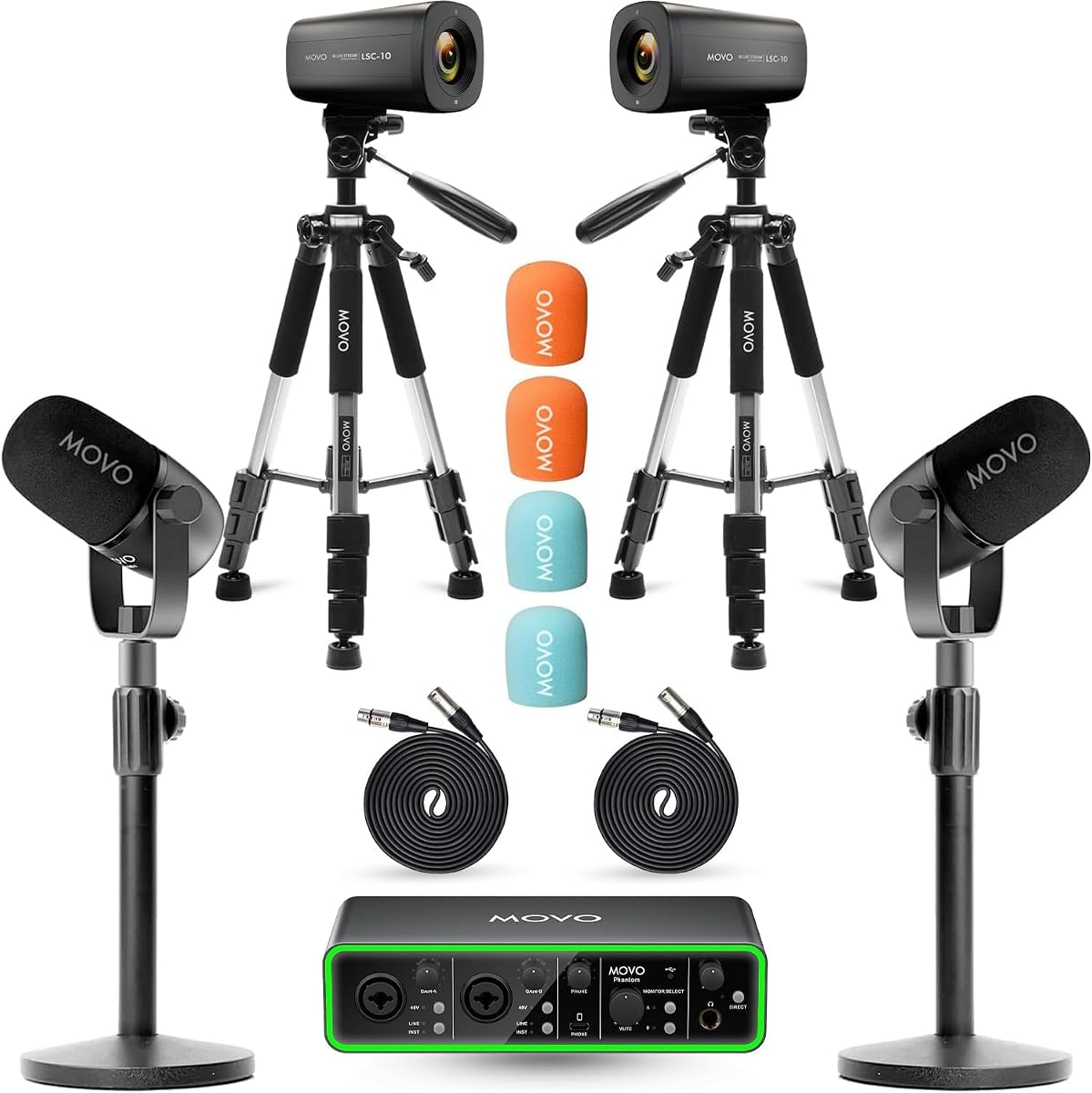
The Movo Video Podcast Equipment Bundle – USB Audio Interface, 2 XLR Dynamic Microphones, 2 4K UHD Cameras, 2 Desk Stands – Complete Podcast Setup has a 5.0 rating. It combines the same fundamental video-podcast components as the boom-arm version, using two desktop microphone stands in place of articulated arms.
We may earn a commission when you buy through this link, at no additional cost to you.
Two 4K UHD cameras provide multiple recording angles, while the Movo Phantom USB audio interface supplies 48V phantom power, high-dynamic-range preamps, USB-C connectivity, and dual monitor outputs. Two cardioid CastMic dynamic microphones offer a stated 40Hz to 16kHz response and are designed to capture clear speech while reducing background sound.
Desktop stands make this bundle appealing to creators who want a simpler, tidier installation than a full boom-arm setup. They also take up less visual space and are easier to reposition. The trade-off is reduced control over exact microphone distance and angle, which may make it less suitable for users who want to fine-tune placement throughout a recording.
This configuration works well for a two-host video podcast, remote interview format, or panel-style production with multiple perspectives. It is a complete audio and camera foundation that can be expanded with stands, lighting, and improved acoustic treatment. For creators who value flexible microphone placement more than compactness, the boom-arm variant is the better alternative within this pair.
Desktop stands create a relatively uncomplicated recording environment and keep the microphones stable. This makes the bundle suitable for creators who want to move between locations without rebuilding a complex arm system each time.
The bundle pairs two cameras with two XLR microphones and a dedicated interface, avoiding the mismatch that can occur when separate equipment is selected. Every core component is designed to work together within the same two-person production.
We may earn a commission when you buy through this link, at no additional cost to you.
The right podcast equipment bundle depends on the number of speakers, recording device, production format, and level of control. The most useful kit is not necessarily the one with the most accessories, but the one whose microphones, interface, monitoring, and connection method align with the creator's actual workflow.
Begin with the number of people who need independent audio. A solo creator can usually start with one microphone and one capture path, while a two-person interview benefits from separate inputs and ideally separate headphone monitoring. Four-person discussions need four microphones, enough channels on the interface, and a desk or table large enough to position everyone without interference.
Choose the channel count first, then verify the included microphone quantity. A four-person listing that uses a mixture of XLR and 3.5mm microphones may be sufficient for conversation, but dedicated XLR bundles generally provide more individual routing control. Product listings can also describe different input arrangements, so read the specifications carefully.
Dynamic microphones are generally more forgiving in untreated rooms because they place less emphasis on capturing ambient sound. Condenser microphones can provide greater sensitivity and detail, but they usually benefit from more deliberate placement and quieter recording spaces. The accessory package may include pop filters, shock mounts, and foam covers to help manage plosives and handling noise.
Choose dynamic models for interviews, group discussions, and untreated rooms. Consider condensers when recording in a controlled environment or when vocal subtlety matters. Check whether the microphone requires 48V phantom power, because that affects interface selection, battery life, and compatibility.
The bundle must connect to the device that will actually run the recording. Some interfaces include USB-A, USB-C, and Lightning cables for broad phone and computer support. Others are designed exclusively around USB-C and computer workflows, while a few use 3.5mm connections or Bluetooth for simpler mobile access.
Make a device checklist before purchasing: operating system, connection type, available ports, and recording application. Confirm whether phones and tablets are supported. A USB microphone that works directly with a computer may still require a separate adapter or interface for a particular phone, so compatibility should not be assumed from the word USB alone.
An audio interface converts microphone signals into a format the computer can record. The important details are input count, connector type, preamp quality, direct monitoring, loopback, and whether gain can be adjusted independently. A mixer-style interface may add EQ, reverb, noise reduction, voice effects, sound pads, and programmable presets that are unnecessary for a straightforward interview but useful for live entertainment.
Beginners may prefer fewer controls and clear labels, while experienced streamers often value per-channel mute, remembered settings, and loopback. Match the interface to the recording style rather than choosing the largest control surface. A complex board also requires more desk space and more time to configure.
Monitoring lets speakers hear their own voice and detect clipping, low levels, plosives, or poor microphone placement in real time. Two-person bundles should ideally provide two headphone outputs or a splitter arrangement so each participant can monitor independently without reducing audio quality.
Check whether monitoring occurs before or after software processing, often called direct or zero-latency monitoring. Direct monitoring is useful for straightforward recording, while software monitoring can help creators hear effects and backing tracks. Confirm that the included headphones and splitters are suitable for the number of people in the show.
Portable bundles should be judged by more than the number of components. Battery life, included travel cases, cable variety, weight, and the stability of stands all affect field use. Battery estimates can change when power-hungry microphones are connected, so creators should review the stated duration under their intended operating conditions.
For frequent travel, prioritize a compact case, protected microphone storage, and simple connection options. For a permanent desk setup, boom-arm compatibility, metal construction, and serviceable controls may matter more. A larger bundle is not automatically more portable if it requires a crowded table and numerous separate pieces.
Useful bundles include the accessories needed to reach a recording session: microphone stands, XLR cables, device cables, pop filters, shock mounts, headphone splitters, and protective cases. However, the number of listed items can obscure what is actually essential. Check for duplicate or low-value accessories and note any necessary item that remains absent.
Create a short setup checklist before buying. At minimum, most creators need the correct cables, a stable way to position each microphone, and a way to monitor the recording. Extra accessories are most valuable when they solve a real workflow problem rather than simply increasing the number of pieces in the box.
A good bundle should work with established recording and streaming applications. Look for compatibility with software such as Audacity, OBS, GarageBand, iMovie, or platform-specific tools, and confirm whether additional drivers are necessary. Some interfaces offer ASIO support for lower-latency Windows recording, while others are designed for immediate plug-and-play operation.
Also consider whether the bundle can grow. XLR inputs make it easier to add or replace microphones, and a standard audio interface gives more freedom than a proprietary hub. If the creator may later add instruments, video cameras, or additional hosts, choosing a flexible interface now can reduce the need for a second system.
Begin by arranging the microphones before connecting the interface, then position each one at a consistent distance from its speaker. Attach the appropriate stand or boom arm, route the cables without crossing the speakers' workspace, and confirm that every microphone is oriented toward its intended voice source. Connect headphones and check the recording device before opening the recording application.
Once the hardware is connected, set microphone gain conservatively and speak at a natural volume. Listen for clipping, excessive room echo, handling noise, and imbalance between speakers. Use the interface's mute buttons to identify channels, test any noise reduction or effects without making them the foundation of the recording, and save useful mixer settings when the hardware supports presets.
After recording, disconnect cables carefully rather than pulling them from the connector, wind cables loosely, and store microphones away from moisture and direct heat. Clean removable foam covers according to the manufacturer's guidance, keep the interface vents unobstructed, and recharge portable components before travel. Review the recording and back up files before changing or dismantling the setup.
For most two-person podcasts, a bundle with two XLR microphones, a two-channel interface, two boom arms, and two headphone outputs offers the most practical balance. The Movo PodPro Podcast Equipment Bundle for 2 with Boom Arms and Headphones is a strong example because it also supports phones, tablets, and computers. Choose a simpler effects-focused mixer if live sound effects and voice changes are central to the show.
Not necessarily. If two participants are physically recording in the same room, a two-microphone bundle is usually sufficient, and each participant can join the remote conversation from a separate device. A four-person kit becomes more useful when four people share one recording space or when separate local tracks are required for later editing.
Some are, while others are designed only for computers. The Movo PodPro Portable bundle includes USB-A, USB-C, and Lightning connections, and the Also GO package supports Bluetooth as well as wired options. Always verify the exact phone model, operating system, connector, and whether the bundle requires an app or adapter.
Dynamic microphones are usually more tolerant of loud voices and untreated rooms because they place less emphasis on ambient sound. Condenser microphones are more sensitive and can capture subtle vocal detail, but they often capture more room noise and handling sound. The best choice depends as much on the recording space as on the microphone's technical specifications.
Most include the principal microphone, interface, cables, stands, and basic monitoring accessories, but software, a recording device, and sometimes acoustic treatment are separate. Review the package list closely because some listings include multiple microphones while only listing one headset, and some omit a boom arm or the proper device cable.
It is optional for interviews, narrative shows, and conventional conversational podcasts. A mixer with EQ, noise reduction, reverb, voice changes, sound pads, and Bluetooth music can be valuable for live streams, gaming commentary, and entertainment formats. For clean dialogue recording, the microphone and interface usually matter more than the number of effects.
Headphones are highly desirable because they provide real-time monitoring and help creators detect clipping, plosives, and low levels. A two-person setup should provide a way for both speakers to monitor independently, either through two interface outputs or an appropriate headphone splitter. The quality and fit of the included headphones can vary, so serious users may upgrade them later.
An audio-only bundle can feed a camera, computer, or capture card as long as the signal and software routing are compatible. For a complete multi-camera setup, a bundle that includes cameras, microphones, an interface, and stands is more efficient. The Movo video podcast bundles provide two 4K UHD cameras and two XLR microphones for this purpose.
The Also GO Two-Person Bundle stands out as the best budget starting point, with a microphone, mixer, boom arms, filters, effects, and flexible connection options in one coordinated package. The Movo PodPro Podcast Equipment Bundle for 2 with Boom Arms and Headphones is the editor's choice for a more balanced recording path, while the Movo Video Bundle with Arms is the premium selection for creators building a two-camera production.
Prioritize the number of speakers, microphone type, recording device, and monitoring method before comparing decorative features or the total accessory count. A four-channel interface is unnecessary for a solo show, while a two-person bundle may be insufficient for a roundtable. The best setup is the one that records each participant clearly, connects to the intended device, and remains manageable during regular use.
Product configurations, ratings, and availability can change, so confirm the current package list and technical specifications before ordering. Check cable types, microphone connection methods, software compatibility, and whether stands or headphones match the intended number of speakers. Those final checks will help ensure that the selected podcast equipment bundle works as a cohesive setup rather than simply a large collection of accessories.