
D & K Exclusives Headphone Splitter
4.3Editor score
Separate mic and audio plugs
Gold-plated oxygen-free copper
Compact portable Y-cable
A mic and speaker splitter connects equipment with separate microphone and headphone connections to a single audio port or a computer with more demanding audio needs. The right adapter depends on connector gender, CTIA wiring, device support, and whether you need gaming, calls, music, or shared listening.
The products in this guide are compared by examining their connector arrangements, stated compatibility, audio construction, cable length, portability, and intended use. The list covers traditional 3.5mm Y-cables, USB audio adapters, and two-headset sharing solutions, with particular attention to how each handles microphone and speaker signals.
Each review explains the strongest reason to consider that model, along with limitations that matter when choosing an adapter. Ratings and availability can change over time, and current prices should be checked on the product page before making a purchase.
4.3Editor score

4.7Editor score

5.0Editor score
As an Amazon Associate we earn from qualifying purchases.
This side-by-side comparison shows how the ten adapters differ in signal direction, connector type, headset support, construction, and portability. Because several listings use similar Y-cable terminology, the specifications below emphasize the physical connections and stated device compatibility.



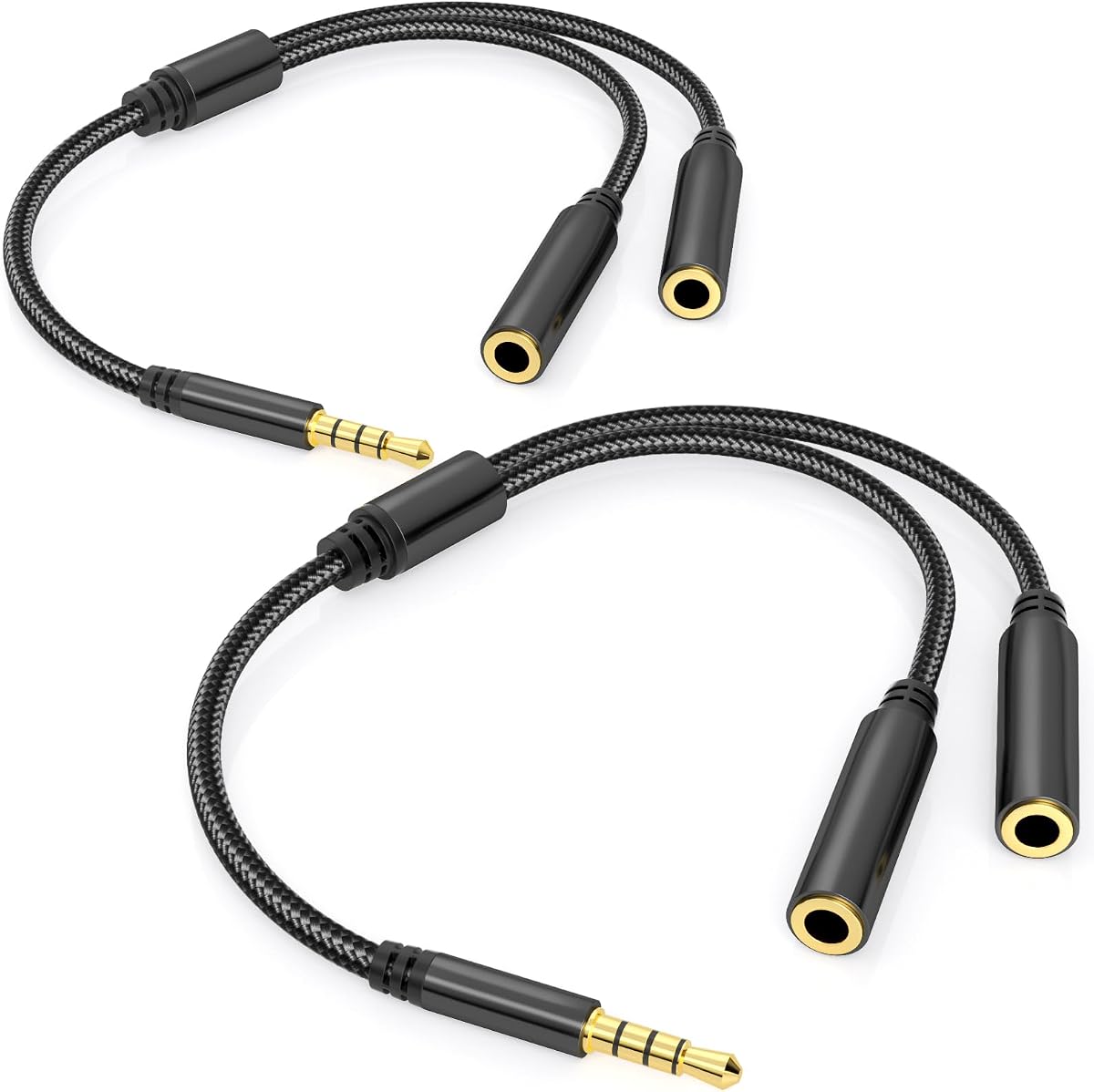

The D & K Exclusives Headphone Splitter is a straightforward 3.5mm Y-cable for connecting a combined headset to a computer with separate headphone and microphone jacks. Its 4.3 rating reflects a generally practical approach, while gold-plated contacts, oxygen-free copper, and a compact form make it a budget-oriented option for calls, meetings, and online communication.
We may earn a commission when you buy through this link, at no additional cost to you.
Its main strength is the two-male output arrangement. One lead is intended for the computer's headphone jack and the other for its microphone input, allowing a single-jack headset to be used with older-style PC and laptop ports. The listing also highlights broad compatibility with common 3.5mm AUX connections and calls the compact construction suitable for carrying in a laptop bag.
Compatibility details are not as precise as those in some newer competitor listings. The product description does not clearly explain whether every headset follows the same CTIA or OMTP standard, so buyers should verify the wiring of their headset and computer. It is also designed around 3.5mm ports rather than newer USB-C or USB audio interfaces.
This is a sensible purchase for someone who needs a inexpensive, portable way to connect separate mic and speaker ports to a combined headset connection. The primary audience is a PC user with dual 3.5mm jacks who values a simple cable over extensive standards documentation or advanced digital audio features.
The splitter turns separate headphone and microphone sockets into a single combined headset connection. That makes it useful with laptops and desktops that retain two legacy 3.5mm audio ports.
Its compact construction makes it easier to keep in a laptop bag than a long adapter cable. It is particularly practical for users who regularly work from shared computers, meeting rooms, or gaming setups.
We may earn a commission when you buy through this link, at no additional cost to you.
The UGREEN Headphone Splitter for Computer is a 4.5-rated adapter designed to connect a four-pole 3.5mm headset to a PC or laptop with separate audio and microphone sockets. It combines polished 24K gold-plated connectors, oxygen-free copper wiring, an aluminum alloy shell, and a braided jacket in a compact twenty-centimeter form.
We may earn a commission when you buy through this link, at no additional cost to you.
The listing is notably clear about signal standards. Functional microphone output requires a CTIA-compliant TRRS cable, and the adapter is not compatible with CTIA-standard Apple Earbuds or Beats headphones. It is also expressly a two 3.5mm TRS male to one TRRS female adapter, the reverse of some similarly named products. Those details reduce the risk of buying the wrong configuration.
Its stated support for Turtle Beach, HyperX, Razer, Bose, Sennheiser, PS4, and various laptops makes it a versatile choice for gaming and communication, provided the headset uses compatible CTIA wiring. The product is aimed at legacy computers with dual 3.5mm jacks, so it does not create a new audio input for a modern computer that lacks those ports.
This adapter is a strong choice for users who value clear technical guidance and a well-constructed cable. It is especially suitable for a gaming headset moving between a dual-jack desktop and a compatible laptop, while the explicit exclusions help prevent avoidable connection problems.
The explicit CTIA requirement and connector-direction notes make this listing especially useful for careful buyers. Checking the headset standard before ordering is simpler than discovering an incompatible wiring arrangement after delivery.
The stated compatibility with popular gaming headset families makes it a natural fit for voice chat, online classes, meetings, and multiplayer sessions. The separate microphone and audio leads preserve the functions a single-jack headset provides.
We may earn a commission when you buy through this link, at no additional cost to you.
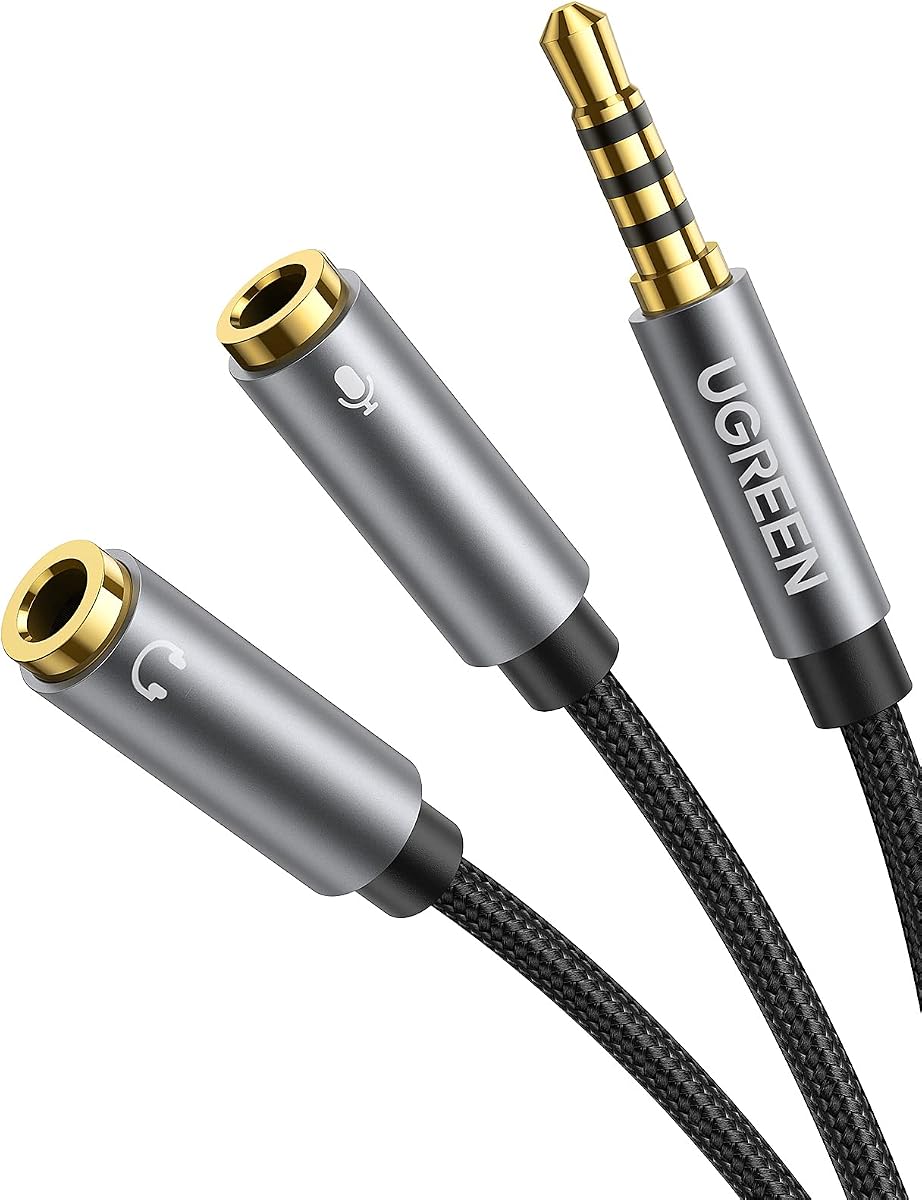
The UGREEN Headphone Splitter with two female ends and one male end serves a different connection pattern from the company's dual-male model. It is intended for a CTIA headset that has separate headphone and microphone plugs, allowing those plugs to connect to a PC, laptop, or tablet with one combined 3.5mm port.
We may earn a commission when you buy through this link, at no additional cost to you.
This product earns a 4.5 rating and uses soft TPE material, a braided cable, copper wiring, and gold-plated connectors. The seven-point-eight-seven-inch length balances portability with enough separation to keep the two headset cables from feeling crowded. The listing also gives a useful installation tip: connect the headset and microphone to the adapter before connecting the adapter to the computer.
As with the other UGREEN model, CTIA compatibility is the central limitation. iPhone headsets and OMTP headphones are not supported, and the listing clearly identifies the adapter as a TRRS male to dual TRS female configuration. Users should not interpret the term Y-splitter as guaranteeing that it can combine an arbitrary headset with any device.
This is the better UGREEN option when the source device has one combined jack and the headset has two separate plugs. It is especially useful for a compatible Android-oriented gaming headset that needs to work with a laptop or tablet.
The recommended sequence—headset and microphone first, computer last—helps the adapter establish the proper connection. That simple tip can prevent a user from concluding that the microphone is faulty when it has not been fully seated.
The flexible TPE section makes the short adapter easier to route around a laptop or tablet. Its braided exterior adds protection without creating the bulk of a longer cable.
We may earn a commission when you buy through this link, at no additional cost to you.
The Headphone Mic Splitter for PC combines a 4.7 rating with a clearly defined TRRS-female-to-dual-TRS-male layout. It is designed to connect a headset with separate microphone and audio plugs to a computer or other device that has one combined 3.5mm socket, making it a versatile two-way adapter for compatible equipment.
We may earn a commission when you buy through this link, at no additional cost to you.
One of its most helpful features is color coding. The black end is identified for headphone audio and the red end for microphone input, reducing the chance of reversing the leads. Gold-plated 24K contacts support clean signal transmission, while the aluminum housings and braided cable are stated to withstand more than 40,000 bending tests.
The compatibility list includes popular gaming headsets, speakers, PS4 equipment, and several legacy computers, but the product warns that the microphone will not work with original Apple earphones or Beats headphones. Its twenty-centimeter length is portable, although users with a permanently installed gaming headset may prefer additional strain relief or a longer cable.
For a CTIA headset moving between a modern single-jack computer and a traditional setup, this is a well-rounded and easy-to-install choice. The color-coded ends, strong stated construction, and clear microphone-audio separation justify its place as the overall selection in this roundup.
The dedicated black audio and red microphone ends make the adapter practical even for a first-time headset user. The visual distinction is more helpful than relying entirely on tiny labels around similar-looking plugs.
Braided wiring, aluminum connector housings, and a stated 40,000-plus bend-test rating suit an adapter that will be plugged in and removed regularly. The short format also limits cable clutter around a desk.
We may earn a commission when you buy through this link, at no additional cost to you.
The SYNCWIRE Headphone Splitter is a 4.6-rated male-to-dual-female Y-cable intended primarily for sharing one stereo source with two sets of headphones or speakers. Its supported source list includes phones, tablets, laptops, portable music players, CD players, and gaming systems such as the PlayStation and Wii.
We may earn a commission when you buy through this link, at no additional cost to you.
The product uses a polished 24K gold-plated connector, double shielding, and a nylon-braided jacket. Its construction is stated to survive at least 15,000 cycles of 90-degree bend testing. The compact, lightweight design is well suited to travel, shared listening during a trip, or carrying between home and office.
This is primarily an audio-sharing cable, not a dedicated two-plug gaming headset adapter. The supplied information does not describe the microphone-separation function found in several competing products, so users who need a microphone and headphone connected through a combined port should choose a purpose-built CTIA adapter instead.
The SYNCWIRE is most attractive to people who want to listen to music or watch a video with another person from one source. It offers a strong rating and thoughtful shielding, but the intended job should be matched carefully to avoid expecting microphone functionality that is not part of the stated design.
The one-male, two-female arrangement lets two compatible headphones or speakers receive the same stereo source. It is a simple solution for travel and shared listening rather than a complex network splitter.
Double shielding is intended to reduce interference, while the nylon jacket improves durability. A lightweight body and short cable make the splitter convenient to pack with a phone, tablet, or laptop.
We may earn a commission when you buy through this link, at no additional cost to you.
The KINGTOP Headset Mic Splitter is built around a specific need: connecting a gaming headset with two separate plugs to a device with a single combined CTIA port. It carries a 4.4 rating, gold-plated connectors, and standard TRRS splitter wiring in a compact form.
We may earn a commission when you buy through this link, at no additional cost to you.
Stated platform support includes PS4, PS5, Xbox One, Switch controllers, newer laptops, and Android phones. The product description also names Logitech G430 and G231, Turtle Beach X12, and compatible dual-plug headsets from HyperX, Razer, and SteelSeries. That makes the use case more gaming-focused than general music sharing.
The exclusions are important. The adapter is not compatible with iPhone, iPad, MacBook Pro, iMac, other Mac-series devices, or Apple-oriented Beats and Bose headphones. It is also not a standard two-person headphone sharing cable; it is specifically a one-microphone, one-headphone combiner for the appropriate direction of connection.
This model is a good fit for a dual-plug gaming headset owner whose console, controller, laptop, or Android device has one CTIA combo socket. Buyers outside that ecosystem should look for an adapter with broader device and headset standards support.
Rather than functioning as a general stereo Y-cable, this adapter separates a headset's microphone and audio connections. That focus makes it especially suitable for gaming and voice communication.
The stated support for current and older gaming platforms is a major advantage for mixed-device setups. A user can keep the same compatible headset connected across console, controller, and computer use.
We may earn a commission when you buy through this link, at no additional cost to you.
The Headset Headphone Splitter Adapter Cable for PC is a 4.4-rated adapter for CTIA four-pole gaming headsets with a combined audio and microphone plug. It uses a female combined end and two male ends for separate headphone and microphone connections on a PC or another compatible device.
We may earn a commission when you buy through this link, at no additional cost to you.
Its stated headset coverage includes Astro A10 and A40, Turtle Beach, BENGOO, HyperX Cloud, SteelSeries, Razer Kraken, Sennheiser, and Sades products. The same general function is also stated for PS4, Xbox One, Switch, and smartphone headsets with a single 3.5mm TRRS connection, making the product relevant beyond desktop gaming.
The important qualifier is CTIA wiring. A four-pole plug is not automatically compatible with every four-pole device because OMTP and CTIA assign microphone and ground contacts differently. The fixed eight-inch length is useful for reaching nearby ports but offers limited positioning flexibility.
This is a sensible choice for a gamer with a compatible CTIA headset who wants to use it with a PC, console, or phone. The broad stated brand support and VOIP use make it a practical general-purpose gaming adapter, provided the wiring standard is confirmed.
The stated PS4, Xbox One, Switch, smartphone, and PC support makes it useful for a mixed gaming setup. The key requirement remains a headset and source device that share the CTIA four-pole standard.
Splitting a combined headset signal into dedicated audio and microphone plugs allows a dual-jack computer to recognize both functions. This also makes the adapter useful for voice-chat applications.
We may earn a commission when you buy through this link, at no additional cost to you.
The 4FT USB to Dual 3.5mm Headphone/Speaker and Mic Splitter is the most technically advanced option in the group, with a 5.0 rating and a four-foot cable. It adds a USB audio interface to a pair of 3.5mm male outputs, allowing a microphone and speakers to connect to a computer that lacks suitable analog audio sockets.
We may earn a commission when you buy through this link, at no additional cost to you.
A built-in high-resolution DAC chip decodes the digital signal and supports analog amplification, while noise reduction is stated up to 16-bit/48kHz. The cable uses a cotton jacket, thickened aluminum connector shells, 24K gold-plated contacts, and a pure copper core. It also presents a more modern alternative to a passive three-inch Y-cable.
Compatibility remains conditional. The product requires CTIA-standard 3.5mm jacks and a USB port, and it is not a universal solution for every USB-C device without an appropriate host connection. Operating-system support is broad, including major Windows versions, Mac OS X, Linux, Chrome OS, Surface 3 Pro, Raspberry Pi, PS4, and PS5.
This is the premium pick for users who want a new audio path for a modern computer, a four-foot reach, and digital conversion rather than a basic passive splitter. It is especially relevant to a desktop or laptop that can accept USB audio but no longer offers convenient 3.5mm microphone and speaker inputs.
The integrated DAC handles the conversion from a USB audio signal to analog 3.5mm outputs. This can provide a more flexible alternative for computers whose built-in analog ports are missing, inconvenient, or already occupied.
The longer cable offers more placement flexibility than the short Y-adapters in this list. It can run from a laptop or desktop to a speaker and microphone positioned farther from the computer.
We may earn a commission when you buy through this link, at no additional cost to you.
The Two-Headset TRRS Splitter is a four-piece-style sharing solution sold as a two-pack, with each one-foot cable providing dual support for audio and microphone. It is designed for two TRRS headsets to connect to one compatible phone, tablet, laptop, PC, game console, or MP3 device.
We may earn a commission when you buy through this link, at no additional cost to you.
The product is particularly relevant to shared music, movies, and calls. Its gold-plated main connector is intended to reduce signal loss, while the aluminum housing protects against scratches and corrosion. A 30-centimeter braided nylon cable adds flexibility and helps resist tangling during daily use or travel.
There is an important distinction between TRRS and TRS headset connections. The listing states that TRS headphones or speakers can receive sound, but their microphones will not work because the adapter requires a TRRS headset with a built-in microphone for that function. Users should also verify how their source device handles a shared microphone input.
The two-pack configuration provides a backup or allows one splitter to remain at home and another in a travel bag. It is a specialized solution for people who regularly listen or communicate together rather than someone who merely needs a computer mic and speaker adapter.
Unlike a basic stereo audio Y-cable, this splitter can support two compatible TRRS headsets, including their microphones. That makes it useful for shared conversations, online meetings, and media when both participants have suitable headsets.
Keeping one adapter in a laptop bag and another at a desk reduces the chance of leaving a crucial cable behind. The one-foot length is compact while still providing a little separation between connected devices.
We may earn a commission when you buy through this link, at no additional cost to you.
The Maeline Headphone Splitter Adapter is a 4.4-rated 3.5mm solution for combining newer headset audio and microphone connections with a PC or laptop. It uses a female combined connector and two male outputs, with one lead for headset sound and the other for microphone input.
We may earn a commission when you buy through this link, at no additional cost to you.
Its construction includes polished 24K gold-plated contacts, an aluminum shell, oxygen-free copper wire, shielding, and a nylon-braided cable. Strain-relief rings are intended to make the connectors more stable and flexible, while the eight-inch length remains compact enough for travel.
The key compatibility note is that it supports CTIA-standard Android headphones but not CTIA-standard Apple Earbuds. That makes it less flexible than adapters with broader multi-platform guidance, and users should confirm that the computer, headset, and intended application use the expected connection arrangement.
This is a balanced choice for a compatible Android-style gaming headset that needs to connect to a PC with separate audio and microphone sockets. Its material specification and strain relief make it a solid conventional option, though shoppers with Apple-oriented headsets should choose another model.
Gold-plated contacts, oxygen-free copper, and shielding are intended to support clean stereo transmission. These features are useful in a compact adapter where signal quality matters during music, gaming, or voice communication.
The aluminum shells and strain-relief rings focus durability around the points most likely to flex. That matters for a headset cable that is routinely plugged into and removed from a computer.
We may earn a commission when you buy through this link, at no additional cost to you.
The correct mic and speaker splitter depends on the direction of the signal, the ports on your headset and device, and the audio standard in use. Connector type, CTIA or OMTP wiring, intended function, and cable construction should be checked before ordering.
A Y-shaped cable can either divide one source into two outputs or combine separate microphone and headphone plugs into one connection. A male-to-dual-female model commonly shares one source with two headphones, while a TRRS female to dual-TRS male model commonly connects a dual-plug headset to a computer with separate jacks. A TRRS male to dual-female model serves a different arrangement and should not be chosen solely because every product is called a splitter.
Four-pole TRRS connections are used by many gaming headsets and combo audio ports, but CTIA and OMTP place the microphone and ground contacts differently. A microphone may fail, audio may be distorted, or the headset may appear incompatible if the two standards do not match. Several products in this guide explicitly support CTIA, while some exclude OMTP headsets, Apple Earbuds, or Apple-oriented Beats models.
Pay attention to male and female ends rather than relying on the phrase Y-cable. A headset with one male TRRS plug may need a female TRRS-to-dual-male adapter. A headset with separate male headphone and microphone plugs may need a male TRRS-to-dual-female adapter. The red and black lead colors on some models can further clarify which cable goes to the microphone and which carries sound.
A conventional 3.5mm Y-cable simply routes an analog signal and is best when the device already has a suitable combo jack. A USB audio adapter performs digital conversion and can add 3.5mm speaker and microphone outputs to a computer with a usable USB port. The USB option is more versatile for modern devices, but it adds a requirement for USB host support and compatible operating-system or device behavior.
Online meetings, remote classes, multiplayer games, and voice chat depend on the microphone connection as much as the headphone output. Look for products that explicitly separate the microphone and audio leads, support popular dual-plug gaming headsets, and work with the relevant voice applications. A stereo-only sharing cable may sound fine for music but will not satisfy a headset microphone need.
Most traditional Y-cables in this roundup are approximately eight inches long, making them easy to carry but somewhat limited when speakers or a microphone sit far from the computer. The USB model includes a four-foot cable, and the shared-headset splitter includes one-foot leads. Consider where the computer is placed, how much strain the connected cable will experience, and whether the adapter will travel in a laptop bag.
Gold-plated contacts, oxygen-free copper, shielding, braided jackets, and aluminum housings are common construction features among the higher-rated products. Bending-test figures provide another indicator, although they are not a direct guarantee of real-world lifespan. Look for strain relief at the plug bodies and a jacket that resists twisting and tangling, especially when a heavier gaming headset cable will remain attached.
A conventional analog adapter may work without software, while a USB audio adapter should be checked for operating-system and device support. The USB model in this list supports several Windows versions, Mac OS X, Linux, Chrome OS, Surface 3 Pro, Raspberry Pi, PS4, and PS5, but it still requires a usable USB connection. For 3.5mm models, compatibility depends primarily on port layout, connector gender, and CTIA or OMTP wiring.
Start by identifying the source device, the headset, and the intended direction of the signal. For a dual-plug gaming headset and a PC with separate microphone and audio sockets, connect the headset's headphone plug to the adapter's audio lead and its microphone plug to the microphone lead. Then connect the combined end to the appropriate source port. For a single-jack headset, the arrangement may be reversed, so follow the connector directions rather than guessing.
For USB adapters, connect the USB plug directly to the computer and attach the 3.5mm microphone and speaker plugs to their respective devices. The listing states that no external power or additional driver is required for supported systems. After connecting the hardware, select the appropriate audio input and output in the operating system's sound settings, then test playback and microphone input separately to confirm that both functions are recognized.
To care for the adapter, grip the metal connector rather than pulling on the attached cable. Avoid sharply bending the cable immediately where it enters the housing, and coil it loosely rather than wrapping it tightly around a device. Keep the connectors dry and free of dust, and periodically check that each plug remains firmly seated. If microphone output fails, verify the CTIA or OMTP standard and confirm that the microphone lead is connected to the microphone input rather than the headphone output.
A mic splitter is designed to route separate headphone and microphone signals through a combined connection, often using a TRRS plug. A standard headphone Y-cable usually divides one analog audio source between two headphones or speakers and may not carry a microphone. Always check the listed signal direction and connector arrangement before buying.
It works only if the laptop provides a compatible 3.5mm audio jack or a USB-C adapter that exposes the correct analog connection. Some USB-C adapters support audio but not microphone input, while others are data-only. Check the adapter specifications for headphone and microphone support before purchasing.
The most common causes are a CTIA versus OMTP mismatch, incorrect microphone routing, or an application configured to use the wrong input. Also confirm that the headset microphone is supported and that the microphone lead is plugged into the microphone input. Some Apple-oriented earbuds and Beats models are explicitly incompatible with several adapters in this guide.
Yes, if the source device and adapter provide separate 3.5mm microphone and speaker outputs. A TRRS female to dual-TRS male model is intended for this arrangement, while a USB model can add both outputs to a compatible computer. The source must recognize the microphone and playback paths correctly.
A dual TRRS headset-sharing splitter can support two compatible headsets with built-in microphones, but the source device must handle the shared microphone connection as intended. Basic stereo Y-cables usually provide sound only. Individual microphone volume and mute controls may also be limited by the headset and source device.
TRS has three conductive sections and generally carries stereo audio. TRRS has four, allowing a combined connection to carry headphone audio and a microphone. A four-pole plug still needs a matching CTIA or OMTP standard, so checking the wiring is essential for reliable microphone operation.
Traditional 3.5mm analog splitters normally pass audio directly and do not require special software. The USB audio model in this guide states that it is plug-and-play without external power or extra drivers for supported systems. Users may still need to select the USB audio device in the operating system's sound settings.
Choose a short Y-cable for a direct analog connection and easy carrying. Choose the four-foot USB adapter when the computer needs a new digital audio path, has usable USB connectivity, and the microphone or speakers sit farther away. The longer lead offers placement flexibility but depends on host and operating-system support.
The Bordsek PC Mic Splitter stands out as the most balanced conventional option because of its 4.7 rating, color-coded microphone and audio leads, strong construction claims, and broad stated headset support. The D & K Exclusives model is a practical budget choice for simple PC mic-and-speaker separation, while the four-foot USB adapter is the premium pick for adding a digital audio path to a modern computer.
Before ordering, prioritize the connector direction, CTIA or OMTP standard, and intended function over the generic term splitter. A dual-plug gaming headset, a headset with one combined plug, and two people sharing one source each require different arrangements. A USB solution is valuable when analog ports are absent, but a passive 3.5mm Y-cable is usually simpler when the source already has the correct jack.
Ratings, device support, and prices can change, so check the latest product listing and current price before purchasing. Confirm the physical plugs on your headset and computer, review the required wiring standard, and make sure the selected adapter supports both the audio output and microphone path you need.