
Wacom Intuos Small
4.6Editor score
Wired pressure-sensitive pen
Compact drawing surface
Broad creative software support
Software and training included
An electronic sketch pad can replace paper, travel more easily, and provide useful tools for drawing, handwriting, annotation, and lesson planning. The best model depends on whether you want a simple LCD board, a computer-controlled tablet, or a standalone device with its own apps and processing power.
We compared all ten products by considering their intended users, writing surfaces, stylus systems, portability, connectivity, pressure sensitivity, and creative features. The list includes child-friendly writing tablets, portable paper-style notebooks, standalone drawing tablets, and a pen display designed to work directly with a computer.
Each review explains the strongest reasons to consider the product along with its practical limitations. Ratings reflect the supplied customer feedback, while availability, software compatibility, included accessories, and prices can change, so shoppers should verify current details before purchasing.
4.6Editor score

4.4Editor score

4.4Editor score
As an Amazon Associate we earn from qualifying purchases.
This side-by-side comparison highlights the major differences among standalone tablets, computer-dependent drawing surfaces, paper-style notebooks, and simple LCD writing boards.





The XPPen 10.95-inch Standalone is our overall pick because it combines a convincing paper-like surface, rich color, strong pen specifications, and complete freedom from a computer. It carries a 4.4 customer rating, which fits a versatile device suited to artists, students, and professionals who want one screen for several kinds of work.
We may earn a commission when you buy through this link, at no additional cost to you.
Its X-Paper display uses AG nano-etching to imitate the texture and friction of paper. That matters because a screen can look attractive while still feeling wrong under a stylus. Here, the included X3 Pro battery-free Pencil 2 supports 16,384 pressure levels and tilt, giving users finer control over line weight, shading, and fine strokes. The 90Hz refresh rate also supports smoother transitions than a slower panel.
The tablet works as a standalone Android 14 device, so it does not need to be tethered to a laptop for basic sketching, note-taking, PDF annotation, or reading. Its Natural Mode displays 16.7 million colors, while separate nature, light, and black-and-white modes help users adapt the appearance to the task. TÜV-certified low-blue-light and anti-glare features are particularly relevant for long sessions.
There are trade-offs. Unlike a traditional paper notebook, this is a full electronic display that must be protected from impact and scratches. It also depends on Android apps, so anyone considering it for a specialized workflow should check compatibility before committing. Even with those limitations, its combination of portability, color, pressure response, and standalone operation makes it the most balanced product in this guide.
The etched X-Paper surface and battery-free Pencil 2 create a convincing writing experience without the constant charging associated with active styluses. This makes the device appealing for users who find ordinary glass screens uncomfortable for extended handwriting.
Color Natural Mode supports illustration and detailed notes, while monochrome viewing can make reading and annotation feel less distracting. Switching modes expands the tablet beyond a single-purpose drawing surface.
We may earn a commission when you buy through this link, at no additional cost to you.
The XP-PEN Artist12 earns the premium designation because it is a true pen display: the stylus draws directly on a full 1920 by 1080 screen. Its 4.4 rating reflects a well-established drawing workflow for illustrators, animators, designers, educators, and remote workers who want accurate hand-to-screen positioning.
We may earn a commission when you buy through this link, at no additional cost to you.
The 11.6-inch IPS panel presents artwork with a 72% NTSC and 100% sRGB color gamut. An anti-reflective screen protector is preinstalled, which is useful because drawing directly on glass can otherwise create distracting reflections. The included P06 passive pen has no battery and includes an eraser at the opposite end, reducing interruptions caused by charging.
Six shortcut keys and a programmable touch bar can be assigned to common actions such as zooming, scrolling, and undoing. Eight replacement nibs are included with the multi-function holder. Software support covers Photoshop, Illustrator, SAI, Painter, MediBang, Clip Studio, and other common creative environments, while its wider operating system list includes Windows, Mac, and Linux.
This is not a standalone tablet, and that distinction is important. It must be connected to a computer that has suitable HDMI and USB-A ports, with additional converters potentially required. In return, users work directly on the display and can expand the desktop for detailed illustration, document markup, online instruction, or remote collaboration. For serious digital art, that directness is a meaningful advantage.
Drawing directly on a full HD screen reduces the hand-to-cursor disconnect found on conventional tablets. Artists can place fine details more confidently, while teachers can annotate documents without constantly looking between two displays.
The customizable shortcut keys and touch bar keep frequently used commands close at hand. Software-specific mapping through the XP-PEN driver makes it possible to adapt the controls to different creative applications.
We may earn a commission when you buy through this link, at no additional cost to you.
The Wacom Intuos Small is a straightforward drawing tablet that earns a 4.6 rating, tying for the highest among the products reviewed. It is a particularly sensible choice for beginners, students, and experienced artists who trust a pen-on-paper feel but do not need a standalone screen or illuminated display.
We may earn a commission when you buy through this link, at no additional cost to you.
Wacom's EMR technology provides pen input without a battery, so there is no charging routine and no risk of the stylus losing power during an important session. The compact surface takes up relatively little desk space and can support drawing, painting, photo and video editing, graphic design, and document markup across a broad range of software.
Registering the tablet provides access to included creative software and online training resources. That combination makes the package more useful for new users because they can begin learning the basics without needing to discover every feature independently. The focus is on dependable input rather than complex hardware controls or a built-in operating system.
The main limitation is obvious: there is no display, so all work appears on a connected computer screen. The wired design also means the tablet cannot be used as a freely portable standalone notebook. Even so, the high rating, established EMR pen system, included software, and modest footprint make this an excellent entry point for computer-based sketching.
The battery-free EMR pen offers the kind of direct, low-friction experience associated with traditional drawing tools. Its simplicity is valuable for sketchers who want to open a compatible application and begin working.
Included creative tools and online instruction make this more than a bare input device. New artists can learn basic workflows while exploring applications suited to illustration, editing, and design.
We may earn a commission when you buy through this link, at no additional cost to you.
The HUION Note takes a different approach to the electronic sketch pad category. Rather than asking users to write on glass, it combines a digital pen, a conventional A5 notepad, and the Huion Note app. Its 4.2 rating reflects a product best suited to people who want the tactile experience of real paper alongside searchable digital copies.
We may earn a commission when you buy through this link, at no additional cost to you.
As writing appears on the paper, the system captures vector lines and transfers them to a mobile device through the free app for iOS and Android. Bluetooth 5.0 handles automatic pairing once the app is open. Real-time and offline synchronization support the capture process, while audio recording can be aligned with handwritten notes to preserve explanations and meeting context.
The app includes tools for merging, splitting, and moving pages into groups. Notes can be shared as images, PDFs, or MP4 files, which is useful for classmates, teammates, and colleagues. The package includes a 50-page notebook, USB-C cable, magnetic pen sleeve, three ballpoint refills, and three plastic pen nibs.
Its battery lasts around 18 hours of use and approximately 30 days in standby. Replacing the inner pages with the panel supplied in the box also turns it into a connected graphics tablet. The trade-off is dependence on the mobile app and physical consumables, but for users who dislike glass surfaces, this is a compelling paper-based solution.
The central advantage is familiarity. Users can write with a ballpoint pen on real paper, preserve the natural line variation, and still receive a digital version for storage, sharing, and later editing.
Synchronized audio adds context that a static digital page cannot provide. Export options for images, PDF, and MP4 make captured material easier to incorporate into coursework or collaborative projects.
We may earn a commission when you buy through this link, at no additional cost to you.
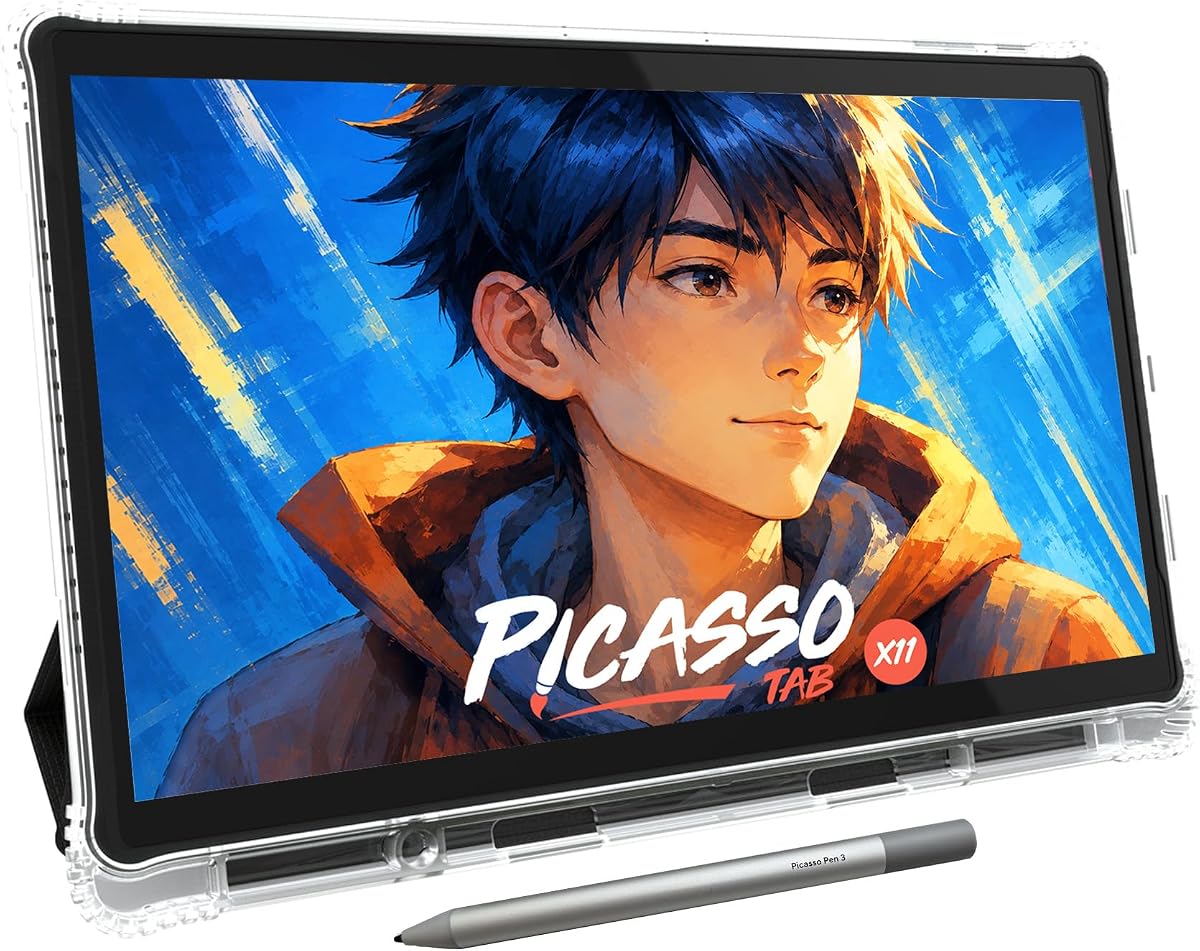
The PicassoTab X11 is built for people who want a full creative tablet rather than a peripheral. It is a standalone 11-inch device with five preloaded applications for sketching, painting, animation, tutorials, and guided lessons. Its 4.2 rating makes it a promising option for students and beginners who want everything ready when the tablet is removed from its case.
We may earn a commission when you buy through this link, at no additional cost to you.
A laminated 2K display reduces parallax and glare while providing a surface intended to resemble paper. The upgraded stylus recognizes 4096 pressure levels, enough for varied line weight, shading, and general illustration. Its octa-core processor, 6GB of memory, and 128GB of expandable storage also allow it to handle creative applications, schoolwork, streaming, and multitasking.
The package is particularly useful for beginners. Lifetime upgrades are included for the Concepts drawing app and Artixo tutorials, while the Xplore app provides guides and instant help. Accessories include a tablet case, drawing glove, universal power adapter, and a preinstalled screen protector, reducing the need to purchase basic extras immediately.
Compared with higher-end pen tablets, the 4096 pressure levels are more modest, and the full standalone computer may be bulkier than a small LCD writing board. It also carries a one-year warranty with responsive customer support. Even with those caveats, the combination of preloaded guidance, a protective laminated screen, and no-computer operation makes the X11 an approachable creative system.
Guided lessons and drawing aids help new users build skills rather than simply presenting an empty canvas. The result is a more structured introduction to digital art and illustration.
The processor, memory, and expandable storage distinguish this tablet from a simple note slate. It can support creative software and ordinary multitasking without requiring a separate computer.
We may earn a commission when you buy through this link, at no additional cost to you.
The Kayoubi LCD Writing Tablet is designed around simple, mess-free creative play, and its 4.6 rating reflects strong customer satisfaction. The 14.5-inch display is unusually large for this category, giving children considerably more room for drawings, stories, handwriting practice, and collaborative artwork than most compact LCD boards.
We may earn a commission when you buy through this link, at no additional cost to you.
A one-button erase control clears the display when the surface becomes crowded. A separate lock function preserves a finished drawing until the user is ready to erase it, reducing accidental deletion during enthusiastic creative sessions. This combination makes the tablet easy for young children to understand without requiring them to manage layers, files, or complicated menus.
Because the screen is reusable, the device can replace stacks of paper and reduce ink consumption. It is positioned for children aged three to eight as well as older children and adults seeking a straightforward writing surface. The large surface may be especially useful for floor drawing, group activities, or travel entertainment where a smaller board would feel cramped.
This is not a full drawing tablet for professional illustration. The supplied information does not list pressure sensitivity, tilt support, storage, or creative applications, so buyers should treat it as a simple LCD board rather than a serious digital art system. For uncomplicated, roomy drawing at an accessible level, however, its large canvas and straightforward controls are compelling.
The 14.5-inch display is the product's defining feature. It supports broad sketches and extended writing while still providing the instant reset expected from an LCD writing board.
Children can quickly learn erasing and locking the screen without navigating menus. The design prioritizes uninterrupted creative play over advanced digital tools.
We may earn a commission when you buy through this link, at no additional cost to you.
The Bravokids 10 Inch LCD Writing Tablet is a colorful, lightweight drawing board for children aged three to eight. Its 4.6 rating places it among the best-reviewed products in the guide. Unlike more complex electronic tablets, it concentrates on providing a durable and immediately understandable surface for doodles, early writing, and quiet entertainment.
We may earn a commission when you buy through this link, at no additional cost to you.
The included stylus creates lines whose thickness changes with the amount of pressure applied. Users can also draw with a fingernail or another hard object, reducing the likelihood that a lost or damaged stylus will end the activity. An erase button removes the current content quickly, while a lock key saves the image on screen for later viewing.
Its 150-gram weight and rounded corners make it suitable for school bags, handbags, and travel bags. Parents can use it in cars, restaurants, airplanes, or other situations where noise would be inconvenient. The durable plastic construction is designed to tolerate being handled by young children and carried between locations.
The battery compartment is secured with a screw, which is appropriate for younger users who might otherwise open it. There are no advanced layers, applications, or note-storage features, so it will not satisfy someone seeking professional art tools. Its appeal lies in being approachable, quiet, portable, and reusable for children's everyday drawing and learning.
The lightweight, compact format is useful for keeping children occupied without paper, markers, or constant supervision. It works well in environments where noise or mess would be unwelcome.
Rounded corners, anti-fall construction, and a screwed battery door are practical details for younger users. The lock control also protects artwork from accidental erasure.
We may earn a commission when you buy through this link, at no additional cost to you.
The TEKFUN LCD Writing Tablet is a colorful 10-inch doodle board developed with children and travel in mind. It holds a 4.5 rating and offers a useful combination of a large drawing area, simple controls, replaceable battery, and a body described as waterproof and anti-fall.
We may earn a commission when you buy through this link, at no additional cost to you.
A pressure-sensitive surface lets children vary line thickness with the included stylus or another hard object. The erase button clears the display in one second when the lock is off, while the lock switch preserves a drawing and prevents accidental clearing. This is a straightforward interaction model that children can learn quickly.
The built-in battery is described as lasting for six months and supporting approximately 100,000 writing and drawing cycles. It can be replaced for continued use. At 150 grams, the tablet is light enough for travel bags and schoolbags, and its stated suitability for living rooms, cars, planes, restaurants, and outdoor settings makes it a versatile travel toy.
It remains a basic LCD board with no advanced applications or file organization. The color display supports drawing and playful learning, but it does not compete with standalone Android tablets for professional illustration. For families seeking a durable, mess-free activity that can travel easily, however, its portability and straightforward operation are the strengths that matter most.
Road trips and flights often require portable entertainment without loose art supplies. The slim, light body and reusable screen fit that need particularly well.
A replaceable battery supports extended use, while the stated waterproof and anti-fall design provides reassurance in homes, cars, and outdoor environments.
We may earn a commission when you buy through this link, at no additional cost to you.
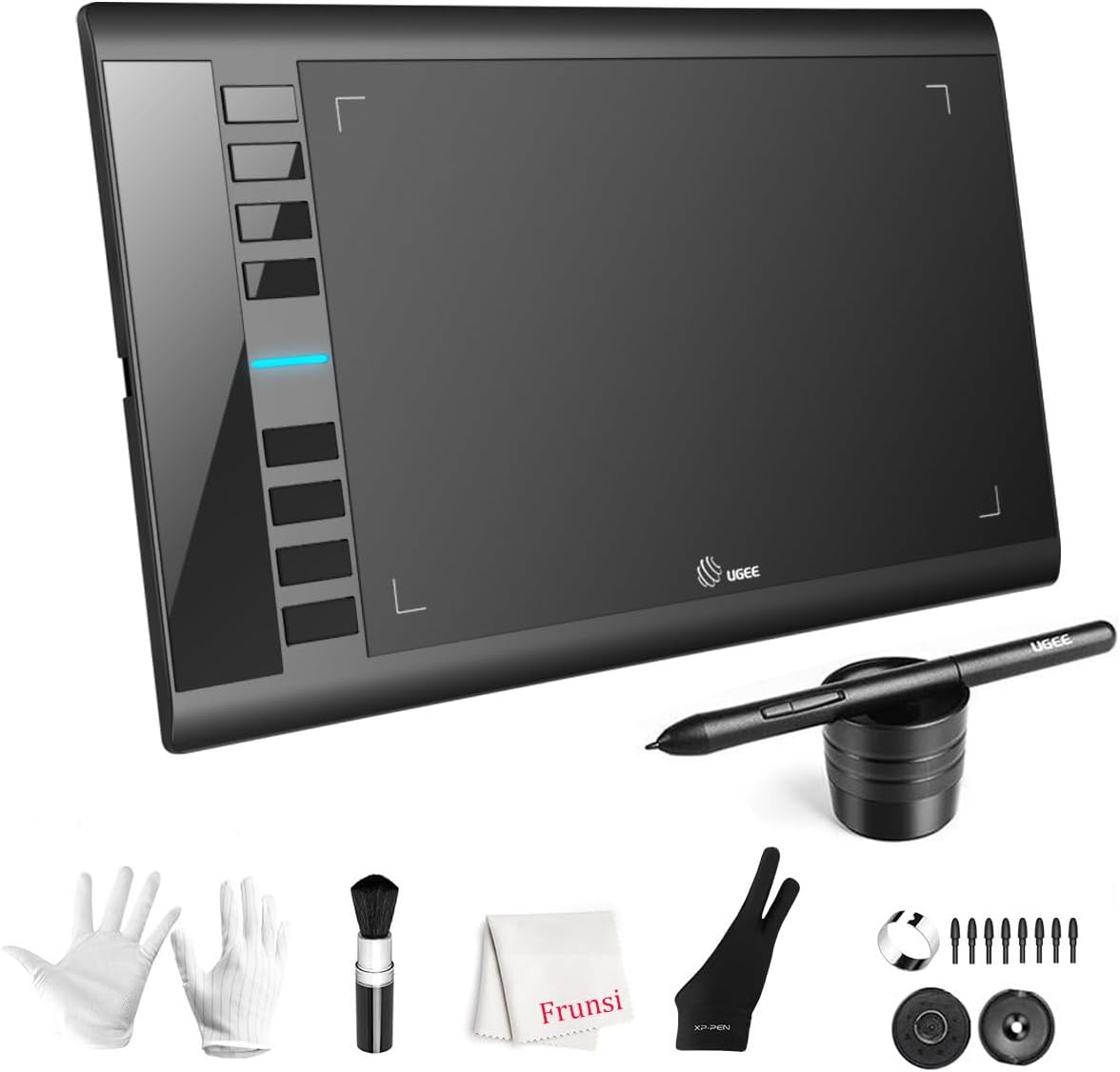
The UGEE M708 combines a large active drawing area with 16,384 levels of pressure sensitivity and eight customizable express keys. Its 4.4 rating makes it a strong choice for desktop artists, students, and beginners who want a capable computer-based tablet without moving to a pen display.
We may earn a commission when you buy through this link, at no additional cost to you.
The 10 by 6-inch surface has a papery texture intended to make ordinary glass-tablet drawing feel more natural. The passive stylus responds to pressure, producing finer lines under light pressure and broader marks under heavier pressure. That range supports sketch development, line variation, brush effects, and basic photo-retouching tasks.
Operating system support includes current and older Windows versions, Mac OS X, Android, Chrome OS, and Linux. Compatibility with Photoshop, Illustrator, Comic Studio, SAI, Infinite Stratos, 3D MAX, Autodesk MAYA, and ZBrush makes it useful across established creative workflows. The express keys can be assigned to erasing, zooming, scrolling, and undoing.
Setup uses USB connectivity, and adapters for USB-C are included. The product is not standalone and does not have its own screen, so it functions as an input device for a computer, Chromebook, or tablet. The ambidextrous design includes a pen holder and extra tips. For buyers prioritizing a large work area and pressure range at an accessible tier, it offers strong utility.
The active area is larger than many compact computer tablets, providing more room for sketching and detailed work. Users still receive their image on a separate screen, but can draw across a broader physical surface.
Eight express keys reduce repeated trips to an on-screen toolbar. Mapping common commands to the side of the tablet can make practice sessions and production work feel more efficient.
We may earn a commission when you buy through this link, at no additional cost to you.
The Mafiti LCD Writing Tablet is one of the simplest products in the guide, yet it serves a focused purpose: providing a small reusable surface for messages, sketches, reminders, and children's doodles. Its 4.2 rating reflects a practical device that many buyers appreciate for portability rather than advanced creative capability.
We may earn a commission when you buy through this link, at no additional cost to you.
The updated version is described as having thicker, easier-to-view writing and a lock-protection switch. A single press of the erase button clears the surface, while the lock prevents accidental erasure. Its replaceable CR2016 coin-cell battery is specified for more than 100,000 writing and erasing cycles, which helps extend useful life.
One unusual feature is the integrated stylus dock. The stylus can also serve as a kickstand, allowing the written display to be shown to family members or coworkers. The board is only one-eighth inch thick, making it easy to carry in a bag or keep on a desk without taking much space.
Its 8.5-inch display is smaller than the other child-oriented LCD models listed, and it does not provide serious pressure sensitivity, storage, or application support. As a portable memo board or uncomplicated doodle surface, though, it is convenient and dependable. It is best suited to users who value the LCD format itself rather than advanced digital art.
Turning the stylus into a kickstand adds useful display functionality without adding another accessory. The built-in dock also keeps the pen with the tablet and reduces the chance of leaving it behind.
The thin body and quick erase function make the tablet convenient for short reminders or spontaneous sketches. Its simplicity is effective when fast cleanup and portability matter more than layered files.
We may earn a commission when you buy through this link, at no additional cost to you.
The right electronic sketch pad depends on whether you want paper-like writing, standalone freedom, computer-based precision, or a simple reusable LCD surface for children.
Standalone products such as the XPPen 10.95-inch tablet and PicassoTab X11 contain their own operating system and can run creative applications without a separate computer. This is ideal for travel, school, field notes, or artists who want one device to handle several tasks. Computer-connected tablets such as the Wacom Intuos Small, UGEE M708, and XP-PEN Artist12 generally provide more direct access to desktop creative software. The latter category also gives the Artist12 a large display on which to draw. Decide whether independence or computer-based workflow matters most before comparing the rest of the features.
A tablet that looks smooth may still feel slippery or imprecise. The XPPen uses an etched X-Paper surface intended to imitate paper texture and friction, while the PicassoTab uses a laminated paper-like display. Computer tablets can use textured active areas even though the artwork appears on a separate monitor. The HUION Note offers the most literal paper experience by placing a digital pen and real A5 pages around a capture system. For children or quick memo use, a simple LCD writing board is easier, but it generally offers less nuanced line control. Choose based on the feel you need, not merely on screen resolution.
Pressure sensitivity determines how readily a stylus changes line thickness, opacity, and brush behavior. The XPPen and UGEE both list 16,384 levels, providing high granularity for shading and fine illustration. The Artist12 offers 8,192 levels, while the PicassoTab lists 4,096. The XPPen also supports tilt, which can broaden shading and shape strokes when the pen is angled. Simple LCD boards are different: pressure may simply create varying line thickness rather than expose detailed digital settings. Artists should prioritize fine pressure response, while young children and casual users generally need less technical control.
Color support matters for illustration, design reference, teaching, and entertainment. The XPPen displays 16.7 million colors in Natural Mode and provides a 90Hz refresh rate for smoother line transitions. The XP-PEN Artist12 uses a full 1920 by 1080 IPS display with a stated 72% NTSC and 100% sRGB gamut. The PicassoTab has a 2K laminated screen. By comparison, most LCD writing boards use simplified monochrome line rendering, and their value lies in quick reset and portability. If accurate color work matters, choose a full-color display; if the goal is clean reusable writing, color specifications are less important.
Thin digital notebooks and LCD boards are easy to carry, but they still require care around screens and batteries. The XPPen is 7mm thick and weighs 495g, while the child-focused Bravokids and TEKFUN boards weigh only 150g each. The Maestro-style Mafiti board is one-eighth inch thick, with the stylus serving as a kickstand. Some styluses are battery-free, including the XPPen Pencil 2, Wacom EMR pen, and XP-PEN P06 pen, removing charging concerns. The HUION Note lasts about 18 hours of use with roughly 30 days of standby. Check both carrying dimensions and charging requirements before committing.
A tablet's software can determine whether it supports a serious creative practice or merely provides a place to draw. Standalone products usually offer app stores or preloaded tools, while computer-connected models rely on software already installed on the connected device. The PicassoTab includes drawing, painting, animation, and tutorial apps along with upgraded access for beginner lessons. The Wacom bundle includes creative software and online training. The XPPen provides XPPen Notes and access to Google Play. Always confirm that the apps you need are compatible and consider whether the device restricts access to useful drawing or annotation programs.
The intended user should shape nearly every purchasing decision. Children need large visible controls, light construction, protected batteries, and an erase function that is easy to understand. Artists need pressure response, precise pen tracking, comfortable surfaces, and dependable software integration. Students may value note organization, PDF annotation, and portability, while professionals may need a larger screen and shortcut controls. The best device for a serious illustrator is rarely the best choice for a preschooler. Avoid choosing on appearance alone; consider how quickly the intended user can begin creating without unnecessary setup.
Computer-connected tablets need compatible ports and sometimes adapters. The XP-PEN Artist12 requires HDMI and USB-A connections, while the UGEE M708 includes USB-to-USB-C options and adapters. The HUION Note uses Bluetooth 5.0 with a mobile app for iOS and Android. Some kits include a case, glove, adapter, or screen protector, while others provide a cable, pen sleeve, refills, or nibs. Reviewing the box contents can prevent an extra purchase, but compatibility should come first. A generous accessory bundle cannot compensate for an operating system or port that does not fit your intended workflow.
Begin by fully charging the device if it has a built-in battery, then install any required app and complete the pairing or driver setup before beginning. For a computer-connected tablet, confirm that the operating system and drawing application recognize the device. Standalone tablets should be updated and populated with the appropriate notes, drawing, or annotation software. Simple LCD writing boards need only a firm battery compartment and a working stylus.
Choose an appropriate surface and stylus pressure. Start with light strokes, test different levels of pressure, and adjust the drawing area or screen orientation so your hand does not block the content. On a standalone tablet, use application-specific settings for palm rejection, tilt, brush behavior, and zoom. Keep the device connected while working on a computer-based tablet and save frequently in the application rather than relying on the device itself.
Protect the screen with the supplied cover or case, and keep the stylus in its holder or dock when possible. Avoid placing pressure on the display, exposing it to excessive heat or liquids, and cleaning it with a soft dry cloth. Replace paper pages, batteries, pen refills, or nibs only as directed by the manufacturer. For transport, use a padded sleeve and make sure the stylus is secured so it cannot damage the screen.
An electronic sketch pad usually includes a screen and is intended for writing, doodling, annotation, or standalone drawing. A conventional drawing tablet may have no display and sends pen input to a computer screen. Standalone pen tablets and pen displays occupy the middle ground by offering a full digital canvas with their own apps or direct computer connection.
It depends on the model. The XPPen 10.95-inch tablet and PicassoTab X11 are standalone Android devices, while the Wacom Intuos Small, UGEE M708, and XP-PEN Artist12 require a computer. The HUION Note primarily uses a mobile app, and simple LCD boards work without either a computer or a host application.
The HUION Note is the most paper-oriented option because it combines a digital pen with a real A5 notepad and captures handwriting digitally. The XPPen standalone tablet offers a more conventional paper-like screen experience for handwritten notes, PDF annotation, and organization through its mobile app. The best choice depends on whether physical paper or an electronic display is preferred.
Higher pressure levels provide finer control over line thickness, opacity, and brush effects. The XPPen and UGEE list 16,384 levels, the Artist12 lists 8,192, and the PicassoTab lists 4,096. Casual sketching can work with fewer levels, while illustration, shading, and professional art benefit from greater granularity.
Yes, when the model is designed for children. The Kayoubi, Bravokids, TEKFUN, and Mafiti products use simple controls, instant erasing, and lightweight construction. Parents should consider the recommended age range, stylus durability, battery-door security, screen protection, and whether the child needs advanced art features.
Most drawing tablets can be used with PDF software that accepts pen input, while a standalone tablet may include a dedicated note or annotation app. The XP-PEN Artist12 is particularly suited to writing directly on documents on its display. Confirm operating system and application compatibility before purchasing any computer-connected model.
Use the lock switch before displaying or setting aside a finished drawing. On models such as the TEKFUN, Bravokids, Mafiti, and Kayoubi, the lock prevents accidental clearing until it is switched off. This is particularly useful for children, travel, and displays where the board may be handled frequently.
Choose a standalone tablet if portability, note-taking, PDF work, and drawing without a computer are priorities. Choose a computer-connected tablet if your preferred creative software runs on a desktop and you value direct integration or a larger, precise pen display. Standalone models offer freedom but may have app restrictions, while connected models depend on the computer's power, ports, and software.
The XPPen 10.95-inch Standalone is the most versatile overall choice because it combines paper-like texture, full color, detailed pressure response, and independent operation. The XP-PEN Artist12 is the premium pick for serious computer-based artwork that benefits from drawing directly on a full HD display, while the Wacom Intuos Small delivers an approachable and highly rated entry point for desktop sketching.
Your priority should determine the rest of the shortlist. Choose the HUION Note when real paper and digital capture are essential, the PicassoTab X11 when guided standalone learning is important, and the UGEE M708 when a large computer-based workspace is needed. Simple LCD boards from Kayoubi, Bravokids, TEKFUN, and Mafiti are best for children, travel, quick messages, and mess-free reusable writing.
Before purchasing, verify current software compatibility, required ports, included accessories, stylus behavior, and available screen protection. Product specifications and customer ratings can change over time, and prices vary by seller and date. Checking the latest listing details ensures the model you choose still fits your device, creative goals, and budget.