
Kanto SP6HD Desktop Speaker Stands
4.7Editor score
Six-inch steel construction
Two included plate sizes
Adjusts up to 15°
Integrated cable routing
Desktop speaker stands can improve a listening setup by lifting speakers to a more natural ear level, directing sound toward the listener, and reducing unwanted vibration from the desk. A good stand also needs to fit your speakers, support their weight, match your available space, and remain stable during everyday use.
This guide compares ten stands featured in the product category, covering short clamp models, adjustable studio monitor supports, universal platforms, and one pair of floor stands. The comparison focuses on height, tilt, plate size, load capacity, mounting options, desk compatibility, cable handling, construction, and ease of setup.
The selections show that the right desktop speaker stand may prioritize a compact clamp, a more refined listening angle, greater height adjustment, or simple freestanding convenience. Product ratings and specifications can change over time, and prices also fluctuate, so shoppers should verify current listings, dimensions, and compatibility before purchasing.
4.7Editor score

4.8Editor score

4.9Editor score
As an Amazon Associate we earn from qualifying purchases.
The table below compares the ten stands by their most important practical attributes, including support style, height, angle adjustment, load capacity, and platform dimensions, helping readers identify the most suitable option for their speakers and desk.
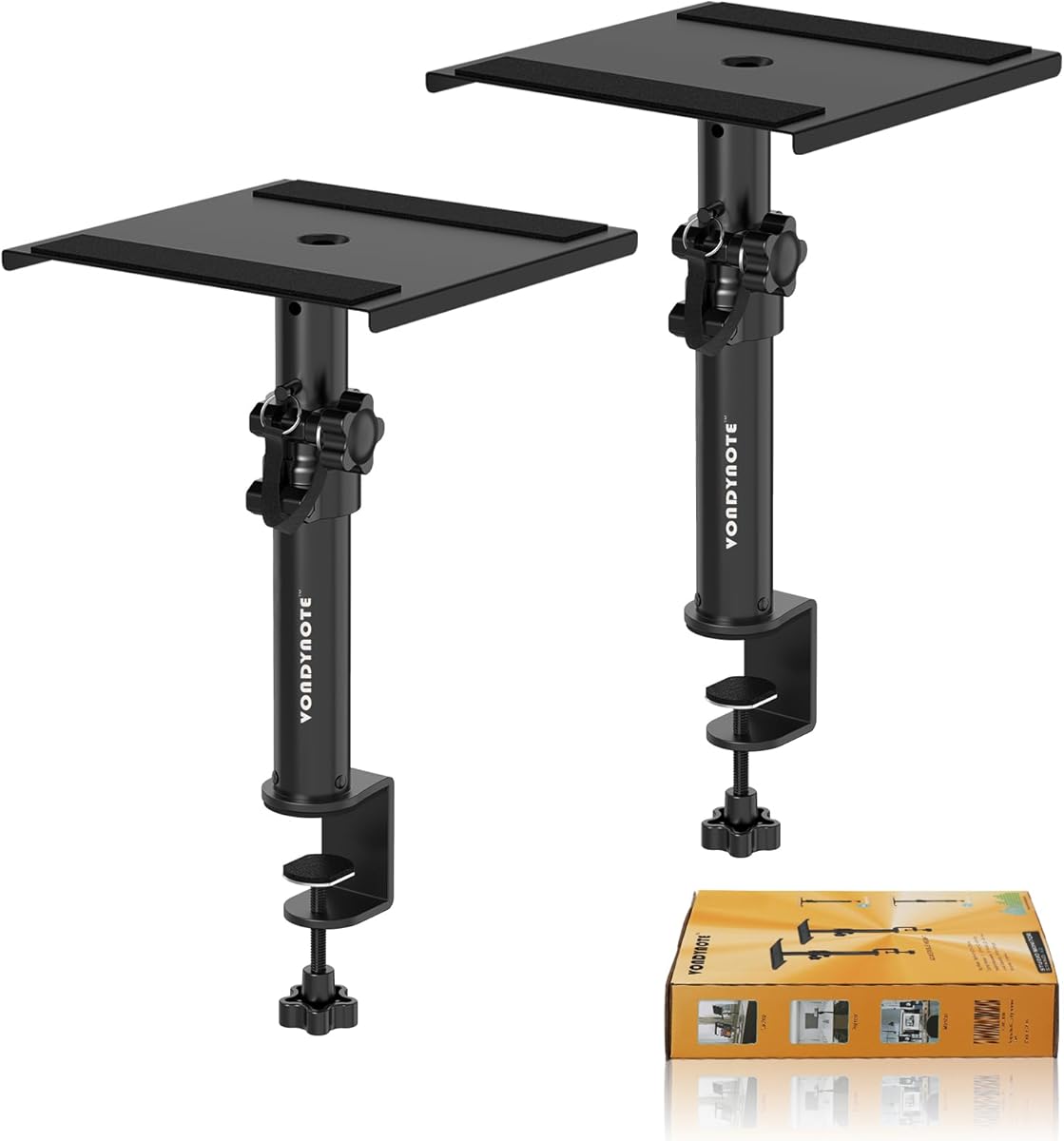


The Vondynote Set of 2 Desktop Clamp Speaker Stands is a compact solution for listeners who want studio monitor elevation without dedicating large platforms to the sides of a desk. Its 4.6 rating reflects a generally favorable balance of useful height adjustment, sturdy hardware, and a small installation footprint. The clamp occupies only 32.5 square centimeters of surface area, making it attractive for compact workspaces.
We may earn a commission when you buy through this link, at no additional cost to you.
Height can be fixed at 9, 10.6, 12.3, or 14 inches, giving users four distinct positions within a relatively short range. The stand uses a 9-by-9-inch metal top plate with a 2mm EVA anti-skid pad, while the 5mm-thick clamp includes a 3mm EVA pad intended to protect the desktop. Grade 8.8 reinforced steel screws are included in the installation package, alongside M8 bolts and an Allen key.
The main limitation is its low maximum height, which may be less useful when a listener wants to raise a speaker considerably above a deep desk or align it with a high-seated listening position. It also requires a compatible desktop edge and installation hardware rather than offering the plug-and-play convenience of a freestanding stand. Nevertheless, the 50-pound capacity and clamp range of up to 2.6 inches make these limitations reasonable for many compact listening stations.
This pair is best for buyers who prioritize desk space, work with speakers within the stated weight limit, and want controlled elevation at a relatively short listening distance. It also supports items such as laptops, CD players, and projectors, although its intended strength is supporting studio monitors. For those wanting a high, freestanding option, the Vondynote adjustable models in this guide offer greater height ranges.
The standout benefit is the small desktop footprint. Because the speakers are supported from the desk edge rather than by broad freestanding bases, the stands leave more usable work surface available and suit smaller creative or office setups.
Four fixed height settings, reinforced screws, and an EVA pad on the top plate create a controlled platform. The locking arrangement is especially useful because it helps prevent the speaker from shifting as vibration transfers through the desk.
We may earn a commission when you buy through this link, at no additional cost to you.
Kanto SP6HD Desktop Speaker Stands are designed for medium and large bookshelf speakers as well as mid-size and full-size studio monitors measuring 4 to 7 inches. The pair has a 4.7 rating, and its defining features include heavy steel construction, closed-cell foam padding, multiple top plate options, and an integrated approach to cable management. The understated black design suits both office and studio environments.
We may earn a commission when you buy through this link, at no additional cost to you.
Each stand raises its speaker six inches, bringing the tweeters closer to ear level. Two top plate sizes are included, and each plate has a mounting hole with a quarter-inch 20 screw for securing compatible speakers. The top plates can also rotate up to 15 degrees left or right, allowing a stereo pair to be directed toward the listening position rather than simply facing forward.
A fixed height means these stands do not offer the broad height selection found in several adjustable models. Buyers who need a much higher platform, a desk clamp, or a very narrow range of movement may prefer another option. Secure speaker mounting is also important: the included quarter-inch 20 hardware is intended for speakers that accept that mounting standard, so users should confirm their speaker bottoms before ordering.
The Kanto pair is an excellent choice for listeners who already know their speakers fit the 4-to-7-inch target and value precise placement over extensive height adjustment. Its heavy steel frame, vibration-absorbing padding, rotatable plates, and hollow cable columns offer a polished and organized solution for a carefully arranged desktop audio system.
The 15-degree plate rotation is more useful than it may first appear. Correctly angled speakers can create a more focused listening experience, particularly on a desk where space is limited and the ideal stereo triangle is already constrained.
The hollow support columns provide a convenient route for speaker cables. This design detail keeps wiring closer to the stand and supports a cleaner desktop without requiring separate cable-management hardware.
We may earn a commission when you buy through this link, at no additional cost to you.
The Vondynote Pair of Studio Monitor Stands combines vertical height adjustment with a tilt range of up to 12 degrees, giving desktop users more control over speaker placement than a fixed-angle platform. Its 4.6 rating reflects a versatile design that supports up to 60 pounds while maintaining a small 32.5-square-centimeter clamp footprint. It is aimed primarily at studio monitors but can also hold compatible laptops, CD players, and projectors.
We may earn a commission when you buy through this link, at no additional cost to you.
The telescoping tube provides four drill-hole positions at 10.4, 12, 13.7, and 15.4 inches. A locking knob and security pin help hold the selected height, while the top plate can move from level to a 12-degree tilt. The 9-by-12-inch plate carries a 3mm EVA anti-skid pad, and the desk clamp also includes a 3mm protective pad. Its clamp accommodates desktop edges from zero to 2.6 inches thick.
One tradeoff is the relatively large top plate, which may be less discreet than a compact square platform. Another is that the clamp design depends on suitable desk construction and a reachable edge; it is not meant to sit directly on the desktop. Buyers should also check that their speakers have a sufficiently broad, stable base for the rectangular platform and are comfortable with the chosen tilt.
This pair suits listeners who want more height range and angle control than a basic stand provides but still want the space savings of an edge-mounted design. It is particularly appropriate for medium and large studio monitors, provided each speaker weighs no more than 60 pounds and the desk edge falls within the stated clamp range.
Independent height and tilt controls make it easier to position speakers both vertically and acoustically. That flexibility is valuable when the speakers sit on a large desk and need to be directed toward a seated listener.
The combination of a locking knob and a security pin adds confidence at the selected height. The high load rating also gives it more headroom than many lightweight universal stands.
We may earn a commission when you buy through this link, at no additional cost to you.
Liquid Stands Studio Monitor Stands offer the broadest positional control in this group, with a tilt range from 0 to 20 degrees and a 65-pound capacity per stand. The 4.8 rating reflects a well-rounded package for recording studios, production desks, and serious listening setups. The pair is built from heavy-duty stainless steel and uses a four-inch-wide base, allowing it to operate close to a wall.
We may earn a commission when you buy through this link, at no additional cost to you.
Height adjusts from 9.5 to 13.5 inches, while the 9-by-12.5-inch platform can be used in horizontal or vertical orientation. Four included lips can be added or removed to configure the platform around different speaker shapes. This versatility allows a monitor to sit in its normal upright position or in a horizontal setup, depending on the speaker design and available desk space.
The clamp is designed for desktops between 0.5 and 2 inches thick, which excludes thinner or thicker edges outside that range. The platform also needs more surrounding clearance than a small square stand, and configuring the removable lips may take more attention than a fixed freestanding design. These are important considerations for compact desks, but the wide tilt, high capacity, and orientation flexibility compensate well for suitable installations.
The pair is best recommended for owners of larger studio monitors who want precise angle control, strong support, and the ability to change orientation. It is also a strong option for music booths and production workspaces where a close-to-wall clamp base and high load rating matter more than a minimal visual footprint. The stated ten-year warranty also provides added reassurance for a long-term installation.
The removable lips and horizontal or vertical plate configurations are the standout features. A stand that can adapt to multiple monitor shapes is more likely to remain useful when the listener changes equipment or experiments with a different placement.
The stated 65-pound support and 20-degree tilt exceed the corresponding figures of the other desktop stands listed here. Those specifications make the pair especially relevant for substantial studio monitors that need a stable, accurately aimed platform.
We may earn a commission when you buy through this link, at no additional cost to you.
The Vondynote Desk Studio Monitor Stands provide freestanding elevation from 11 to 16 inches, filling the gap between short desktop platforms and taller stands. Their 4.6 rating is supported by a steel construction, a broad 9.5-inch base, a 60-pound capacity, and adjustment for both tilt and rotation. They are particularly interesting for compact setups because the stand can also be configured horizontally to remain low.
We may earn a commission when you buy through this link, at no additional cost to you.
Four fixed positions allow the user to select an appropriate height, with a knob and locking pin securing the setting. The top plate can tilt from 0 to 12 degrees and rotate freely, making it easier to align each speaker toward the listening position. A full-coverage 2mm EVA pad covers the 9-by-9-inch plate, while non-slip feet help prevent the base from shifting.
Unlike clamp-based alternatives, this model does not depend on a compatible desktop edge, although the 9.5-inch base still requires more surface area than a compact clamp. The horizontal, space-saving mode is useful but may not suit every monitor because the speaker must be stable in that orientation. Buyers should consider the base footprint and ensure the desk has room for the complete stand, not just the platform.
These stands are a good middle-ground choice for listeners who want meaningful height and angle adjustment but do not want to drill or clamp onto a desk edge. They can hold studio monitors, laptops, or projectors, while the 60-pound rating gives them sufficient capacity for many common desktop speakers. Their freestanding design makes them especially convenient for reorganizing a workspace.
No clamp means the pair can be installed and repositioned without working on the desk edge. This makes the stands practical for renters, shared offices, and listeners who frequently change their equipment layout.
The ability to set the stand horizontally is valuable in shallow workspaces. It expands placement options beyond the standard upright monitor position, although the speaker's own stability must be considered.
We may earn a commission when you buy through this link, at no additional cost to you.
The Vondynote Set of 2 Desktop Studio Monitor Speaker Stands focuses on height rather than angle. They adjust from approximately 11.6 to 18 inches, with four drill-hole positions at 12, 14, 16, and 18 inches. Their 4.6 rating makes them an appealing choice for listeners who need to raise larger bookshelf speakers or monitors noticeably above a deep work surface.
We may earn a commission when you buy through this link, at no additional cost to you.
A safety-pin locking device holds the selected height, reducing the chance of the support shifting during use. The nine-inch square plate has a 2mm EVA anti-skid pad, and the steel frame has a 50-pound maximum bearing capacity. The matte black finish is intended to blend with professional studio, recording, or office equipment, while the disassemblable construction simplifies carrying and rearrangement.
There is no listed tilt or rotation mechanism, so these stands cannot make the same directional adjustments as several Vondynote competitors. The extended height also demands sufficient vertical clearance and can make the stands look more imposing in a small room. Users who prioritize exact acoustic aiming over maximum elevation would be better served by a model with an adjustable angle.
The pair is recommended for bookshelf speakers and studio monitors that benefit from a relatively high placement, especially where the listener is seated well back from the desk. The 50-pound capacity accommodates many mainstream monitors, and the locking pin adds security. For users who need a tall platform with flexible tilt, the other adjustable Vondynote models offer a broader combination of positioning controls.
The four height settings provide enough variation to improve the relationship between speaker and listener height. This is helpful when the desk is deep or the speaker is relatively tall and would otherwise be positioned below the intended ear line.
A safety pin supplements the support tube's drilled positions. The visible locking detail provides reassurance that the chosen height will remain in place during regular use.
We may earn a commission when you buy through this link, at no additional cost to you.
The Suptek Universal Desktop Speaker Stands provide a straightforward way to elevate a stereo pair by 6.1 inches. Their 4.5 rating reflects a simple design built around a large platform, stable support, and easy assembly. Each stand is intended for desktop or bookshelf speakers and can also be used with studio monitors, PC speakers, gaming equipment, or home-audio systems.
We may earn a commission when you buy through this link, at no additional cost to you.
The 7.9-by-6.5-inch top plate gives speakers a broad base and includes an anti-slip mat intended to reduce movement and support cleaner sound. Each stand has a 44-pound capacity, enough for many common desktop speakers. The product is a pair, so both sides of a stereo system can be placed at the same height without assembling a matched pair from separate units.
Fixed height and the absence of a stated tilt or rotation control limit the level of acoustic positioning. The platform is also not especially deep, so very large or deep speaker cabinets may overhang or sit less securely than they would on a larger plate. Buyers should compare the speaker footprint with the 7.9-by-6.5-inch platform before choosing it.
The Suptek pair is best for straightforward desktop listening where the speakers are small or medium sized and the goal is simple elevation. Its intuitive assembly and stable 6.1-inch height make it approachable for first-time stand users. Listeners who require multiple height positions, a pronounced angle, or a broad desk clamp should examine the more adjustable alternatives.
The 7.9-by-6.5-inch top area offers a stable landing point for many compact speakers. It is a useful middle ground between a small universal pad and the larger platforms designed for full-size studio monitors.
The product includes illustrated instructions and uses a simple design that is intended to be assembled in about ten minutes. That convenience makes it approachable for listeners who want immediate elevation without complex hardware.
We may earn a commission when you buy through this link, at no additional cost to you.
The Desk Speaker Stands for Most Bookshelf Speakers are a simple, ready-to-use pair for compact desktop audio. Their 4.9 rating is the highest listed among the ten products, and the design centers on a 16-degree upward tilt, a metal base, and a 22-pound load capacity. The stands can be used immediately or configured with screws for a more secure connection to compatible speakers.
We may earn a commission when you buy through this link, at no additional cost to you.
The 7.1-by-4.8-inch metal base is designed for most bookshelf speakers. A protective pad helps keep the stand from scratching the desk, while an anti-vibration pad at the speaker contact point is intended to reduce resonance. The fixed 16-degree angle directs sound upward toward a seated listener, which is especially useful for smaller speakers placed on a deep desk.
The 22-pound limit is lower than that of most adjustable studio monitor stands, and the fixed tilt may not suit every room or speaker. There is no height adjustment, so a listener with unusually low or high seating may need a different solution. The option to attach speakers with screws helps with security, but it is only useful when the speaker's underside has compatible mounting points.
This pair is a strong budget-conscious choice for small bookshelf speakers, gaming systems, and casual desktop listening. It offers the most straightforward setup in the roundup and avoids installation entirely if freestanding use is preferred. For larger monitors or exact positioning, the Liquid Stands, Kanto, and adjustable Vondynote pairs offer greater capacity and control.
A 16-degree upward angle can bring a compact speaker's acoustic output more directly toward the listener. It provides meaningful direction control without the complexity of a locking tilt mechanism.
The stand works as a freestanding platform right out of the box, while compatible speakers can also be secured with screws. This gives buyers flexibility without requiring every setup to use the more involved method.
We may earn a commission when you buy through this link, at no additional cost to you.
The PERLESMITH Universal Speaker Stands are floor stands rather than conventional desktop platforms, but they can be valuable in a home theater or room-based surround-sound arrangement. Their 4.3 rating reflects a practical design built around substantial height adjustment, adjustable platform width, and multiple cable-management choices. They are best viewed as an extension of the category for listeners seeking elevated satellite speakers around a room.
We may earn a commission when you buy through this link, at no additional cost to you.
Height extends from 33.3 to approximately 45 inches, and a twist-lock mechanism allows tool-free changes. The platform width adjusts from 4.5 to 9 inches, accommodating many small bookshelf, satellite, and studio speakers up to 11 pounds. A wide steel base, deeper threaded connections, and non-slip foot pads provide stability, while standard mounting hardware is included.
These are not the right choice for a crowded workstation, as their floor-standing construction demands considerably more space than a desktop model. The 11-pound capacity also limits them to smaller speakers, and the manufacturer specifically notes that they are unsuitable for round or irregularly shaped speakers. Cable routing through the hollow poles may not accommodate large connectors, so hook-and-loop straps are included as an alternative.
The pair is best for home cinema users, gaming rooms, and listening spaces that need surround speakers elevated well above floor level. Its adjustable width and height make it more versatile than a fixed floor stand. However, a listener seeking a compact monitor riser for a desk should prioritize one of the clamp or freestanding desktop models listed elsewhere in this guide.
The extended height range positions satellite speakers much higher than small desktop stands can. That can be useful for rear or side surround speakers where a low placement would point sound away from the listening area.
A cable hole runs through the hollow pole, while external hook-and-loop straps provide a fallback for plugs or cables that do not fit. The two options help manage wiring across a larger installation.
We may earn a commission when you buy through this link, at no additional cost to you.
The Desk Speaker Stands for Most Bookshelf Speakers use a cantilevered C-shaped design to elevate small speakers while preserving useful space underneath. Their 4.5 rating reflects a compact solution aimed at small and medium bookshelf speakers, computer speakers, and studio monitors. The defining feature is not merely a raised platform, but the open area created beneath the speaker.
We may earn a commission when you buy through this link, at no additional cost to you.
A fixed six-degree tilt aims the speaker toward the listener, while an extendable ledge stopper provides a depth range of 5.5 to 7.5 inches. The stand includes a preset slot for speakers with bottom mounting holes and soft EVA pads that help with stability, desk protection, and vibration absorption. Each stand has a 12-pound weight capacity, keeping the product focused on lighter speakers.
The low load rating is the clearest limitation, as even a moderately sized monitor can exceed it. The stand also offers only a modest fixed tilt and no height adjustment, so it cannot adapt to every seating position. Its depth range is substantial, but buyers should still compare those dimensions with the depth of their speakers and the available desk space.
These stands are best for small bookshelf or computer speakers on a desk where preserving the area below the speaker matters. The open design can accommodate small everyday items and makes the platform feel less bulky than a full enclosed base. For heavier or larger studio monitors, one of the 50-pound or higher-capacity models would be the more sensible choice.
The cantilevered frame leaves 5.9 inches of clearance beneath the speaker. This is a practical distinction from solid-base stands and can be helpful on desks where every usable area matters.
The extendable stopper changes the platform depth to accommodate different speaker sizes. Preset slots also offer a secure connection for speakers designed with compatible underside mounting holes.
We may earn a commission when you buy through this link, at no additional cost to you.
The right stand depends on the speaker, desk, and listening position. Comparing capacity, dimensions, mounting style, angle control, and construction will prevent an expensive mismatch and produce a more stable, accurately positioned system.
Begin with the physical dimensions and shape of each speaker. The top plate should support the full footprint without creating an overhang that could make the speaker unstable. A speaker with a recessed base may need a platform with an anti-skid pad, while a model designed for bottom mounting can benefit from a stand with a mounting hole and quarter-inch 20 screw. Check whether the product is aimed at compact bookshelf speakers, full-size studio monitors, or a broader universal range.
The Vondynote short clamp model, for example, uses a nine-by-nine-inch plate, while the Liquid Stands platform is larger at 9 by 12.5 inches. Match the platform to the speaker rather than assuming a larger stand is always better. A wider platform can improve stability, but it may consume valuable desk space.
Check the stated weight limit and leave room for uncertainty. The listed capacity should comfortably exceed the weight of each speaker, especially when a stand includes tilt hardware, a broad plate, or a clamp that transfers vibration into the desk. Lightweight universal stands may suit small bookshelf speakers, while heavier studio monitors generally require a substantially stronger platform.
Capacities in this roundup range from 11 pounds for the PERLESMITH floor stands to 65 pounds for the Liquid Stands pair. The 22-pound universal tilt stands and 12-pound cantilevered stands are appropriate mainly for smaller models. Do not use a stand at or near its stated maximum unless the manufacturer permits it.
Height matters because ear-level placement can improve clarity, imaging, and the apparent balance of a stereo pair. Measure the distance from your normal seated ear position to the desk surface, then estimate how far the speaker cabinet extends above that surface. A stand may need to add only a few inches or may need to raise the speaker substantially above the desktop.
The fixed options range from 6 inches on the Kanto SP6HD pair to 6.1 inches on the Suptek stands. Adjustable models cover broader ranges, including 9 to 14 inches, 10.4 to 15.4 inches, 9.5 to 13.5 inches, 11 to 16 inches, and 12 to 18 inches. Choose based on the actual desk and seating arrangement rather than selecting the greatest advertised height automatically.
Tilt directs a speaker's acoustic energy toward the listener, while rotation allows a stereo pair to be angled inward. These controls are especially useful on large desks where the speakers sit outside the ideal listening triangle. Even a modest upward angle can make a compact speaker's output feel better aligned with the listener.
The Liquid Stands offer the broadest listed range at 0 to 20 degrees. Kanto supports up to 15 degrees of rotation, while several Vondynote models provide up to 12 degrees of tilt. The universal budget pair uses a fixed 16-degree angle, and the cantilevered model uses a fixed six-degree tilt. Fixed angles are easier to set up but cannot accommodate changing seating positions.
Clamp stands preserve more of the desktop because they attach to an edge and place the speaker above the surface. They are useful in tight workspaces, but the desktop must fall within the supported thickness range and the installation may be less convenient. Freestanding stands are easier to move and can be used on almost any surface, although their base consumes more horizontal room.
The short Vondynote clamp and Liquid Stands both occupy only 32.5 square centimeters of clamp surface. The short model accepts desktop edges from zero to 2.6 inches, while Liquid Stands specifies 0.5 to 2 inches. Freestanding options range from the Kanto's compact steel columns to broad bases such as the Vondynote model's 9.5-inch square footprint.
A freestanding platform is convenient when the speaker has a broad, flat base and anti-skid material. A screwed connection adds security, but it requires compatible mounting holes beneath the speaker. Clamp designs should include locking screws, reinforced fasteners, and protective padding where they contact the desk.
Look for a locking knob or pin on adjustable stands so the height does not drift. Non-slip feet help freestanding models resist lateral movement, while EVA pads on the top plate can reduce visible movement and transmitted vibration. The Kanto SP6HD stands are distinctive for offering two plate sizes and quarter-inch 20 mounting hardware.
Cables are easier to manage when a stand provides a vertical route or keeps the speaker connection above the desktop. The Kanto pair uses hollow support columns for this purpose, while the PERLESMITH floor stands include both internal holes and external straps. Clamp models often leave the cable area less visible, but the open vertical column can still guide a lead toward the desk.
Before buying, check the diameter of the cable and the size of any connectors. A nominal cable hole may not accommodate a bulky plug. Also consider whether the cables need enough slack to move when tilt or rotation is adjusted, since moving a tightly fitted cable can create strain.
Steel construction provides a useful indication of rigidity, but the entire design matters. A heavy frame, substantial plate, secure locking mechanism, and well-finished contact points should work together to prevent movement. Pads are also useful for protecting the desk and speaker finish, while welded or reinforced connections can be preferable to lightweight plastic brackets.
The Liquid Stands pair includes a ten-year warranty, and the Kanto and several Vondynote options emphasize heavy steel, closed-cell foam, or EVA padding. Warranty length should not replace checking compatibility, but it can complement a well-built design when the stand is intended for long-term studio or office use.
Begin by identifying a solid section of desk that can support the entire stand and both speakers. For a freestanding model, place the bases on a level surface without pressing unevenly against a desk edge. For a clamp model, position the padded jaw against the underside of the desktop and tighten it gradually while checking that the clamp remains vertical and does not distort the surface.
Next, position the speakers before fully tightening every adjustment. Set the height, tilt, or rotation so the speaker faces the listener, and use the ledge, mounting slot, or included screws to prevent it from sliding. Leave a small amount of cable slack, route wires through the support column if one is provided, and confirm that neither speaker nor cable blocks a mouse, keyboard, or other equipment.
For care, wipe the metal surfaces with a soft, dry or lightly damp cloth and avoid abrasive cleaners. Do not soak EVA or foam padding, and do not use solvents that could damage the speaker finish. Periodically check clamp screws, locking pins, height collars, and mounting hardware. If a stand begins to wobble, loosen the adjustment before realigning it, because forcing a locked mechanism can damage the threads or internal joints.
They can. Raising a speaker toward ear level helps its output reach the listener more directly, while a correctly angled platform can improve the stereo image. Isolation pads may also reduce vibration transferred into the desk. Actual results depend on the speakers, room acoustics, placement, and source material, so a stand is one part of a well-planned system rather than a substitute for good speakers.
The ideal position places the tweeters close to the listener's ears when seated normally. The correct height depends on the desk, speaker cabinet, and chair, so measuring is more useful than relying on a universal number. A fixed stand may be sufficient for a compact setup, while an adjustable model is preferable if the listening position changes or the speakers are large.
Clamp-on models can free more desk surface because they do not require broad bases, making them useful in compact workspaces. Freestanding models are easier to move, can be used with nearly any surface, and often offer a more conventional appearance. The better choice depends on desk thickness, available space, portability, and the stability of the speaker's own base.
No. A mounting hole and quarter-inch 20 screw are common, but not every speaker has compatible underside hardware. Check the speaker's manual and measure the pattern before using screws. If the speaker lacks mounting holes, it should be placed on a stable padded surface rather than forced into an incompatible attachment.
The limit varies considerably among the listed products, ranging from 11 pounds to 65 pounds. Choose a stand with a rating comfortably above the weight of each speaker, and follow the manufacturer's instructions. A stand near its maximum may be less rigid, and an undersized stand can tip, distort, or transfer excessive vibration to the desk.
They may reduce direct surface movement by adding a supportive platform and vibration-absorbing pad. The extent of the effect varies with the stand, pad, desk material, speaker weight, and bass content. Isolation cannot remove acoustic vibration in the room, so it should be viewed as one part of a stable installation rather than a complete solution for all unwanted resonance.
Matching models and settings generally makes it easier to create a balanced stereo image. If the stands differ, use the same height and angle on each side and verify that both are stable. Small placement differences can be helpful, but they should come from deliberate positioning rather than mismatched hardware or one stand settling differently.
Route cables through an integrated column or channel when one is available, and keep excess slack so tilt or rotation does not pull on the connector. If a cable will not pass through the opening, use a separate cable guide rather than forcing it. Check that the cable cannot contact a moving plate, sharp edge, or clamp mechanism.
The Liquid Stands pair stands out for its 20-degree tilt range, 65-pound capacity, flexible platform configuration, and ten-year warranty, making it the most versatile selection for larger studio monitors. The Kanto SP6HD pair offers refined steel construction, rotatable plates, mounting hardware, and clean cable routing, while the universal 16-degree tilt stands deliver a simple, ready-to-use option for lighter bookshelf speakers.
For buyers with limited desk space, the clamp-based Vondynote models are especially relevant, and their choice depends on whether the priority is a short 9-to-14-inch range, the broader 10.4-to-15.4-inch range, or the more flexible Liquid Stands configuration. For larger speakers and maximum elevation, the freestanding Vondynote stands offer stronger load ratings and taller adjustment ranges. Always compare platform size, weight limits, mounting holes, and desk thickness first.
Ratings, product configurations, and prices can change, and current listing details should always be checked before buying. With the correct compatibility confirmed, a well-built stand can improve placement, reduce desk clutter, and make a desktop audio system easier to position precisely.