
PC Diagnostic Card 4 Digit
4.6Editor score
Four-digit hexadecimal display
Current and previous codes
PCI and ISA support
Remote display function
Our Post Debug Cards guide compares 10 motherboard diagnostics by interface, code display, LED coverage, compatibility, and repair versatility for PC technician
Post debug cards are diagnostic instruments that reveal motherboard startup behavior, power status, error codes, and component activity without requiring a complete operating system. A useful card can shorten fault isolation by showing whether a problem originates around power, the processor, memory, graphics, storage, or another motherboard subsystem.
This guide compares ten post debug cards according to supported interfaces, display styles, LED coverage, code-reading features, and intended repair applications. It includes PCI, ISA, PCI Express, LPC, mini PCI Express, and multifunction designs for desktop, laptop, and broader motherboard troubleshooting.
Each review explains the product's strongest feature, practical trade-offs, and ideal user. Ratings and specifications reflect the available product information, while availability, interface support, and pricing can change, so readers should confirm current listing details before purchasing.
4.6Editor score

4.0Editor score

3.5Editor score
This side-by-side comparison covers all ten cards, emphasizing interface support, display or LED functions, motherboard coverage, and the repair scenarios each design is best equipped to address.


The Fafeicy Motherboard Diagnostic Card combines an LPC tester, colored LED fault indicators, and a digital post-code display in one motherboard diagnostic tool. No published rating is shown in the supplied information, but its feature set is aimed at technicians who want more than a single code readout during computer assembly and maintenance.
We may earn a commission when you buy through this link, at no additional cost to you.
Its strongest feature is the layered visual feedback. Colored indicators can identify faults associated with the CPU, DRAM, VGA output, and hard disk, while flashing decimal points provide real-time clock-signal prompts. Digital indicators add information about PCIe reset status and standby power, making the card useful when tracing startup behavior rather than merely reading the final halted code.
The main limitation is that PCI Express support is described as applying to selected GIGABYTE motherboards, whereas PCI and LPC support form the broader foundation. Technicians should therefore verify the motherboard model and connector layout before relying on the PCIe-related functions. The compact PCB construction and included user manual help, but the card still demands careful signal interpretation.
This is a compelling option for repairers who want colored fault lights, live signal prompts, and a numeric code display in the same instrument. It is best suited to users comfortable with LPC and mixed-interface motherboards who can also confirm whether their specific board is covered by the listed PCI Express compatibility.
Colored LEDs provide a quick way to distinguish common fault categories involving the processor, memory, video hardware, and storage. That makes the card particularly useful during first-time assembly, when a board that does not reach video output needs a systematic physical check.
Flashing decimal-point prompts and digital reset indicators help show whether startup signals are active. These functions add context to a static post code and can help a technician decide whether the system is still progressing or has stopped at a particular stage.
We may earn a commission when you buy through this link, at no additional cost to you.
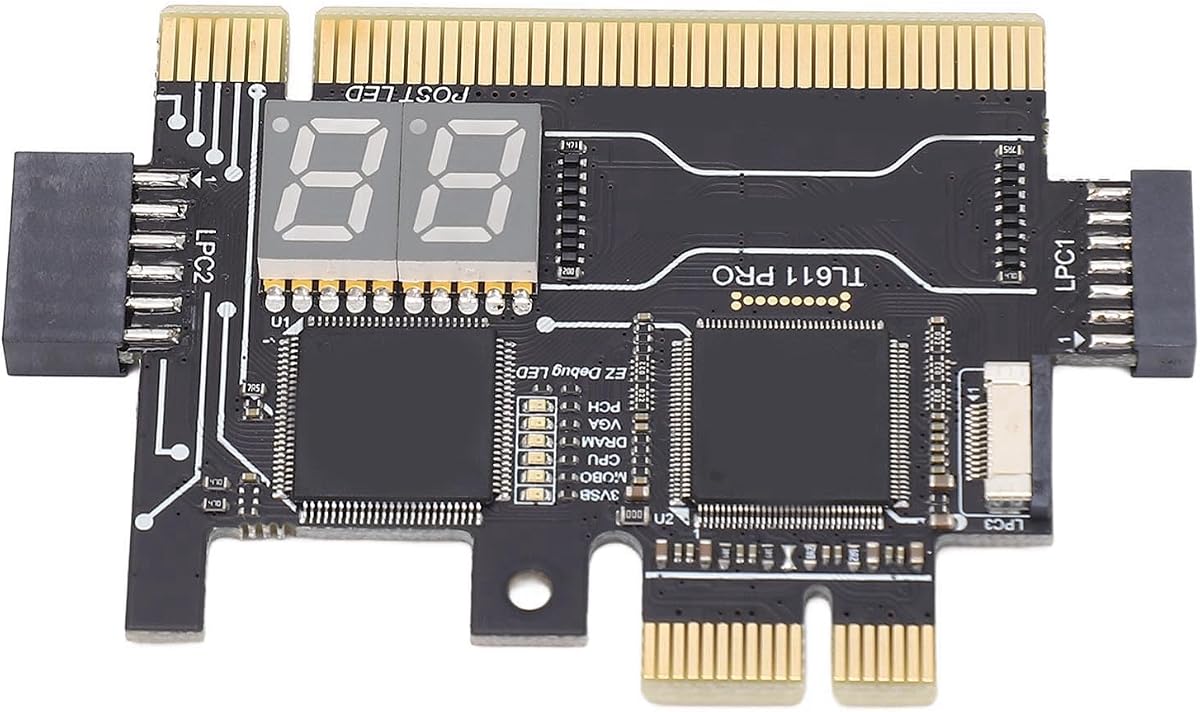
The TL611 Pro Mainboard Debug Card is a four-digit post-code analyzer with LED indicators and support for PCI Express, mini PCI Express, and LPC. Its published rating is 3.5, but the underlying design is unusually adaptable for technicians moving between conventional desktop systems and motherboard layouts that expose mini PCI Express or LPC diagnostics.
We may earn a commission when you buy through this link, at no additional cost to you.
Multiple channel detection is the card's most useful trait. LED indicators report the status of the power supply, processor, memory, and other board areas, while the four-digit display supplies a more precise diagnostic reference. The listing also states that the card automatically identifies power modules, reducing the need to infer basic power status from LEDs alone.
Compatibility is extensive for a diagnostic card, although it should not be interpreted as a guarantee for every board. The card supports PCI Express, mini PCI Express, and LPC and is compatible with PCI slots, yet connector placement, board design, and firmware behavior still matter. The modest published rating may also reflect buyer experience or listing-specific concerns that are not detailed in the supplied information.
Choose this model when your repair bench handles a mixture of laptop and desktop motherboards and you want both a four-digit display and component-level LEDs. It offers one of the broadest interface combinations in this list, making it a strong choice for adaptable professional workflows.
Support for PCI Express, mini PCI Express, LPC, and PCI slots reduces the need to keep separate basic testers for every motherboard architecture. That makes the TL611 Pro useful for technicians who encounter legacy, modern, and compact board layouts.
The four-digit readout gives a technician a numerical reference, while the LEDs show component and channel status. Using both forms of feedback can make a diagnosis more methodical than relying on a single code display.
We may earn a commission when you buy through this link, at no additional cost to you.
The Analyzer Diagnostic LPC-DEBUG Card is a straightforward motherboard post tester supporting PCI, PCI Express, and LPC interfaces. No rating or additional feature description is provided in the supplied information, so buyers should evaluate it primarily as a simple diagnostic card rather than a feature-rich instrument.
We may earn a commission when you buy through this link, at no additional cost to you.
Its multi-interface design is the central advantage. A card that supports PCI, PCI Express, and LPC can cover many desktop motherboards without requiring a different tester for each connector style. That makes it a practical addition to a general repair kit focused on determining how a board behaves during the power-on self-test.
The product information does not describe a numeric display, LED arrangement, code-history function, automatic power recognition, or included accessories. As a result, the card is best suited to users who already understand post-test behavior and know how to interpret the card's output. Confirming the physical connector arrangement is especially important when working with unfamiliar boards.
This listing is a viable option for a technician seeking a basic multi-interface tester without paying for a large multifunction analyzer. It is less compelling for beginners who need a clearly described display, reference guide, or detailed indicator layout, because those elements are not documented in the available information.
Supporting PCI, PCI Express, and LPC gives the card relevance across a broad class of motherboard test setups. It can be useful as a general-purpose companion to a more specialized diagnostic station.
The limited published details favor technicians who already understand motherboard power-on sequences. Buyers seeking guided diagnostics should look for a card with a documented code table and clearly identified status indicators.
We may earn a commission when you buy through this link, at no additional cost to you.
The Multifunction 3-in-1 Debug Card is a compact post tester designed around mini PCI Express, PCI Express, and LPC connections. Its listed dimensions of 5 by 3 centimeters make it appealing for technicians who need a small diagnostic instrument that can be carried between workstations.
We may earn a commission when you buy through this link, at no additional cost to you.
Compactness is its defining feature. Rather than emphasizing a large display or a broad component checklist, the card focuses on three useful motherboard interfaces and a basic analyzer role. It is particularly relevant for laptop repair, where internal diagnostic connectors and space constraints can make a full-size desktop-oriented card less convenient.
The available information does not clarify the number of display digits, individual LED functions, code-history behavior, or whether a reference table is included. Those omissions make exact comparison with the more fully documented products difficult. Its laptop focus also implies that connector type and board layout must be checked before use, since not every laptop exposes the same diagnostic interface.
For a mobile technician working with mini PCI Express or LPC-capable boards, the small footprint may outweigh the need for extensive built-in guidance. It is best viewed as a portable basic analyzer rather than a complete, feature-heavy diagnostic station.
At 5 by 3 centimeters, the card is easy to carry in a technician's tool kit. Its compact form is valuable when repairs happen at a client location rather than on a fixed workshop bench.
Mini PCI Express, PCI Express, and LPC coverage targets three common diagnostic connections. The focused design can simplify kit selection for technicians who know which interface their target boards use.
We may earn a commission when you buy through this link, at no additional cost to you.
The 4 Digit PCI and ISA Card is a desktop motherboard analyzer with a 3.8 rating and a straightforward four-digit display. Its most useful feature is the split readout: the first two digits show the current error code, while the last two preserve the previous code for comparison.
We may earn a commission when you buy through this link, at no additional cost to you.
That history function adds meaning to repeated POST failures. A technician can compare the code that stopped the boot sequence with the code visible immediately before it, which may help reveal whether the system advanced and then failed or remained at one stage. The card also supports a code-search function, and a supplied error-code table helps translate the displayed values.
Its interface scope is the main drawback. PCI and ISA support makes it most relevant to older desktop hardware and motherboards with those slots; modern systems built exclusively around PCI Express and LPC may not accept it. The motherboard bus-speed test is a specialized extra, but it does not compensate for the limited interface compatibility.
This card remains a sensible choice for a repair bench that handles legacy desktops or retains systems with ISA expansion slots. Users working across contemporary platforms should instead consider one of the LPC or PCI Express-focused options in this guide.
Retaining the previous code lets a technician observe two stages of startup in one view. That makes it easier to distinguish a stable early failure from a later boot error without repeatedly moving away from the test bench.
The included error-code table and code-search function make the card more approachable for users who are still learning POST diagnostics. ISA and PCI support keeps it relevant to older desktop platforms that cannot use newer connector combinations.
We may earn a commission when you buy through this link, at no additional cost to you.
The second Analyzer Diagnostic LPC-DEBUG Card uses the same core PCI, PCI Express, and LPC concept as the earlier listing. It is designed as a motherboard post-test kit, giving desktop technicians a single compact option for testing several common expansion and debug interfaces.
We may earn a commission when you buy through this link, at no additional cost to you.
The main benefit is connector coverage. Supporting PCI, PCI Express, and LPC means the card can work with a wider assortment of desktop boards than a single-interface tester. This is useful for general repair work where the exact motherboard may vary from one job to the next.
Published specifications are extremely limited. There is no supplied information about a numerical display, individual LED labels, automatic channel identification, code lookup materials, or remote viewing. A prospective buyer therefore gains less confidence about the precise diagnostic experience than with the more thoroughly documented multifunction and TL611 Pro cards.
The product is most appropriate for an experienced technician who wants a straightforward multi-interface tester and already has a reliable method for interpreting its output. Buyers who need guided code lookup, automatic power identification, or clearly defined component LEDs should favor a better-documented alternative.
Combining PCI, PCI Express, and LPC reduces connector-specific tool switching. A general-purpose repair technician can keep one card on the bench for a broader variety of motherboard layouts.
The product's supplied description identifies its interface coverage but not its readout method or indicator functions. Checking the current listing for those details can prevent a mismatch with a technician's preferred diagnostic workflow.
We may earn a commission when you buy through this link, at no additional cost to you.
The PC Diagnostic Card 4 Digit has a 4.6 rating, the highest published rating among the products in this guide. It combines standard PCI and ISA interfaces with a four-digit hexadecimal readout, giving older and mainstream desktop systems a practical post-code display.
We may earn a commission when you buy through this link, at no additional cost to you.
The display records both current and previous error codes, enabling a technician to compare successive startup states without relying on memory alone. Its self-checking remote display is especially useful when the card must sit inside a cramped desktop case, where reading the digits directly would otherwise be difficult.
Its limitation is connector age. PCI and ISA support excludes systems that offer only PCI Express and LPC diagnostic access, so this card does not cover every motherboard found in a modern repair environment. The listing does not mention automatic power-module identification, multi-component LED arrays, or compatibility with laptop boards.
This is the most approachable choice for desktop technicians who primarily service PCI or ISA systems and want a readable, history-capable code display. It also stands out as a budget-minded option because it provides more defined functionality than several less-documented alternatives.
The remote display allows post codes to be viewed without leaving the card deep inside a chassis. That improves workflow for desktop cases where the expansion area is difficult to reach while the system is powered.
Current and previous codes appear together on the four-digit screen. This history view helps technicians follow changes during the power-on process and focus on the stage associated with a repeated failure.
We may earn a commission when you buy through this link, at no additional cost to you.
The Desktop Diagnostic Card 4-in-1 is a PCB-based analyzer supporting PCI, PCI Express, and two LPC configurations. Its 4.0 rating and extensive feature set make it the most complete component-oriented option described in this guide, especially for desktop and server motherboard troubleshooting.
We may earn a commission when you buy through this link, at no additional cost to you.
The multifunction LED indicator reports the power supply, motherboard, processor, memory, graphics card, and hard drive. Automatic power-module identification adds speed by recognizing key power areas without requiring software. The card needs no drivers, and its support for multiple channels gives technicians a broad view of board status from a single installation.
Despite its four-in-one design, it is not a universal replacement for every type of debug card. It is aimed at motherboards using supported desktop interfaces and does not cover mini PCI Express laptop boards or every proprietary diagnostic arrangement. Its extensive LED-based workflow may also be less useful to someone who primarily wants a numeric post-code history.
This is the strongest all-around choice for desktop repair benches. It combines broad interface support, automatic recognition, component-level indicators, and software-free operation in one compact tool, making it particularly useful for technicians who need to identify whether a fault lies in power, CPU, memory, graphics, storage, or the motherboard itself.
Separate indicators for the power supply, motherboard, processor, memory, graphics, and hard drive let a technician narrow a startup failure quickly. The breadth of labels also helps distinguish a board-level problem from a peripheral or memory-related issue.
The card automatically identifies power modules, reducing the number of manual checks required early in the process. Because the device operates without drivers or extra software, it can be inserted and used as part of a direct hardware troubleshooting process.
We may earn a commission when you buy through this link, at no additional cost to you.
The TL611 Pro Motherboard Diagnostic Card and EC Debug Adapter is intended for both laptop and desktop boards. Its PCI Express, mini PCI Express, LPC, and PCI support is broad, while the included EC adapter adds a second function aimed at computer repair workflows involving embedded-controller debugging.
We may earn a commission when you buy through this link, at no additional cost to you.
LED indicators report the power supply, motherboard, processor, memory, graphics card, and hard drive. Automatic power-module recognition is also listed, providing an initial indication of whether the card has identified the relevant power areas. The dual laptop-and-desktop focus could be valuable for mobile repair technicians who do not want separate tools for each form factor.
The 1.0 rating is a significant concern and sharply distinguishes this model from the other TL611 Pro listing. The supplied product description also contains incomplete wording around supported brands and applications, making its broader compatibility less clear. While the interface list is useful, buyers should not interpret it as proof of fitment for every laptop or motherboard.
The design suits a technician who specifically needs an EC debug adapter alongside broad connector support. For anyone without a clear EC-related requirement, the low published rating and incomplete description justify comparing the alternative TL611 Pro products or the fully documented 4-in-1 analyzer before purchasing.
The EC debug adapter differentiates this package from a basic post-code reader. It may suit repairers whose workflow includes embedded-controller diagnosis in addition to conventional motherboard power-on testing.
Support for desktop and laptop interfaces is promising, but motherboard design still determines practical compatibility. Checking the exact board layout and the product's current documentation is essential, particularly given the low published rating.
We may earn a commission when you buy through this link, at no additional cost to you.
The TL611 Pro Debug Kit combines a four-digit display with support for PCI, ISA, PCI Express, and LPC. It also automatically identifies power modules and uses LED indicators to show the status of the power supply, motherboard, processor, memory, graphics card, and hard drive.
We may earn a commission when you buy through this link, at no additional cost to you.
Its diagnostic breadth is the main attraction. A numeric display can record a specific startup state, while the LED array supplies broader context about which major components have active or fault indications. Automatic power recognition can make the first stage of troubleshooting faster and reduce reliance on manual interpretation of basic power conditions.
No published rating is available in the supplied information, so the product's buyer feedback cannot be compared objectively with rated models. The description also uses broad compatibility language and does not provide a detailed list of supported boards. Interface support should therefore be matched to the actual diagnostic connector rather than treated as universal.
This kit is best for a technician who wants both a four-digit readout and multi-component indicators in a broad-format motherboard tester. It is a particularly good fit for repair work that includes desktop boards with conventional PCI or ISA alongside more modern PCI Express and LPC designs.
The four-digit display records detailed POST information, while LEDs summarize activity across major components. Combining the two helps a technician move from a general symptom to a more focused hardware investigation.
PCI, ISA, PCI Express, and LPC support gives the kit useful coverage across different generations of desktop motherboards. As with any diagnostic card, the target board's physical connector and diagnostic protocol must be confirmed before use.
We may earn a commission when you buy through this link, at no additional cost to you.
The right post debug card depends on connector compatibility, diagnostic detail, and the range of computer systems in your repair workflow. These factors determine whether a card will fit the target motherboard and provide enough evidence to isolate a fault efficiently.
Start by identifying every diagnostic connector available on the motherboards you service. PCI and ISA cards suit older desktop systems, while PCI Express and LPC are more relevant to many contemporary boards. Some compact laptop designs expose mini PCI Express, and a small number of the reviewed cards support that format. A card with several interfaces offers more flexibility, but it may still not fit every board or support every diagnostic protocol represented by a connector.
Numeric post displays provide specific startup codes, which can be useful when consulting a motherboard code table. LED indicators provide a broader view of power and component activity, often highlighting the processor, memory, graphics, storage, motherboard, and power supply. Some cards combine both approaches. Your choice should reflect how you plan to diagnose: exact code lookup favors a numeric display, while rapid subsystem isolation may favor clearly labeled indicators.
A display that retains both the current and previous code can reveal whether a system progressed before failing. This is useful for intermittent or sequence-dependent faults because it lets a technician compare two startup stages at once. Cards without history may still be effective, but they can require more active monitoring and note-taking. If your work involves repeated boot attempts, code history adds meaningful diagnostic context.
Automatic power-module identification can save time at the beginning of a diagnosis by confirming recognized power areas without manual configuration. Several TL611 Pro products and the 4-in-1 desktop analyzer advertise this feature. It is especially valuable for technicians who do not want to interpret power signals solely through a code table. Even so, automatic recognition should be treated as an aid rather than a final diagnosis, since a recognized module can still be operating outside expected limits.
Laptop repair often involves tighter internal spaces and diagnostic connectors that differ from standard desktop expansion slots. Mini PCI Express and LPC support improves relevance for compact systems, while an EC debug adapter may help with embedded-controller work. Desktop-focused cards can still be valuable for server boards and conventional motherboards. Think about the full mix of equipment in your workshop rather than choosing solely from a generic system category.
A large, clearly visible readout is helpful when working at a bench, while a remote display can make codes easier to observe inside a cramped case. The four-digit PCI and ISA options place current and previous codes together, and cards with LEDs can provide status cues from a greater distance. Consider where the card will sit during testing and whether direct viewing is realistic before deciding which output style is most useful.
A product with a documented error-code table and search function can help less-experienced users translate a display. Several listings provide little information beyond interface names, leaving the diagnostic method unclear. Look for current images, labeled indicators, a code reference, and instructions for connecting the card. Clear documentation is especially important when purchasing a compact or minimally described model for occasional rather than daily use.
PCB construction is standard for several models and helps keep the tool compact for a hardware case. The 3-in-1 card is explicitly listed at 5 by 3 centimeters, which may be valuable for mobile work. Other multi-interface cards prioritize more indicators and display functions. Consider whether a larger instrument with easier-to-read controls is preferable or whether a smaller card is important for transport and access inside laptop chassis.
Before connecting a post debug card, power the computer down completely, disconnect the mains supply, and discharge residual power according to the system's service guidance. Identify the correct PCI, ISA, PCI Express, mini PCI Express, or LPC diagnostic connector, check its orientation, and confirm that the card and motherboard agree on the expected post-code system.
With the system off, insert the card carefully into the appropriate connector and position it so the display or LEDs remain visible. Reconnect power and start the computer without changing hardware configuration. Observe the code or indicator pattern from the earliest startup stage, and record both current and previous codes when the card provides that history. Use the appropriate code reference and the card's labeling to narrow the fault area before removing or replacing components.
Handle the board by its edges, keep it away from moisture and conductive debris, and avoid forcing it into an unfamiliar connector. Store it in a protective pouch or fitted case so the display and indicator components are not crushed. If readings seem inconsistent, reseat the card, repeat the startup under the same conditions, and compare the result with another known-good component or diagnostic method rather than relying on one indication alone.
A post debug card connects to a motherboard's diagnostic interface and displays startup codes or component status indicators. It helps a technician determine whether the system is reaching initialization, identify the stage where a fault occurs, and narrow potential problems involving power, the processor, memory, graphics, storage, or the motherboard. It is especially useful when a computer fails before producing usable video output.
No. A post debug card can reveal startup behavior and point toward a faulty area, but it rarely proves the source of every failure by itself. Components, power delivery, firmware settings, cables, memory configuration, and even the diagnostic card can affect what appears on the display. Use its results to guide further testing rather than automatically replacing the first component associated with an illuminated indicator.
The correct choice depends on the diagnostic connector actually provided by the motherboard. PCI Express and LPC are common considerations for contemporary systems, while some boards also retain PCI or ISA slots. Review the motherboard manual or identify the internal header before purchasing. A card supporting several interfaces provides more flexibility, but each connector may have different signaling or code requirements.
They can be, but laptop support depends on the card's connector coverage and the board's diagnostic layout. Mini PCI Express and LPC support is particularly relevant for compact systems, and an EC debug adapter may assist with certain embedded-controller workflows. A technician should never force a card into an unverified connector because laptop layouts vary considerably even when two systems use the same physical interface.
The meanings vary by model, but common labeled indicators cover the power supply, processor, memory, graphics, storage, and motherboard itself. A lit or flashing light may indicate activity, successful detection, or a fault depending on the card's design and documentation. Read the labeling and instructions for the exact product rather than applying a universal meaning to every similarly colored LED.
A current code represents the startup state visible at that moment, while a previous code records an earlier state. Comparing the two can show whether the motherboard advanced between initialization phases or repeatedly stopped at the same point. This history is useful for diagnosing sequence-dependent failures and can reduce the need to watch every code change from the moment power is applied.
Most hardware-only post cards, including the explicitly software-free 4-in-1 analyzer, operate through the motherboard's diagnostic interface without separate software. However, code interpretation may require a printed or online reference. Before use, confirm the card's startup instructions and make sure the target motherboard uses a compatible post-code display and connector arrangement.
A multifunction model may support several older and newer interfaces, but fitment still needs to be checked for each board. Physical connector support does not always guarantee identical code protocols or signal behavior. Keep the relevant motherboard documentation available and test with the system fully powered down, reconnecting the card only after confirming its orientation.
The PC Diagnostic Card 4 Digit stands out for accessible diagnostics, a 4.6 rating, current-and-previous code history, and a remote display for cramped desktop cases. The Desktop Diagnostic Card 4-in-1 offers the most complete component-oriented feature set, while the TL611 Pro Mainboard Debug Card is the top pick for technicians who need broad interface coverage across desktop and laptop boards.
Prioritize exact connector support first, then choose the diagnostic output that matches your workflow. A numerical display is useful for code-based troubleshooting, an LED array works well for rapid subsystem isolation, and a card combining both provides the most context. Consider code history, automatic power recognition, documentation, and portability before making a final selection.
Product availability, seller information, included accessories, and pricing can change over time, so check the current listing before purchasing. Also verify that the card's connector matches the motherboard and that its code format or labeling matches the system being tested. With those checks completed, the right post debug card can make hardware fault isolation considerably more methodical.
