
10-Device Laptop & Tablet Charging Station
4.4Editor score
Charges up to ten devices
Six AC outlets and four USB ports
Integrated cable management system
Surge-protected 110V power strip
Compact vertical open rack
Discover the best charging stations for Chromebooks, comparing capacity, compatibility, cable management, portability, safety, and classroom readiness today.
A Chromebook charging station does more than recharge several devices at once. It creates a centralized place to store, protect, and retrieve laptops throughout the school day. The right model should match your device count, fit the sizes of your Chromebooks, manage cords cleanly, and remain easy to use in a busy classroom or shared workspace.
This guide compares ten charging stations designed for Chromebooks and related devices, considering slot capacity, device dimensions, included power distribution, ventilation, mobility, and cable organization. It covers open desktop racks, wall-ready stations, rolling carts, and USB-powered organizers so readers can compare practical formats before choosing a model.
Each review explains the strongest features and genuine limitations of its featured station, helping you separate high-capacity models from compact or budget-friendly options. Product availability, features, ratings, and prices can change, so confirm the current listing and your Chromebook dimensions before purchasing.
4.4Editor score

4.7Editor score

4.8Editor score
The table below compares device capacity, Chromebook compatibility, power delivery, and physical format across all ten stations, from compact USB organizers to rolling carts and high-density AC charging racks.




The POCHAR 8-Device Universal AC Laptop Charging Station combines a useful eight-device capacity with the flexibility to hold Chromebooks, laptops, tablets, and other common electronics. Its 4.7 rating reflects a generally favorable user response, while the product details emphasize broad device compatibility, straightforward organization, and suitability for classrooms, offices, and business workspaces.
We may earn a commission when you buy through this link, at no additional cost to you.
Its principal strength is the roomy slot design. The station supports devices with screens up to 14 inches and thickness up to 1.4 inches, making it a more practical choice than narrow tablet-only organizers. The integrated power strip includes surge protection, so users can connect supported chargers without relying on a separate surge protector. The open arrangement also keeps screens and keyboards visible and makes each device easy to remove.
There are trade-offs. Eight slots may be insufficient for a large class, and the stated dimensions of 14.75 by 12.75 by 8.25 inches mean the station needs a fair amount of counter or shelf space. The product description also presents a broad device range without specifying every possible charger shape, so checking the dimensions and connector requirements of your actual Chromebook fleet remains important.
This is a strong all-around recommendation for teachers, administrators, and home users who want a dependable AC-based station without a complicated setup. It combines a generous device-size allowance, surge protection, and ready-to-use assembly, making it one of the most balanced options in the guide for everyday Chromebook charging and storage.
The wide-angle slots are a key advantage in a shared environment where a charging area may serve Chromebooks alongside tablets or larger laptops. Devices remain upright, separated, and easy to retrieve rather than being stacked in a tray that could obstruct vents or screens.
The integrated surge-protected power strip reduces the number of separate wall connections, while the open design limits cable congestion. Because no assembly is required, the station can be positioned and put into service with minimal setup time.
We may earn a commission when you buy through this link, at no additional cost to you.
The 10-Device Laptop & Tablet Charging Station is a versatile high-capacity option for organizations that want both AC outlets and USB connections. Its 4.4 rating indicates generally positive feedback, and its supplied features position it as a practical charging hub for schools, offices, libraries, training rooms, reception areas, and shared workspaces.
We may earn a commission when you buy through this link, at no additional cost to you.
Six AC outlets and four USB charging ports give administrators more connection choices than a station built around only one connector type. Chromebooks that use traditional AC power adapters can occupy the AC outlets, while phones, wireless accessories, and compatible smaller devices can use the USB connections. The open vertical layout makes insertion and removal straightforward and helps maximize available surface area.
Integrated cable routing is another important advantage. It is particularly valuable in environments where each device leaves and returns daily, because a predictable cable path reduces tangles and makes it easier to see whether a charger has been left behind. The included surge-protected strip is rated for 110V and 10A operation, although users must still ensure the station is connected to a suitable outlet and the combined load remains within electrical limits.
The main drawback is that the station's vertical structure requires enough depth behind or beneath the devices, and its 4.4 rating is slightly below the strongest alternatives. Nevertheless, it is a compelling premium choice for buyers who value mixed charging interfaces, ten-device organization, and built-in cable management in one package.
Mixing six AC outlets with four USB ports makes this station adaptable to a broader collection of devices. That flexibility is especially useful where older Chromebooks rely on wall adapters while newer accessories may be managed through USB connections.
Built-in routing keeps charging leads organized and less likely to tangle around the base. For a busy shared area, a cleaner cable path can also reduce the time workers spend tracing cords and checking that every device has been returned.
We may earn a commission when you buy through this link, at no additional cost to you.
The 14-Slot Open Charging and Storage Rack stands out for accommodating a substantial Chromebook fleet in a relatively compact open frame. It carries a perfect 5 rating based on the supplied listing data, and its defining features include fourteen independent slots, solid steel construction, adjustable leveling feet, and an open structure designed to promote heat dissipation.
We may earn a commission when you buy through this link, at no additional cost to you.
Capacity is the rack's clearest advantage. Fourteen separated positions can organize Chromebooks, laptops, tablets, and iPads, while the open frame allows quick access to every device. Natural ventilation is valuable when many laptops are charging together because it helps limit the buildup of heat around stored equipment. The steel structure and leveling feet contribute to stability, particularly on surfaces that are not perfectly even.
The critical caveat is that a power strip is not included. Buyers must account for that separate component when planning the setup, and should ensure the selected strip has enough outlets for all intended devices. The product also requires some assembly and advises against overtightening the screws, so careful, moderate tightening is needed to avoid deformation.
This rack is best for schools, libraries, offices, and training rooms that need more positions than a standard eight- or ten-device station. It is not the simplest choice for someone wanting a completely plug-and-play system, but for high-density storage with excellent access and ventilation, the 14-slot design offers compelling capacity.
Fourteen independent slots make this a strong candidate for a classroom cart or central charging cabinet. The generous count allows devices to remain upright and identifiable, reducing the chance that a charger will be connected to the wrong machine.
The open steel design supports airflow while adjustable feet help compensate for uneven surfaces. Those details are useful for long charging sessions and for keeping multiple larger devices stable during everyday classroom handling.
We may earn a commission when you buy through this link, at no additional cost to you.
The Workington 8-Device Open Desktop School Charging Cart is a practical storage-focused option for schools and offices that need a protective shelf rather than fully divided vertical slots. The supplied product data does not include a numerical customer rating, so its value proposition should be assessed primarily from its construction, included components, and intended classroom use.
We may earn a commission when you buy through this link, at no additional cost to you.
Eight devices can be stored and charged on the padded shelf. Removable plastic dividers can be removed or adjusted to accommodate larger laptops and tablets, giving the station more flexibility than a fixed-size divider system. Soft padding and the dividers are intended to reduce scratches and accidental damage, while the open front allows students to retrieve devices without opening doors or moving surrounding equipment.
Cord management is handled through attached plastic clips and an additional rear tray for cables and adapters. The included power strips are described as UL approved, adding a useful layer of assurance for daily multi-device charging. The trade-off is that assembly is required, and the listed dimensions of 17 inches wide, 16.75 inches deep, and 13.5 inches high should be checked against available counter space.
This cart is best for users who value a simple, protective horizontal shelf and flexible dividers more than a vertical, individually partitioned design. It is especially relevant to elementary classrooms, shared family workspaces, and offices where Chromebooks vary in size and need to remain accessible throughout the day.
Removable dividers allow administrators to alter the layout as device sizes change. That flexibility is valuable when the same station must serve smaller Chromebooks, larger laptops, and tablets over time.
The padded shelf and open front create a practical balance between protection and quick access. Students can lift out a device without opening a cabinet, while soft surfaces help guard against everyday scratches.
We may earn a commission when you buy through this link, at no additional cost to you.
The Moezuti 20-Port 600W Charging Station offers unusually dense USB charging in a compact desktop format. It has a 4.8 rating, making it one of the strongest-rated products in the guide, and its mixed-port design is intended for laptops, tablets, phones, earbuds, e-readers, and other compatible USB-C or USB-A devices.
We may earn a commission when you buy through this link, at no additional cost to you.
Twenty ports include two high-speed 65W USB-C connections, ten 30W USB-C ports, and eight 20W QC USB-A ports. This distribution can support several demanding devices without relying on a collection of wall chargers. The total capacity is listed at 600W. Ten short cables are included, reducing the initial need to source a separate assortment of leads for phones, tablets, and smaller accessories.
Unlike stations with fragile removable dividers, the physical one-piece bays are molded into flame-retardant ABS. Two wider center spaces are intended for laptops or thick tablet cases. GaN technology, real-time temperature monitoring, and protections against overcharging, overheating, short circuits, overcurrent, and overvoltage add further reassurance for overnight or unattended use.
The important limitation is connector compatibility. Chromebooks with different power systems may not accept every included cable or charge properly from the available USB outputs, and users may need to retain compatible AC adapters. The best fit is a mixed collection of modern USB-C and USB-A devices in a home, classroom, or office that values high port density and included accessories.
Twenty ports in a desktop organizer can replace many individual adapters and reduce outlet congestion. The result is particularly useful for teams carrying a mixture of Chromebooks, phones, tablets, headphones, and other accessories.
The 65W USB-C outputs provide meaningful power for compatible laptops, while the lower-wattage USB-A and USB-C ports support smaller devices. Built-in thermal monitoring and multiple electrical protections make the station useful for extended charging sessions.
We may earn a commission when you buy through this link, at no additional cost to you.
The POCHAR 20-Device Laptop Charging Cart is built for institutions that need to move a large device collection between rooms. It can store and charge up to 20 Chromebooks, laptops, iPads, or tablets in individual slots, and the product information is aimed at classrooms, offices, libraries, training centers, healthcare facilities, and shared workspaces.
We may earn a commission when you buy through this link, at no additional cost to you.
Its adjustable removable dividers are designed for devices up to 15.6 inches and 1.5 inches thick. The dedicated rear cable-management system helps keep cords arranged, while the open frame promotes airflow around powered devices. A built-in 20-outlet power strip provides a convenient central source for the connected chargers.
Mobility comes from four swivel casters and ergonomic side handles. Two casters include locking mechanisms to stabilize the cart when it is parked. The trade-off is the footprint: dimensions of 21.6 inches wide, 18.8 inches deep, and 40 inches high mean this is a substantial piece of equipment, and it needs a suitable storage location and clear route between rooms.
The listing does not provide a customer rating, so buyers should place greater emphasis on the stated capacity and included power strip. This cart is a strong recommendation for schools or businesses that need to transport many larger Chromebooks and want a comprehensive power and storage system in one mobile format.
Twenty individually defined spaces allow a sizable Chromebook fleet to move together. Locking casters and side handles make the cart easier to park and reposition without allowing it to roll unexpectedly.
Removable dividers can be configured for different device sizes, including laptops as large as 15.6 inches. The open frame supports airflow while the rear cable system keeps charging leads from becoming entangled around the stored devices.
We may earn a commission when you buy through this link, at no additional cost to you.
The POCHAR 10-Device Open Charging Station combines a practical ten-device capacity with a strong steel frame and integrated power distribution. Its 4.7 rating places it among the better-rated options in this guide, and the station is specifically positioned for Chromebooks, tablets, iPads, and laptops in schools, offices, hospitals, libraries, and conference rooms.
We may earn a commission when you buy through this link, at no additional cost to you.
The station holds devices with screens up to 14 inches and thickness up to 1.5 inches. An open-frame construction promotes airflow and makes every device easy to view or remove. Its 10-outlet power strip is integrated into the base, and rear cable clips help keep individual leads organized instead of allowing them to fall behind the unit.
A lower storage tray provides another layer of utility for chargers, cables, school supplies, or other accessories. The heavy-duty steel frame is built for high-traffic environments, and the stated maximum weight capacity is 55 pounds. The dimensions of 19.6 inches wide, 13.8 inches deep, and 16.3 inches high mean it occupies more space than a compact USB organizer but remains less bulky than a full rolling cart.
This is a good match for administrators who want individual vertical slots, integrated AC charging, and useful accessory storage without locking wheels. Its fixed 1.5-inch spacing is less accommodating than adjustable dividers, so measure thicker cases first, but the station otherwise provides a balanced solution for a medium-sized device group.
The open structure gives airflow around upright Chromebooks and allows quick visual confirmation that each machine is present. It is a sensible design for offices and classrooms where devices are collected throughout the day.
Combining a 10-outlet strip with a lower accessory shelf keeps the station self-contained. Chargers and spare cables can be stored close to the devices, while rear clips preserve an orderly cable path.
We may earn a commission when you buy through this link, at no additional cost to you.
The Belkin 10-Device Charging Station is a recognizable classroom-focused design that provides surge-protected AC charging and organized storage. It holds and charges up to ten devices, carries a 4.3 rating, and is built around a wide-angle open design intended for tablets, laptops, Chromebooks, and e-readers.
We may earn a commission when you buy through this link, at no additional cost to you.
Its ten AC outlets accept common chargers and include automatic surge protection against voltage spikes. Wide-angle slots accommodate a broad selection of devices, and the listed compatibility extends to Chromebooks up to 13 inches and cases up to 1.18 inches thick. Built-in cable management minimizes tangles, while labeling space allows device identifiers to be attached for easier assignment.
The station can fit on a standard AV cart, making it suitable for mobile classroom setups. It can also be securely mounted to a desk, table, or another horizontal surface. That flexibility is useful for institutions that want a permanent charging point, a cart-mounted solution, or a unit that can be moved between storage and instructional areas.
The main limitation is its stated 13-inch Chromebook compatibility, which is smaller than the allowance offered by several competing racks. Its 4.3 rating is also lower than most alternatives in this roundup. Even so, the Belkin's combination of surge protection, mounting options, labeling areas, and AV-cart compatibility makes it a practical choice for schools that prioritize durable organizational features.
The station can sit on a surface, be mounted securely, or occupy a standard AV cart. This makes it easier to match the charging location to the way a classroom's devices are actually stored and used.
Ten protected outlets, integrated cable management, and labeling space support a systematic return process. Students can identify assigned machines quickly, while staff can verify that every charger is present.
We may earn a commission when you buy through this link, at no additional cost to you.
The Zobirez 420W 10-Port Fast USB Charging Station is a compact organizer for buyers who want many USB connections without a large AC rack. It has a 4.5 rating, supports up to ten devices, and uses five USB-C ports within a total output of up to 420W, making it versatile for compatible laptops, tablets, phones, and accessories.
We may earn a commission when you buy through this link, at no additional cost to you.
The two highest-output ports can deliver up to 65W, while three additional ports provide 45W and five provide 30W according to the supplied specifications. This spread allows the station to serve both larger compatible laptops and smaller high-demand devices. Eight short mixed charging cables are included, covering USB-C, Lightning-style, and Micro USB connections, which helps reduce the initial cable clutter.
The one-piece flame-retardant ABS construction is intended to outlast removable dividers that can crack or separate. Two wider and taller center bays measure 1.57 inches wide and 1.77 inches high, allowing a laptop or a child's tablet in a protective case to stand upright. Four non-slip pads protect the desktop and keep the unit stable.
Its main limitation is that it does not provide a bank of AC outlets. Chromebook compatibility therefore depends on the charging standards and cables supported by the individual device. This is best suited to homes, offices, classrooms, and travel spaces with a modern mix of USB-C and USB-A equipment, especially when a compact, fast-charging hub is more important than traditional adapter storage.
Ten ports and 420W of aggregate capacity provide meaningful charging flexibility in a smaller footprint than a full AC rack. It works well for a desk where several personal devices need to be connected without occupying multiple wall outlets.
One-piece bays avoid the wear associated with frequently removed dividers. The two enlarged center positions offer a practical way to keep compatible laptops and thick tablet cases upright.
We may earn a commission when you buy through this link, at no additional cost to you.
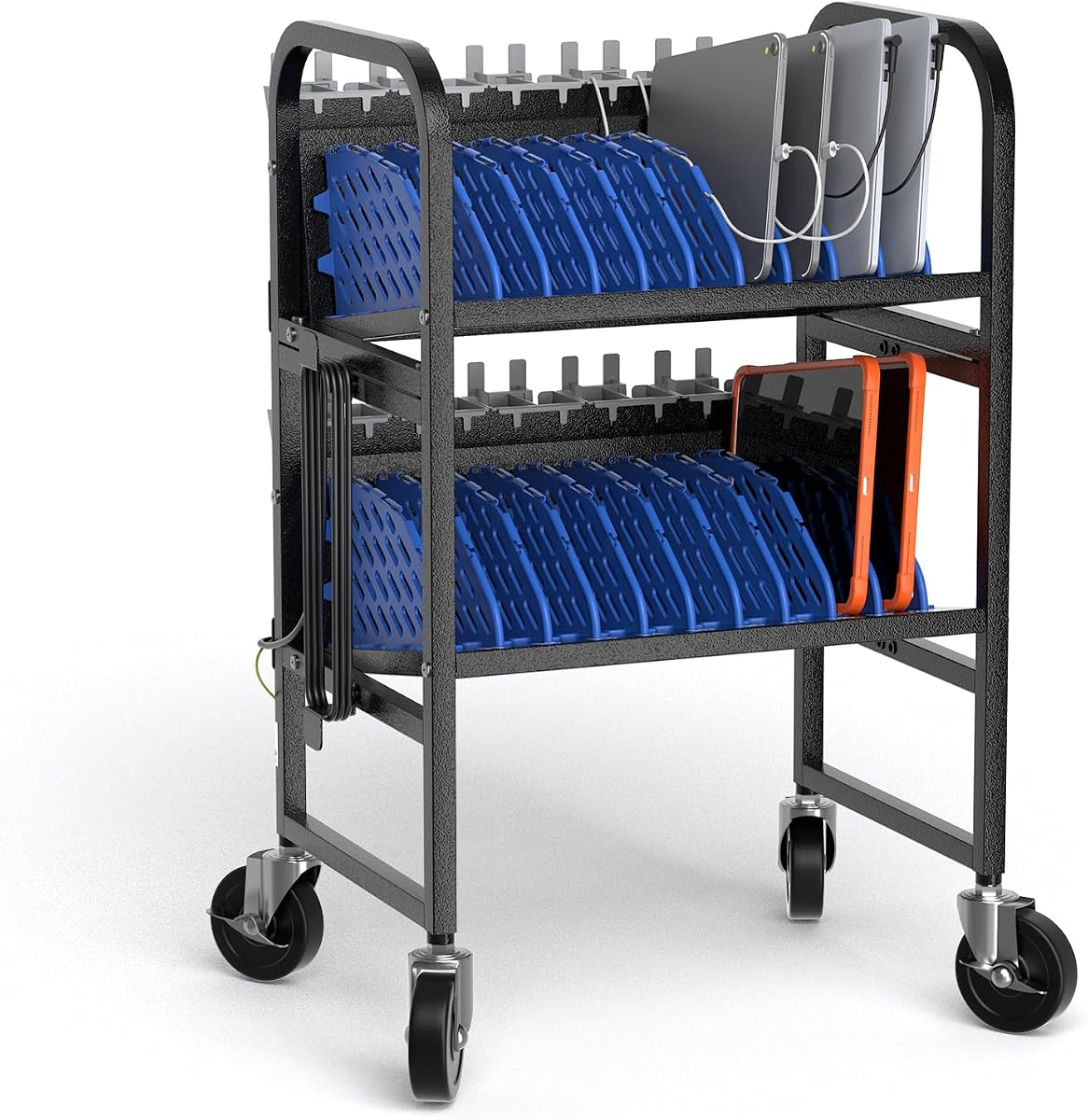
The 10-Device Mobile Charging Station is a rolling open-frame solution for classrooms, computer labs, libraries, and offices that need flexible storage. It has a perfect 5 rating in the supplied product data and combines ten adjustable device compartments with four casters, two brakes, cable-management features, and a lower shelf for accessories.
We may earn a commission when you buy through this link, at no additional cost to you.
Each compartment can hold a Chromebook, laptop, or tablet, and the removable dividers can be adjusted to accommodate different sizes. The open design allows a device to be lifted out quickly and promotes airflow during charging. A bottom shelf provides a convenient place for power adapters and related accessories, helping keep the main charging area uncluttered.
Mobility is one of its clearest strengths. Four smooth-rolling casters make it possible to move the cart between classrooms or workspaces, while two brakes hold it steady when parked. Integrated clips and routing holes organize cords, and the steel frame has a baked-on finish intended to resist rust, wear, and deformation. Rounded edges also improve handling in busy areas.
The main point to verify is the power configuration, because the supplied listing emphasizes storage and mobility without clearly stating the included outlets or power strip. Buyers should check the current product details before assuming it includes a particular charging system. Even with that caveat, the station's 5 rating, easy maintenance, and strong mobile design make it an appealing choice for shared-device environments.
The wheeled frame lets a shared collection of Chromebooks move with the class or between work areas. Brakes on two casters prevent unwanted rolling once the cart reaches its destination.
Tool-free assembly reduces setup time, while wipe-clean steel surfaces simplify routine care. Adjustable dividers, cable clips, and a lower storage shelf keep the cart useful as device combinations change.
We may earn a commission when you buy through this link, at no additional cost to you.
The best charging station for Chromebooks depends on fleet size, charger style, device thickness, available space, and how often the equipment moves. Compare these factors before choosing a model to avoid paying for unnecessary capacity or selecting a station that cannot hold your devices safely.
Start with the number of Chromebooks that need to charge at the same time, then add a little room for occasional overflow. An eight-device station is appropriate for a small classroom or family collection, while 10-, 14-, and 20-device options suit larger groups. USB-only stations may accommodate more small accessories, but they do not necessarily support every Chromebook power adapter. Capacity should mean usable positions for your actual fleet rather than the largest number of connectors advertised.
In short, choose enough simultaneous positions for your routine, plus a modest margin for repairs, replacements, or visiting devices.
Screen size and device thickness are critical because a wide screen can still fit poorly if a slot is too shallow. Several products support devices up to 13 or 14 inches, while the POCHAR mobile cart supports up to 15.6 inches. Thick protective cases can also change the required clearance, so measure both the Chromebook and its case. Adjustable dividers are useful when a station serves a mixed fleet, whereas fixed slots are simpler but less forgiving.
In short, check the listing's maximum screen size, thickness allowance, slot width, and case clearance before ordering.
Chromebook charging methods vary by model and generation. AC-outlet stations support traditional wall adapters, while USB-A and USB-C stations can serve compatible devices through their own power electronics. Mixed-port designs offer flexibility, but the included cable may not be right for every Chromebook. USB-C power output also depends on protocol and wattage; a physically compatible connector does not guarantee full-speed or appropriate charging. Confirm the charging method used by your fleet and whether each station accepts the required adapter or cable.
In short, prioritize a station that explicitly supports your Chromebook power method and the wattage your devices require.
Cable management determines whether a charging area remains workable after a full day of use. Integrated clips, rear routing channels, and dedicated accessory trays keep leads visible, prevent tangles, and make missing chargers easier to identify. This is especially important for students who return devices independently. Cable features do not replace the need for adequate outlets, but they help each adapter reach the intended device without crossing unrelated slots or hanging near walkways.
In short, choose a model with dedicated routing or clips so cords can be organized after every charging cycle.
Chromebooks generate heat while operating, particularly during demanding lessons or extended video calls. An open rack allows air to move around the devices and reduces the chance that screens or vents are blocked by neighboring equipment. Solid, enclosed cabinets may offer more physical protection but require stronger attention to spacing and ventilation. A broad open design is usually easier to maintain, while a desktop USB organizer should keep unused ports and dividers from obstructing device vents.
In short, favor open or well-spaced slots that allow passive airflow around active Chromebooks.
An integrated power strip can simplify installation by reducing the number of separate wall connections. Surge protection is particularly valuable in shared environments with many adapters in use. Confirm the number of outlets, supported voltage, current rating, and whether a power strip is included. Some large racks provide only the physical frame and require you to add a suitable strip. Electrical compatibility does not mean the combined charging load can exceed the strip's rating, so use the manufacturer-specified limits.
In short, verify included power components, outlet count, surge protection, and electrical limits before installation.
A fixed desktop rack works well where devices always return to the same room, while a mobile cart is better when the same fleet travels between classes or service areas. Look for sturdy handles, smooth casters, and wheel brakes rather than mobility alone. Mobile carts need a clear path and adequate parking space, and their added weight can make them difficult to reposition safely. Desktop stations should have enough clearance for cables behind the devices and for users to stand in front of the rack.
In short, choose wheels only when the station must move regularly, and reserve adequate floor and counter space either way.
Steel frames and one-piece slots generally suit high-traffic environments better than assemblies with many small removable parts. Adjustable feet can improve stability on uneven surfaces, while a wipe-clean finish makes routine maintenance easier. Look for smooth edges, secure dividers, and ventilation openings that do not collect dust easily. If the station requires assembly, allow enough time for setup and avoid overtightening fasteners, which can distort the frame or cause stress around the slots.
In short, favor durable frames, simple maintenance, and secure hardware over features that add complexity without improving daily use.
Before placing devices, confirm that the station is fully assembled, stable on its surface, and connected to a suitable grounded outlet. If the product requires a separate power strip, install it according to the strip manufacturer's instructions and observe its load limits. Position the station away from walkways and heat sources, then connect each device with the charger or cable appropriate for its charging standard.
Assign each Chromebook to a consistent slot and route its cable through the provided clips, channels, or rear tray. Keep ports and ventilation openings unobstructed, and avoid pushing devices so tightly together that their vents are covered. At the end of the charging period, disconnect cables in a systematic order, check that every adapter is present, and return devices to their assigned positions. Labeling slots can reduce mix-ups in shared environments.
Clean the frame and dividers with a soft, slightly damp cloth, then allow the surfaces to dry before reconnecting equipment. Do not spray cleaning liquid directly onto the station, and keep moisture away from outlets, power strips, and electronic connections. Inspect casters, dividers, cable clips, and fasteners periodically. Tighten loose hardware moderately, replace damaged cables, and follow the manufacturer's cleaning and safety guidance.
Yes, provided the station supports the charger, connector, dimensions, and power requirements of each device. Many models are designed for laptops, tablets, iPads, and Chromebooks in the same rack. USB-only stations are most flexible for compatible USB-C and USB-A devices, while AC-outlet models are better for devices that use standard wall adapters.
No. Compatibility depends on screen size, device thickness, case dimensions, and the charging method used by the particular Chromebook. Larger screens and thick cases need wider slots, while older or specialized models may require an AC adapter that a USB-only station cannot accommodate. Check the fleet specifications before purchasing.
They can be, if the Chromebook supports USB-C Power Delivery and the station provides sufficient wattage. A USB-C port that fits physically may still charge a compatible laptop more slowly than its original charger. For a mixed or uncertain fleet, an AC-outlet rack with individual device chargers usually offers clearer compatibility.
Ideally, the station should hold every device that needs charging during the same period, plus a small margin for overflow or replacement units. Match the capacity to the actual class size rather than the total number of devices in the building. A ten- or fourteen-device rack often suits a single classroom, while larger institutions may require carts or multiple stations.
A mobile cart lets teachers or staff move a device collection between classrooms, libraries, offices, or testing areas. Casters and locking brakes make repositioning and parking more convenient, while the open frame keeps devices accessible. It does require enough storage space and a clear route, and moving a fully loaded cart should always be done carefully.
Surge protection is strongly recommended for any station powering several chargers. It helps guard connected equipment from voltage spikes, although it does not eliminate every electrical risk. Buyers should verify whether a protected power strip is included, check its rating, and avoid exceeding the manufacturer's stated load and connection limits.
Use the station's built-in clips, cable channels, dividers, or routing holes consistently rather than leaving cords loose behind the unit. Assigning each cable to a specific slot also reduces confusion. For USB-based models, the included short cables can keep device leads short and prevent them from crossing neighboring positions.
An open frame generally allows more passive airflow around stored devices than a tightly enclosed cabinet. That can help reduce heat buildup when many active Chromebooks are charging together. Devices should still be positioned so their vents remain unobstructed, and the station should be kept away from direct heat sources.
The POCHAR 8-Device Universal Station is the most balanced all-around choice because it supports eight devices, accommodates laptops up to 14 inches, includes surge protection, and requires no assembly. For buyers wanting more connections and premium organization, the 10-Device Laptop & Tablet Station adds six AC outlets, four USB ports, and integrated cable routing. The Moezuti 20-Port model stands out as the budget-oriented high-density option for compatible USB devices.
Your priority should be device compatibility first, followed by usable capacity, ventilation, and cable management. A larger station is not automatically better if its slots cannot hold your cases or its charging interfaces do not match your Chromebooks. Rolling carts suit shared environments, fixed racks suit dedicated rooms, and compact USB organizers suit smaller or more modern device collections.
Finally, confirm the current listing, dimensions, included power components, and charger requirements before buying. Ratings, product features, availability, and prices can change, and electrical standards may differ by location. A careful fit check will help you select a charging station that remains organized, accessible, and dependable throughout the school or workday.