
MINISFORUM NAB9S
4.5Editor score
Intel Core i9 13900HK
Quad 4K displays
Dual 2.5G Ethernet
Flexible storage expansion
Our Intel Core i9 Mini PC guide compares ten powerful compact systems for gaming, networking, expansion, displays, productivity, and professional work.
Intel Core i9 mini PCs combine flagship-class processor performance with a footprint small enough for desks, studios, offices, and media cabinets. The best models deliver strong multitasking, fast storage, capable integrated graphics, and flexible networking while avoiding the bulk of a conventional desktop tower.
We compared the ten featured systems by processor capabilities, memory and storage configuration, display support, network hardware, expansion options, cooling, and practical connectivity. The guide covers complete ready-to-use configurations, a barebone workstation, compact gaming systems, and professional mini PCs aimed at specialized workloads.
Each numbered review explains the strongest features, practical limitations, and ideal users, while the comparison table offers a faster side-by-side view. Product configurations and availability can change, and current prices fluctuate, so confirm the listed specifications before making a final purchase.
4.5Editor score

4.6Editor score

4.5Editor score
The comparison highlights processor generation, core count, memory, networking, display support, and expansion capabilities to show how each mini PC serves a distinct set of users.


The MINISFORUM M1-1390 is a compact Core i9 system built around the 24-core, 32-thread Intel Core i9-13900HX, making it one of the strongest options in this guide for heavily threaded work. Its 4.5 rating reflects a favorable balance of processing power, memory, storage, and connectivity in a very small enclosure.
We may earn a commission when you buy through this link, at no additional cost to you.
The standout feature is processor breadth. Eight performance cores and 16 efficiency cores provide substantial capability for video editing, software compilation, large spreadsheets, content pipelines, and simultaneous application use. The supplied 32GB of DDR4 RAM is generous for demanding office and creative work, while the 1TB PCIe 4.0 NVMe SSD supports rapid file access and can be expanded within a dual-drive design.
Its Intel UHD Graphics hardware supports up to three 4K displays through HDMI, DisplayPort, and USB-C. A 2.5G Ethernet port, Wi-Fi 6E, and Bluetooth 5.2 provide flexible networking, although the single wired port makes it less appealing for advanced dual-network configurations. The core trade-off is DDR4 rather than newer DDR5, but the generous starting capacity helps offset that limitation.
This model is a strong choice for power users who need many CPU cores but do not require the extensive network ports or dedicated graphics capability of a workstation. It suits editors, developers, engineers, and advanced home-office users who want flagship-class responsiveness without building a full-size tower.
The 24-core design is especially useful when a workload can divide across many threads. It can shorten demanding render, compile, compression, and batch-processing tasks compared with lower-core mini PCs while retaining a compact footprint.
Triple-display support creates a productive alternative to a laptop dock, while 2.5G Ethernet, Wi-Fi 6E, and Bluetooth cover modern office and home connectivity needs without requiring multiple adapters.
We may earn a commission when you buy through this link, at no additional cost to you.
The Beelink GTi13 earns the Editor's Choice position because it combines strong Core i9 performance with unusually useful expansion and networking features. Its Intel Core i9 13900HK has 14 cores and 20 threads, while the 32GB DDR5 configuration supplies ample bandwidth for demanding creative and development workloads.
We may earn a commission when you buy through this link, at no additional cost to you.
Thunderbolt 4 is the feature that distinguishes this model from many conventional mini PCs. It supports high-speed data transfer, display output, and charging, while the PCIe x8 slot enables connection to compatible graphics, network, or storage accessories. The supplied system also has two 2.5G Ethernet ports, Wi-Fi 6, Bluetooth 5.2, an SD card slot, and three-display support.
Its 4.6 rating indicates strong user satisfaction, though buyers should consider that it occupies an upper configuration tier. The included 1TB SSD is useful but not especially generous for large media libraries, and some of the most advanced capabilities require compatible docks or expansion hardware. Its 65W processor design balances power and performance without abandoning high-clock capability.
The GTi13 is an excellent general recommendation for a user who wants one compact PC that can handle serious work today and accept more expansion later. It is especially attractive to developers, editors, technical professionals, and advanced users who appreciate fast networking, modern memory, and flexible high-speed ports.
Thunderbolt 4 and the PCIe x8 slot turn the GTi13 into more than a fixed desktop replacement. Compatible docks and cards can add displays, storage, graphics, or networking when a changing workload requires them.
DDR5 improves data-transfer headroom, while two 2.5G ports are useful for high-speed file access, aggregation, virtual networking, or keeping separate work and personal traffic on distinct connections.
We may earn a commission when you buy through this link, at no additional cost to you.
The KAMRUI Hyper H2 is a particularly fast compact system, using the 14th-generation Intel Core i9-14900HX with 24 cores, 32 threads, up to 5.8GHz, and 36MB of cache. Its 4.5 rating suggests buyers appreciate the combination of high clock speed, graphics support, and a small 5.04-by-5.04-by-1.63-inch enclosure.
We may earn a commission when you buy through this link, at no additional cost to you.
The supplied 32GB of dual-channel DDR4 is ample for office productivity, video editing, gaming, and general creative work, and it can be expanded to 64GB. A 1TB M.2 PCIe 4.0 SSD provides fast startup and file performance, while two storage positions allow room for a second drive. HDMI 2.0, DisplayPort 1.4, and USB-C support three 4K displays.
Its most attractive trait for performance users is the combination of many cores and a 5.8GHz maximum frequency. The cooling system uses a centrifugal fan, dual copper heat pipes, and a dual-fin module to support sustained 55W operation. The main compromises are DDR4 rather than DDR5 and a 1Gbps Ethernet port, which is modest for a performance-oriented model.
The Hyper H2 is best suited to gamers, editors, and creators who prioritize CPU speed and a compact footprint. It also makes sense for office users who want three displays and the option of mounting the computer behind a monitor to reclaim desk space.
The 14900HX combines 24 cores with a high 5.8GHz ceiling, helping both threaded productivity tasks and lightly threaded applications respond quickly. That makes it versatile across demanding office, game, and creative scenarios.
The square chassis is small enough for a media cabinet or behind a monitor. Included VESA mounting support makes it especially convenient for creating a clean workstation with multiple displays.
We may earn a commission when you buy through this link, at no additional cost to you.
The MINISFORUM NAB9S is the value-focused selection in this guide, pairing the Intel Core i9 13900HK with 16GB of DDR4 memory and a 500GB PCIe 4.0 SSD. Its 4.5 rating indicates that the core platform remains compelling even though the bundled memory and storage are more modest than several rivals.
We may earn a commission when you buy through this link, at no additional cost to you.
The 14-core, 20-thread processor reaches up to 5.4GHz and handles office suites, programming, content creation, and multitasking efficiently. Two DDR4 SO-DIMM slots support up to 32GB, and the tool-free top cover simplifies upgrades. Storage can include one PCIe 4.0 NVMe drive and one 2.5-inch SATA SSD or hard drive.
Networking is particularly strong for the category. Two 2.5G Ethernet ports support firewall, aggregation, and high-speed file-transfer use cases, while dual-band Wi-Fi 6 and Bluetooth 5.2 provide wireless alternatives. Dual HDMI and dual USB-C video outputs support as many as four independent displays. The tradeoff is that 16GB and 500GB leave less room for heavy multitasking or large projects than the higher configurations.
The NAB9S suits budget-conscious buyers who still want Core i9 processing, enterprise-style networking, and multiple displays. Users expecting extensive creative libraries or heavy virtual-machine use should plan an immediate memory and storage upgrade.
This configuration prioritizes the processor, cooling, networking, and expansion potential. Buyers who need a large working drive can select a 2.5-inch SSD later without sacrificing the compact processor platform.
Quad-display capability is rare at this configuration level, and the two 2.5G ports add uncommon flexibility for file servers, virtual machines, and specialized network tasks.
We may earn a commission when you buy through this link, at no additional cost to you.
The MINISFORUM MS-01 is the premium workstation choice because it goes well beyond a conventional mini PC. Its Intel Core i9 13900H provides 14 cores and 20 threads, but the defining advantage is a full PCIe 4.0 x16 slot, two 10Gbps SFP+ ports, two 2.5G RJ45 ports, and extensive storage support.
We may earn a commission when you buy through this link, at no additional cost to you.
Its 32GB DDR5 and 1TB SSD make it a complete configuration, while the chassis can accept three M.2 drives, including a PCIe 4.0 position capable of 7000MB/s transfer speeds. RAID 0 and RAID 1 are supported, and a U.2-to-M.2 adapter allows enterprise NVMe use. The PCIe slot can accept a discrete graphics card, network controller, or storage card.
Display connectivity includes HDMI 2.0 and two USB4 ports with DisplayPort alternative mode. Two 10G SFP+ ports are particularly attractive for NAS access, servers, high-speed LANs, and link aggregation, while the RJ45 ports support conventional network devices. Compared with office mini PCs, this model is larger and more complex, but its expansion options can justify that tradeoff.
The MS-01 is ideal for homelab builders, network professionals, video editors, engineers, and small studios that need a dense workstation with unusual I/O. It is less appropriate for ordinary web use, but for specialized infrastructure it can replace several separate components.
The PCIe 4.0 x16 slot opens the door to discrete graphics, high-speed networking, and specialized controllers. That flexibility makes the MS-01 more adaptable than systems limited to internal M.2 storage.
Two 10G SFP+ interfaces and two 2.5G RJ45 ports support demanding storage and server environments. Link aggregation and the range of physical connections are particularly useful for advanced homelab configurations.
We may earn a commission when you buy through this link, at no additional cost to you.
The GEEKOM IT13 MAX is included because its Intel Core Ultra 9 185H platform provides a compelling alternative to conventional Core i9 systems. It combines a 65W processor with local AI acceleration, 16GB of DDR5 memory, and a 1TB SSD in a quiet, compact enclosure. Its listed rating is 4.6.
We may earn a commission when you buy through this link, at no additional cost to you.
The major attraction is its suitability for local AI and productivity workflows. The platform is presented for language models, computer vision, machine-learning tasks, 4K editing, and development work, while support for Windows and major Linux distributions expands its usefulness for Docker, Proxmox, and embedded projects. Dual Ethernet and support for four displays including 8K output suit professional multi-screen setups.
Its IceBlast 3.0 cooling system is designed for quiet 65W operation, making the system appropriate for offices, classrooms, medical environments, and homes where fan noise matters. The three-year warranty and stated reliability testing add reassurance for long-term use. The main limitation is the 16GB base memory, which is modest for large local models, high-resolution editing, and many virtual machines.
The IT13 MAX is a good choice for developers, engineers, researchers, and privacy-conscious creators who want local AI capabilities and a compact Linux-capable workstation. It should be regarded as a premium alternative to Core i9 rather than a direct replacement for every 24-core model.
Local AI acceleration can reduce dependence on cloud services for compatible inference and media-processing tasks. Keeping data on the machine may also appeal to users who want tighter control over sensitive files and prompts.
The combination of quiet cooling, dual Ethernet, and four-display support creates a flexible platform for offices and studios. It can serve as a central workstation without occupying a full tower or producing the noise of a conventional gaming desktop.
We may earn a commission when you buy through this link, at no additional cost to you.
The MINISFORUM MS-01 Barebone includes the same highly expandable workstation shell without RAM, SSD, or operating system. This makes it a distinctive choice for builders who already own components or want to tailor memory and storage precisely. The Core i9 13900H supplies 14 cores, 20 threads, and performance up to 5.4GHz.
We may earn a commission when you buy through this link, at no additional cost to you.
Two DDR5-5200 slots, several M.2 NVMe positions, RAID support, U.2 enterprise SSD compatibility, and a PCIe 4.0 x16 slot provide exceptional build flexibility. The expansion card is described as compatible with discrete graphics, and an RTX 3050 was tested by the manufacturer. Two 10G SFP+ and two 2.5G RJ45 ports preserve the advanced networking focus.
Display output is handled by HDMI and two USB4 connections, with support for multiple monitors. The principal cost of the barebone format is obvious: buyers must supply compatible RAM, storage, and an operating system, and must ensure that selected components work well together. A first-time builder may find the complete MS-01 configuration easier to use.
This barebone model is best for experienced enthusiasts, IT departments, and homelab operators who want a standardized expandable base. It offers a path to a high-end compact workstation without paying for components they do not need, but it is less convenient as a ready-to-use office computer.
Selecting RAM and drives yourself can produce a better-balanced system for virtualization, databases, media editing, or enterprise storage. It also makes it possible to reuse compatible components already owned.
The combination of PCIe expansion, multiple SSD slots, RAID, U.2 support, and high-speed networking turns the barebone into an unusually capable foundation. It rewards careful planning and hands-on setup.
We may earn a commission when you buy through this link, at no additional cost to you.
The GEEKOM XT13 Pro is a ready-to-use Core i9 mini PC that comes with 32GB of RAM and a generous 2TB PCIe 4.0 SSD. Its Intel Core i9 13900H has 14 cores and 20 threads, with clock speeds up to 5.4GHz. The 4.1 rating is the lowest among the featured systems, but the underlying configuration remains capable.
We may earn a commission when you buy through this link, at no additional cost to you.
The most noticeable advantage is storage capacity. A 2TB drive gives users room for games, creative assets, virtual machines, and project files without immediately needing another disk. Memory can expand to 96GB, while storage can be extended to 4TB, making the system suitable for evolving workflows. Intel Iris Xe Graphics includes AV1 encoding and decoding support for modern video tasks.
Wi-Fi 6E operates across 2.4GHz, 5GHz, and 6GHz bands, and Bluetooth 5.3 provides current wireless peripheral support. The manufacturer emphasizes reliability testing, local repair support, and a three-year hardware warranty. Compared with the 24-core models in this guide, however, the XT13 Pro offers fewer CPU cores and less detail about its wired networking and display configuration.
The XT13 Pro is a strong fit for buyers who want substantial memory and storage in a compact, ready-to-run system. It is particularly suitable for game libraries, home creative studios, and multitaskers who dislike assembling components themselves.
The included 2TB SSD removes the need for an immediate secondary-drive purchase. It offers room for large game installations, source media, project files, and multiple virtualized systems.
AV1 support helps position the system for current video workflows, while tri-band Wi-Fi 6E and Bluetooth 5.3 make it well suited to contemporary wireless peripherals and networks.
We may earn a commission when you buy through this link, at no additional cost to you.
The GEEKOM GT13 MAX is another premium alternative to a conventional Core i9 mini PC, using the Intel Core Ultra 9 185H with 16 cores and 22 threads. Its Intel AI Boost NPU reaches up to 11 TOPS, while Intel Arc graphics provide eight Xe cores, ray tracing, and AV1 decoding. The system carries a 4.4 rating.
We may earn a commission when you buy through this link, at no additional cost to you.
The stated software potential is broad, covering local language models, private document question-and-answer, retrieval-augmented search, OCR, transcription, subtitles, image processing, noise reduction, and coding assistance. This makes it interesting for users who want on-device AI without uploading files and prompts to cloud services, although actual results depend on the selected application and workload.
Display and network specifications are strong. Dual USB4, dual HDMI 2.0, and Mini DisplayPort 1.4 support as many as four displays. Wi-Fi 7, Bluetooth 5.4, and dual 2.5G LAN provide high-speed connectivity. Memory expands to 96GB and storage to 6TB, although the standard 16GB and 1TB configuration is conservative for local AI models and heavy creative work.
The GT13 MAX suits AI developers, technical professionals, office teams, and creators who value a modern platform, polished enterprise features, and flexible displays. Buyers planning intensive local models should upgrade memory, while those seeking the simplest traditional Core i9 experience may prefer another model.
Compatible local AI tools can handle transcription, document analysis, image work, and lightweight model inference without sending every input to a remote server. This may be valuable for privacy-sensitive and offline-oriented workflows.
Intel Arc graphics add a stronger creative and gaming foundation than basic integrated graphics. Four-display support, including high-resolution USB4 output, makes the mini PC effective for trading, engineering, and editing workspaces.
We may earn a commission when you buy through this link, at no additional cost to you.
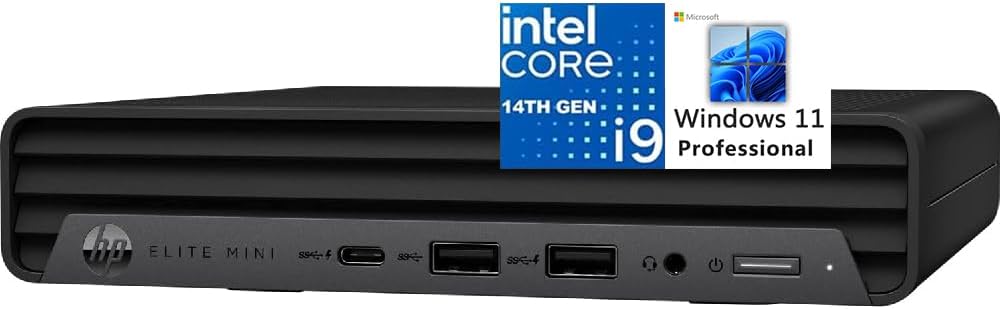
The HP Elite Mini 800 G9 combines the Core i9-14900T with a business-oriented configuration and a 4.6 rating. The processor provides 24 cores and 32 threads, including eight performance and 16 efficiency cores, with a maximum turbo frequency of 5.5GHz and 32MB of cache.
We may earn a commission when you buy through this link, at no additional cost to you.
Its 16GB of DDR5 memory and 1TB PCIe NVMe SSD form a practical everyday configuration, although ambitious users may want more RAM. Intel UHD Graphics 770 handles business graphics and display output. Two DisplayPort 1.4 connections and HDMI 2.1 support multiple 4K displays, while five USB-A ports, one 20Gbps USB-C port, and a 3.5mm audio jack provide everyday peripheral flexibility.
Windows 11 Professional is included, along with a full-size wired keyboard and mouse, making the package especially approachable for a first desktop or office refresh. Wi-Fi 6, Bluetooth, and one RJ45 port cover standard connectivity. The ultra-quiet design also makes sense in offices, reception areas, studios, and shared workspaces where a loud gaming system would be inconvenient.
The Elite Mini 800 G9 is a strong business option for organizations or individuals who want a complete Core i9 mini PC package. Its main limitations are the modest base memory and lack of multiple high-speed wired network ports, but for conventional professional computing it is polished, compact, and ready to use.
Windows 11 Pro plus a keyboard and mouse removes the need to source several basic accessories. That makes the system convenient for offices, remote workers, and first-time desktop buyers.
The quiet enclosure and compact dimensions are useful where space and distraction matter. Multiple 4K outputs can improve productivity when paired with larger productivity monitors.
We may earn a commission when you buy through this link, at no additional cost to you.
The right Core i9 mini PC depends less on the processor label alone than on memory, storage, cooling, networking, display support, and the expansion required by your work.
Core count matters most for work that can divide a workload across many threads, such as rendering, software compilation, video encoding, large spreadsheets, and virtual machines. Models with 24 cores and 32 threads, including the MINISFORUM M1-1390, KAMRUI Hyper H2, and HP Elite Mini 800 G9, provide the greatest multitasking headroom. Systems with 14 cores and 20 threads can still deliver excellent performance, especially for gaming, general office tasks, and applications that benefit more from a high single-core clock.
Choose for the workload rather than the largest number. High-frequency HX and HK processors are attractive for responsive interactive work, while H-series parts often balance performance, thermals, and battery or power efficiency more effectively. Verify the actual operating limits, cooling design, and sustained behavior when a system will remain under heavy load.
A minimum of 16GB is reasonable for office work, web use, and light applications, but 32GB is the more comfortable target for multitasking, creative software, and virtual machines. The included 32GB configurations in the M1-1390, GTi13, MS-01, and XT13 Pro are more future-oriented than 16GB systems. DDR5 offers greater bandwidth and newer platform support, while DDR4 remains a valid compromise when capacity is generous and the initial configuration is lower.
Confirm whether memory is soldered or replaceable. The NAB9S, MS-01, KAMRUI Hyper H2, and other models with accessible slots make it easier to add capacity later. Do not buy more memory than the operating system and application can use unless your workload specifically benefits from large datasets, memory-heavy editing, or numerous virtual machines.
A 1TB NVMe SSD is the practical sweet spot for a modern Core i9 system because it provides room for applications and active project files while keeping load times short. The 500GB NAB9S configuration may require an early upgrade, whereas the 2TB XT13 Pro is better suited to extensive game libraries and media collections. Look for PCIe 4.0 support when working with large files, virtual machines, or professional media.
Expansion is equally important. Multiple M.2 positions provide cleaner, faster internal storage than a single SATA drive, while some systems support RAID, U.2 enterprise drives, or a 2.5-inch SATA device. Match the total capacity to your workflow and remember that high-speed scratch drives and large archives have different performance and redundancy needs.
Integrated Intel graphics can drive multiple 4K displays, handle office applications, and support video workflows, but they are not equivalent to a discrete graphics card. The M1-1390, GTi13, and Hyper H2 support three displays, while the NAB9S supports four. The MS-01 and models with newer Intel Arc graphics provide more advanced media and graphics capabilities, and the MS-01 barebone can accept a discrete card through its PCIe slot.
Check the exact display outputs and resolutions rather than relying on a generic multi-screen claim. USB-C display functionality depends on the port supporting DisplayPort Alternate Mode. Also consider whether your work requires 3D rendering, gaming, GPU acceleration, or multiple high-resolution screens, because integrated graphics may otherwise become the limiting component.
A single 1Gbps Ethernet port handles standard office traffic, while 2.5G improves large transfers and can reduce bottlenecks when moving files to fast NAS or storage systems. The MS-01 models are distinguished by two 10G SFP+ interfaces, making them appropriate for advanced LAN, server, and homelab use. Dual 2.5G ports on the GTi13 and NAB9S support firewall, aggregation, and separate-network arrangements.
Wireless specifications matter for flexible placement. Wi-Fi 6E, Wi-Fi 7, and current Bluetooth versions provide a good foundation for peripherals and secondary networks, but the newest wireless standard does not replace a fast Ethernet connection for sustained transfers. Count USB-A and USB-C ports, and verify whether an external drive, dock, keyboard, or display adapter occupies one of them.
Thunderbolt 4 can add displays, storage, networking, and external enclosures through compatible docks, while a PCIe x16 slot offers a more direct path to a discrete graphics card or specialized controller. The Beelink GTi13 includes both Thunderbolt 4 and a PCIe x8 slot, making it flexible for high-speed peripherals. The MS-01 configurations include a full PCIe 4.0 x16 slot and are better suited to high-end graphics or workstation cards.
Expansion is not limited to hardware. Some models support RAID, U.2 enterprise drives, link aggregation, and Thunderbolt Ethernet. Consider the power, thermal, and dimensional requirements of any large card before buying a compact workstation. A barebone version also requires compatible RAM, storage, and an operating system, so verify that the final build fits the chassis and support documentation.
A high-performance mobile processor in a small enclosure needs a capable cooling system. The Hyper H2 uses a centrifugal fan and copper heat pipes, while the GEEKOM models emphasize quieter cooling for professional environments. A system that throttles under sustained workloads may offer less real-world value than a cooler design with slightly lower peak specifications.
Noise can matter more than raw clock speed in a bedroom, office, classroom, studio, or reception area. Review the stated cooling architecture and consider where the computer will sit. Leave clearance around vents, avoid enclosed cabinets during demanding use, and clean dust from filters or openings when recommended by the manufacturer.
A ready-to-use configuration should include the operating system and basic accessories if you want a straightforward setup. The HP Elite Mini 800 G9 includes Windows 11 Pro, a keyboard, and a mouse, while the MS-01 barebone requires the buyer to install an operating system. GEEKOM models also support major Linux distributions, which is valuable for developers and homelab users.
Check application requirements, especially for professional video, engineering, AI, and enterprise software. Confirm that the relevant peripherals, displays, network hardware, and accessories are supported. Warranty duration and local repair access are also useful comparison points because a compact workstation may serve as a central productivity device for years.
Begin by placing the mini PC on a stable, hard surface with its vents unobstructed. Connect the display, keyboard, mouse, and network before powering it on, then complete operating-system setup, activate any included software, and install the latest operating-system and application updates. A VESA mount can be used on supported models to place the system behind a monitor.
For demanding work, use the included or recommended power adapter and allow the cooling system to operate without obstruction. Do not repeatedly hard-power the unit while it is processing major tasks. Keep the system away from enclosed cabinets, direct heat, dust, and moisture, and periodically check that intake and exhaust paths remain clear.
Use Task Manager or the equivalent system monitor to check memory, storage, temperatures, and network activity when diagnosing slow performance. Expand storage only with compatible drives, upgrade memory according to the manual, and create a backup of important data. If the machine is used for server functions, configure automatic recovery, monitored storage health, and a reliable backup strategy.
A Core i9 mini PC can be highly capable, but the result depends on the specific processor, integrated graphics, memory, cooling, and storage. 32GB of RAM is a better starting point for demanding timelines, and models with Intel Arc graphics or PCIe expansion offer more headroom. Large projects may also benefit from a dedicated graphics card.
The 24-core models provide more threads for rendering, compiling, encoding, and heavy multitasking, while the 14-core models are often more compact and thermally efficient. A lower core count does not automatically mean poor performance because clock speed, cache, graphics, memory, and cooling all influence results. Choose according to the programs and workload you actually use.
16GB is sufficient for office software, browsing, communication, and many lighter applications. It can feel limited when running large editing projects, many browser tabs, demanding AI tools, or several virtual machines. A 32GB configuration provides a better balance for power users and is worth considering when the processor and storage are otherwise high-end.
Many models support two to four displays, and the best selections in this guide include configurations with three or four outputs. Maximum resolution and refresh rate depend on the specific HDMI, DisplayPort, or USB-C port. Verify DisplayPort Alternate Mode and the advertised resolution before connecting an unusual monitor arrangement.
A barebone mini PC can be worthwhile for builders who already own compatible memory, storage, and an operating system. It offers control over the final configuration and may reduce unnecessary spending. First-time users should account for the extra cost and setup effort, as well as the need to confirm that every component is supported by the manufacturer.
For office work, browsing, development, media playback, and many creative tasks, a well-equipped Core i9 mini PC can replace a conventional desktop. The main differences are fewer internal expansion slots, smaller cooling capacity, and fewer upgrade paths on some models. Workstations with PCIe graphics support and multiple network ports narrow that gap.
Performance depends heavily on the processor generation, integrated graphics, memory, cooling, and the game. Compact systems with high clock speeds and 32GB of memory can handle many mainstream and demanding titles, although a modern discrete graphics card is preferable for the most graphically intensive games. The MS-01 barebone is the clearest option here for adding one.
A 2.5G Ethernet port can improve transfers involving large files and high-speed NAS systems, while 10G SFP+ connections offer even more throughput on compatible networks. Dual network ports can support firewalls, virtual routers, link aggregation, or separate traffic paths. For ordinary web work and external drives, one fast wired port is usually sufficient.
The Beelink GTi13 is the strongest all-around recommendation because it balances Core i9 13900HK performance with DDR5 memory, Thunderbolt 4, dual 2.5G networking, and useful expansion. The MINISFORUM NAB9S is the budget-focused alternative, while the complete MINISFORUM MS-01 stands out for premium workstation networking, storage, and PCIe graphics expansion.
Before buying, prioritize the capabilities your work actually requires. Choose 32GB for sustained multitasking, multiple M.2 slots for future storage growth, multiple fast Ethernet ports for NAS or advanced networking, and a PCIe slot when dedicated graphics are important. Also consider cooling and noise rather than looking only at the processor number.
Finally, confirm the current configuration, port layout, operating system, warranty, and accessory bundle at the time of purchase. Component configurations can change, and current prices fluctuate, so use the comparisons as a guide to the best features rather than assuming every listing remains identical.