
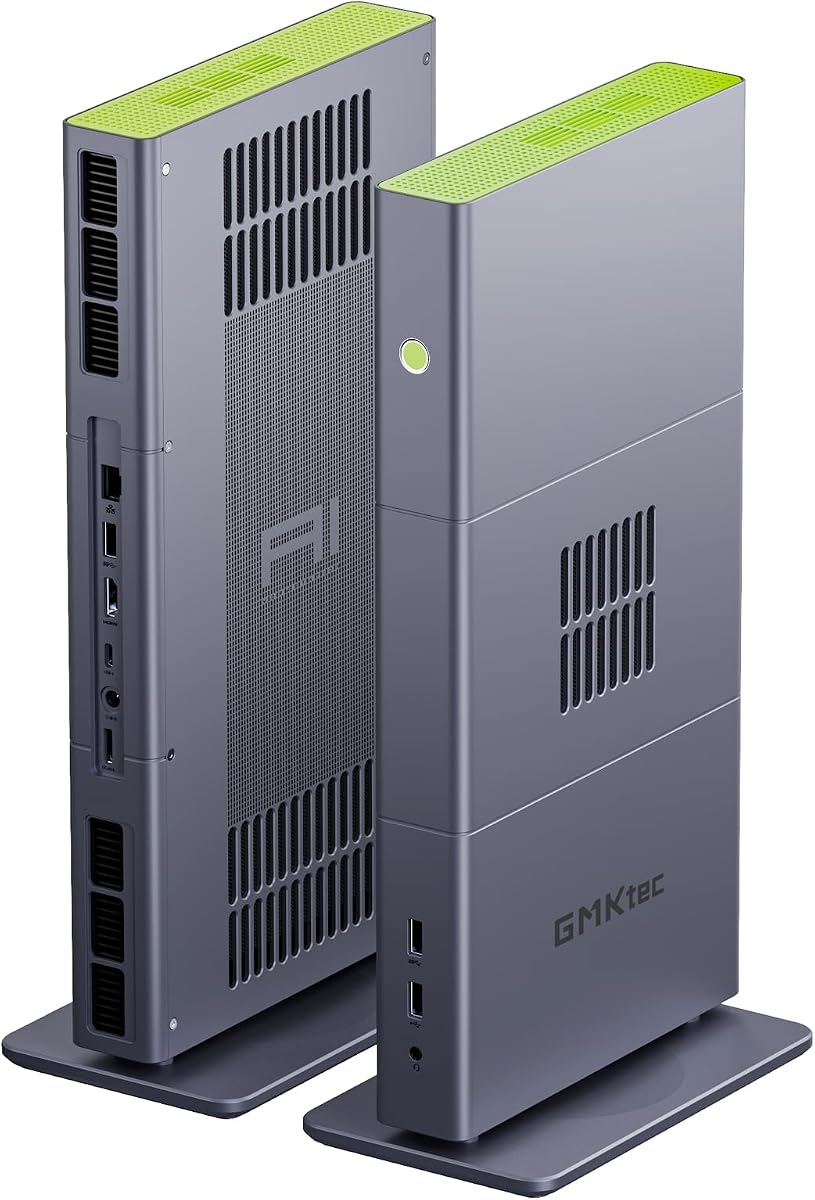
GMKtec M8 Mini PC AMD Ryzen PRO 6650H
Six cores and twelve threads
Radeon 660M integrated graphics
16GB LPDDR5 and 512GB SSD
Our Mini PC with Oculink 2 guide compares 10 compact systems for eGPU expansion, processing power, memory, cooling, networking, displays, and value.
A Mini PC with Oculink 2 is a compact computer built around a high-bandwidth PCIe expansion interface, making it an interesting option when you want desktop-style graphics without a full-size tower. Oculink can connect compatible external GPUs and other PCIe devices, while the processor, memory, storage, networking, and display support determine how useful the system will be each day.
The ten systems in this guide were compared using their stated processor, graphics, memory, storage, networking, cooling, display, and expansion capabilities. Particular attention was given to Oculink implementation and the surrounding ports, because an eGPU is only as useful as the bandwidth, compatibility, enclosure, and power arrangement available. The list ranges from Ryzen PRO office systems to AI-focused and high-end configurations.
Each review explains who the system suits, where it stands out, and what trade-offs deserve consideration. The top selections represent the strongest balanced, value-oriented, and premium options in this collection, although exact availability and pricing can change. Always verify the current listing, supported accessories, and operating-system configuration before purchasing.

4.1Editor score
This side-by-side overview highlights the major hardware, expansion, networking, and display differences among all ten Oculink-equipped mini PCs, helping buyers identify the model that best matches their workload.


The GMKtec M8 combines a Ryzen 5 PRO 6650H processor, Radeon 660M graphics, 16GB of LPDDR5 memory, and a 512GB PCIe SSD in a compact enclosure. It has no published customer rating, but its specification sheet is notably complete: Oculink, full-featured USB4, dual 2.5GbE Ethernet, WiFi 6E, and support for as many as three displays. That combination makes it a practical foundation for office work, development, media tasks, and a later eGPU upgrade.
We may earn a commission when you buy through this link, at no additional cost to you.
The processor provides six cores and twelve threads, with boost speed stated at up to 4.5GHz. Its Radeon 660M graphics are suitable for mainstream games, high-resolution playback, and productive creative applications without requiring a discrete card. Oculink gives buyers a direct PCIe route to a compatible external GPU, while USB4 adds a separate 40Gbps connection for displays, data, and charging. Dual 2.5GbE ports are unusually useful for NAS access, virtualized networks, or separating traffic on distinct connections.
Storage is also flexible. The supplied 512GB drive is joined by dual M.2 2280 slots, with the product data describing support for up to 4TB per slot and 8TB total. Cooling uses larger top and bottom fans, copper heat pipes, and 360-degree airflow. The BIOS provides Quiet 28W, Balance 35W, and Performance 40W modes, along with VRAM allocation, Auto Power On, and Wake-on-LAN. These are valuable details for buyers who care about acoustics, remote operation, or consolidating network roles.
The main compromise is the 16GB memory capacity. Although LPDDR5 is fast, it is soldered rather than user-replaceable, so buyers should consider whether 16GB will remain sufficient for their particular software. An external GPU also requires a compatible enclosure, power supply, and supported card, and those costs must be considered separately. Even so, this M8 is a strong general-purpose recommendation for anyone who wants Oculink expansion without moving to a large desktop.
Oculink gives the M8 a direct high-bandwidth PCIe connection for a compatible eGPU. That makes it useful for boosting graphics later while retaining a small footprint for the processor, storage, and networking components.
Dual 2.5GbE Ethernet, link aggregation options, and Wake-on-LAN make the system appealing for network storage, remote access, and small server workflows. The second port can also provide useful network segmentation.
We may earn a commission when you buy through this link, at no additional cost to you.
This M8 configuration is another compact Ryzen 5 PRO 6650H system, built around six cores, twelve threads, and boost speeds up to 4.5GHz. It has no published rating, so buyer feedback is not available as a deciding factor. The supplied details instead emphasize a balanced platform: 16GB of 6400MT/s LPDDR5, a 512GB NVMe SSD, Radeon 660M graphics, Oculink, full-function USB4, and dual 2.5GbE LAN.
We may earn a commission when you buy through this link, at no additional cost to you.
The distinction between this listing and the first M8 is subtle because much of the core hardware and feature set overlaps. Both offer a direct eGPU path and extensive connectivity, while this listing presents the overall package as a desktop-class compact work system. Full-function USB4 handles data, power delivery, and video output, reducing the need to choose between a high-speed data port and a display connector. Oculink remains the preferred route for a discrete graphics upgrade when compatibility is confirmed.
The M8 supports up to three displays using HDMI 2.0, DisplayPort 1.4, and USB4 with DisplayPort. Its dual-fan cooling arrangement uses copper heat pipes and a 360-degree airflow path. BIOS options include Quiet, Balanced, and Performance power profiles, VRAM allocation, Auto Power On, and Wake-on-LAN. The supplied warranty language for this listing differs from some other M8 entries, making it especially important for shoppers to verify the current terms on the listing they ultimately choose.
For a buyer, the 16GB memory ceiling remains the main consideration. It should handle office suites, browser-heavy multitasking, development, and many mainstream applications, but demanding virtual machines, large local AI models, and professional editing projects may benefit from more memory. The M8 is nevertheless an Editor's Choice because its mix of processing power, eGPU readiness, networking, displays, and manageable size is unusually coherent. It is a strong recommendation for a compact workstation that can grow into a graphics-capable system.
Oculink and USB4 serve different needs. Oculink provides the direct PCIe path for a compatible eGPU, while USB4 handles peripherals, charging, and display output with considerable bandwidth.
The selectable 28W, 35W, and 40W modes let owners tune thermal output and responsiveness. This is useful when the same machine alternates between background tasks, everyday productivity, and heavier creative work.
We may earn a commission when you buy through this link, at no additional cost to you.
The GMKtec K16 raises the performance ceiling with a Ryzen 7 7735HS processor featuring eight cores, sixteen threads, and boost speeds up to 4.75GHz. It carries a 4.4 rating, making it one of the better-reviewed systems in this guide. Radeon 680M integrated graphics, 32GB of 6400MT/s LPDDR5 memory, a 512GB NVMe SSD, and Oculink expansion make this a compelling compact choice for gaming, content creation, and professional multitasking.
We may earn a commission when you buy through this link, at no additional cost to you.
The eight-core processor is well suited to heavier parallel workloads, while 32GB of memory provides more headroom than the 16GB M8 configurations. Storage expansion is particularly noteworthy: two M.2 2280 slots are described as supporting up to 8TB per drive and 16TB in total. An external GPU can be attached through Oculink, and the full-function USB4 port provides 40Gbps data, DisplayPort output, and power delivery. Dual 2.5GbE ports add flexibility for high-speed transfers, link aggregation, virtualization, and small-server use.
The K16 also provides HDMI 2.0, DisplayPort 1.4, and USB4/DP display outputs, supporting as many as three displays. Its cooling system uses larger top and bottom fans with copper heat pipes and 360-degree airflow. The supplied description mentions a metal case, WiFi 6E, and dual-fan cooling, all of which reinforce its positioning as a more performance-oriented desktop. Some feature text refers to M8 power modes and VRAM controls, so users should confirm the exact K16 BIOS behavior and included functions in the current manual.
The main limitation is that 32GB LPDDR5 is soldered and cannot be upgraded. That makes the memory amount especially important when selecting a configuration. Oculink-based graphics also demand compatible external hardware, and the enclosure and power supply need to support the intended card. Even with those caveats, the K16 is a strong recommendation for buyers who want a small high-performance computer, substantial integrated memory, and a direct route to external graphics.
Eight cores, sixteen threads, and 32GB of fast memory provide a more substantial foundation for compiling, video editing, virtual machines, and multitasking than a six-core, 16GB configuration.
The dual M.2 arrangement is described as supporting up to 16TB total. That makes the 512GB starting drive less of a long-term constraint for buyers who need large project libraries or game installations.
We may earn a commission when you buy through this link, at no additional cost to you.
The 1TB M8 is a storage-focused version of the Ryzen 5 PRO 6650H platform. It offers six cores and twelve threads, Radeon 660M graphics, 16GB of 6400MT/s LPDDR5, and a 1TB NVMe drive. As with the other M8 listings, no published rating is available. Its principal distinction is simple: buyers receive twice the listed starting storage of the 512GB M8 configurations, which is useful for game libraries, project media, or multiple virtual machines.
We may earn a commission when you buy through this link, at no additional cost to you.
The rest of the platform is well suited to compact productivity. Oculink provides a direct PCIe interface for a compatible external GPU, while 40Gbps USB4 offers display, charging, and data functions. Two 2.5GbE Ethernet ports create opportunities for NAS access, link aggregation, firewall work, or separate network segments. WiFi 6E and USB 3.2 Gen2 ports round out the connectivity, and the system can drive up to three displays through HDMI 2.0, DisplayPort 1.4, and USB4/DP.
Two additional M.2 2280 slots are described as supporting up to 4TB per slot and 8TB total, giving this system considerable room to grow. The dual-fan cooling design uses copper heat pipes and 360-degree airflow, while BIOS profiles cover Quiet 28W, Balance 35W, and Performance 40W operation. Auto Power On, Wake-on-LAN, and VRAM allocation are also listed, which are valuable for remote-access and network-oriented installations.
As with other 16GB M8 systems, the soldered memory cannot be expanded, so demanding users should not assume the large SSD can compensate for limited RAM. The 1TB drive is still a meaningful advantage for users who want room to install applications and retain media. This M8 is best for a buyer who values storage, networking, and eGPU readiness in a small system but does not need the additional CPU cores and memory of the K16.
A 1TB drive gives applications, projects, and media more room from the outset. The additional M.2 slots mean this capacity can be expanded rather than remaining fixed for the life of the system.
Oculink makes it possible to add a compatible external GPU later. A buyer can begin with integrated Radeon 660M graphics and upgrade only if a particular game or creative project requires more.
We may earn a commission when you buy through this link, at no additional cost to you.
The GMKtec K15 brings an Intel Core Ultra 5 125U processor, 32GB of dual-channel DDR5 memory, and a 512GB PCIe 4.0 SSD to a compact Oculink-equipped platform. The processor uses Meteor Lake architecture and provides a stated 14 threads, with turbo capability up to 4.3GHz and a 15W base power target. No customer rating is published, but the upgradeability and display breadth make this an interesting alternative to the AMD-based M8 and K16 systems.
We may earn a commission when you buy through this link, at no additional cost to you.
Memory consists of two 16GB SO-DIMM modules running at 4800MT/s. Unlike soldered LPDDR5 configurations, these modules can potentially be replaced, making the K15 attractive for buyers who expect memory needs to change. Storage is also unusually flexible, with three M.2 2280 slots described as supporting up to 8TB each and 24TB total. The included drive is a 512GB PCIe 4.0 model, and Oculink operates as a PCIe x4 connection for compatible external expansion.
Display support extends to four screens. HDMI 2.1 is listed for 8K at 60Hz, DisplayPort 1.4 for 4K at 60Hz, and USB Type-C with PD 3.0, DisplayPort 1.4, and data transfer. Dual 2.5GbE Ethernet, WiFi 6E, and Bluetooth 5.2 provide strong networking for NAS, soft routing, file storage, and peripheral connectivity. Cooling uses a CPU fan, a dedicated memory and SSD fan, heat pipes, and a 360-degree airflow path, with the product data noting 35dB in Quiet Mode.
This is a compelling choice when upgradability and four-screen operation matter more than maximum integrated gaming graphics. Buyers must still obtain a compatible Oculink enclosure and external GPU for expanded graphics, and the 4800MT/s memory speed is lower than the 6400MT/s LPDDR5 used by several AMD rivals. Overall, the K15 is recommended for mobile work, media production, multi-monitor offices, and buyers who want a flexible PCIe-oriented mini PC.
Replaceable SO-DIMM memory and three M.2 slots give the K15 a longer upgrade path. This is especially useful for development, virtualization, and media workflows that tend to outgrow initial specifications.
The mixture of HDMI 2.1, DisplayPort 1.4, and USB Type-C creates flexibility for trading dashboards, editing timelines, monitoring screens, and office productivity.
We may earn a commission when you buy through this link, at no additional cost to you.
This K15 pairs the Intel Core Ultra 5 125U with 32GB of DDR5 memory and a 1TB PCIe 4.0 SSD. It has a 4.2 rating, providing a modest amount of published buyer feedback. The main attraction is the processor's AI capability: the listing identifies an Intel AI Boost NPU capable of up to 13 TOPS for INT8 calculations, alongside an Intel Arc 140T integrated GPU with eight Xe cores.
We may earn a commission when you buy through this link, at no additional cost to you.
The Arc graphics support modern APIs and hardware-assisted video features such as Quick Sync and AV1 encoding and decoding. That combination is relevant to creators who want efficient media work in a compact system. Dual 16GB SO-DIMM modules provide 32GB of memory, and three M.2 2280 positions allow substantial expansion, with the product data listing up to 8TB per slot and 24TB total. The 1TB drive provides a more useful starting capacity than the 512GB K15 alternative.
Oculink is described as a PCIe x4 interface for eGPU expansion, offering a direct path to discrete graphics while USB4 and other ports support peripherals and displays. The system can operate four displays, with HDMI 2.1 listed for 8K at 60Hz, DisplayPort 1.4 for 4K at 60Hz, and USB Type-C supporting PD 3.0, DisplayPort 1.4, and data. Dual 2.5GbE Ethernet is useful for server, routing, and storage tasks. The wireless description differs from the other K15 listing, which names WiFi 6, so buyers should confirm the exact module included.
Cooling is handled by two CPU fans, a larger memory and SSD cooling fan, three heat pipes, and 360-degree airflow. The system is best for creators and developers who value the dedicated NPU, efficient video features, and memory expandability. It is less suitable for someone seeking maximum gaming performance without investing in a compatible external GPU and enclosure. Its 4.2 rating and strong feature set nevertheless make it a credible compact AI and productivity platform.
The Intel AI Boost NPU can handle supported INT8 AI workloads independently of the CPU. Buyers running compatible software should still verify application support, since not every AI task necessarily benefits from the NPU.
Intel Arc graphics include Quick Sync and AV1 encode and decode support. These features can improve the efficiency of compatible editing, encoding, and media-playback applications.
We may earn a commission when you buy through this link, at no additional cost to you.
The AOOSTAR MACO combines a Ryzen 7 6850H processor, Radeon 680M graphics, 24GB of LPDDR5 memory, and a 1TB PCIe 4.0 NVMe drive. Its 4.5 rating is the second highest among the rated systems in this guide. The Ryzen processor provides eight cores, sixteen threads, and boost speeds up to 4.7GHz, while three BIOS power profiles adjust the stated operating range from 45W to 70W. It is a strong enthusiast mini PC for gaming, programming, image editing, and media work.
We may earn a commission when you buy through this link, at no additional cost to you.
Storage is a major strength. Three M.2 2280 PCIe 4.0 x4 slots are provided, and the listing describes RAID 0, RAID 1, and RAID 5 support for NVMe drives. Total storage capacity is listed at up to 24TB. Oculink is described as a 64Gbps interface operating independently from the M.2 slots, allowing a high-performance external GPU without consuming an internal storage position. The specification also emphasizes that Oculink does not support hot-swapping, so the system should be powered down when connecting or removing a device.
Connectivity is unusually broad. There are two 2.5GbE Ethernet ports, two USB4 ports, Oculink, USB 3.0, USB 2.0, two USB 3.2 Gen2 ports, HDMI 2.1, DisplayPort 1.4, WiFi 6, Bluetooth 5.2, and a 3.5mm audio jack. The system supports four 4K displays at up to 120Hz according to the listing. A fingerprint reader with Windows Hello support adds convenient local security, and the recycled aluminum chassis combines with a vapor-chamber cooling system and dual turbo fans.
The trade-off is its soldered 24GB memory, which is less than the 32GB offered by the two K16 models but still useful for many tasks. The 70W upper power profile can also generate more heat and noise than lower-power alternatives, making the cooling design important. The lack of Oculink hot-swapping is inconvenient but straightforward to manage. Overall, the MACO is recommended for buyers who value connectivity, storage flexibility, four-screen operation, and one of the stronger published ratings in the group.
Separate from Oculink, three PCIe 4.0 M.2 positions allow substantial storage expansion. RAID support can be useful for users balancing performance, redundancy, and working data in a compact system.
Dual USB4, dual 2.5GbE Ethernet, HDMI 2.1, DisplayPort 1.4, and Oculink cover many expansion needs. The breadth reduces reliance on unpowered hubs for demanding accessories.
We may earn a commission when you buy through this link, at no additional cost to you.
The GMKtec X3 is the premium selection, built around the AMD Ryzen AI Max+ 395 with 16 Zen 5 CPU cores, 32 threads, and boost speeds up to 5.1GHz. It has a 4.1 rating. Its defining feature is 128GB of LPDDR5X unified memory, a quantity that makes it unusually capable for local AI models, large creative projects, and applications that benefit from a large shared graphics and system memory pool.
We may earn a commission when you buy through this link, at no additional cost to you.
The Ryzen AI engine is listed at up to 126 TOPS of AI performance through the XDNA 2 NPU. Integrated Radeon 8060S graphics use 40 RDNA 3.5 compute units and are described as capable of FHD gaming in demanding titles. More importantly for AI development, the large memory pool can support substantial local language models. The product information specifically mentions LM Studio and a DeepSeek 70B Q8 use case, illustrating the kind of work for which this hardware is uniquely suited.
OCuLink provides a PCIe 4.0 x4 interface for a compatible external GPU, allowing desktop-class graphics to be added for gaming, AI acceleration, rendering, or video production. The 2TB PCIe 4.0 SSD supplies generous starting storage. Networking includes 2.5GbE Ethernet, WiFi 7, and Bluetooth 5.4. LPDDR5X memory is listed at speeds up to 8000MT/s, and the product data associates it with improved performance in communication, photo editing, productivity, and digital-content applications.
This is not a casual recommendation for basic browsing or a small office. Its advanced integrated platform, substantial memory, and premium components place it in a different class from the value-focused M8 models. Buyers should carefully consider cooling needs, software support, and the total cost of adding an eGPU. Even without that upgrade, it stands as an exceptional compact platform for local AI development and advanced creative work.
The 128GB memory pool can be shared between the processor and Radeon graphics, creating much more headroom for large models and data sets. This capacity is the X3's defining advantage.
Oculink PCIe 4.0 x4 adds a route to a dedicated GPU, while the 2TB drive and fast networking suit demanding development and production environments. The result is closer to a compact workstation than a conventional home mini PC.
We may earn a commission when you buy through this link, at no additional cost to you.
This K15 provides a smaller-memory version of the Intel Core Ultra 5 125U platform. It includes 16GB of dual-channel DDR5-4800 memory, a 512GB SSD, and an Intel AI Boost NPU rated at 13 TOPS for INT8 operations. No published rating is available. The system uses the same modern connectivity theme as the larger-memory K15 models, including Oculink, multiple display outputs, and dual 2.5GbE Ethernet.
We may earn a commission when you buy through this link, at no additional cost to you.
Its 16GB memory may be upgraded according to the listing, which references support for up to 128GB. Three PCIe 4.0 x4 M.2 slots are listed with 24TB maximum combined storage. The Oculink interface is described as 64Gbps, using a direct PCIe path for a compatible external GPU or high-speed network adapter. The product information also presents it as a way to create a render node or AI server, although actual application performance will depend on the workload and attached hardware.
Display capabilities are extensive, with support for four screens through HDMI 2.1, DisplayPort 1.4, and dual USB4 Type-C connections. The listed maximums include HDMI at 8K 60Hz, DisplayPort at 8K 30Hz, and USB4 at 4K 120Hz. Intel Arc 140T graphics with eight Xe cores support hardware-accelerated AV1, Quick Sync, variable-rate shading, and ray tracing. These features make the system particularly relevant to media creators and compact professional workstations.
The primary concern is the base memory amount. Sixteen gigabytes can be restrictive for large AI models, complex virtualized environments, and memory-heavy editing. In addition, no published rating means buyers have less visible customer feedback than with several other selections. Nevertheless, the combination of an AI NPU, replaceable memory, multiple M.2 slots, and Oculink makes this a practical recommendation for a user who wants an expandable platform at a lower starting configuration.
The initial 16GB is modest for demanding work, but the presence of replaceable memory makes the system more adaptable than soldered-memory alternatives. Confirm supported module configurations before upgrading.
Intel Arc graphics provide Quick Sync, AV1, ray tracing, and variable-rate shading support. Compatible creative applications can take advantage of these dedicated media and graphics features.
We may earn a commission when you buy through this link, at no additional cost to you.
The 1TB K16 combines a Ryzen 7 7735HS processor, Radeon 680M graphics, 32GB of LPDDR5-6400 memory, and a 1TB M.2 PCIe SSD. Its 4.6 rating is the highest published score among the ten products. The listing provides unusually clear detail about ports, display modes, power profiles, cooling, networking, and physical dimensions, making it easier to judge as a compact everyday desktop or gaming base.
We may earn a commission when you buy through this link, at no additional cost to you.
The Ryzen 7 7735HS provides eight cores, sixteen threads, a stated 3.2GHz base clock, and boost speed up to 4.75GHz. Radeon 680M graphics use 12 graphics cores at up to 2,200MHz. Together with 32GB of fast memory, the system is suited to office productivity, programming, research, video calls, content creation, high-resolution media, and mainstream gaming at settings appropriate for integrated graphics. The 1TB drive adds useful room for applications and project files.
OCuLink is a front PCIe 4.0 x4 interface for compatible external expansion, while the full-featured USB4 port supports 40Gbps data, DisplayPort 1.4 output, and 100W USB-C power input. The listing explicitly warns that Oculink is not hot-swappable, so the system must be powered off before connecting or removing an adapter. Two 2.5GbE Ethernet ports with Realtek RTL8125BG controllers suit NAS access, large transfers, remote access, routing, firewall projects, and separate network connections.
Display support covers three monitors through HDMI 2.0, DisplayPort 1.4, and USB4, with the first two listed at up to 8K 60Hz and USB4 at up to 4K 60Hz. Silent 35W, Balanced 45W, and Performance 50W modes let users tune energy and speed. At approximately 4.21 by 4.37 by 2.48 inches and 1.23 pounds, the metal-bodied system is easy to deploy. The 4.6 rating and balanced configuration make this a strong recommendation for buyers who want strong integrated performance and room for an eGPU.
Eight CPU cores, 32GB of fast memory, and a 1TB drive form a more balanced foundation than many lower-memory alternatives. This configuration should suit mixed productivity and creative use without immediate storage pressure.
The two Realtek 2.5GbE controllers provide more than duplicate connectivity. They can support separate networks, dedicated storage traffic, routing experiments, or other small-server arrangements.
We may earn a commission when you buy through this link, at no additional cost to you.
Choosing an Oculink-equipped mini PC requires balancing processor performance, memory, storage, eGPU compatibility, networking, display needs, cooling, and the total cost of external expansion hardware.
Oculink is a direct PCIe expansion interface, but not every external GPU, enclosure, adapter, driver, and operating-system combination is guaranteed to work. Buyers should identify the specific eGPU they want to use, confirm that the enclosure supports Oculink rather than only USB4 or Thunderbolt, and verify the system's compatibility documentation. PCIe x4 bandwidth can be excellent for graphics, yet real-world results also depend on the CPU, the workload, the card, and the software. Several systems in this guide explicitly state that Oculink does not support hot-swapping, so the computer should be shut down before changing attached hardware.
The processor determines how quickly the system handles general computing, compilation, media processing, and multi-application workloads. The Ryzen 7 7735HS and 6850H provide eight cores and sixteen threads, while the Ryzen 5 PRO 6650H provides six cores and twelve threads. The Intel Core Ultra 5 125U uses a hybrid core design, and the Ryzen AI Max+ 395 is aimed at particularly demanding AI and professional workloads. Integrated graphics range from Radeon 660M and Radeon 680M to Intel Arc 140T and Radeon 8060S, so buyers should consider more than the processor name.
Memory is one of the easiest specifications to overlook and one of the hardest to change later. The 16GB M8 and K15 configurations are adequate for many mainstream tasks, but 32GB models offer more comfortable headroom for creative software, many browser workloads, development, and virtual machines. The 128GB X3 is a different category designed for local AI models and unified-memory workloads. SO-DIMM-based K15 systems offer replaceable modules, while LPDDR5 configurations in the M8, K16, MACO, and X3 are onboard and not user-replaceable.
A 512GB drive can feel restrictive after installing a demanding operating system, creative applications, and several large game libraries. The 1TB and 2TB configurations offer a more comfortable starting point. Expansion potential also varies: several systems include two M.2 slots, the K15 and MACO offer three, and the MACO lists RAID support. Confirm both the number of slots and whether one is already occupied by the included SSD. Oculink operating independently from M.2 storage is valuable because it avoids reducing internal storage expansion.
The number of displays depends on the work. Three-screen support covers many office and creative arrangements, while four-screen systems are useful for monitoring, trading dashboards, video walls, and large editing workspaces. HDMI 2.1, DisplayPort 1.4, and USB4 with DisplayPort offer different refresh-rate and resolution combinations. A good system should also include enough USB-A and USB-C ports for peripherals, along with audio, WiFi, and Bluetooth. Oculink should complement rather than replace a broad set of everyday connections.
Dual 2.5GbE Ethernet is a meaningful feature for mini PCs used near NAS systems, routers, firewalls, or virtualization infrastructure. Two ports can provide separate network paths, support link aggregation where the equipment permits it, or simplify segmentation. WiFi 6E or WiFi 7 is convenient for flexible placement, but wired Ethernet remains preferable for large transfers and consistent low-latency operation. Bluetooth support can simplify peripheral connections, though it is not a replacement for a wired network in performance-sensitive applications.
Compact processors can generate substantial heat, making the cooling design and acoustic behavior important. The products here use combinations of top and bottom fans, turbo fans, dedicated memory or SSD fans, copper heat pipes, or a vapor chamber. BIOS performance modes range from lower-power quiet settings to higher-wattage profiles. Lower modes may reduce noise for an office or media center, while higher modes can sustain demanding workloads. Adequate clearance around the chassis is essential because these systems rely on airflow entering and leaving through multiple sides.
An eGPU-ready mini PC is only part of the complete solution. The budget may also need to include a compatible Oculink enclosure or dock, the external graphics card, suitable cables, additional storage, and possibly a stronger power supply. Warranty terms differ across the listed models, with some describing a one-year period and others describing a three-year service structure that begins in October 2026. Review the current listing carefully because terms and inclusions can differ between variants of the same product family.
Begin by installing the operating system, updating the system firmware and network drivers, and arranging the system with clear space around every intake and exhaust vent. Connect the display, keyboard, mouse, and network first, then use the BIOS to select an appropriate power mode and configure Auto Power On or Wake-on-LAN if you plan to operate the machine remotely. Update the software that manages the processor, integrated graphics, and any Oculink-compatible external GPU.
When attaching an Oculink device, shut down the mini PC and disconnect its power before inserting or removing the adapter. Connect the external GPU through the designated enclosure, install its drivers, and configure the operating system to use the new display output. Follow the enclosure manufacturer's instructions for power delivery and graphics-card support. Do not attempt to change Oculink hardware while the system is running, particularly on models that explicitly do not support hot-swapping.
For routine care, keep the chassis away from dusty or enclosed spaces and clean exterior vents with soft, dry air rather than pulling lint into the case. Maintain reasonable storage free space, install operating-system and firmware updates, and back up important data. If you use a RAID configuration, monitor drive health and understand that RAID is not a substitute for a separate backup. When performance declines, compare temperatures, storage health, memory use, and the selected BIOS power profile before changing settings or adding expansion hardware.
Oculink provides a direct high-bandwidth PCIe connection for compatible external expansion, most commonly an external graphics card. It is designed to offer a more direct path than a general-purpose USB4 or Thunderbolt connection. Actual performance depends on the processor, enclosure, card, drivers, and workload.
Oculink is generally the better choice when the goal is PCIe graphics expansion because it provides a direct PCIe link. USB4 can be more convenient, widely compatible with docks, and easier to use with a single cable, but the bandwidth and protocol behavior may be less suitable for some demanding eGPU workloads. Confirm enclosure and mini PC compatibility before purchasing.
No, and several products in this guide specifically state that Oculink does not support hot-swapping. Power off the mini PC and disconnect its power before connecting or removing an Oculink device. Attempting to change the hardware while the system is running can cause instability or damage.
No. Compatibility depends on the mini PC's implementation, the Oculink enclosure, the external graphics card, its power requirements, the host processor, and the operating system. Check manufacturer compatibility lists and current user reports. A physical connector match alone does not guarantee that every card will operate at its intended performance.
Sixteen gigabytes is enough for office work, browsing, video playback, lighter development, and many games when a modern eGPU is used. It may be limiting for large local AI models, virtual machines, heavy editing, and numerous demanding applications. Models with replaceable DDR5 SO-DIMMs offer more flexibility than systems with soldered LPDDR5.
Dual 2.5GbE ports provide greater flexibility than a single network connection. They can separate networks, support link aggregation where compatible equipment allows it, or provide dedicated paths for NAS traffic, a router, a firewall, or virtual machines. A second port is useful for infrastructure users, although ordinary desktop tasks rarely require it.
It depends on the games and settings. Radeon 660M, Radeon 680M, and Intel Arc 140M can handle mainstream or lighter gaming, while the Radeon 8060S in the X3 is considerably stronger. Oculink makes a later upgrade possible, but the external card, enclosure, and power supply must be budgeted separately and confirmed as compatible.
A 512GB drive is workable for a lightweight system, while 1TB is a more comfortable starting point for applications, media, and games. The 2TB X3 is aimed at heavier professional and AI use. Compare usable M.2 slots after accounting for the included drive, and remember that Oculink should ideally remain independent of the internal storage slots.
The GMKtec M8 with Ryzen 5 PRO 6650H stands out as the most balanced general recommendation, offering Oculink, full USB4, dual 2.5GbE Ethernet, and flexible storage without moving to a large desktop. The AMD Ryzen 7 7735HS K16 is the stronger performance option, while the K15 appeals to buyers who prioritize replaceable memory and Intel's AI platform. For exceptionally large local AI workloads, the X3's 128GB unified memory changes the calculation entirely.
Before buying, prioritize the workload rather than the Oculink label alone. Memory capacity determines whether complex applications will remain comfortable, storage slots determine how the system grows, and dual Ethernet can make a compact PC especially useful for network tasks. Most importantly, verify the external GPU, enclosure, power delivery, driver support, and display requirements as a complete package rather than treating Oculink as a guarantee of plug-and-play gaming performance.
Product specifications, configurations, ratings, warranty terms, and pricing can change, and the current Amazon listing is the final source for those details. Review the exact model, included power adapter, operating-system status, and return terms before placing an order. With those checks completed, one of these ten systems can provide a compact base that still has considerable room for graphics, storage, and networking expansion.