
8Bitdo M30 Wired Controller
4.2Editor score
Official Xbox platform support
Six-button arcade-style layout
Three switchable control profiles
Fightpads for Xbox vary in layout, buttons, connectivity, and compatibility; this guide compares ten excellent options for competitive play.
A fightpad for Xbox gives fighting-game players a more specialized alternative to a standard gamepad. The right model can improve button access, movement precision, profile flexibility, and tournament readiness while remaining comfortable for long sessions across Xbox Series X|S, Xbox One, and PC.
We compared these products by examining their control layouts, directional options, button features, connectivity, platform support, customization tools, audio provisions, and physical designs. The list covers traditional six-button pads, leverless controllers, compact all-button designs, and full-size arcade sticks for different play styles.
Each pick highlights a distinct approach, from practical six-button control to premium arcade construction and advanced leverless features. Ratings reflect available customer feedback, while current prices and availability can change, so confirm the latest listing details before purchasing.
4.2Editor score

4.6Editor score

4.4Editor score
The comparison below shows how the ten fightpads differ across layout, connection method, customization, and platform support. It makes it easier to identify a compact six-button pad, a wireless leverless controller, or a full-size arcade stick without relying on a single feature.
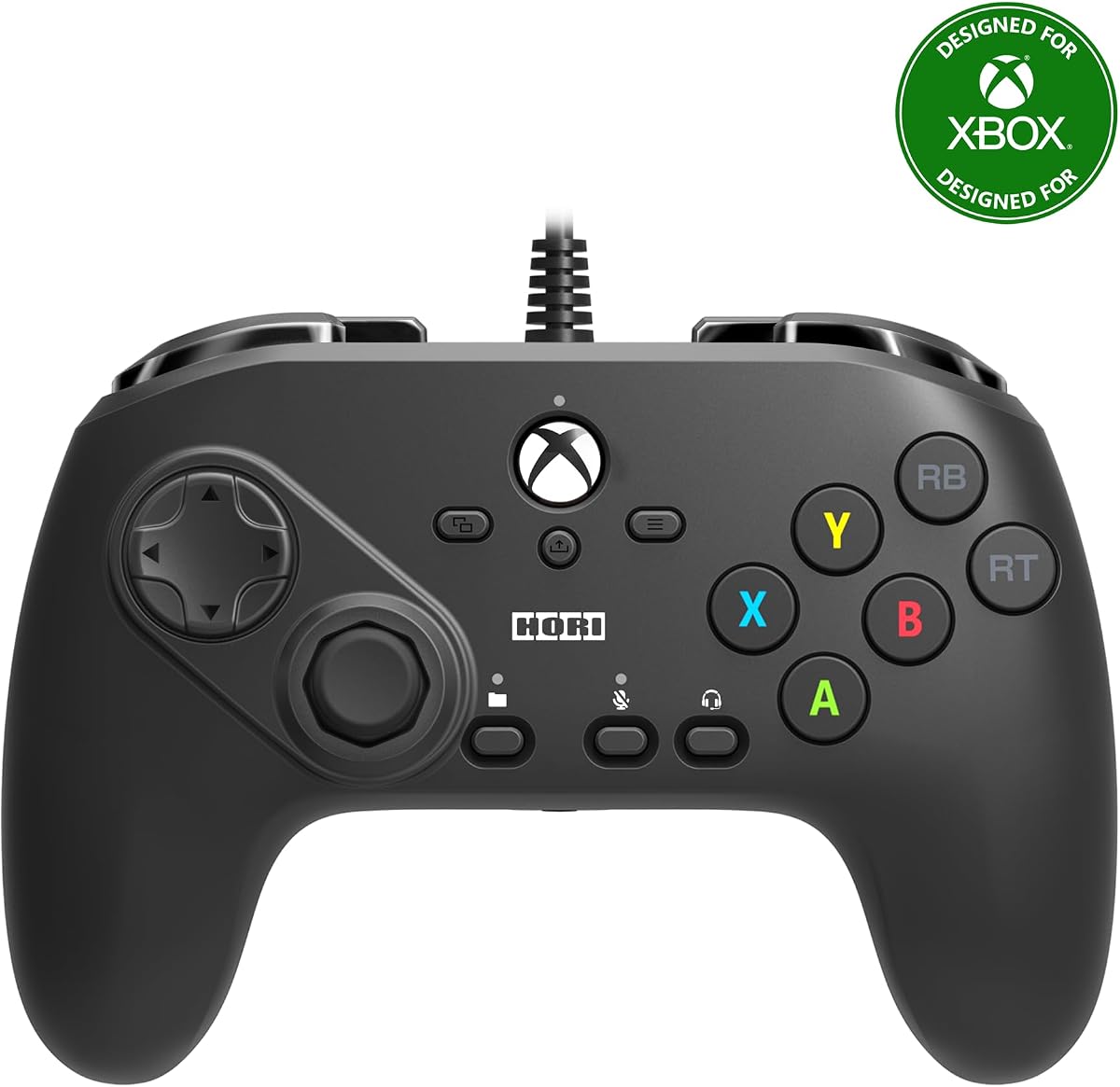


The HORI Fighting Commander Octa is a compact wired fightpad designed around a six-button arrangement, giving traditional fighting-game players direct access to punches, kicks, and the remaining action buttons. Its 3.5 customer rating places it near the bottom of this list, but its specialized layout and useful controls still make it worth considering for players who value a short-throw stick and portable footprint.
We may earn a commission when you buy through this link, at no additional cost to you.
Its most notable features include micro switch buttons, an adjustable D-pad, and a short throw analog stick with an eight-way gate. Those details can help players execute directional movements and attacks with less hand travel than a conventional controller requires. The companion app also lets users customize and save as many as four profiles, with a dedicated button making profile changes relatively convenient during a gaming session.
The main drawback is the relatively modest customer rating, which suggests that real-world experiences may differ considerably. Wired connectivity removes wireless latency concerns and avoids battery management, but the cable can limit freedom of movement. The reliance on app-based configuration may also be inconvenient for users who want to make every adjustment directly from the controller itself.
This is a sensible choice for fighting-game fans who want a traditional six-button pad, a short-throw stick, and saved profiles without carrying a larger arcade stick. It is less convincing for buyers who prioritize the strongest available feedback, extensive onboard controls, or a completely self-contained setup. The layout is the priority here, while the rating tempers the overall recommendation.
The Octa removes the clutter associated with a standard gamepad and places the action buttons closer to the left grip. That arrangement is especially useful for six-button fighters and games where training, tournament play, and precise input timing matter.
Four stored profiles can accommodate different games, button arrangements, or personal preferences. Once configured through the companion app, changing profiles should be less disruptive than remapping every function before each session.
We may earn a commission when you buy through this link, at no additional cost to you.
The Xbox 360 Street Fighter IV FightPad is a recognizable six-button design aimed at players who enjoy the arcade-style control schemes found in games such as Street Fighter IV. With a 3.9 rating, it sits in the middle of the group and stands out for its enlarged floating D-pad, multi-speed turbo function, and unusual ability to turn the D-pad into left or right analog input.
We may earn a commission when you buy through this link, at no additional cost to you.
The floating D-pad provides a larger target than a conventional directional pad and supports eight-way movement, which can make diagonal inputs more deliberate. The three-way switch expands the D-pad's role by allowing it to function as either analog stick. Combined with six action buttons and adjustable turbo speed, this creates a flexible pad for arcade games, retro titles, and conventional Xbox games.
Compatibility is the central concern. The product is explicitly associated with Xbox 360, and the supplied information does not establish support for Xbox Series X|S or modern Windows. Its integrated headset port and nine-foot-plus USB cable also reflect an earlier generation of accessories. Players still using the original console may find that period design more appropriate than current alternatives.
Among newer Xbox systems, the 8Bitdo M30 is the more broadly compatible option, while the Nacon Daija is the stronger premium arcade choice. For an Xbox 360 setup, however, this dedicated Street Fighter IV pad delivers a focused layout and controls that newer general-purpose products may not reproduce.
The enlarged floating D-pad supports eight-way input and can be switched to imitate a left or right analog stick. That versatility helps it serve both fighting games and games that benefit from finer directional control.
Multi-speed turbo functionality can save effort in games that allow programmable repeated inputs. The feature is most useful when a title supports programmable controls rather than requiring ordinary manual presses.
We may earn a commission when you buy through this link, at no additional cost to you.
The 8Bitdo M30 is a modern six-button fightpad that combines an arcade-inspired arrangement with official Xbox compatibility. Its 4.2 rating, wired USB-C connection, profile support, and broad console compatibility make it a practical entry point for players who want a focused fighting-game controller without moving to a full-size arcade stick.
We may earn a commission when you buy through this link, at no additional cost to you.
The controller has two bumpers, two triggers, and six main action buttons, matching the needs of classic four- and six-button fighting games. Its USB-C wired connection is described as virtually lag-free, which makes sense for competitive sessions where consistent input delivery is more important than wireless freedom. A profile switch button provides access to three configurations, and the controller works with 8BitDo Ultimate Software.
A headset jack and separate volume control are helpful for players who use wired audio equipment, while official licensing provides reassurance about its intended Xbox focus. The trade-offs are inherent to the format: six main buttons cannot accommodate eight-button fighters without sacrificing a face-button layout, and the fixed cable adds some restriction compared with a wireless controller.
The M30 is our budget pick because it covers the core needs of many Xbox fighting-game players without requiring app-based profile storage or a large desk surface. It suits four- and six-button games, nostalgic arcade libraries, and players who prioritize a direct wired connection. A leverless model is the better choice for modern eight-button titles.
Official licensing and compatibility with Xbox Series X|S, Xbox One, and Windows give the M30 broader utility than accessories designed only for the Xbox 360. It can serve as a general controller as well as a dedicated fighting-game pad.
The USB-C connection keeps power and data in one cable while removing the need to charge internal batteries. For local competitive play, that simple and dependable approach can be preferable to managing wireless settings.
We may earn a commission when you buy through this link, at no additional cost to you.
The 8Bitdo All-Button Arcade Controller is a remarkably compact leverless design that combines a high 4.6 rating with official Xbox support. Its all-button layout, quad-movement system, 2.4G wireless connection, and hot-swappable switch PCB make it especially appealing to modern fighting-game players who want precise inputs without the footprint of a traditional arcade stick.
We may earn a commission when you buy through this link, at no additional cost to you.
The controller measures approximately the size of an A4 sheet and is described as only 1.6 centimeters thick, making it exceptionally easy to store. Its quad-movement design provides directional input without a conventional stick, while 16 Kailh Wizard low-profile mechanical switches sit on a hot-swappable PCB. Players who dislike the initial switch feel can replace them with compatible alternatives without soldering.
Two programmable buttons, fast mapping, replaceable lock caps, and an independent control panel add to its adaptability. The built-in 3.5mm audio jack and volume control are convenient for private sessions. The main learning curve is the all-button arrangement: it can feel unfamiliar to players accustomed to directional sticks, and its low-profile body may provide less wrist support than a full-size fightpad.
This is the most balanced recommendation in the guide for players who value portability, customization, and modern competitive features. It supports Xbox Series X|S, Xbox One, and Windows, and its 4.6 rating is among the strongest available in this list. For anyone willing to adjust to leverless play, it offers an unusually refined combination of size, features, and build flexibility.
An A4-sheet-sized body and thin profile make this controller substantially easier to carry than a full arcade cabinet. It is a practical choice for players who compete or practice in different locations and want to minimize controller storage.
The hot-swappable PCB lets users alter switch feel without replacing the entire controller. This is valuable for players who want to experiment with sound, weight, and tactile feedback while retaining the same external design.
We may earn a commission when you buy through this link, at no additional cost to you.
The HORI PAD Pro is an officially licensed, gamepad-style controller aimed more at fine-tuning than at recreating an arcade cabinet. Its 4.2 rating reflects a favorable customer response, while adjustable analog sensitivity, dead-zone control, trigger behavior, and vibration provide meaningful reasons to choose it over an unmodified standard controller.
We may earn a commission when you buy through this link, at no additional cost to you.
Users can tune the analog stick, dead zone, and LR triggers, then save up to four profiles through the companion app. A dedicated profile button allows fast switching. The controller also includes the Share Button, which is important for current Xbox platform functions, and compatibility extends across Xbox Series X|S, Xbox One, and Windows 10.
This is not a dedicated six-button fightpad. Its conventional four-face-button arrangement makes it better suited to four-button fighters, training applications, and players who want one controller for several game genres. The app-based setup workflow also requires extra effort compared with a pad offering more direct onboard controls, although the saved profiles reduce the need for repeated changes.
Choose the PAD Pro if you want a familiar grip, modern Xbox features, and precise adjustment of stick and trigger behavior. It is a strong compromise between a standard controller and a specialized fightpad, but players who need six action buttons or a directional-pad-first design should consider a dedicated arcade-style product.
Adjustable stick sensitivity and dead-zone settings can help players tune the controller to their preferred execution style. These options are particularly useful when moving between games that have different control requirements.
Saved profiles preserve separate configurations for different titles or play styles. The physical profile button makes those changes accessible during a session rather than forcing the player to reopen the companion app.
We may earn a commission when you buy through this link, at no additional cost to you.
The Nacon Daija Arcade Fight Stick is the premium full-size option in this guide, with a 4.4 rating and a design developed for serious fighting-game play. It combines a Sanwa joystick, Sanwa action buttons, a textured palm rest, extensive software mapping, and broad compatibility with Xbox Series X|S, Xbox One, and Windows 10 or 11.
We may earn a commission when you buy through this link, at no additional cost to you.
Its most compelling feature is the level of control offered over the playing surface. Users can configure every button, create game profiles, switch between two joystick heads, and use a lock function to prevent accidental presses. The lock feature can be particularly valuable during intense matches where a stray input could interrupt a combo or trigger an unintended action.
Customization extends beyond software. The top faceplate can be replaced with one of three included options or a user-created design based on the available template. The package includes a detachable three-meter USB-A to USB-C cable, both joystick heads, and tools for internal customization. A 3.5mm audio jack supports a directly connected competition headset.
The main drawback is size. A full-size arcade stick occupies considerably more desk space than a compact leverless pad or six-button controller, and it is a larger commitment for casual players. Even so, the Daija offers the most complete traditional arcade experience here, making it well suited to dedicated competitors who value component quality, maintainability, and precise configuration.
Sanwa is a recognized name in fighting-game hardware, and the Daija uses both a Sanwa joystick and Sanwa action buttons. These components form the foundation of its responsive, familiar arcade control experience.
The included tools, detachable cable, interchangeable joystick heads, customizable faceplate, and openable design support long-term ownership. Players can maintain or modify the stick rather than treating it as a sealed accessory.
We may earn a commission when you buy through this link, at no additional cost to you.
The 8Bitdo Arcade Stick combines a full-size arcade layout with wireless freedom and a high 4.6 rating. It is described as the first Xbox-licensed wireless arcade stick and supports 2.4G wireless or wired USB connectivity, making it a distinctive option for players who want traditional joystick-and-button control without remaining tethered.
We may earn a commission when you buy through this link, at no additional cost to you.
The stick works with Xbox Series X|S, Xbox One, and Windows 10 or later. It supports 8BitDo Ultimate Software, customizable button mapping, and dedicated fast-mapping and profile-setting buttons. A 3.5mm audio jack and volume control handle headset audio, while the maximum stated playtime is 30 hours after a four-hour charge.
Wireless convenience is the defining advantage, although it introduces a battery-management consideration that wired arcade sticks avoid. The full-size body also needs more desk space than the compact 8Bitdo all-button model. Users should also account for the need to check wireless setup, battery level, and firmware or software support before a session, particularly when playing at an event where reliability is critical.
This arcade stick is a strong choice for players who want a conventional joystick, modern Xbox support, and freedom from a cable. Its 4.6 rating places it among the most well-regarded products in the guide. The Nacon Daija offers deeper physical customization and premium components, but this model prioritizes wireless convenience and streamlined setup.
Players can choose 2.4G wireless for a cleaner desk or a wired USB connection when they prefer a constant power and data link. Supporting both approaches makes the stick adaptable to different play environments.
Dedicated fast-mapping and profile-setting buttons shorten the process of adapting the stick to different games. This reduces downtime compared with navigating every option through software alone.
We may earn a commission when you buy through this link, at no additional cost to you.
The HORI Fighting Stick alpha is a full-size arcade stick built for owners who want to maintain, personalize, and modify their controller. Its 4.3 rating reflects solid customer reception, while the opening chassis, replaceable top housing artwork, assignable buttons, Share Button, Profile Button, and Key Lock Mode distinguish it from more basic sticks.
We may earn a commission when you buy through this link, at no additional cost to you.
The opening chassis is a particularly useful feature for long-term ownership. It makes internal maintenance and customization more accessible than a sealed arcade controller. Players can also replace the top housing artwork with their own design, creating a controller that reflects their setup rather than looking like a standard retail accessory.
Official compatibility extends to Xbox Series X|S, Xbox One, and Windows 10. The Share Button supports current platform functions, and a Profile Button makes stored configurations easier to access. As with any full-size joystick, the design requires more desk space than a leverless controller, and exposed moving parts need regular attention to stay clean and responsive.
The Fighting Stick alpha is well suited to dedicated players who value repairability and visual customization. It offers fewer explicitly stated component details than the Nacon Daija, but its serviceable construction may appeal to buyers interested in long-term tinkering. Players wanting a simple, sealed stick can choose the 8Bitdo Arcade Stick instead.
The opening chassis gives owners direct access for maintenance and customization. This can make cleaning, component replacement, and other servicing tasks more practical over the controller's lifetime.
Replaceable top housing artwork allows the arcade stick to display a custom design. The result is both a visual upgrade and a way to distinguish the controller from other equipment at shared practice spaces.
We may earn a commission when you buy through this link, at no additional cost to you.
The Akko FUNBOX Leverless Arcade Controller is a feature-rich competitive controller built around Hall effect switches, adjustable rapid triggering, an integrated color display, and tournament-oriented controls. Its 4.2 rating reflects a generally favorable response, while the additional hardware makes it one of the most technically advanced pads in this roundup.
We may earn a commission when you buy through this link, at no additional cost to you.
Kailh Star Mini 2.8mm low-profile Hall effect magnetic switches use a contactless design intended to avoid physical friction and debris buildup. The rapid trigger is adjustable from 0.1mm to 2.8mm, and the stated specifications include a 50KHz scan rate with 8,000Hz polling on PC. The hot-swappable design also accepts compatible Kailh low-profile mechanical switches for a different feel without soldering.
A two-inch full-color LCD functions as a control hub, allowing users to switch modes, adjust SOCD settings, test inputs, and upload standby animations through a browser-based driver. An aluminum multi-function dial provides tactile access to settings. The controller also supports PC, PS4, Xbox, Switch, and Android, while Tournament Lock restricts simultaneous opposing directions and disables several system buttons.
This model best suits players who want extensive control over input behavior and are comfortable configuring advanced options. The browser-based driver and tournament features create a steep learning curve for casual users, and the hardware is more specialized than a simple six-button pad. Competitive players who value rapid-trigger adjustment, Hall effect durability, and cross-platform support will find that combination unusually complete.
The unusually wide 0.1mm to 2.8mm adjustment range lets players choose between extremely light actuation and more deliberate travel. This is valuable for games where quick directional releases, back dashes, or movement timing influence execution.
The integrated LCD can show mode information, provide input tests, and display custom standby artwork. Having settings and diagnostics directly on the controller makes the advanced feature set easier to navigate.
We may earn a commission when you buy through this link, at no additional cost to you.
The HyperX Clutch Gladiate is a conventional Xbox-style controller with competitive-oriented features rather than a dedicated six-button or leverless layout. Its 4.3 rating indicates a well-received product, and the adjustable trigger locks, programmable rear buttons, textured grips, and detachable USB-C cable make it a useful alternative for fighting-game players who also play other genres.
We may earn a commission when you buy through this link, at no additional cost to you.
The trigger-lock switches can limit trigger travel for faster actions or permit longer pulls when more nuanced control is needed. Four rear buttons are programmable to functions such as stick clicks, providing additional commands without changing the primary layout. Dual rumble motors add feedback for broader gaming, while the textured grips help maintain a secure hold during long or intense sessions.
The primary limitation is its face-button count. Four main buttons work well with four-button fighting games but do not provide the six- or eight-button access that dedicated fightpads offer. The included 3.5mm stereo headset port supports direct headset routing, and the Share Button provides familiar Xbox functionality. The detachable cable is a useful durability feature, although the controller remains wired.
Choose the Clutch Gladiate if you want one controller for fighting games, shooters, and everyday Xbox use. It is less suitable for a player whose main goal is practicing modern eight-button fighters with a dedicated leverless layout. Within that broader category, however, its trigger locks, rear controls, comfort features, and official Xbox compatibility make it a strong all-purpose choice.
Dual trigger locks let players shorten or lengthen the trigger pull according to the action. Shorter travel can suit quick inputs, while longer travel may feel more natural for actions that benefit from gradual pressure.
Textured grips, rumble motors, rear buttons, and a standard face-button layout make the Gludiate suitable for more than competitive fighters. It can transition easily between fighting games and other Xbox or PC genres.
We may earn a commission when you buy through this link, at no additional cost to you.
Choosing a fightpad means balancing button count, movement style, platform compatibility, connection method, customization, and the amount of desk space available. The most important decision is whether your favorite games call for a classic six-button pad, a modern leverless layout, or a standard gamepad with added competitive controls.
Start with the button requirements of the games you play. Classic four- and six-button fighters work well with pads such as the 8Bitdo M30 or HORI Fighting Commander Octa, while modern eight-button games are better served by an all-button or leverless controller. If you also play shooters, action games, and other console genres, a familiar gamepad shape may be more useful than a specialized layout.
Choose a layout that matches your most-played games rather than choosing solely by appearance. A six-button arrangement can be limiting, while an all-button design can require practice before it feels natural.
Directional execution is central to fighting games, so examine the D-pad, leverless movement system, or joystick in detail. The Xbox 360 Street Fighter IV FightPad uses an enlarged floating D-pad, while the 8Bitdo All-Button controller employs quad movement and the Nacon Daija uses a traditional Sanwa joystick. Leverless models can add rapid-trigger adjustment, but they usually require more practice.
Match the movement system to your existing habits. Stick users will adapt most easily to an arcade joystick, while players who already use leverless controls may prefer fast-trigger options and programmable directional behavior.
Verify that the controller supports the Xbox system you own. Most current recommendations cover Xbox Series X|S, Xbox One, and Windows, but the Xbox 360 Street Fighter IV FightPad is specifically tied to the older console. Also check the requirements of individual games, since some arcade-style controllers may have limited function outside supported titles.
Official Xbox licensing is useful when broad menu navigation and platform support matter. Cross-platform controllers can be especially convenient for players who regularly move between console and PC.
Wired controllers provide a consistent connection without battery management, while wireless models can reduce cable clutter and simplify movement. The 8Bitdo M30, HORI Fighting Commander Octa, and HyperX Clutch Gladiate use wired connections, whereas the 8Bitdo All-Button controller uses 2.4G wireless and the 8Bitdo Arcade Stick supports both wireless and wired modes.
Competitive players should prioritize reliable input and clear setup procedures. Casual players who value freedom of movement may prefer wireless, provided they remember to charge the controller and maintain its wireless connection.
Profile systems make it easier to switch between games with different button requirements. The HORI Fighting Commander Octa and HORI PAD Pro each save four profiles, the 8Bitdo M30 provides three, and the Nacon Daija supports game profiles through its software. Dedicated mapping buttons can reduce the time required to prepare for a new title.
Prioritize controllers that offer both customizable layouts and a quick way to access saved configurations. Software-only customization is useful, but physical controls make last-minute adjustments more convenient.
Full-size arcade sticks and leverless controllers should be judged partly by serviceability. The HORI Fighting Stick alpha has an opening chassis, while the 8Bitdo All-Button controller and Akko FUNBOX use hot-swappable switch boards. The Nacon Daija includes tools, interchangeable joystick heads, and a customizable faceplate for ongoing maintenance and personalization.
Favor designs that can be cleaned, opened, or modified when necessary. If you travel frequently, a compact controller may be easier to maintain and store than a large arcade cabinet.
Arcade sticks offer familiar controls and abundant space for movement, but they occupy the most desk area. The 8Bitdo All-Button controller is dramatically smaller, described as nearly the size of an A4 sheet and only 1.6 centimeters thick, making it easier to carry between home, practice, and tournament locations.
Measure the available playing area before buying a full-size stick. If you share a desk or play in tight spaces, a compact pad may be more practical than the most traditional arcade design.
Headset support can matter during online matches or private sessions. The Xbox 360 FightPad has an integrated headset port, the 8Bitdo M30 includes a 3.5mm jack and volume control, and both 8Bitdo arcade products provide similar audio provisions. The HyperX Clutch Gladiate also includes a stereo headset port. These features are helpful, but they do not replace checking whether a particular game supports the desired headset arrangement.
Choose audio features that match your setup. Wired headset support is convenient, while wireless headset users should verify their preferred connection method separately.
Begin by reading the controller's connection instructions and installing any required companion software. For a wired model, connect the cable directly to the Xbox or PC and use the device menu to confirm that it is recognized. For a wireless controller, charge it fully, complete the 2.4G pairing process, and confirm that the assigned receiver or controller appears as an active input device.
Next, configure the layout for the specific game. Use the built-in profile or mapping software to assign face buttons, shoulder controls, rear buttons, and any special functions. Create a separate profile for each game or control style, then test important movements, shortcuts, menu commands, and throw inputs before starting online matches.
Keep the controller clean and dry, and avoid pulling on an attached cable. For arcade sticks, gently wipe the joystick and buttons, check for debris, and use the included tools if the manufacturer recommends opening the chassis. For leverless pads, preserve the switch covers and avoid pressing hard on the adjustment dial. Store the controller in a protective case when traveling and recharge wireless models before extended sessions.
Fightpads can be better when their layout matches the game and your control habits. Six-button models provide familiar arcade access, leverless controllers place directional and action inputs in compact clusters, and arcade sticks use a traditional joystick. A standard controller remains useful for players who need one device across many genres.
An all-button or leverless design is generally the most appropriate choice for eight-button fighters. The 8Bitdo All-Button Arcade Controller and Akko FUNBOX both use leverless-style layouts, while the latter adds advanced rapid-trigger and tournament features. Players should also verify the specific game's required number of buttons and supported input methods.
Most of the current models in this guide explicitly support Xbox Series X|S, Xbox One, and Windows. The main exception is the Xbox 360 Street Fighter IV FightPad, which is designed for the older Xbox 360 platform. Always confirm the compatibility statement on the current product listing before ordering.
Wired models offer a constant connection and avoid charging interruptions, which can be attractive for regular competitive play. Wireless models provide greater freedom of movement and a cleaner desk, but require battery management and reliable pairing. The 8Bitdo Arcade Stick offers both options, while the compact All-Button controller uses 2.4G wireless.
They can be, but they require more adaptation than a familiar gamepad or six-button pad. Players should begin in training mode, practice basic movement and combos, and gradually adjust lever spacing or trigger behavior if the model supports it. The Akko FUNBOX provides several SOCD modes and an aluminum adjustment dial to help with that process.
A fightpad is generally smaller and resembles a gamepad or compact arcade-style control panel. An arcade stick is a larger desktop unit with a joystick, face buttons, and usually a substantial base. Fightpads can be easier to store and carry, while arcade sticks often feel more traditional and leave more room for hand movement.
Official licensing indicates that the manufacturer designed the controller with Xbox support in mind and may provide access to relevant platform features. Many modern third-party controllers also work well, but buyers should check compatibility, button mapping, update procedures, and any required wireless receiver before purchase.
Disconnect the controller first and use a soft, slightly damp cloth to wipe the exterior. Avoid spraying cleaner directly onto buttons, switches, controls, or openings. For an openable arcade stick, follow the manufacturer's maintenance instructions, remove debris carefully, and make sure every part is dry and secure before reconnecting it.
The 8Bitdo M30 is the most practical budget choice for players who want a modern six-button pad with official Xbox support and a wired connection. The 8Bitdo All-Button Arcade Controller is the strongest all-around recommendation for compact leverless play, hot-swappable switches, wireless freedom, and strong customer feedback, while the Nacon Daija leads the premium category with professional components and extensive customization.
Your most-played game should determine the format more than any other factor. Choose six buttons for classic fighters, leverless controls for modern eight-button games, a joystick for traditional arcade play, and a conventional gamepad shape if you need one controller for fighting games and other genres. Also consider desk space, wired or wireless preferences, profile management, and the amount of customization you actually need.
Customer ratings provide a useful snapshot, but they do not replace checking the latest listing, compatibility details, software requirements, and included accessories. Current prices and availability change frequently, so review the current product page before making a final purchase decision.