
ALTSON 60 LED Portable Selfie Light
4.5Editor score
Rechargeable 2200mAh battery
CRI 97+ color rendering
Three color modes
Ten brightness levels
Clip and tripod adapters
A portable light can make a major difference during Zoom, Microsoft Teams, and other video calls, especially when overhead lighting is harsh or your face appears dim on screen. The best models provide soft, flattering illumination, natural-looking skin tones, and flexible positioning without taking over the workspace.
We compared these ten lights by examining their lighting controls, color temperature, mounting options, adjustability, power source, and suitability for different workspaces. The list includes compact clip-on panels, portable ring lights, monitor-mounted fixtures, and adjustable desktop lights for calls, streaming, recording, and online teaching.
Each review highlights the product's most useful traits and any practical compromises, while the top picks identify the strongest options for value, overall performance, and premium features. Product listings, ratings, and configurations can change, so confirm the latest details and current price before purchasing.
4.5Editor score

4.5Editor score

4.5Editor score
As an Amazon Associate we earn from qualifying purchases.
This side-by-side comparison covers ten portable lights suited to video calls and online meetings, ranging from pocket-sized rechargeable panels to wide desktop fixtures with adjustable stands and monitor mounting options.



The Logitech for Creators Litra Glow is a purpose-built desktop light with a 4.5 rating and a design strongly suited to video calls. Its wide, frameless diffuser produces soft illumination across the face rather than the concentrated beam associated with many small panel lights. That makes it a practical choice for anyone who wants a polished, evenly lit appearance during Zoom or Teams meetings.
We may earn a commission when you buy through this link, at no additional cost to you.
TrueSoft technology is the product's most distinctive lighting feature, providing balanced, full-spectrum output intended to render skin tones and colors accurately. The diffuser also helps reduce harsh shadows. Brightness and color temperature can be adjusted, allowing the light to move between warmer candlelight tones and cooler blue illumination as the room changes.
The patent-pending three-way monitor mount offers height, tilt, and rotation adjustments, allowing the light to sit above or beside a laptop and aim directly toward the caller's face. It is a more specialized setup than a simple phone clip, but the result is easier to position consistently. G HUB support adds convenient control over brightness, color temperature, power, and saved presets.
Its principal trade-off is the need for a USB connection, so it is not a battery-powered travel light. It also has a fixed panel shape rather than a ring or rectangular adjustable head. Even so, it offers one of the most balanced combinations of soft output, color control, and mounting flexibility, making it our top overall recommendation for a regular desk setup.
The broad frameless diffuser is especially valuable for meetings because it spreads light evenly and softens facial shadows. It can improve a dim image without creating the concentrated glare associated with a bare bulb or small directional panel.
G HUB gives users a straightforward way to adjust the light and save preferred settings. This is useful when the same desk serves calls, streaming, and recorded content with different lighting needs.
We may earn a commission when you buy through this link, at no additional cost to you.
The Evershop 5-Inch Ring Light combines a small ring-shaped lamp with a folding monitor stand, making it a convenient option for compact workspaces. Its 4.4 rating reflects a well-rounded feature set that includes 64 high-efficiency LEDs, three color modes, and ten brightness levels for each mode.
We may earn a commission when you buy through this link, at no additional cost to you.
Its stretchable horizontal bracket is designed to accommodate notebook and desktop computer screens, including curved displays. The main support adjusts from 6.5 to 8.5 inches, while the light can fold and rotate. A phone or tablet can also be placed on the integrated support for mobile calls and recording, broadening its usefulness beyond laptop meetings.
The 10-watt USB-powered design avoids battery management and can draw power from a computer, laptop, mobile power supply, or charging plug. At seven ounces, the light is genuinely easy to pack. Its foldable bracket, foldable light base, and horizontal rotation make it convenient to store between meetings or carry during travel.
The main limitation is its five-inch diameter, which cannot spread light across a face as broadly as a full-width panel. It also remains tethered to USB power. Even so, its low weight, flexible construction, and broad device compatibility make it one of the more appealing compact options for hybrid workers and mobile callers.
The hinged bracket, collapsible base, and rotating light make it easier to pack away than a conventional ring light. This makes the Evershop useful for shared desks, travel, and temporary call setups.
The adjustable support can work with laptops and desktop screens, while the phone and tablet platform adds another positioning option. It is a simple solution for users who move between computer and mobile calls.
We may earn a commission when you buy through this link, at no additional cost to you.
The ALTSON 60 LED Portable Selfie Light is a compact, rechargeable panel with a 4.5 rating and an unusually broad accessory package. Its 2200mAh battery separates it from basic USB-only lights, allowing users to move between calls without searching for a free charging port.
We may earn a commission when you buy through this link, at no additional cost to you.
The panel uses 60 LED beads and offers three color temperatures from 2500K to 6500K, along with ten brightness levels. Its stated CRI of 97+ is particularly relevant to video calls because it helps maintain natural-looking skin tones. The included clip and quarter-inch adapter also allow use with phones, tablets, laptops, tripods, and cameras.
Battery life depends on the selected output. The manufacturer lists approximately 15 hours of light at 10% brightness and four hours at 50%, so maximum-output use will require more frequent charging. Its 160-degree panel rotation helps direct light toward a subject, although a small panel cannot provide the broad facial coverage of a full-width desktop diffuser.
For buyers seeking a capable portable light without a large desktop stand, this model is hard to overlook. The combination of rechargeable power, high CRI, color and brightness controls, and included mounting adapters makes it our best budget pick and a strong option for travel, mobile content creation, and everyday calls.
The built-in rechargeable battery is the feature that most clearly separates this light from simple wired panels. It allows the light to be used for video calls, makeup, and recording wherever a suitable mounting surface is available.
A spring-style clip, quarter-inch nut adapter, hot shoe mount, USB-C cable, and storage pouch are included. That range of accessories allows the panel to move easily between a phone, tripod, or camera.
We may earn a commission when you buy through this link, at no additional cost to you.
The InnoGear Ring Light for Computer is a versatile monitor-mounted and freestanding light rated 4.2 stars. It uses a ring format to create soft, even illumination, while the 360-degree horizontal and 180-degree vertical adjustments make it easier to aim at a laptop, desktop monitor, or nearby subject.
We may earn a commission when you buy through this link, at no additional cost to you.
Three color modes and ten brightness levels allow the light to accommodate different rooms and skin tones. The listed eye-protecting, flicker-free technology is particularly relevant for long meetings. The product can be installed in under a minute and used in either horizontal or vertical orientation.
Its stand adjusts from 5.5 to 8.3 inches in height and accommodates clamping ranges of 1.55 to 2.35 inches. It can sit on a desk or clip onto a compatible screen, and the sponge pads help reduce slipping and scratching. The power requirement is important: the manufacturer recommends a 5V, 2A or greater adapter or power bank and specifically advises against a typical laptop USB port.
That power requirement may be inconvenient for users who want a simple all-in-one cable arrangement, and the clamping range excludes unusually thick screens. Even so, the flexible mounting, precise angle control, and dual clip-on and desktop operation make this a practical choice for a fixed office or home-office setup.
Horizontal and vertical rotation gives users more control than a fixed clip-on ring. This is useful when the webcam sits above a monitor or when the light must be moved around a room during a call.
A suitable 5V, 2A or greater power source helps maintain consistent operation. Checking the power adapter before setup can prevent flickering or unstable performance.
We may earn a commission when you buy through this link, at no additional cost to you.
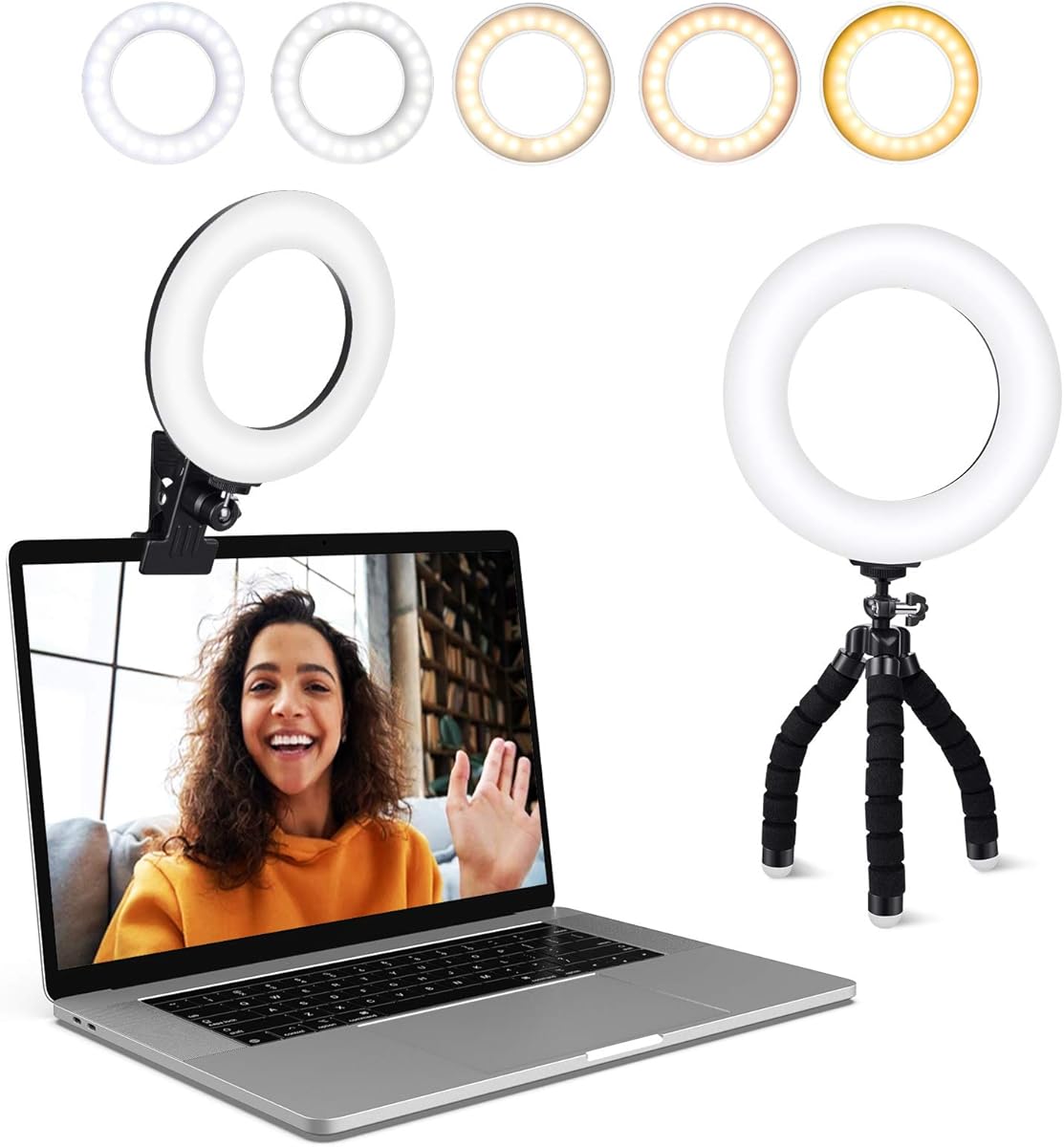
The ACMEZING Video Conference Lighting Kit is a 4.4-rated ring light that comes with both a monitor clamp and a flexible mini tripod. That two-mount arrangement gives it more setup options than many basic clip lights, allowing it to sit on a laptop, monitor, conference table, or dressing table.
We may earn a commission when you buy through this link, at no additional cost to you.
Its 64 LED beads provide five brightness levels and five color temperatures ranging from 3200K to 6500K. The detailed warm-to-cool choices make it useful for calls, broadcasting, streaming, makeup, and general content creation. The ring design softens shadows, which can produce a more flattering and even appearance on camera.
The metal clamp uses a strong spring and foam cushioning to resist slipping and scratching. The included tripod has flexible legs that can grip, wrap, or stand, offering a practical fallback when a screen is not suitable for clamping. A two-meter USB cable provides more positioning freedom than a short attached lead.
Its minimum color temperature of 3200K is warmer than some newer competitors, and the product depends on USB power rather than a rechargeable battery. Still, the included mounting hardware, generous control range, and protective clamp make this a well-equipped option for home offices and meeting spaces.
The padded clamp provides a stable screen-mounted position, while the flexible tripod can adapt to unusual surfaces. Having both included makes it easier to find a workable light angle in different rooms.
Five color temperatures give users more nuanced control than the common three-mode setup. This is helpful for matching different rooms or adjusting the tone between video calls and recorded material.
We may earn a commission when you buy through this link, at no additional cost to you.
The LitONES Video Conference Lighting is a 4.5-rated desktop fixture designed to deliver controlled, natural-looking light for long meetings. Its four-layer optical soft panel combines diffusion and edge-lighting technology to spread illumination evenly while blocking harsh glare.
We may earn a commission when you buy through this link, at no additional cost to you.
A stated CRI above 98 is the standout specification. It indicates that the light is designed to render skin tones and object colors closely, which is valuable for video conferencing, podcasts, makeup, and professional recording. The seven-inch square head also covers a larger area than a typical compact ring light, reducing the unevenness that can occur with smaller panels.
Control is unusually detailed. Three color temperatures and ten brightness levels create 30 combinations, while stepless dimming from 10% to 100% and a 2700K to 6500K range provide additional precision. A built-in memory function stores preferred settings, reducing the need to reset the light for each session.
The stand adjusts from 20.5 to 28.5 inches, and both the lamp head and phone holder rotate 360 degrees. The reinforced iron base and non-slip pads help prevent tipping and protect the desk. Its size makes it less convenient for travel than a pocket light, but for a permanent meeting or content-creation desk, the advanced optics and controls justify its premium position.
The high CRI specification and broad square diffuser are designed to keep skin tones consistent and shadows soft. That combination makes the light particularly useful when appearance matters during professional meetings or recorded presentations.
Stepless dimming, a wide color-temperature range, and the built-in memory function make repeated setups convenient. Once a preferred look is found, users can return to it without cycling through every adjustment.
We may earn a commission when you buy through this link, at no additional cost to you.
The LitONES Desk Ring Light is a full-screen desktop light built for Zoom meetings, remote work, teaching, reading, and recording. It has a 4.4 rating and combines edge-lit LED technology with a stated CRI of 97.8 to create soft illumination and lifelike colors.
We may earn a commission when you buy through this link, at no additional cost to you.
The seven-inch square head produces a broad area of light, while three color temperatures and ten brightness levels cover a 3000K to 6500K range. These controls allow the appearance to be adjusted for warmer rooms, cooler daylight, and different call environments without replacing the fixture.
The key practical feature is its tall, adjustable base. The stand extends from 22 to 32.5 inches, allowing the light to rise above a laptop or monitor and aim downward toward the user. The head rotates 360 degrees, and the included phone holder also rotates for mobile calls or recording. A metal base and non-slip pad provide stability and desk protection.
This model needs 10W USB power and takes up more space than a compact clip-on panel. Its portability therefore refers more to moving it around an office or taking it outdoors with a suitable power source than to slipping it into a pocket. For users who want a tall, stable, directional desk light, it remains a strong option.
The extended stand can place the source above a laptop or monitor, reducing the upward shadows that sometimes appear when a webcam is lit only from below. It can also be placed beside the device when a lower profile is preferred.
The same height adjustment and directional head make the fixture useful as a reading lamp, recording light, or content-creation lamp. The rotating phone holder extends that versatility to mobile sessions.
We may earn a commission when you buy through this link, at no additional cost to you.
The Rechargeable Clip-On Ring Light stands out with a 5.0 rating, the highest score in this group. It is designed for phones, tablets, laptops, mirrors, and monitors, with a spring-loaded clip that attaches without tools and a silicone pad intended to protect the host device.
We may earn a commission when you buy through this link, at no additional cost to you.
Three color temperatures—warm at 3000K, natural at 4500K, and white at 6500K—combine with ten dimmable levels. That range covers the major lighting moods most users need for calls, selfies, makeup, live streaming, and tutorials. The clip provides adjustable tilt so the light can be directed away from the camera and toward the subject.
Its 2000mAh rechargeable battery provides an estimated three to ten hours of continuous use depending on brightness. A digital display shows the remaining battery percentage, removing much of the guesswork associated with small LED lights. Fast Type-C charging adds convenience for users who switch frequently between mobile and computer calls.
Its small form and three-mode color selection make it less suitable than a larger panel for creating a broad studio effect. However, for a pocketable, rechargeable light with visible battery status and broad device compatibility, it is one of the most practical products in the guide.
The digital percentage display is a simple but meaningful convenience. It allows users to check remaining power before joining a meeting or beginning a recording session.
The universal spring clip and adjustable tilt make it easy to transfer the light between a phone and laptop. That flexibility is valuable for hybrid workers who alternate between platforms.
We may earn a commission when you buy through this link, at no additional cost to you.
The yAyusi Dual-Lamp Video Conference Lighting is a two-bar kit intended to provide brighter and more even illumination than a single compact panel. It carries a 4.2 rating and is designed for video calls, podcasts, streaming, and desktop recording.
We may earn a commission when you buy through this link, at no additional cost to you.
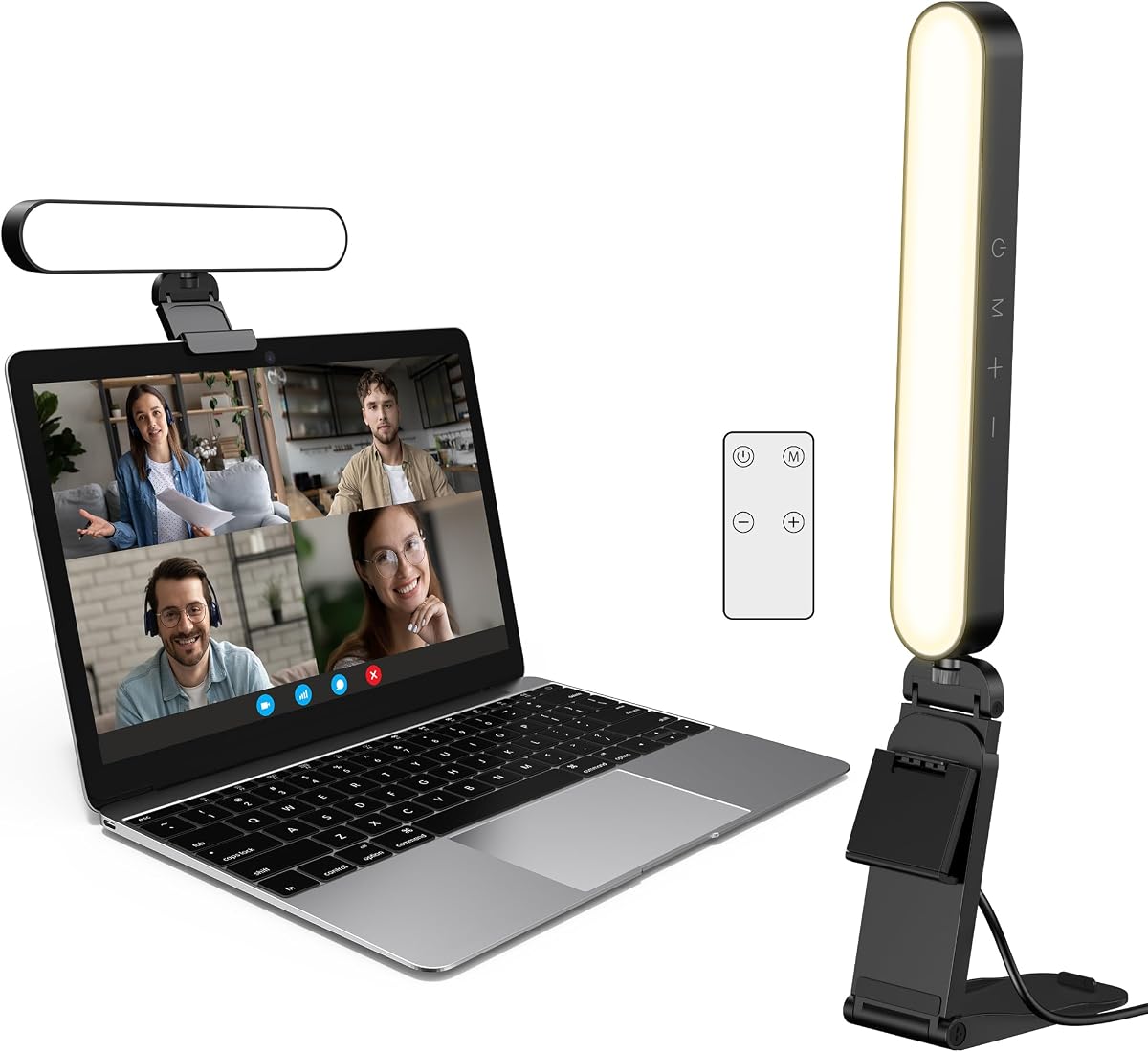
Using two light bars can create a more balanced look because illumination can come from both sides of a laptop or monitor. Each unit supports 360-degree horizontal and 180-degree vertical rotation, and the pair can be installed in either horizontal or vertical orientation. The manufacturer states that the complete set can be installed within a minute.
Both touch controls and a remote control are included, allowing settings to be changed without reaching behind the equipment. Three color modes and ten brightness levels help users adapt the light to the environment. The stands adjust from 5.5 to 8.3 inches in height and from 1.55 to 2.35 inches in width, allowing monitor or desktop use.
The two-bar arrangement requires more space and careful cable management than one lamp. It may also be excessive for a small meeting area. Even so, users who find a single light produces uneven illumination or want a more deliberate two-sided setup will appreciate the added coverage and remote operation.
Two separate bars can be positioned on opposite sides of a display. That gives users a way to reduce unevenness and create a more controlled meeting-room appearance.
Touch operation is convenient for quick changes, while the included remote is helpful when the lights sit out of reach. Both methods provide access to the color and brightness adjustments.
We may earn a commission when you buy through this link, at no additional cost to you.
The Anautin Ring Light is a 4.3-rated clip-on fixture for laptops and desktop monitors. It attaches to screens up to 2.5 centimeters thick and offers 360-degree horizontal rotation with 170-degree vertical tilt, giving it more directional flexibility than many fixed screen lights.
We may earn a commission when you buy through this link, at no additional cost to you.
Its 64 LEDs have a stated CRI of 97+, designed to maintain lifelike skin tones during Zoom calls, FaceTime conversations, recordings, and livestreams. Brightness is adjustable across five levels, while the color setting spans warm 2600K to cool 6500K. These controls are simpler than those on lights with multiple named modes, but they still cover a useful tonal range.
The two-meter USB cable includes adhesive material for managing the wire along a desk or monitor. The product is designed for 5V, 2A, or 10W USB power. Its clip requires no separate stand, making it a clean option for a small workspace where a freestanding base would be inconvenient.
Because it has only one adjustable brightness control and no rechargeable battery, it is less versatile than similarly positioned premium options. Nevertheless, the generous adjustment range, tidy cable solution, and broad color compatibility make it a solid monitor-mounted choice for users who value a compact setup.
Combining full horizontal rotation with a 170-degree tilt lets the light move from a front-facing position to a more angled source. This is useful for reducing shadows or directing illumination toward a particular side of the face.
The long cable and included adhesive help prevent the power lead from dangling directly from the monitor. A suitable 5V, 2A source should be selected for consistent operation.
We may earn a commission when you buy through this link, at no additional cost to you.
The most useful light is one that produces even facial illumination, fits your devices, and can be positioned without interfering with the call. Consider light quality, mounting, controls, power, and portability together rather than focusing on brightness alone.
Color-rendering index, or CRI, indicates how accurately a light reproduces colors compared with a reference source. For video calls, a high CRI helps skin look natural rather than overly warm, cool, or washed out. The ALTSON, LitONES, InnoGear, and Anautin models specify especially high figures, while the Logitech uses TrueSoft technology intended for cinematic color accuracy and balanced skin tones.
Prioritize a high stated CRI and a range of color temperatures, but also consider how easy the controls are to operate. A nominal CRI rating alone cannot guarantee flattering results if the lamp is aimed poorly or operated at an excessive brightness.
A broad diffuser creates more even facial illumination and helps soften shadows. Full-width panels such as the Logitech Litra Glow and square heads from the LitONES lights cover a larger area than compact ring lights or small clip-on panels. Ring lights can still work well, but their illumination is more concentrated around the center of the frame.
Choose a wide panel when the goal is a natural meeting-room appearance. Choose a small clip-on light when portability and quick phone setup matter more than maximum coverage.
Good positioning matters more than raw brightness. Look for height, tilt, and rotation controls that let the light sit near eye level and point toward your face without creating screen reflections. Clips are convenient for laptops and monitors, freestanding bases offer more stability, and flexible tripods help in unusual locations.
Also check device thickness, clamp range, and desk space before buying. Some lights can work in both clip-on and desktop modes, which is valuable if your setup changes.
USB-powered lights are dependable for desk use and avoid battery degradation, but they remain tethered to a cable. Rechargeable models such as the ALTSON and clip-on ring light are better for travel and spontaneous mobile use. Check the stated runtime at your likely brightness, because runtime figures usually assume a low output.
For wired products, verify the required voltage and current. Some manufacturers recommend a 5V, 2A or greater adapter and warn that lower-current laptop ports may cause flickering or unstable operation.
Color temperature changes the atmosphere of a call. Warm light can feel comfortable in the evening, neutral light often suits daytime meetings, and cooler light can match an office with bright overhead illumination. Adjustable brightness is equally important because ambient light changes throughout the day.
Three modes and ten levels are common, while the LitONES offers stepless dimming and a broader range. More options can be useful, but a simple interface and saved settings may matter more for people who want to join calls quickly.
True portability depends on weight, dimensions, folding features, and power requirements. Pocketsized rechargeable panels fit easily into a bag, while tall desktop stands occupy more space but offer stable positioning. Folding ring-light brackets and collapsible bases are helpful for frequent travel or shared workspaces.
Consider how often you will move the equipment. A permanently installed desk light can use a larger format, while a commuter may prioritize a compact body, protective clip padding, and a rechargeable battery.
Physical controls are essential for basic use, and remote control can be useful when a light is positioned out of reach. Software can add precision, as the Logitech G HUB application supports brightness, color temperature, power, and saved presets. The LitONES model includes a memory function for retaining preferred settings.
Choose the system that matches your routine. Frequent content creators may value presets and fine control, while occasional meeting users may prefer one-touch buttons and straightforward modes.
Begin by positioning the light near your laptop or monitor, generally in front of you and slightly above or beside the screen. Aim it toward your face rather than the camera. If the light has a clamp, check that the device fits within the stated thickness range and that the padded area rests securely against the screen.
Join a test call and adjust the brightness to match the room. Start at a moderate level, then compare the image with overhead lights turned on or off. Use warm color temperature for a softer evening appearance, natural or neutral light for daylight rooms, and cooler light for a crisp office environment. Avoid selecting the brightest setting by default, as excessive frontal illumination can wash out facial detail.
For battery-powered models, recharge before travel or a long series of meetings and use the available battery indicator when provided. Keep USB cables arranged so they do not pull against the clip, and clean the diffuser with a soft, dry cloth. Do not use liquid cleaners unless the manufacturer specifically approves them, and avoid leaving a light in direct heat, moisture, or an enclosed bag while it is charging.
A rectangular panel usually spreads light more evenly across the face, making it a strong choice for natural-looking professional calls. A ring light is compact and effective for close-up framing, but its circular output is more concentrated. The best option depends on the camera position, room size, and whether you also use the light for phone video, streaming, or makeup.
Place the light in front of you and slightly above eye level, or beside the screen and angled toward your face. Avoid positioning it directly behind you because that creates a dark silhouette. Test the setup with the actual webcam and meeting application, because a lamp that looks balanced in the room may still produce glare or reflections on screen.
An additional light can still help because many ceiling fixtures create shadows beneath the eyes or uneven illumination across the face. A small adjustable light can soften those shadows and improve the camera's view without replacing all room lighting. If your existing setup already looks consistent on a test call, a less powerful portable option may be sufficient.
Yes, if its mounting system supports both device types. The Evershop includes a phone and tablet platform, the ALTSON includes a clip and tripod adapters, and several other models use adjustable clamps. Check device dimensions and confirm that the light will not obscure the phone camera or laptop screen before purchasing.
Use the power source specified in the product instructions. Several lights in this guide require 5V and at least 2A, and using a typical lower-current laptop port may cause flickering or unstable operation. A suitable wall adapter or power bank can provide more consistent power and reduce cable strain on the monitor connection.
The best brightness is the level that matches the ambient room without washing out your face. Many products provide ten brightness levels, allowing gradual adjustment, while the LitONES also supports stepless dimming. Test before a meeting, because a light that looks bright in daylight can appear harsh in a darker room.
A high CRI generally indicates more accurate color rendering, including skin tones, but it is only one part of a good result. Light direction, diffusion, brightness, and color-temperature matching also shape the camera image. A wider panel with softer output can sometimes look more natural than a bare small light with a high CRI specification.
Unplug the light before cleaning and use a soft, dry cloth on the diffuser and housing. Keep the clip and adjustment joints free from dust, and avoid liquids unless the manufacturer explicitly allows them. Rechargeable lights should also be kept away from excessive heat during charging, while wired models benefit from loosely routed cables that do not pull on the mount.
The Logitech Litra Glow is the strongest all-around choice for a dedicated desk because its wide diffuser, natural color rendering, adjustable monitor mount, and software presets cover the core needs of a polished video call. For value and genuine battery portability, the ALTSON 60 LED Light is harder to overlook, while the LitONES Video Conference Light stands out as the premium desktop option with advanced optics and detailed controls.
Your priorities should determine the remaining choice. Choose a compact rechargeable clip when travel and phone calls matter most, a dual-light system for balanced two-sided coverage, and a tall desktop fixture when stable positioning above a large monitor is useful. In every case, color rendering, diffusion, and correct placement matter more than simply choosing the brightest lamp.
Before purchasing, verify the mount fits your device, confirm the required power source, and compare the listed features with your typical room and call setup. Ratings, product configurations, and prices can change over time, so check the current listing for the most accurate availability and purchasing information.