
BENFEI 2.5 Inch SATA Enclosure
4.6Editor score
Tool-free 2.5-inch installation
USB Type-C and Type-A
UASP-enabled USB 3.0
Broad operating-system support
A laptop hard drive adapter kit makes old and removable storage accessible without installing the drive permanently. The right device can help transfer files, recover data, clone storage, or create a temporary external drive from a compatible 2.5-inch or 3.5-inch HDD or SSD.
We compared the ten products by examining drive-interface support, USB connectivity, power requirements, operating-system compatibility, transfer capabilities, included accessories, and practical features such as hot swapping and status indicators. The list covers IDE, SATA, M.2, and USB-only solutions.
Each review explains the strongest reason to consider a particular kit, along with its limitations and ideal user. Ratings and product details reflect the supplied information, while prices and availability can change, so shoppers should verify current details before purchasing.
4.6Editor score

4.4Editor score
4.6Editor score
As an Amazon Associate we earn from qualifying purchases.
The table below compares the ten selected laptop hard drive adapter kits by interface coverage, power requirements, USB connection, and intended use, making it easier to identify the right option for legacy IDE drives, modern SATA storage, M.2 SSDs, or portable 2.5-inch drives.


The Unitek USB 3.0 IDE/SATA Adapter is the strongest all-around choice for a laptop hard drive adapter kit. It has a 4.4 rating and combines broad legacy-drive support with a practical dual-drive layout. One IDE drive and one SATA drive can be connected at the same time, making the kit useful for migrations, backups, and recovery work involving more than one storage device.
We may earn a commission when you buy through this link, at no additional cost to you.
Its standout feature is the combination of 40-pin and 44-pin IDE connectors with a SATA III port. The adapter supports 2.5-inch and 3.5-inch IDE hard drives, 2.5-inch and 3.5-inch SATA hard drives and SSDs, and compatible optical drives. The included 12V/2A power adapter and four-pin power cable provide the stable external power needed by 3.5-inch IDE hardware.
The trade-offs are modest but worth noting. The host side uses USB-A rather than USB-C, so a USB-C-only laptop requires a separate USB-C-to-USB-A adapter. The manufacturer also says to connect the external power supply whenever using the adapter, especially with two drives. Those requirements make the kit less convenient for minimalist, bus-powered setups.
This is the recommended adapter for users who may encounter both IDE and SATA hardware. It provides more flexibility than a SATA-only dock, supports two mixed drives simultaneously, and includes the accessories needed for larger legacy disks. For a laptop with USB-A, it offers a particularly convincing balance of capability, convenience, and included equipment.
The dual-head IDE connector and SATA III port allow the adapter to cover both older PATA equipment and newer SATA storage. That breadth is valuable when copying files from an old desktop hard drive, diagnosing a spare SATA SSD, or recovering information from optical hardware.
A 3.5-inch drive can demand more current than a laptop USB port can reliably provide. The included 12V/2A supply and dedicated four-pin cable address that issue and make the adapter more dependable for sustained data-transfer work.
We may earn a commission when you buy through this link, at no additional cost to you.
The Vorodcip SATA IDE Adapter is a versatile bridge for users who need to access a wide range of internal drives. Its 4.1 rating is the lowest among the selected products, but the feature set includes IDE and SATA support, USB-A and USB-C connectivity, and compatibility with drives up to 20TB.
We may earn a commission when you buy through this link, at no additional cost to you.
The adapter supports 2.5-inch and 3.5-inch SATA hard drives and SSDs, 2.5-inch and 3.5-inch IDE drives, and SATA or IDE internal Blu-ray drives. It is positioned for retrieving old files, backups, cloning, transfers, and data recovery. Plug-and-play operation eliminates the need to install additional drivers on supported systems.
Its main limitation is the nature of the older IDE interface. The stated maximum transfer rate for IDE is 133Mbps, which is substantially lower than the 5Gbps figure associated with SATA. Actual performance also depends on the source drive and connected computer. Buyers should therefore judge the advertised interface speed as a ceiling rather than a guaranteed result.
This adapter makes sense for a laptop owner who wants a single dock for both SATA and legacy IDE equipment, particularly when high-capacity modern drives are important. The 20TB support and USB-C accommodation set it apart from several simpler alternatives, even though users seeking the highest possible legacy-drive speed should look elsewhere.
Support for drives up to 20TB is valuable as storage volumes continue to grow. It gives the adapter a useful lifespan for accessing large backup disks, archival drives, and high-capacity SSDs without suggesting that the older IDE side can match modern SATA performance.
USB-C and USB-A support reduces friction when moving between modern laptops and traditional desktop systems. The included USB-C-to-USB adapter and hot-swapping support make drive changes more convenient for routine backups and recovery tasks.
We may earn a commission when you buy through this link, at no additional cost to you.
The YINNCEEN USB 3.0 Reader is tailored to users recovering files from older IDE equipment as well as modern SATA drives. It carries a 4.3 rating and includes the external 12V/2A power supply and four-pin cable required for many 3.5-inch IDE hard drives.
We may earn a commission when you buy through this link, at no additional cost to you.
Its dual-head arrangement includes both 40-pin and 44-pin IDE connectors plus a SATA III connector. The reader supports 2.5-inch and 3.5-inch IDE and SATA hard drives, with stated compatibility for Windows, Mac OS 10 or higher, and Linux. Plug-and-play operation, hot swapping, an on/off switch, and a status LED add convenience for repeated bench work.
The most important caveat concerns vintage hardware. Some older IDE drives require jumper changes for master or slave operation, which can be unfamiliar to a first-time user. The stated capacity support reaches 6TB, and the 12V supply is needed for 3.5-inch devices. These details make the kit less general than newer broad-capacity models.
Despite those limitations, it is a strong choice for a technician, retro-computing enthusiast, or home user with an old desktop disk. It combines the correct legacy connectors, dependable external power, and modern USB 3.0 access in one package. It is particularly relevant when recovering information that is otherwise stranded inside an IDE drive.
Supporting both 40-pin and 44-pin connectors is essential for broad IDE compatibility. The arrangement allows older hard drives and optical devices to be accessed without searching for a separate legacy connector or risking an incorrect fit.
Support for Windows, Mac OS, and Linux means recovered files can be moved to several kinds of systems. The adapter's plug-and-play behavior also helps users begin data access without installing a complex driver stack.
We may earn a commission when you buy through this link, at no additional cost to you.
The FEMORO SATA IDE Adapter combines strong customer feedback with a particularly accessible layout. Its 4.6 rating places it near the top of the group, and the product description emphasizes easier 3.5-inch IDE connection, a softer four-pin cable, and a flexible USB 3.0 cable.
We may earn a commission when you buy through this link, at no additional cost to you.
The kit supports 2.5-inch and 3.5-inch SATA hard drives and SSDs, IDE drives, and SATA or IDE internal Blu-ray drives. A USB 3.0 cable, USB-C adapter, 12V/2A power supply, four-pin cable, and manual are included. This makes it well suited to file retrieval, archiving, system backups, and storage expansion during a computer upgrade.
Users must still observe the power requirement for larger 3.5-inch drives and recognize that this is an IDE and SATA device rather than an M.2 adapter. The switch, LED status indicator, and no-driver installation help reduce setup friction, but the included power supply and four-pin lead should not be treated as optional for legacy hardware.
This is an excellent general-purpose kit for a home office or repair bench where both modern and older drives appear. It provides the strongest rating among the multi-interface readers in this list, broadens host-device support with USB-C, and includes everything needed for typical recovery or transfer work.
The extended body and softer four-pin cable are practical improvements for 3.5-inch IDE use. These details matter because legacy connectors are often bulky, and a rigid or awkward cable can make a bench setup harder to work with.
The bundled USB cable, USB-C adapter, external supply, four-pin lead, and manual cover the main connection needs. Having the appropriate power and legacy cabling in the box is especially helpful for users who may not own these parts already.
We may earn a commission when you buy through this link, at no additional cost to you.
The SABRENT USB 3.0 Dock is a straightforward SATA-focused option for users who want a stable place to mount a bare hard drive. It has a 4.4 rating, accepts both 2.5-inch and 3.5-inch SATA drives, and requires no tools or drivers for use with common Windows, macOS, and Linux systems.
We may earn a commission when you buy through this link, at no additional cost to you.
Its lay-flat bay makes changing disks easy, while hot-swapping allows a drive to be exchanged without rebooting the computer. UASP support can improve transfer performance on compatible hosts. A 12V/2A power adapter is included and is required for 3.5-inch hard drives, while most 2.5-inch drives can operate from bus power.
Compatibility is narrower than that of the IDE-and-SATA adapters. It does not support IDE/PATA, M.2 NVMe, M.2 SATA, SAS, or a drive already installed inside a USB enclosure. The included host cable also ends in USB-A, and a USB-C-to-USB-A adapter is not included.
This dock is best for a laptop user who regularly handles standard SATA hard drives or SSDs and values simple insertion over universal legacy support. Its hot-swap design, tool-free bay, and included power supply make it especially convenient for backups, drive testing, and temporary desktop storage.
The open dock accepts a bare drive without screws or a tray. Combined with hot swapping and an activity LED, it reduces downtime when alternating between storage disks for backups, testing, or file organization.
Although USB 3.0 can theoretically handle much faster transfers, a mechanical hard drive normally remains the limiting factor. Users should judge expected performance by their source media rather than assuming every file operation will reach the interface maximum.
We may earn a commission when you buy through this link, at no additional cost to you.
The SABRENT 2.5-inch Adapter Cable is the most compact choice in this roundup and holds the highest supplied rating at 4.7. It connects standard 2.5-inch SATA SSDs and laptop hard drives directly through USB, avoiding the bulk of a full docking station.
We may earn a commission when you buy through this link, at no additional cost to you.
The cable draws power from the USB port, so most compatible laptop drives can operate without an external power adapter. It uses a USB-A host connection, provides USB 3.0 transfer capability with UASP support on compatible systems, and requires no drivers for Windows, macOS, or Linux.
The supported drive category is narrow. It does not work with M.2 NVMe drives, M.2 SATA drives, 3.5-inch desktop hard drives, or slim SATA optical drives. Some older or high-capacity 2.5-inch mechanical hard drives may also require more current than one port supplies, making a powered hub or another port advisable.
This adapter is ideal for a laptop owner who needs occasional access to a spare 2.5-inch SSD or conventional laptop hard drive. Its simple construction, hot-swappable design, and bus-powered operation make it convenient for backups and file transfers, provided the drive interface and current requirements are compatible.
A direct adapter cable removes the need for a bulky enclosure or dock. That makes the product easy to carry between a laptop, desktop, or another compatible system when one drive needs to be accessed briefly.
Most 2.5-inch SATA SSDs draw little power and operate directly from a laptop connection. Keeping a powered hub or alternative USB 3.0 port in mind is useful for older or higher-capacity mechanical drives that may have greater startup demand.
We may earn a commission when you buy through this link, at no additional cost to you.
The BENFEI 2.5-inch SATA Enclosure is the best budget-oriented pick for standard laptop hard drives and SSDs. It has a 4.6 rating, a tool-free design, and a USB Type-C/Type-A connection scheme that makes it suitable for both modern and traditional host ports.
We may earn a commission when you buy through this link, at no additional cost to you.
Installation is straightforward: open the cover, insert a compatible 2.5-inch drive, and close the shell. It works with SATA I, II, and III drives, supports UASP for improved performance on compatible systems, and remains backward compatible with older USB standards. The enclosure can connect to laptops, desktops, phones, tablets, and a PS4.
Its limitations are defined mostly by drive size and interface. It is designed for 2.5-inch SATA drives, not 3.5-inch desktop hard disks, IDE equipment, or M.2 SSDs. The stated compatibility includes drives up to 6TB and thicknesses of 7mm or 9.5mm, so unusual dimensions should be checked before buying.
For users seeking an inexpensive way to reuse a spare 2.5-inch drive, this is a strong recommendation. It avoids external power, removes the need for tools, offers broad device compatibility, and includes an 18-month warranty, making it a focused yet highly useful adapter for everyday storage tasks.
The removable cover makes it easy to place a bare 2.5-inch drive inside and close the enclosure without screws. That simplicity benefits occasional users who only need temporary external storage.
USB-C and USB-A connectivity allows the enclosure to work with modern laptops as well as systems that still rely on rectangular USB ports. The stated console support adds another use for media stored on a compatible drive.
We may earn a commission when you buy through this link, at no additional cost to you.
The USB 3.0 IDE SATA Reader is designed for data-transfer situations that may involve one older IDE disk and one newer SATA drive. It has a 4.3 rating, includes SATA III and IDE connectors, and uses a two-in-one USB and USB-C cable for flexible host-computer access.
We may earn a commission when you buy through this link, at no additional cost to you.
The reader accepts 2.5-inch and 3.5-inch SATA HDDs and SSDs along with 2.5-inch and 3.5-inch IDE drives, with stated capacity support up to 6TB. It can run one IDE and one SATA drive simultaneously, though two IDE drives cannot operate together. Hot swapping and an LED for power and activity add practical controls.
A 12V/2A supply and four-pin cable are included for 3.5-inch IDE and older SATA hardware. New drives may need to be initialized in Disk Management, and vintage IDE jumper settings should be checked against the drive manufacturer's documentation. Actual transfer speed depends on the connected equipment.
This reader is a good fit for a mixed-device workspace where a technician or user regularly moves between legacy and current storage. It provides the essential connectors, external power, and host flexibility without trying to cover every modern SSD format. It is less suitable for users who need M.2 support or two simultaneous IDE disks.
Supporting one IDE disk and one SATA disk together is useful during migrations and selective backups. The restriction against two IDE drives keeps the performance and power expectations clearer for buyers.
The bundled USB and USB-C two-in-one cable allows use with both common connector types. That makes it easier to connect the reader to a modern notebook, a desktop, or a system with an older USB-A port.
We may earn a commission when you buy through this link, at no additional cost to you.
The Universal SATA IDE Reader stands out for supporting not only hard drives but also several 5.25-inch optical-drive formats. Its 4.5 rating reflects a broadly useful package for users recovering storage from older PCs, reading archived discs, or transferring files from IDE and SATA equipment.
We may earn a commission when you buy through this link, at no additional cost to you.
Supported optical hardware includes DVD-ROM, CD-ROM, CD-RW, DVD-RW, and DVD+RW drives. The adapter also works with 2.5-inch and 3.5-inch IDE and SATA hard drives and SSDs. Its dual-head IDE connector and SATA III connection provide broad coverage, while USB-A and USB-C options improve host compatibility.
The included 12V/2A power adapter and four-pin cable are required for 3.5-inch HDD or SSD use according to the supplied instructions. New drives must be initialized and formatted in Disk Management before the system recognizes them. These are important setup considerations rather than minor footnotes, especially when restoring unfamiliar media.
The reader is a good choice for an IT support worker, collector, or home user with legacy optical and hard-drive hardware. Its support coverage is broader than most SATA-only docks, while hot swapping, an on/off switch, and status lighting make it suitable for a working data-recovery bench.
Support for CD, DVD, rewritable, and read-only optical formats is a meaningful advantage for older media. It lets the same adapter handle archived discs and optical drives that otherwise require a dedicated external reader.
The on/off switch gives the user a direct way to control power to the connected hardware. The LED provides an at-a-glance indication of operating and activity status during transfers.
We may earn a commission when you buy through this link, at no additional cost to you.
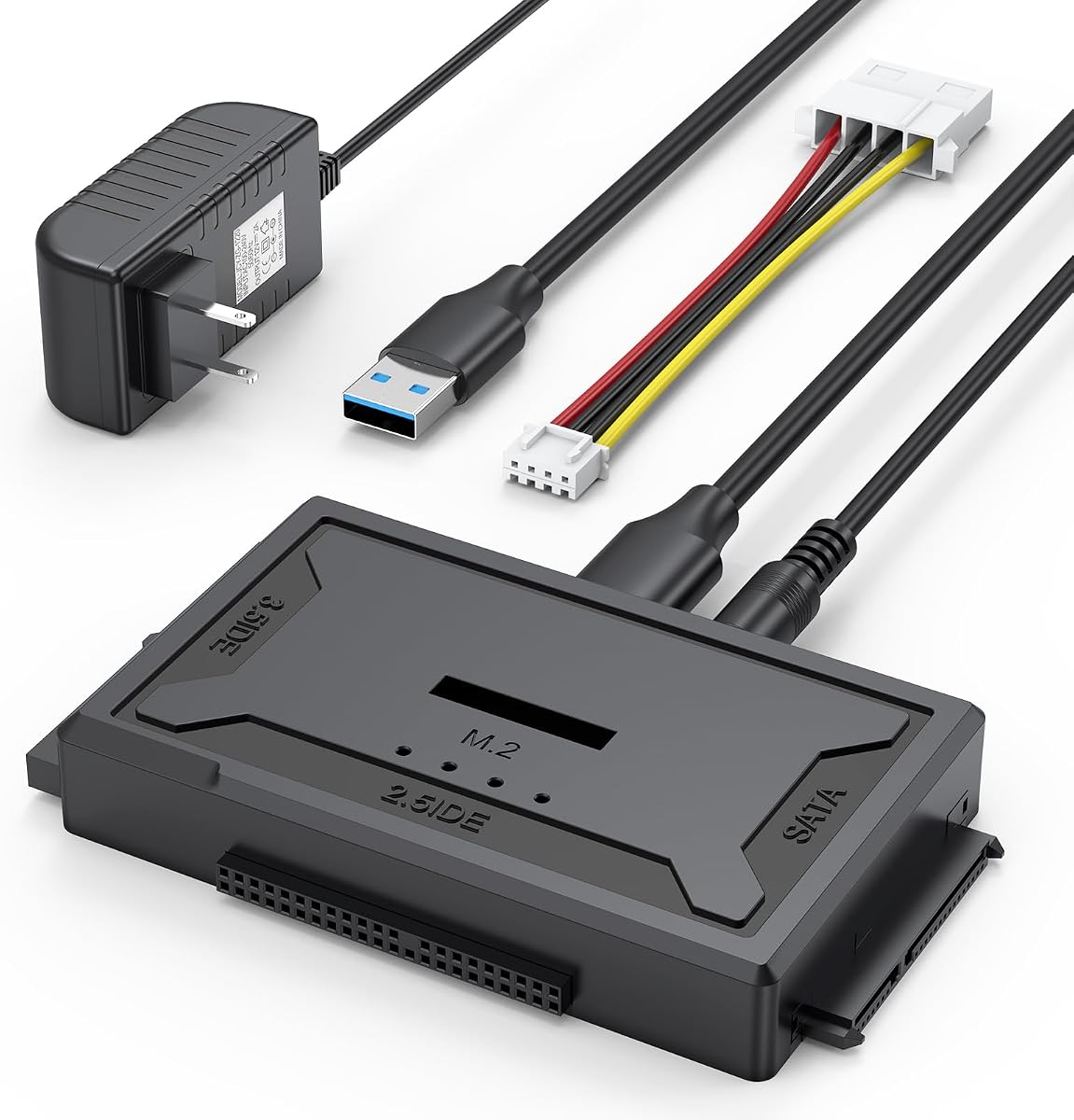
The 4-in-1 M.2 SATA IDE Reader is the most format-flexible product in the selection. It has a 4.6 rating and can work with IDE, SATA, and M.2 drives, including the ability to read multiple drive types at the same time according to the supplied product information.
We may earn a commission when you buy through this link, at no additional cost to you.
Its upgraded design includes a softer, more flexible four-pin power cable and improved IDE connection spacing. M.2 support covers the NVMe protocol for M-Key drives and SATA for B+M Key drives, with stated transfer speeds up to 10Gbps. The open M.2 design accommodates different physical drive sizes.
Not every M.2 module is compatible. B-Key-only drives and mSATA modules are excluded, and file-system format must match the host operating system. The 3.5-inch IDE, dual-IDE, SATA HDD, and internal Blu-ray scenarios also require appropriate external power connections, as described in the supplied details.
This is the premium pick for a technician or advanced user whose storage collection crosses old PATA disks, SATA drives, and modern M.2 SSDs. Few alternatives combine that range in one unit. Buyers should still verify the physical connector and protocol of every M.2 drive before purchasing.
IDE, SATA, and M.2 support can reduce the number of adapters needed for a mixed repair or migration setup. This makes the dock valuable for users who regularly encounter older hard disks alongside contemporary NVMe or SATA modules.
The stated M.2 transfer rate of up to 10Gbps is the key premium feature. Actual results depend on the drive, host controller, file system, and workload, but the interface provides substantially more headroom than older USB 3.0 bridges.
We may earn a commission when you buy through this link, at no additional cost to you.
The best laptop hard drive adapter kit depends on the drives you need to access, the connectors available on your computer, and whether the device must also supply external power. Use the following factors to narrow the field before making a final purchase.
In short, inspect the drive before ordering and confirm that the adapter supports both its interface and physical size.
In short, check the adapter's host cable and your laptop's available ports, then add a suitable adapter if it is not included.
In short, use the supplied power supply for 3.5-inch or legacy drives, and keep a powered hub as a backup for demanding 2.5-inch disks.
In short, compare the slowest component in the chain rather than expecting every drive to reach the connector's advertised maximum.
In short, look for straightforward access and transfer features, and treat true file recovery as a separate process that may require specialist software.
In short, verify both the number of drives and the exact interface combination supported before planning a migration workflow.
In short, prepare unfamiliar drives before assuming they will appear, and consult the drive manufacturer's documentation for jumper settings.
In short, prioritize a simple cable for occasional access and a stable, powered dock for frequent swapping or larger drives.
Before connecting anything, identify the drive interface, inspect it for visible damage, and confirm that the adapter supports its size and protocol. Read the included instructions, install the appropriate four-pin power lead when required, and make sure the drive is secured in the enclosure or dock. For a new blank drive, plan to initialize and format it after the operating system detects it.
Connect the adapter directly to the laptop or desktop using the specified USB host cable. Attach external power for 3.5-inch drives, older SATA hardware, dual-IDE arrangements, or any setup the manufacturer identifies as power-dependent. Wait for the drive to appear in the operating system's file manager, browse cautiously, and copy important files before making changes to the disk.
To disconnect, stop any active transfer and safely eject the drive from the operating system before removing it. Use the on/off switch where one is provided, and avoid unplugging a drive while files are being read or written. Store cables without sharp bends, keep the power adapter accessible for larger drives, and preserve the manual so jumper and compatibility guidance remains available.
A laptop hard drive adapter kit connects internal storage to a laptop or desktop through USB. It is commonly used to transfer files, create temporary external storage, clone a drive, back up an old disk, or retrieve files from a drive that is no longer installed internally. The exact formats supported depend on the adapter.
Yes, but only if it is specifically designed with both IDE and SATA connectors. Many inexpensive docks support only SATA, while universal readers in this guide include 40-pin and 44-pin IDE connectors alongside a SATA interface. Check connector shape, drive size, and power requirements before connecting the hardware.
Only the 4-in-1 reader in this selection explicitly supports M.2 storage. It covers the NVMe protocol for M-Key drives and the SATA protocol for B+M Key drives, but it does not support B-Key-only or mSATA modules. A standard SATA connector also cannot accept an M.2 SSD because the two interfaces are physically different.
A 3.5-inch drive normally requires more power than a laptop USB port can provide. Connect the included 12V/2A power adapter and the correct four-pin power cable, then verify that the drive is seated firmly. A 2.5-inch mechanical drive may also need a powered hub if it fails to spin up on a single port.
A new blank drive may need to be initialized in Disk Management before it can be used. Older IDE drives may also have an incorrect master or slave jumper setting. Check the drive manufacturer's documentation, confirm the correct interface is connected, and verify that the file system is compatible with the operating system.
It depends on the included cable. Several universal readers provide USB-A and USB-C options, while the two SABRENT products use a USB-A host cable and may require a separate USB-C-to-USB-A adapter. The BENFEI enclosure includes a Type-C and Type-A connection arrangement, making it convenient for different host systems.
Many of the listed adapters support hot swapping, but the operating system should be allowed to eject the drive first. Stop all transfers, safely eject the volume, and then disconnect the power or USB connection. Avoid removing media during an active read or write operation because that can corrupt files.
An adapter can provide access to a drive when the problem is simply that its interface is incompatible with the computer. It cannot repair physical damage, restore overwritten sectors, or bypass filesystem corruption by itself. If the drive makes unusual noises, fails to spin up, or contains critical data, seek professional recovery assistance before repeated attempts.
The Unitek USB 3.0 IDE/SATA Adapter is the best overall selection because it combines IDE and SATA support with two-drive capability and a complete power package. The BENFEI enclosure is the best budget option for standard 2.5-inch drives, while the 4-in-1 M.2 SATA IDE Reader offers the most premium and versatile range of storage formats.
When choosing, begin with the drive you actually have. A 2.5-inch SATA user may prefer the simple, bus-powered BENFEI enclosure or SABRENT cable, while someone handling vintage desktop disks should favor an IDE-capable reader with external power. M.2 owners should verify the protocol and connector before selecting a multi-format dock.
Finally, check the included cables, host-port requirements, operating-system compatibility, and current product details before buying. Ratings, availability, and prices can change, so the latest listing should always be treated as the final source for specifications and purchase availability.