
Rosewill FBM-Z3-400
3.3Editor score
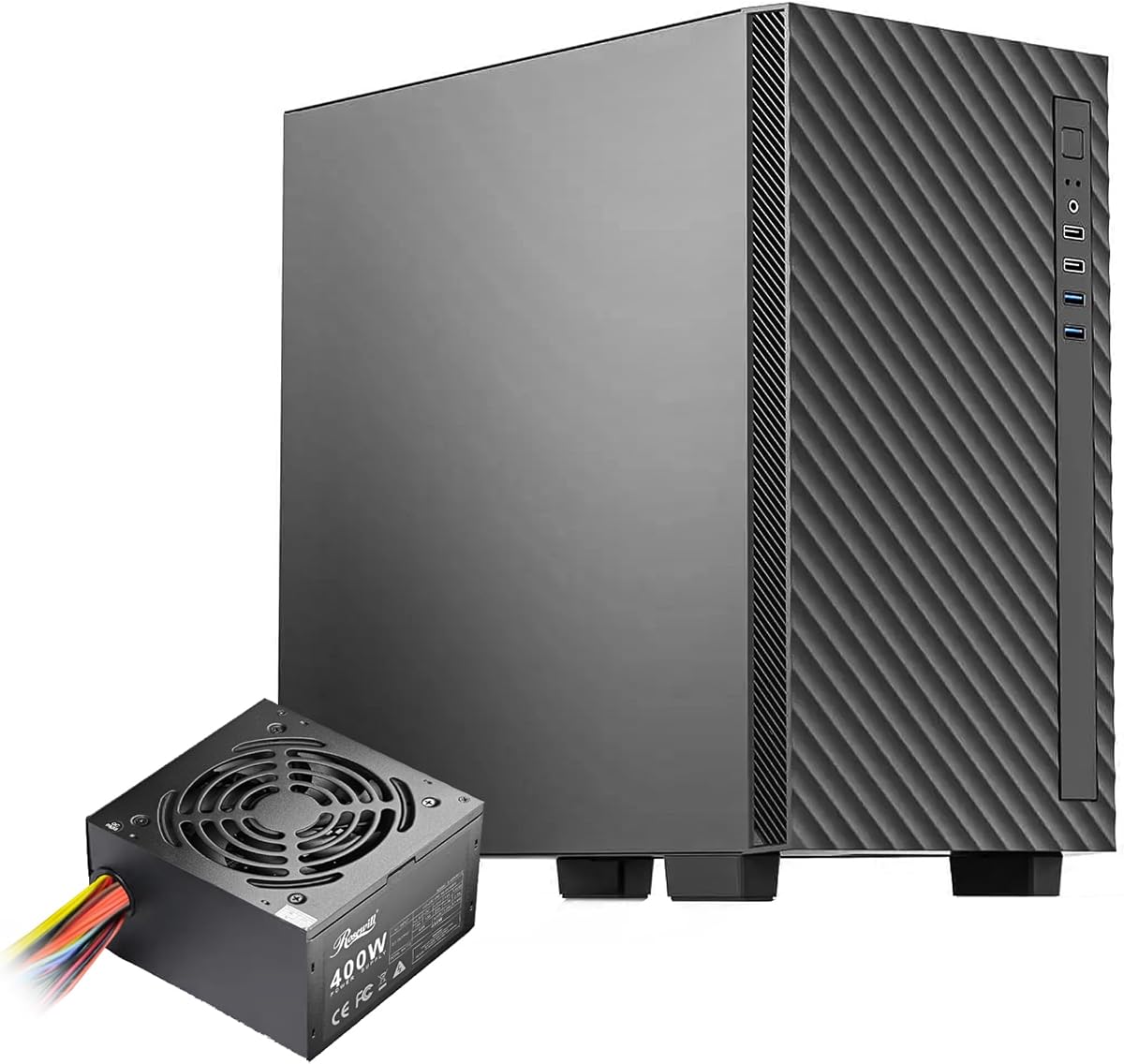
Pre-installed 400W power supply
Tempered glass side panel
Built-in carrying handle
Explore the best Rosewill computer cases, comparing storage capacity, cooling, motherboard support, connectivity, included fans, power supplies, and build
Rosewill computer cases cover several distinct use cases, from compact micro-ATX office builds to full-size ATX home servers and visually striking gaming systems. A worthwhile chassis should make component installation easier, move plenty of air, provide the ports you actually use, and fit your hardware without compromising the layout.
The list compares ten cases using the supplied specifications, including motherboard support, drive capacity, radiator clearance, included fans, front connectivity, and whether a power supply is pre-installed. It covers the Helium NAS models, the FBM desktop range, the RWM1 and walnut-finish gaming cases, and two additional ATX alternatives.
Each pick reveals what type of builder it best suits, from storage-heavy NAS owners to compact workstation enthusiasts and gamers seeking strong airflow. Product ratings provide another useful signal, but fit, cooling, and feature priorities should lead your decision. Current prices and availability can change, so confirm listings before purchasing.
3.3Editor score

4.6Editor score

4.0Editor score
The comparison highlights major differences in case size, motherboard support, cooling hardware, drive capacity, front-panel ports, and power-supply inclusion, making it easier to identify the most suitable Rosewill chassis for a particular build.


The Rosewill Helium NAS Max is the most purpose-built chassis in this guide for DIY network-attached storage, media servers, and small-business storage systems. Its 4.0 rating is modest, but the specification set is unusually focused: an ATX mid-tower layout can accommodate up to 11 3.5-inch hard drives while retaining a professional black exterior suited to a home office or server area.
We may earn a commission when you buy through this link, at no additional cost to you.
Its strongest feature is the combination of storage capacity and active cooling. A ventilated mesh front helps move air through the densely populated drive bays, while four included 140mm PWM fans provide substantial airflow for hard drives, memory, processors, and add-in cards. The front USB 3.2 Type-C port is a particularly welcome addition for modern peripherals and storage devices, while BTF motherboard compatibility can help produce a cleaner build with fewer exposed connectors.
The trade-offs are inherent in the NAS-oriented design. Builders wanting a compact office case or a conventional gaming appearance may find the full ATX proportions excessive, and the 4.0 rating suggests it does not inspire the same level of buyer enthusiasm as several smaller cases. Drive cages can also make airflow and cable routing more involved, so installation should be planned around the final storage layout rather than added after assembly.
This is the strongest recommendation for someone who plans to fill the chassis with multiple 3.5-inch drives. Choose it when storage density, active airflow, and clean cable presentation matter more than a small footprint. If you only need two drives, one of the micro-ATX alternatives will be more proportionate, but for a serious DIY NAS or expandable media server, the Helium NAS Max makes the most sense.
Supporting up to 11 3.5-inch hard drives gives the Helium NAS Max a clear advantage over general-purpose compact cases. That capacity is useful for media libraries, archives, virtual-machine data, and business file storage, particularly when the system will run continuously.
The mesh front and four 140mm PWM fans create an airflow strategy suited to a case filled with storage. Larger fans can move substantial air while operating at controlled speeds, helping keep densely packed drives and nearby computing components supplied with cool air.
We may earn a commission when you buy through this link, at no additional cost to you.
The Rosewill FBM-X5 combines a compact desktop form with several conveniences that make it appealing for first-time builders and system integrators. Its 4.9 rating is the strongest among the ten products, reflecting an especially favorable buyer response. The case accepts microATX and Mini-ITX motherboards and arrives with a CE/FCC-certified, non-modular 400W power supply already installed.
We may earn a commission when you buy through this link, at no additional cost to you.
Although compact, the layout includes four expansion slots, one 3.5-inch bay, and two 2.5-inch drive positions. That provides more flexibility than an extremely small form factor chassis, while the steel-and-plastic construction is intended for office systems and compact gaming PCs. One 120mm PWM rear fan is included, and the cooling options are broader than the standard fan count suggests, with support for additional 120mm fans or a 240mm front radiator.
The main limitation is that only one fan is supplied, so owners planning a hot-running processor may want to add intake or radiator cooling. The front panel provides two USB 3.0 and two USB 2.0 ports but no Type-C connection. The bundled non-modular power supply also means unused cables will need to be managed rather than selectively omitted, although the case includes space for organized routing.
For an office PC, compact gaming system, or straightforward home build, the FBM-X5 is an easy recommendation. It is particularly attractive when you want a ready-to-build foundation without having to select and install a power supply separately. Just ensure the available wattage suits your processor and graphics card, and plan additional cooling if the system will operate under sustained heavy loads.
The pre-installed 400W unit removes one major purchasing and assembly step. It is particularly suitable for straightforward builds using mainstream components, although demanding processors and graphics cards should be checked carefully against the supply's capacity and available connectors.
One rear 120mm PWM fan provides a baseline, while the chassis can accept more fans or a 240mm front radiator. That gives compact builders room to improve airflow without immediately outgrowing the enclosure.
We may earn a commission when you buy through this link, at no additional cost to you.
The Rosewill Helium NAS is designed for builders who want substantial hard-drive capacity without giving up 2.5-inch SSD mounting positions. It has a 4.1 rating and supports ten 3.5-inch HDDs plus three 2.5-inch SSDs, a configuration well suited to a NAS operating system, fast cache, and data-heavy applications. ATX motherboard support gives it more flexibility than a micro-ATX storage case.
We may earn a commission when you buy through this link, at no additional cost to you.
All-mesh side panels are a defining feature, supporting unrestricted airflow through the chassis. Four included 140mm PWM fans provide the core cooling package, and the case can accommodate a 360mm AIO radiator for builders who want a more substantial liquid-cooling solution. USB 3.2 Type-C appears on the front panel, making it easy to connect compatible storage devices and accessories directly.
Its main compromises are size and specialization. A full ATX mid-tower takes up more room than the smaller FBM cases, and the mesh design prioritizes function over the more decorative front panels found in many gaming enclosures. The stated hard-drive total of 13 refers to the combination of ten HDD and three SSD positions, so buyers should understand the split rather than expecting thirteen 3.5-inch bays.
This is a compelling choice for a dedicated DIY NAS, media server, or small business storage system that needs both platter and solid-state drives. It is less likely to be the best option for a minimal office PC because its ventilation and bay capacity are more than such a build requires. For a storage-centered ATX system, however, the Helium NAS offers one of the strongest feature combinations in this roundup.
Ten HDD positions and three SSD positions make it practical to combine high-capacity archival drives with faster solid-state storage. That mix is especially useful when a NAS benefits from fast access to frequently used data.
Mesh side panels and four 140mm PWM fans help prevent the enclosure from becoming a heat trap. Builders with demanding CPUs can also use the 360mm AIO radiator support for additional thermal headroom.
We may earn a commission when you buy through this link, at no additional cost to you.
The walnut-finish Rosewill gaming case stands apart from conventional black and RGB-dominated designs, earning a 4.6 rating and an Editor's Choice place. It combines a warm wood-look mesh front with a tempered glass side panel, creating a recognizable appearance for microATX and Mini-ITX builds. The enclosure is less conventional than many gaming alternatives, but that visual identity is central to its appeal.
We may earn a commission when you buy through this link, at no additional cost to you.
Cooling capability is unusually strong for its compact size. Three 120mm PWM fans are pre-installed, with two positioned at the front and one at the rear. The chassis can hold up to nine fans and supports dual 360mm radiators at the top and bottom. It accommodates graphics cards up to 395mm and CPU coolers up to 175mm, providing useful hardware flexibility for performance-oriented compact systems.
A front-mounted power supply uses downward-facing connectors to keep the main cables out of sight, and support for BTF motherboards extends that tidy approach. Full dust-filter coverage appears at the top, front, bottom, and side, while thumb screws and clasps simplify access. The front I/O includes USB 3.2 Gen 2 Type-C, USB 3.0, and audio connections. Storage consists of one 3.5-inch position and multiple 2.5-inch bays.
This is the ideal recommendation for a builder who wants a compact gaming PC that does not look like every other black steel box. It suits systems where appearance, cooling flexibility, and clean cable routing all matter. The compromise is motherboard format: full-size ATX builders should look to the Helium NAS models, while anyone prioritizing maximum drive capacity will need a different layout.
The walnut finish gives the case a warmer, furniture-like character that contrasts with the usual industrial appearance of gaming chassis. Paired with tempered glass, it can suit a desk setup as well as a traditional gaming room.
Three included fans, room for nine, and support for two 360mm radiators provide more cooling options than a standard mini-tower. The limit is a 175mm CPU-cooler height, so oversized air coolers must be checked before purchase.
We may earn a commission when you buy through this link, at no additional cost to you.
The Rosewill FBM-Z1-650 is a compact micro-ATX chassis whose defining feature is its pre-installed 80+ Gold 650W ATX 3.1 power supply. That capacity is meaningfully greater than the 400W units used by several other cases here, making it more suitable for processors and graphics cards that require a stronger power budget. Its 3.4 rating should be considered alongside that practical advantage.
We may earn a commission when you buy through this link, at no additional cost to you.
The front panel includes one USB 3.0 port, one USB Type-C port, and HD audio connections. A black tempered glass side panel allows the installed components to remain visible, while the steel construction and front-mounted PSU support an organized, space-conscious layout. Maximum component limits include a 340mm graphics card, 160mm CPU cooler, and 150mm power supply length.
Cooling is less fully furnished. Only one 120mm PWM rear fan is included, although the case supports a 360mm radiator and has room for a more capable cooling configuration. Users should not interpret radiator support as a reason to omit airflow planning, particularly with a powerful processor. The compact chassis also means cable space and component clearance can be tighter than in a mid-tower.
Choose the FBM-Z1-650 if you want a ready-to-build compact PC with a capable power supply and modern front connectivity. It is a sensible choice for a compact gaming or workstation system whose power demands exceed what a basic 400W unit can comfortably provide. The lower rating and single included fan mean it is less compelling for buyers who prioritize a complete cooling package, but its feature balance remains useful.
The 80+ Gold 650W ATX 3.1 unit provides additional headroom for higher-power components. Checking graphics-card connector requirements and estimated system load remains essential, even with a generous nominal wattage.
USB Type-C and USB 3.0 on the front provide convenient access to compatible accessories. The tempered glass panel adds visual appeal without sacrificing the smaller desktop footprint.
We may earn a commission when you buy through this link, at no additional cost to you.
The Rosewill RWM1 delivers the visual language of a modern gaming PC in a compact micro-tower format. Its 4.6 rating reflects a strong balance of features, including a perforated mesh front, a front RGB light strip, and three pre-installed 120mm PWM fans. It supports Mini-ITX and microATX motherboards while retaining enough internal flexibility for serious compact gaming hardware.
We may earn a commission when you buy through this link, at no additional cost to you.
The cooling specification is a major selling point. In addition to the included fans, the chassis can support up to dual 360mm radiators, and graphics cards may measure up to 395mm. A front-mounted power supply uses downward-facing connectors to reduce visual cable clutter, while BTF motherboard support can eliminate additional front-panel connections. Thumb screws and clasps make the panels easier to open for maintenance.
Front connectivity includes USB 3.2 Gen 2 Type-C, USB 3.0 ports, and audio jacks. An integrated RGB hub supports synchronized lighting through a 5V 3-pin header, which is useful for coordinating the case with compatible components. Dust filters are provided at the top, front, and bottom. The primary compromise is that the case cannot accept full-size ATX motherboards, and some buyers may prefer a restrained appearance over an illuminated accent.
The RWM1 is best for a compact gaming build that combines microATX hardware with active cooling and synchronized lighting. It can serve as a strong small-form-factor-style system without requiring Mini-ITX-specific components. If the visual appeal of RGB is important, this is among the clearest choices in the guide; if it is not, the walnut-finish case offers a more distinctive alternative.
The built-in RGB hub gives the RWM1 a ready route for coordinated 5V 3-pin lighting. It avoids the need to source a separate controller for the case's front accent, although motherboard software and accessory support should be compatible.
A 395mm graphics-card allowance and dual 360mm radiator support make the RWM1 practical for performance components. Its compact dimensions still require builders to pay attention to power-supply and CPU-cooler clearances.
We may earn a commission when you buy through this link, at no additional cost to you.
The Rosewill FBM-Z3-400 is a compact micro-ATX mini tower for builders who value portability and immediate readiness. Its 3.3 rating is among the lower figures in the guide, but the case includes a 400W power supply, a tempered glass side panel, and a top-mounted carrying handle. Those features distinguish it from more conventional small desktop enclosures.
We may earn a commission when you buy through this link, at no additional cost to you.
The built-in handle makes the system easier to move between rooms, offices, or service locations. A 120mm PWM rear fan is included, and a 240mm radiator can be fitted for more capable liquid cooling. Front connectivity consists of two USB 3.0 ports and HD audio connections. The internal maximums are 340mm for the graphics card, 160mm for the CPU cooler, and 150mm for the power supply.
The compromises are straightforward. There is no front Type-C port, only one cooling fan is supplied, and the 400W power supply may constrain high-end component combinations. A mini-tower also provides less routing space than a mid-tower, so tidy cable arrangement will depend on careful planning. The rating also suggests that buyer satisfaction is less consistent than with the FBM-X5 and the RWM1.
For an entry-level office PC, a compact home system, or a portable LAN-party build, this case delivers a useful combination of value-oriented features. It is not the first choice for a high-power gaming machine, but it provides the essentials in a small chassis and reduces assembly complexity through the included power supply. The carrying handle is the feature most likely to distinguish it from competing cases.
The integrated top handle adds mobility without increasing the case's footprint. It is particularly useful for systems that may travel between a desk, workshop, or temporary LAN event.
A pre-installed 400W supply and one PWM fan reduce the number of parts a first-time builder must select. The included configuration is best aligned with mainstream processors and graphics cards rather than unrestricted enthusiast hardware.
We may earn a commission when you buy through this link, at no additional cost to you.
The DARKROCK EC2 is a versatile ATX mid tower that combines broad hardware support with a 4.4 rating. It accepts ATX, micro-ATX, and Mini-ITX motherboards, giving it broader appeal than the compact micro-tower alternatives. A mesh front panel supports intake airflow, while the tempered glass side allows the internal components to remain visible.
We may earn a commission when you buy through this link, at no additional cost to you.
Its front panel is Type-C ready, making it a relevant option for current accessories that use reversible USB-C connections. The chassis can support as many as eight 120mm fans and a single 360mm radiator at the front. It accommodates graphics cards up to 340mm and power supplies up to 200mm, which gives builders more freedom with larger PSUs than the mini towers allow.
Separate magnetic dust filters are mounted at the top and bottom, making routine cleaning more convenient. The main uncertainty is that the supplied data does not specify a number of pre-installed fans, so buyers should not assume the cooling package is complete. Supporting one 360mm radiator is less generous than the dual-radiator configurations offered by the RWM1 and walnut-finish case, although it remains practical for many builds.
The EC2 is a strong general-purpose mid-tower for a builder who values format flexibility, a large power-supply allowance, and modern front connectivity. It is particularly suitable for compact full-ATX systems. Those wanting the most fans, dual radiators, or a visible component display may favor one of the purpose-built gaming models, while storage-heavy builders should examine the Helium NAS options.
Supporting all three common motherboard formats means the EC2 can grow with a build rather than locking it into a single size class. The 200mm power-supply clearance is another helpful accommodation for more substantial units.
Removable magnetic filters at the top and bottom make periodic cleaning more convenient. Keeping those filters clear is important because dense filtration can restrict intake airflow when neglected.
We may earn a commission when you buy through this link, at no additional cost to you.
The Rosewill FBM-Z2-400 is a compact micro-ATX case that stands out for its support for both 240mm and 280mm radiators. The 280mm option is less common and may be useful for builders who already own a compatible liquid cooler. No customer rating is available in the supplied information, so its appeal should be judged primarily from the specification set rather than buyer feedback.
We may earn a commission when you buy through this link, at no additional cost to you.
The front-mounted 400W power supply frees interior space and includes downward-facing positioning to help keep cables less visible. A pre-installed 120mm PWM rear fan provides baseline cooling, and the case is constructed from steel with a black tempered glass side panel. The front I/O includes one USB 2.0 port, two USB 3.0 ports, and HD audio connections.
The main limitation is the absence of a customer rating, which provides fewer signals about long-term assembly experience, noise, or fit. It also lacks Type-C, and the 400W unit may not suit power-hungry graphics cards or processors. Maximum clearances are 340mm for the GPU, 160mm for the CPU cooler, and 150mm for the power supply, so larger enthusiast components may not fit comfortably.
This case is a practical choice when radiator dimensions are more important than front Type-C connectivity or a large bundled power supply. It may suit a compact workstation, a small gaming system using moderate components, or a builder with a 280mm AIO cooler. Otherwise, the closely related FBM-X5 offers a better-established rating and a more familiar 240mm-oriented cooling configuration.
Support for a 280mm radiator gives owners more choice than a case limited to 240mm cooling. It can be especially convenient for a builder who already owns a 280mm AIO unit and wants to avoid replacing it.
Placing the power supply at the front of the compact chassis helps preserve usable room behind the motherboard tray. The tempered glass panel lets owners retain visibility of the organized cable and component layout.
We may earn a commission when you buy through this link, at no additional cost to you.
The GAMDIAS AURA GC1 ELITE ARGB is a gaming-focused mid tower that comes with one of the more complete cooling packages in the guide. Its 4.3 rating reflects a generally favorable response, while the specification includes four 120mm ARGB fans installed behind an airflow-focused mesh front. The case can hold up to six 120mm fans in total.
We may earn a commission when you buy through this link, at no additional cost to you.
A full-size tempered glass side panel displays the illuminated interior and uses tool-free installation for easier access. The stealth-black exterior, mesh intake, and ARGB fans create a familiar gaming aesthetic without relying on a front display or unusually shaped panels. A 360mm radiator can be fitted, giving builders an upgrade path if a single fan is insufficient for their processor.
Component limits include a 340mm graphics card and 160mm CPU cooler. Storage and expansion include two 3.5-inch bays, alternative 2.5-inch tray arrangements, and seven PCIe slots. The front panel provides one USB 3.0 port, two USB 2.0 ports, HD audio, and an LED-control connection. As with any ARGB system, compatible lighting software or a controller is needed for synchronization.
This is a good choice for a conventional gaming PC builder who wants a strong set of illuminated fans immediately in the box. The complete four-fan package reduces the need for extra cooling purchases, and the mid-tower format is easier to work in than a mini tower. It is less specialized than the NAS models and offers less Type-C connectivity than several modern alternatives, but it remains a balanced, visually complete gaming chassis.
Four included 120mm ARGB fans provide immediate front-to-rear airflow and illumination. This makes the AURA GC1 ELITE ARGB a convenient option for builders who want coordinated lighting without sourcing every fan separately.
The tool-free tempered glass panel makes it easier to inspect and reach components. Its large viewing area showcases the ARGB fans, while the mesh front allows the primary intake path to remain ventilated.
We may earn a commission when you buy through this link, at no additional cost to you.
The right computer case depends on your motherboard, hardware dimensions, cooling strategy, storage needs, and preferred connection layout. Compare the listed clearances and included components rather than judging solely by exterior size, because each Rosewill model prioritizes a different type of build.
Motherboard size is the first constraint to confirm. ATX mid-tower cases such as the Helium NAS Max, Helium NAS, DARKROCK EC2, and GAMDIAS AURA GC1 ELITE ARGB support full-size ATX boards and therefore offer the broadest motherboard choice. The remaining models primarily accept microATX and Mini-ITX boards, which can reduce case size but may eliminate some upgrade paths.
Choose a chassis that explicitly supports your planned board and any future possibility of moving to a larger format. A compact case looks tidy but offers less flexibility if you later replace a Mini-ITX board with a microATX or ATX model.
Storage is the defining consideration for the Helium NAS Max and Helium NAS. The former supports up to 11 3.5-inch hard drives, while the latter supports ten 3.5-inch HDDs and three 2.5-inch SSDs. Other cases provide more conventional storage arrangements suited to desktop systems, and the GAMDIAS model is particularly limited in its 3.5-inch bay count.
Match the bay layout to the drives you already own and the drives you expect to add. Confirm whether the manufacturer counts SSDs and hard drives together, whether cages reduce usable expansion, and whether a boot drive and data drive need separate mounting positions.
A case may support large radiators while including only one or no fan, so radiator compatibility and the bundled cooling package are separate questions. The Helium models include four 140mm PWM fans, the walnut-finish and RWM1 cases include three 120mm PWM fans, and the GAMDIAS model includes four 120mm ARGB fans. The FBM cases generally begin with one 120mm PWM fan.
Calculate the intake and exhaust arrangement needed by your processor and graphics card. The RWM1 and walnut case support dual 360mm radiators, the FBM-Z1-650 supports one 360mm radiator, and the DARKROCK EC2 also lists support for one front 360mm radiator.
Several Rosewill cases arrive with a power supply, which simplifies assembly but does not guarantee suitability for every build. The FBM-X5, FBM-Z2-400, and FBM-Z3-400 include 400W units, while the FBM-Z1-650 includes an 80+ Gold 650W ATX 3.1 unit. Check your processor and graphics-card recommendations against the available wattage, connectors, and efficiency.
Remember that a pre-installed supply is non-modular in the cases described here, so surplus cables will remain in the chassis. A higher-wattage unit offers more headroom, but it is not a substitute for verifying the actual power draw of your selected hardware.
Front-panel connections affect daily convenience. USB Type-C appears in the Helium NAS Max, Helium NAS, walnut-finish case, RWM1, and FBM-Z1-650, while the DARKROCK EC2 is described as Type-C ready. The FBM-X5 offers two USB 3.0 and two USB 2.0 ports, and the FBM-Z2-400 combines two USB 3.0 ports with one USB 2.0 connection.
Choose based on the accessories you use regularly rather than counting ports in isolation. Type-C is useful for compatible phones, portable drives, and accessories, while multiple USB-A ports remain practical for keyboards, mice, controllers, and external storage.
Long graphics cards and tall tower coolers can prevent otherwise suitable systems from being assembled. The walnut-finish case and RWM1 allow graphics cards up to 395mm, while the GAMDIAS AURA GC1 ELITE ARGB, DARKROCK EC2, and FBM cases generally list a 340mm maximum. CPU-cooler clearance varies from 160mm in several compact models to 175mm in the walnut-finish case.
Measure or check every large component before ordering, including the power supply and radiator hardware. Clearance figures can also be influenced by cable routing, so leave additional room if a thick power cable bends sharply near the graphics card.
Micro-ATX mini towers can fit more easily beneath desks, inside entertainment units, or in compact workspaces. Full-size ATX mid towers offer more room for drives, radiators, and cable management but require a larger footprint. The FBM-Z3-400 adds a top carrying handle for mobility, while the FBM-X5 and RWM1 prioritize compact gaming or office use.
Consider not only the case dimensions but also the space needed for front I/O access, side-panel removal, and filter maintenance. Measure the intended location before choosing a full-size chassis, and account for any stand or storage unit underneath.
Appearance can be as important as technical fit. The walnut-finish Rosewill case offers a distinctive natural texture, the RWM1 includes a front RGB strip and lighting hub, and the GAMDIAS model comes with four ARGB fans. For understated systems, the all-black Helium NAS Max has a more professional server-oriented appearance.
Look for accessible panels and removable filters when choosing a case that will require maintenance. The RWM1 and walnut-finish models use thumb screws and clasps, while the DARKROCK EC2 uses separate magnetic top and bottom filters. These features make cleaning easier and can extend the useful life of a frequently used system.
Begin by inventorying the motherboard, processor, graphics card, power supply, drives, memory, and cooling hardware against the case specifications. Install the standoffs appropriate for the motherboard form factor, confirm that every rear-panel opening has a matching shield, and verify that cables will reach the front ports and mounted drives. For a case with a pre-installed power supply, inspect it before adding expensive components.
Install the power supply and connect it before the motherboard when the layout makes access easier. Route cables behind the tray, use the case's designated tie-down points, and leave enough slack for a front-mounted unit. Fit the motherboard, then add the storage drives, memory, graphics card, and CPU cooler while checking clearances again. Connect fans to the appropriate headers and use the included hardware rather than forcing incompatible screws or standoffs.
After the first startup, check temperatures, fan behavior, storage detection, and front-panel connections. Clean the dust filters regularly and keep the intake path unobstructed. Remove the side panels only when the system is powered off, avoid resting the tempered glass against hard surfaces, and tighten thumbscrews without applying excessive force. Periodic visual inspections can reveal loose connectors, obstructed cables, or accumulated dust before they become significant problems.
The Helium NAS Max is the strongest choice when maximum 3.5-inch drive capacity is the priority, supporting up to 11 hard drives and including four 140mm PWM fans. The Helium NAS is an alternative for owners who want ten HDD positions plus three dedicated 2.5-inch SSD positions. Both are ATX mid towers, so buyers should confirm that their motherboard and available floor or shelf space can accommodate the larger enclosure.
The FBM-X5, FBM-Z1-650, FBM-Z2-400, and FBM-Z3-400 are the compact micro-ATX mini-tower options. The FBM-Z3-400 stands out for its integrated carrying handle, while the FBM-Z1-650 has the most capable included power supply at 650W. Their shared maximum GPU length is 340mm, and each lists a 160mm CPU-cooler limit.
It depends on the power draw of the selected processor and graphics card. The 400W units are best aligned with mainstream and moderate components, while the 650W ATX 3.1 unit in the FBM-Z1-650 provides more headroom. Check the graphics-card manufacturer's power requirements, connector needs, and recommended system wattage before finalizing a build.
The RWM1 and walnut-finish Rosewill gaming case support dual 360mm radiators, with space for a top and bottom installation. The Helium NAS lists 360mm AIO support, the FBM-Z1-650 and GAMDIAS AURA GC1 ELITE ARGB also accept a 360mm radiator, and the FBM-Z2-400 uniquely lists support for both 240mm and 280mm radiators.
No. The Helium NAS Max, Helium NAS, walnut-finish case, RWM1, and FBM-Z1-650 include a front Type-C connection, while the DARKROCK EC2 is Type-C ready. The FBM-X5, FBM-Z2-400, and FBM-Z3-400 provide USB-A ports but do not list a front Type-C port in the supplied specifications.
Micro-ATX cases can be more compact than ATX models, but they do not automatically require more advanced assembly skills. Follow the included standoffs, keep the motherboard layout visible, and plan cable routes before inserting drives or the graphics card. Cases with front-mounted power supplies and tempered glass panels can make access easier once the internal layout is organized.
The FBM-X5 provides four expansion slots. It also supports microATX and Mini-ITX motherboards, one 3.5-inch bay, and two 2.5-inch drive bays, giving it more flexibility than the smallest office-oriented enclosures while maintaining a compact mini-tower footprint.
That depends on the components and cooling arrangement. The FBM cases include one 120mm PWM fan, while the NAS and gaming cases include three or four larger fans. Adding front intake airflow and a compatible radiator can improve a compact system, but first confirm the supported fan positions, radiator dimensions, CPU-cooler height, and available power headers.
The strongest overall choice in this guide is the walnut-finish Rosewill gaming case because it combines a distinctive appearance, three included PWM fans, extensive dust filtering, modern Type-C connectivity, and support for dual 360mm radiators. The FBM-Z3-400 stands out as a budget-friendly compact option with an included power supply and carrying handle, while the Helium NAS Max is the premium recommendation for dense hard-drive configurations.
Prioritize the constraints that cannot be changed after assembly: motherboard format, maximum graphics-card length, CPU-cooler height, radiator position, drive-bay count, and power-supply capacity. Then consider the details that improve daily ownership, including front Type-C, accessible dust filters, tempered glass, RGB lighting, and cable-management features. A slightly larger case can be easier to build, but a smaller one may suit the available space better.
Product listings, customer ratings, and current prices can change, so verify the exact model, included accessories, dimensions, and warranty information at the time of purchase. The links in this guide lead to the relevant product pages and can help confirm whether the configuration still matches the specifications discussed here.
